
Oura MCP Server
echocharlie/oura-mcp-server
Acesso aos biométricos do Oura Ring para análise de recuperação e performance
Ver no GitHubServidor MCP que conecta Claude aos dados biométricos do anel Oura em modo read-only, permitindo análise de sono, recuperação, estresse e atividade. Integra-se com conectores Strava para correlacionar treino com recuperação em uma única consulta.
Instalação
npx convez-ai echocharlie/oura-mcp-server1 comando no terminal: detecta o formato do repositório (marketplace ou plugin avulso) e instala via Claude Code. Requer Node 18+ e o Claude Code instalado.
Métricas
Casos de uso
- Analisar correlação entre sessões de treino e qualidade de sono/recuperação
- Monitorar tendências de estresse, HRV e readiness ao longo do tempo
- Reconciliar dados de workout entre Oura e Strava para visão completa
Veredito

Integração bem-arquitetada com a API Oura v2, focada em casos reais de análise de treino/recuperação. Documentação clara e design limpo favorecem produtividade; a composição com Strava é um diferencial genuíno.
README
A tradução para o português deste README ainda está na fila.
Oura MCP server
A Model Context Protocol (MCP) server that gives Claude read-only access to your Oura ring biometrics via the Oura API v2.
It's designed to sit alongside a Strava connector: every tool is namespaced oura_* and
keyed by ISO date (YYYY-MM-DD), so Claude can join Oura recovery data against Strava training
load on date and answer questions like "how did last week's hard sessions affect my sleep,
stress, and next-day readiness?" in one reasoning step.
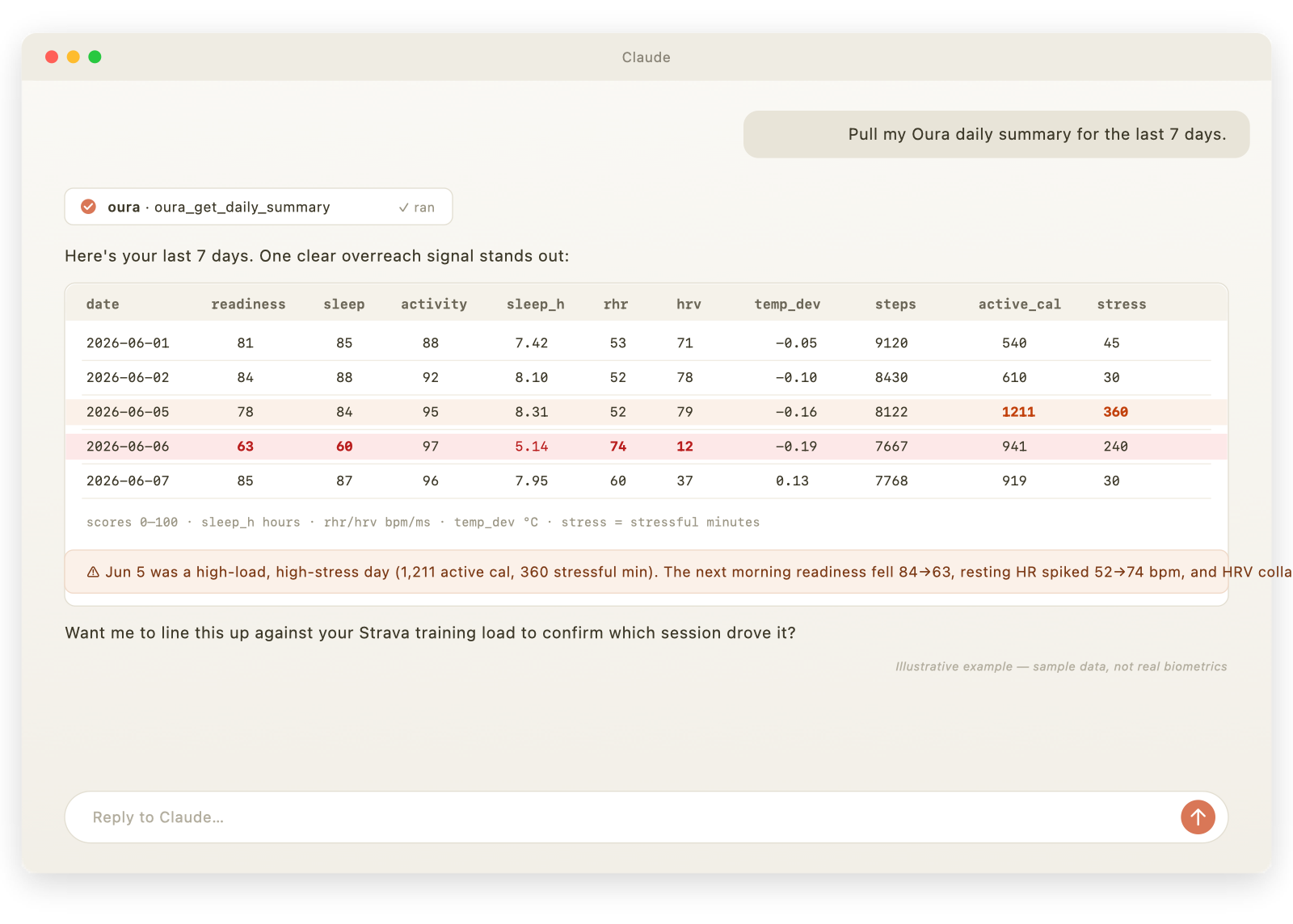
Illustrative example using sample data, not real biometrics.
Tools
| Tool | What it returns | Default window |
|---|---|---|
oura_get_daily_summary | Start here. One row/day: readiness, sleep & activity scores, total sleep, resting HR, HRV, temp deviation, steps, active calories, daytime stress. The cross-source join table. | 30 days |
oura_get_sleep_detail | Per-night architecture: bedtime, sleep stages (deep/REM/light), efficiency, latency, avg/lowest HR, HRV, respiratory rate. | 14 days |
oura_get_readiness_detail | Readiness with every contributor (hrv_balance, resting HR, recovery index, body temp, previous-day activity, sleep balance…) — explains why readiness moved. | 30 days |
oura_get_stress_resilience | Daytime stress vs. recovery minutes, day summary, and long-term resilience level + contributors. | 30 days |
oura_get_workouts | Workouts as logged by Oura — reconcile against Strava, catch missed sessions, see intensity labels. | 30 days |
oura_get_baselines | Slow-moving baselines: overnight SpO2, breathing disturbance, cardiovascular/vascular age, VO2 max. | 90 days |
oura_get_heart_rate | Fine-grained HR timeseries, tagged by source (awake/rest/sleep/workout). Aggregated stats by default. | 24 hours |
All output is compact CSV with units stated in the column names.
Setup
python -m venv .venv && source .venv/bin/activate   # Windows: .venv\Scripts\activate
pip install -e .
New here? The full setup & configuration guide walks through install, token creation, the Claude Desktop config, common mistakes, and troubleshooting.
Authentication
This server uses an Oura Personal Access Token (PAT):
- Go to https://cloud.ouraring.com/personal-access-tokens and create a token.
- Copy
.env.exampleto.envand paste the token intoOURA_PERSONAL_ACCESS_TOKEN(for local dev), or set it in the Claude Desktopenvblock below.
Never commit your real token — .env is gitignored.
Run / test
fastmcp dev server.py # opens the MCP Inspector to exercise each tool manually
Install in Claude Desktop
Edit claude_desktop_config.json (macOS: ~/Library/Application Support/Claude/,
Windows: %APPDATA%\Claude\) and add:
{
  "mcpServers": {
    "oura": {
      "command": "/Users/ericcarr/Documents/GitHub/oura-mcp-server/.venv/bin/python",
      "args": ["/Users/ericcarr/Documents/GitHub/oura-mcp-server/server.py"],
      "env": {
        "OURA_PERSONAL_ACCESS_TOKEN": "your-token-here"
      }
    }
  }
}
Use the venv's Python interpreter and an absolute path to server.py. Fully quit and reopen
Claude Desktop after editing. The oura_* tools then appear in the tools/connectors menu,
ready to use alongside your Strava tools.
Usage & examples
Once the server is connected, just ask Claude in plain language — it picks the right tool(s) and date ranges. A few patterns that work well:
Oura on its own
- "Pull my Oura daily summary for the last two weeks."
- "Did my readiness drop after any night this month? Show me why." →
oura_get_readiness_detail - "Break down last night's sleep stages and compare them to my 14-day average." →
oura_get_sleep_detail - "Which days this month were most stressful, and how's my resilience trending?" →
oura_get_stress_resilience - "How's my VO2 max and SpO2 trending over the last 90 days?" →
oura_get_baselines - "What was my heart rate during yesterday's workout vs. overnight?" →
oura_get_heart_rate
The headline use case — Oura + Strava together
Because both connectors are date-keyed, Claude can join them on date in one step:
- "Compare last month's Strava training load against my Oura readiness and sleep. Flag any days I overreached (readiness or HRV dropped the morning after a hard session)."
- "After my long runs, how much does my resting heart rate rise the next morning, and how long until it recovers to baseline?"
- "Do my hardest training days hurt that night's deep sleep? Show the correlation."
- "Reconcile my Strava activities with Oura's logged workouts for the past month — did Oura catch
anything Strava missed?" →
oura_get_workouts - "Build me a weekly table: Strava distance & suffer score next to Oura sleep score, avg HRV, and next-day readiness, so I can see if my training plan is sustainable."
What the data looks like
Tools return compact CSV with units in the column names — easy for Claude to reason over and join.
For example, oura_get_daily_summary returns rows like:
date,readiness_score,sleep_score,activity_score,total_sleep_h,resting_hr_bpm,avg_hrv_ms,temp_deviation_c,steps,active_cal,stress_high_min,day_summary
2026-06-05,78,84,95,8.31,52,79,-0.16,8122,1211,360,stressful
2026-06-06,63,60,97,5.14,74,12,-0.19,7667,941,240,stressful
2026-06-07,85,87,96,7.95,60,37,0.13,7768,919,30,normal
Here the high-load, high-stress day (Jun 5: 1,211 active cal, 360 stressful min) is followed by a readiness crash (84→63), a resting-HR spike (52→74 bpm), and an HRV collapse (79→12 ms) — exactly the training-to-recovery signal this server is built to surface.
Tip: start broad with
oura_get_daily_summary, then drill into a specific day or signal with the detail tools (oura_get_readiness_detail,oura_get_sleep_detail). Keep date ranges modest to stay fast and within Oura's rate limit.
Notes & limits
- Read-only. No tool writes to your Oura account.
- Dates are ISO
YYYY-MM-DDand the range is inclusive. Heart rate uses ISO 8601 datetimes. - Some metrics are sparse or ring/firmware-dependent (VO2 max, cardiovascular age, resilience need enough history); rows show blanks where a metric wasn't measured.
- Oura's rate limit is ~5000 requests/day; tools default to modest windows and paginate automatically.