
Source-Intake Agent
dskemp/source-intake-agent
Transforme uma pasta de PDFs em biblioteca pessoal pesquisável automaticamente
Ver no GitHubAgent macOS que monitora uma pasta e automaticamente resumidiza PDFs, URLs e snapshots usando Claude, organizando-os em uma biblioteca de pesquisa pessoal com metadados e tags. Tudo roda localmente, sem cloud, e mantém um índice markdown puro que você pode editar e manter para sempre.
Instalação
npx convez-ai dskemp/source-intake-agent1 comando no terminal: detecta o formato do repositório (marketplace ou plugin avulso) e instala via Claude Code. Requer Node 18+ e o Claude Code instalado.
Métricas
Casos de uso
- Pesquisadores e acadêmicos construindo base de conhecimento de papers
- Escritores e analistas coletando artigos para resumo automático
- Auditoria de bibliotecas pessoais com busca e deduplicação de preprints
Veredito

Agent sólido para quem tem fluxo real de ingestão de documentos. Traz valor genuíno: automação sem vendor lock-in, markdown como storage durável, e UI clara para auditoria. Requer setup macOS e paciência com configuração inicial de taxonomia.
README
A tradução para o português deste README ainda está na fila.
Source-Intake Agent
A macOS tool that turns a folder of PDFs into a searchable research library — automatically.
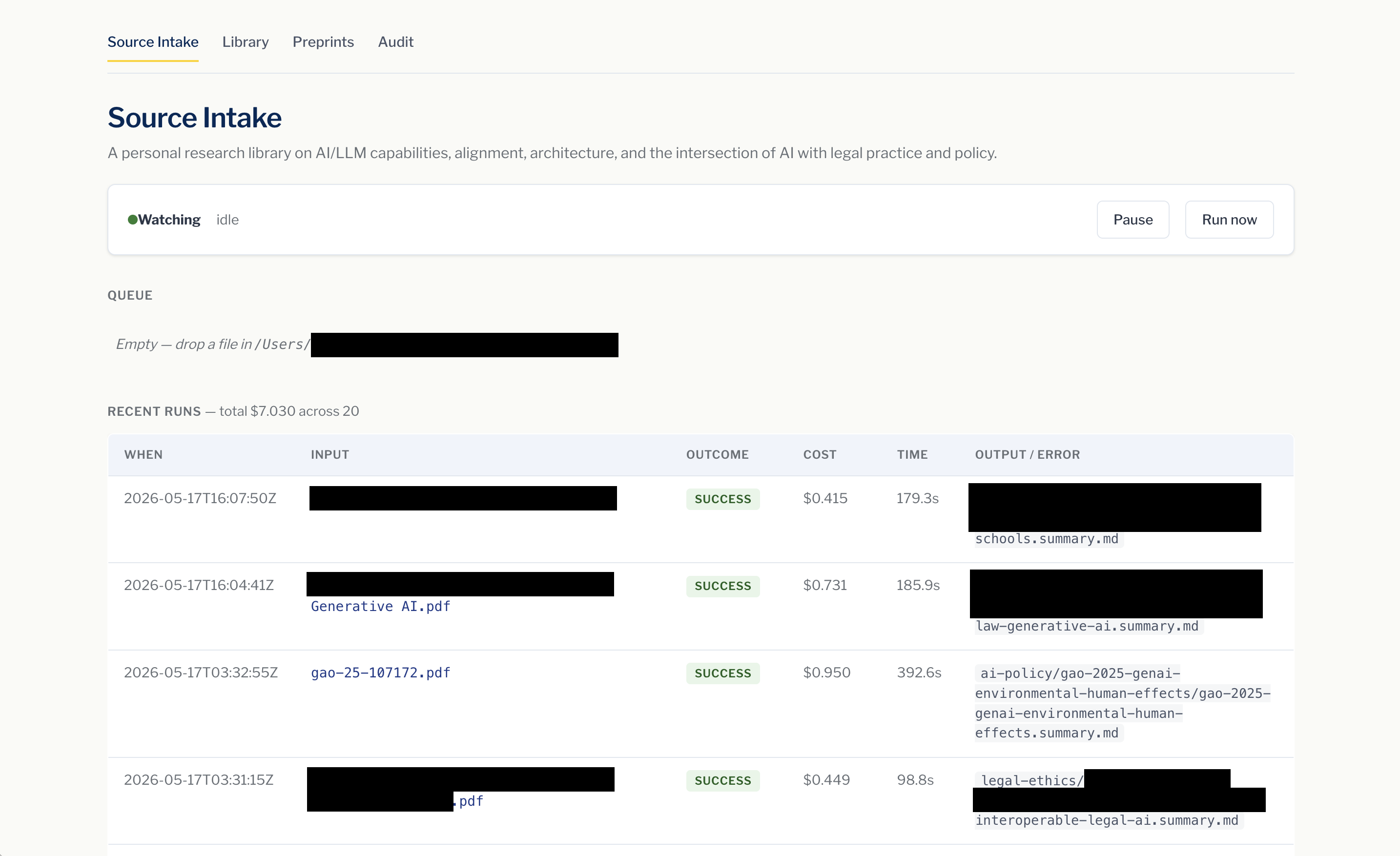
What this is
Drop a research paper, an article URL, or a saved webpage into a folder on your Mac. In the background, Claude Code reads it, writes a structured summary, and files everything into a personal library — organized, tagged, and searchable. You configure once what kind of library you're building (research papers, recipes, news clippings, climate policy — whatever), and the LLM adapts its category choices, tag vocabulary, section framing, and tone to fit.
Everything runs locally on your own machine. Your library lives in a folder you own: browse it in Finder, edit summaries in any text editor, and keep it forever even if you stop using this tool.
How it works
1. Drop a file in your inbox folder.
PDFs work directly. URLs can be dropped as a plain .txt file. Saved
webpages (.md or .html) work too. You can do this from Finder, the
command line, a browser's "Save as," or any other way you'd put a file in a
folder — the tool doesn't care how it gets there.
2. The agent reads it in the background.
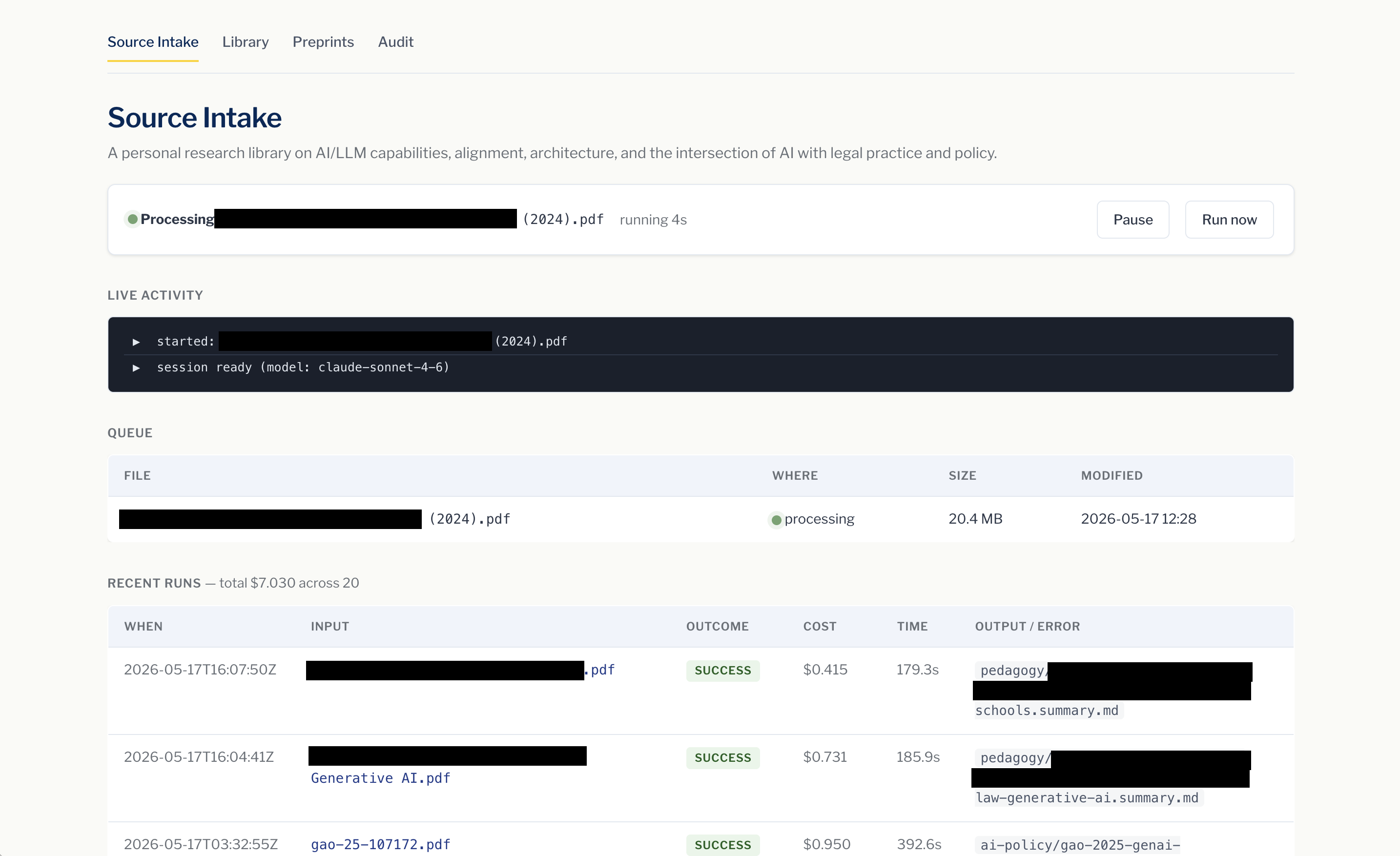
No clicking around. A folder watcher notices the new file and the agent
starts automatically. Watch progress in the dashboard at
http://localhost:7341, or just walk away — runs typically take a few
minutes per source and the dashboard remembers everything.
3. A structured summary lands in your library.
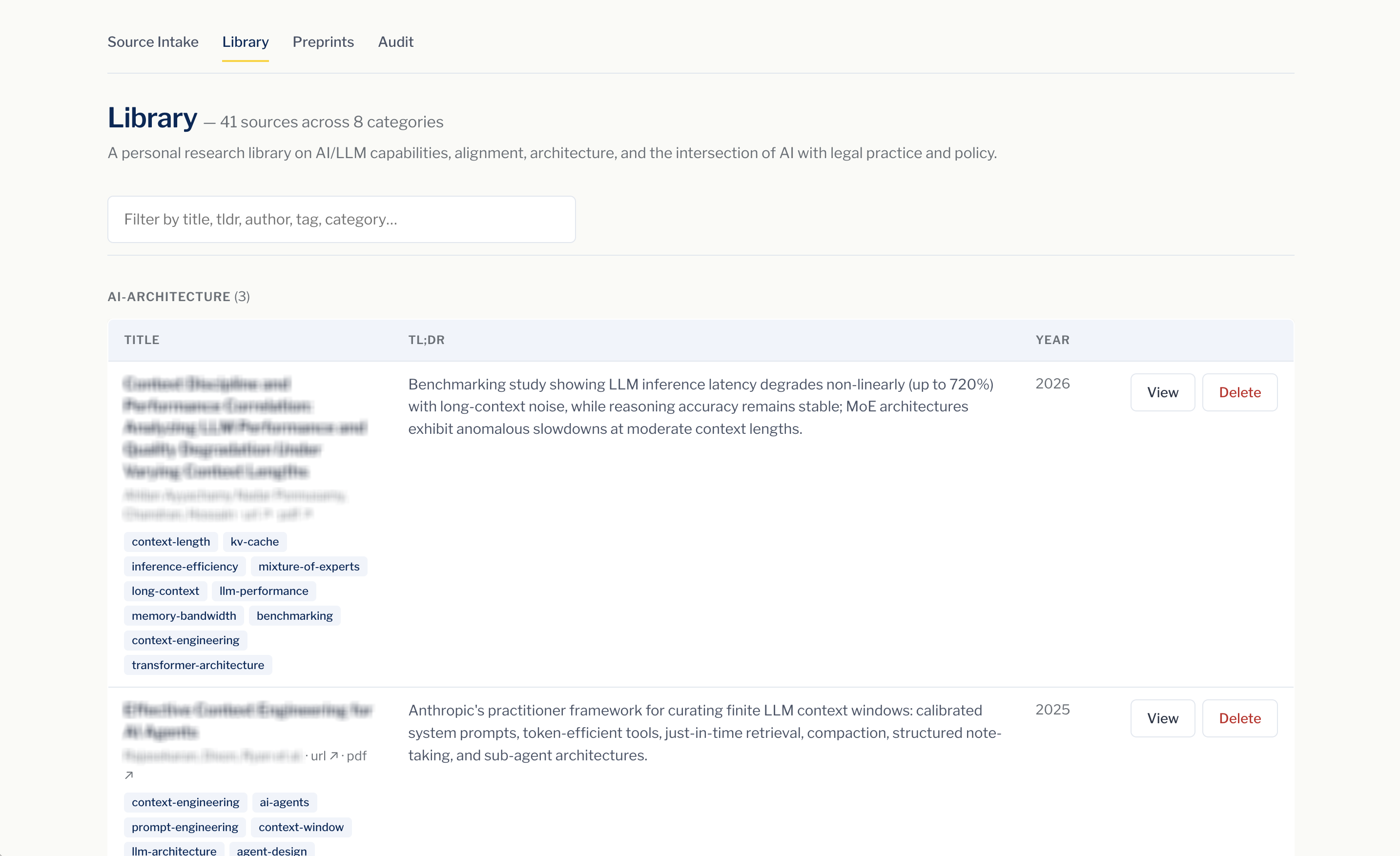
Each source gets its own folder with a markdown summary, the original PDF, and metadata you can search by title, author, tag, category, or TL;DR. Institutional authors (think U.S. Government Accountability Office or OECD) are recognized as organizations and displayed in full.
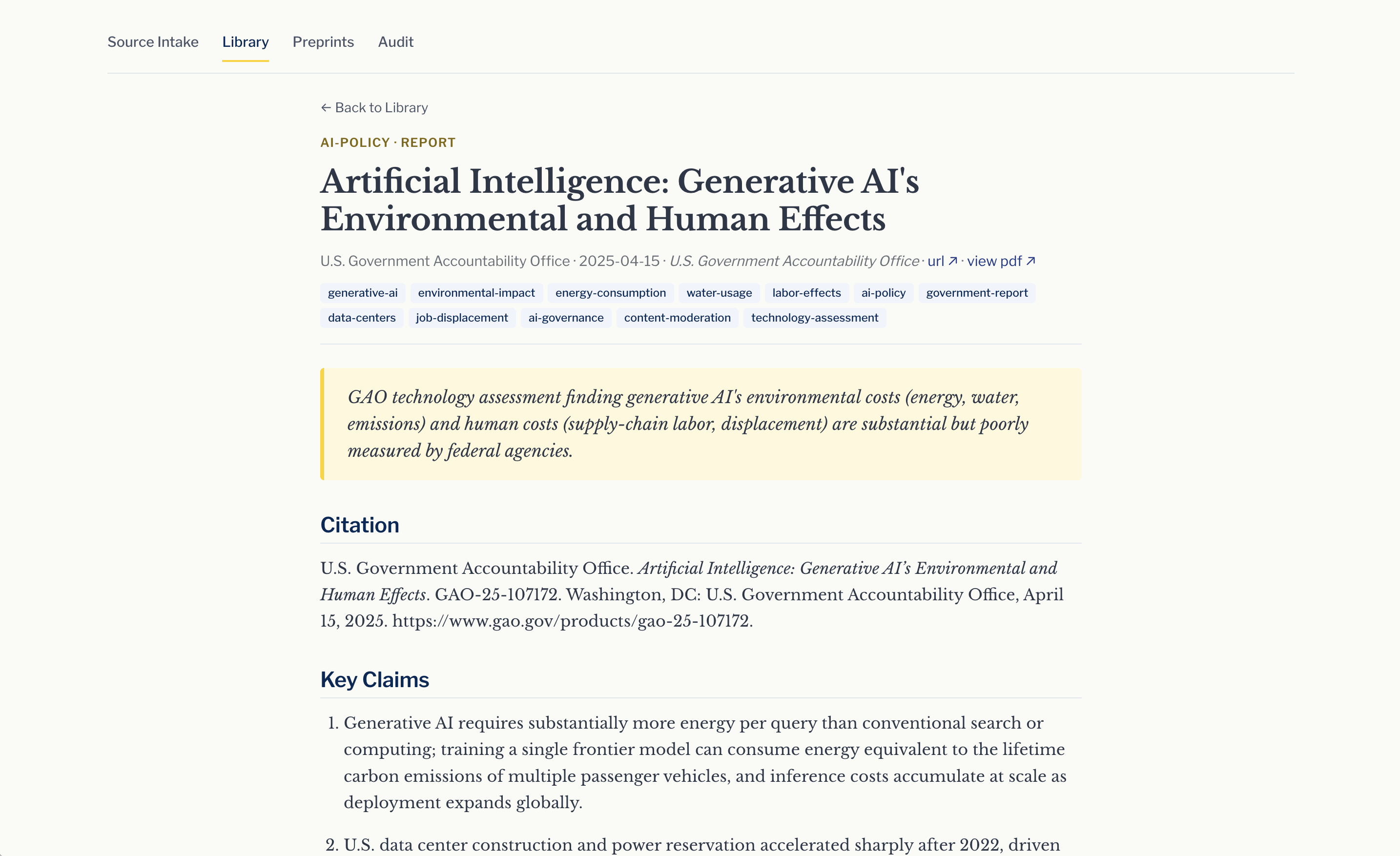
Summaries are plain markdown with structured YAML frontmatter — readable on their own, but also queryable as data. Nothing is hidden in a proprietary database; if you stop using the tool tomorrow, you keep every file.
4. Built-in audit and preprint tools keep things tidy.
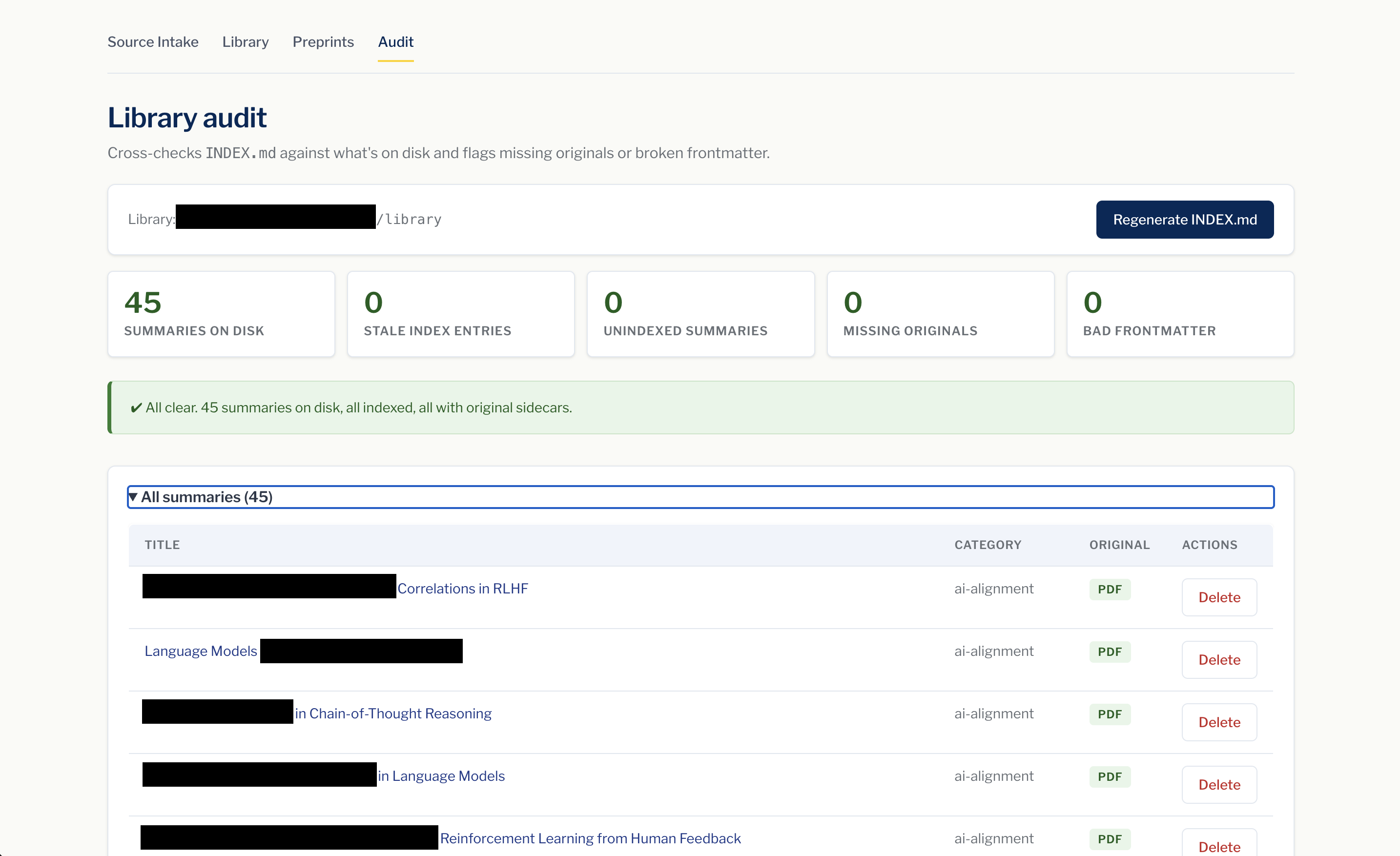
The audit page catches stale index entries, summaries missing their original PDF, and unparseable frontmatter — useful when you've been editing the library by hand or moving things around.
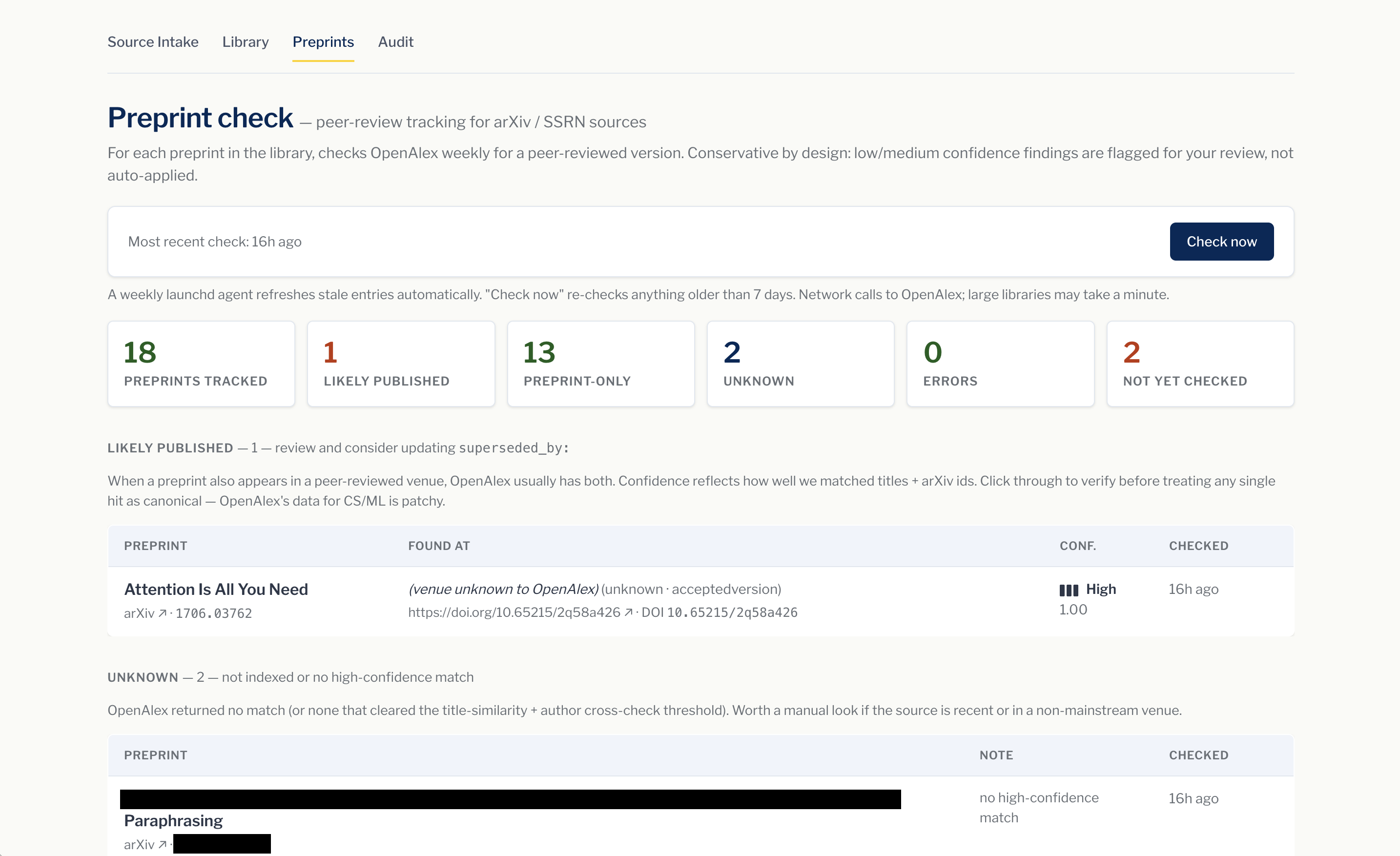
For academic libraries, a weekly check against OpenAlex flags arXiv and SSRN preprints that have since appeared in a peer-reviewed venue. Confidence is shown as a signal-bar meter — the tool surfaces matches for your review and never overwrites your summaries automatically.
Who is this for?
- Researchers and academics building a personal knowledge base from papers.
- Writers and analysts who collect articles and reports and want them summarized and searchable.
- Hobbyists with a folder of PDFs they wish they could actually find things in.
- Anyone curious about agent automation — a small, readable example of headless Claude Code wired into a real workflow.
If you're on macOS, comfortable running a one-time install script in your terminal, and have an Anthropic API key, you're set.
You choose where the library and inbox live, and what they're for. Defaults are
~/source-library,~/source-library-inbox, and a generic domain — but you'll almost certainly want to override them via a local.env(gitignored). See Configure below.
Architecture
$INBOX/                                ← drop files here
  ├── .staged/                         (worker-managed working copies)
  └── _failed/                         (quarantined inputs + .log sidecars)
      ├── _partial/                    (summary folders from crashed/failed runs)
      └── _rejected/                   (summary folders that failed metadata validation)

~/.config/claude-source-intake/
  ├── env                              (your ANTHROPIC_API_KEY, mode 0600)
  ├── prompt.txt                       (autonomy prompt — editable from UI)
  ├── runs.jsonl                       (append-only run history)
  ├── current-run.log, last-run.log    (claude stream-json output)
  └── venv/                            (Flask + PyYAML)

~/Library/Scripts/                     (deployed by install.sh)
  ├── claude-source-intake.sh
  ├── claude-source-intake-ui.py
  ├── claude-source-intake-regen-index.py
  ├── claude-source-intake-check-preprints.py
  └── claude-source-intake-detect-promotion.py

~/Library/LaunchAgents/
  ├── <prefix>.claude-source-intake.plist                 (WatchPaths + 5-min interval)
  ├── <prefix>.claude-source-intake-ui.plist              (dashboard server)
  └── <prefix>.claude-source-intake-preprint-check.plist  (weekly cron)
Flow per file drop:
- launchd's
WatchPathson the inbox fires the worker (a 5-minuteStartIntervalbackstop catches files whose directory event was missed, and the worker re-scans the inbox after each pass so files dropped while a run is in progress are picked up by the same run). - Dedup check (before staging): SHA-256 the input bytes (and, for
.txt/.urlinputs, extract the URL). Compare against every existing summary'ssource_hash:andurl:frontmatter fields. On match: move the input to_duplicate/with a.loglisting the matched summary, append aduplicateentry toruns.jsonl, skip claude entirely (no cost), and continue. - Otherwise: stage the file into
.staged/<uuid>-<basename>(atomic). - Invoke
claude -p "<autonomy prompt>" --model claude-sonnet-4-6 --permission-mode acceptEdits --output-format stream-json --verbose, redirecting output tocurrent-run.logso the dashboard can tail it live. - On claude exit 0 + new
*.summary.mdfile(s): runvalidate.py, a normalize-then-validate metadata gate. It first normalizes mechanical deviations in place (nullfields → template defaults,source_typesynonyms → the template enum,snapshotflag set to the actual presence of a.snapshot.md, missingretrieved/currency_check→ intake date), then hard-validates: enum membership, date formats, category field vs. folder, authors as a"Last, First"block list with no"X et al."placeholder entries, and — for arXiv URLs — a live author cross-check against the arXiv API (skipped with a warning if the fetch fails, so an arXiv outage never blocks intake). - On success (validation passed): inject
source_hash: "<sha256>"into each new summary's frontmatter (hashing that summary's own filed.pdf/.snapshot.md, not the run's input — a digest input can produce several summaries), delete the staged file, append a dated entry per source to the library'sCHANGELOG.md(newest at top under a## YYYY-MM-DD (latest)heading), regenerateINDEX.md, append a JSONL entry with cost + duration toruns.jsonl. - On failure: move the staged file to
_failed/with its log next to it. Any summary folders the failed run already created are quarantined to_failed/_partial/so a half-written summary can't dedup-block a retry. Validation failures behave the same but quarantine to_failed/_rejected/and logoutcome: "rejected-metadata"toruns.jsonl, with the validator's findings in the entry's error excerpt — bad metadata never reaches the library orINDEX.md. - If the worker is killed mid-run (reboot, force-quit), the next tick recovers the staged input back to the inbox automatically.
Prerequisites
- macOS (uses launchd,
launchctl,plutil,open) - Claude Code CLI on
PATH python3(system or homebrew)- An Anthropic API key
Install
git clone <this repo> ~/Developer/source-intake-agent
cd ~/Developer/source-intake-agent
cp .env.example .env       # then edit .env with your real LIBRARY / INBOX
./install.sh               # or `./install.sh --link` (see Sync below)
Then set your API key (kept out of git, mode 0600):
echo 'ANTHROPIC_API_KEY=sk-ant-...' > ~/.config/claude-source-intake/env
chmod 600 ~/.config/claude-source-intake/env
Open http://localhost:7341 to see the dashboard.
Configure
Configuration is layered — later sources override earlier ones:
- Defaults (placeholders shown below)
.envat the repo root — your personal config; gitignored- Environment variables passed on the command line to
install.sh
| Var | Default | Purpose |
|---|---|---|
DOMAIN | generic library | Free-text description of the library's domain |
LIBRARY | ~/source-library | Where summaries are filed |
INBOX | ~/source-library-inbox | Watched folder |
LABEL_PREFIX | com.user | Reverse-DNS prefix for plist labels |
CLAUDE_BIN | $(command -v claude) | Path to the claude CLI binary |
CATEGORY_ORDER | (empty — alphabetical) | Comma-separated preferred sort for categories |
OPENALEX_EMAIL | (empty — anonymous) | Opts the weekly preprint check into OpenAlex's polite pool |
DASHBOARD_EXTRA_ORIGINS | (empty) | Comma-separated extra browser origins permitted to POST to the dashboard (CSRF allowlist); 127.0.0.1 and localhost are always allowed |
Recommended workflow: keep your real paths in .env (which is .gitignored)
so they never leak into commit history.
cat > .env <<'EOF'
DOMAIN="AI/LLM research papers and policy reports."
LIBRARY=~/path/to/your/library
INBOX=~/path/to/your/inbox
LABEL_PREFIX=com.your-handle
EOF
./install.sh --link
Domain customization
The DOMAIN field is the single most important setting after paths. It's
free text — a sentence or two describing what kind of sources this library
collects. The worker substitutes it into the autonomy prompt at run time so
claude has appropriate context for category choices, tag vocabulary, section
framing, and tone.
A specific domain produces a more useful library. Examples:
| Domain | Effect on intake |
|---|---|
"AI/LLM research papers and policy reports." | Scholarly framing — Methodology sections, formal citations, technical tags |
"Recipes from cookbooks, blogs, and magazines for home cooks." | Sections like ingredients, technique notes, dietary tags; no Methodology |
"Tech industry news articles and analyst reports from 2024 onward." | Article framing — main argument, key takeaways, source-credibility note |
"Climate policy briefings and academic papers on energy transition." | Mixed scholarly/policy — adapts per source |
"Personal reading notes from non-fiction across the humanities." | Looser, more interpretive; chapter-level categories |
The taxonomy (category folders) emerges organically as you add sources — claude picks an appropriate category for each one, creating a new folder when no existing one fits. After a handful of intakes you'll see your domain's natural categories take shape. If you want a head start, create a few empty category folders manually before processing your first file.
You can change DOMAIN later by editing .env and re-running ./install.sh
(re-renders the launchd plist with the new value); the change applies on the
next file drop.
install.sh is idempotent — re-running it refreshes the deployed scripts and
reloads the launchd agents without touching your API key, run history, or
custom prompt. It also tightens permissions on $CONFIG/env to 0600 if
they've drifted.
Runtime tunables
These don't affect install; the worker reads them from $CONFIG/env (or the
launchd plist EnvironmentVariables). Defaults are sensible — override only if
you have a reason.
| Var | Default | Effect |
|---|---|---|
MODEL | claude-sonnet-4-6 | --model passed to claude. Bump when a newer model ships. |
CLAUDE_TIMEOUT | 900 | Wall-clock seconds before the watchdog kills a hung claude (SIGTERM, then SIGKILL 3s later). Normalized to exit 124. |
MAX_RETRIES | 2 | Number of retries after the first attempt (so up to 3 attempts). Exit 127 (binary missing) skips retries. |
RETRY_BACKOFF | 30 | Seconds between retries. |
RUNS_LOG_MAX_BYTES | 5242880 | Rotate runs.jsonl past 5 MB; previous file becomes runs.jsonl.1. |
RUN_LOG_KEEP | 50 | Per-iteration stream-json archives kept under $CONFIG/run-logs/. |
DASHBOARD_PORT | 7341 | Localhost port the dashboard binds to. Set it in .env and re-run ./install.sh (it's rendered into the dashboard plist). |
PREPRINT_REFRESH_DAYS | 7 | Preprint cache entries older than this are re-checked. Set it in .env and re-run ./install.sh (rendered into the dashboard + cron plists). |
PREPRINT_PROMOTION_MODE | auto | How the worker handles a PDF that looks like the published version of a tracked preprint. auto archives the preprint and intakes the published PDF into its category slot. stage routes the PDF to _promoted/_pending/ for manual review. off disables detection. |
Keeping the repo and the running system in sync
The deployed scripts live at ~/Library/Scripts/ and the launchd plists at
~/Library/LaunchAgents/. Two ways to keep them in lockstep with this repo:
Option A — copy mode (default)
Edit files in the repo, then ./install.sh to re-deploy. Standard, portable,
safe to delete the repo after install.
vim scripts/dashboard.py
./install.sh                    # redeploys + reloads launchd
Option B — symlink mode (--link)
The deployed scripts become symlinks pointing back into this repo. Edits in
scripts/*.{sh,py} are live immediately on the next invocation. The repo is
the single source of truth — don't move or delete it.
./install.sh --link             # one-time setup
# from now on:
vim scripts/dashboard.py
launchctl kickstart -k gui/$(id -u)/<LABEL_PREFIX>.claude-source-intake-ui
                                # bounce dashboard to pick up Python changes
What needs reloading after each kind of edit:
| You edit | Action needed |
|---|---|
scripts/worker.sh | nothing — invoked fresh per file drop |
scripts/dashboard.py | launchctl kickstart -k gui/$(id -u)/<prefix>.claude-source-intake-ui |
scripts/regen-index.py | nothing — invoked fresh after each successful run |
scripts/check-preprints.py | nothing — invoked fresh by cron / dashboard |
scripts/detect-promotion.py | nothing — invoked fresh by the worker on each PDF drop |
launchd/*.plist.template | re-run ./install.sh (re-renders + reloads agents) |
config/prompt.txt | doesn't auto-propagate — see note below |
requirements.txt | re-run ./install.sh (re-runs pip install) |
.env | re-run ./install.sh (re-renders plists with new values) |
Note on the prompt: ~/.config/claude-source-intake/prompt.txt is a
user-customizable file (editable from the dashboard's Settings panel) and is
deliberately not symlinked or overwritten on re-install. To start fresh from
the repo's template, delete the file and run ./install.sh.
Verifying which mode you're in
ls -l ~/Library/Scripts/claude-source-intake.sh
# symlink (→ <repo>/scripts/worker.sh)   ← --link mode
# regular file with byte count           ← copy mode
Day-to-day use
- Drop a file in your inbox folder (PDF,
.txtwith a URL,.md, or.html). Watch progress at http://localhost:7341. - Dashboard pages:
/— live status, queue, recent runs (cost + duration), failed items, last-run replay, prompt editor./library— searchable, sortable browser of all sources with click-to-open and a per-row Delete button (removes the<category>/<slug>/folder and regeneratesINDEX.md)./audit— cross-checksINDEX.mdagainst what's on disk. Catches stale INDEX entries (folder deleted by hand but still linked), unindexed summaries, summaries missing their original sidecar (.pdf/.snapshot.md), and unparseable frontmatter. Has a one-click Regenerate INDEX.md button to fix the stale-index case./preprints— surfaces arXiv / SSRN sources that have since appeared in a peer-reviewed venue. A weekly launchd agent refreshes the cache in the background; the Check now button forces a re-check. See Preprint publication tracking below.
- Pause/resume the watcher from the dashboard, or:
touch ~/.config/claude-source-intake/paused # pause rm ~/.config/claude-source-intake/paused # resume - Tail logs from a terminal (parallel to the dashboard view):
tail -f ~/.config/claude-source-intake/current-run.log
tail -f /tmp/claude-source-intake.out.log
Customizing the autonomy prompt
The prompt at ~/.config/claude-source-intake/prompt.txt is what gets passed
to claude -p for each run. Edit it from the dashboard's Settings panel or
directly. The token <STAGED_PATH> is substituted with the staged file's path
at run time. On first install, __LIBRARY__ in the template is substituted
with your configured library path.
Deduplication
The worker skips files that duplicate something already in the library, so accidental re-drops don't cost time or money:
- Byte-identical PDFs/MDs/HTMLs are matched by
source_hash:(SHA-256) .txt/.urlinputs are matched byurl:against existing summaries, after conservative normalization on both sides (case-insensitive host, trailing slash,utm_*-style tracking params, fragments)
A duplicate lands in _duplicate/ with a .log sidecar identifying the
matched summary; you'll also see it in the dashboard's Duplicates section.
No claude invocation, $0 cost for dedup-rejected files.
To force re-processing of a file you really do want to re-summarize: delete
the matched summary first, then move the file from _duplicate/ back to the
inbox.
Backfill (missing originals): if the matched summary is missing its
source artifact (<slug>.pdf / <slug>.snapshot.md deleted or never filed),
a matching drop is not a duplicate — the worker files it into the summary's
folder as the missing original and force-refreshes source_hash:, again with
no claude invocation. Besides hash/URL matches, the worker recognizes the
original by filename-vs-slug similarity, and for PDFs by the embedded Title
metadata and first-page text matched against the summary's title: — so a
re-downloaded 3582269.3615599.pdf finds its summary even though the
filename says nothing about the paper.
Preprint publication tracking
Many sources start as preprints on arXiv or SSRN and later appear in a
peer-reviewed venue. The dashboard's /preprints page surfaces that
promotion so you can decide whether to swap the source or fill in
superseded_by:.
What it does:
- Walks the library for summaries whose
url:lives onarxiv.orgorssrn.com, or whosesource_type:ispreprint(also catchespublication:strings that start with "arXiv" / "SSRN" / "preprint"). - For each one, queries OpenAlex by title (with an
arXiv-id cross-validation when available) and inspects the matched work's
locations[]for a non-repository, non-preprint-server version. - Caches results in
~/.config/claude-source-intake/preprint-checks.json. Entries are refreshed when older than 7 days (override:PREPRINT_REFRESH_DAYS).
How to use it:
- The
/preprintspage lists results in four buckets — Likely published, Preprint-only, Unknown, Errors — with a confidence rating on each published hit. A weekly launchd cron (Monday 03:15) keeps the cache fresh in the background. Click Check now to force an immediate re-check. - Findings are never auto-written to summary frontmatter. OpenAlex's
coverage of CS/ML is patchy and title-search has inherent false-positive
risk, so the page surfaces matches for your review — you decide whether to
update
superseded_by:or replace the source entirely. See Replacing a preprint with its published version below for the replace-in-place flow.
Be a good OpenAlex citizen: set OPENALEX_EMAIL=you@example.com in
.env. That opts the check into OpenAlex's "polite pool" with a higher rate
limit and friendlier 503 behavior. Without it, the API still works but is
treated as anonymous and may throttle on libraries with many preprints.
You can also run the check manually:
LIBRARY_PATH=$LIBRARY ~/.config/claude-source-intake/venv/bin/python \
  scripts/check-preprints.py            # refresh stale entries
  # --force                             # re-check everything
  # --rel-path foo/bar.summary.md       # check one source by path
Replacing a preprint with its published version
When /preprints flags a "Likely published" hit and you've verified it's the
same paper, drop the published-version PDF into the inbox — the worker
auto-detects the promotion and swaps it in.
Workflow:
- On
/preprints, click the DOI / venue link for the candidate and confirm it's the same paper. - Download the published-version PDF from the publisher (or wherever you have access).
- Move that PDF into the inbox like any other source.
- The worker tick:
- Extracts the DOI from the PDF (metadata + first-page text) and matches it
against the
preprint-checks.jsoncache. A high-similarity title match against the cachedpublished_titleis the fallback when no DOI can be extracted. - Archives the preprint's summary, sidecar PDF, and snapshot to
$INBOX/_promoted/<timestamp>-<slug>/along with apromotion.txtnote (recoverable; mirrors the_failed/and_duplicate/pattern). - Removes the preprint's entry from
preprint-checks.json. - Runs normal intake on the published PDF, then moves the produced summary and filed PDF into the preprint's original category folder so it inherits that library slot.
- Stamps URL provenance into the produced summary:
url:is set to the cachedpublished_url(the venue page from OpenAlex — the intake agent only sees the bare PDF, so left alone it tends to write the arXiv link), and the preprint's original URL is preserved aspreprint_url:. Dedup matches both keys, so a later drop of the old arXiv/SSRN link still counts as a duplicate of the promoted entry. - Logs the iteration to
runs.jsonlwithoutcome: "promoted".
- Extracts the DOI from the PDF (metadata + first-page text) and matches it
against the
INDEX.mdregenerates with the new entry;/preprintsno longer lists the old summary.
Failure safety: if intake of the published PDF fails after the preprint is
archived, the worker restores the preprint from the archive directory
automatically (the failed PDF goes to _failed/ for retry).
Tuning: set PREPRINT_PROMOTION_MODE=stage to route promotion-candidate
PDFs to $INBOX/_promoted/_pending/ for manual review instead of acting
automatically, or PREPRINT_PROMOTION_MODE=off to disable detection entirely
and treat such PDFs as fresh sources.
Backfilling existing summaries
If you're upgrading an installation that pre-dates dedup, run once to add
source_hash: to the YAML frontmatter of every existing summary:
LIBRARY_PATH=$LIBRARY ~/.config/claude-source-intake/venv/bin/python \
  scripts/backfill-hashes.py
The script walks the library, hashes each summary's sibling <slug>.pdf (or
.snapshot.md), and inserts the hash into the frontmatter. Idempotent — safe
to re-run.
If your library has institutional sources (GAO, ABA, OECD, etc.) filed before the library page learned to render them in full, also run:
LIBRARY_PATH=$LIBRARY ~/.config/claude-source-intake/venv/bin/python \
  scripts/migrate-institutional-authors.py            # dry-run
  # --apply                                           # actually write changes
The script copies publication: into authors: for summaries where the
publication is recognized as an organization and authors: is empty.
Defaults to dry-run; idempotent.
Library schema
Each summary has YAML frontmatter; the auto-generated INDEX.md is built from
these fields:
---
title: "..."
authors:
  - "Last, First"
source_type: paper
publication: "..."
date: "YYYY-MM-DD"
url: "..."
retrieved: "YYYY-MM-DD"
snapshot: false
category: "your-category"
tldr: "One sentence (~25 words) that stands alone."
source_hash: "<sha256 of the source file>"   # auto-injected by worker; used for dedup
tags:
  - tag1
currency_check: "YYYY-MM-DD"
superseded_by: ""
---
The tldr field powers the Tl;dr column in INDEX.md and the dashboard's
Library page. The prompt requires it on every intake.
Troubleshooting
| Symptom | Likely cause | Fix |
|---|---|---|
Worker fails with Not logged in · Please run /login | launchd-spawned claude can't see your interactive auth | Add ANTHROPIC_API_KEY=... to ~/.config/claude-source-intake/env (mode 0600) |
| File dropped but nothing happens | mtime guard (5s) is filtering a "still being written" file | Will fire on next event; or click "Run now" in the dashboard |
| Dashboard not at localhost:7341 | Port collision or agent crashed | tail /tmp/claude-source-intake-ui.err.log; launchctl kickstart -k gui/$(id -u)/<prefix>.claude-source-intake-ui |
| Library page shows zero sources | LIBRARY env not set in plist, or summaries lack --- frontmatter | Re-run install.sh; verify summaries have YAML frontmatter |
INDEX.md won't regenerate | PyYAML missing from venv | ~/.config/claude-source-intake/venv/bin/pip install -r requirements.txt |
Run keeps timing out at the CLAUDE_TIMEOUT ceiling | Large PDF or slow upstream | Raise CLAUDE_TIMEOUT in $CONFIG/env (e.g. CLAUDE_TIMEOUT=1800). |
Dashboard rejects POSTs with 403 cross-origin request blocked | A browser extension or external site is hitting localhost | Expected — the CSRF guard blocks it. Use the dashboard directly. |
Stale /tmp/claude-source-intake.lock blocks all runs | Worker was killed before its trap fired | The next worker invocation detects the dead holder PID and reclaims automatically. To force-clear: rm -rf /tmp/claude-source-intake.lock. |
Logs to check:
/tmp/claude-source-intake.out.log— worker stdout (per-file processing)/tmp/claude-source-intake.err.log— worker stderr/tmp/claude-source-intake-ui.err.log— Flask + binding info~/.config/claude-source-intake/runs.jsonl— structured run history~/.config/claude-source-intake/last-run.log— lastclaudeinvocation's stream-json output
Uninstall
./uninstall.sh           # removes launchd agents + deployed files; keeps state
./uninstall.sh --purge   # also wipes ~/.config/claude-source-intake (api key,
                         # history, prompt, venv). Library/inbox NEVER touched.
Repo layout
source-intake-agent/
├── README.md
├── install.sh
├── uninstall.sh
├── requirements.txt
├── .env.example                 ← copy to .env (gitignored) and customize
├── .gitignore
├── scripts/
│   ├── worker.sh
│   ├── dashboard.py
│   ├── regen-index.py
│   ├── check-preprints.py    ← OpenAlex lookup for arXiv/SSRN promotion
│   ├── detect-promotion.py   ← worker hook: match dropped PDF to a tracked preprint
│   ├── backfill-hashes.py    ← one-shot: add source_hash to existing summaries
│   └── migrate-institutional-authors.py  ← one-shot: normalize org-authored summaries
├── launchd/
│   ├── worker.plist.template
│   ├── dashboard.plist.template
│   └── preprint-check.plist.template      (weekly cron, Mon 03:15)
└── config/
    └── prompt.txt               ← default autonomy prompt; __LIBRARY__ token
                                    is substituted on first install
License
MIT — do what you like, no warranty.
Found a problem or have a question?
Open an issue: https://github.com/dskemp/source-intake-agent/issues/new/choose. See CONTRIBUTING.md for templates and guidelines.