
Orchardist
drewdrewthis/orchardist
Dashboard unificado para worktrees, PRs, tmux e Claude Code sessions
Ver no GitHubCentral de comando para gerenciar git worktrees, PRs, sessões tmux e Claude Code sessions em múltiplos repositórios e máquinas. Oferece um dashboard unificado (TUI, GUI e daemon) que sincroniza o estado de desenvolvimento, worktrees, CI e sessões de IA em tempo real.
Instalação
npx convez-ai drewdrewthis/orchardist1 comando no terminal: detecta o formato do repositório (marketplace ou plugin avulso) e instala via Claude Code. Requer Node 18+ e o Claude Code instalado.
Métricas
Casos de uso
- Monitorar múltiplos worktrees e branches em paralelo
- Acompanhar estado de PRs e CI/CD em um único dashboard
- Gerenciar sessões Claude Code locais e remotas
- Coordenar desenvolvimento entre máquinas via federation
Veredito

Orchardist é uma ferramenta sofisticada para desenvolvedores que trabalham com múltiplos worktrees e sessões Claude. Combina TUI, GUI e daemon GraphQL em um ecossistema bem arquitetado, ideal para quem quer eliminar context-switching entre ferramentas, mas exige certa curva de aprendizado.
README
A tradução para o português deste README ainda está na fila.
orchardist 🌲🌳🌴
A command center for git worktrees, PRs, tmux sessions, and Claude Code sessions — across repos and machines.
Orchardist is an ecosystem of cooperating binaries and agent-layer tools. One orchard command dispatches to them; the languages (Rust, Go, Tauri) matter less than what the components do together.

📰 Blog: Grow the Orchard
What is orchardist
Orchardist gives you a single dashboard showing everything happening across your repos: which worktrees have PRs, what state they're in, which Claude sessions are working/idle/waiting for input, and what needs your attention.
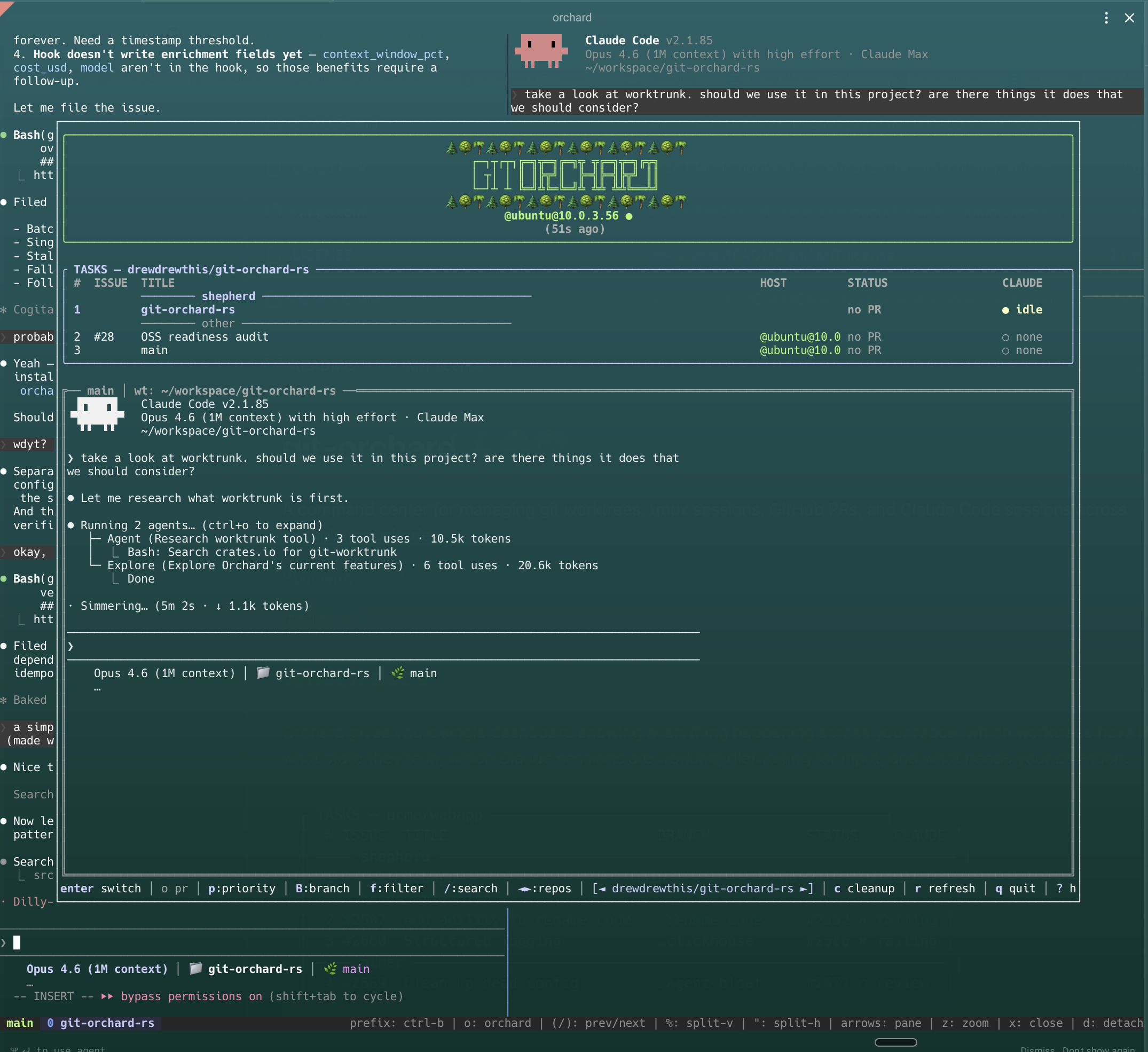
The ecosystem spans a terminal dashboard, a desktop GUI, a local GraphQL daemon, worktree and chat CLIs, a tmux popup integration, and Claude Code agent skills — all wired together through one dispatcher.
The ecosystem
One binary — orchard — is the user-facing entry point. It dispatches verbs to the right helper, so you never need to remember which binary owns which command.
Binaries
| Binary | Role | Stack | Location | Build |
|---|---|---|---|---|
orchard | Dispatcher — the only binary users invoke directly; routes verbs to helpers (orchard tui → orchard-tui, etc.) | Rust | crates/orchard-dispatcher | make dispatcher |
orchard-tui | Terminal dashboard — worktrees, PRs, sessions, CI in one view; --json/--schema wire format | Rust + Ratatui 0.30 | crates/orchard | make rust → target/release/orchard-tui |
orchard-daemon | Read/join GraphQL daemon on localhost:7777; schema-first (schema.graphql at repo root, make generate to regenerate Go types); read-only join layer over git, tmux, gh, claude, processes, and federation peers | Go (github.com/drewdrewthis/orchardist) | cmd/orchard-daemon | make daemon → bin/orchard-daemon |
orchard-gui | Desktop app for deep Claude session view | Tauri 2 + SvelteKit / Houdini / Tailwind / xterm | crates/orchard-gui | make gui |
orchard-worktree | Worktree mutation CLI; dispatched as orchard new/rm/mv/prune/ls/path | Rust | crates/orchard-worktree | make worktree-cli |
orchard-chat | Cross-machine agent-to-agent chat (JSONL rooms, tmux fanout); dispatched as orchard send/chat | Rust | crates/orchard-chat + crates/chat-core | — |
The binaries are named distinctly from the repo slug on purpose so they can coexist on the same
$PATH.
Non-binary surfaces
tmux popup — orchard-tui init installs an orchard() shell function, a Ctrl-o tmux popup keybinding, and an optional status bar. The TUI then lives one keystroke away from any terminal.
Claude skills / agent layer — the /install-orchard skill (.claude/skills/install-orchard/) automates orchardist setup from inside a Claude Code session. The bundled orchardist plugin in .claude-plugin/marketplace.json provides /orchardist:recall — session-search and synthesis over past Claude Code conversations.
Federation / remote — manage worktrees on remote SSH hosts; transfer (push/pull) worktrees between machines; reachability indicators in the dashboard.
History
Renamed from git-orchard to orchardist on 2026-06-09; the old URL redirects.
Features
- Unified dashboard — worktrees, PRs, issues, tmux sessions, and Claude state in one view
- Multi-repo — switch between projects with left/right arrows
- Claude Code integration — see which sessions are working, idle, or waiting for input via hooks
- Smart grouping — shepherd (main sessions), needs attention, claude working, ready to merge, other
- Priority toggle — flag worktrees as priority to keep them at the top
- PR status — review decisions, CI checks, merge conflicts, unresolved threads
- Issue state — closed issues flagged for cleanup
- Cleanup — select and delete worktrees with merged PRs or closed issues
- Click-to-switch notifications — desktop notifications when Claude finishes; click to jump to the session
- Remote worktrees — manage worktrees on remote machines via SSH, with reachability indicators
- JSON output —
orchard-tui --jsonreturns complete, fresh data for scripting - Auto-refresh — background refresh with two-phase loading (fast locals, then slow remotes)
- Mouse support — click to select worktrees, scroll to navigate
- Transfer — push/pull worktrees between local and remote machines
- Self-healing —
orchard-tui healaudits and repairs drifted state - Theme system — centralized semantic color definitions for consistent styling
Install
From source
cargo install --git https://github.com/drewdrewthis/orchardist orchard --bin orchard-tui

# Or from a local checkout:
cargo install --path crates/orchard --bin orchard-tui
The binaries are named distinctly from the repo slug (orchardist) on purpose so they can coexist on the same $PATH.
Setup
orchard-tui init
This will:
- Add the
orchardshell function to your rc file (launches inside tmux) - Set up a tmux keybinding (default:
Ctrl-o) - Optionally add orchard status to your tmux status bar
- Install Claude Code hooks for session state detection
Usage
orchard-tui                    Interactive dashboard
orchard-tui cleanup            Jump straight to cleanup view
orchard-tui heal               Audit state for drift (dry-run by default)
orchard-tui heal --fix         Apply repairs
orchard-tui setup-remote HOST  Provision a remote host for SSH worktrees
orchard-tui init               Setup wizard
orchard-tui --json             Full state as JSON (always fresh, never cached)
orchard-tui --schema           Print the JSON Schema for --json output and exit
Agent-oriented output
--json is the single wire format. Agents that want a token-efficient
encoding should pipe through @toon-format/cli:
npm i -g @toon-format/cli
orchard-tui --json | jq '.repos' | toon
--schema emits the JSON Schema for --json output — field names
(post-camelCase), enum string values, and nullability. Agents should read
it before writing jq filters so they target the real wire format instead
of guessing from Rust types:
orchard-tui --schema | jq '.properties | keys'
# ["hosts", "repos", "tmuxSessions", "version"]
The schema is generated at build time from the same types the binary
serializes, and CI fails if the committed crates/orchard/schema.json
drifts from the live types.
Keybindings
| Key | Action |
|---|---|
↑/↓ or j/k | Navigate worktrees |
←/→ | Switch between repos |
Enter | Switch to tmux session (creates one if needed) |
1-9 | Jump to worktree by number |
o | Open PR in browser |
i | Open issue in browser |
p | Toggle priority flag |
d | Delete worktree |
n | New worktree |
t | Transfer worktree (push/pull to remote) |
c | Cleanup stale worktrees |
f | Cycle filter mode |
/ | Search |
r | Refresh |
R | Reconnect (SSH) |
? | Help |
| Mouse click | Select worktree |
| Mouse scroll | Navigate list |
q | Quit |
Configuration
Global config
~/.orchard/config.json — register multiple repos:
{
  "repos": [
    {
      "slug": "owner/repo",
      "path": "/path/to/repo",
      "remotes": [
        {
          "name": "gpu",
          "host": "user@server",
          "path": "/remote/path",
          "shell": "ssh"
        }
      ]
    }
  ],
  "tmux_sessions": [
    {
      "name": "shepherd",
      "command": "claude --continue",
      "cwd": "/path/to/repo",
      "start_on_launch": true
    }
  ]
}
If no global config exists, orchard auto-detects the current repo via gh repo view.
Per-repo config
.orchard.json in the repo root (committable, team-shared):
{
  "ci": {
    "ignore": ["codecov/patch", "deploy-preview"],
    "required": ["test", "build"]
  }
}
.git/orchard.json for local-only overrides (remotes, personal preferences).
See ADR-003 for the full design.
The Orchardist (optional)
Optional power-user workflow. Orchard is a fully functional worktree, PR, and session dashboard on its own. The orchardist is an advanced layer on top — skip this section unless you want it.
The orchardist is a persistent Claude Code session attached to a repo that acts like an always-on engineering lead: it reviews PRs, launches worktrees for issues, drives sessions to green, and keeps the orchard tidy. It lives in a dedicated tmux session that orchard starts and reconnects to automatically, so it's always one keystroke away from the dashboard.
Easy setup
The recommended path is automated — no JSON editing required:
- From a Claude Code session inside the repo, run
/install-orchardand follow the prompts, or - Re-run
orchard-tui init, which can offer to configure an orchardist for you.
Either option writes the right tmux_sessions entry into your config and starts the session.
Using it
Once configured, the orchardist shows up as a row in the orchard dashboard:
- Press Enter on the orchardist row to jump straight into its tmux session.
- Delegate work with slash commands:
/launch <issue>— create a worktree and Claude session for a GitHub issue/drive-pr <pr>— loop a PR to green (fix CI, address review comments)/orchard-view— dashboard view of active worktrees/prune— clean up stale worktrees and dead sessions/recover— self-heal after a reboot or crash
Manual config (reference)
If you'd rather configure it by hand, add a tmux_sessions entry to ~/.orchard/config.json:
"tmux_sessions": [
  {
    "name": "shepherd",
    "command": "claude --continue",
    "cwd": "/path/to/repo",
    "start_on_launch": true
  }
]
name— tmux session name shown in the dashboard.command— command to run in the session (claude --continueresumes the last conversation).cwd— working directory for the session (usually the repo root).start_on_launch— iftrue, orchard starts the session automatically when it launches.
This is the same snippet the automated setup writes for you; edit it only if you want to customize what the skill produces.
Claude Code Integration
Orchard detects Claude session state via hooks (not terminal scraping):
orchard-tui init # installs hooks automatically
The hooks write structured JSON on every Claude event (tool use, stop, notification). Orchard reads these for accurate working/idle/input detection, plus context window usage and cost tracking.
Architecture & deeper docs
See docs/architecture.md for the full architecture guide and the Functional Core, Imperative Shell breakdown (source modules → build_state() → TUI / --json).
Contributor references:
- docs/adr/ — 23 Architecture Decision Records, including ADR-003 (per-repo config) and ADR-013 (CLI ecosystem design)
- RULES.md — the repo constitution
- specs/features/ — BDD feature specs
Requirements
- Git
- tmux
- GitHub CLI (
gh) — for PR/issue data - terminal-notifier — for click-to-switch notifications (optional, falls back to osascript)
License
MIT