
LLM Ground Zero
douglas-vaz/llm-ground-zero
Memória única para múltiplos agentes de código + dashboard de uso local
Ver no GitHubMCP server que cria uma memória compartilhada entre múltiplos agentes de código (Claude Code, Codex, Gemini) rodando em planos de subscrição. Inclui dashboard de uso em máquina local e sincronização de contexto entre sessões de diferentes agentes via arquivo e banco de dados Engram.
Instalação
npx convez-ai douglas-vaz/llm-ground-zero1 comando no terminal: detecta o formato do repositório (marketplace ou plugin avulso) e instala via Claude Code. Requer Node 18+ e o Claude Code instalado.
Métricas
Casos de uso
- Sincronizar contexto entre Claude Code e Codex CLI durante uma tarefa
- Rastrear uso equivalente em API entre múltiplos agentes de subscrição
- Manter histórico compartilhado de decisões técnicas entre agentes
Veredito

Solução especializada para desenvolvedores que usam múltiplos agentes CLI simultânea ou sequencialmente. Bem construído e open source, mas requer setup manual (bash scripts, Homebrew) e é macOS-only na distribuição principal — não é plug-and-play.
README
A tradução para o português deste README ainda está na fila.
llm-ground-zero
One memory, every coding agent. A shared brain + usage dashboard for Claude Code, Codex CLI, Gemini CLI and friends — on subscription plans, with no API keys.
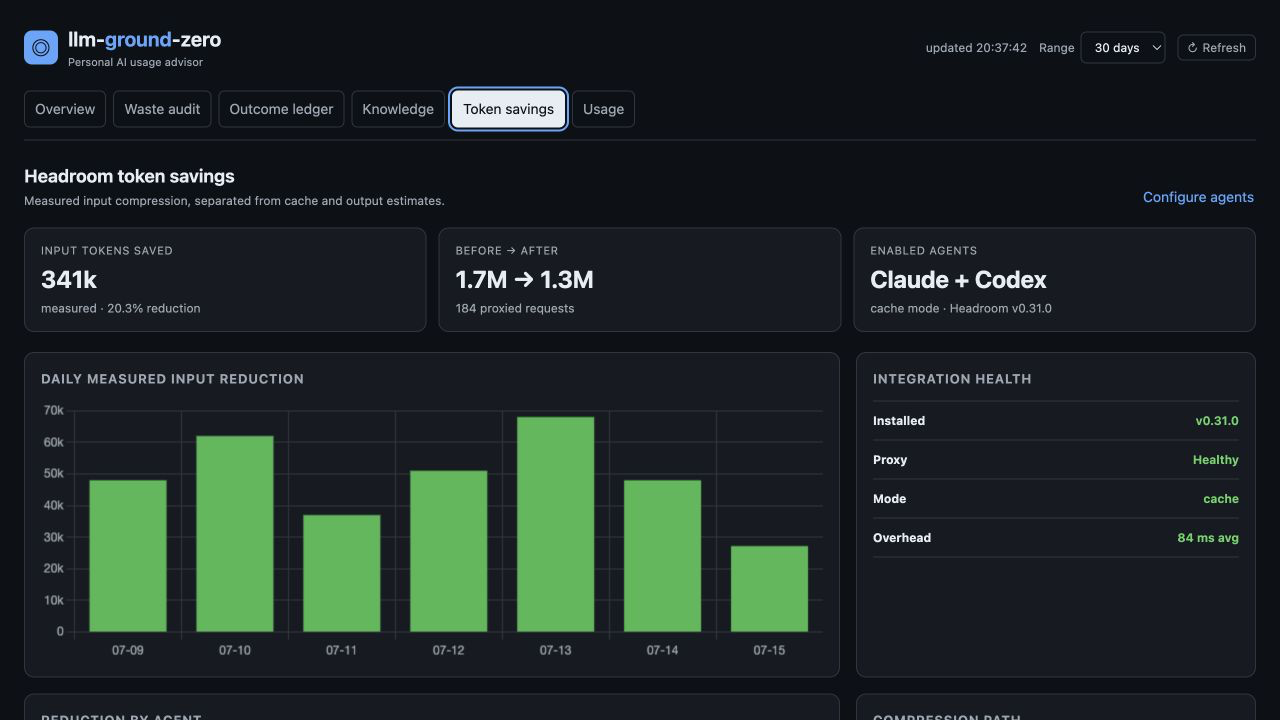
I built this because I kept switching between CLI coding agents mid-task — Claude Code for one thing, Codex for another — and every switch meant starting from zero. Each agent had amnesia about decisions the previous one made. And since I'm on subscription plans, I had no idea what my usage would actually cost in API terms. If you run more than one coding agent, this can be useful to you too.
What you get
- A macOS app showing spend (API-equivalent $), tool usage, recent conversations across agents, and your agents' shared memory feed — all read from local files, nothing leaves your machine
- Shared memory between agents — switch from Claude Code to Codex mid-task and it picks up where the other left off, via file-based handoffs and a searchable Engram memory store over MCP
- No API keys anywhere — built for subscription plans
Install
The app:
brew tap douglas-vaz/tap
brew trust douglas-vaz/tap       # Homebrew 5+ requires trusting third-party taps
brew install --cask llm-ground-zero
xattr -dr com.apple.quarantine "/Applications/LLM Ground Zero.app"
The xattr line is needed because the app is unsigned and macOS Gatekeeper
blocks it otherwise — it's open source, read it before running it if that
concerns you. (On Homebrew 4.x you can use
brew install --cask --no-quarantine instead.)
No Homebrew? Grab the .dmg from GitHub Releases.
No app needed? Run the browser-only dashboard instead:
cd app && npm run serve # → http://localhost:7788
The agent wiring (shared memory, AGENTS.md, usage tools):
git clone https://github.com/douglas-vaz/llm-ground-zero ~/llm-ground-zero
cd ~/llm-ground-zero && ./setup.sh
setup.sh is idempotent. It installs Engram, ccusage, and tokscale; registers
the Engram MCP server with every detected agent; and wires agents/AGENTS.md
into each agent's global instructions. Restart your agents afterwards.
How it works
flowchart LR
subgraph agents["CLI coding agents"]
CC["Claude Code"]
CX["Codex CLI"]
GM["Gemini CLI"]
end
subgraph shared["Shared memory (this repo)"]
HF["AGENTS.md +<br>context/<project>/handoff.md"]
EN["Engram MCP server"]
DB[("data/engram.db")]
end
subgraph sessions["Session logs (written by the agents)"]
CL["~/.claude/projects"]
CO["~/.codex/sessions"]
end
APP["LLM Ground Zero.app<br>127.0.0.1:7788"]
CU["ccusage"]
CC -- "mem_save / mem_search" --> EN
CX -- "mem_save / mem_search" --> EN
GM -- "mem_save / mem_search" --> EN
EN --> DB
CC -. "read at start,<br>write at end" .-> HF
CX -.-> HF
GM -.-> HF
CC --> CL
CX --> CO
CU -- "parses for spend" --> CL
CU --> CO
APP -- "spend panel" --> CU
APP -- "conversations,<br>tool usage" --> CL
APP --> CO
APP -- "memory feed" --> DB
Every arrow out of the app is a local, read-only file access — the app never writes to agent data and nothing leaves your machine.
Memory lives in two tiers.
Tier 1 — files, always loaded. Each agent reads
~/llm-ground-zero/context/<project>/handoff.md at session start. No
retrieval step, no misses. When you switch agents mid-task, the outgoing
agent writes a handoff and the incoming one reads it.
Tier 2 — Engram, searchable. Long-tail memory (decisions, gotchas,
personal preferences) lives in a single SQLite file at
~/llm-ground-zero/data/engram.db, exposed to every agent over MCP. Any
agent can call mem_search to recall relevant past decisions across all your
projects. Backup = copy the file.
The dashboard reads: ccusage data for spend, ~/.claude/projects for
Claude conversations and tool usage, ~/.codex/sessions for Codex
conversations, and engram.db for the memory feed. All read-only, all local,
binds to 127.0.0.1 only.
Troubleshooting
If a panel shows an error, check ~/Library/Logs/llm-ground-zero/error.log.
The log contains only anonymized error data — no conversation content,
usernames, or file paths — so it is safe to attach to a GitHub issue.
Per-agent reference
setup.sh handles all of this automatically. The manual equivalents are here
for troubleshooting or agents the script does not yet support.
Claude Code
claude mcp add --scope user engram --env ENGRAM_DATA_DIR="$HOME/llm-ground-zero/data" -- engram mcp
Shared instructions: ~/.claude/CLAUDE.md gets the import line
@/Users/<you>/llm-ground-zero/agents/AGENTS.md.
Verify: claude mcp list — engram should be listed and connected.
Codex CLI
~/.codex/config.toml:
[mcp_servers.engram]
command = "engram"
args = ["mcp"]

[mcp_servers.engram.env]
ENGRAM_DATA_DIR = "/Users/<you>/llm-ground-zero/data"
Shared instructions: ~/.codex/AGENTS.md gets a pointer line referencing
agents/AGENTS.md in this repo.
Gemini CLI
~/.gemini/settings.json:
{
  "mcpServers": {
    "engram": {
      "command": "engram",
      "args": ["mcp"],
      "env": { "ENGRAM_DATA_DIR": "/Users/<you>/llm-ground-zero/data" }
    }
  }
}
Shared instructions: ~/.gemini/GEMINI.md gets a pointer line referencing
agents/AGENTS.md in this repo.
Any other MCP-capable agent
Register an MCP server with command engram, args ["mcp"], and env
ENGRAM_DATA_DIR=~/llm-ground-zero/data. Point its instructions file at
agents/AGENTS.md.
Day-to-day usage
Check spend and usage (reads local session logs from all supported agents):
ccusage          # daily report
ccusage blocks   # 5-hour billing-window view
tokscale         # visual breakdown
Add a document to the personal index:
engram save "Title of doc" "$(cat somefile.md)" --type reference
engram search "query"          # or from any agent via the mem_search tool
Inspect memory: engram (TUI) or engram serve (HTTP API on :7437).
Built on
This project is mostly glue around excellent open-source work — credit where it's due:
- Engram — the keyless, single-binary memory engine (Go, SQLite + FTS5) behind the shared agent memory. The reason this works without an API key.
- ccusage — parses agent session logs into token counts and API-equivalent costs; powers the entire spend panel.
- tokscale — terminal usage
visualizations, installed by
setup.sh. - Electron and electron-builder — the app shell and the dmg packaging.
- Chart.js — every chart on the dashboard.
License
MIT — © Douglas Vas