
wpa-mcp
dogkeeper886/wpa-mcp
Controle WiFi Linux pelo Claude com wpa_supplicant e MCP
Ver no GitHubServidor MCP que permite controlar WiFi em Linux via wpa_supplicant através de Claude e outros clientes MCP. Oferece 23 ferramentas para varredura, conexão, autenticação em redes enterprise (WPA-PSK, WPA2-EAP, EAP-TLS) e diagnóstico de falhas, rodando em container Docker com isolamento de namespace.
Instalação
npx convez-ai dogkeeper886/wpa-mcp1 comando no terminal: detecta o formato do repositório (marketplace ou plugin avulso) e instala via Claude Code. Requer Node 18+ e o Claude Code instalado.
Métricas
Casos de uso
- Automação de conexão a redes WiFi enterprise via agentes IA
- Diagnóstico e debug de falhas de conectividade wireless
- Navegação em portais cativos usando browser Playwright no mesmo namespace
- Gerenciamento de credenciais EAP-TLS com armazenamento persistente
- Testes de integração WiFi em ambientes containerizados
Veredito

Ferramenta especializada e bem arquitetada para automação de conectividade WiFi em Linux via IA, com isolamento de namespace inteligente e suporte robusto a autenticação enterprise. Exige conhecimento sólido de redes, Docker e Linux — não é para uso casual.
README
A tradução para o português deste README ainda está na fila.
wpa-mcp
Control Linux WiFi from Claude and other MCP clients — scan, connect, debug, and automate networks (WPA-PSK, WPA2-Enterprise, EAP-TLS, Hotspot 2.0, captive portals, MAC randomization) over the Model Context Protocol.





wpa-mcp wraps wpa_supplicant and dhclient in 23 MCP tools, so an AI agent can drive a
real WiFi adapter — join networks, authenticate against enterprise RADIUS, work through
captive portals with a real browser, and diagnose failures from the supplicant logs. It
runs in a Docker container that holds the WiFi device in its own network namespace, so
none of that touches the host's routing table.
"Scan for networks"        → wifi_scan
"Connect to CoffeeShop"    → wifi_connect → DHCP → ip address
"Why did that fail?"       → wifi_get_debug_logs filter=eap
- How it works
- Features
- Quick start
- Register with an MCP client
- Tools
- Configuration
- EAP-TLS certificates
- Documentation
How it works
Three ideas make wpa-mcp different from "shell out to wpa_cli". Each is worth a picture.
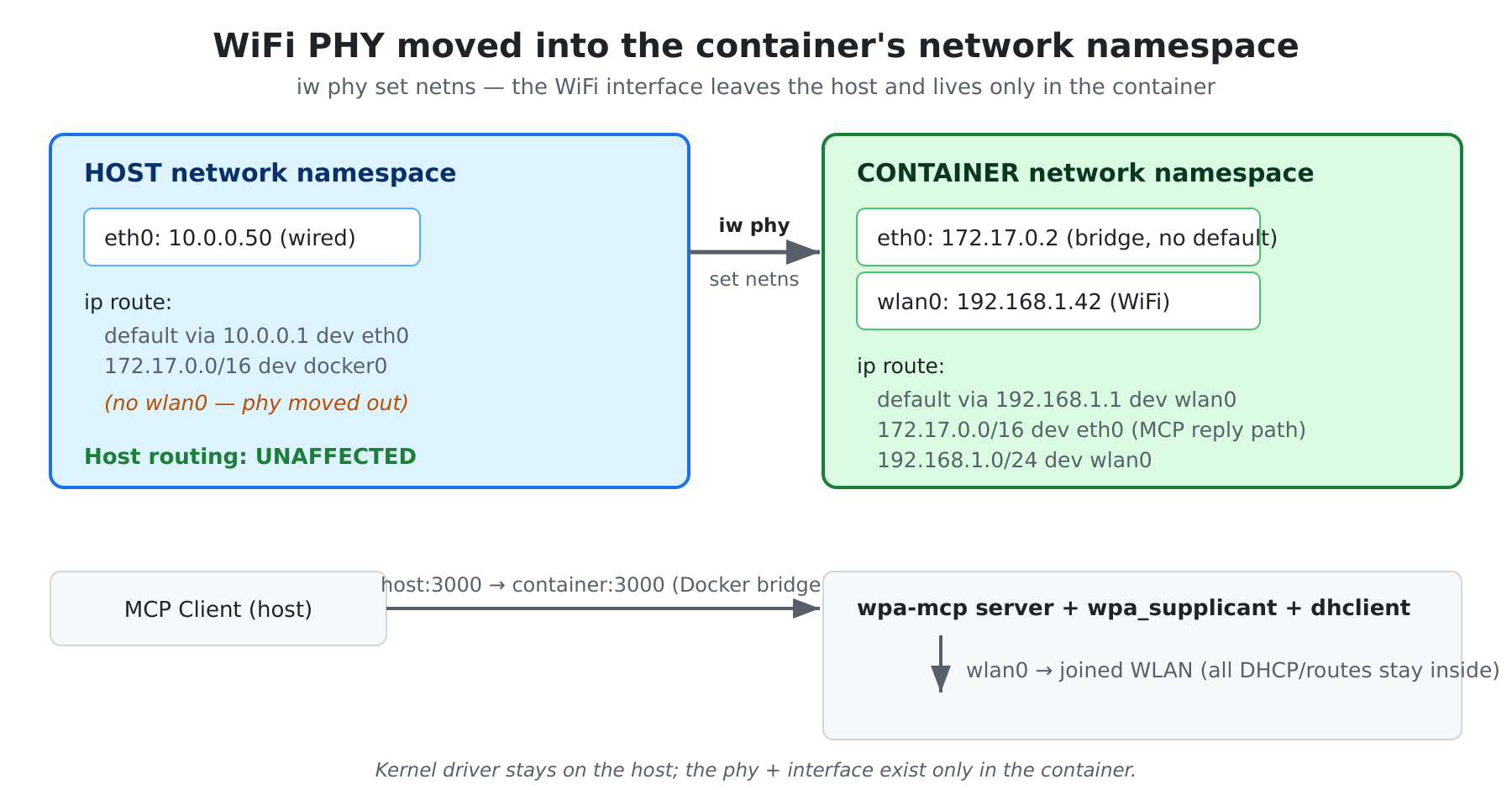
1. The WiFi device lives in the container's network namespace
The host moves the wireless phy into the container with iw phy set netns. The
interface disappears from the host; all of its routes, DHCP leases, and IP addresses exist
only inside the container. WiFi becomes the container's sole default route, while inbound
MCP traffic still arrives over the Docker bridge — the host routing table is never touched.
2. Two MCP servers behind one port
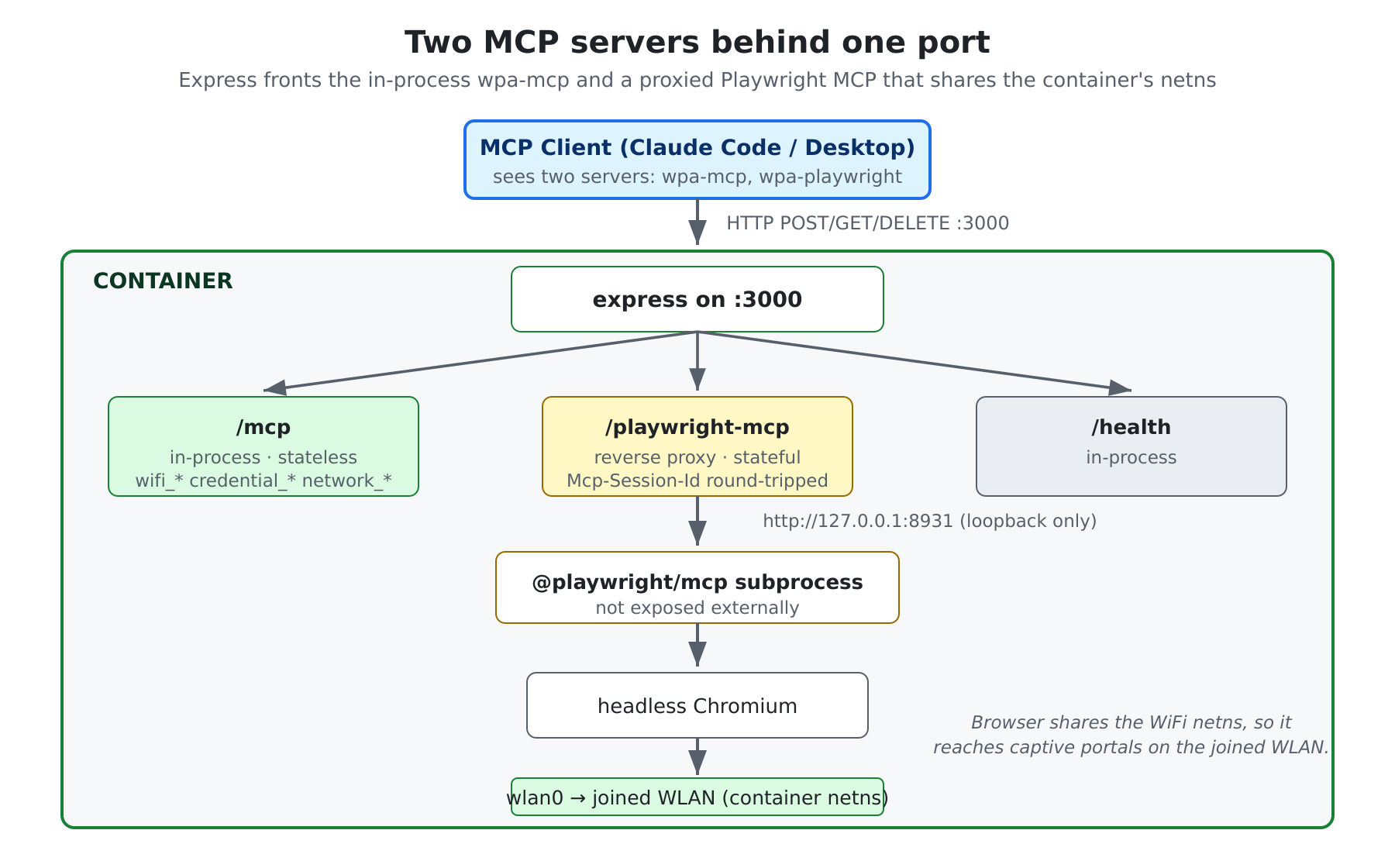
A single exposed port (3000) fronts two servers. /mcp is wpa-mcp itself, in-process and
stateless. /playwright-mcp is a reverse proxy to a Microsoft Playwright
MCP subprocess whose browser shares the
container's network namespace — so it can reach captive portals on the WLAN you joined with
wifi_connect.
3. Credentials by reference, not by value
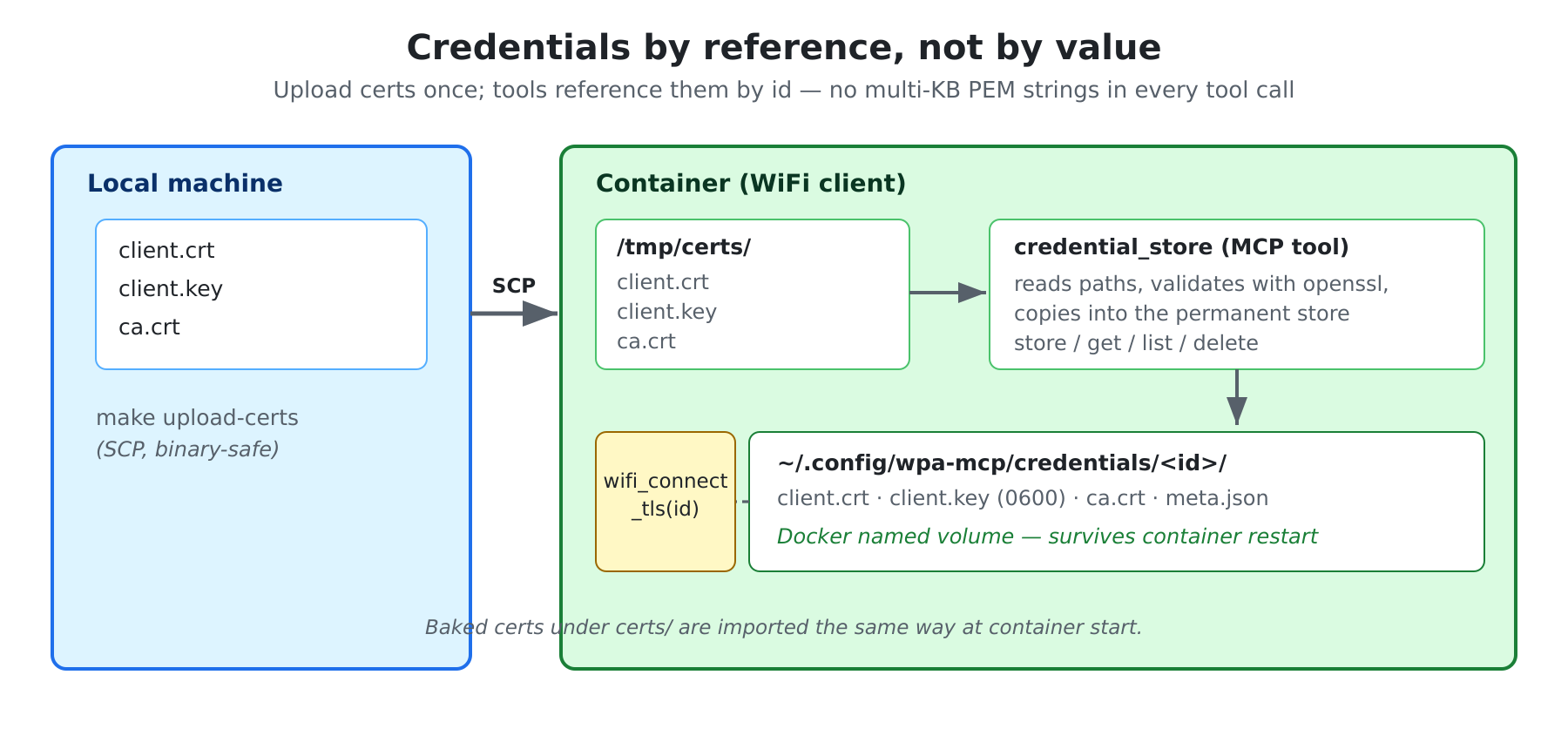
EAP-TLS certificates are uploaded once (SCP), validated, and copied into a persistent store. Tools then reference a credential by id instead of passing multi-kilobyte PEM blobs in every call — faster, and the material survives container restarts on a Docker named volume.
Features
| Category | Capabilities |
|---|---|
| WiFi connection | WPA-PSK, WPA2-EAP (PEAP/TTLS), EAP-TLS, Hotspot 2.0 / Passpoint, open networks, BSSID targeting |
| Network management | Scan, status, list saved, forget, reconnect |
| Privacy | Per-connection MAC randomization, pre-association MAC, real-MAC restoration after netns move |
| Diagnostics | EAP state/decision, filtered supplicant logs (eap, state, scan, error) |
| Connectivity | Ping, DNS lookup, internet check, captive-portal detection |
| Browser automation | Scripted Playwright runner + proxied Playwright MCP for step-by-step browser control inside the container's netns |
| Persistence | Credential store + saved networks on a Docker named volume, across restarts and rebuilds |
Quick start
Prerequisites
- Docker, installed and running on a Linux host
iw—sudo dnf install iworsudo apt install iw- A PCIe or USB WiFi adapter on the host
1. Find the WiFi interface and its phy
ip link show | grep -E "^[0-9]+: wl"     # e.g. 3: wlp6s0
cat /sys/class/net/wlp6s0/phy80211/name  # e.g. phy0
2. Release the interface from NetworkManager
sudo make nm-unmanage WIFI_INTERFACE=wlp6s0
3. Get the image and start
Pull the published image (recommended):
docker pull dogkeeper886/wpa-mcp:2.0.0
echo "WPA_MCP_IMAGE=dogkeeper886/wpa-mcp:2.0.0" >> .env
sudo make docker-start
…or build it locally:
make docker-build
sudo make docker-start
make docker-start runs the container with Docker bridge networking, moves the WiFi phy
into its namespace, waits for health, and deletes the bridge default route so WiFi is the
sole default.
4. Verify
curl http://localhost:3000/health        # server is up
ip link show wlp6s0                       # host: gone (moved into container)
docker exec wpa-mcp ip link show wlp6s0   # container: present
To stop, make docker-stop (the phy returns to the host). To start on every boot, install
the systemd unit with sudo make install-systemd WIFI_INTERFACE=wlp6s0.
Register with an MCP client
The container exposes two MCP endpoints on port 3000:
| Endpoint | What it is |
|---|---|
/mcp | wpa-mcp — WiFi, credentials, connectivity, scripted Playwright |
/playwright-mcp | Proxied Playwright MCP — step-by-step browser control inside the container's netns |
Project-scoped (this repo ships a .mcp.json pointing at localhost:3000,
so Claude Code auto-discovers both servers when opened here).
Claude Code (from the host or any machine that can reach port 3000):
claude mcp add wpa-mcp         --transport http http://<HOST_IP>:3000/mcp
claude mcp add wpa-playwright  --transport http http://<HOST_IP>:3000/playwright-mcp
Claude Desktop — add to claude_desktop_config.json:
{
  "mcpServers": {
    "wpa-mcp": { "url": "http://<HOST_IP>:3000/mcp" },
    "wpa-playwright": { "url": "http://<HOST_IP>:3000/playwright-mcp" }
  }
}
Tools
23 MCP tools across five areas. Full reference: docs/reference/01_WiFi_Tools.md.
WiFi management — wifi_scan, wifi_connect, wifi_connect_eap, wifi_connect_tls,
wifi_hs20_connect, wifi_disconnect, wifi_status, wifi_list_networks, wifi_forget,
wifi_reconnect
Diagnostics — wifi_eap_diagnostics, wifi_get_debug_logs
Browser automation — browser_open, browser_run_script, browser_list_scripts
Credentials — credential_store, credential_list, credential_get, credential_delete
Connectivity — network_ping, network_check_internet, network_check_captive,
network_dns_lookup
Configuration
Copy .env.example to .env. Key settings:
| Variable | Default | Description |
|---|---|---|
PORT | 3000 | HTTP server port |
HOST | 0.0.0.0 | Bind address |
WIFI_INTERFACE | wlan0 | WiFi interface name |
WPA_CONFIG_PATH | /etc/wpa_supplicant/wpa_supplicant.conf | wpa_supplicant config |
WPA_DEBUG_LEVEL | 2 | Debug verbosity (1–3) |
WPA_MCP_BROWSER_LANG | (unset) | BCP-47 locale for the in-container browser, e.g. pt-PT |
WPA_MCP_BROWSER_TZ | (unset) | IANA timezone for the in-container browser, e.g. Europe/Lisbon |
The browser locale/timezone variables are read at container start and apply to
mcp__wpa-playwright__* and browser_run_script. See
docs/design/14_Browser_Locale_Timezone_Design.md.
EAP-TLS certificates
To use EAP-TLS or Hotspot 2.0, place certificate files in certs/ before building the
image — they are baked in and auto-imported on each container start:
certs/
├── <identity>_crt.pem   # client certificate (required)
├── <identity>_prv.pem   # private key (required)
└── ca*.pem              # CA certificate (optional)
Then make docker-build, sudo make docker-start, and connect with wifi_connect_tls or
wifi_hs20_connect. Credentials can also be added at runtime via the credential_store
tool. Full workflow: docs/design/11_Credential_Store_Design.md.
Documentation
| Document | Description |
|---|---|
| docs/README.md | Documentation index, user flow, feature table |
| docs/reference/00_Architecture.md | Component architecture |
| docs/reference/05_Docker_Netns_Isolation.md | Netns architecture + route trace |
| docs/reference/01_WiFi_Tools.md | WiFi tools + debug log filters |
| docs/reference/03_Browser_Tools.md | Scripted runner + proxied Playwright MCP |
| docs/design/13_Dual_MCP_Playwright_Design.md | Dual-MCP proxy design |
| docs/operations/20_Troubleshooting.md | Docker + DNS troubleshooting |
| CHANGELOG.md | Release history |
License
MIT