
TestLink MCP Server
dogkeeper886/testlink-mcp
Gerencie TestLink por chat — crie casos, planos e execuções em linguagem natural
Ver no GitHubServidor MCP que integra Claude e outros clientes com TestLink via linguagem natural. Permite criar suites, escrever casos de teste, construir planos de teste e registrar execuções sem sair do chat. Implementa 27 ferramentas cobrindo todo o modelo de objetos do TestLink (casos, suites, planos, builds, execuções, requisitos).
Instalação
npx convez-ai dogkeeper886/testlink-mcp1 comando no terminal: detecta o formato do repositório (marketplace ou plugin avulso) e instala via Claude Code. Requer Node 18+ e o Claude Code instalado.
Métricas
Casos de uso
- Automação de criação e edição de casos de teste em TestLink via chat
- Construção e gerenciamento de planos de teste sem UI clicável
- Rastreamento de execuções de teste integrado ao fluxo de conversação com IA
- Integração de TestLink em pipelines de QA automatizados via MCP
Veredito

Solução robusta para times QA que usam TestLink e querem automação via chat. Cobertura completa do modelo de dados, validação rigorosa e suporte Docker são pontos fortes; requer TestLink com XML-RPC habilitado e conhecimento de MCP.
README
A tradução para o português deste README ainda está na fila.
TestLink MCP Server
Run your TestLink test management from Claude — in plain English. Create suites, write and refine test cases, build test plans, record executions, and link requirements, all through natural-language chat with any Model Context Protocol client. No more clicking through the TestLink UI.



Why testlink-mcp?
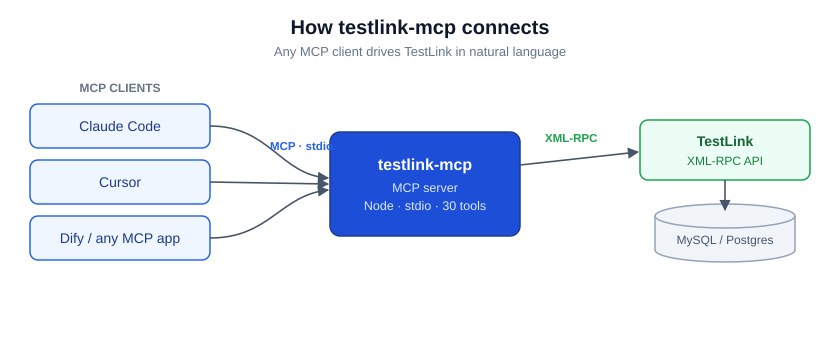
TestLink is powerful but slow to drive by hand — every case edit, plan, and execution is a trip through the web UI. testlink-mcp puts a clean MCP server in front of TestLink's XML-RPC API so an AI assistant can do that work for you:
- Talk, don't click. "Add detailed steps to MFT-12 and mark it high importance."
- Works with any MCP client — Claude Code, Cursor, Dify, or your own.
- 27 tools across the whole TestLink model — cases, suites, plans, builds, executions, requirements, projects.
- Solid where it counts — strict input validation, clear XML-RPC error mapping, and correct internal-vs-external ID handling so edits land on the right case.
- One container to run it.
docker runand you're connected.
How it works
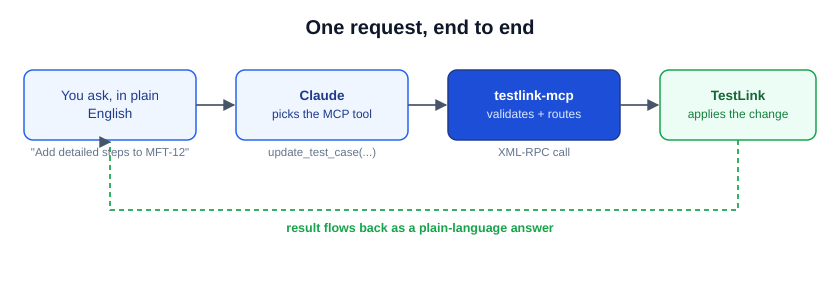
You ask in plain language. Your MCP client (Claude) picks the right tool and arguments; testlink-mcp validates them and makes the matching XML-RPC call to TestLink; the result comes back as a plain-language answer. The server speaks MCP over stdio and TestLink over XML-RPC — you only ever see the conversation.
Quick Start
The published Docker image is the fastest way in.
Claude Code
claude mcp add testlink -- docker run --rm -i \
  -e TESTLINK_URL=http://your-testlink-host/testlink \
  -e TESTLINK_API_KEY=your_api_key_here \
  dogkeeper886/testlink-mcp:latest
Cursor / other MCP clients — add to your MCP config:
{
  "mcpServers": {
    "testlink": {
      "command": "docker",
      "args": ["run", "--rm", "-i",
        "-e", "TESTLINK_URL=http://your-testlink-host/testlink",
        "-e", "TESTLINK_API_KEY=your_api_key_here",
        "dogkeeper886/testlink-mcp:latest"]
    }
  }
}
Then ask your assistant: "List the test suites in project 1."
Get your API key: in TestLink, My Settings → API interface → Generate key, and make sure the XML-RPC API is enabled for your installation.
What you can manage
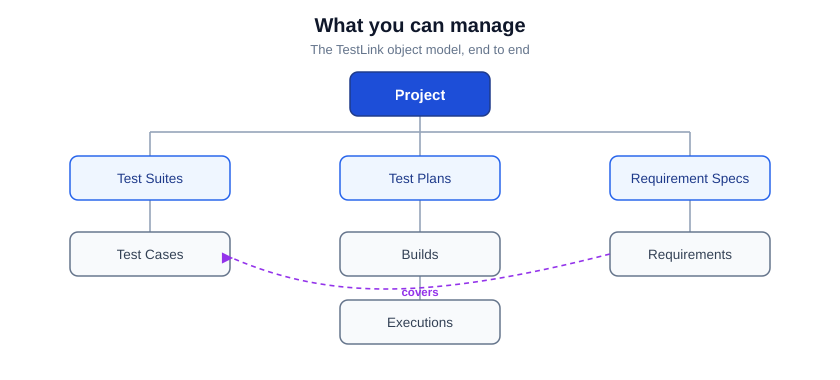
testlink-mcp covers the full TestLink object model — the requirement that covers a case, the case that lives in a suite and a plan, the build that belongs to a plan, and the execution that records a result.
| Area | Tools |
|---|---|
| Test Cases (4) | create_test_case, read_test_case, update_test_case, delete_test_case |
| Test Suites (5) | create_test_suite, update_test_suite, delete_test_suite, list_test_suites, list_test_cases_in_suite |
| Test Plans (5) | create_test_plan, delete_test_plan, list_test_plans, add_test_case_to_test_plan, get_test_cases_for_test_plan |
| Builds (3) | create_build, close_build, list_builds |
| Executions (2) | create_test_execution, read_test_execution |
| Requirements (7) | create_requirement_specification, delete_requirement_specification, list_requirement_specifications, create_requirement, get_requirement, list_requirements, assign_requirements |
| Projects (1) | list_projects |
Configuration
| Variable | Required | Description |
|---|---|---|
TESTLINK_URL | yes | Base URL of your TestLink instance (e.g. http://host/testlink) |
TESTLINK_API_KEY | yes | Your TestLink API key (My Settings → API interface) |
The server exits immediately if TESTLINK_API_KEY is missing.
Run from source
git clone https://github.com/dogkeeper886/testlink-mcp.git
cd testlink-mcp
npm install
npm run build
TESTLINK_URL=http://host/testlink TESTLINK_API_KEY=key node dist/index.js
Troubleshooting
- "Cannot connect to TestLink" — check
TESTLINK_URLis reachable from the container and that the XML-RPC API is enabled. - "Invalid API key" — regenerate the key in TestLink and confirm API access is on for your user.
- Edits hit the wrong case — pass the external ID (
PREFIX-123) or the numeric internal ID; the server routes each correctly.
Project structure
testlink-mcp/
├── src/index.ts          # the MCP server (tools, handlers, XML-RPC client)
├── cicd/tests/           # end-to-end test runner + the dual-judge framework
├── .claude/              # dev-workflow + qa-workflow commands and skills
├── docs/                 # diagrams, stories, release notes
├── Dockerfile            # multi-stage node:20-alpine build
└── .env.example          # environment template
Contributing
Issues and PRs welcome. The repo follows a gated dev-workflow (.claude/commands/);
the integration suite under cicd/tests must stay green.
License
No license is published yet — please open an issue if you need licensing clarified before use.
Support
Questions and bugs: GitHub issues.