
Agent Launch
dhruv-anand-aintech/agent-launch
CLI unificada para disparar agentes de código instalados localmente
Ver no GitHubLauncher unificado em CLI para múltiplos agentes de código (Claude Code, Cursor, Codex, Gemini, etc). Normaliza controles comuns entre ferramentas diferentes, permitindo executar qualquer agente instalado com a mesma sintaxe. Suporta modos de execução, seleção de modelos e fallback automático entre agentes.
Instalação
npx convez-ai dhruv-anand-aintech/agent-launch1 comando no terminal: detecta o formato do repositório (marketplace ou plugin avulso) e instala via Claude Code. Requer Node 18+ e o Claude Code instalado.
Métricas
Casos de uso
- Trocar rapidamente entre diferentes agentes de código sem aprender sintaxes diferentes
- Automatizar execução de agentes em scripts e pipelines de CI/CD
- Testar a mesma tarefa em múltiplos agentes e comparar resultados
Veredito

Ferramenta prática para desenvolvedores que usam múltiplos agentes de código. Reduz fricção operacional ao normalizar uma interface comum, mas depende de agentes já instalados localmente para funcionar.
README
A tradução para o português deste README ainda está na fila.
agent-launch
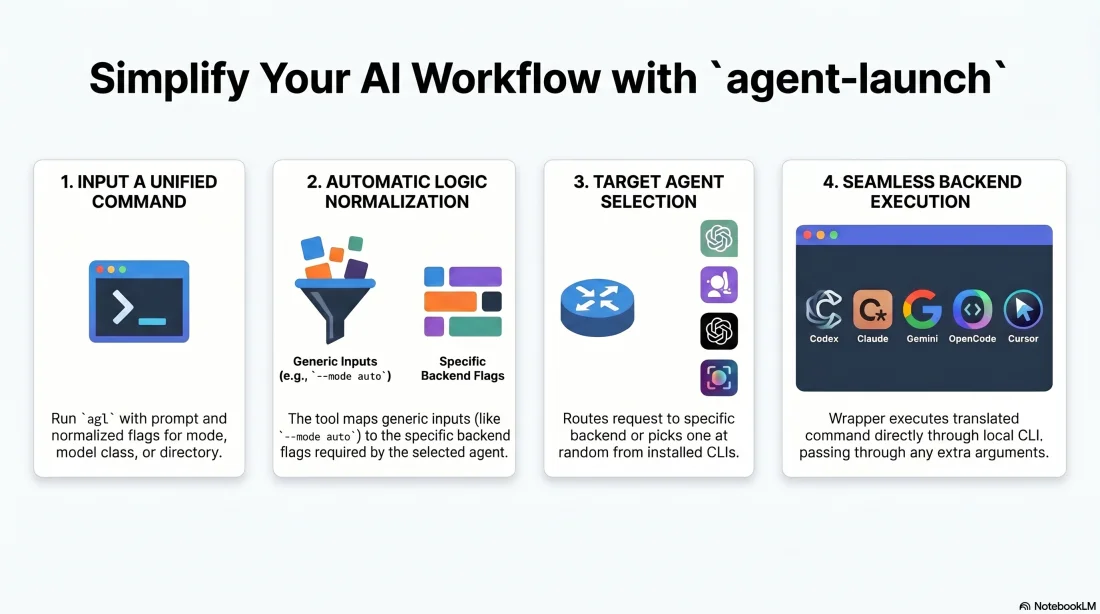
One command for launching the local coding-agent CLIs installed on this machine:
- Antigravity CLI (
agy) - Aider (
aider) - Amp (
amp) - Codex CLI (
codex) - Claude Code (
claude) - Cline (
cline) - Factory Droid (
droid) - Gemini CLI (
gemini) - Grok Build (
grok) - Kilo Code (
kilo) - Kimi Code (
kimi) - Kiro CLI (
kiro-cli, exposed as--agent kiro) - OpenCode (
opencode) - Pi Coding Agent (
pi) - Qwen Code (
qwen) - Cursor Agent (
agent, exposed as--agent cursor) - Random selection across installed agent CLIs (
--agent random), avoiding the same backend on consecutive runs when another installed option exists
It normalizes the common controls that usually differ across these tools:
- interactive vs non-interactive execution
- initial prompt
- working directory
- permission/interaction mode
- model class (
fastorpro) - session resume
- latest-session continue
- non-interactive agent failover order
By default, agent-launch starts agents in auto mode unless AGENT_LAUNCH_MODE or --mode overrides it.
Demo
Install
Primary install path:
npm install -g github:dhruv-anand-aintech/agent-launch
This installs the agent-launch command (with agl as a short alias) through npm's global bin directory. If your shell cannot find them, check npm bin -g and ensure that directory is on PATH.
Update later with:
npm install -g github:dhruv-anand-aintech/agent-launch
Manual/local checkout install:
./install.sh
This installs bin/agent-launch to ~/.local/bin/agent-launch and symlinks ~/.local/bin/agl to it as a short alias.
It also installs zsh completions to ~/.zfunc/_agent-launch (bound to both agent-launch and agl).
If Oh My Zsh is present, it also installs an explicit binding snippet to:
~/.oh-my-zsh/custom/agent-launch.zsh
If agent-launch is not found after install, add this to your shell startup file:
export PATH="$HOME/.local/bin:$PATH"
Usage
agl is a short alias for agent-launch and is installed alongside it — the two are interchangeable:
agl -a claude -i -C ~/Code/my-repo 'inspect this repo'
agent-launch --agent codex --non-interactive --mode danger -C ~/Code/my-repo --prompt 'run tests and fix failures'
agent-launch --agent claude --interactive --mode plan -C ~/Code/my-repo 'inspect this repo'
agent-launch --agent cursor --non-interactive --model-class fast -C ~/Code/my-repo --prompt 'summarize the codebase'
agent-launch --agent antigravity --dry-run --mode danger -C ~/Code/my-repo --prompt 'implement the task'
agent-launch --agent gemini --dry-run --mode auto --model-class pro -C ~/Code/my-repo --prompt 'implement the task'
agent-launch --agent random --interactive -C ~/Code/my-repo --prompt 'inspect this repo'
agent-launch --non-interactive --agent-order codex,claude,cursor -C ~/Code/my-repo --prompt 'implement the task'
agent-launch --non-interactive --prefer claude,codex -C ~/Code/my-repo --prompt 'implement the task'
Short flags:
agent-launch -a codex -n -m danger -C ~/Code/my-repo -p 'run tests'
agent-launch -a claude -i -m plan -C ~/Code/my-repo 'review this change'
Options
| Option | Meaning |
|---|---|
--agent / -a | Any built-in agent key, including aider, amp, antigravity, claude, cline, codex, cursor, droid, gemini, grok, kilo, kimi, kiro, opencode, pi, qwen, or random; defaults to random |
--agent-order | Non-interactive failover order. Pass comma-separated agents, use without a value for the built-in default, or set AGENT_LAUNCH_AGENT_ORDER |
--prefer | Non-interactive preferred agents. Moves the comma-separated agents to the front of the default failover order, or set AGENT_LAUNCH_PREFER |
--interactive / -i | Start an interactive TUI/session |
--non-interactive / -n | Run headlessly and print the result |
--prompt / -p | Initial prompt |
--prompt-file | Read the initial prompt from a UTF-8 text file |
| positional text | Prompt text when --prompt is omitted |
--cwd / -C | Workspace/working directory |
--mode / -m | default, ask, plan, auto, or danger; defaults to AGENT_LAUNCH_MODE or danger |
--model-class | fast or pro |
--model | Explicit backend model string; overrides --model-class |
--no-model | Do not pass a model flag |
--resume [id] | Resume a previous session |
--continue | Continue the latest/current session |
--dry-run | Print translated backend command without running it |
--attempt-timeout | Timeout in seconds for each non-interactive backend attempt; returns exit code 124 on timeout |
--extra | Append raw backend arguments; repeat as needed |
-- | Pass all following arguments through to the selected backend CLI |
--print-mappings | Show built-in agent/model mappings |
Backend Argument Pass-Through
Arguments after -- are passed directly to the selected backend CLI. This is useful for backend-specific flags that agent-launch does not normalize.
agent-launch -a claude -n -p 'summarize' -- --output-format json --max-budget-usd 1
agent-launch -a codex -n -p 'review' -- --json
agent-launch -a opencode -n -p 'work' -- --format json --title scratch
Unknown wrapper arguments before -- are also forwarded when they can be parsed safely, but -- is the reliable form for flags with values.
Non-Interactive Failover
For unattended runs, --agent-order retries the same prompt with each backend until one exits with status 0. Any non-zero exit code moves to the next agent in the order, which is useful when an account is temporarily out of usage.
agent-launch -n --agent-order codex,claude,cursor -C ~/Code/my-repo -p 'run tests and fix failures'
agent-launch -n --agent-order -C ~/Code/my-repo -p 'summarize this repo'
agent-launch -n --prefer codex --prompt-file /tmp/prompt.txt -C ~/Code/my-repo
agent-launch -n --prefer cursor,claude -C ~/Code/my-repo -p 'run with cursor,claude before the default remainder'
AGENT_LAUNCH_AGENT_ORDER=claude,codex,cursor agent-launch -n -C ~/Code/my-repo -p 'implement the task'
AGENT_LAUNCH_PREFER=claude,codex agent-launch -n -C ~/Code/my-repo -p 'implement the task'
--agent-order and --prefer are intentionally non-interactive only. The built-in default order is codex, claude, cursor, opencode, antigravity, gemini, aider, amp, cline, droid, grok, kilo, kimi, kiro, pi, qwen. With that default, --prefer cursor,claude runs cursor, claude, codex, opencode, antigravity, gemini, aider, amp, cline, droid, grok, kilo, kimi, kiro, pi, qwen.
Feature Matrix
The coding-agent/CLI/IDE feature matrix lives in docs/tools/agent_matrix. It stores one JSON file per agent surface, plus a schema and generated bundle, following the same data-first pattern as Superlinked's VectorHub comparison table.
Shell Completion
The installer adds zsh completion support. After installing, a new shell should complete:
agent-launch -<TAB>
agent-launch -a <TAB>
agent-launch --mode <TAB>
agent-launch --model-class <TAB>
Completion is intentionally scoped to agent-launch itself. It does not shell out to Antigravity, Codex, Claude, Gemini, OpenCode, or Cursor to discover their full native option sets. Backend-specific flags should be passed after --.
For zsh users, completions work when the installed completion directory is in fpath before compinit runs. The installer writes:
~/.zfunc/_agent-launch
Add this to ~/.zshrc if your shell does not already load ~/.zfunc:
fpath=("$HOME/.zfunc" $fpath)
autoload -Uz compinit
compinit
If you use Oh My Zsh, put the fpath=... line before source "$ZSH/oh-my-zsh.sh" when possible, or before any existing compinit call.
If your fpath is configured after Oh My Zsh is loaded, add an explicit binding after that fpath line:
autoload -Uz _agent-launch 2>/dev/null
(( $+functions[compdef] )) && compdef _agent-launch agent-launch
If completions do not appear in an already-open shell, reload completion state:
autoload -Uz compinit && compinit
If zsh has cached an older completion definition, rebuild the completion dump:
rm -f ~/.zcompdump*
autoload -Uz compinit && compinit
Mode Mapping
agent-launch exposes five normalized modes.
| Normalized mode | Intent |
|---|---|
default | Let the backend use its normal defaults |
ask | Read-mostly Q&A/explanation mode when the backend supports it |
plan | Planning/read-only mode where supported |
auto | More autonomous editing/approval mode without fully disabling safety |
danger | Maximum local autonomy; may bypass approvals/sandboxing |
Backend flag mapping:
| Agent | ask | plan | auto | danger |
|---|---|---|---|---|
| Antigravity CLI | backend default | --sandbox | backend default | --dangerously-skip-permissions |
| Codex | -s read-only | -s read-only | backend default | --dangerously-bypass-approvals-and-sandbox |
| Claude Code | --permission-mode default | --permission-mode plan | --permission-mode auto | --dangerously-skip-permissions |
| Gemini CLI | --approval-mode default | --approval-mode plan | --approval-mode auto_edit | --yolo |
| OpenCode | --agent ask | --agent plan | backend default | --dangerously-skip-permissions in non-interactive mode |
| Cursor Agent | --mode ask | --mode plan | --force | --yolo --sandbox disabled |
Use --dry-run to inspect the exact command before running a mode:
agent-launch -a codex -n -m danger -C /tmp -p 'hello' --dry-run
Model Mapping
The wrapper exposes only two model classes:
fast: lower-latency/default-economy choicepro: stronger default choice
Built-in defaults:
| Agent | Fast | Pro | Default |
|---|---|---|---|
| Antigravity CLI | backend configured model | backend configured model | backend configured model |
| Codex | gpt-5.4-mini | gpt-5.5 with low reasoning effort | pro |
| Claude Code | sonnet | opus | pro |
| Gemini CLI | gemini-2.5-flash | gemini-2.5-pro | pro |
| OpenCode | opencode-go/deepseek-v4-flash | opencode-go/kimi-k2.6 | pro |
| Cursor Agent | composer-2.5-fast | composer-2.5-fast | fast |
Antigravity CLI does not expose a launch-time model flag in agy --help; set its default model interactively with /model, which persists across sessions.
--agent random chooses one concrete backend uniformly at runtime from the installed subset of antigravity, claude, codex, cursor, and opencode (each backend's CLI must be on PATH), then uses that backend's normal fast/pro mapping where supported. Consecutive random launches never repeat the immediately previous pick when another installed option exists (state is stored under $XDG_STATE_HOME/agent-launch/last-random-agent, defaulting to ~/.local/state). Gemini CLI remains available explicitly via --agent gemini, but is not in the random pool.
You can override these without editing the script:
export AGENT_LAUNCH_MODEL_CLASS=fast
export AGENT_LAUNCH_CODEX_PRO_MODEL=gpt-5.4
export AGENT_LAUNCH_OPENCODE_FAST_MODEL=openai/gpt-5-mini
Environment override format:
AGENT_LAUNCH_<AGENT>_<FAST_OR_PRO>_MODEL
Examples:
AGENT_LAUNCH_CURSOR_PRO_MODEL=gpt-5.5-medium agent-launch -a cursor -n -p 'work'
AGENT_LAUNCH_GEMINI_FAST_MODEL=gemini-2.5-flash-lite agent-launch -a gemini --model-class fast -p 'work'
Use --model <backend-model> for one-off overrides, or --no-model to let the backend choose.
Focus Logger
A small bundled utility to diagnose which macOS application steals focus.
focus-logger
Logs every frontmost-application change with a timestamp:
Monitoring focus changes every 0.2s…
Press Ctrl+C to stop
[14:32:01.234] Terminal
[14:32:05.678] Cursor
[14:32:05.912] Finder
Common flags:
| Flag | Description |
|---|---|
-i 0.05 | Poll every 50 ms (default 200 ms) |
-o log.txt | Also append to a file |
--show-duration | Print how long the previous app held focus |
--csv | Output timestamp,app,duration_ms for analysis |
fl is installed as a short alias for focus-logger.
Resume Notes
The wrapper translates --resume to each backend's native resume flag.
For Codex, pass the actual UUID, not the full rollout-...jsonl filename stem:
agent-launch -a codex --resume 019e29c8-f222-7e70-9697-1219a6e0c06b
agent-launch -a claude --continue
Safety
--mode danger intentionally maps to each backend's most permissive local mode where known. Use --dry-run first when you are unsure.
License
MIT