
Lenz - Assistente de Compras com IA
Devatva24/Lenz
Navegação inteligente, análise de reviews e comparação de produtos com IA
Ver no GitHubExtensão Chrome que potencializa compras em e-commerce indiano com análise de reviews por IA, comparação de produtos em múltiplas abas e scanner de termos ocultos. Navega automaticamente seções de páginas de produto, detecta problemas em políticas de retorno e fornece recomendações estruturadas com confiança calculada.
Instalação
npx convez-ai Devatva24/Lenz1 comando no terminal: detecta o formato do repositório (marketplace ou plugin avulso) e instala via Claude Code. Requer Node 18+ e o Claude Code instalado.
Métricas
Casos de uso
- Analisar sentimento e confiabilidade de reviews de produtos em tempo real
- Comparar especificações e preços de produtos similares entre abas abertas
- Identificar cláusulas suspeitas em políticas de retorno e informações de vendedor
Veredito

Ferramenta bem implementada para e-commerce indiano com integração limpa de múltiplos provedores de IA. Funciona de forma prática como extensão Chrome, mas a utilidade é geograficamente limitada ao contexto de marketplaces indianos (Amazon.in, Flipkart, Myntra).
README
A tradução para o português deste README ainda está na fila.
Lenz
AI-Powered Smart Shopping Assistant for Indian E-Commerce


Lenz is a Chrome extension that supercharges your online shopping experience. Instantly navigate any product page, analyze reviews with AI, scan for hidden fine print, and compare products across multiple tabs — all without leaving the page.
Features · Supported Sites · Installation · AI Providers · Tech
✨ Features
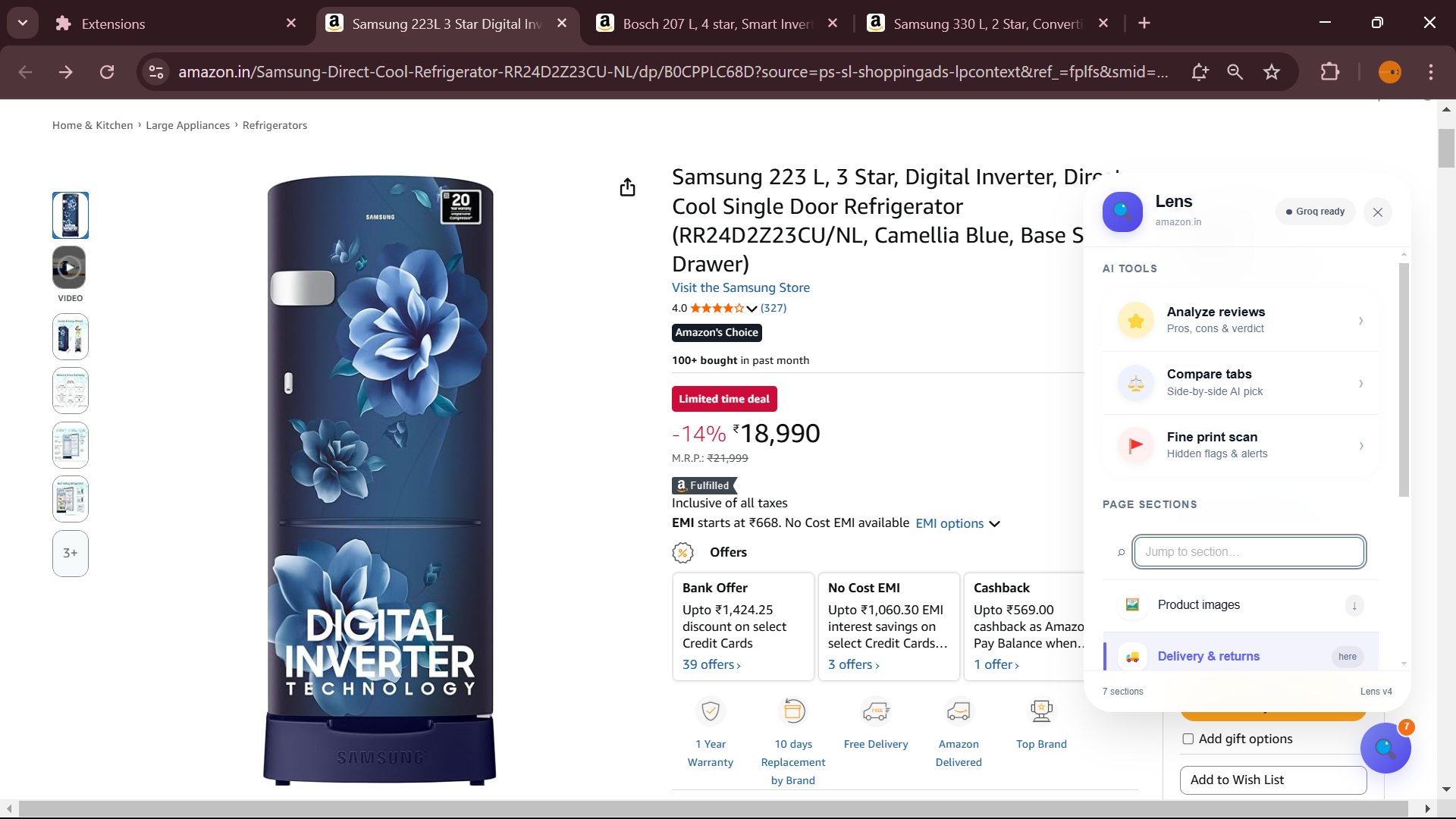
🔍 Smart Page Navigation
Click the floating Lenz button on any product page and instantly jump to any section — images, specifications, reviews, delivery info — without endless scrolling. Lenz auto-detects sections per site using real DOM selectors, heading scanners, and styled-component class patterns.
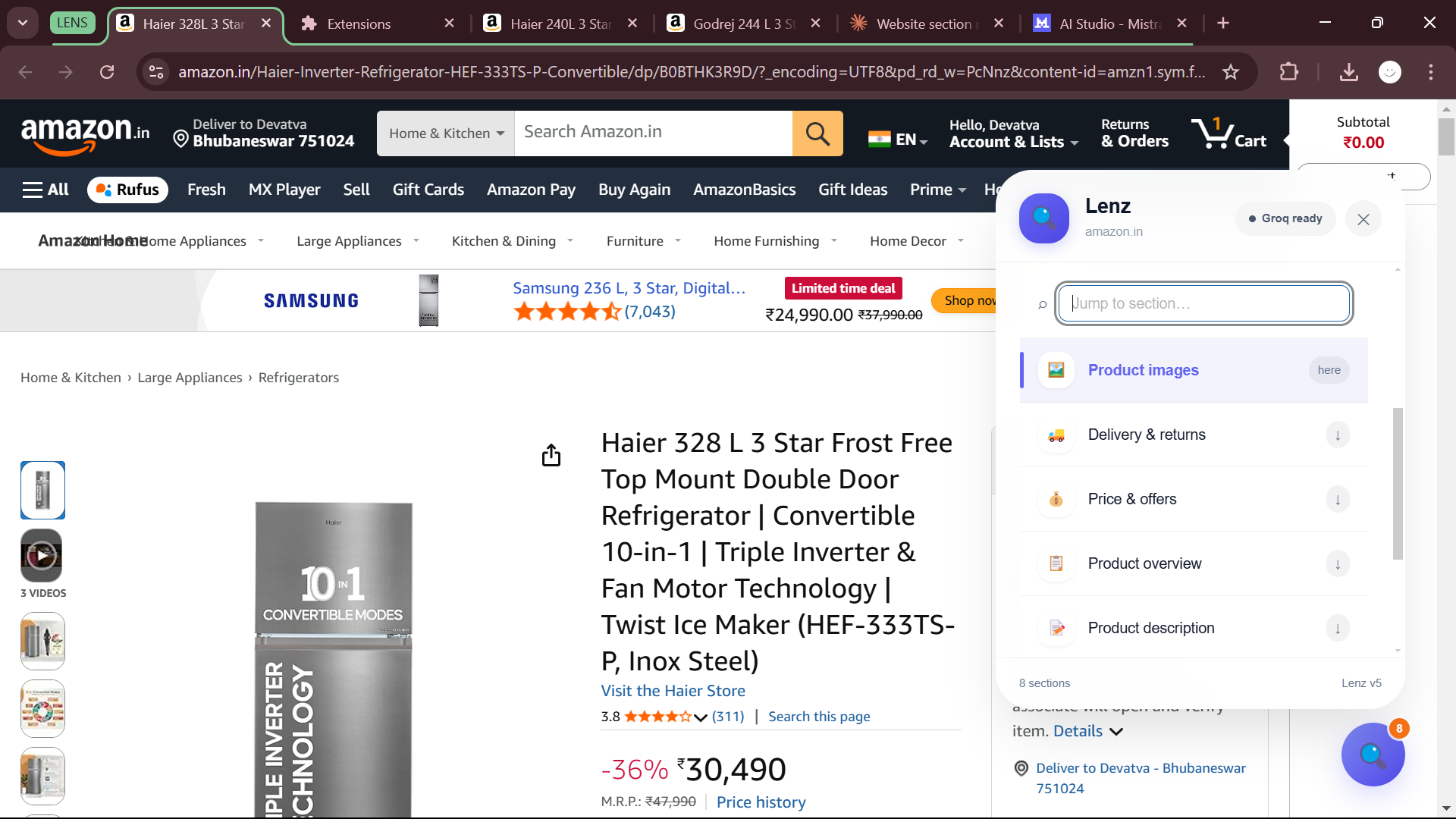
⭐ AI Review Analysis
Get a structured AI summary of product reviews in seconds. Lenz scrapes review text directly from the page (Amazon, Myntra) or uses the rating distribution (Flipkart, Meesho) to give you:
- Verdict — Recommended / Mixed / Avoid
- Confidence Score — how much to trust the verdict, based on review count, rating spread, and consistency
- Pros & Cons — specific, actionable points extracted from real reviews
- Buy Advice — a personalised 2-sentence recommendation
- User Satisfaction — overall sentiment as a percentage
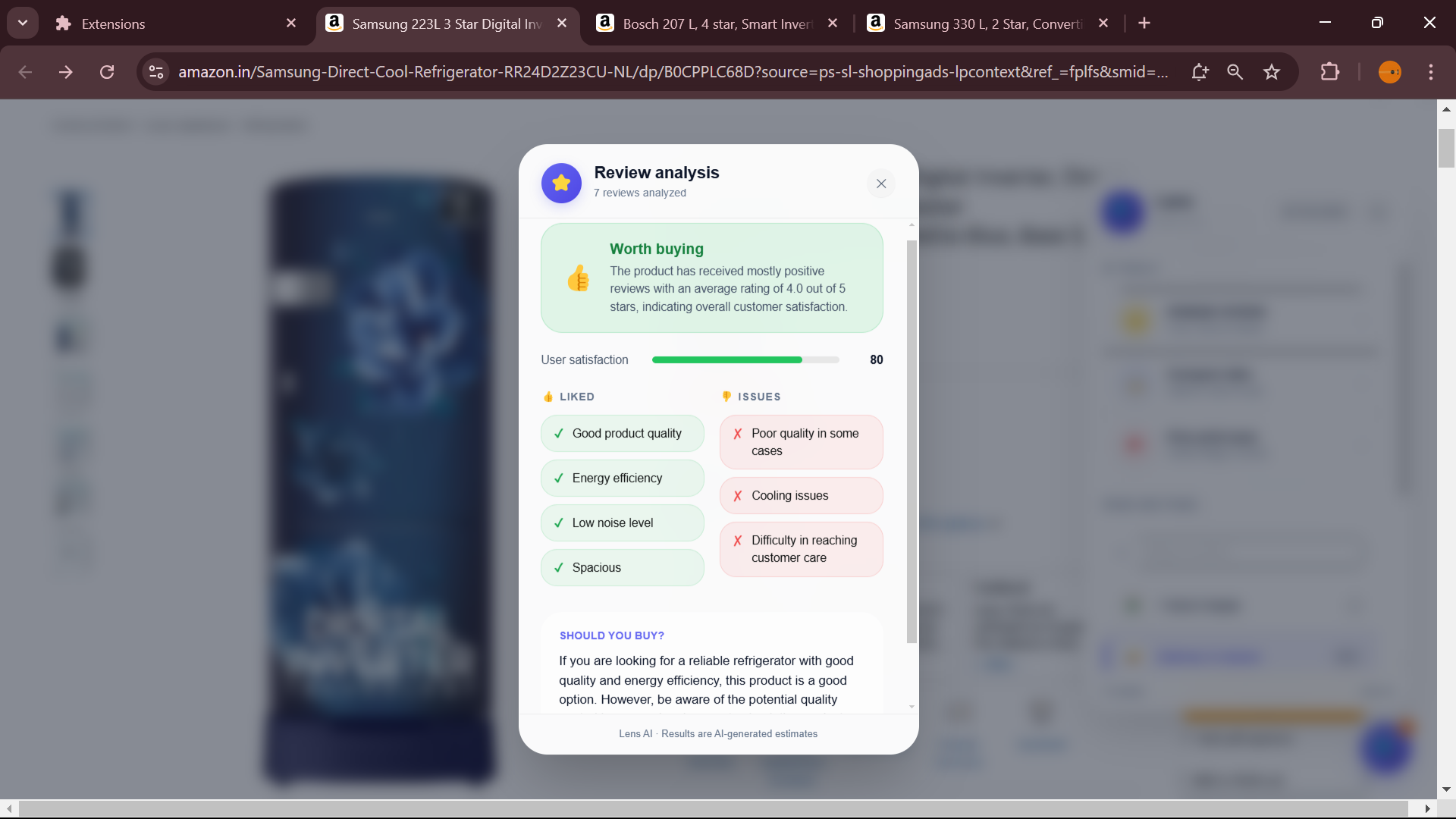
⚖️ Cross-Tab Product Comparison
Open 2–5 product pages in separate tabs, then hit Compare Products. Lenz scrapes each tab in parallel, filters for similar products using category word similarity, and presents a ranked side-by-side breakdown:
- Medal ranking (🥇🥈🥉) with winner highlighted
- Price, rating, and site for each product
- Per-product confidence score based on review reliability
- Pros, cons, and "best for" blurb per product
- Overall buy advice across all options
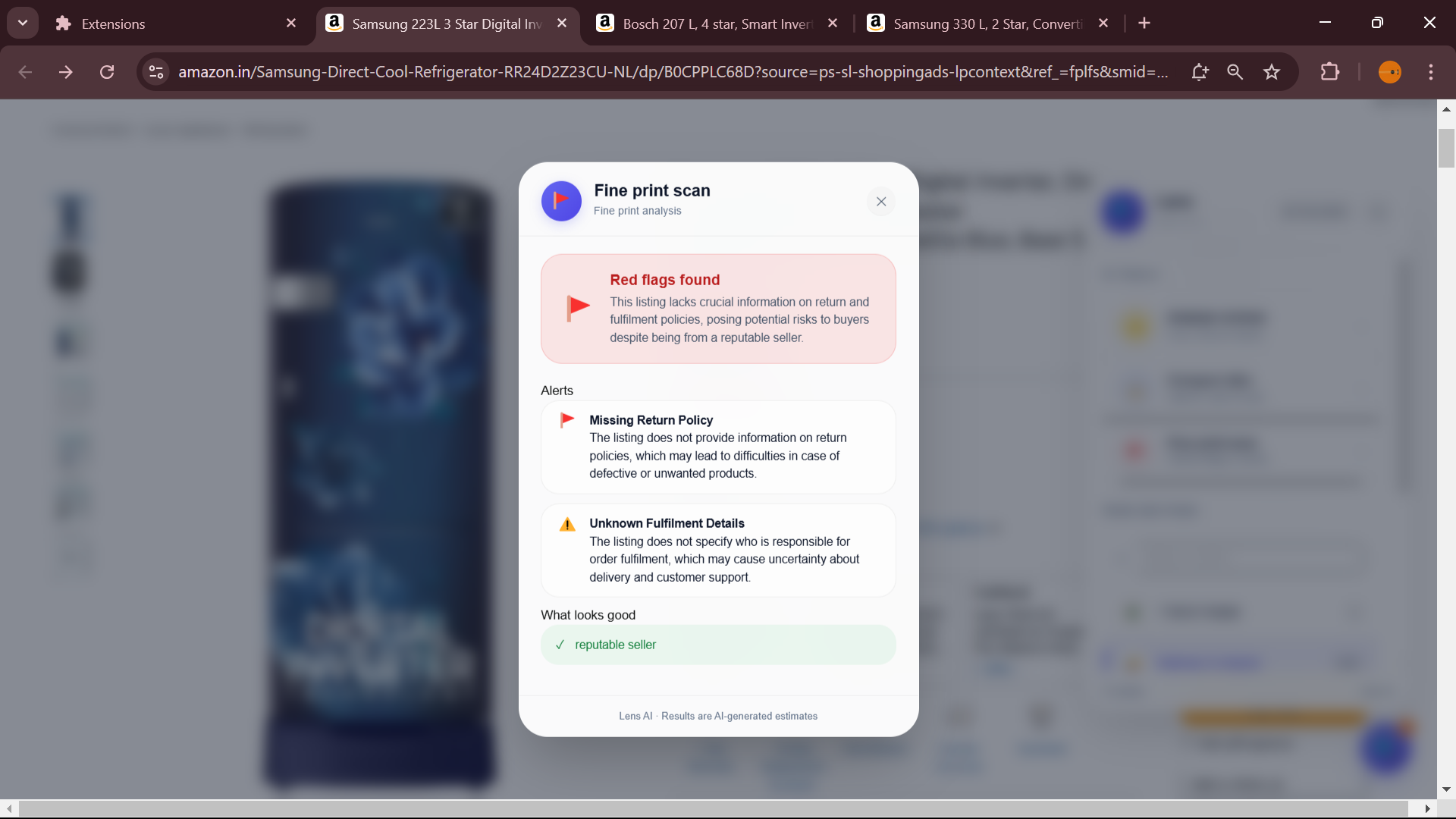
🔎 Fine Print Scanner
Worried about return policies, seller ratings, or fulfilment conditions? The Fine Print Scanner reads the seller info, returns policy, and fulfilment details and flags anything suspicious — hidden charges, short return windows, third-party sellers, or unclear warranty terms.
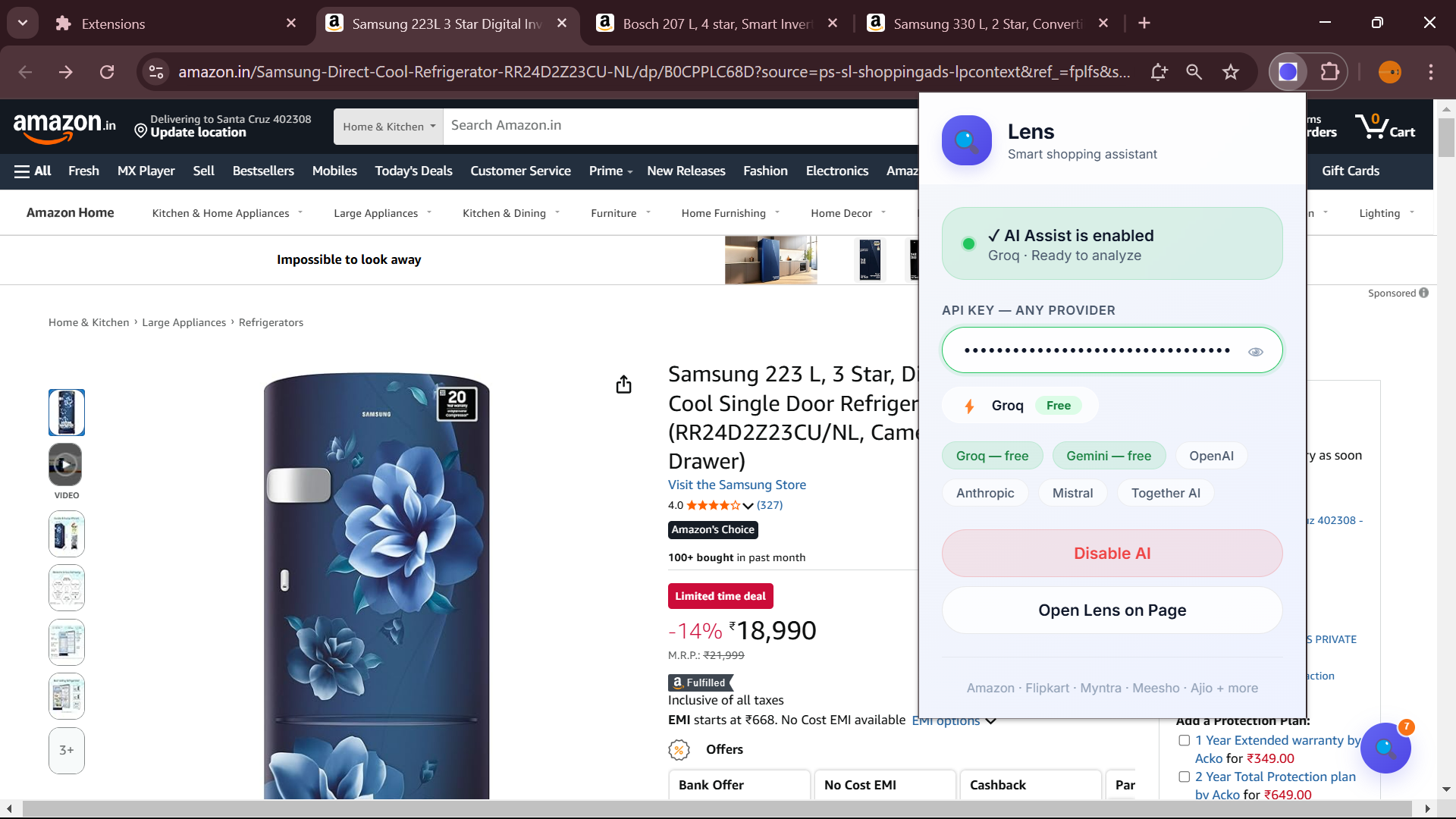
🔑 Universal API Key — 6 Providers
Paste any supported API key and Lenz auto-detects your provider. No dropdowns, no configuration.
| Provider | Key Prefix | Model | Cost |
|---|---|---|---|
| Groq | gsk_ | llama-3.3-70b-versatile | 🟢 Free |
| Google Gemini | AIza | gemini-1.5-flash | 🟢 Free |
| OpenAI | sk- / sk-proj- | gpt-4o-mini | 💛 Paid |
| Anthropic | sk-ant- | claude-haiku | 💛 Paid |
| Mistral | 32-char alphanumeric | mistral-small | 💛 Paid |
| Together AI | 64-char hex | Llama 3 70B | 💛 Paid |
🛒 Supported Sites
Lenz works on 19 Indian shopping sites out of the box:
| Site | Navigation | Review Analysis | Comparison | Fine Print |
|---|---|---|---|---|
| Amazon (.in / .com) | ✅ | ✅ Full reviews | ✅ | ✅ |
| Flipkart | ✅ | ✅ Rating data | ✅ | ✅ |
| Myntra | ✅ | ✅ Full reviews | ✅ | ✅ |
| Meesho | ✅ | ✅ Rating data | ✅ | ✅ |
| Ajio | ✅ | ✅ | ✅ | ✅ |
📦 Installation
Since Lenz is not yet on the Chrome Web Store, install it manually in Developer Mode:
1. Download the extension
Download the latest Lenz-v5.0-Extension.zip from the Releases page and unzip it.
2. Open Chrome Extensions
Go to chrome://extensions in your browser.
3. Enable Developer Mode
Toggle Developer Mode on (top-right corner).
4. Load Unpacked
Click Load unpacked and select the unzipped lens-v4 folder.
5. Add your API Key
Click the Lenz icon in your toolbar → paste your API key → click Verify & Save Key.
💡 Free keys: Get a Groq key at console.groq.com/keys or a Gemini key at aistudio.google.com/apikey — both are free with generous limits.
🚀 Usage
Page Navigation
- Open any product page on a supported site
- Click the 🔍 Lenz FAB (bottom-right corner)
- The panel slides open with AI tools and page sections
- Click any section to instantly scroll there
Review Analysis
- Open a product page
- Click the Lenz FAB → Analyze Reviews
- Wait ~5 seconds while Lenz reads the page and calls the AI
- View your verdict, confidence score, pros, cons, and buy advice
Compare Products
- Open 2 to 5 product pages in separate tabs
- On any tab, click the Lenz FAB → Compare Products
- Lenz scrapes all tabs in parallel and returns a ranked comparison
Fine Print Scan
- Open a product page
- Click the Lenz FAB → Scan Fine Print
- Lenz reads seller info, return policy, and fulfilment details
- Flagged issues appear in red; positive signals in green
🏗 Architecture
lenz/
├── manifest.json       # MV3 manifest — permissions & host matches
├── content.js          # Injected into every shopping page
│   ├── Section scanner  (per-site selectors + heading/text scanner)
│   ├── FAB + Panel UI   (floating button, navigation panel)
│   ├── AI popup UI      (review, compare, fine print results)
│   └── scrapePageData() (rating dist, reviews, product info)
├── background.js       # Service worker
│   ├── Cross-tab scraping  (executeScript on all product tabs)
│   ├── Similarity scoring  (category word matching)
│   └── compareWithAI()     (multi-product AI comparison)
├── popup.html/js       # Toolbar popup — API key management
├── overlay.css         # All injected styles (glassmorphism v5)
└── providers.js        # Provider definitions reference
How Site Detection Works
Each site uses the best available approach:
| Site | CSS Strategy | Review Source |
|---|---|---|
| Amazon | Stable IDs (#productTitle, #feature-bullets) | Inline review cards |
| Myntra | BEM classes (pdp-title, pdp-details) | Inline review section |
| Meesho | Styled-components (ShippingInfo__PriceRow) | Rating distribution |
| Flipkart | Text-content label scanner ("Key Highlights" etc.) | Rating distribution |
| Ajio | BEM classes (prod-sp, prod-detail-info) | Inline reviews |
Flipkart and Meesho both use atomic/hashed CSS that changes with every deploy. Lenz handles this by scanning for visible text labels ("Key Highlights", "Delivery details") and using stable styled-component prefixes (ComponentName__) which never change even when the hash suffix does.
🤖 AI Providers
How Auto-Detection Works
Lenz detects your provider from the key prefix — no dropdown needed:
gsk_...          → Groq (llama-3.3-70b-versatile)
AIza...          → Gemini 1.5 Flash
sk-ant-...       → Anthropic Claude Haiku
sk-... / sk-proj → OpenAI GPT-4o Mini
[32 alphanum]    → Mistral Small
[64 hex]         → Together AI Llama 3 70B
Confidence Score Logic
The AI is instructed to score confidence 0–100 based on:
- Review count — more reviews = higher confidence
- Rating distribution spread — balanced distribution = more reliable
- Verified purchase ratio — more verified = higher confidence
- Consistency — rating matches review sentiment = higher confidence
- Low confidence signals — fewer than 10 reviews, extreme skew (all 5★ or all 1★), no review text available
🛠 Tech
- Manifest V3 Chrome Extension
- Vanilla JS — zero runtime dependencies in the extension
- CSS: Glassmorphism design system with Inter font, CSS custom properties
- AI: Supports OpenAI-compatible chat completions API + Gemini's generateContent API
- DOM Strategy: Per-site CSS selectors + heading-text scanner + styled-component prefix matching
🗺 Roadmap
- Ajio — verified DOM selectors from DevTools
- Price comparison using Groq Compound Beta (web search)
- Cerebras / Sambanova as additional free providers
- Firefox support
- Chrome Web Store listing
🤝 Contributing
Pull requests are welcome! If you want to add selectors for a new site or fix existing ones:
- Fork the repo
- Open DevTools on the target site and run the selector diagnostic:
({
  title:    document.querySelector('h1,[class*="title"]')?.className,
  price:    document.querySelector('[class*="price"],[class*="selling"]')?.className,
  rating:   document.querySelector('[class*="rating"],[class*="star"]')?.className,
  reviews:  document.querySelector('[class*="review"],[class*="Review"]')?.className,
  delivery: document.querySelector('[class*="delivery"],[class*="shipping"]')?.className,
})
- Add the site to
SITE_GROUPSincontent.js - Test on 3–4 different product pages
- Open a PR with the site name and selectors used
📄 License
MIT License — see LICENSE for details.
Made with ☕ and way too many DevTools console sessions