
AgentBox
deployment-io/agentbox
Execute agentes de IA em Docker com contrato estruturado
Ver no GitHubRuntime headless para executar agentes de IA coding em Docker com contrato previsível. Abstrai complexidade de lifecycle, streaming e signal handling, permitindo invocar agentes de forma consistente em CI, plataformas gerenciadas ou terminal local.
Instalação
npx convez-ai deployment-io/agentbox1 comando no terminal: detecta o formato do repositório (marketplace ou plugin avulso) e instala via Claude Code. Requer Node 18+ e o Claude Code instalado.
Métricas
Casos de uso
- Executar agentes de código de forma headless em pipelines CI/CD
- Integrar agents de IA em plataformas serverless ou orquestração
- Automatizar tarefas de desenvolvimento (README, refatoração, testes) em repositórios
Veredito

Solução robusta e pragmática para orquestração de agentes de código em ambientes containerizados. Elimina boilerplate de integração e oferece contrato estruturado (result.json), mas requer familiaridade com Docker e setup de permissões.
README
A tradução para o português deste README ainda está na fila.
agentbox


Run AI coding agents in a Docker container with a predictable contract.
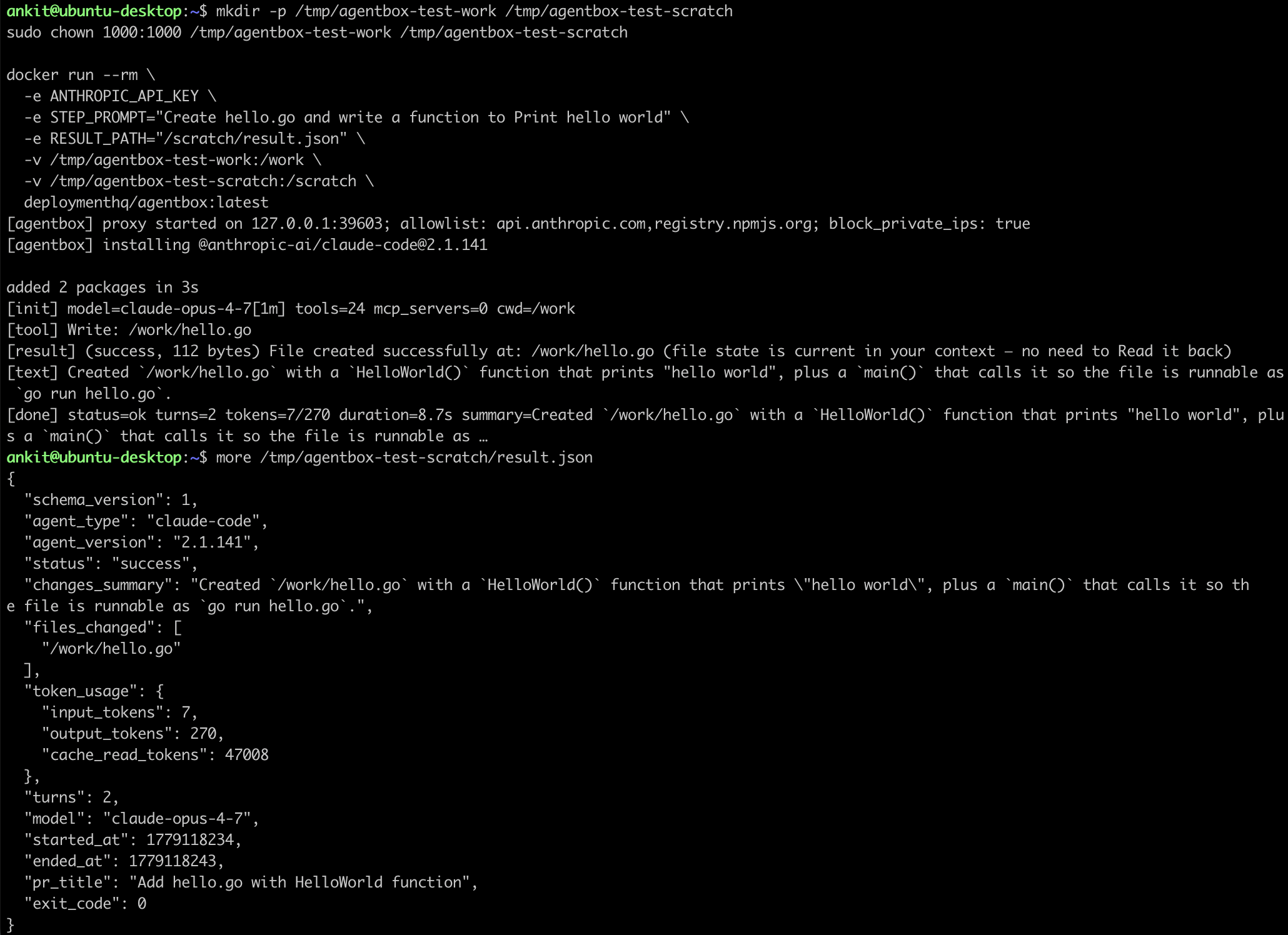
Give agentbox a prompt and credentials via environment variables; it
installs the agent, runs it against a bind-mounted working directory,
streams output to stdout, and writes a structured result to
/result.json. You don't have to think about stream-json parsing,
subprocess lifecycle, signal handling, or version pinning — agentbox
handles it so the same invocation shape works across CI, a managed
platform, or a local terminal.
Built by deployment.io but designed to stand alone — useful to anyone running agents headlessly on their own infrastructure.
Quick Start
You'll need:
- Docker
- A working directory (any git repo or folder for the agent to work on)
- An Anthropic API key (see Credentials)
# Pull the image
docker pull deploymenthq/agentbox:latest

# Create a scratch output dir (agentbox writes result.json there)
mkdir -p /tmp/agentbox-out
chmod 777 /tmp/agentbox-out

# Run the agent on a local directory
docker run --rm \
  -e ANTHROPIC_API_KEY="sk-ant-..." \
  -e STEP_PROMPT="Add a README.md if missing, summarizing the project." \
  -e RESULT_PATH="/scratch/result.json" \
  -v "$(pwd):/work" \
  -v /tmp/agentbox-out:/scratch \
  deploymenthq/agentbox:latest

# Inspect the outcome
cat /tmp/agentbox-out/result.json
On exit:
- Files the agent created or modified are in your working directory
/tmp/agentbox-out/result.jsonhas the structured outcome (status,changes_summary,files_changed,token_usage,turns, etc.)- The container's exit code indicates what happened (see Contract)
Permissions
agentbox runs as UID 1000 (the agent user) inside the container, so
any host directory you bind-mount must be writable by that UID. On
most single-user Linux desktops your account is already UID 1000 and
this just works — but if Docker auto-created the bind-mount source,
or you're on a multi-user box, the agent will hit permission denied
the first time it tries to write a file.
Fix it before running, either with chown (preferred):
sudo chown 1000:1000 /path/to/your/dir
…or with chmod (works, but less hygienic):
chmod 777 /path/to/your/dir
This applies to both the working directory you bind-mount at /work
and any scratch directory you bind-mount at /scratch for the result
file.
Contract
Full spec: docs/CONTRACT.md. Summary:
Required environment variables
| Variable | Description |
|---|---|
STEP_PROMPT | The prompt for the agent. Free-form text. |
ANTHROPIC_API_KEY | Anthropic API key. See Credentials. |
Optional environment variables
| Variable | Default | Description |
|---|---|---|
WORK_DIR | /work | Path where the repo is bind-mounted. |
RESULT_PATH | /tmp/result.json | Where to write the structured result. |
AGENT_TYPE | claude-code | Which agent to install and run. |
CLAUDE_CODE_VERSION | Pinned in image | Overridable Claude Code version. |
MODEL | Agent default | e.g., opus, haiku, or a pinned version. |
MAX_TURNS | Uncapped | Hard cap on agent turns. |
NO_ACTIVITY_TIMEOUT | 10m | Kill the subprocess if stdout is silent this long. 0 disables. |
PREVIOUS_STEPS_SUMMARY | — | Free-form context of prior steps for multi-step workflows. |
Exit codes
| Code | Meaning |
|---|---|
0 | Success |
1 | Execution failure |
2 | Auth / rate-limit / model-access failure |
3 | Cancelled (SIGTERM received) |
4 | No-activity timeout |
/result.json schema (abbreviated)
{
  "schema_version": 1,
  "agent_type": "claude-code",
  "agent_version": "2.1.117",
  "status": "success",
  "changes_summary": "Added README.md summarizing the project.",
  "files_changed": ["/work/README.md"],
  "token_usage": {
    "input_tokens": 4,
    "output_tokens": 125,
    "cache_read_tokens": 28143,
    "cache_creation_tokens": 0
  },
  "turns": 2
}
Credentials
Pass your Anthropic API key as an environment variable:
-e ANTHROPIC_API_KEY="sk-ant-..."
Get a key at platform.claude.com.
Supported Agents
v1: Claude Code and Codex (OpenAI). Select via AGENT_TYPE
(claude-code | codex).
Planned: other agent runtimes (Aider, …) register through the same
Driver interface and dispatch on AGENT_TYPE. See
docs/ARCHITECTURE.md.
How It Works
Docker container
  └── agentbox (Go binary — ENTRYPOINT, PID 1)
       └── agent subprocess (claude in v1)
            └── agent's own subprocesses (bash, git, npm, ...)
- Pre-built language runtimes (Node.js 22, Python 3) live in the image at build time.
- At startup, the Go orchestrator installs the selected agent package
(
npm install -g/pip install --user) as a non-root user. This takes ~15-30s on a cold cache. - The agent runs against the bind-mounted working directory. Its
output is teed two ways: a per-event human-readable summary line
goes to the container's stdout (for log streaming), and the raw
stream goes to an internal parser that builds the structured
result. The unfiltered raw stream is also written to
/scratch/agent.logfor deep debugging when the summarized view isn't enough. - On SIGTERM, agentbox forwards it to the agent with a 10s grace period before SIGKILL.
- On exit,
/result.jsonis written and the container exits with the appropriate code.
See docs/ARCHITECTURE.md for details.
Production Hardening
The Quick Start command is the minimum to get a run going. agentbox ships with a non-root user, a hostname allowlist proxy, and a private-IP deny list baked into the image — those apply without any extra flags. Everything below is host-side hardening that agentbox itself can't enforce; it's how we launch the container in production.
docker run --rm \
  --user 1000:1000 \
  --cap-drop=ALL \
  --read-only \
  --tmpfs /tmp:exec,size=512m,uid=1000,gid=1000,mode=755 \
  --tmpfs /home/agent:exec,size=1g,uid=1000,gid=1000,mode=755 \
  --memory=2g \
  --cpus=2 \
  --add-host metadata.google.internal:127.0.0.1 \
  --add-host metadata.goog:127.0.0.1 \
  --add-host 169.254.169.254:127.0.0.1 \
  -e AGENT_TYPE=claude-code \
  -e ANTHROPIC_API_KEY="sk-ant-..." \
  -e STEP_PROMPT="..." \
  -e MAX_TURNS=30 \
  -e ADDITIONAL_ALLOWED_HOSTS="github.com,api.github.com" \
  -v "$(pwd):/work" \
  deploymenthq/agentbox:latest
| Flag | Why |
|---|---|
--user 1000:1000 | Pin to the non-root agent user even if the orchestrator scheduling the container forgets. |
--cap-drop=ALL | Strip every Linux capability. The agent and its subprocesses don't need any of them. |
--read-only | Root filesystem becomes immutable. Anything that needs to write must go through the bind mount or a tmpfs. |
--tmpfs /tmp:exec,... | Scratch space for the agent. exec is required — npm and pip extract executables here. |
--tmpfs /home/agent:exec,... | Holds the agent's per-run install (e.g. npm install -g). Sized at 1G to fit Claude Code's footprint. |
--memory=2g --cpus=2 | Cap blast radius from a runaway agent. Tune per workload. |
--add-host ...metadata...:127.0.0.1 | Pin AWS/GCP cloud-metadata endpoints to localhost so a bypassed proxy still can't reach IMDS. |
MAX_TURNS | Hard cap on agent turns; second line of defense against an agent that won't stop. |
ADDITIONAL_ALLOWED_HOSTS | Extends the proxy allowlist for hosts your task legitimately needs (your git host, internal registries, etc.). |
Building From Source
git clone https://github.com/deployment-io/agentbox.git
cd agentbox
docker build -t agentbox:dev .
The multi-stage Dockerfile compiles the Go binary inside a
golang:1.24-bookworm stage and copies it into a
debian:bookworm-slim runtime. No local Go install required.
To pin a different Claude Code version at build time:
docker build --build-arg CLAUDE_CODE_VERSION=X.Y.Z -t agentbox:dev .
Platform Support
v1 publishes linux/amd64 images only. Multi-arch support is
planned but not yet in scope.
License
Apache 2.0 — see LICENSE.
Related
- docs/CONTRACT.md — full input/output contract
- docs/ARCHITECTURE.md — internals
- deployment.io — the platform agentbox was built to power (and one of many possible consumers)