
mlx-serve — Servidor LLM nativo para Apple Silicon
ddalcu/mlx-serve
Inferência LLM local 35% mais rápida, compatível com OpenAI e Anthropic
Ver no GitHubServidor de inferência LLM nativo em Zig para Macs com Apple Silicon, compatível com APIs OpenAI e Anthropic. Executa modelos MLX e GGUF sem Python, sem cloud, incluindo app macOS (MLX Core) com chat, modo agent e tool calling via MCP.
Instalação
npx convez-ai ddalcu/mlx-serve1 comando no terminal: detecta o formato do repositório (marketplace ou plugin avulso) e instala via Claude Code. Requer Node 18+ e o Claude Code instalado.
Métricas
Casos de uso
- Rodar LLMs locais no Mac sem dependências Python
- Integrar com Claude Code, Cursor, Continue e IDEs via API compatível
- Usar modelos GGUF e MLX com suporte a speculative decoding e quantização de KV-cache
Veredito

Solução técnica sólida e performática para quem quer LLM local no Mac sem overhead Python. Integração nativa com ecossistema de APIs padrão torna-a prática para desenvolvimento, embora limitada a Apple Silicon.
README
A tradução para o português deste README ainda está na fila.
mlx-serve — run any LLM on your Mac
OpenAI- and Anthropic-compatible local inference for Apple Silicon — MLX and GGUF — faster than LM Studio on the same file. No Python. No cloud. No Electron.







ddalcu.github.io/mlx-serve · Download MLX Core.app · Changelog
★ If mlx-serve saves you from spinning up another Electron app, star the repo — it genuinely helps people find this.
mlx-serve is a native Zig server that runs any LLM on Apple Silicon — MLX-format models and every GGUF on HuggingFace (Qwen, Llama, Mistral, Gemma, DeepSeek V4 Flash, thousands more). It exposes OpenAI-compatible and Anthropic-compatible HTTP APIs out of the box, so the same http://localhost:11234 works with Claude Code, the OpenAI SDK, Continue, Cursor, Open WebUI, and anything else that speaks one of those wires. Ships with MLX Core, a macOS menu-bar app with chat, agent mode, MCP tool calling, and model management.
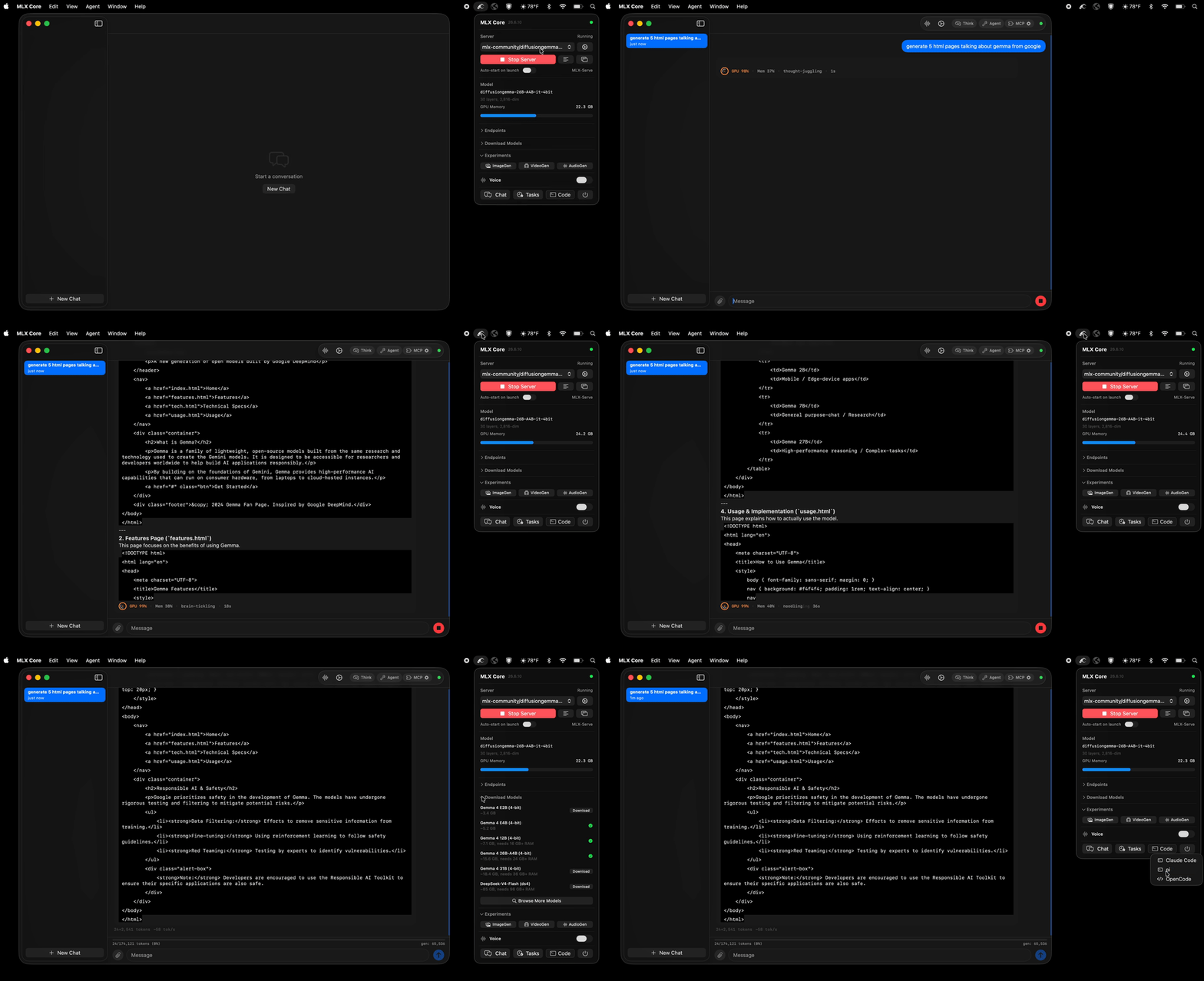
Download MLX Core.app — latest release for macOS (Apple Silicon)
Install via Homebrew
brew tap ddalcu/mlx-serve https://github.com/ddalcu/mlx-serve
brew install --cask mlx-core   # GUI menu bar app
brew install mlx-serve          # CLI server only
Why mlx-serve
If you're already on LM Studio, Ollama, or mlx-lm and wondering whether to switch — here's the short version, head-to-head:
| mlx-serve | LM Studio | Ollama | mlx-lm | |
|---|---|---|---|---|
| MLX models (native Apple) | ✅ | ✅ | ❌ | ✅ |
| GGUF models (llama.cpp) | ✅ embedded | ✅ | ✅ | ❌ |
| OpenAI-compatible API | ✅ | ✅ | partial | ❌ |
| Anthropic Messages API | ✅ | ❌ | ❌ | ❌ |
| OpenAI Responses API + WebSockets | ✅ | ❌ | ❌ | ❌ |
| DeepSeek V4 Flash (284B) | ✅ via ds4 | ❌ | ❌ | ❌ |
| Speculative decoding (PLD + drafter) | ✅ | ❌ | partial | drafter only |
| Decode speed (geomean vs LM Studio, identical weights) | +35% (MLX) | baseline | ~−15% (GGUF, est.¹) | +11% (MLX) |
| KV-cache quantization (4/8-bit + TurboQuant) | ✅ | ❌ | partial | ✅ |
| Continuous batching | ✅ | ❌ | ✅ | ❌ |
| Built-in agent loop + MCP client | ✅ 10 tools | ❌ | ❌ | ❌ |
| One-click launchers (Claude Code, OpenCode, Pi) | ✅ | ❌ | ❌ | ❌ |
| Python required at runtime | ❌ | ❌ | ❌ | ✅ |
| Native menu-bar app (no Electron) | ✅ | ❌ Electron | ❌ | ❌ |
| License | MIT | proprietary | MIT | MIT |
¹ Ollama can't run MLX, so the comparison is GGUF-vs-GGUF.
Benchmarks (Apple M4, 16 GB · identical weights · ctx=4096 · temp=0)
Same .gguf file, both engines: mlx-serve's embedded llama.cpp beats LM Studio's wrapper on gemma-4-E4B-it-Q4_K_M.gguf:
| Workload | LM Studio (GGUF) | mlx-serve (GGUF) | Δ |
|---|---|---|---|
| Free-form decode | 24.6 tok/s | 28.2 tok/s | +15% |
| Echo | 22.3 | 25.1 | +13% |
| Code completion | 23.0 | 25.7 | +12% |
| Prefill | 349 | 367 | +5% |
Same 4-bit MLX weights, plus mlx-serve's optional speculative-decode wins:
| Model | Workload | LM Studio | mlx-serve | mlx-serve + PLD | mlx-serve + Drafter |
|---|---|---|---|---|---|
| Gemma 4 E2B | Echo | 125 tok/s | 164 (+31%) | 269 (+115%) | 192 (+54%) |
| Gemma 4 E4B | Code | 89.2 | 101 (+13%) | 100 | 131 (+47%) |
| Gemma 4 26B-A4B MoE | Echo | 72.6 | 91.1 (+25%) | 125 (+72%) | — |
| Qwen 3.6 35B-A3B MoE | Echo | 83.0 | 101 (+22%) | 140 (+69%) | — |
Across 18 cells (best mlx-serve vs best LM Studio, geomean): +35%. Reproduce with tests/bench.sh --family gemma --lmstudio --omlx.


Features
- Run any LLM — every supported MLX architecture and the entire GGUF universe via embedded llama.cpp. DeepSeek V4 Flash runs through the dedicated antirez/ds4 engine.
- OpenAI-compatible API —
/v1/chat/completions,/v1/completions,/v1/embeddings,/v1/models, streaming SSE, tools, JSON-schema constrained decoding, logprobs. - OpenAI Responses API —
/v1/responseswithprevious_response_idchains, per-eventsequence_number, the/v1/responses/compactopaque history blob, and a WebSocket transport on the same endpoint. - Anthropic Messages API —
/v1/messagesworks with Claude Code (ANTHROPIC_BASE_URL=http://localhost:11234) and the Anthropic SDK. - Speculative decoding — PLD (model-agnostic n-gram lookup, on by default) + the Gemma 4 cross-attention drafter. Adaptive prompt-time and runtime gates keep novel-content workloads at parity; agentic code loops see up to 1.6×.
- KV-cache quantization — 4-bit / 8-bit / TurboQuant variants shrink KV memory ~4× / ~2× / further still, so 16K contexts fit on hardware that couldn't hold them dense.
- Continuous batching —
--max-concurrent Nbatches decode requests through one forward pass for ~1.6× throughput at 4-way parallel. - Prefix cache — shared system-prompt KV reuse across turns and across conversations. v26.5.7 adds an LRU of llama.cpp KV sessions so multi-doc agent loops stay warm.
- Tokenize cache — chat-template render + tokenize cached per request; the second hit on a long conversation is a memcpy. Warm TTFT 7.7× faster on 1.8K-token prompts.
- Vision — Gemma 4 SigLIP encoder; send images via
image_urlcontent blocks. - Reasoning / thinking — full streaming of thinking tokens as
reasoning_content. - No Python — single Zig binary, no
pip, no venv. The MLX Core app ships everything signed and notarized.
MLX Core (macOS App)
Menu-bar app that wraps the server with a full UI:
- Model browser — download from HuggingFace with resumable transfers, auto-discovers LM Studio's existing model folder (
~/.lmstudio/settings.json) so you don't re-download what's on disk, GGUF rows show a min–max RAM-estimate range. - Chat interface — multi-session chat with markdown rendering. Drop in PDFs (PDFKit-extracted) or images alongside text.
- Agent mode — 10 built-in tools (shell, cwd, readFile, writeFile, editFile, searchFiles, listFiles, browse, webSearch, saveMemory) with automatic tool calling loop and a per-tool approval dialog (Allow / Deny / Always allow this session).
- MCP client — curated marketplace of stdio + HTTP MCP servers (GitHub, Azure DevOps, DBHub, Docker, Kubernetes, Playwright, Slack, Notion, Filesystem, Shell) plus your own from
~/.mlx-serve/mcp.json. - Editable system prompt + persistent memory —
~/.mlx-serve/system-prompt.mdand~/.mlx-serve/memory.md. - Prompt-based skills — drop
.mdfiles into~/.mlx-serve/skills/with YAML frontmatter to teach the agent custom capabilities triggered by keywords. - Engine-aware Settings window (Cmd+,) — every server-launch flag and per-request default, with sections that show only the knobs relevant to the engine you've loaded (MLX vs GGUF vs ds4).
- Server management — start/stop, live log buffer, restart-on-flag-change banner.
- Image / Video Generation (optional) — FLUX.2 and LTX-Video 2.3 through a Python subprocess (the Zig server itself stays Python-free; see below).
Image / Video Generation (optional)
The tray has ImageGen and VideoGen buttons that run FLUX.2 and LTX-Video 2.3 through a Python subprocess. Both run natively on MLX — no MPS/diffusers path. This is completely optional — the Zig server itself remains Python-free.
Prerequisite: Python 3 and ffmpeg must be installed on your Mac.
brew install python ffmpeg
Then launch MLX Core, click the ImageGen (or VideoGen) tray icon, and hit Install in the window. The app will:
- Create a dedicated venv at
~/.mlx-serve/venv(does not touch your system Python) - Install mflux (FLUX), ltx-pipelines-mlx (LTX-2.3), and shared utilities. ~3 GB pip install.
- Download the model weights on first generation (HuggingFace cache, resumable)
Models:
| Feature | Default | Other options | Approx. RAM |
|---|---|---|---|
| Image | FLUX.2-klein 4B 4-bit (mflux, ~5 GB pre-quantized) | FLUX.1-schnell / dev 4-bit and 8-bit | 8 / 12 / 16 GB |
| Video | LTX-Video 2.3 Q4 | — | 24 GB RAM, ~50 GB first-run download (LTX 41 GB + Gemma 8 GB) |
The 41 GB LTX snapshot ships both transformer variants (1-stage distilled + 2-stage dev, ~11 GB each) plus a 7.6 GB distillation LoRA, so you can switch between Fast/Good/Quality/Super offline without re-downloading.
The image path uses mflux for native MLX inference with built-in 4/8-bit quantization. The video path uses ltx-2-mlx with audio generation (muxed via system ffmpeg).
Outputs go to ~/.mlx-serve/generations/images/YYYY-MM-DD/ and .../videos/YYYY-MM-DD/.
The app won't let you start a generation if there isn't enough free RAM. If the mlx-serve server is running and competing for memory, you'll be prompted to stop it first.
Supported Models
| Architecture | model_type | Examples | Chat Format | Vision |
|---|---|---|---|---|
| Gemma 4 | gemma4 | gemma-4-e2b-it-4bit, gemma-4-e4b-it-8bit, gemma-4-26b-a4b-it-4bit | Gemma turns | SigLIP |
| Gemma 3 | gemma3 | gemma-3-12b-it-qat-4bit | Gemma turns | -- |
| Qwen 3 / 3.5 / 3.6 | qwen3, qwen3_5, qwen3_5_moe, qwen3_next | Qwen3-4B, Qwen3.5-4B, Qwen3.6-35B-A3B | ChatML | -- |
| Nemotron-H | nemotron_h | Nemotron-3-Nano-4B | ChatML | -- |
| LFM2 | lfm2 | LFM2.5-350M | ChatML | -- |
| Llama | llama | Llama 3, Llama 3.1, Llama 3.2 | Llama-3 | -- |
| Mistral | mistral | Mistral 7B | ChatML | -- |
| DeepSeek V4 Flash | deepseek_v4 (GGUF) | DeepSeek-V4-Flash | DSV4 | -- |
| Anything else as GGUF | via embedded llama.cpp | any .gguf on HuggingFace | per-template | -- |
Any quantized MLX model using one of the above architectures works natively. Anything else can be served as GGUF through the embedded llama.cpp engine — just pick the .gguf file in the Model Browser and the server auto-routes by format. Models with unsupported architectures are flagged in the Model Browser but can still be downloaded.
Prerequisites
- macOS 26+ with Apple Silicon (M1/M2/M3/M4) — the released app bundles MLX dylibs built for macOS 26; older macOS needs a from-source build against a local mlx
- Zig 0.16+ (only if building from source)
- mlx-c and libwebp (only if building from source):
brew install mlx-c webp
Quick Start
Download a model
The MLX Core app can download models directly, or use the CLI:
pip install huggingface-hub
huggingface-cli download mlx-community/gemma-4-e4b-it-4bit --local-dir ~/.mlx-serve/models/gemma-4-e4b-it-4bit
Build and run
./scripts/fetch-llama.sh (only once)
zig build -Doptimize=ReleaseFast
./zig-out/bin/mlx-serve --model ~/.mlx-serve/models/gemma-4-e4b-it-4bit --serve --port 8080
Build the app
./scripts/fetch-llama.sh (only once)
cd app && SKIP_NOTARIZE=1 bash build.sh
open "MLX Core.app"
Requires APPLE_DEVELOPER_ID and APPLE_TEAM_ID environment variables for code signing.
Usage
Interactive mode
./zig-out/bin/mlx-serve --model /path/to/model --prompt "What is 2+2?"
HTTP server
./zig-out/bin/mlx-serve --model /path/to/model --serve --port 8080
Run any GGUF
./zig-out/bin/mlx-serve --model ~/models/Qwen3.5-4B-Q4_K_M.gguf --serve --port 8080
# Same flags work — server auto-detects GGUF and routes to embedded llama.cpp
CLI options
| Flag | Default | Description |
|---|---|---|
--model PATH | required | Path to the model directory or a .gguf file |
--serve | off | Start the HTTP server |
--host ADDR | 127.0.0.1 | Host address to bind |
--port N | 11234 | Port for the HTTP server |
--prompt TEXT | "Hello" | Prompt for interactive mode |
--max-tokens N | 100 | Maximum tokens to generate |
--temp F | 0.0 | Sampling temperature (0 = greedy) |
--ctx-size N | auto | Context window size (auto = computed from GPU memory) |
--timeout N | 300 | Request timeout in seconds |
--reasoning-budget N | -1 | Thinking token budget (-1 = unlimited, 0 = no thinking) |
--no-vision | off | Disable vision encoder even if model supports it |
--pld / --no-pld | on | Prompt Lookup Decoding (model-agnostic spec-decode) |
--pld-draft-len N | 5 | Max draft tokens per PLD step |
--pld-key-len N | 3 | N-gram match key length for PLD |
--drafter DIR | none | Gemma 4 assistant drafter checkpoint (e.g. gemma-4-E4B-it-assistant-bf16) |
--draft-block-size N | 4 | Drafts per round for the Gemma 4 drafter |
--kv-quant {off,4,8,turbo2,turbo4} | off | KV-cache quantization scheme (MLX path) |
--llama-kv-quant {off,q8,q4} | off | KV-cache quantization for GGUF (llama.cpp path) |
--llama-cache-entries N | 1 | Multi-session LRU for llama.cpp (warm multi-doc agents) |
--tokenize-cache-entries N | 4 | Chat-template + tokenize cache size |
--max-concurrent N | 1 | Continuous-batch decode parallelism |
--prefix-cache-entries N | auto | Shared-prefix KV cache entry cap |
--prefix-cache-mem N{KB,MB,GB} | 2 GB | Shared-prefix KV cache memory cap |
--model-dir PATH | none | Discover and serve every model in a folder (LRU resident set) |
--log-level | info | Log level (error, warn, info, debug) |
API
POST /v1/chat/completions
curl http://localhost:8080/v1/chat/completions \
  -H "Content-Type: application/json" \
  -d '{
    "messages": [{"role": "user", "content": "Write a haiku about programming."}],
    "max_tokens": 256,
    "stream": true
  }'
Supports messages, max_tokens, temperature, top_p, top_k, stream, tools, repetition_penalty, presence_penalty, logprobs, plus a per-request kv_quant override. Messages can include image_url content blocks (base64 or URL) for vision-capable models.
POST /v1/messages (Anthropic)
curl http://localhost:8080/v1/messages \
  -H "Content-Type: application/json" \
  -H "anthropic-version: 2023-06-01" \
  -d '{
    "model": "mlx-serve",
    "max_tokens": 256,
    "messages": [{"role": "user", "content": "Write a haiku about programming."}]
  }'
Compatible with Claude Code (ANTHROPIC_BASE_URL=http://localhost:8080 claude) and Anthropic SDKs. Supports streaming, tool calling, and extended thinking.
POST /v1/responses (OpenAI Responses API)
curl http://localhost:8080/v1/responses \
  -H "Content-Type: application/json" \
  -d '{
    "model": "mlx-serve",
    "input": "Write a haiku about programming.",
    "stream": true
  }'
Stateful chains via previous_response_id, full streaming SSE with per-event sequence_number, schema-conformant envelope with tools / tool_choice / text / reasoning / usage echo. POST /v1/responses/compact returns an opaque base64 history blob that round-trips back as a compaction input item without any LLM call. Same endpoint also accepts an Upgrade: websocket handshake — each text frame is a response.create JSON message, and each SSE event becomes one outbound text frame.
Other endpoints
GET /health— health checkGET /v1/models— list loaded models with capabilities + engine infoPOST /v1/completions— text completionsPOST /v1/embeddings— text embeddings (BERT and encoder-only models)GET /v1/responses/{id},DELETE /v1/responses/{id}— fetch / delete stored responses
Performance
Benchmarked on Apple M4 (16 GB unified memory):
| Model | Prefill | Decode | Memory |
|---|---|---|---|
| Gemma-4 E4B (4-bit) | ~390 tok/s | ~33 tok/s | 4.3 GB |
| Qwen3.5-4B (4-bit) | ~380 tok/s | ~38 tok/s | 2.3 GB |
| LFM2.5-350M (8-bit) | ~3800 tok/s | ~210 tok/s | 0.4 GB |
| Nemotron-3-Nano-4B (8-bit) | -- | ~22 tok/s | 4.3 GB |
Matches mlx-lm (Python) generation speed while using less memory and starting 3× faster. Key optimizations: fully-lazy async pipeline with reordered eval (submit-first pattern), JIT-compiled activations (GELU, GeGLU, softcap via mlx_compile), GPU memory wiring, chat-template + tokenize caching, and a per-engine prefix cache.
# Prefill (~840 token prompt):
./zig-out/bin/mlx-serve --model ~/.mlx-serve/models/gemma-4-e4b-it-4bit \
  --prompt "$(python3 -c "print('Explain the following topics in extreme detail: ' + ', '.join([f'topic {i} about science and technology and its impact on human civilization throughout history' for i in range(1,50)]))")" \
  --max-tokens 1

# Decode (256 tokens, temp=0):
./zig-out/bin/mlx-serve --model ~/.mlx-serve/models/gemma-4-e4b-it-4bit \
  --prompt "Write a detailed essay about quantum computing" \
  --max-tokens 256
Run 3 times and take the average of runs 2-3 (run 1 includes model loading from disk).
Speculative Decoding
Two flavors, both greedy-equivalent (byte-identical at temp=0 within the first 30 tokens; mathematically exact at temp > 0 via the Leviathan probability-ratio sampler):
- PLD (Prompt Lookup Decoding) — model-agnostic n-gram match in
prompt + generated_tokens. Default-on (--pld); zero per-model setup. Wins on agentic loops, RAG, code editing, anywhere the answer echoes prompt content. - Gemma 4 assistant drafter — Google's small 4-layer cross-attention drafters (
gemma-4-{E2B,E4B,26B-A4B,31B}-it-assistant-bf16). Opt-in via--drafter <dir>. The drafter cross-attends into the target's KV cache — no separate weights duplicated.
Both share an adaptive prompt-time gate: a 3-gram repetition score on the prompt (spec_gate_threshold = 0.01) auto-disables speculation on novel content, so creative writing and one-shot Q&A run at parity with --no-pld instead of paying per-step verify overhead. A runtime acceptance gate further disables speculation mid-decode if per-draft acceptance falls below break-even (0.50 after 5 attempts). Sticky for the rest of the request. Both modes apply uniformly across all four API surfaces (chat completions, Anthropic messages, OpenAI responses, legacy completions), streaming and non-streaming, including requests with tools — agentic tool loops are speculative decoding's best workload (~2× on file-edit tool calls).
Speedup on the realistic agentic code-edit workload
Apple M-series, MLX 4-bit weights, temp=0, function in prompt + small modification requested (the canonical mlx-serve workload). nospec = same binary with --no-pld:
| Model | nospec | PLD | Drafter |
|---|---|---|---|
| Gemma 4 E4B (4-bit) | 28.0 tok/s | 45.0 tok/s · 1.61× | 44.6 tok/s · 1.59× |
| Qwen 3.5 4B (4-bit) | 28.1 tok/s | 40.5 tok/s · 1.44× | — |
| LFM2.5 350M (8-bit) | 162 tok/s | 160 tok/s · 0.99× | — |
On creative / novel-content prompts both features stay at parity (≈1.0×) thanks to the gate — no regression. The 350M LFM2.5 is roughly neutral on spec-decode — its forward is small enough that the verify pass costs about the same as AR.
Reproduce with ./tests/bench.sh --family gemma (mlx-serve only — emits per-spec none/pld/drafter rows across the prefill/decode/echo/code prompts).
vs. LM Studio (HTTP-vs-HTTP)
+35% faster overall (geomean across 18 cells, best mlx-serve vs best LMS, identical 4-bit weights, ctx=4096, temp=0).
| Model | Echo | Code | Free-form |
|---|---|---|---|
| Gemma 4 E2B | +122% | +47% | +20% |
| Gemma 4 E4B | +97% | +53% | +35% |
| Gemma 4 31B | +20% | +4% | -1% |
| Gemma 4 26B-A4B-MoE | +66% | +23% | +31% |
| Qwen 3.6 27B | +60% | +24% | +32% |
| Qwen 3.6 35B-A3B-MoE | +88% | +20% | +25% |

Reproduce: ./tests/bench.sh --family gemma --lmstudio --omlx (or qwen36). Requires lms, jq, python3, matplotlib; --omlx requires omlx on PATH.
FAQ
Is mlx-serve faster than LM Studio?
Yes — every cell, every model we've benchmarked. On identical 4-bit MLX weights mlx-serve wins by +35% geomean across 18 workloads (Gemma 4 E2B/E4B/31B/26B-A4B-MoE and Qwen 3.6 27B/35B-A3B-MoE). On the same .gguf file as LM Studio (gemma-4-E4B-it-Q4_K_M.gguf), mlx-serve's embedded llama.cpp wrapper still wins +12-15% on decode and +5% on prefill. Speculative decoding pushes the lead further on echo-heavy and code-completion workloads — up to 2.65× on Gemma 4 E4B echo.
Does mlx-serve replace LM Studio?
For most use cases, yes. mlx-serve runs the same MLX and GGUF models, exposes an OpenAI-compatible API on the same kind of port, and ships a native menu-bar app instead of an Electron one. It also adds things LM Studio doesn't have: a real Anthropic Messages API (works with Claude Code), the OpenAI Responses API + WebSockets, MCP tool calling, agent mode with 10 built-in tools, KV-cache quantization, continuous batching, and the antirez/ds4 engine for DeepSeek V4 Flash.
Does mlx-serve replace Ollama?
On Apple Silicon, yes. Ollama is cross-platform and uses llama.cpp; mlx-serve runs llama.cpp and native MLX with the Mac-specific optimizations Ollama doesn't ship (Metal kernels through mlx-c, JIT-compiled activations, shared-prefix KV cache, the Gemma 4 cross-attention drafter). If you're on a Mac and only need the model APIs, you can drop in http://localhost:11234 wherever you had http://localhost:11434 — both wires are OpenAI-compatible.
Can I run GGUF models on my Mac without Python?
Yes. mlx-serve embeds llama.cpp's inference library (libllama) inside the same signed, notarized binary. Point --model at any .gguf and the server auto-detects the format and routes to the right engine — no pip, no venv, no llama-server to install separately. DeepSeek V4 Flash GGUFs go through the dedicated antirez/ds4 engine instead, also embedded.
Does mlx-serve work with Claude Code?
Yes — natively. mlx-serve implements Anthropic's /v1/messages endpoint including streaming, tool calling, and extended thinking. Point Claude Code at it with ANTHROPIC_BASE_URL=http://localhost:11234. The MLX Core app ships a one-click "Launch Claude Code" button that wires up the env vars for you.
What about the OpenAI SDK, Continue, Cursor, Open WebUI?
All work — anything that talks the OpenAI chat-completions or Anthropic Messages wire protocol does. mlx-serve also implements the newer OpenAI Responses API (/v1/responses) for clients that want stateful chains via previous_response_id, plus a WebSocket transport on the same endpoint.
Can mlx-serve run DeepSeek V4 Flash locally?
Yes, on 96 GB+ Apple Silicon Macs. Open the MLX Core Model Browser, pick DeepSeek-V4-Flash, hit Download — the server routes the GGUF through the embedded ds4 engine (native Metal kernels, byte-validated against the reference forward). Agent mode and MCP tools work on DSV4 too.
What models are supported?
Native MLX dispatch for Gemma 3/4, Qwen 3 / 3.5 / 3.6 / 3-Next, Llama 3.x, Mistral, Nemotron-H, LFM2.5, and DeepSeek V4 Flash. Anything else as GGUF via embedded llama.cpp — Qwen, Llama, Mistral, Gemma, DeepSeek, Phi, Yi, and thousands more available on HuggingFace.
Does it support tools / function calling?
Yes, on both API surfaces. The server detects tool-call patterns across architectures (Hermes XML, Gemma 4 <|tool_call>, raw JSON, ChatML), repairs common Qwen 3.5/3.6 escape quirks, and emits OpenAI-style tool_calls deltas in the SSE stream. The MLX Core app ships 10 built-in tools (shell, file I/O, search, browse, web search, memory) and connects to MCP servers from a curated marketplace.
How does it stay this small / fast?
Zig with direct mlx-c FFI — no Python runtime, no Electron, no IPC bridge. The release binary is ~4.5 MB. Eager warmup at boot page-faults weights and pre-compiles decode kernels (first request 3.5× faster). Multi-turn agent loops reuse KV across turns and skip re-prefilling system prompts via a shared-prefix cache. Tokenize caching turns the second hit on a long conversation into a memcpy.
Is the inference exact, or quantized output drift?
For greedy decoding (temp=0), mlx-serve is byte-identical to the reference for the first ~30-80 generated tokens, with the long-tail divergence inherent to INT4 float-reduction order (documented in CLAUDE.md). For temp > 0, the Leviathan probability-ratio sampler keeps speculative decoding mathematically exact in distribution. Equivalence is pinned by tests/test_pld_equivalence.sh, test_drafter_equivalence.sh, and test_kv_quant_equivalence.sh.
Where does my data go?
Nowhere. Everything runs locally on your Mac — no analytics, no telemetry, no cloud calls. The HTTP server binds to 127.0.0.1 by default. Open source under MIT.
How do I update?
The MLX Core app self-updates by checking the GitHub releases feed. CLI: brew upgrade --cask mlx-core or brew upgrade mlx-serve.
Acknowledgements
mlx-serve stands on a lot of open-source shoulders. Huge thanks to all of these projects.
Inference + math
- MLX (Apple) — the C++/Metal tensor framework that does the actual GPU work. We link against it via
mlx-c, Apple's stable C API, so a Zig binary can drive it without a Python runtime. - mlx-lm (Apple) — the reference Python implementation we cross-check against on every release. Many architecture quirks were nailed down by reading mlx-lm side-by-side.
- llama.cpp — embedded as
libllamafor the GGUF inference path. Also vendored underlib/jinja_cpp/for the C++17 Jinja2 chat-template engine plus the bundled nlohmann/json header. - antirez/ds4 — the embedded engine that serves DeepSeek-V4-Flash via GGUF. Vendored under
lib/ds4/pinned at commit477c0e8; native Metal kernels, official-logits-validated. Salvatore did the hard part.
Model architectures + tokenizers
- Google Gemma, Qwen team, Meta Llama, Mistral AI, NVIDIA Nemotron-H, Liquid LFM2.5, DeepSeek — the model families this server runs. The Zig forward paths were written against each project's official reference implementations.
- The HuggingFace
tokenizerslibrary — the byte-level BPE reference our Zig tokenizer matches against.
Image + video
- stb_image — single-header JPEG/PNG decode for vision input.
- libwebp — WebP decode.
- Black Forest Labs FLUX.2 and LTX-Video 2.3 (dgrauet/ltx-2-mlx) — the optional MLX-native image / video generators MLX Core can drive.
MLX Core (Swift app) integrations
- Anthropic swift-sdk — the Claude API client the agent loop uses.
- Model Context Protocol (Swift SDK) — powers the MCP marketplace + tool routing.
- Apple frameworks (PDFKit, WKWebView, AVFoundation, AppKit, SwiftUI) — the menu-bar app, browser tool, video player, and PDF attachment pipeline all ride on these.
Build + ship
- Zig — the systems language the server is written in. The 0.16 migration was painless thanks to the team's documentation.
- Homebrew — distribution channel for both the server (
brew install mlx-serve) and the GUI (brew install --cask mlx-core).
If we missed you, please open a PR — happy to add anyone who landed code, fixtures, or a fix here.
License
MIT — see LICENSE.
★ Found this useful? Star the repo — it really does help others discover it.