
DCC-MCP Core
dcc-mcp/dcc-mcp-core
Gateway MCP para automação segura de ferramentas de criação digital
Ver no GitHubRuntime e tooling compartilhado para integração MCP em aplicações de criação digital (Maya, Blender, Houdini, Photoshop). Converte DCCs em endpoints MCP descobríveis com sistema de skills sem código, roteamento seguro, estado de cena ao vivo e auditoria completa.
Instalação
npx convez-ai dcc-mcp/dcc-mcp-core1 comando no terminal: detecta o formato do repositório (marketplace ou plugin avulso) e instala via Claude Code. Requer Node 18+ e o Claude Code instalado.
Métricas
Casos de uso
- Automatizar workflows em Maya, Blender, Houdini e Photoshop via agentes IA
- Criar skills reutilizáveis sem código para operações em DCCs
- Integrar ferramentas de estúdio customizadas ao ecossistema MCP com descoberta automática
- Auditar e logar operações de agentes em ambientes de produção
Veredito

Solução enterprise-grade para orquestração de agentes IA em ferramentas de criação digital. Escolha ideal para estúdios que precisam de automação robusta com auditoria, embora exija infraestrutura dedicada e familiaridade com MCP.
README
A tradução para o português deste README ainda está na fila.
dcc-mcp-core














中文 | English
Give AI agents a real control plane for Maya, Blender, Houdini, Photoshop, and custom studio tools.
dcc-mcp-core turns DCC applications into discoverable, routable MCP endpoints. Agents stop guessing from shell output and start working with live scene state, scoped tool catalogs, structured results, viewport diagnostics, audit logs, and workflows that can survive real production constraints.
It combines MCP 2025-03-26 Streamable HTTP, a zero-code Skills system built on agentskills.io 1.0, and a Rust gateway for discovery, routing, installation, linting, and operations. The Python package keeps zero runtime Python dependencies for embedded DCC hosts, while standalone dcc-mcp-cli and dcc-mcp-server binaries ship through GitHub Releases for workstation-style installs. Supports Python 3.7–3.13.
Use it when you want agents to operate production DCC sessions without flooding the context window, hand-writing Python glue for every tool, or shipping fragile one-off shell scripts. Start with the CLI in two commands, or embed the Python core directly in a DCC adapter.
What You Get
| Need | dcc-mcp-core gives you |
|---|---|
| Let agents operate real DCC sessions | MCP + REST endpoints for Maya, Blender, Houdini, Photoshop, and custom hosts |
| Keep tool context small | Gateway discovery: MCP search -> describe, then REST POST /v1/call |
| Add tools without framework glue | SKILL.md + sibling YAML/scripts, aligned with agentskills.io |
| Debug live workstation state | Admin UI, viewport diagnostics, audit logs, traces, metrics |
| Survive production constraints | Main-thread dispatch, async jobs, sidecar/server binaries, workflow and artefact primitives |
Runtime Architecture
Use the process names this way:
- DCC startup hook runs inside Maya, Houdini, 3ds Max, or another host and should only launch the service path without blocking the UI/main thread.
- Per-DCC service is one registered runtime row for one concrete DCC instance.
- Sidecar is the
dcc-mcp-sidecarchild launched bydcc-mcp-server sidecar; it bridges host RPC to MCP/REST and watches the DCC process. - Gateway daemon is the one machine-wide routing/Admin process.
- Guardian is the live service loop that probes gateway
/healthand re-ensures the daemon throughgateway-launch.lock. - Service heartbeat keeps registry rows fresh; it is not the gateway restart trigger.
The intended plugin experience is: open DCC -> startup hook launches a per-DCC service/sidecar -> that service ensures the machine-wide gateway daemon exists -> it registers and heartbeats one instance row -> the gateway routes across every live DCC instance.
Why This Matters
Generic MCP servers and CLI wrappers expose commands. dcc-mcp-core exposes a
live DCC control plane built for production sessions:
- Agents can reason from active scenes, documents, selections, viewport captures, output streams, and host-published resources instead of blind shell output.
- Progressive discovery keeps context small: search compact capability records first, inspect only the selected schema, then load or call the chosen tool.
- One gateway can route across many DCC instances, versions, scenes, and custom
studio hosts without merging every backend action into one huge
tools/list. - Main-thread dispatch, readiness probes, async jobs, cancellation, persistence, and artefact hand-off match the constraints of embedded desktop hosts.
- Skills are packages:
SKILL.md,tools.yaml, scripts, reference docs, and Rez/context bundles can travel through normal studio distribution workflows. - Audit logs, security annotations, diagnostics, telemetry, and Admin UI panels give operators enough evidence to trust what agents did.
Recommended Agent Workflow
- Discover live context only when needed: gateway clients can read
gateway://instances, while direct per-DCC clients can use adapter resources for scene, document, or viewport context. - Search compactly: use gateway MCP
searchor RESTPOST /v1/searchfor multi-DCC routing; use direct per-DCCsearch_toolsfor active tools andsearch_skillsfor unloaded skill candidates. - Inspect before loading or calling: use gateway
describe/POST /v1/describefor onetool_slug, or direct per-DCCget_skill_info(skill_name=...)for the selected skill's schemas. - Load only what the task needs with
load_skill, then activate any collapsed tool group if the chosen hit says so. - Call the typed tool and inspect structured results, job updates, resources, prompts, diagnostics, and follow-up hints.
tools/list is MCP-compatible and paginated. Treat it as a transport listing,
not as a complete search index; never assume the first page contains every
loaded or discoverable tool.
Quick Start
Install the standalone CLI
Use the release binary when you want the operator/CI control plane without a Python environment:
# Linux/macOS
curl -fsSL https://raw.githubusercontent.com/dcc-mcp/dcc-mcp-core/main/scripts/install-cli.sh | bash

# Windows PowerShell
powershell -c "irm https://raw.githubusercontent.com/dcc-mcp/dcc-mcp-core/main/scripts/install-cli.ps1 | iex"
After install:
dcc-mcp-cli health
dcc-mcp-cli list
dcc-mcp-cli search --query sphere --dcc-type maya --instance-id abc12345
dcc-mcp-cli load-skill workflow --dcc-type 3dsmax --instance-id 80321760
dcc-mcp-cli wait-ready --dcc-type maya --instance-id abc12345 --require skill_catalog,host_execution_bridge
dcc-mcp-cli lint path/to/skills
Install the Python core
pip install dcc-mcp-core
Or build from source with the repo's canonical feature set:
git clone https://github.com/dcc-mcp/dcc-mcp-core.git
cd dcc-mcp-core
vx just dev
Serve a DCC over MCP — Skills-First
create_skill_server wires up progressive discovery, skill loading, routing, and structured results:
from dcc_mcp_core import create_skill_server, McpHttpConfig

server = create_skill_server("maya", McpHttpConfig(port=8765))
handle = server.start()
print(handle.mcp_url())   # "http://127.0.0.1:8765/mcp"
Agents then search compactly before they load or call tools. On a direct
per-DCC server, use search_tools for active tools, search_skills for
unloaded skill candidates, get_skill_info for schema inspection, then
load_skill and tools/call. Through the gateway, use MCP search ->
describe -> load_skill if needed -> call, or the REST twin
POST /v1/search -> /v1/describe -> /v1/call.
The Problem & Our Solution
Why Not Just Use CLI?
CLI tools are blind to DCC state. They can't see the active scene, selected objects, or viewport context. They execute in isolation, forcing the AI to:
- Make multiple roundtrips to gather context
- Rebuild state from CLI outputs (fragile, slow)
- Lack visual feedback from the viewport
- Scale poorly with context explosion as requests grow
Why MCP (Model Context Protocol)?
MCP is AI-native, but stock MCP lacks two critical capabilities for DCC automation:
- Context Explosion — MCP has no mechanism to scope tools to specific sessions or instances, causing request bloat with multi-DCC setups.
- No Lifecycle Control — Can't discover instance state (active scene, documents, process health) or control startup/shutdown.
Our Approach: MCP + Skills System
We reuse and extend the existing MCP ecosystem, adding:
| Capability | Benefit |
|---|---|
| Gateway Election & Version Awareness | Multi-instance load balancing; automatic handoff when a newer DCC launches |
| Session Isolation | Each AI session talks to its own DCC instance; prevents context bleeding |
| Skills System (Zero-Code) | Define tools as SKILL.md + sibling YAML/scripts — no Python glue code needed |
| Progressive Discovery | Scope tools by DCC type, instance, scene, product; prevents context explosion |
| Instance Tracking | Know active documents, PIDs, display names; enable smart routing |
| Structured Results | Every tool returns (success, message, context, prompt) for AI reasoning |
| Workflow Primitive | Declarative multi-step workflows with retry / timeout / idempotency / approval gates |
| Artefact Hand-off | Content-addressed (SHA-256) file passing between tools and workflow steps |
| Job Lifecycle + SSE | tools/call opt-in async dispatch, $/dcc.jobUpdated notifications, SQLite persistence |
This isn't reinventing MCP — it's solving MCP's blind spots for desktop automation.
For production pipelines, skills can be distributed as Rez packages and composed
into context bundles before a DCC starts. A resolved launch context sets
DCC_MCP_* environment variables for project, task, asset, provenance, and
skill paths; the adapter records those values in gateway metadata so clients
discover only the active project/task/asset surface instead of every studio
tool. See Context Bundles and
Rez Skill Packages.
Why dcc-mcp-core Over Alternatives?
| Aspect | dcc-mcp-core | Generic MCP | CLI Tools | Browser Extensions |
|---|---|---|---|---|
| DCC State Awareness | Scenes, docs, instance IDs | No | No | Partial |
| Multi-Instance Support | Gateway election + session isolation | Single endpoint | No | No |
| Context Scoping | By DCC / scene / product | Global tools | No | Limited |
| Zero-Code Tools | SKILL.md + sibling files | Full Python required | Scripts only | No |
| Performance | Rust + zero-copy + IPC | Python overhead | Process overhead | Network overhead |
| Security | Sandbox + audit log | Manual | Manual | None |
| Cross-Platform | Windows / macOS / Linux | Yes | Limited | Browser only |
AI-friendly docs: AGENTS.md · docs/guide/agents-reference.md · .agents/skills/dcc-mcp-core/SKILL.md
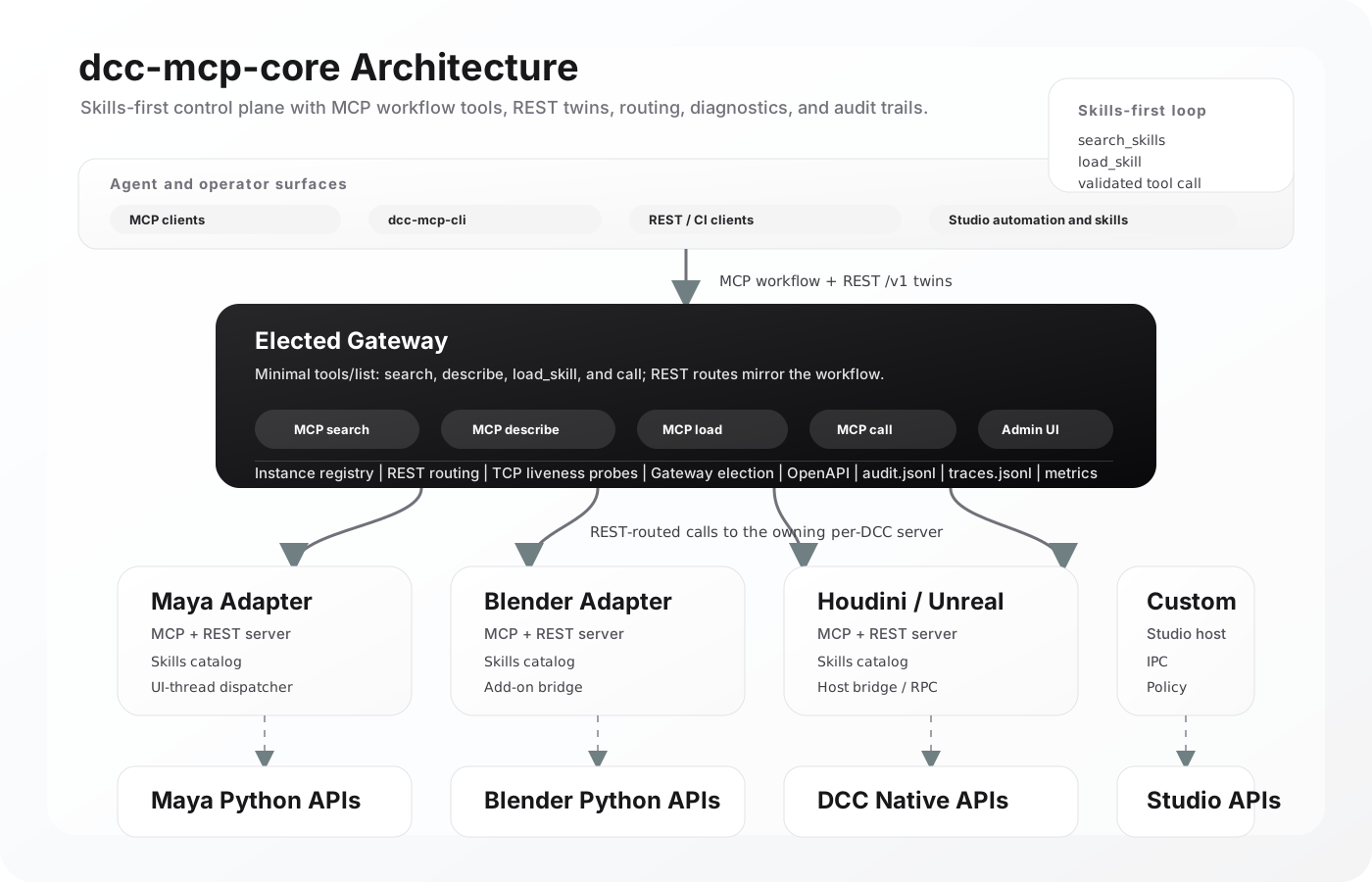
Architecture: The Current Stack
Gateway Admin UI
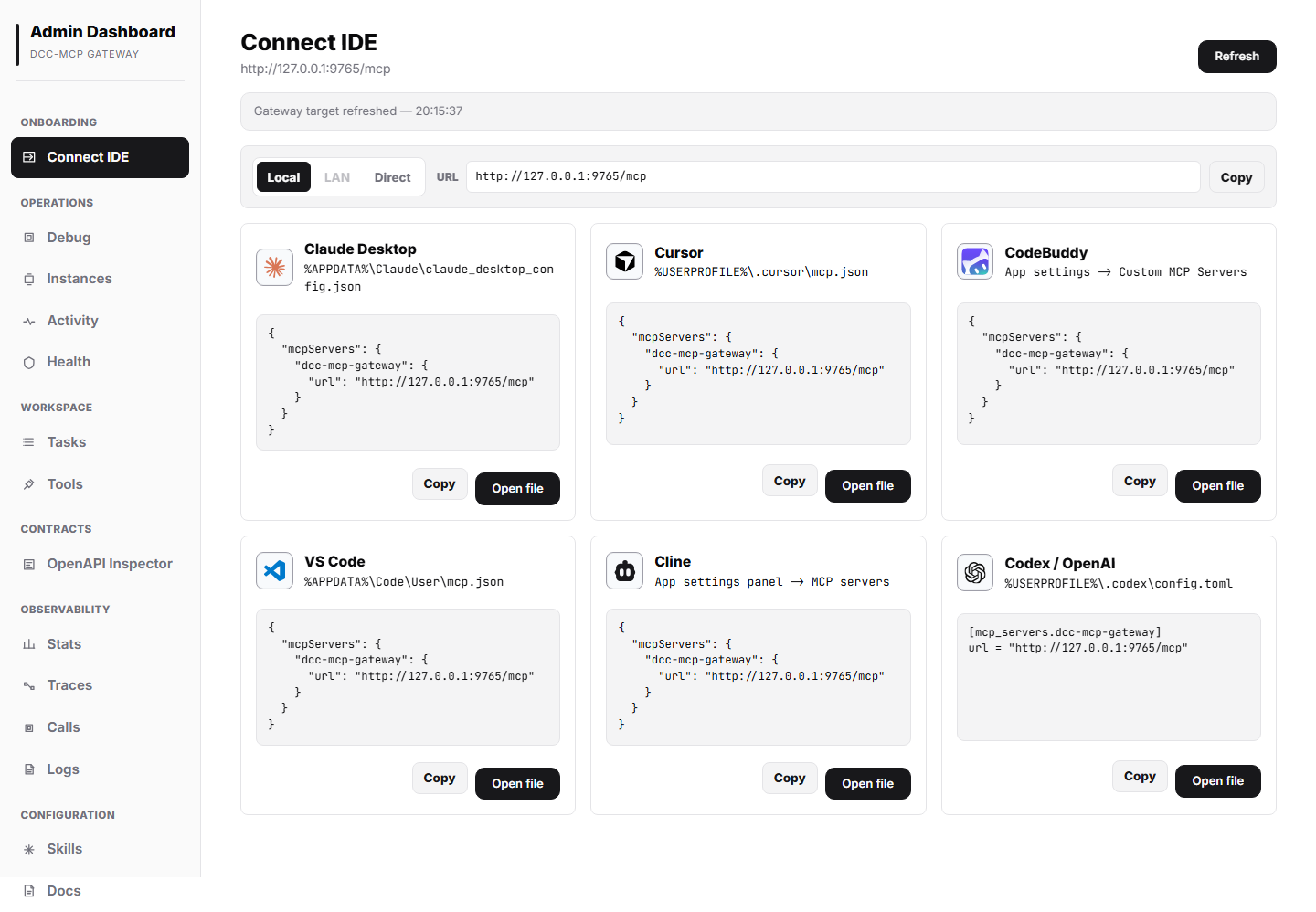
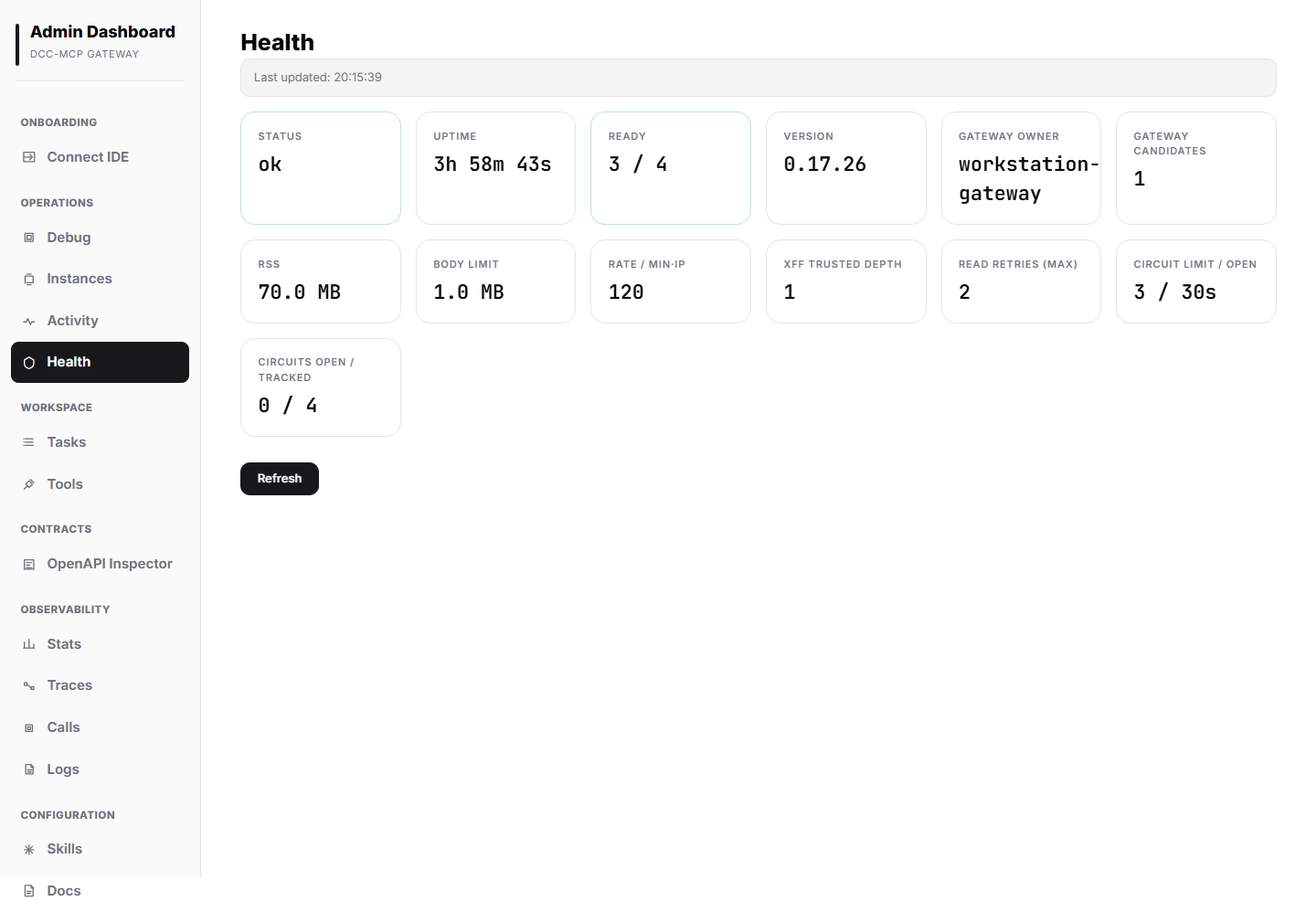
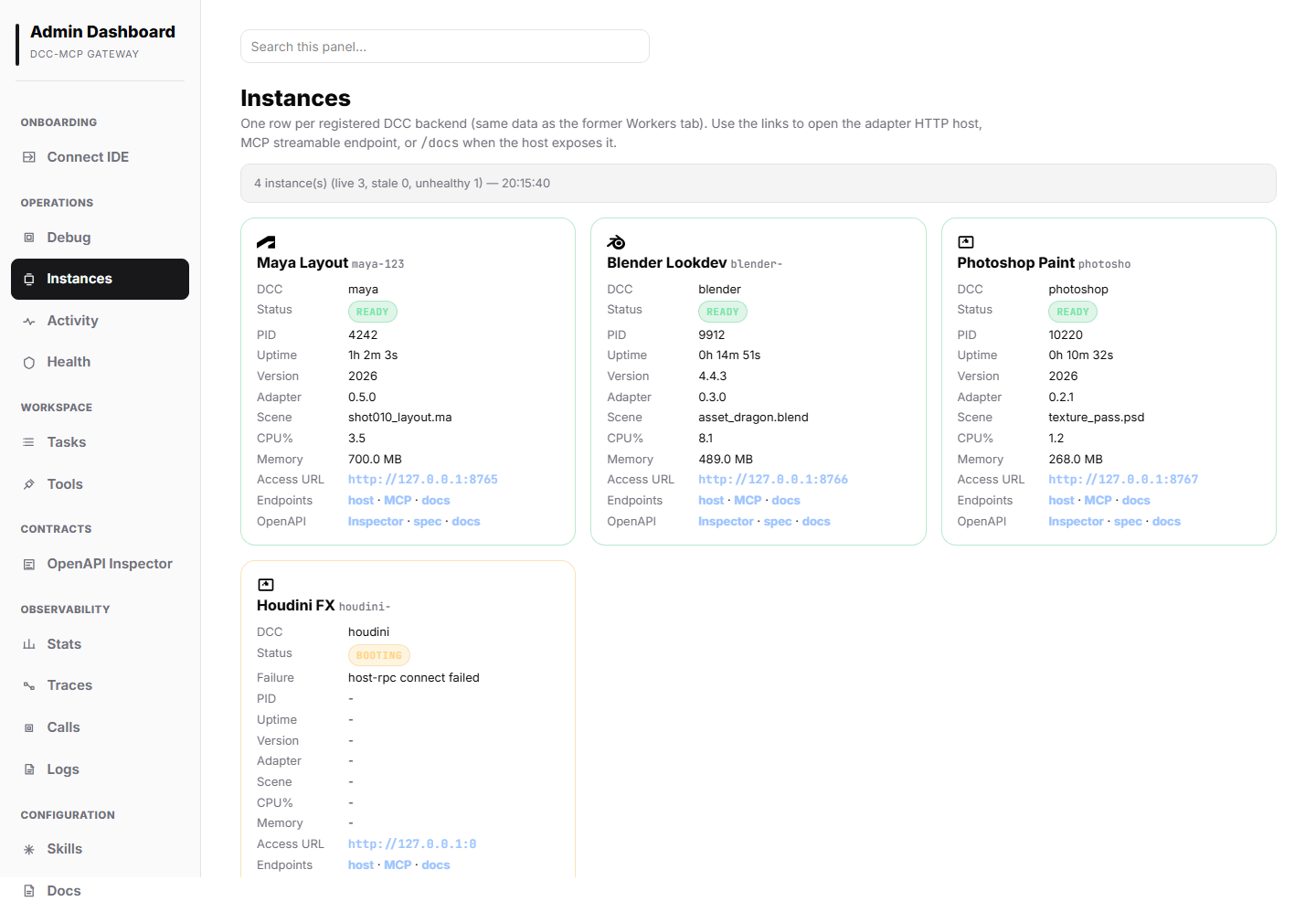
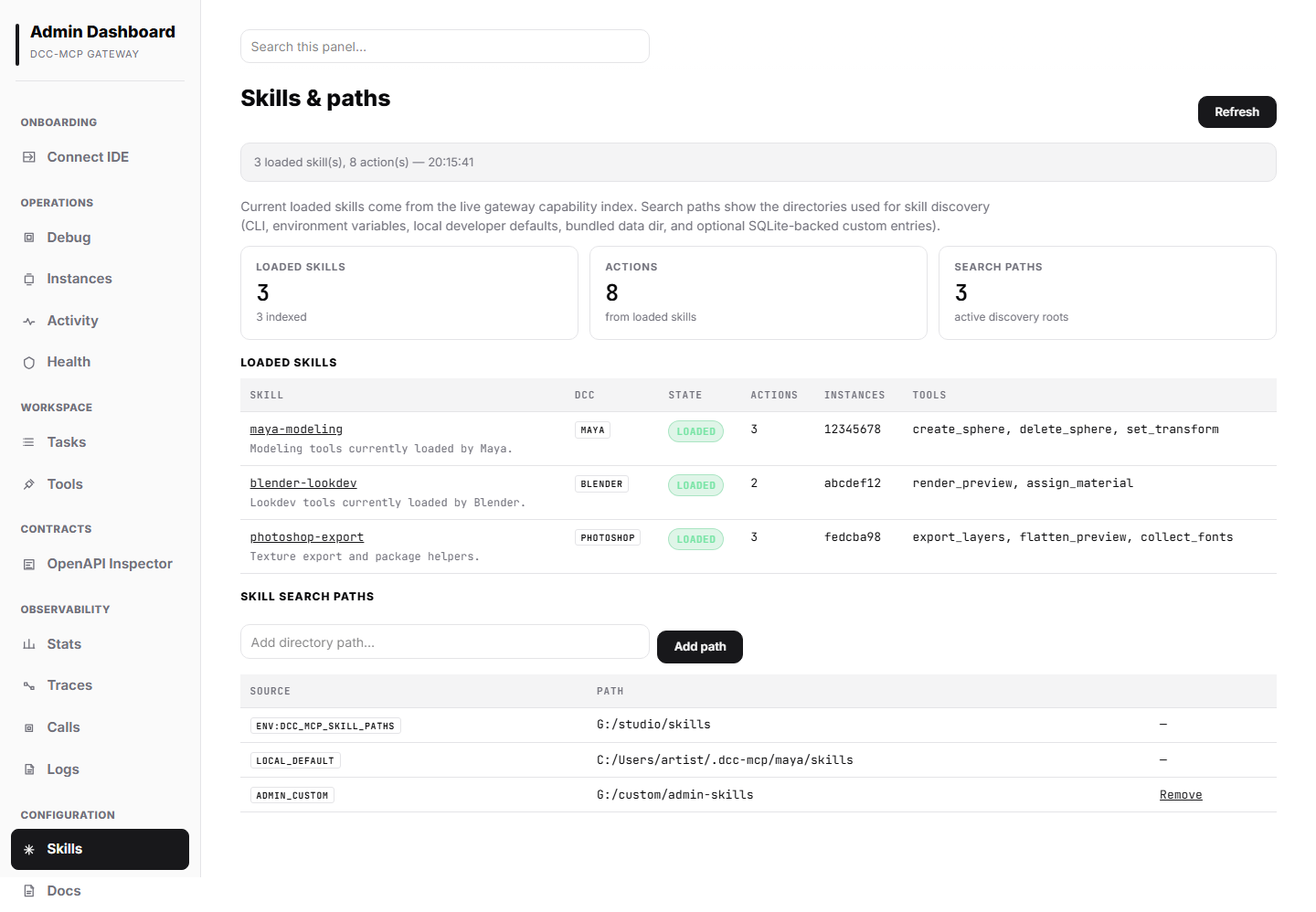
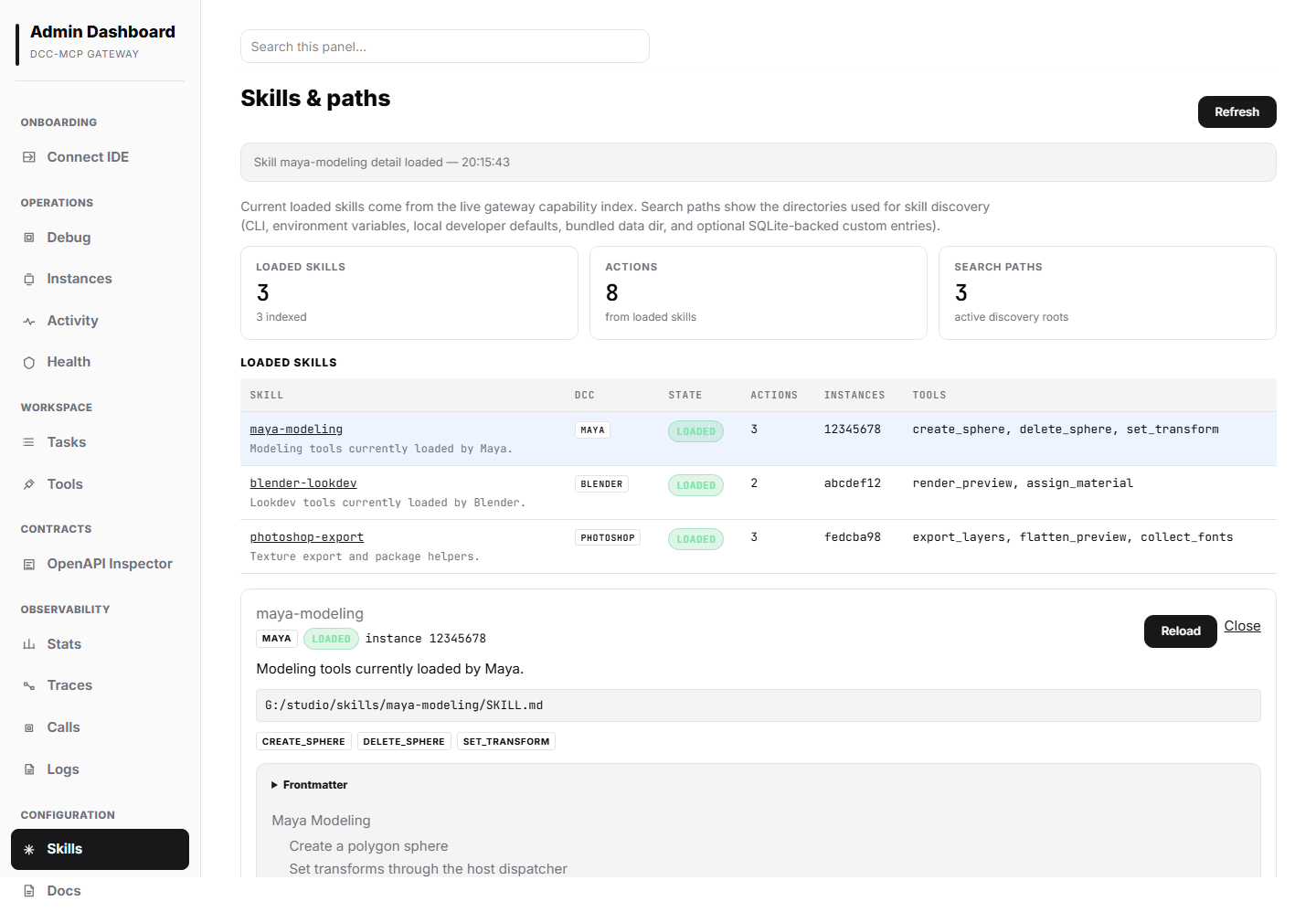
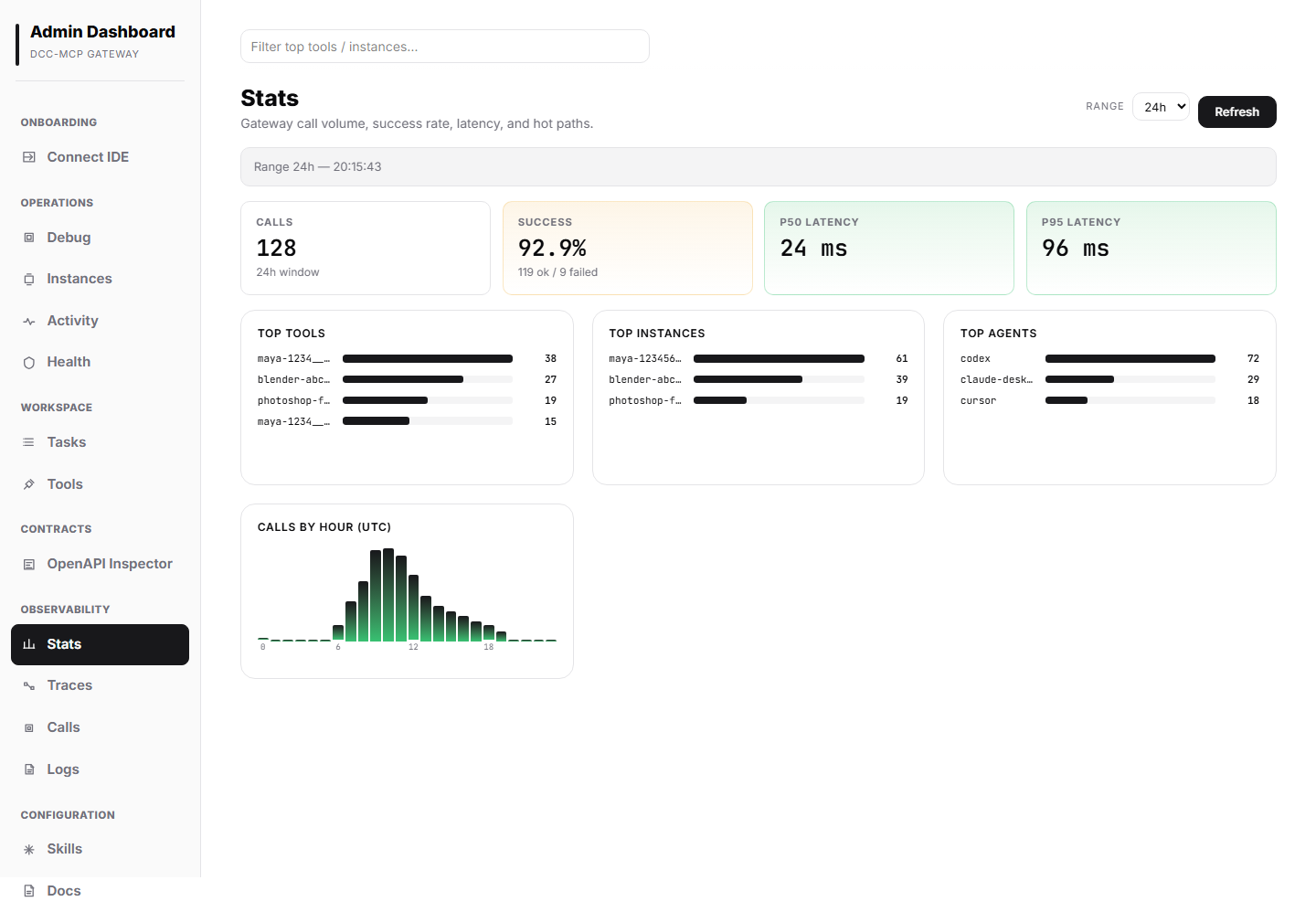
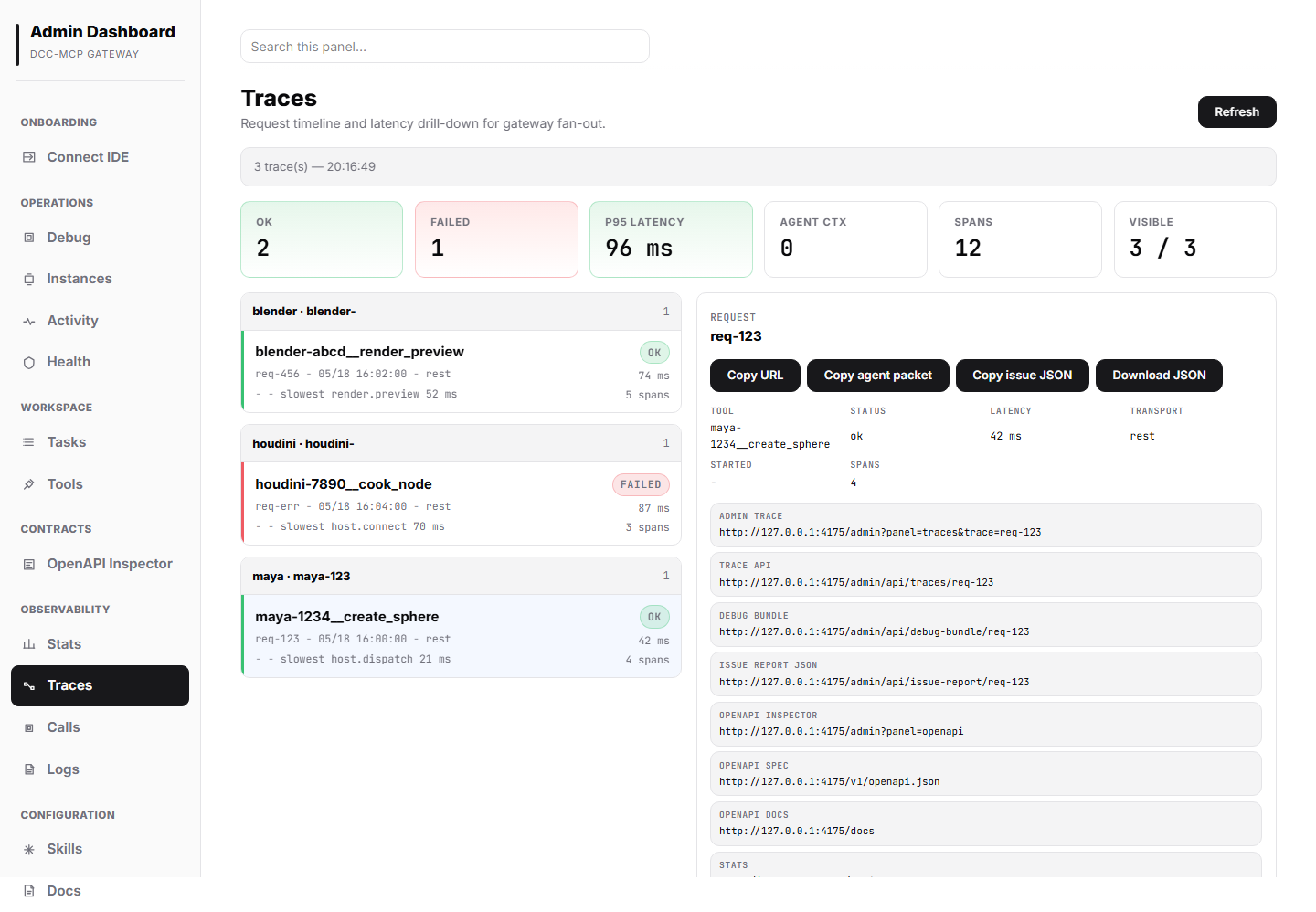
The elected gateway ships with a built-in admin console for operators who need to inspect live DCC sessions, routing health, audit calls, traces, logs, skill paths, and latency trends without leaving the browser. The examples below use representative demo data to show the range of panels available in a busy multi-DCC workstation.
Installation Details & Manual API Example
Install the standalone CLI
Use the release binary when you want the operator/CI control plane without a Python environment:
# Linux/macOS
curl -fsSL https://raw.githubusercontent.com/dcc-mcp/dcc-mcp-core/main/scripts/install-cli.sh | bash

# Windows PowerShell
powershell -c "irm https://raw.githubusercontent.com/dcc-mcp/dcc-mcp-core/main/scripts/install-cli.ps1 | iex"
By default, the installers download the latest GitHub Release asset:
| Platform | Asset |
|---|---|
| Linux x86_64 | dcc-mcp-cli-linux-x86_64 |
| Windows x86_64 | dcc-mcp-cli-windows-x86_64.exe |
| macOS universal2 | dcc-mcp-cli-macos-universal2 |
Pin a release or install somewhere custom:
export DCC_MCP_VERSION=v0.17.44
export DCC_MCP_INSTALL_DIR="$HOME/bin"
curl -fsSL https://raw.githubusercontent.com/dcc-mcp/dcc-mcp-core/main/scripts/install-cli.sh | bash
$env:DCC_MCP_VERSION = "v0.17.44"
$env:DCC_MCP_INSTALL_DIR = "$env:USERPROFILE\bin"
irm https://raw.githubusercontent.com/dcc-mcp/dcc-mcp-core/main/scripts/install-cli.ps1 | iex
After install:
dcc-mcp-cli health
dcc-mcp-cli list
dcc-mcp-cli search --query sphere --dcc-type maya --instance-id abc12345
dcc-mcp-cli load-skill workflow --dcc-type 3dsmax --instance-id 80321760
dcc-mcp-cli wait-ready --dcc-type maya --instance-id abc12345 --require skill_catalog,host_execution_bridge
dcc-mcp-cli lint path/to/skills
Install the Python core
# From PyPI (pre-built wheels for Python 3.7+)
pip install dcc-mcp-core

# Or from source (requires Rust 1.95+)
git clone https://github.com/dcc-mcp/dcc-mcp-core.git
cd dcc-mcp-core
vx just dev           # recommended — uses the project's canonical feature set
# or: pip install -e .
Every release attaches raw dcc-mcp-cli and dcc-mcp-server binaries for Linux, Windows, and macOS universal2. dcc-mcp-server also ships as the dcc-mcp-server Python wheel for hosts that prefer pip install.
Serve a DCC over MCP — Skills-First (recommended)
create_skill_server wires up the full Skills-First entry point: tools/list
returns a paginated transport list with discovery/lifecycle tools plus one stub
per unloaded skill. Agents should not scrape only page one. Use search_tools
or search_skills to find candidates, get_skill_info to inspect selected
schemas, then load_skill to activate only the tools the task needs.
from dcc_mcp_core import create_skill_server, McpHttpConfig

server = create_skill_server(
    "maya",
    McpHttpConfig(port=8765),
)
handle = server.start()
print(handle.mcp_url())   # "http://127.0.0.1:8765/mcp"
# ... later ...
handle.shutdown()
Low-level: register tools manually
import json
from dcc_mcp_core import (
    ToolRegistry, ToolDispatcher, EventBus,
    McpHttpServer, McpHttpConfig,
    success_result, scan_and_load,
)

skills, skipped = scan_and_load(dcc_name="maya")
print(f"Loaded {len(skills)} skills, skipped {len(skipped)}")

registry = ToolRegistry()
registry.register(
    name="get_scene",
    description="Return the active Maya scene path",
    category="scene",
    dcc="maya",
    version="1.0.0",
)

dispatcher = ToolDispatcher(registry)
dispatcher.register_handler(
    "get_scene",
    lambda params: success_result("OK", path="/proj/shots/sh010.ma").to_dict(),
)

# Optional: observe lifecycle events
bus = EventBus()
bus.subscribe("action.after_execute", lambda **kw: print(f"done: {kw['action_name']}"))

result = dispatcher.dispatch("get_scene", json.dumps({}))
print(result["output"])   # {"success": True, "message": "OK", "context": {"path": ...}}

# Expose registry over MCP (register ALL handlers before .start())
server = McpHttpServer(registry, McpHttpConfig(port=8765))
handle = server.start()
Core Concepts
ToolResult — Structured Results for AI
All skill execution results use ToolResult, designed to be AI-friendly with structured context and follow-up guidance.
from dcc_mcp_core import ToolResult, success_result, error_result

# Factory functions (recommended). Extra kwargs land in `context`.
ok = success_result(
    "Sphere created",
    prompt="Consider adding materials or adjusting UVs",
    object_name="sphere1",
    position=[0, 1, 0],
)
# ok.context == {"object_name": "sphere1", "position": [0, 1, 0]}

err = error_result(
    "Failed to create sphere",
    "Radius must be positive",
)

# Direct construction
result = ToolResult(
    success=True,
    message="Operation completed",
    context={"key": "value"},
)

result.success   # bool
result.message   # str
result.prompt    # Optional[str] — AI next-step suggestion
result.error     # Optional[str] — error details
result.context   # dict — arbitrary structured data
result.to_json() # JSON-safe serialization for transport
ToolRegistry & Dispatcher
import json
from dcc_mcp_core import ToolRegistry, ToolDispatcher, EventBus

registry = ToolRegistry()
registry.register(name="my_tool", description="My tool", category="tools", version="1.0.0")

dispatcher = ToolDispatcher(registry)
dispatcher.register_handler("my_tool", lambda params: {"done": True})

result = dispatcher.dispatch("my_tool", json.dumps({}))
# result == {"action": "my_tool", "output": {"done": True}, "validation_skipped": True}

bus = EventBus()
sub_id = bus.subscribe("action.before_execute", lambda **kw: print(f"before: {kw}"))
bus.publish("action.before_execute", action_name="test")
bus.unsubscribe("action.before_execute", sub_id)
Skills System — Zero-Code MCP Tool Registration
The Skills system lets you register any script (Python, MEL, MaxScript, Batch, Shell, PowerShell, JavaScript, TypeScript) as an MCP tool with zero Python glue code. Aligned with the agentskills.io 1.0 specification.
Architectural Rule — Sibling-File Pattern (v0.15+)
Every dcc-mcp-core extension — tools, groups, workflows, prompts, next-tools, etc. — lives in a sibling file pointed at by a metadata.dcc-mcp.<feature> key. The SKILL.md frontmatter itself only carries the six standard agentskills.io fields (name, description, license, compatibility, metadata, allowed-tools).
my-automation/
├── SKILL.md                      # frontmatter + human-readable body
├── tools.yaml                    # tool definitions + annotations + groups
├── workflows/
│   └── vendor_intake.workflow.yaml
├── prompts/
│   └── review_scene.prompt.yaml
└── scripts/
    ├── cleanup.py
    └── publish.sh
Five Minutes to Your First Skill
1. Create maya-cleanup/SKILL.md:
---
name: maya-cleanup
description: >-
  Domain skill — Scene optimisation and cleanup tools for Maya.
  Not for authoring new geometry — use maya-geometry for that.
license: MIT
compatibility: "Maya 2024+, Python 3.7+"
metadata:
  dcc-mcp:
    layer: domain
    dcc: maya
    tools: tools.yaml
    search-hint: "cleanup, optimise, unused nodes"
    depends: [dcc-diagnostics]
---
# Maya Scene Cleanup

Automated tools for optimising and validating Maya scenes.
2. Create maya-cleanup/tools.yaml:
tools:
  - name: cleanup
    description: "Remove unused nodes from the active scene."
    source_file: scripts/cleanup.py
    execution: sync
    affinity: main
    annotations:
      read_only_hint: false
      destructive_hint: true
      idempotent_hint: true
    next-tools:
      on-success: [maya_cleanup__validate]
      on-failure: [dcc_diagnostics__screenshot, dcc_diagnostics__audit_log]

  - name: validate
    description: "Validate scene integrity after cleanup."
    source_file: scripts/validate.mel
    execution: sync
    affinity: main
    annotations:
      read_only_hint: true
3. Create maya-cleanup/scripts/cleanup.py:
#!/usr/bin/env python
"""Clean unused nodes from the scene."""
from __future__ import annotations

import json
import sys


def main() -> int:
    result = {"success": True, "message": "Cleaned up 42 unused nodes"}
    print(json.dumps(result))
    return 0


if __name__ == "__main__":
    sys.exit(main())
4. Register and call:
import os
os.environ["DCC_MCP_SKILL_PATHS"] = "/path/to/maya-cleanup/.."

from dcc_mcp_core import create_skill_server, McpHttpConfig

server = create_skill_server("maya", McpHttpConfig(port=8765))
handle = server.start()
# Agent calls search_skills("cleanup") → load_skill("maya-cleanup") → maya_cleanup__cleanup
That's it — no Python glue code, just SKILL.md + tools.yaml + scripts.
Supported Script Types
| Extension | Type | Execution |
|---|---|---|
.py | Python | subprocess with system Python |
.mel | MEL (Maya) | Via DCC adapter |
.ms | MaxScript | Via DCC adapter |
.bat, .cmd | Batch | cmd /c |
.sh, .bash | bashell | bash |
.ps1 | PowerShell | powershell -File |
.js, .jsx | JavaScript | node |
.ts | TypeScript | node (via ts-node or tsx) |
See examples/skills/ for complete reference packages.
Bundled Skills — Zero Configuration Required
dcc-mcp-core ships core skills directly inside the wheel. They are available immediately after pip install dcc-mcp-core — no repository clone or DCC_MCP_SKILL_PATHS configuration needed.
| Skill | Tools | Purpose |
|---|---|---|
app-ui | snapshot, find, act, wait_for | Scoped application UI observation/action mock backend |
dcc-diagnostics | screenshot, audit_log, tool_metrics, process_status | Observability & debugging for any DCC |
media | probe, sequence_to_mp4, transcode, extract_frames, thumbnail | vx-managed FFmpeg media processing for render/playblast artifacts |
workflow | run_chain | Multi-step action chaining with context propagation |
from dcc_mcp_core import get_bundled_skills_dir, get_bundled_skill_paths

print(get_bundled_skills_dir())
# /path/to/site-packages/dcc_mcp_core/skills

paths = get_bundled_skill_paths()                       # default ON
paths = get_bundled_skill_paths(include_bundled=False)  # opt-out
DCC adapters (e.g. dcc-mcp-maya) include the bundled skills by default. To opt out: start_server(include_bundled=False).
The media skill uses vx ffmpeg / vx ffprobe internally so fresh machines
do not need a manual FFmpeg install. If vx is missing, non-read-only media
tools bootstrap vx with the official install script before retrying; the
read-only probe tool reports vx_not_found instead of installing anything.
Solving MCP Context Explosion
The problem: Stock MCP returns all tools in tools/list, even those irrelevant to the current task or DCC instance. With 3 DCC instances × 50 skills × 5 scripts = 750 tools, the context window fills instantly.
Progressive discovery — dcc-mcp-core shrinks this to what the agent actually needs:
- Skill stubs — direct per-DCC
tools/listreturns discovery/lifecycle meta-tools plus one stub per unloaded skill (__skill__<name>). Agents callsearch_skills(query)→load_skill(name)to activate the real tools; gatewaytools/liststays bounded to discover/describe/call wrappers and usesgateway://instances/gateway://diagnostics/*resources for management views. - Instance awareness — Each DCC registers its active documents, PID, display name, scope level.
- Smart tool scoping — Tools filter by DCC type, trust scope (Repo < User < System < Admin), product whitelist, and policy.
- Session isolation — An AI session is pinned to one DCC instance; it sees only that instance's tools.
- Gateway election — When a newer DCC version launches, traffic automatically hands off to it.
Stock MCP:
tools/list response:
  100 Maya + 100 Houdini + 100 Blender + 250 shared = 550 tool definitions
With dcc-mcp-core (Skills-First):
tools/list response (Maya session, nothing loaded yet):
  small core surface + 22 skill stubs
→ agent loads only the 3 skills it needs → ~30 tools in context
Highlights
- Rust-powered performance — Zero-copy serialisation (
rmp-serde), LZ4 shared memory, lock-free data structures. - Zero runtime Python deps — Everything compiled into the native extension.
- Skills-First MCP server —
create_skill_server()gives a ready-to-use MCP 2025-03-26 Streamable HTTP endpoint with progressive discovery. - Workflow primitive —
WorkflowSpec/WorkflowExecutor: declarative multi-step workflows with retry, timeout, idempotency keys, approval gates, foreach / parallel / branch steps, SQLite-backed recovery. - Scheduler — Cron + webhook (HMAC-SHA256) triggered workflows via sibling
schedules.yaml(opt-in feature). - Artefact hand-off — Content-addressed (SHA-256)
FileRef+ArtefactStorefor passing files between tools and workflow steps. - Job lifecycle & notifications — Opt-in async
tools/call, SSE channels (notifications/progress,$/dcc.jobUpdated,$/dcc.workflowUpdated), optional SQLite persistence surviving restarts. - Resources & Prompts primitives — Live DCC state (
scene://current,capture://current_window,audit://recent,artefact://sha256/<hex>) and reusable prompt templates from sibling YAML. - Thread affinity —
DeferredExecutorroutes main-thread-only tools to the DCC's event loop safely; Tokio workers handle the rest. - Gateway & multi-instance — Version-aware first-wins election, SSE multiplex across sessions, async dispatch + wait-for-terminal passthrough.
- Resilient IPC — DccLink framing over
ipckit(Named Pipe / Unix Socket):IpcChannelAdapter,GracefulIpcChannelAdapter,SocketServerAdapter. - Process management — Launch, monitor, auto-recover DCC processes.
- Sandbox security — Policy-based access control with audit logging;
ToolAnnotationssafety hints;ToolValidatorschema validation. - Screen capture — Full-screen or per-window (HWND
PrintWindow) viewport capture for AI visual feedback. - USD integration — Universal Scene Description read/write bridge.
- Structured telemetry — Tracing, recording, optional Prometheus
/metricsexporter. - 380+ public Python symbols via top-level re-exports;
_core.pyiis generated after a stub-gen/dev build rather than hand-edited source.
Architecture Overview — 43 Workspace Packages
dcc-mcp-core is organised as a Rust workspace of 43 packages (42 functional packages + workspace-hack). Most library crates compile into the native Python extension (_core) via PyO3 / maturin, while operator-facing crates such as dcc-mcp-cli, dcc-mcp-server, and tunnel binaries also ship as release assets. The root Cargo.toml is the source of truth for membership. Selected crates:
| Crate | Responsibility | Key Types |
|---|---|---|
dcc-mcp-naming | SEP-986 naming validators | validate_tool_name, validate_action_id, TOOL_NAME_RE |
dcc-mcp-models | Data models | ToolResult, SkillMetadata, ToolDeclaration |
dcc-mcp-actions | Tool execution lifecycle | ToolRegistry, ToolDispatcher, ToolValidator, ToolPipeline, EventBus |
dcc-mcp-app-ui | App UI observation/action contracts | UiSnapshot, UiActionRequest, UiWaitCondition, AppUiPolicy |
dcc-mcp-skills | Skills discovery & loading | SkillScanner, SkillCatalog, SkillWatcher, dependency resolver |
dcc-mcp-protocols | MCP protocol-facing models | ToolDefinition, ResourceDefinition, PromptDefinition, ToolAnnotations, BridgeKind |
dcc-mcp-jsonrpc | MCP JSON-RPC wire types | JsonRpcRequest, JsonRpcResponse, notifications |
dcc-mcp-job | Async job tracking | JobManager, persistence traits |
dcc-mcp-skill-rest | Per-DCC REST skill API | SkillRestService, SkillRestConfig, /v1/* router |
dcc-mcp-gateway-core | Pure gateway domain layer | CapabilityRecord, SearchQuery, SearchHit, ranking scorers, slug helpers |
dcc-mcp-gateway | Multi-DCC gateway app/infra | registry probing, MCP search / describe, REST /v1/* facade |
dcc-mcp-http-types | Pure HTTP wire/config/value types | HttpError, JobConfig, InstanceConfig, PromptSpec, ProducerContent, SessionLogMessage |
dcc-mcp-http-server | Reusable HTTP runtime support | core tool builders, executor, sessions, in-flight requests, notifications, workspace roots |
dcc-mcp-catalog | Public adapter catalog | catalog search / describe CLI and MCP tools |
dcc-mcp-transport | IPC communication | DccLinkFrame, IpcChannelAdapter, GracefulIpcChannelAdapter, SocketServerAdapter, FileRegistry |
dcc-mcp-process | Process management | PyDccLauncher, PyProcessMonitor, PyProcessWatcher, PyCrashRecoveryPolicy, HostDispatcher |
dcc-mcp-sandbox | Security | SandboxPolicy, SandboxContext, InputValidator, AuditLog |
dcc-mcp-shm | Shared memory | PySharedBuffer, PySharedSceneBuffer, LZ4 compression |
dcc-mcp-capture | Screen capture | Capturer, WindowFinder, HWND / DXGI / X11 / Mock backends |
dcc-mcp-telemetry | Observability | TelemetryConfig, ToolRecorder, ToolMetrics, optional Prometheus |
dcc-mcp-usd | USD integration | UsdStage, UsdPrim, scene_info_json_to_stage |
dcc-mcp-http | MCP Streamable HTTP facade | McpHttpServer, McpHttpConfig, McpServerHandle, PyO3 bindings, compatibility re-exports |
dcc-mcp-cli | Client control-plane CLI | dcc-mcp-cli list/search/load-skill/describe/call/wait-ready/stop-instance/install |
dcc-mcp-server | Binary entry point | dcc-mcp-server CLI, gateway runner |
dcc-mcp-sidecar | Sidecar runtime | SidecarArgs, sidecar MCP dispatch listener, gateway daemon guardian helpers |
dcc-mcp-workflow | Workflow engine (opt-in) | WorkflowSpec, WorkflowExecutor, WorkflowHost, StepPolicy, RetryPolicy |
dcc-mcp-scheduler | Cron + webhook scheduler (opt-in) | ScheduleSpec, TriggerSpec, SchedulerService, HMAC verification |
dcc-mcp-artefact | Content-addressed artefact store | FileRef, FilesystemArtefactStore, InMemoryArtefactStore |
dcc-mcp-logging | Rolling file logging | FileLoggingConfig, log retention helpers |
dcc-mcp-paths | Platform path helpers | cache/config/data directory helpers |
dcc-mcp-pybridge | PyO3 bridge helpers | repr/to-dict macros, JSON/YAML bridge |
dcc-mcp-host | Host execution bridge | adapter-facing execution contracts |
dcc-mcp-tunnel-* | Remote MCP relay | tunnel protocol, relay, and local agent |
Selected APIs
Transport Layer — Inter-Process Communication
from dcc_mcp_core import DccLinkFrame, IpcChannelAdapter, SocketServerAdapter

# Server: create channel and wait for client
server = IpcChannelAdapter.create("dcc-mcp-maya")
server.wait_for_client()

# Client: connect to server
client = IpcChannelAdapter.connect("dcc-mcp-maya")
client.send_frame(DccLinkFrame(msg_type="Call", seq=1, body=b'{"method":"ping"}'))
reply = client.recv_frame()      # DccLinkFrame(msg_type, seq, body)

# Multi-client socket server (for bridge-mode DCCs)
sock_server = SocketServerAdapter("/tmp/dcc-mcp.sock",
                                  max_connections=10,
                                  connection_timeout_secs=30)
Process Management — DCC Lifecycle Control
from dcc_mcp_core import (
    PyDccLauncher, PyProcessMonitor, PyProcessWatcher, PyCrashRecoveryPolicy,
)

launcher = PyDccLauncher(dcc_type="maya", version="2025")
process = launcher.launch(
    script_path="/path/to/startup.py",
    working_dir="/project",
    env_vars={"MAYA_RENDER_THREADS": "4"},
)

monitor = PyProcessMonitor()
monitor.track(process)
stats = monitor.stats(process)     # CPU, memory, uptime

watcher = PyProcessWatcher(
    recovery_policy=PyCrashRecoveryPolicy(max_restarts=3, cooldown_sec=10),
)
watcher.watch(process)
Sandbox Security — Policy-Based Access Control
from dcc_mcp_core import SandboxContext, SandboxPolicy, InputValidator

policy = SandboxPolicy()
ctx = SandboxContext(policy)
validator = InputValidator(ctx)

allowed, reason = validator.validate("delete_all_files")
if not allowed:
    print(f"Blocked by policy: {reason}")

# Audit trail
for entry in ctx.audit_log.entries():
    print(f"{entry.action} -> {entry.outcome}")
Workflow & Artefact Hand-off (v0.14+)
from dcc_mcp_core import (
    WorkflowSpec, BackoffKind,
    artefact_put_bytes, artefact_get_bytes,
)

spec = WorkflowSpec.from_yaml_str(yaml_text)
spec.validate()                    # static idempotency_key + template check
print(spec.steps[0].policy.retry.next_delay_ms(2))

ref = artefact_put_bytes(b"hello", mime="text/plain")
print(ref.uri)                     # "artefact://sha256/<hex>"
assert artefact_get_bytes(ref.uri) == b"hello"
See AGENTS.md for the full feature matrix and decision tree.
Development Setup
git clone https://github.com/dcc-mcp/dcc-mcp-core.git
cd dcc-mcp-core

# Recommended: use vx (universal dev tool manager) — https://github.com/loonghao/vx
vx just dev            # build + install dev wheel (uses canonical feature set)
vx just test           # run Python tests
vx just test-rust      # run Rust unit/integration tests
vx just lint           # full lint check (Rust + Python)
vx just preflight      # pre-commit checks (cargo check + clippy + fmt + test-rust)
vx just ci             # full local CI pipeline
Without vx
python -m venv venv
source venv/bin/activate   # Windows: venv\Scripts\activate
pip install maturin pytest pytest-cov ruff mypy

# The canonical feature list lives in the root justfile — see `just print-dev-features`.
maturin develop --features "$(just print-dev-features)"
pytest tests/ -v
ruff check python/ tests/ examples/
cargo clippy --workspace -- -D warnings
The feature list is the single source of truth in justfile (OPT_FEATURES, DEV_FEATURES, WHEEL_FEATURES, WHEEL_FEATURES_PY37). CI, local dev, and release wheels all read from the same place.
Release Process
This project uses Release Please to automate versioning and releases:
- Develop: Create a branch from
mainand commit using Conventional Commits. - Merge: Open a PR and merge to
main. - Release PR: Release Please automatically creates / updates a release PR that bumps the version and updates
CHANGELOG.md. - Publish: When the release PR merges, a GitHub Release is created with
dcc-mcp-clianddcc-mcp-serverbinaries, and separate PyPI jobs publishdcc-mcp-core,dcc-mcp-server, anddcc-mcp-core-semanticwheels through Trusted Publishing.
Commit Message Format
| Prefix | Description | Version Bump |
|---|---|---|
feat: | New feature | Minor (0.x.0) |
fix: | Bug fix | Patch (0.0.x) |
feat!: or BREAKING CHANGE: | Breaking change | Major (x.0.0) |
docs: | Documentation only | No release |
chore: | Maintenance | No release |
ci: | CI/CD changes | No release |
refactor: | Code refactoring | No release |
test: | Adding tests | No release |
build: | Build system / dependency changes | No release |
git commit -m "feat: add batch skill execution support"
git commit -m "fix: resolve middleware chain ordering issue"
git commit -m "feat!: redesign skill registry API"
git commit -m "feat(skills): add PowerShell script support"
git commit -m "docs: update API reference"
Contributing
Contributions are welcome — please open a Pull Request.
- Fork the repository and clone your fork.
- Create a feature branch:
git checkout -b feat/my-feature. - Make your changes following the coding standards below.
- Run tests and linting:
vx just lint # check code style vx just test # run tests vx just preflight # run all pre-commit checks - Commit using Conventional Commits.
- Push and open a Pull Request against
main.
Coding Standards
- Style: Rust via
cargo fmt, Python viaruff format(line length 120, double quotes). - Type hints: All public Python APIs must have type annotations; Rust uses
thiserrorfor errors andtracingfor logging. - Docstrings: Google-style docstrings for all public modules, classes, and functions.
- Testing: New features must include tests; maintain or improve coverage.
- Imports (Python):
from __future__ import annotationsfirst, then stdlib → third-party → local with section comments.
License
MIT — see the LICENSE file.
AI Agent Resources
If you're an AI coding agent, also read:
- AGENTS.md — Navigation map for AI agents (entry point, decision tables, top traps).
docs/guide/agents-reference.md— Detailed agent rules, traps, code style, and project-specific architecture constraints..agents/skills/dcc-mcp-core/SKILL.md— Complete API skill definition.python/dcc_mcp_core/__init__.py— Full public API surface (380+ symbols).python/dcc_mcp_core/_core.pyi— Ground-truth type stubs (parameter names, types, signatures).llms.txt— Concise API reference optimised for LLMs.llms-full.txt— Complete API reference optimised for LLMs.- CONTRIBUTING.md — Development workflow and coding standards.