
Claude Second Brain
dc3108-2024/claude-second-brain
Segunda cérebro pessoal: skills, memória e automação para Claude
Ver no GitHubArquitetura de referência para transformar Claude Code em infraestrutura pessoal persistente. Implementa sistema de memória, skills reutilizáveis, configuração versionada e automação com hooks que sincronizam tudo com GitHub automaticamente.
Instalação
npx convez-ai dc3108-2024/claude-second-brain1 comando no terminal: detecta o formato do repositório (marketplace ou plugin avulso) e instala via Claude Code. Requer Node 18+ e o Claude Code instalado.
Métricas
Casos de uso
- Construir biblioteca reutilizável de skills e prompts
- Automatizar sincronização de configurações e memória com GitHub
- Manter histórico versionado de instruções e padrões pessoais
- Escalar trabalho de IA além de conversas isoladas
Veredito

Projeto sólido e pragmático para quem quer fugir do paradigma reativo de chat. A automação com hooks e versionamento no Git é bem pensada, embora exija conforto com Python e configuration em CLI para máximo proveito.
README
A tradução para o português deste README ainda está na fila.
Claude Code — Personal Second Brain
A reference architecture for turning Claude Code from a chat interface into personal infrastructure. Fork it, adapt it to your context, and stop starting from scratch every session.
Architecture
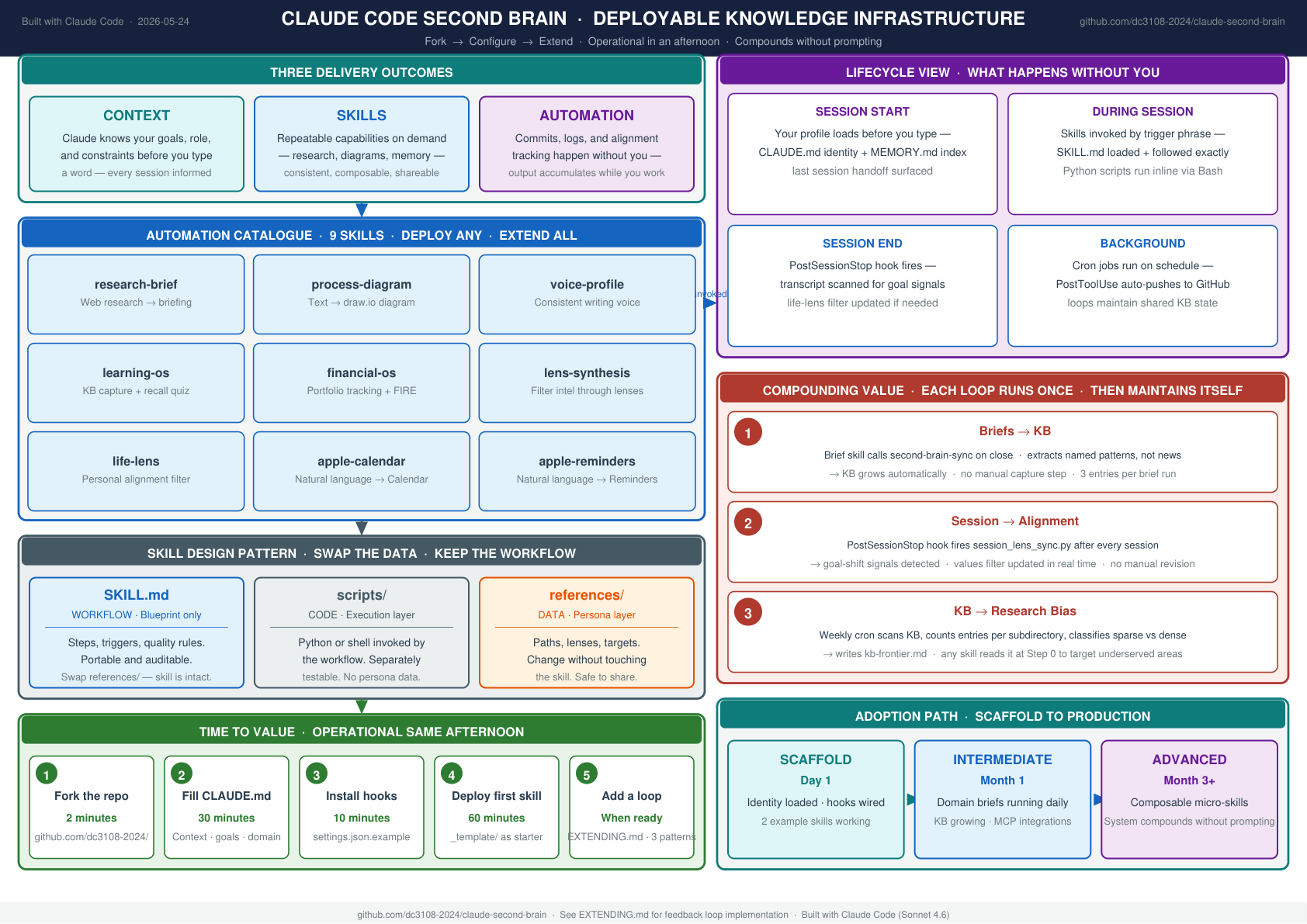
View full architecture PDF — auto-updated weekly.
The idea
Most people use AI reactively — ask a question, get an answer, move on. This setup is different. It's built on a single principle:
The AI work you do today should make your work next month easier.
That means persistent memory, reusable skills, version-controlled configuration, and automation that runs without you having to remember to trigger it.
What's in this repo
claude-second-brain/
│
├── CLAUDE.md.template          # Your global Claude instructions — who you are,
│                               # how you think, how you want Claude to behave.
│                               # Loaded into every conversation automatically.
│
├── settings.json.example       # Hook architecture: two PostToolUse hooks that
│                               # auto-commit skills and config to GitHub on every
│                               # write. One PreToolUse hook that blocks accidental
│                               # deletion of skill files.
│
├── sync-config.py              # Config backup script. Copies CLAUDE.md, memory
│                               # files, and settings to ~/.claude-backup/ on every
│                               # change. Wire it up with the hook and your config
│                               # is version-controlled automatically.
│
├── skills/
│   ├── generate-readme.py      # Scans all SKILL.md files, auto-classifies skills
│   │                           # by keyword, and regenerates README.md. Runs via
│   │                           # pre-commit hook — README is always current.
│   │
│   ├── _hooks/
│   │   └── pre-commit          # Git hook: regenerates skills README before every
│   │                           # commit. Install with: cp _hooks/pre-commit
│   │                           # .git/hooks/pre-commit && chmod +x .git/hooks/pre-commit
│   │
│   ├── _template/
│   │   └── SKILL.md            # Starter template for any new skill.
│   │
│   ├── research-brief/         # Example: web research → synthesised briefing
│   │   └── SKILL.md
│   │
│   └── process-diagram/        # Example: any process description → draw.io diagram
│       └── SKILL.md
│
└── memory/
    ├── README.md               # How the memory system works
    └── _template.md            # Starter template for any memory file
How the automation works
Skills auto-push to GitHub
Add this PostToolUse hook to your ~/.claude/settings.json:
{
  "matcher": "Write|Edit",
  "hooks": [{
    "type": "command",
    "command": "{ f=$(jq -r '.tool_input.file_path // empty'); [[ \"$f\" == */.claude/skills/* ]] && git -C ~/.claude/skills add -A && git -C ~/.claude/skills commit --quiet -m \"auto: skill update\" && git -C ~/.claude/skills push --quiet; } 2>/dev/null || true",
    "async": true
  }]
}
Every time you write or edit a skill file, it commits and pushes silently in the
background. You never manually git push your skills library.
Skills README auto-regenerates
Install the pre-commit hook in your skills repo:
cp skills/_hooks/pre-commit ~/.claude/skills/.git/hooks/pre-commit
chmod +x ~/.claude/skills/.git/hooks/pre-commit
Before every commit, generate-readme.py scans all SKILL.md files, classifies
each skill by keyword matching, and rebuilds README.md. Add a new skill, commit
it — the index updates itself.
Config auto-backs-up
# 1. Create the backup repo
mkdir ~/.claude-backup && cd ~/.claude-backup
git init && git remote add origin <your-private-github-repo>

# 2. Copy sync-config.py to your Claude config dir
cp sync-config.py ~/.claude/sync-config.py

# 3. Add the config hook from settings.json.example to ~/.claude/settings.json
From that point on, every change to CLAUDE.md, your memory files, or settings
triggers sync-config.py → commits → pushes automatically.
Skills
A skill is a focused instruction set for a repeatable task. Claude loads it on demand and follows it exactly.
Anatomy of a skill
skill-name/
├── SKILL.md          # The workflow — steps, triggers, quality rules (~150 lines max)
├── scripts/          # Executable code invoked by the workflow (optional)
└── references/       # Persona data and config: lenses, paths, scenarios (optional)
SKILL.md only describes the workflow. Code goes in scripts/, data goes in references/.
Blueprint vs Data — the most important pattern
The easiest mistake when building personal skills is letting persona-specific data creep into SKILL.md. It starts small: you hardcode your own file path, embed your domain focus, inline your financial targets. Over time every skill becomes a mix of workflow logic and personal data — and changing anything means editing the skill itself.
The fix is a clean separation: SKILL.md is the blueprint, references/ is the data.
What belongs in SKILL.md | What belongs in references/ |
|---|---|
| Steps and decision logic | File paths and folder locations |
| Output format templates | Personal lenses and analytical filters |
| Quality rules and conditions | Financial scenarios and account details |
| Orchestration (which sub-skills to call) | Domain context and professional role |
| Trigger phrases | Search topics and trusted sources |
Before — data embedded in the workflow:
## Step 2 — Synthesise

Every item must connect to one of the four lenses:
Career · Regulatory · Wealth · Thought leadership

### Career
What does this mean for my role or positioning? What specific action does it unlock?
After — workflow references the data file:
## Step 2 — Synthesise

Read `references/lenses.md` for the current lens definitions.
Apply each lens to the content. Every item must connect to at least one.
# references/lenses.md

## Career
What does this mean for my role or positioning? What specific action does it unlock?
Why it matters:
- A lens changes → edit
references/lenses.md, not the skill - A new account → edit
references/financial-config.md, not the skill - Share a skill → swap or strip
references/, the workflow is intact - Audit a skill →
SKILL.mdtells you HOW,references/tells you FOR WHOM
The lens-synthesis skill in this repo is the canonical example of this pattern.
Adding a new skill
- Create
~/.claude/skills/<skill-name>/SKILL.md - Use the YAML frontmatter format from
skills/_template/SKILL.md - The description field drives auto-classification — write it to match your trigger phrases
- Commit — the pre-commit hook regenerates the README automatically
🔄 Feedback loops
Skills are one-directional by default — you trigger them, they produce output. The next level is closing the loop so the system compounds without prompting.
The full system runs 12 reinforcing loops across 4 families — Pipeline Governance, Knowledge Flywheel, Personal Alignment, Operational Resilience — each an instance of one reusable six-stage pattern:
INSTRUMENT → STORE → ANALYSE → SURFACE → ACTUATE → RATCHET
The ratchet stage is what separates self-improving from merely self-healing: self-healing systems fix the same fault forever; a ratchet (enforcement tests, weight tables, error memory) makes each fix permanent, so effort compounds.
→ docs/FEEDBACK_LOOPS.md — the full visual map: Mermaid diagrams for every loop family, the 12-loop index (auto vs HITL), and the six-stage architecture template for building your own self-improving systems.
See EXTENDING.md for implementation details on the three knowledge loops.
Self-governing AI operations monitor
Every Claude call made by a skill is logged, classified by root cause, and surfaced in a weekly report — with a human approval gate before any fix ships.
Instrument → Analyse → Queue → HITL Review → Enforce → Reset → repeat
Four failure classes detected automatically:
| Type | What it means | Fix |
|---|---|---|
| Hard failure | Sporadic prompt/critique quality issue | Fix prompt or critique |
| JSON failure | Model returned plain text instead of JSON | Add fallback rule to prompt |
| Critique strict | Valid output rejected by over-strict critique | Recalibrate thresholds |
| Low variance | Same output every run — rule would suffice | Replace with deterministic logic |
Plus static analysis — a pre-commit gate blocks any call site where the response variable is assigned but never used downstream.
The monitor also runs as a live HTTP dashboard (monitor_server.py) with sub-typed badges per failure class. See monitor/README.md for the full architecture.
This is the answer to "how do you govern AI in production?" — not a policy document, but a running system with time-stamped evidence.
Memory
Claude's memory system persists facts, preferences, and project context across conversations. Files live in:
~/.claude/projects/-Users-<username>/memory/
The index file MEMORY.md is loaded into every session. Individual memory files
are loaded on demand when relevant. See memory/README.md for the full breakdown.
Restoring on a new machine
If your skills and config are in separate private GitHub repos (the recommended setup), restore is two commands:
gh auth login
gh repo clone <your-username>/claude-config ~/.claude-backup && bash ~/.claude-backup/restore.sh
restore.sh handles the rest: config files, memory, skills clone, and any
additional project repos you've added to the script (see below).
Everything — skills, memory, hooks, settings, project repos — is back exactly as you left it.
Adding project repos to restore.sh
If you have private repos for your KB, financial tools, or other projects that
Claude writes to, add them to restore.sh using the same pattern:
MYPROJECT="$HOME/YourProject"
if [[ -d "$MYPROJECT/.git" ]]; then
  echo "→ YourProject already present — skipping clone"
else
  echo "→ Cloning YourProject..."
  gh repo clone <your-username>/your-project "$MYPROJECT"
  echo "  ✓ YourProject cloned"
fi
Pair each clone with the corresponding auto-sync hook in settings.json.example
and the repo stays current without any manual git push.
Getting started
- Fork this repo
- Fill in
CLAUDE.md.templatewith your actual context and rename it toCLAUDE.md - Copy
CLAUDE.mdto~/.claude/CLAUDE.md - Create a private GitHub repo for your skills library, push
skills/to it - Install the hooks from
settings.json.exampleinto~/.claude/settings.json - Build your first skill using the template in
skills/_template/SKILL.md
The two example skills (research-brief, process-diagram) are working starting
points — adapt them to your domain and trigger phrases.
Going further
See EXTENDING.md for the path from scaffold to production — how
each skill grows, when to split monolithic skills into composable micro-skills, which
MCP integrations unlock the most, and what not to build.
Philosophy
Skills are cheap to build and infinitely reusable. Memory accumulates without effort. Config is version-controlled and portable. The result is a setup where each session compounds the ones before it — context grows, quality improves, and the gap between "I need X" and "X is done" keeps shrinking.
That's the difference between using AI and operating it.