
n8n MCP Workflow Setup
dbDez/n8n-mcp-workflow-setup
Configure workflows n8n via MCP sem tocar no editor
Ver no GitHubMCP server que configura e repara workflows do n8n automaticamente — vincula credenciais, seleciona modelos e corrige bugs sem necessidade de clicar no editor. Transforma ajustes manuais repetitivos em operações declarativas versionáveis.
Instalação
npx convez-ai dbDez/n8n-mcp-workflow-setup1 comando no terminal: detecta o formato do repositório (marketplace ou plugin avulso) e instala via Claude Code. Requer Node 18+ e o Claude Code instalado.
Métricas
Casos de uso
- Importar e configurar workflows portáveis instantaneamente
- Vincular credenciais, IDs de recursos e parâmetros em lote
- Versionaçãoe reprodução de configurações via código
Veredito

Solução prática que elimina o atrito manual ao importar workflows em n8n. Excelente para times que automatizam processos e precisam garantir portabilidade e versionamento das configurações.
README
A tradução para o português deste README ainda está na fila.
n8n-mcp-workflow-setup
Upload a workflow to n8n and let an MCP server configure and repair it for you — credentials, models, and the bugs that stop it running — with zero clicks in the editor.
When you upload a workflow into n8n, it can have inherent flaws or even bugs: credentials that don't match your instance, an unselected model, hard-coded IDs that point nowhere, a node that errors the moment it runs. You have two choices:
- Fix each non-functioning step by hand — open every node, pick your credential, select a model, hunt down the broken parameter, retest.
- Wire up an MCP server and let it do the heavy lifting — express the whole configuration once, as a small batch of declarative operations, and apply them in a single call.
This repo is the second option: three sample workflows plus the matching n8n-MCP operation batches that configure and repair them — reproducible, diffable, and version-controlled.
It works — zero manual fixes
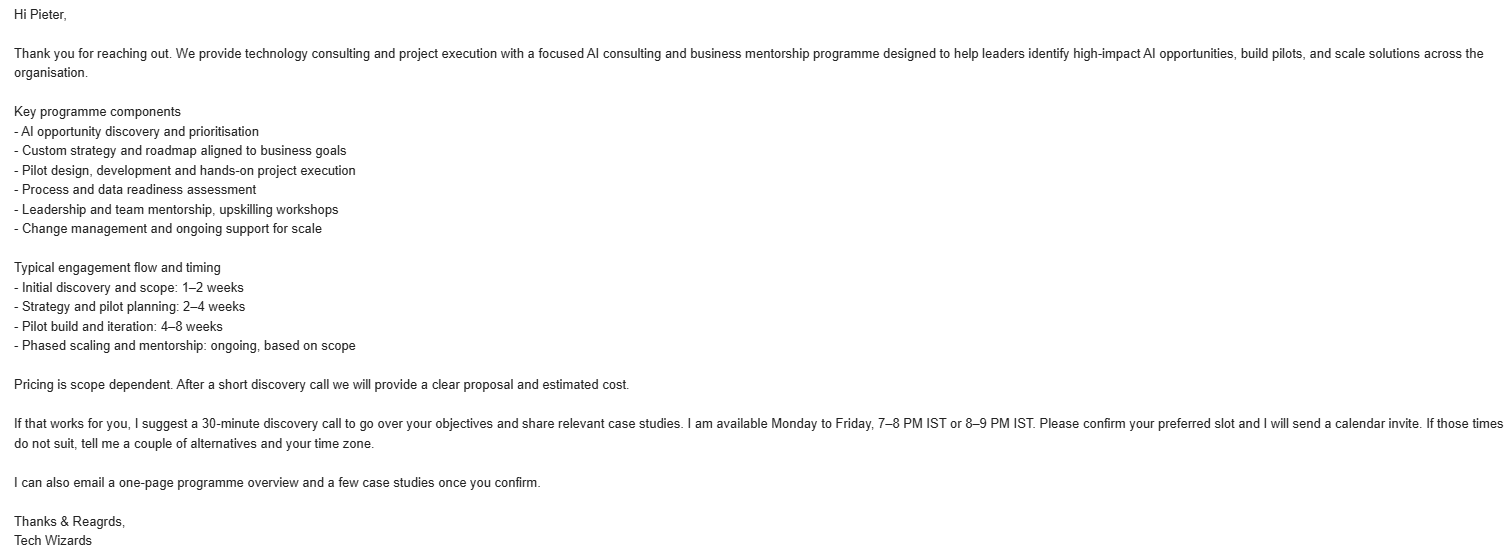
The screenshots below were produced after the MCP applied its operations. No node was opened, no field was edited by hand in the n8n editor.
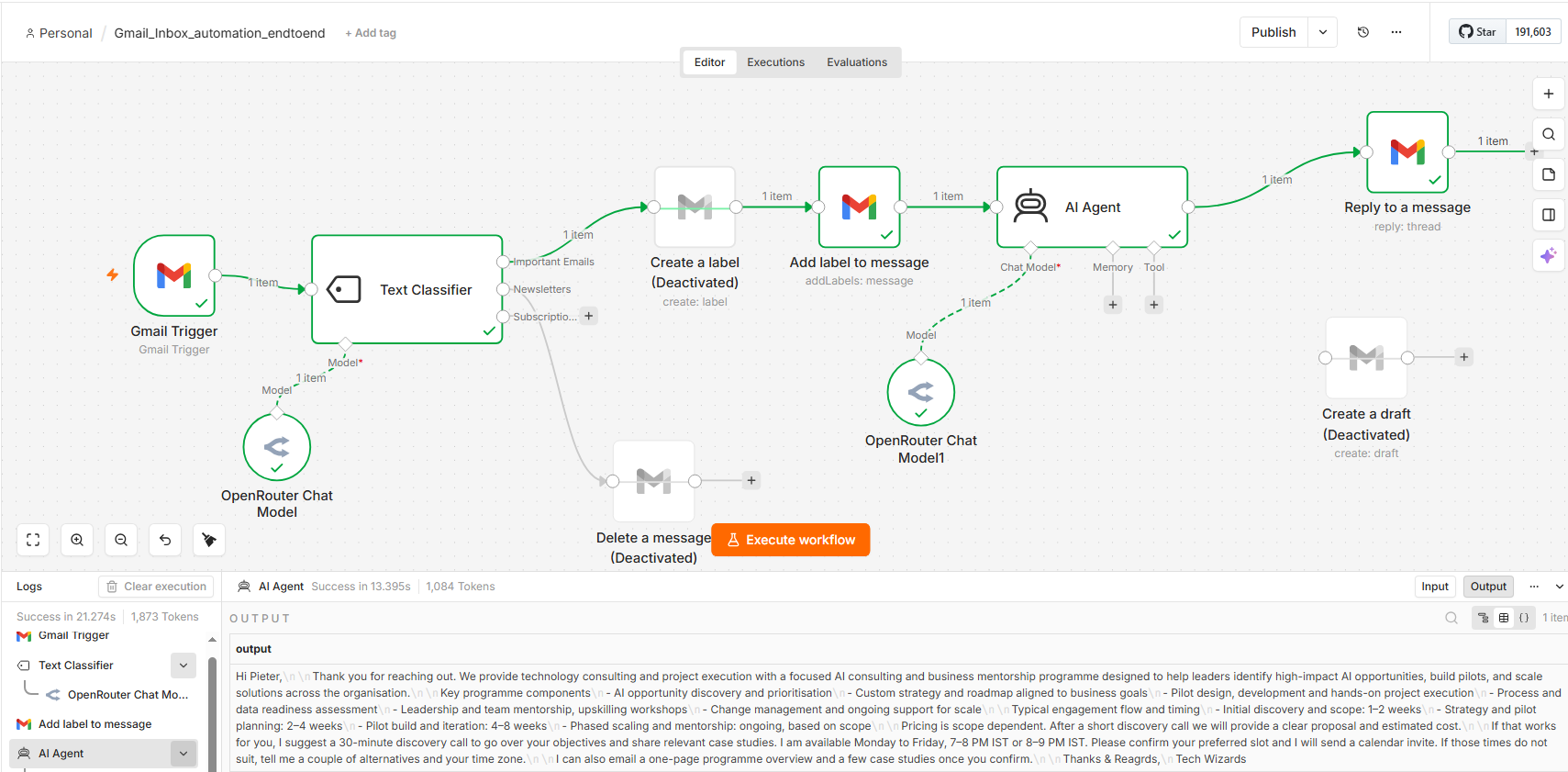
The configured workflow, running green in n8n (credentials bound, models selected, broken nodes handled automatically):
The output it produced — a polished, fully-automated reply, start to finish:
Why a fresh upload doesn't "just run"
An exported *.json workflow looks portable, but several things don't carry across instances:
- Credentials don't travel. n8n never exports secrets, and the credential IDs baked into the export don't exist in your instance — so on import every node comes in unauthenticated.
- Hard-coded resource IDs break. Gmail label IDs, Slack channel IDs, Notion DB IDs and the like are account-specific; an ID from another instance is meaningless in yours.
- Idempotency bugs surface on the second run. e.g. a "create label" node returns
409 — Label name existsonce the label already exists. - Some fields ship blank. Model pickers in particular often export empty.
Expressed as MCP operations, the entire fix looks like this:
// update_workflow(workflowId, operations)
[
  { "type": "setNodeCredential", "nodeName": "Gmail Trigger",         "credentialKey": "gmailOAuth2",   "credentialId": "<YOUR_GMAIL_CRED_ID>",      "credentialName": "Gmail account" },
  { "type": "setNodeCredential", "nodeName": "OpenRouter Chat Model", "credentialKey": "openRouterApi", "credentialId": "<YOUR_OPENROUTER_CRED_ID>", "credentialName": "OpenRouter account" },
  { "type": "setNodeParameter",  "nodeName": "OpenRouter Chat Model", "path": "/model", "value": "openai/gpt-4.1-mini" },
  { "type": "setNodeDisabled",   "nodeName": "Create a label", "disabled": true },
  { "type": "setNodeParameter",  "nodeName": "Add label to message", "path": "/labelIds", "value": ["IMPORTANT"] }
]
What's in here
workflows/    Three sample n8n workflows (credential-free templates)
operations/   The matching n8n-MCP update_workflow operation batches to configure each one
images/       Screenshots of a configured workflow running and its output
| Workflow | What it does |
|---|---|
workflows/gmail-inbox-classifier.json | Polls Gmail → classifies each email (Important / Newsletter / Subscription) with an LLM → labels + AI-drafts a reply to important mail, routes newsletters to a cleanup branch. |
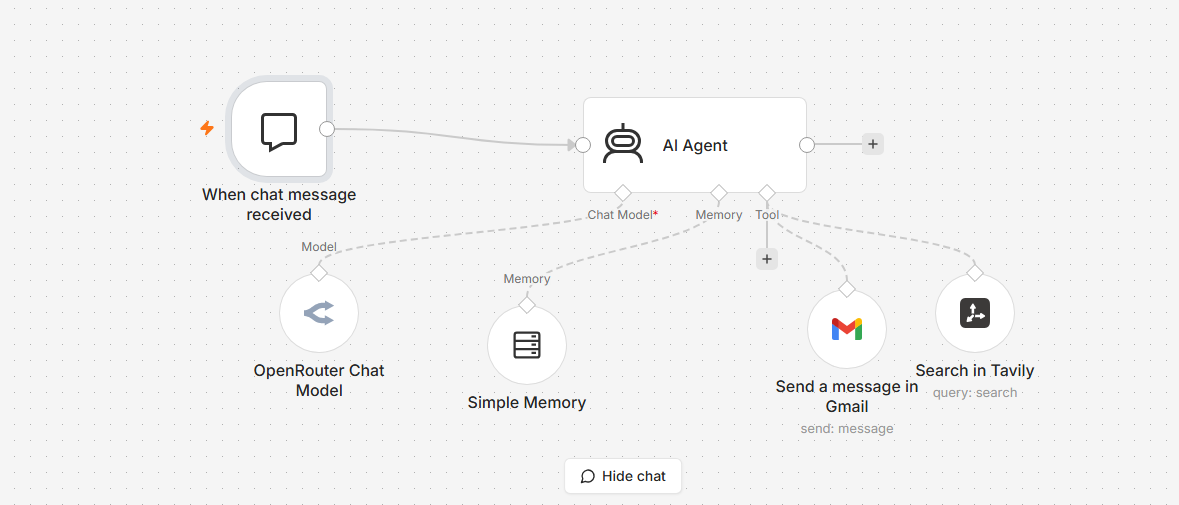
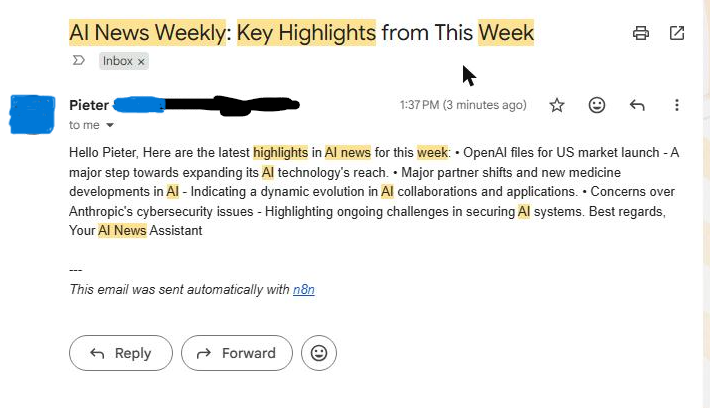
workflows/personalized-newsletter.json | Chat-triggered AI agent that researches a topic via Tavily web search and emails a curated newsletter through Gmail, with buffer memory. |
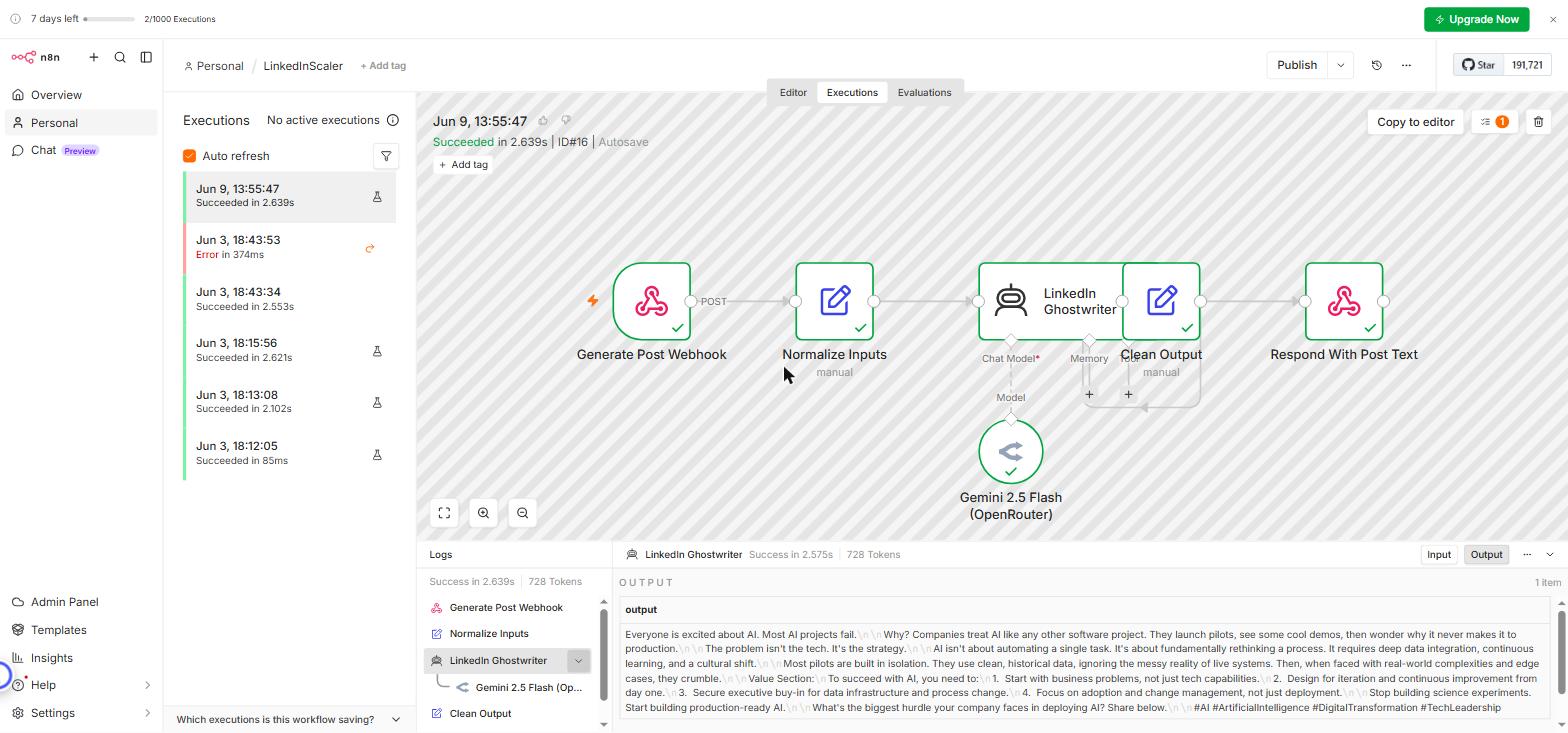
workflows/linkedin-scaler.json | Two independent webhook flows. Generate → an AI ghostwriter (Gemini 2.5 Flash via OpenRouter) turns a topic into a viral-style post and returns it as text. Publish → posts approved text to LinkedIn. The Generate flow runs with just an OpenRouter key; the Publish flow needs your own LinkedIn Developer app (w_member_social + openid profile), so its author URN + credential ship blank by design. |
Each one, configured and running
Personalized newsletter — the agent researches the topic and the email lands in the inbox (recipient details redacted):
| Running in n8n | The email it sent |
|---|---|
 |  |
LinkedInScaler — the Generate flow runs green and returns a ready-to-post draft (nothing is published without your own LinkedIn app):
| Generate flow running | The post it produced |
|---|---|
 |  |
Set up the n8n-MCP server in Claude
The operations in this repo are applied through the n8n-MCP
server (npx n8n-mcp), which connects Claude to your n8n instance over the n8n API.
flowchart TD
    subgraph SETUP["🔌 Set up the MCP server in Claude  (one time)"]
        A["n8n → Settings → n8n API<br/>Create an API key"] --> B["Copy the API key<br/>+ your instance URL"]
        B --> C{"Which Claude client?"}
        C -->|"Claude Code (CLI)"| D["claude mcp add n8n-mcp …<br/>-- npx n8n-mcp"]
        C -->|"Claude Desktop"| E["Add n8n-mcp to<br/>claude_desktop_config.json<br/>→ restart"]
        D --> F(["Claude connects to n8n<br/>MCP tools available"])
        E --> F
    end
    subgraph USE["⚙️ Configure a workflow  (per workflow)"]
        G["Import a workflow<br/>→ note the workflow ID"] --> H["list_credentials()<br/>→ your credential IDs"]
        H --> I["update_workflow(id, operations)<br/>bind creds · set model · fix bugs"]
        I --> J(["Reload n8n → Execute<br/>✅ runs green"])
    end
    F --> G

    classDef done fill:#1f7a3d,stroke:#0f3,color:#fff;
    class F,J done;
1. Get an n8n API key
In n8n: Settings → n8n API → Create an API key. Copy the key and note your instance URL
(e.g. https://your-instance.app.n8n.cloud, or http://localhost:5678 for a local instance).
2a. Claude Code (CLI)
claude mcp add n8n-mcp \
  -e MCP_MODE=stdio \
  -e LOG_LEVEL=error \
  -e DISABLE_CONSOLE_OUTPUT=true \
  -e N8N_API_URL=https://your-n8n-instance.com \
  -e N8N_API_KEY=your-api-key \
  -- npx n8n-mcp
On Windows PowerShell, quote each -e flag:
claude mcp add n8n-mcp `
  '-e MCP_MODE=stdio' `
  '-e LOG_LEVEL=error' `
  '-e DISABLE_CONSOLE_OUTPUT=true' `
  '-e N8N_API_URL=https://your-n8n-instance.com' `
  '-e N8N_API_KEY=your-api-key' `
  -- npx n8n-mcp
2b. Claude Desktop (or any client using a config file)
Open the MCP config (Claude Desktop: Settings → Developer → Edit Config, which opens
claude_desktop_config.json) and add the server, then restart the app:
{
  "mcpServers": {
    "n8n-mcp": {
      "command": "npx",
      "args": ["n8n-mcp"],
      "env": {
        "MCP_MODE": "stdio",
        "LOG_LEVEL": "error",
        "DISABLE_CONSOLE_OUTPUT": "true",
        "N8N_API_URL": "https://your-n8n-instance.com",
        "N8N_API_KEY": "your-api-key"
      }
    }
  }
}
The same mcpServers block works in a project-level .mcp.json for Claude Code. Once connected, Claude
can call list_credentials, get_workflow_details, update_workflow, get_execution, and the rest.
Keep your API key out of source control — it lives in the MCP config / environment, never in a committed file.
Use it
1. Import a workflow
Through the n8n UI (Workflows → Import from File) or with the MCP create_workflow_from_code. Note the
resulting workflow ID.
2. Find your credential IDs
list_credentials()
3. Apply the setup operations
Open the matching file in operations/, replace the <YOUR_*_ID> placeholders with your
own IDs, and pass the array to:
update_workflow(workflowId = "<YOUR_WORKFLOW_ID>", operations = [ ... ])
update_workflow is atomic — if any operation fails (bad node name, missing credential), the whole
batch is rejected and nothing changes. Re-check node names with get_workflow_details and retry.
4. Reload and run
⚠️ n8n does not live-refresh an editor tab that was already open before an API edit — reload the workflow page, then Execute.
The operation cheat-sheet
| Need | Operation |
|---|---|
| Attach a credential to a node | setNodeCredential (nodeName, credentialKey, credentialId, credentialName) |
Set a parameter inside parameters | setNodeParameter (nodeName, path e.g. /model, value) |
| Skip a node without rewiring | setNodeDisabled — a disabled node passes data straight through |
| Re-route a branch | removeConnection + addConnection |
| Rename / move | renameNode / setNodePosition |
Debugging a failed run
get_execution(executionId, includeData: true) returns the failing node, the branch that was taken, and
the raw provider error body — so you confirm, e.g., a 409 Label name exists or conflicts instead of
guessing.
Worked example: the Gmail classifier
A freshly-imported copy of this workflow hits three issues; here's the complete fix as one reproducible
flow — see operations/gmail-inbox-classifier.ops.json:
- Bind credentials on all Gmail + OpenRouter nodes.
409 Label name exists→ disable theCreate a labelnode (it's pass-through, so the chain holds).- Invalid label IDs → set
Add label to messageto the valid["IMPORTANT"]system label. - (Optional reply mode) swap
AI Agent → Reply to a messageforAI Agent → Create a draftto review replies as unsent drafts instead of auto-sending.
The screenshots at the top of this README are the result: the workflow runs end-to-end and produces the reply, with everything configured by the MCP.
License
MIT. The sample workflow templates are provided as-is for educational use. The n8n-MCP project is © its respective authors.