
AI Agent Board
DanWahlin/ai-agent-board
Kanban com agentes IA para automação de tarefas de codificação
Ver no GitHubQuadro Kanban com drag-and-drop que delega tarefas de codificação para agentes IA (GitHub Copilot, Claude Code, OpenAI Codex e outros). Suporta múltiplos agentes, execução paralela de grupos de tarefas, isolamento com git worktree e streaming em tempo real do progresso na interface.
Instalação
npx convez-ai DanWahlin/ai-agent-board1 comando no terminal: detecta o formato do repositório (marketplace ou plugin avulso) e instala via Claude Code. Requer Node 18+ e o Claude Code instalado.
Métricas
Casos de uso
- Delegar tarefas de desenvolvimento para múltiplos agentes IA simultaneamente
- Gerenciar grupos paralelos de tarefas de codificação com priorização
- Monitorar execução em tempo real e revisar mudanças antes de merge
Veredito

Solução madura e bem arquitetada para orquestração de agentes IA em workflows de desenvolvimento. Multi-agente com padrão provider, isolamento de contexto e UX pensada; excelente para equipes que precisam automatizar tarefas repetitivas de código em escala.
README
A tradução para o português deste README ainda está na fila.

AI Agent Board
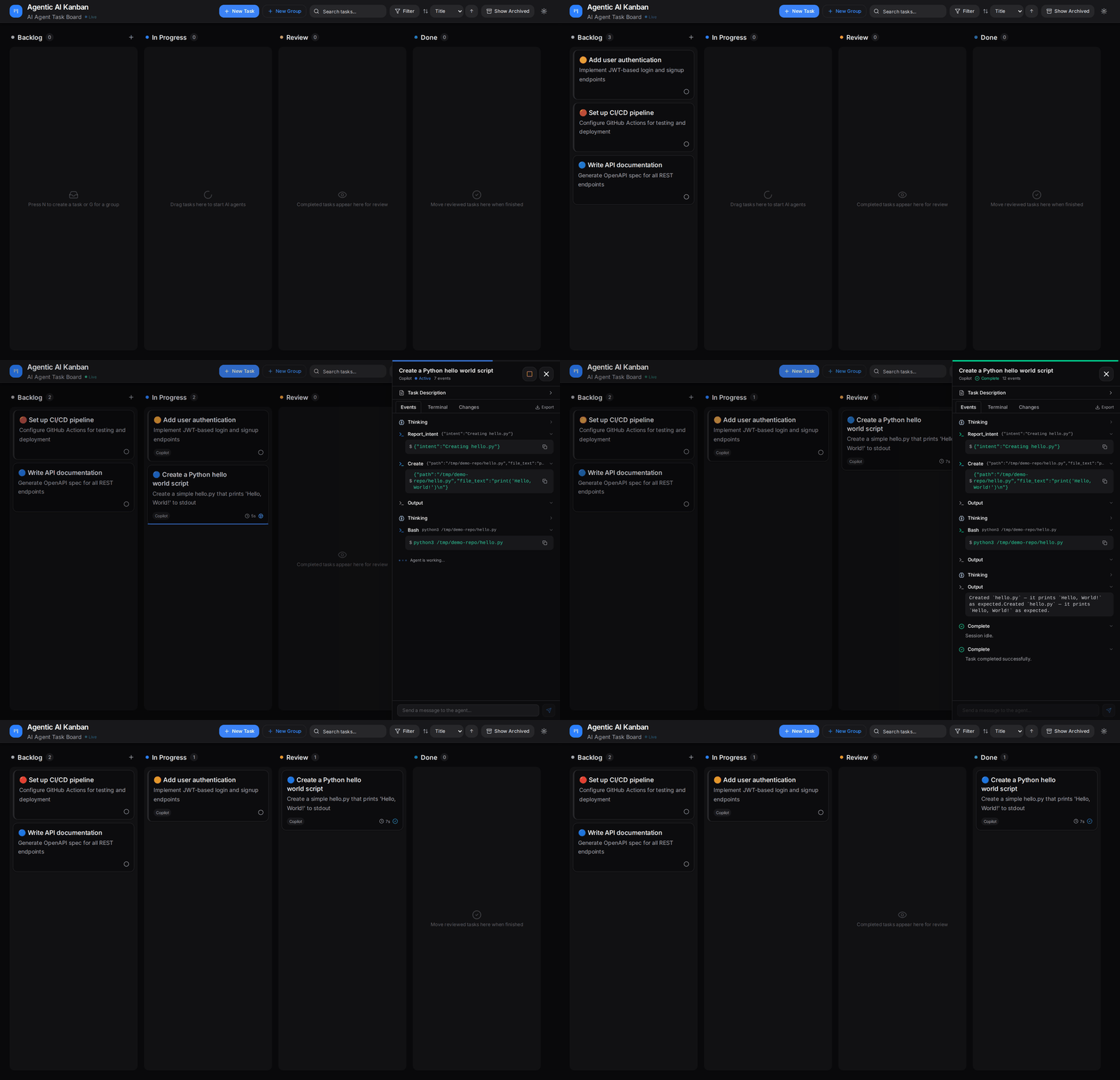
A drag-and-drop Kanban board that delegates coding tasks to AI agents — GitHub Copilot, Claude Code, OpenAI Codex, OpenCode, Hermes, or OpenClaw. Drop a task into "In Progress," pick an agent, and it will plan, execute, and complete the work, streaming live progress back to the board.
How It Works
- Create a task in the Backlog column
- Drag it to In Progress — the agent panel opens automatically
- Configure the run — set the repo path, branch name, agent type, and whether to use a git worktree
- Click Start Agent — the selected agent begins working, streaming progress in real-time
- Review the results — commands executed, files modified, output produced
- Merge or create a PR — merge the branch to main locally, or create a PR if the repo has a GitHub remote
Multi-Agent Architecture
The server uses a provider pattern (via @codewithdan/agent-sdk-core) to support multiple AI coding agents behind a common interface:
AgentProvider— creates sessions, reports availabilityAgentSession— runs a task, emits events, supports abortAgentManager— orchestrates sessions with timeouts, event caching, and graceful cleanup
Each task can specify which agent to use. Available agents are auto-detected at startup by checking for installed CLIs. Six providers are supported: Copilot, Claude Code, Codex, OpenCode, Hermes, and OpenClaw. Events from all providers are normalized into a common AgentEvent format and streamed to the UI via WebSocket.
Task Groups
For projects needing multiple parallel changes, Task Groups let you define a batch of related tasks in a single form:
- Click New Group (or press
G) to open the group creation dialog - Set group-level config: title, repo path, base branch, priority
- Add child tasks (2–20), each with its own title, description, agent type, and worktree toggle
- Set parallelism with a slider (1 to N) — controls how many agents run concurrently
- Click Create & Run to launch immediately, or Create Group to add to backlog
Groups appear as a single card on the board showing aggregate progress. Click to expand the Group Panel with per-child status, retry buttons for failures, and drill-through to individual agent panels. Groups auto-advance to "review" when all children complete successfully.
Features
- Kanban board with Backlog, In Progress, Review, Done columns
- Multi-agent support — choose GitHub Copilot, Claude Code, OpenAI Codex, OpenCode, Hermes, or OpenClaw per task
- Auto-detection of available agents at startup
- Drag-and-drop task management with transition validation
- Real-time agent activity streaming via WebSocket
- Terminal-style event viewer (xterm.js) with ANSI color support
- Agent panel with event coalescing (thinking, commands, output)
- Git worktree isolation per task (optional)
- Local merge or PR — merge worktree branch to main locally, or create a PR if a GitHub remote exists (auto-detected)
- Worktree auto-cleanup after merge, PR creation, or archival
- Dual database backends — SQLite (zero-config default) or PostgreSQL
- Task templates for reusable task configurations
- Task Groups — define multiple related tasks in one form, launch with configurable parallelism (slider 1..N), monitor aggregate progress
- Auto-run option to start agent immediately on task creation
- Priority levels (critical, high, medium, low) with emoji indicators and color-coded borders
- Filter and sort tasks by agent type, status, and priority
- API key authentication (optional — set
API_KEYenv var) - Task archiving
- Dark/light theme toggle
- Task search and filtering
- Keyboard shortcuts (N: new task, G: new group, Esc: close panels)
Getting Started
Prerequisites
- Node.js 22+
- npm 10+
- At least one agent CLI authenticated on your machine:
- GitHub Copilot: CLI installed and authenticated
- Claude Code: CLI installed and authenticated
- OpenAI Codex: CLI installed and authenticated
- OpenCode: CLI installed and authenticated
- Hermes: Hermes Agent installed and
hermes acp --checksucceeds - OpenClaw: OpenClaw CLI installed and Gateway/session access configured
Works on Linux, macOS, and Windows.
Quick Start
git clone https://github.com/DanWahlin/ai-agent-board.git
cd ai-agent-board
npm install

# Start both server and client together
npm run dev

# Or run them separately:
# Terminal 1 — API server (port 8080)
npm run dev:server
# Terminal 2 — Vite dev server (port 8081)
npm run dev:client
Open http://localhost:8081.
Database Options
By default the app uses SQLite — zero configuration required.
For PostgreSQL, start the database container and set DATABASE_URL:
docker compose up -d

# Set the connection string in packages/server/.env
DATABASE_URL=postgresql://agentboard:your_password@localhost:5433/agentboard
Build for Production
npm run build:server
npm run build:client
Required Gate
Use the deterministic gate before pushing changes. It runs the client build, server build, and required Playwright E2E suite; if E2E cannot run, the command fails.
npm run gate:required

# Enable the committed pre-push hook for this clone
npm run hooks:install
Environment Variables
| Variable | Default | Description |
|---|---|---|
API_KEY | (unset) | Bearer token for API + WebSocket auth; unset = open access |
VITE_API_KEY | (unset) | Client-side API key (must match API_KEY) |
PORT | 8080 | Server port |
DATABASE_URL | (unset) | PostgreSQL connection string; when unset, uses SQLite |
DB_PATH | ./data/agentboard.db | SQLite database file path |
COPILOT_MODEL | claude-opus-4-20250514 | Model for Copilot SDK sessions |
CLAUDE_MODEL | claude-opus-4-20250514 | Model for Claude Code sessions |
CODEX_MODEL | gpt-5.2-codex | Model for OpenAI Codex sessions |
HERMES_COMMAND | hermes | Hermes CLI command or absolute path used to start the ACP server |
HERMES_MODEL | configured default | Display/configured model label for Hermes sessions; Hermes ACP uses its own active config |
HERMES_ACCEPT_HOOKS | (unset) | Set to true to auto-approve Hermes startup hook prompts in headless ACP sessions |
OPENCLAW_COMMAND | openclaw | OpenClaw CLI command or absolute path used to start the ACP bridge |
OPENCLAW_GATEWAY_URL | (SDK default) | Optional OpenClaw Gateway WebSocket URL forwarded to openclaw acp |
OPENCLAW_GATEWAY_TOKEN / OPENCLAW_GATEWAY_PASSWORD | (unset) | Optional OpenClaw Gateway credentials passed through environment variables |
COPILOT_DENIED_TOOLS | (unset) | Comma-separated tool names to deny in Copilot sessions |
ALLOWED_REPO_ROOTS | $HOME, temp, current workspace | Allowed repo root paths (comma-separated) |
ALLOWED_ORIGINS | http://localhost:8081,http://localhost:4175,http://localhost:4176 | CORS origins |
AGENT_TIMEOUT_MS | 600000 | Max agent execution time (ms) |
API_URL | http://localhost:8080 | Vite proxy target |
PROJECTS_DIR | ~/projects | Host projects path |
Project Structure
ai-agent-board/
├── packages/
│   ├── client/                # React frontend
│   │   └── src/
│   │       ├── components/    # Board, Column, TaskCard, TaskGroupCard, GroupPanel, AgentPanel, TerminalView, ParallelismSlider, FilterChips, dialogs
│   │       ├── hooks/         # useTasks, useTaskGroups, useTheme, useDebounce, useKeyboardShortcuts
│   │       └── lib/           # API client, WebSocket, agent-config, priority-config, utilities
│   ├── server/                # Express backend
│   │   └── src/
│   │       ├── middleware/     # Bearer token auth
│   │       ├── routes/        # REST API split: tasks, agent, git (merge/PR/worktree), templates, groups
│   │       ├── services/      # Agent session orchestration via agent-sdk-core
│   │       ├── repositories/  # SQLite + PostgreSQL data access (tasks + templates + groups)
│   │       ├── db.ts          # Database init + migrations
│   │       └── websocket.ts   # Real-time event broadcast
│   └── e2e/                   # Playwright end-to-end tests
└── shared/                    # Shared types (Task, TaskGroup, TaskTemplate, AgentEvent, etc.) + validation
Tests
# Required deterministic gate: client build, server build, E2E
npm run gate:required

# Required E2E only; starts isolated test app processes on ports 3002/4176
npm run test:e2e:required

# Run directly from the E2E workspace
cd packages/e2e && npx playwright test --reporter=list
The local pre-push hook in .githooks/pre-push runs npm run gate:required. Run npm run hooks:install once per clone to enable it with core.hooksPath .githooks.
7 test files covering 81 tests:
| File | Tests | Coverage |
|---|---|---|
board.spec.ts | 14 | Task CRUD, drag & drop, theme, priority, sorting, filters, retry |
api-improvements.spec.ts | 20 | Auto-run, batch create, status endpoint, WebSocket events, follow-up messages |
agent-selector.spec.ts | 7 | Agent selection UI, badges, worktree dialog |
groups.spec.ts | 28 | Group CRUD, validation, archive, edge cases (E3/E12), UI |
git-operations.spec.ts | 8 | Local merge, conflict handling, PR creation, worktree cleanup |
group-integration.spec.ts | 2 | Full agent execution with real agents, stop & cleanup |
agent-sdk.spec.ts | 2 | Real Copilot SDK execution (skipped without test repo) |
Tech Stack
| Layer | Technology |
|---|---|
| Frontend | React 19, Vite, Tailwind CSS 4, Framer Motion |
| Drag & Drop | @dnd-kit |
| Backend | Express, better-sqlite3 / PostgreSQL, ws (WebSocket) |
| AI Agents | @codewithdan/agent-sdk-core (wraps Copilot, Claude Code, Codex, OpenCode, Hermes, and OpenClaw providers) |
| Terminal UI | @xterm/xterm |
| Monorepo | npm workspaces |
| Dev Environment | Direct install (Linux, macOS, Windows) |
Contributing
See CONTRIBUTING.md.