
freshell
danshapiro/freshell
The Agentic IDE (or, the loving child of tmux and claude code)
Instalação
npx convez-ai danshapiro/freshell1 comando no terminal: detecta o formato do repositório (marketplace ou plugin avulso) e instala via Claude Code. Requer Node 18+ e o Claude Code instalado.
Métricas
README
A tradução para o português deste README ainda está na fila.
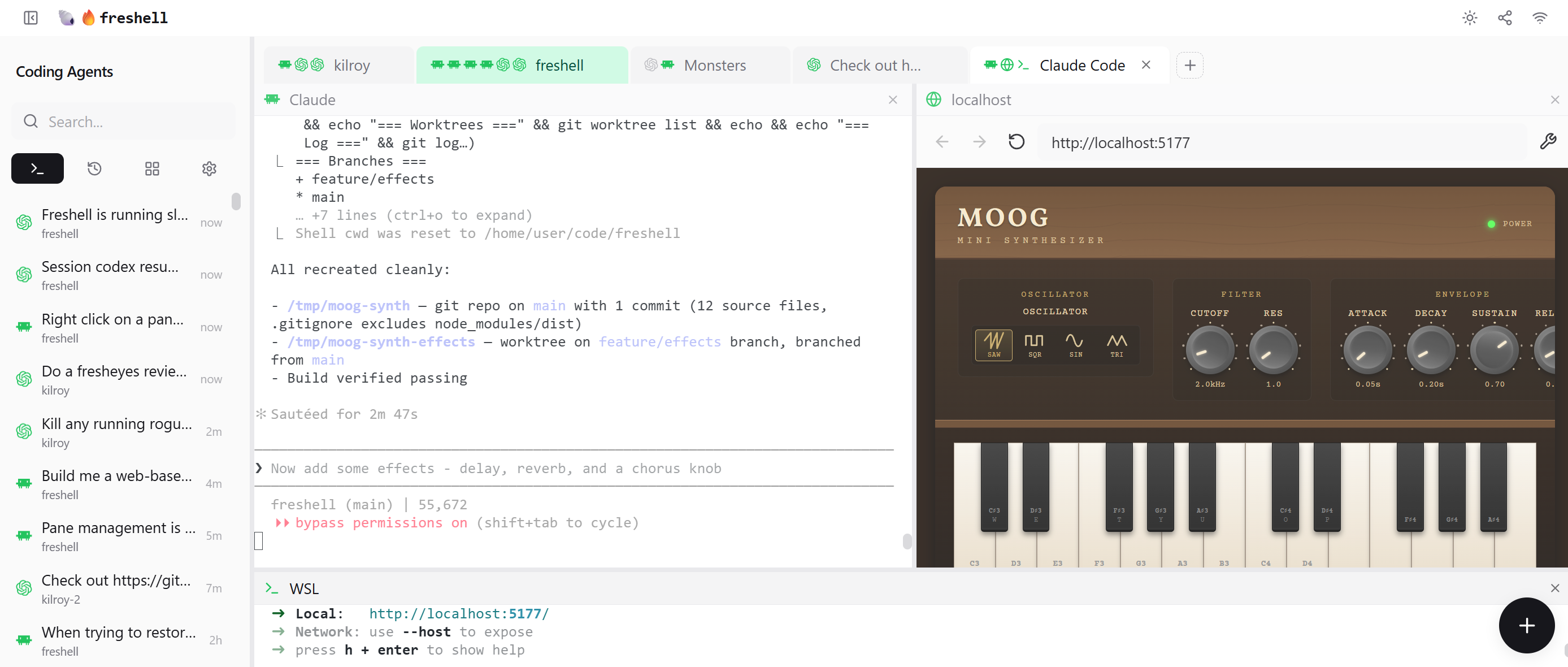
Features
- Tabs and panes — Organize projects with multiple coding agents, shells, browsers, editors, and more on a tab - and as many tabs as you want.
- Desktop, laptop, phone — Run on your main machine, then work on your project anywhere via VPN or Tailscale.
- Speak with the dead — Resume any Claude, Codex, or OpenCode session from any device (even if you weren't using freshell to run it)
- Fancy tabs — Auto-name from terminal content, drag-and-drop reorder, and per-pane type icons so you know what's in each tab
- Freshclaude — An interactive alternative to Claude CLI that works with your Anthropic subscription. Rich chat UI with collapsible tool strips, token budget display, and full session persistence.
- Extension system — Add new pane types, CLI integrations, and server-side services via manifest-based extensions. Enable and disable from the Extensions management page.
- Self-configuring workspace — Just ask Claude or Codex to open a browser in a pane, or create a tab with four subagents. Built-in tmux-like API and skill makes it simple.
- Live pane headers — See your active directory, git branch, and context usage in every pane title bar, updating live as you work
- Activity notifications — Configurable attention indicators (highlight, pulse, darken) on tabs and pane headers when a coding CLI finishes its turn, with click or type dismiss modes
- AI-powered session titles — Right-click any session and generate a Gemini-powered title based on conversation content
- Progressive sidebar search — Two-phase search with instant local results followed by deep server-side content search
- Mobile responsive — Auto-collapsing sidebar and overlay navigation for phones and tablets
Quick Start
# Clone the repository at the latest stable release
git clone --branch v0.7.0 https://github.com/danshapiro/freshell.git
cd freshell

# Install dependencies
npm install

# Build and run
npm run serve
On first run, freshell auto-generates a .env file with a secure random AUTH_TOKEN. The token is printed to the console at startup — open the URL shown to connect.
Prerequisites
Node.js 18+ (20+ recommended) and platform build tools for native modules (windows-build-tools on Windows, Xcode CLI Tools on macOS, build-essential python3 on Linux).
Note: On native Windows, terminals default to WSL. Set
WINDOWS_SHELL=cmdorWINDOWS_SHELL=powershellto use a native Windows shell instead.
Usage
npm run dev     # Development with hot reload
npm run serve   # Production build and run
Keyboard Shortcuts
| Shortcut | Action |
|---|---|
Alt+T | New tab |
Alt+W | Close tab |
Alt+H / Alt+Shift+T | Reopen closed tab |
Ctrl+Shift+[ / Alt+[ | Previous tab |
Ctrl+Shift+] / Alt+] | Next tab |
Ctrl+Shift+ArrowLeft | Move tab left |
Ctrl+Shift+ArrowRight | Move tab right |
Ctrl+Shift+C | Copy selection (in terminal) |
Ctrl+V / Ctrl+Shift+V | Paste (in terminal) |
Ctrl+F | Search (in terminal) |
Shift+Enter | Newline (in terminal) |
Cmd/Ctrl+End | Scroll to bottom (in terminal) |
Right-click / Shift+F10 | Context menu |
Configuration
Environment Variables
| Variable | Required | Description |
|---|---|---|
AUTH_TOKEN | Auto | Authentication token (auto-generated on first run, min 16 chars) |
PORT | No | Server port (default: 3001) |
ALLOWED_ORIGINS | No | Auto-managed CORS origins for the active server bind host and LAN IPs |
EXTRA_ALLOWED_ORIGINS | No | Comma-separated custom CORS origins preserved across runtime origin rebuilds |
CLAUDE_HOME | No | Path to Claude config directory (default: ~/.claude) |
CODEX_HOME | No | Path to Codex config directory (default: ~/.codex) |
WINDOWS_SHELL | No | Windows shell: wsl (default), cmd, or powershell |
WSL_DISTRO | No | WSL distribution name (Windows only) |
CLAUDE_CMD | No | Claude CLI command override |
CODEX_CMD | No | Codex CLI command override |
OPENCODE_CMD | No | OpenCode CLI command override |
GEMINI_CMD | No | Gemini CLI command override |
KIMI_CMD | No | Kimi CLI command override |
GOOGLE_GENERATIVE_AI_API_KEY | No | Gemini API key for AI-powered terminal summaries |
Coding CLI Providers
Freshell indexes local session history and can launch terminals for these coding CLIs:
| Provider | Session history | Launch terminals | Home directory |
|---|---|---|---|
| Claude Code | Yes | Yes | ~/.claude |
| Codex | Yes | Yes | ~/.codex |
| OpenCode | Yes | Yes | XDG_DATA_HOME/opencode (or platform default) |
| Gemini | — | Yes | — |
| Kimi | — | Yes | — |
Enable/disable providers and set defaults in the Settings UI or via ~/.freshell/config.json.
OpenCode sessions are discovered directly from OpenCode's local session database, so existing OpenCode work can be resumed from freshell without importing anything manually.
OpenCode permissions are controlled by the OpenCode configuration for the OS user running freshell. Freshell does not set OPENCODE_PERMISSION or pass --dangerously-skip-permissions for OpenCode sessions; OS filesystem permissions remain the hard boundary.
Tech Stack
- Frontend: React 18, Redux Toolkit, Tailwind CSS, xterm.js, Monaco Editor, Zod, lucide-react
- Backend: Express, WebSocket (ws), node-pty, Pino, Chokidar, Zod
- Build: Vite, TypeScript
- Testing: Vitest, Testing Library, supertest, superwstest
- AI: Vercel AI SDK with Google Gemini
Extensions
Freshell supports custom pane types via extensions. Three categories are available:
- Client — Static HTML/JS served by freshell (no server needed)
- Server — Your own HTTP server, managed by freshell with automatic port allocation
- CLI — Any terminal tool wrapped as a pane
Drop a directory with a freshell.json manifest into ~/.freshell/extensions/ and restart freshell. See examples/extensions/ for working examples of each type.
Contributing
Contributions are welcome. Start from origin/main, submit a Pull Request against main, and keep behavior changes on PR branches. Local development self-hosting uses the dev integration branch described in docs/development/branch-model.md.
Community Projects
Projects built by the community around freshell.
- freshell-container — Docker container packaging freshell with all supported coding CLI providers for self-hosted, multi-device access
License
MIT License — see LICENSE for details.