
Claude Code Statusline de Limites
danilchernyshev/cc-limits-statusline
Monitore limites reais, custos e contexto do Claude Code em uma linha
Ver no GitHubPlugin para Claude Code que exibe em tempo real os limites de plano (janela de 5h e 7d), custo da sessão, uso de contexto e um sinal visual codificado por cores para detectar sobrecarga. Mantém você informado sobre quando está próximo de ativar uso extra (pagamento por overage).
Instalação
npx convez-ai danilchernyshev/cc-limits-statusline1 comando no terminal: detecta o formato do repositório (marketplace ou plugin avulso) e instala via Claude Code. Requer Node 18+ e o Claude Code instalado.
Métricas
Casos de uso
- Acompanhar consumo de rate limits durante sessões de desenvolvimento
- Detectar visualmente quando sobrecarga (extra-usage) está ativa
- Planejar compactação de contexto antes de atingir limites críticos
Veredito

Ferramenta prática e bem pensada para quem trabalha regularmente com Claude Code — elimina a incerteza sobre limites de taxa e custos de overage. A codificação visual por cores é inteligente e o shell script é transparente, sem dependências pesadas.
README
A tradução para o português deste README ainda está na fila.
cc-limits-statusline
A Claude Code statusline that shows your real plan limits at a glance — the 5‑hour session window, the 7‑day weekly window, your session cost, context usage, and a colour‑coded extra‑usage signal so you instantly know whether you're about to start paying for overage.
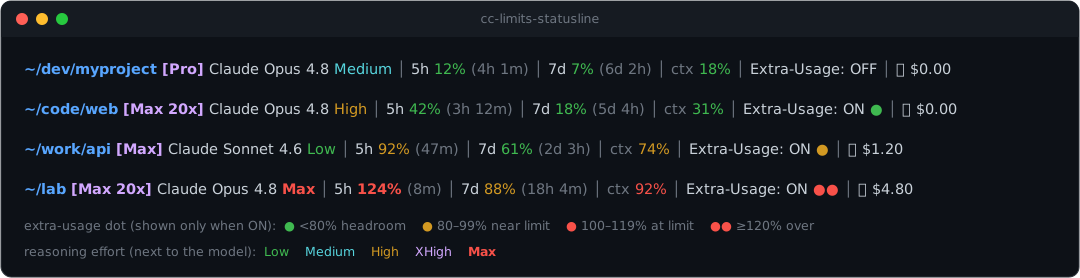
~/dev/myproject [Max 20x] Claude Opus 4.8 │ 5h 42% (3h 12m) │ 7d 18% (5d 4h) │ ctx 31% │ Extra-Usage: ON ● │ 💳 $0.00
What it shows
| Field | Meaning |
|---|---|
~/dev/myproject | Current working directory |
[Max 20x] | Your subscription plan |
Claude Opus 4.8 | Active model |
5h 42% (3h 12m) | 5‑hour session limit used, and time until it resets |
7d 18% (5d 4h) | 7‑day weekly limit used, and time until it resets |
ctx 31% | Context window used — colour‑coded by how soon you should /compact (green → yellow → red) |
Extra-Usage: ON ● | Whether extra usage (paid overage) is enabled on your account (ON/OFF). When ON, a coloured ● status dot follows; when OFF the dot is hidden — see below |
💳 $0.00 | Money, kept last: cost of the current session (paid overage / credits) |
All percentages are rounded to whole numbers.
The rate‑limit percentages are colour‑coded: green <80%, yellow
80–99%, red ≥100%.
The ctx percentage uses its own thresholds, keyed to when it pays to run
/compact rather than to billing (a full context costs nothing — Claude Code
just auto‑compacts it). The colour nudges you to compact at a natural breakpoint
first: green <70% (plenty of room), yellow 70–84% (good time to
/compact), red ≥85% (compact now — auto‑compact is imminent). Both
thresholds are configurable — see Configuration.
The extra‑usage signal
The Extra-Usage: field shows whether extra usage (paid overage) is
enabled on your account — ON when it is, OFF when it isn't. When it's ON,
a status dot follows whose colour reflects the worst of your two limits
(when OFF the dot is hidden, since no overage can start):
| Sign | When | Meaning |
|---|---|---|
🟢 ● | worst limit < 80% | Enabled, plenty of headroom — not paying |
🟡 ● | 80–99% | Getting close to the limit |
🔴 ● | 100–119% | At the limit → paid overage active |
🔴 ●● | ≥ 120% (DOUBLE_AT) | Well over the limit, paid overage is active |
Why a text
●and not ⚡ or a 🟢 emoji? Emoji like ⚡ are rendered by the terminal in their own fixed colour and ignore ANSI colour codes, so a "coloured lightning bolt" always looks the same yellow. The plain text glyph●(U+25CF) instead takes its colour from ANSI — so it matches the rest of the line, tracks your terminal theme, and keeps a single‑cell width.
All three thresholds (and which fields show at all) are configurable — see Configuration.
Configuration
The statusline reads an optional config file
(~/.config/cc-limits-statusline.conf, override with the CC_STATUSLINE_RC
env var). The installer seeds it from
config.example.conf if you don't have one; without a
file the built-in defaults apply. It's sourced as bash — plain NAME=value
lines, no restart needed.
Every setting has a default baked into the script, so the file is entirely
optional and safe to trim. A setting you omit, comment out, leave blank
(YELLOW_AT=), or set to garbage (RED_AT=abc) falls back to its default
rather than breaking the line — thresholds expect a non-negative integer and the
SHOW_* flags expect 0 or 1; anything else is ignored.
Colour thresholds
The colour of the worst-of-two limit (and the ●/●● dot) is driven by three
percentages:
YELLOW_AT=80    # >= this → 🟡 yellow (getting close)
RED_AT=100      # >= this → 🔴 red    (at the limit, paid overage active)
DOUBLE_AT=120   # >= this → 🔴 ●●     (well over the limit, overage active)
The ctx field has its own pair, keyed to when to /compact (not billing):
CTX_YELLOW_AT=70   # >= this → 🟡 yellow (good time to /compact)
CTX_RED_AT=85      # >= this → 🔴 red    (compact now, auto-compact imminent)
Show / hide fields
Each field can be toggled with 1 (show) / 0 (hide). Hiding one drops its
│ separator too:
SHOW_CWD=1      # ~/dev/myproject — current working directory
SHOW_PLAN=1     # [Max 20x]       — subscription plan
SHOW_MODEL=1    # Claude Opus 4.8 — active model
SHOW_5H=1       # 5h 42% (3h 12m) — 5-hour session window
SHOW_7D=1       # 7d 18% (5d 4h)  — 7-day weekly window
SHOW_CTX=1      # ctx 31%         — context window used
SHOW_EXTRA=1    # Extra-Usage: ON ● — overage state + status dot
SHOW_COST=1     # 💳 $0.00        — current-session cost
Requirements
- Claude Code
jq(sudo apt install jq/brew install jq)- A POSIX shell (
bash)
Install
Option A — install script (any setup)
git clone https://github.com/danilchernyshev/cc-limits-statusline.git
cd cc-limits-statusline
bash install.sh
…or as a one‑liner:
curl -fsSL https://raw.githubusercontent.com/danilchernyshev/cc-limits-statusline/main/install.sh | bash
The installer copies statusline.sh into ~/.claude/ and adds this to your
~/.claude/settings.json (backing it up first):
{
  "statusLine": {
    "type": "command",
    "command": "bash /home/you/.claude/statusline.sh"
  }
}
Reload Claude Code and you're done.
Option B — as a Claude Code plugin (marketplace)
This repo doubles as its own Claude Code marketplace. From inside Claude Code:
/plugin marketplace add danilchernyshev/cc-limits-statusline
/plugin install cc-limits-statusline@cc-limits-statusline
The plugin contributes the statusline via ${CLAUDE_PLUGIN_ROOT}/statusline.sh,
so there's nothing to copy by hand. Update later with /plugin marketplace update cc-limits-statusline.
Manual install
- Copy
statusline.shanywhere (e.g.~/.claude/statusline.sh). chmod +x ~/.claude/statusline.sh- Add the
statusLineblock above to~/.claude/settings.json. - (Optional)
cp config.example.conf ~/.config/cc-limits-statusline.confand edit it to tune thresholds or hide fields — see Configuration.
How it works
Claude Code pipes a JSON blob to the statusline command on stdin every time it
refreshes. The script reads the live rate_limits, cost, and
context_window fields from that JSON, and reads the plan name + extra‑usage
flag from the cached config ~/.claude.json. No network calls, no extra
state.
The two sources have different freshness. The stdin fields are live per refresh.
The plan name is not on stdin — it only exists in ~/.claude.json, which
Claude Code rewrites on auth events (login / token refresh / restart), not in
real time. You can point the script at a different config with the
CC_STATUSLINE_CONFIG environment variable (the test suite uses this).
Plan still shows the old tier after upgrading? That's the cache above. After you upgrade (e.g. Pro → Max) on the web, restart Claude Code so it re‑authenticates and rewrites
~/.claude.json; the statusline then shows the new plan. There is no live plan field to read instead.
Tests
A zero‑dependency test suite (just bash + jq) covers plan parsing, percentage
rounding, the extra‑usage dot thresholds, and the layout:
bash tests/run.sh
It feeds fixture JSON to statusline.sh (via CC_STATUSLINE_CONFIG) and asserts
against the rendered line, and unit‑tests the pure functions by sourcing the
script.
Uninstall
Remove the statusLine key from ~/.claude/settings.json (or restore one of
the settings.json.bak.* backups the installer left), and delete
~/.claude/statusline.sh.
License
MIT © 2026 Danil Chernyshev