
MCP HR Data Lakehouse Analytics
danielrodriguezrivera/mcp-people-analytics
Pipeline ETL em três camadas com ferramentas MCP para orquestração de dados por IA
Ver no GitHubServidor MCP que expõe um pipeline ETL em arquitetura Medallion (Bronze, Silver, Gold) usando SQLite, permitindo que LLMs orquestrem transformações de dados, diagnostiquem erros e consultem métricas de RH. Ideal para explorar automação de analytics e data engineering dirigida por IA.
Instalação
npx convez-ai danielrodriguezrivera/mcp-people-analytics1 comando no terminal: detecta o formato do repositório (marketplace ou plugin avulso) e instala via Claude Code. Requer Node 18+ e o Claude Code instalado.
Métricas
Casos de uso
- Automação de pipelines ETL e transformação de dados via prompts de IA
- Diagnóstico e limpeza de qualidade de dados em tempo real
- Consultas analíticas e geração de relatórios de RH/headcount automatizados
- Exploração de arquitetura Medallion como exemplo prático de Data Lakehouse
Veredito

Projeto exemplar que demonstra a integração do MCP em contexto de engenharia de dados com camadas bem definidas e ferramentas úteis de diagnóstico. Recomendado para quem quer explorar orquestração de pipelines ETL por LLM, embora o escopo seja educacional (dados sintéticos em SQLite).
README
A tradução para o português deste README ainda está na fila.
MCP HR Data Lakehouse Analytics
This repository demonstrates the integration of the Model Context Protocol (MCP) within a Data Engineering context. It showcases how to expose a Medallion Architecture (Bronze, Silver, Gold) ETL pipeline to Large Language Models (LLMs), allowing them to autonomously trigger data transformations, diagnose pipeline errors, and query business metrics.
This project is ideal for exploring LLM-driven data orchestration and analytics.
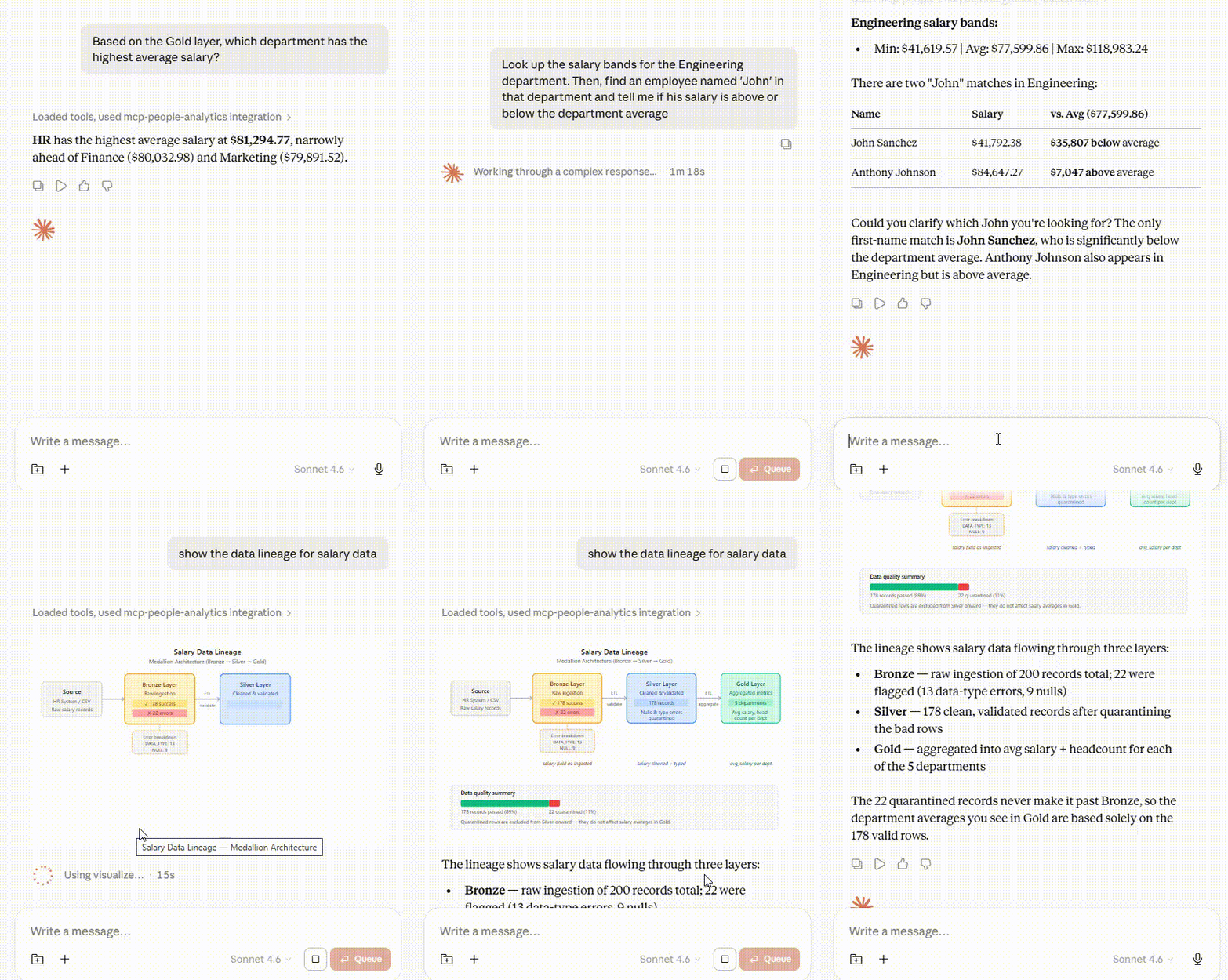
Architecture Overview
The system simulates a local Data Lakehouse using SQLite with three distinct layers:
- Bronze (Staging): Ingests raw, untyped data containing intentional anomalies (nulls, string data in numeric fields, malformed dates).
- Silver (Cleansed): Stores validated, typed, and clean data ready for granular analysis.
- Gold (Aggregated): Contains business-level metrics (department headcount, average salary) optimized for reporting.
Project Structure
mcp-github-analytics/
│   .gitignore
│   LICENSE
│   README.md
│   requirements.txt
│
├───assets/
│
├───data/
│       hr_lakehouse.db
│
├───src/
│       hr_mcp.py
│       init_hr_lakehouse.py
│
├───venv/
│		(...)
└───Scripts/
        activate
        activate.bat
        Activate.ps1
        deactivate.bat
        dotenv.exe
        faker.exe
        httpx.exe
        idna.exe
Available MCP Tools
The FastMCP server exposes the following tools to the connected LLM:
- ETL Operations
run_bronze_to_silver_etl: Validates raw records from the Bronze layer and loads successful entries into Silver.run_silver_to_gold_etl: Aggregates Silver data to calculate headcount and average salary per department, updating the Gold layer.
- Data Quality & Diagnostics
diagnose_bronze_errors: Retrieves a sample of records that failed the Bronze-to-Silver ETL process.export_quarantine_csv: Generates a local CSV report of all rejected records for manual review.get_lakehouse_audit_report: Generates a health check showing row counts and error rates across all Medallion layers.
- Analytics & Querying
query_gold_metrics: Retrieves high-level business metrics from the Gold layer.search_employee_directory: Performs a case-insensitive search in the clean Silver layer.get_department_salary_bands: Calculates min, max, and average salaries for specific departments to analyze pay equity.
Setup and Installation
1. Activate the Virtual Environment If you are using the included environment structure on Windows:
.\Scripts\activate
(On Linux/macOS, you would typically use source venv/bin/activate)
2. Install Dependencies Ensure you have the required packages installed:
pip install -r requirements.txt
3. Initialize the Lakehouse Database Before running the MCP server, you must generate the initial database and the dirty Bronze data:
python src/init_hr_lakehouse.py
Note: This script uses the Faker library to generate 200 synthetic employee records and intentionally injects 5-15% error rates (nulls, text in numeric fields) to test the ETL tools.
4. Run the MCP Server You can execute the FastMCP server directly to expose the tools to your chosen LLM client (such as Claude Desktop or the MCP Inspector):
python src/hr_mcp.py