
Symaira Vault
danieljustus/symaira-vault
Gerenciador de senhas moderno para CLI e agentes IA com age-encryption
Ver no GitHubGerenciador de senhas para terminal e agentes de IA, construído em Go com criptografia age (X25519 + ChaCha20-Poly1305). Oferece suporte a TOTP, integração com MCP server, sincronização Git e keyring do SO com cache de sessão de 15 minutos. Zero telemetria, código aberto sob MIT.
Instalação
npx convez-ai danieljustus/symaira-vault1 comando no terminal: detecta o formato do repositório (marketplace ou plugin avulso) e instala via Claude Code. Requer Node 18+ e o Claude Code instalado.
Métricas
Casos de uso
- Armazenar e gerenciar credenciais no terminal com criptografia forte
- Integração segura de secrets em fluxos de trabalho de agentes IA via MCP
- Geração e gerenciamento de códigos TOTP para autenticação de dois fatores
- Compartilhamento seguro de credenciais entre múltiplos usuários via age recipients
Veredito

Ferramenta sólida de segurança com implementação criptográfica moderna (age) e design pensado para integração com agentes IA. A interface CLI é prática e o MCP server oferece fluxos guiados diretos em editores compatíveis. Recomendado para quem precisa gerenciar secrets em ambientes de desenvolvimento com automação.
README
A tradução para o português deste README ainda está na fila.
Symaira Vault (ex. OpenPass)


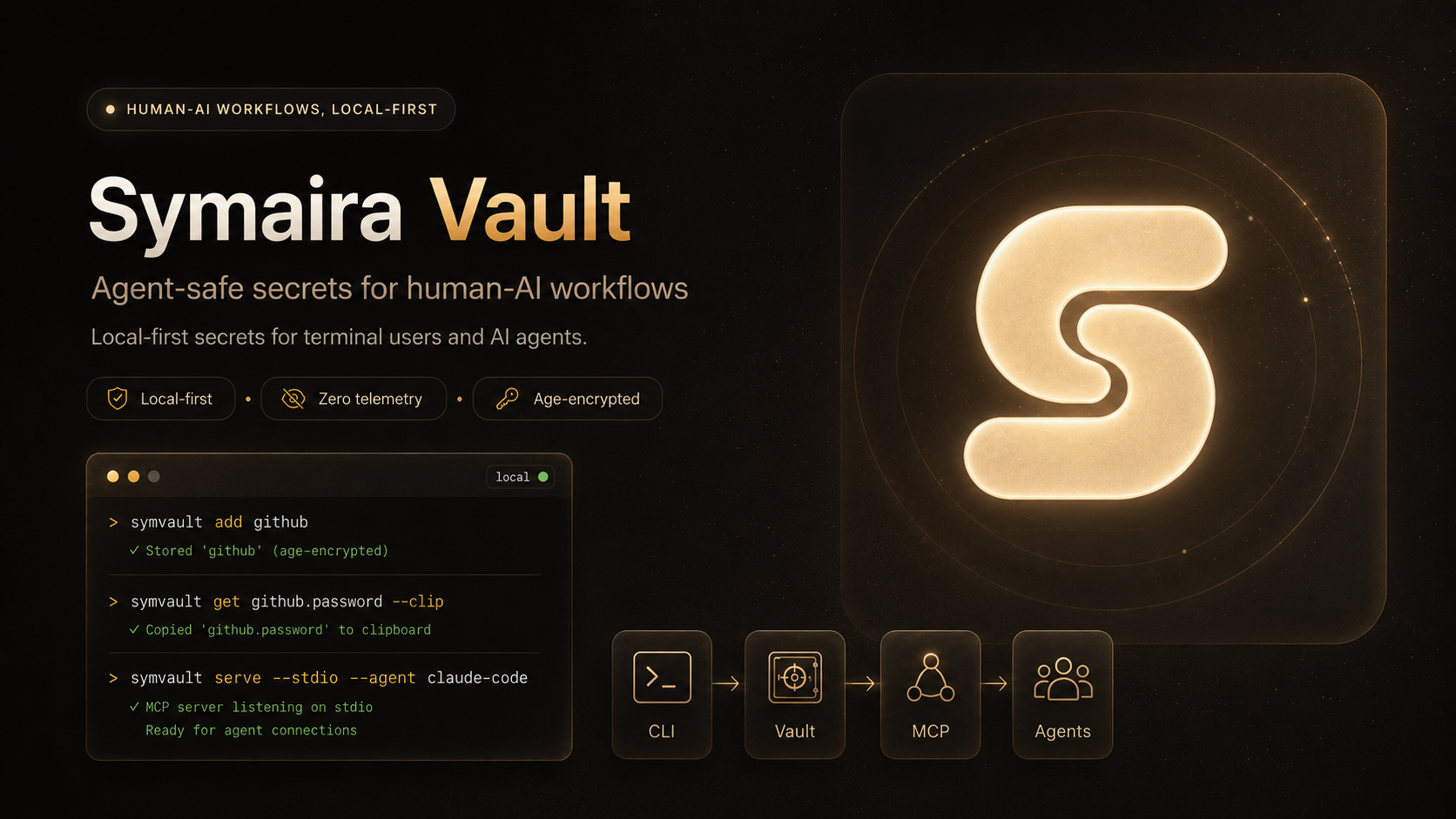
A modern, secure command-line password manager written in Go. Uses age for encryption with built-in MCP server support for AI agent integration.

Safety Notice: Symaira Vault manages sensitive secrets. Use at your own risk, keep tested backups of your vault, and verify recovery before relying on it for critical credentials.
Features
- Modern Encryption: age (X25519 + ChaCha20-Poly1305)
- TOTP Support: Store and generate TOTP codes
- Clipboard Auto-Clear: Automatic clearing after timeout
- Autotype: Cross-platform automatic password entry (macOS, Linux, Windows)
- Secret Execution: Run commands with vault secrets injected as environment variables
- Session Caching: OS keyring with 15-minute TTL
- Git Integration: Automatic commits and sync
- Multi-User Vaults: age recipients for shared access
- MCP Server: stdio and HTTP for AI agent integration with scoped token management
- MCP Slash Commands:
add-credential,rotate-credential,find-and-use,share-credential— guided workflows surfaced as slash commands in Claude Code, OpenCode, Hermes - Native Secure-Input Dialog: cross-platform popups (macOS osascript, Linux zenity/kdialog, Windows Get-Credential) for collecting credentials from agents without exposing them in chat
- Cross-Platform: macOS, Linux, Windows, FreeBSD
Installation
Quick install
macOS / Linux:
curl -sSfL https://raw.githubusercontent.com/danieljustus/symaira-vault/main/scripts/install.sh | sh
Windows:
irm https://raw.githubusercontent.com/danieljustus/symaira-vault/main/scripts/install.ps1 | iex
Homebrew:
brew tap danieljustus/tap
brew install symvault
Scoop:
scoop bucket add symvault https://github.com/danieljustus/scoop-bucket
scoop install symvault
Nix (Flake):
# Run directly (no install needed)
nix run github:danieljustus/symaira-vault

# Or add as a flake input
# flake.nix:
#   inputs.symvault.url = "github:danieljustus/symaira-vault";
Note: The flake is new. Go module dependencies are pinned via
vendorHashinflake.nix. If updating dependencies, rungo mod vendor && nix hash path --sri vendor/and update the hash.
Go:
go install github.com/danieljustus/symaira-vault@latest
For manual downloads, Linux packages, release verification (including Cosign signature verification), and build-from-source instructions, see docs/distribution.md.
| Platform | amd64 | arm64 | Install Methods |
|---|---|---|---|
| macOS | ✓ | ✓ | Quick install, Homebrew, Go, Manual |
| Linux | ✓ | ✓ | Quick install, Homebrew, Go, Manual, deb/rpm/apk |
| Windows | ✓ | ✓ | Quick install, Scoop, Go, Manual |
| FreeBSD | ✓ | ✓ | Go, Manual |
| NixOS / Nix | ✓ | ✓ | Nix flake (nix run github:danieljustus/symaira-vault) |
Quick Start
# Initialize vault
symvault init

# Add a password
symvault add github
# or non-interactive:
symvault set github.password --value "mysecretpassword"

# Add TOTP metadata
symvault add github --totp-secret JBSWY3DPEHPK3PXP --totp-issuer GitHub

# Retrieve (auto-copies to clipboard with 45s timeout)
symvault get github.password --clip

# Autotype password into focused application (macOS/Linux/Windows)
symvault get github.password --autotype

# Show entry details, including the current TOTP code when configured
symvault get github

# List and search
symvault list
symvault find mybank

# Generate secure passwords
symvault generate --length 32 --symbols
symvault generate --store newaccount.password --length 20 --symbols

# Session management
symvault unlock   # cache passphrase
symvault lock     # clear cache
symvault auth status
symvault auth set touchid      # macOS Touch ID unlock
symvault auth set passphrase   # passphrase-only unlock

# Interactive Terminal UI (Experimental)
symvault ui --experimental

# Recipients for multi-user vaults
symvault recipients list
symvault recipients add age1...

# Git sync
symvault git pull
symvault git push

# Secret execution (injects vault secrets as env vars)
symvault run --env API_KEY=api.kimi-key -- curl -H "Authorization: Bearer $API_KEY" https://api.example.com

# Backup/Restore
symvault backup ~/backups/symvault-$(date +%Y%m%d).tar.gz
symvault restore ~/backups/symvault-20260427.tar.gz
Backup archives contain encrypted vault files, identity material, config, and MCP tokens. Protect them like the vault itself and test restore before relying on backups.
Migration from other managers
Symaira Vault can import from 1Password, Bitwarden, pass, and CSV exports:
symvault import <format> <source>
symvault import bitwarden ~/exports/bitwarden.json
symvault import pass ~/.password-store
See docs/migration.md for export steps, format details, and verification guidance.
MCP Server
Symaira Vault exposes an MCP server for AI agent integration:
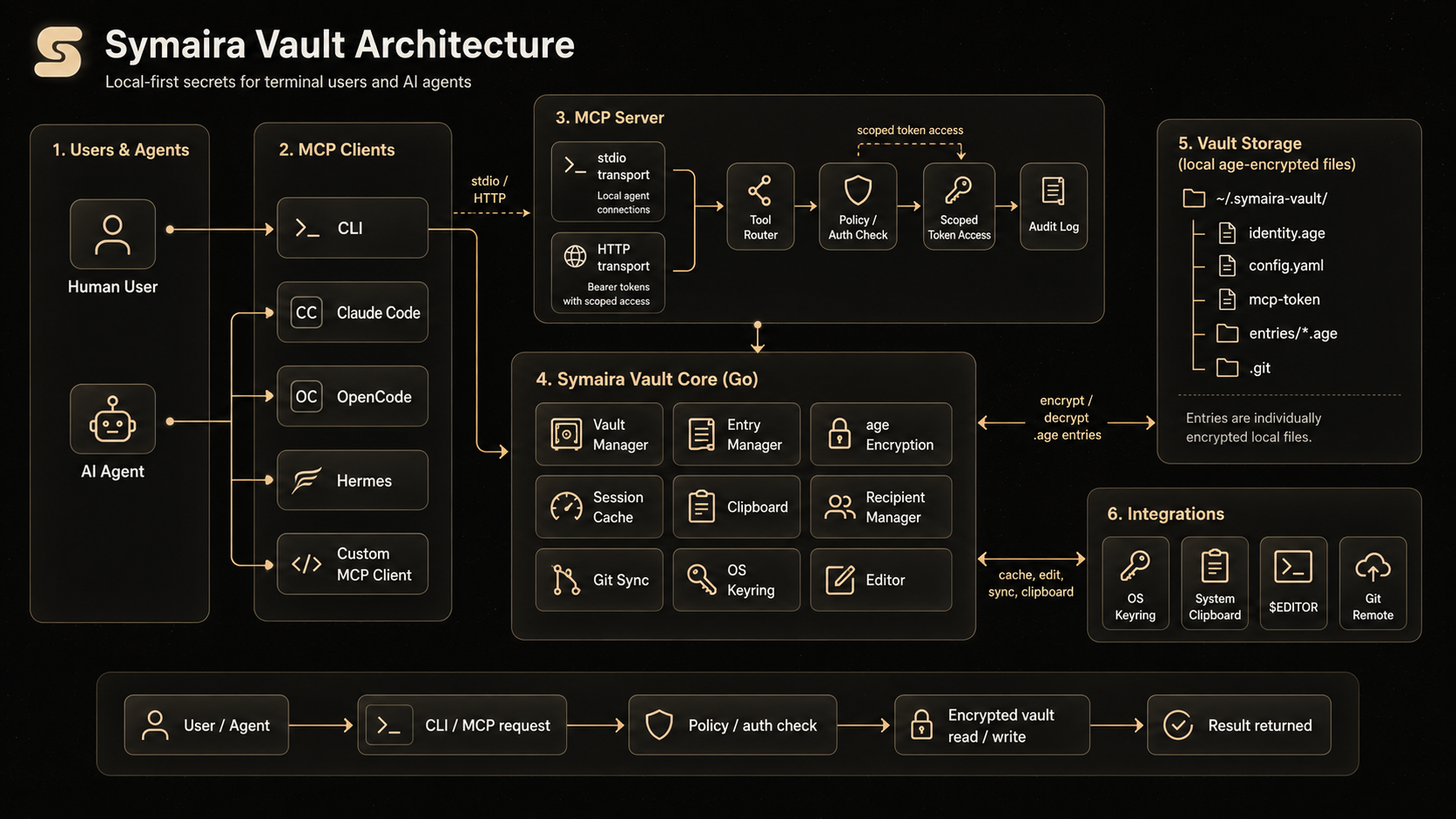
# Stdio mode (recommended for local agents)
symvault serve --stdio --agent claude-code

# HTTP mode
symvault serve --port 8080
Use symvault mcp-config to generate ready-to-paste client config:
symvault mcp-config claude-code
symvault mcp-config claude-code --http
symvault mcp-config hermes --http --format hermes
HTTP mode binds to 127.0.0.1 by default and uses bearer token authentication. Agents can use the MCP generate_totp tool to get current TOTP codes without receiving the stored TOTP secret.
Scoped Token Management (v2.2.0+): Create fine-grained access tokens for agents:
symvault mcp token create --agent hermes --tools list_entries,get_entry --expires 24h
symvault mcp token list
symvault mcp token revoke <token-id>
For detailed agent setup, profiles, token management, and observability, see docs/agent-integration.md.
Configuration
Global config: ~/.symvault/config.yaml. See config.yaml.example for a commented starting point.
For the full configuration reference, see docs/configuration.md.
Environment Variables
SYMVAULT_VAULT— Path to vault directory (default:~/.symvault)
Vault Structure
~/.symvault/
├── identity.age      # Encrypted age identity
├── config.yaml       # Vault configuration
├── mcp-token         # Bearer token for HTTP MCP
├── entries/          # Encrypted password entries
│   ├── github.age
│   └── work/
│       └── aws.age
└── .git/             # Git repository
Security
- age encryption: X25519 + ChaCha20-Poly1305
- Passphrase never stored in plain text
- Session caching via OS keyring (15-minute TTL)
- Each entry individually encrypted
- Git history contains only ciphertext
- HTTP MCP bound to
127.0.0.1with bearer token auth - No telemetry (see SECURITY.md)
Documentation
- Configuration reference
- Agent integration
- MCP API
- Audit event schema
- Audit retention & integrity
- Distribution channels
- Troubleshooting
- Architecture
- Security policy
Comparison
Last updated: May 2026. Features, pricing, and availability are subject to change. Please verify all details on the respective product's official website before making decisions.
Disclaimer: All product names, logos, and brands referenced in this comparison are trademarks or registered trademarks of their respective owners. Use of these names is for identification and informational purposes only and does not imply endorsement, affiliation, or sponsorship. The information in this comparison is provided "as is" without warranty of any kind.
| Feature | Symaira Vault | 1Password | Bitwarden | pass (zx2c4) | Sharing with AI Agents in Chat |
|---|---|---|---|---|---|
| Encryption | age (X25519 + ChaCha20-Poly1305) | AES-256 | AES-256 | GPG | None (plaintext) |
| Primary Interface | Terminal-first | GUI-first (CLI available) | GUI-first (CLI available) | Terminal-only | Chat interface |
| AI Integration | MCP server (stdio + HTTP) with scoped tokens | Agentic Autofill, SDKs for AI agents | MCP server, Agent Access SDK | No AI integration | Paste secrets into prompts |
| Pricing | Free (MIT) | Subscription ($47.88/yr Individual) | Freemium / Subscription ($19.80/yr Premium) | Free (GPL) | Free (but risky) |
| Sync | Git (built-in) | Cloud (1Password servers) | Cloud (Bitwarden servers) or self-host | Git (automatic commits) | Manual copy-paste |
| Self-hosting | Full control (local vault + git) | Partial (Connect Server, SCIM Bridge) | Yes (official Docker/K8s or Vaultwarden) | Full control | N/A |
| Open Source | Yes (MIT) | Partial (SDKs open, core proprietary) | Mostly (core GPL/AGPL, Enterprise Bitwarden License) | Yes (GPLv2+) | N/A |
| TOTP | Built-in | Built-in | Premium feature | Extension only | Manual entry |
| Autotype | Built-in (cross-platform) | Built-in (Windows Auto-Type, macOS Universal Autofill) | Browser autofill only (desktop autotype in development) | No built-in | Manual entry |
| Secret Execution | Built-in (symvault run) | Built-in (op run) | Built-in (bws run) | No built-in | Not applicable |
| Session Caching | OS keyring (15m TTL) | Biometric unlock, Magic Unlock, SSO | Biometric unlock, PIN, BW_SESSION token | gpg-agent | None |
| Git Integration | Built-in | SSH agent, commit signing | SSH agent, GitHub Actions, GitLab CI | Built-in (automatic commits) | No |
| MCP Server | Built-in (stdio + HTTP) | Community (official: no raw secrets via MCP) | Official (bitwarden-mcp) | No | No |
| Password Generation | Built-in | Built-in | Built-in | Built-in | Manual / ad-hoc |
| Cross-Platform | macOS, Linux, Windows, FreeBSD | macOS, Linux, Windows, mobile | macOS, Linux, Windows, mobile, web | Unix-like (Linux, macOS, FreeBSD) | Any chat platform |
| Telemetry | None | Opt-in (personal), on-by-default (business) | Administrative data only (vault zero-knowledge) | None | Logged by chat providers |
| Entry Format | Individual encrypted files | Proprietary database (1PUX export documented) | Encrypted JSON / SQLite | Individual encrypted files | Plaintext in chat history |
Symaira Vault differentiators:
- Terminal-native: Designed for keyboard-driven workflows without GUI dependency
- Modern encryption: age instead of GPG — simpler key management, no web of trust
- MCP-ready: Native AI agent integration via Model Context Protocol with scoped tokens and audit logging
- Zero telemetry: No analytics, no cloud dependency, no account required
- Built-in utilities: TOTP, autotype, secret execution, and password generation without external tools
- Git-native: Automatic sync with full version history of encrypted entries
Security note on AI agent chat sharing: Pasting passwords into chat interfaces exposes secrets in plaintext chat history, model training logs, and provider databases. Unlike Symaira Vault's MCP integration — which keeps credentials encrypted and uses scoped tokens with audit logging — chat sharing provides no access control, rotation, or revocation capabilities.
Dependencies
- Go 1.26.4 or later
- filippo.io/age — encryption
- spf13/cobra — CLI framework
- zalando/go-keyring — OS keyring
Contributing
See CONTRIBUTING.md for development setup and PR process.
Testing
# Run all tests with race detector (recommended for local validation)
make test

# Run tests without race detector (faster, for quick iteration)
make test-fast

# Run specific package tests
go test ./internal/vault/... -v
Tests include the Go race detector by default via make test to catch concurrency issues early. Use make test-fast when iterating quickly and you want a faster feedback loop without the race detector penalty.
Some tests are skipped automatically:
- Slow tests (
-shortflag): Flow and binary e2e tests skip in short mode. Run without-shortto execute them. - Headless CI: Tests requiring the OS keyring (session caching) skip when no keyring backend is available (e.g., containerized or headless CI). These are environment-dependent and not failures.
License
MIT License
Acknowledgments
- Inspired by pass from zx2c4
- MCP support via mark3labs/mcp-go
Disclaimer
Use at your own risk. Always keep tested backups of your vault.