
miko
dan-calin/miko
A personal AI agent for Windows that researches, remembers, watches, and ships code - voice or web chat, any model. Second-brain memory, deep research with cited reports, inbox watches & scheduling, PC/Discord/email/calendar control, and Claude Code as a pair-programming teammate.
Instalação
npx convez-ai dan-calin/miko1 comando no terminal: detecta o formato do repositório (marketplace ou plugin avulso) e instala via Claude Code. Requer Node 18+ e o Claude Code instalado.
Métricas
README
A tradução para o português deste README ainda está na fila.
Miko — a personal AI agent for Windows
Miko is a personal AI agent for Windows that researches, remembers, watches, and ships code — reachable by voice or a web chat UI. It runs multi-round web research and saves cited reports, keeps a local second-brain memory, controls your PC / Discord / email / calendars, keeps standing watch (inbox watches, scheduled tasks, calendar briefs — set up just by asking in conversation), and — the headline — directs Claude Code as a pair-programming teammate to actually change your repos, with your approval and per-round git revert.
It's a self-hosted, single-user tool (your keys live in a local .env). You bring API
keys for the models you use; several integrations below are optional and require their
own setup — those are marked. Miko is bilingual (MIKO_LANGUAGE=en or ro, default
English) and replies in the language you write/speak.
A personal take on JARVIS: loyal, direct, fast — and now a coding teammate, not just a chatbot.
What it does
- Pair programming — Miko directs Claude Code (the CLI) as a coder: Miko instructs, Claude implements in a real repo and reports back, they iterate until both agree it's done. Autonomous or Controlled (approve each round) mode; every round is git-checkpointed with a per-round Revert. Requires Claude Code installed and your own Claude plan/API — and is subject to Claude's own rate limits.
- Deep research — distills a clean subject from your request, runs iterative rounds (search → read → find gaps → search again) in parallel, writes a cited report and saves it to the vault. Report quality depends on which sources are fetchable (many sites block scrapers; those are skipped). Live progress in the Chat UI; spoken summary by voice. Pick the research model (defaults to Gemini Flash).
- Second-brain memory — a local-embedding (fastembed) semantic memory in SQLite that
learns facts from your conversations (reconciles corrections instead of duplicating),
recalls by meaning, keeps an episodic log, and stores notes as an Obsidian-compatible
vault (PARA folders +
[[wikilinks]]). Works in voice and chat. Falls back to a provider embedding API, then keyword search, if fastembed isn't installed. - Sub-agents — Miko can spawn up to 5 focused, read-only agents in parallel to research several angles or inspect multiple files at once, then synthesize their findings.
- Web Chat UI (
/chat) — any model (Gemini, OpenAI, Anthropic Claude, MiniMax, DeepSeek, Kimi, xAI Grok, or any OpenAI-compatible endpoint), a live activity view that shows each tool call as it runs, a Stop button, an approval mode (review file/command changes as diffs before they apply), file & image attachments (drag, drop, or paste — handled sensibly even on models without vision), per-model persona/skill/effort settings, a built-in file explorer + editor, an Inbox viewer, a task scheduler with an interactive calendar, an in-UI Settings panel for every key and credential, resumable conversations, and a selectable workspace. - Email watching (optional) — read, search, triage, and send mail; browse the same inbox Miko reads inside the UI (rich HTML, inline images, attachments); and set standing inbox watches — tell Miko "let me know when Andra emails me" mid-conversation and she schedules it herself, then pings you on Discord with a snippet within ~30 seconds of the mail landing.
- Scheduler — recurring or one-off tasks in plain language ("every morning at 8, DM me my calendar") or from an interactive calendar in the Tasks panel; results arrive as Discord DMs. Miko sets these up herself when you ask in conversation — no forms.
- Voice — real-time voice in/out via Gemini Live (ACTIVE / STANDBY / MUTE modes),
hardened for the real world: sessions resume with context intact after a network
drop, long conversations are compressed instead of truncated, and a missing microphone
means a retry — not a crash loop. A second engine (
MIKO_VOICE_ENGINE=chat) runs voice through the same brain as chat on any provider (STT → chat → TTS). Needs a Gemini key. This is one input mode, not the whole product. - PC control — open apps, file operations, system info, screenshots, reminders, clipboard, volume & media keys. Windows-specific.
- Project mapping — point Miko at a project folder; it scans it, writes a profile to the vault, and keeps it in context so it knows what you're building.
- Calendars (optional) — iCloud (CalDAV) + Microsoft/Outlook (Graph), with morning/midday/night Discord briefs.
- Discord — control Miko from your phone via DMs (text or voice notes), stream music into a voice channel, and control your personal Discord account by voice.
- Optional integrations (each needs setup/deps) — browser automation (Playwright), an MCP client (use tools from external Model Context Protocol servers), and a MiniMax backend + HTTP tool server so external agents can call Miko's tools.
Contents
- Prerequisites
- Installation
- Discord bot setup
- Calendar setup (optional)
- Personal Discord voice control (optional)
- MiniMax & external agents (optional)
- Chat UI
- Second brain & intelligence
- First run
- Voice commands
- Architecture
- Troubleshooting
Prerequisites
| Requirement | Minimum version | Note |
|---|---|---|
| Python | 3.11+ | python.org |
| FFmpeg | any stable build | Must be on your PATH |
| Google Gemini API key | — | aistudio.google.com |
| Windows 11 | — | Windows-only (uses pycaw, winsound) |
| Microphone + speakers | — | Required for voice I/O |
Installing FFmpeg
- Download from ffmpeg.org/download.html (Windows builds).
- Extract the archive (e.g.
C:\ffmpeg\). - Add
C:\ffmpeg\binto your systemPATH. - Verify with
ffmpeg -versionin a terminal.
Installation
# 1. Clone or download the project
cd "C:\Users\YourName\Desktop\Jarvis V2"

# 2. Create a virtual environment (recommended)
python -m venv venv
venv\Scripts\activate

# 3. Install dependencies
pip install -r requirements.txt

# 4. Configure environment variables
copy .env.example .env
notepad .env
Edit .env and fill in at least LLM_API_KEY. See .env.example for every
supported setting.
Language: set MIKO_LANGUAGE=en for English (default) or MIKO_LANGUAGE=ro
for Romanian. This controls the system prompt, spoken confirmations, and mode
announcements. Regardless of the setting, Miko will reply in whichever of the two
languages you actually speak.
Discord bot setup
Only needed if you want the Discord features (music in a voice channel, DMs, notifications):
- Go to discord.com/developers/applications.
- Click New Application and give it a name (e.g. "Miko").
- Open Bot → Add Bot and confirm.
- Under Token, click Reset Token and copy it into
.envasDISCORD_TOKEN. - Under Privileged Gateway Intents, enable:
- Server Members Intent
- Message Content Intent
- Presence Intent
- Under OAuth2 → URL Generator:
- Scopes:
bot - Bot permissions:
Send Messages,Read Message History,Connect,Speak,Use Voice Activity
- Scopes:
- Open the generated URL in a browser and add the bot to your server.
- Copy your server ID into
.envasDISCORD_GUILD_ID. (Enable Developer Mode in Discord → right-click the server → Copy Server ID.)
Tell Miko who you are. Set DISCORD_OWNER to your exact Discord username (and,
optionally, OWNER_ALIASES to comma-separated nicknames). When you say "DM me" or
"invite me to voice", Miko resolves "me" to that account — never to a
similarly-named friend. Both are editable from the UI's Settings panel.
Calendar setup (optional)
Miko can read and create events in your calendars, and send you Discord DM reminders 30 minutes and 5 minutes before each event.
iCloud (CalDAV)
- Sign in at appleid.apple.com → Sign-In and Security → App-Specific Passwords → generate one.
- In
.env:ICLOUD_EMAIL=your_apple_id@example.com ICLOUD_APP_PASSWORD=xxxx-xxxx-xxxx-xxxx
Events must live in an iCloud calendar (not "On My iPhone", which is local-only) to be visible over CalDAV.
Microsoft Teams / Outlook (Graph API)
- Go to portal.azure.com → Entra → App registrations →
New registration.
- Account types: Accounts in any organizational directory and personal Microsoft accounts (register under a personal account to avoid work-tenant admin gates).
- Copy the Application (client) ID.
- API permissions → Microsoft Graph → Delegated →
Calendars.ReadWrite. - Authentication → Allow public client flows → Yes.
- In
.env:AZURE_CLIENT_ID=<application-client-id> AZURE_TENANT_ID=common - The first calendar command prints a device-code login link — open it once, sign in, and the token is cached + auto-refreshed afterwards.
If your school/work tenant blocks third-party apps, register the app under a personal Microsoft account with
AZURE_TENANT_ID=common.
Personal Discord voice control (optional)
Lets Miko control your own Discord account (not the bot) over Discord's local RPC socket — join a voice channel as you, move between channels, mute/deafen yourself. Useful for "Miko, connect me to the General voice channel and mute me."
Requirements: the Discord desktop client running and logged into your account.
Because you own the app, the restricted rpc scopes work without Discord's whitelist.
- In the Developer Portal app (you can
reuse your bot's app) → OAuth2 → copy the Client ID and Client Secret,
and add a redirect URI of
http://localhost. - In
.env:DISCORD_RPC_CLIENT_ID=<client-id> DISCORD_RPC_CLIENT_SECRET=<client-secret> DISCORD_RPC_REDIRECT=http://localhost - Say "Miko, connect to my Discord account" once → approve the popup in your Discord client. The token is cached afterwards and it runs headless.
MiniMax & external agents (optional)
MiniMax backend for phone commands
By default, Discord DM commands are processed with Gemini. Set a MiniMax key to use it instead (Anthropic-compatible or OpenAI-compatible endpoints are auto-detected):
MINIMAX_API_KEY=<your-key>
MINIMAX_BASE_URL=https://api.minimax.io/anthropic
MINIMAX_MODEL=MiniMax-M2.7
Tool server for external agents
Miko exposes all of its tools over HTTP so other agents (e.g. Hermes on WSL2) can
call them — and this is also how you run Miko chat-only, without the voice loop (it
still serves the Chat UI at /chat):
python start_tools_server.py
This starts the HTTP tool server (default port 7832), the Discord bot, and the file
indexer — but no microphone or Gemini Live session, so the agent can use Miko's tools
without Miko listening. Tool schemas are served at GET /tools?format=openai|anthropic|gemini.
Set TOOL_SERVER_KEY to require a bearer token. Trusted local agents may send
X-Bypass-Confirmation: true to skip the voice-confirmation gate on destructive tools.
Chat UI
The tool server also hosts a web chat app where you can type to Miko, pick your model, browse and edit files, and choose the folder she works in. Open it at:
http://localhost:7832/chat
(Available whenever python main.py or python start_tools_server.py is running.)
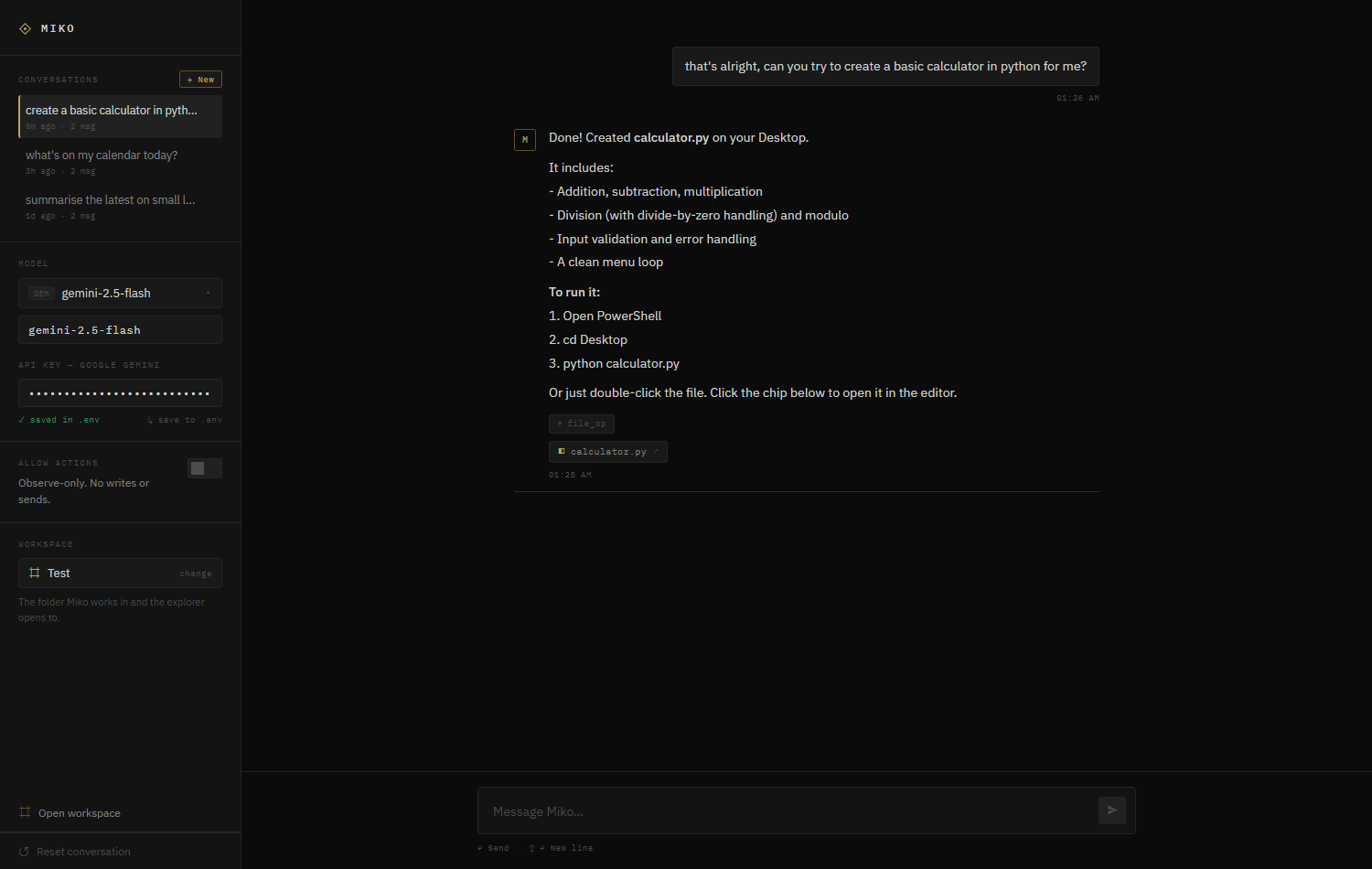 | 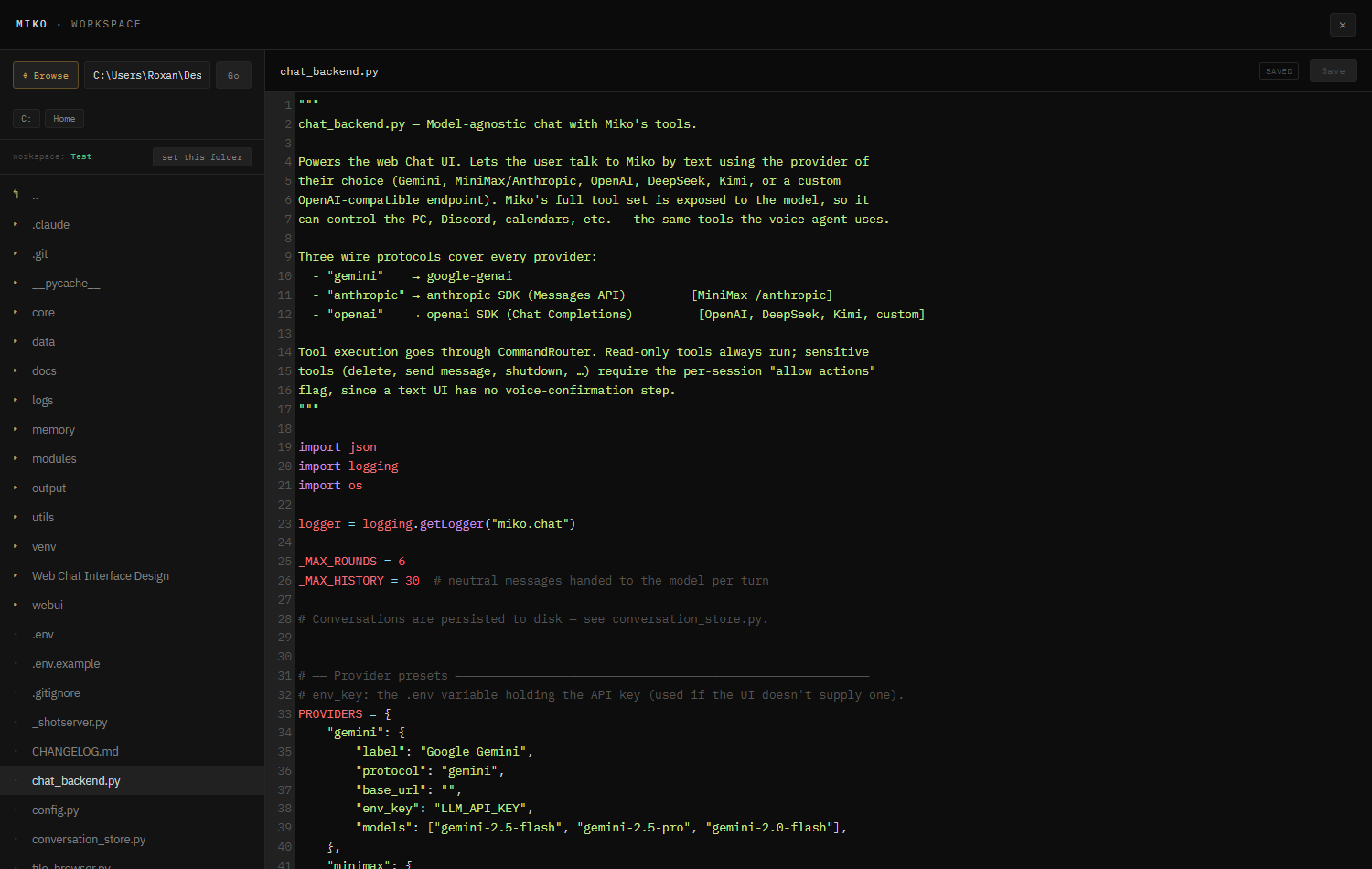 |
| Persistent conversations, model/key/workspace panels, and replies with tool + file-link chips | The built-in Workspace — browse any folder and edit files with syntax highlighting |
Chat & models
- Pick a provider per chat: Google Gemini, MiniMax (Anthropic-compatible), OpenAI, DeepSeek, Kimi (Moonshot), or a custom OpenAI-compatible endpoint (LM Studio, Ollama, etc.) — enter any base URL + model.
- API keys can be typed into the UI (kept in your browser) or saved to
.env— enter a key and click “save to .env” to persist it server-side, no file editing. - Miko's full tool set is available to the model — it can control the PC, Discord, calendars, notes, files, and more, mid-conversation. Each tool she uses shows as a chip.
- Safety: read-only tools always run; sensitive actions (delete, send message, shutdown, …) only run when you flip “Allow actions” on, since a text chat has no spoken confirmation step.
Workspace — file explorer + editor
- Open the Workspace (sidebar button, or click any file chip) for a built-in, VS Code-style file explorer + code editor. Browse folders, open files, edit with syntax highlighting, and save with the button or Ctrl/⌘-S.
- Go anywhere: a Browse… button opens the native Windows folder dialog, plus an editable address bar and drive-letter shortcuts. Browsing and reading are unrestricted; only writes into the Windows system folders are blocked.
- Clickable file links: when Miko creates or edits a file, it appears as a chip under her message — click it to open the file straight in the editor.
Selectable workspace
- Choose the folder Miko works in right now from the sidebar (or “set this folder”
while browsing). The chosen workspace is where the explorer opens, is told to Miko (so
“what workspace are you in?” and “create a file here” follow your choice), and is the
working directory her
run_commandexecutes in. It persists across restarts.
Attachments — send files & images
- Attach with the paperclip, paste, or drag-and-drop (up to 12 MB per file).
- Images: vision-capable models (Gemini, Claude, GPT-4o…) see them directly; for text-only models Miko auto-captions the image server-side so nothing is silently dropped — every model can talk about what you sent.
- Documents: Word / PowerPoint / Excel / OpenDocument / PDF / RTF are text-extracted on the server — no converters, no shell tricks — plus any plain-text/code file as-is.
Inbox — see what Miko sees
- The Inbox button opens the mailbox Miko watches: unread filter, rich HTML rendering (sandboxed — no scripts run), inline images, and attachment previews/downloads. Reading never marks mail as seen.
Tasks — the scheduler panel
- Lists every scheduled task and inbox watch, live (pause / resume / delete — no restart).
- Add tasks in plain language (“every 30 minutes, check HN for AI news and DM me”) or from the interactive calendar: click a day, type the task, done.
Settings — keys & credentials in the UI
- A grouped Settings panel (footer) edits every
.envcredential — Discord, email, calendars, model providers — without touching a file. Secrets are write-only: the server masks saved values and never sends them back to the browser. The Reset conversation button next to it asks twice, so a stray click costs nothing.
Heads-up: the Chat UI is served by the same process as the tools. Changes to the page appear on a browser refresh, but new server features (file browser, workspace, …) need the server restarted (
python start_tools_server.pyorpython main.py).
Second brain & intelligence
Miko is more than a command runner — it learns from you and from its own research, and
keeps that knowledge in a vault you own. Everything below runs locally (embeddings via
fastembed; a SQLite vector store) and works in both voice and chat. The "smart" work
runs asynchronously on a cheap model, so per-turn cost stays small.
Memory that actually learns
- Self-correcting facts. A single memory-aware extract → reconcile pass (Mem0-style)
reads your current memory and the latest turn and emits canonical add/update/delete
operations — so "actually, my name is Dan" overwrites the right fact instead of piling
up duplicates. Tools:
remember,recall,forget. - Recall by meaning. Retrieval is a hybrid score — semantic similarity + keyword + recency
- importance — and only the top few, relevant memories are injected per turn (a tight token budget), not a fixed blob.
- Episodic memory + reflection. Miko keeps a short episodic log of what you've been doing and periodically distills it into durable insights ("you've been building Miko's memory all week"), pruning the raw log — memory that gets smaller and smarter as it grows.
The vault is an Obsidian second brain
Your notes folder (Desktop/Miko Notes, or MIKO_NOTES_DIR) is a plain-Markdown vault you can
open directly in Obsidian — graph view, backlinks, search, zero
migration. Miko lays a light PARA structure over it (Inbox / Projects / Areas / Resources / Archives / Daily), routes captures and research into the right folders, and links related
notes with [[wikilinks]]. Deleting a note also clears it from recall.
Deep Research → permanent knowledge
Toggle the Deep Research skill (or say "research …"): Miko distills a clean subject from
your request, then runs iterative rounds (1/2/3 by effort) of plan → parallel search →
parallel read → gap-analysis → follow-up questions, stopping when coverage is complete. Sources
are ranked and de-duplicated by domain. It writes a cited report and saves it as a linked
note in Resources/ — so next time you ask, plain recall already knows it. The Chat UI streams
live progress and you can Stop mid-run; by voice you get a spoken summary.
Pair programming — Miko ↔ Claude Code
Miko can direct Claude Code (the CLI) as a coding teammate: Miko = boss/instructor,
Claude Code = coder. Toggle Pair in the composer, point it at a project folder,
pick Autonomous (run to completion) or Controlled (approve each round), and type a
goal. Miko instructs → Claude implements in the repo and reports → Miko reviews and pushes
back → they iterate until a two-way handshake (both agree it's done). It drives the
installed claude CLI headlessly with a resumed session, and git-checkpoints every
round so any change is revertible from the UI (per-round Revert button, like /undo).
Needs Claude Code installed (npm i -g @anthropic-ai/claude-code). A code_with_claude
tool exposes the same loop to voice / mid-chat.
Live activity, Stop & sub-agents
Normal chat streams what Miko is doing — a "Working" card shows each tool call as it runs
(→ web_search(…) ✓) and which reasoning round it's on, so the menu isn't a black box. The Send
button becomes a Stop button while a turn (or research) is running. And Miko can summon
sub-agents (spawn_agents): up to five focused, read-only agents that run in parallel —
each searches/reads/recalls on its own and reports back — so big jobs (research several angles,
inspect many files) finish faster. Sub-agents can't make changes or spawn their own sub-agents.
Agents, skills & per-model settings
An Agent / Skills picker by the composer lets you choose an ECC persona (Chief of Staff, Planner, Code Explorer/Reviewer, Security Reviewer) and toggle skills (Deep Research, Article Writing, Brand Voice, Git/GitHub, Email/Knowledge Ops, Codebase Onboarding). These layer trimmed, Miko-adapted instructions into the prompt and work on every provider. The selection — plus an effort dial (Quick / Standard / Deep, which scales research depth) — is remembered per provider+model. (Adapted from ECC, MIT.)
Project mapping (user-controlled)
Point Miko at a project folder (add_project) and it scans the structure + key files, writes a
concise profile into Projects/, and remembers it — so Miko always knows what you're building.
list_projects / forget_project manage them. Miko only maps folders you add.
Calendar awareness
A daemon refreshes today's events and sends morning / midday / night briefs by Discord DM, and the day's schedule is injected into Miko's context (voice + chat) so it always knows what's on — without a calendar call every turn.
Reinforced voice mode
Spoken replies are kept to one or two sentences (no filler). Beyond STANDBY (wake word + a short follow-up window), there's a stricter MUTE mode ("mute yourself" / "complete silence" / "leave me alone") — wake-word only, no window — exited with "Miko, wake up".
The default Gemini Live engine is hardened where realtime voice actually breaks: when the connection drops, the session resumes with its context intact (resumption handles) instead of starting over; long sessions use sliding-window context compression instead of hitting a wall; a missing or unplugged microphone gets a warn + retry every 30 s instead of a reconnect death-loop; and reconnects back off exponentially. A tool-discipline prompt layer keeps voice honest — every claimed action must be a real tool call, so "I've sent it" means it was sent.
Prefer one brain everywhere? MIKO_VOICE_ENGINE=chat routes voice through the same
pipeline as the Chat UI (mic → VAD → STT → chat() → neural TTS) on any provider —
full memory, watches, and tool fixes included — at the cost of a few seconds per turn.
Email, browser, scheduled tasks & MCP
Four optional capability systems Miko can use when configured:
- Email — read, search, and send mail over IMAP/SMTP (
list_emails,read_email,search_emails,send_email), ask plain-language questions about recent mail (triage_inbox— "any job-related emails in the past 2 days?"), and browse the inbox in the UI (the Inbox button). Inbox watches are standing by default: say "look out for emails from andra@…" in conversation and Miko registers the watch herself (watch_email), then DMs you on Discord — sender, subject, and a snippet of the body — within ~30 seconds (MIKO_EMAIL_WATCH_INTERVAL, default 30s). Watches catch Gmail replies as well as new threads, ignore Gmail dot-aliases, never double-ping the same email even with overlapping watches, and only fire for mail that arrives after the watch was set. The watch daemon starts at boot, so watches survive restarts. SetEMAIL_USER/EMAIL_PASS/EMAIL_IMAP_HOST/EMAIL_SMTP_HOSTin.env(Gmail: use an App Password). Sending is gated by approval mode; reading never marks mail unread. - Browser automation — Miko drives a real headless browser (open, click, type, extract,
screenshot) for logins and multi-step flows, not just HTML fetches. Needs
pip install playwright && python -m playwright install chromium. - Scheduled tasks — recurring or one-off prompts that run Miko headlessly and DM you
the result (
schedule_task,list_scheduled_tasks,cancel_scheduled_task). Create them three ways: ask in conversation ("every 30 minutes, check…") and Miko schedules herself; describe it in the Tasks panel; or pick a day on the panel's interactive calendar. The daemon starts at boot, so tasks survive restarts. - MCP client — connect Miko to external Model Context Protocol
servers (stdio or SSE) in
data/mcp_servers.json; their tools becomemcp_<server>_<tool>available to every chat model. Needspip install mcp.
Optional but recommended for fully-offline embeddings:
pip install fastembed. Without it, Miko falls back to a provider embedding API, then to keyword search. The async memory model defaults to a cheapgemini-2.5-flash-lite(override withMIKO_MEMORY_MODEL).
First run
# Activate the virtualenv if it isn't already
venv\Scripts\activate

# Start Miko
python main.py
python main.py starts everything: the tool server (which serves the Chat UI) and,
if a mic + Gemini key are present, the voice loop.
On first launch:
- The Chat UI comes up at http://localhost:7832/chat — this is the main way to use Miko (any model, deep research, pair programming, etc.).
- File indexing runs in the background (2–5 minutes depending on your disk).
- If voice is enabled: a double beep plays once Gemini Live connects, Miko announces it's connected and listening, and it starts in ACTIVE mode.
Chat-only (no voice/mic)? Run just the tool server — see Tool server for external agents. It serves the same Chat UI and all tools.
Voice commands
The examples below are in English. The equivalent Romanian phrasing works too.
Modes
| Voice command | Effect |
|---|---|
Miko, go to standby | Enter STANDBY — only responds to the wake word "Miko" |
Miko, wake up | Return to ACTIVE mode |
Miko, enter conversation mode | AUTO mode — responds naturally to everything |
Miko, stop conversation mode | Leave AUTO mode |
System control
| Voice command | Effect |
|---|---|
Miko, open Chrome | Launch an application |
Miko, open Documents | Open the Documents folder |
Miko, take a screenshot | Save a screenshot to the Desktop |
Miko, lock the screen | Lock Windows |
Miko, what's my system status? | CPU, RAM, battery, disk |
Miko, set a reminder in 10 minutes — call John | Reminder with a notification |
Volume & media
| Voice command | Effect |
|---|---|
Miko, set volume to 50 | Set volume to 50% |
Miko, turn it up | Volume up ×3 |
Miko, turn it down | Volume down ×3 |
Miko, mute | Mute |
Miko, play / pause / next | System media control |
Music on Discord (voice channel)
| Voice command | Effect |
|---|---|
Miko, play Linkin Park on Discord | Search and play in the voice channel |
Miko, queue up Eminem | Add to the playlist |
Miko, skip / Miko, next | Skip the current track |
Miko, pause / Miko, resume | Pause / resume |
Miko, stop the music | Stop and clear the queue |
Miko, what's up next? | Show the queue |
Miko, join voice | Join your voice channel |
Miko, leave voice | Disconnect |
Web research
| Voice command | Effect |
|---|---|
Miko, find the best restaurants in town | DuckDuckGo search + summary |
Miko, what do you know about artificial intelligence? | Search + summary |
Miko, open Google in the browser | Open a URL |
Notes
| Voice command | Effect |
|---|---|
Miko, note that I have a meeting tomorrow at 2 PM | Create a note |
Miko, read today's note | Read the latest note from today |
Miko, show me recent notes | List notes |
Miko, search notes for: project | Search within notes |
Files
| Voice command | Effect |
|---|---|
Miko, find the file budget.xlsx | Search the SQLite index |
Miko, where's my CV document? | Search PDFs / docx |
Miko, list the files in Documents | Folder contents |
Miko, rebuild the file index | Full re-index |
Discord messaging
| Voice command | Effect |
|---|---|
Miko, send John a message: "I'll be there at 8" | DM with confirmation |
Miko, read my Discord messages | Latest DMs |
Miko, invite John to voice | Invitation + join |
Personal Discord account (voice)
Requires Personal Discord voice control set up.
| Voice command | Effect |
|---|---|
Miko, connect me to the General voice channel | Join voice as you |
Miko, move me to Music | Switch your voice channel |
Miko, mute me / Miko, unmute me | Mute/unmute your mic |
Miko, deafen me | Deafen yourself |
Miko, disconnect me from voice | Leave the voice channel |
Calendar
Requires Calendar setup.
| Voice command | Effect |
|---|---|
Miko, what's on my calendar today? | Today's events (iCloud + Teams) |
Miko, what do I have this week? | Upcoming events |
Miko, add an event Friday at 1 PM — Test | Create an event |
Miko, delete that event | Remove an event |
You'll also receive Discord DM reminders automatically — 30 minutes and 5 minutes
before each event — as long as Miko (or start_tools_server.py) is running.
Email & inbox watches
Requires the email settings in
.env(see Email…). These work identically in the Chat UI — just type them.
| Voice command | Effect |
|---|---|
Miko, any new emails? | Plain-language inbox triage |
Miko, watch for emails from andra@gmail.com | Standing watch → Discord ping with a snippet (~30 s) |
Miko, what watches are running? | List active inbox watches |
Miko, stop watching that address | Cancel a watch |
Miko, every morning at 8, DM me my schedule | Recurring scheduled task |
Journey planning
| Voice command | Effect |
|---|---|
Miko, find a coffee shop near me | Nearby places search |
Miko, how do I get to the train station? | Route + Google Maps link |
Miko, plan a trip to the city centre | Full journey plan |
Architecture
main.py
├── Voice engine (MIKO_VOICE_ENGINE)
│   ├── "live" (default): AudioHandler — Gemini Live WebSocket, session-resume,
│   │     context compression, no-mic resilience (core/audio_handler.py)
│   └── "chat": VoiceChat — mic → VAD → STT → chat brain → edge-tts, any provider
│         (core/voice_chat.py)
│   ├── ModeManager (ACTIVE / STANDBY / AUTO filtering)
│   └── CommandRouter (tool dispatch + safety)
├── DiscordBot thread (own asyncio loop)
├── DiscordPoll thread (checks DMs every 2s; runs the phone commander)
├── FileIndexer thread (SQLite, full + incremental)
├── MemoryExtractor thread (every 5 turns, extracts facts from speech)
├── ToolServer thread (FastAPI HTTP bridge + Chat UI)
├── CalendarReminder thread (DM reminders before events)
├── ScheduledTasks daemon (recurring/one-off prompts → Discord DM)
└── EmailWatch daemon (IMAP poll every 30s; standing inbox watches)
start_tools_server.py (headless / chat-only mode) runs everything except the voice
engine — including the Discord DM loop and both daemons — so watches, tasks, and phone
commands keep working without a microphone.
Phone commander (modules/phone_commander.py) handles Discord DM commands (text or
voice notes) with per-user conversation history. It auto-selects its LLM backend:
Anthropic-compatible (e.g. MiniMax …/anthropic), OpenAI-compatible, or Gemini fallback.
Tool server (tool_server.py) exposes all of Miko's tools over HTTP so external
agents (e.g. Hermes) can call them. It serves tool schemas in OpenAI / Anthropic / Gemini
formats and guards execution with an optional bearer token (TOOL_SERVER_KEY) and a
confirmation gate for destructive actions. Run it standalone (no voice) with
python start_tools_server.py. The same server hosts the web Chat UI at /chat
(webui/chat.html), backed by chat_backend.py (model-agnostic chat that runs Miko's
tools) and file_browser.py (the workspace file explorer/editor + folder picker).
Second brain: memory/embeddings.py (local-first embeddings), memory/knowledge_store.py
(SQLite vector store with scored hybrid recall), memory/memory_manager.py (extract→reconcile
learner + reflection), modules/knowledge.py (remember/recall/forget), vault.py
(Obsidian/PARA + wikilinks), deep_research.py (the research pipeline), modules/projects.py
(project mapping), and modules/schedule_briefs.py (calendar briefs). Agents/skills live in
agent_skills.py with the original docs vendored under vendor/ecc/.
Agentic surfaces: chat_backend.py streams live tool activity (/chat/message/stream)
and supports a propose→approve flow for edits/commands; modules/subagents.py runs parallel
read-only sub-agents (spawn_agents); modules/claude_code.py drives the Claude Code CLI
for pair programming (/chat/code, every round git-checkpointed with per-round revert).
Optional integrations each live in their own module: modules/email_box.py (IMAP/SMTP +
the UI inbox viewer), modules/email_watch.py (standing inbox watches), modules/browser.py
(Playwright), modules/scheduled_tasks.py (recurring prompts + the calendar scheduler), and
modules/mcp_client.py (external MCP servers).
Safety: destructive tools (delete file, send Discord message, shutdown, etc.) require
an explicit spoken "da" confirmation. Writes to C:\Windows, System32, and the
Windows registry are hard-blocked in code.
Troubleshooting
Miko doesn't respond to voice
- Check the microphone under Settings → Sound → Input.
- Make sure
sounddevicehas microphone access. - Confirm
LLM_API_KEYis correct in.env.
No module named 'pycaw'
pip install pycaw comtypes
Discord bot won't connect
- Check
DISCORD_TOKENin.env. - Make sure the Privileged Intents are enabled in the Developer Portal.
- The bot must be a member of the server set in
DISCORD_GUILD_ID.
Discord music doesn't work
- Verify FFmpeg is installed and on PATH:
ffmpeg -version. - Make sure you're in a voice channel before issuing the command.
- Confirm
PyNaClis installed:pip install PyNaCl.
UnicodeEncodeError in the console
- Run in Windows Terminal (not the classic CMD).
- Or set
PYTHONIOENCODING=utf-8in your system variables.
File indexing is slow
- Normal on first run — it can take 3–10 minutes on large disks.
- After that it runs incrementally (every 30 min) and is fast.