
arrstack-mcp
CT4nk3r/arrstack-mcp
MCP server for Sonarr, Radarr, qBittorrent & Jellyfin — give your AI assistant control over your media stack
Instalação
npx convez-ai CT4nk3r/arrstack-mcp1 comando no terminal: detecta o formato do repositório (marketplace ou plugin avulso) e instala via Claude Code. Requer Node 18+ e o Claude Code instalado.
Métricas
README
A tradução para o português deste README ainda está na fila.
🎬 arrstack-mcp
An MCP server that gives AI assistants configurable access to homelab media and game services.
Works with Claude Desktop, Cursor, VS Code Copilot, OpenClaw, and any other MCP-compatible client.
Demo
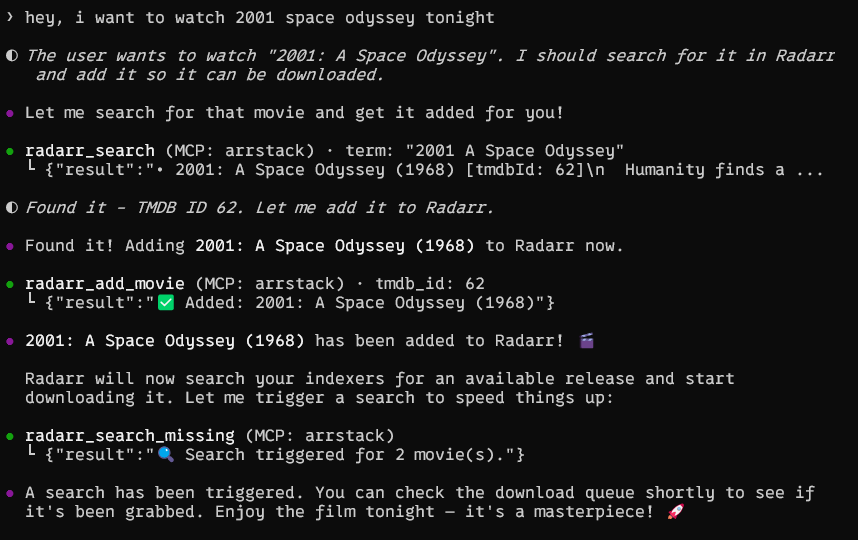
Features
| Service | Tools |
|---|---|
| Sonarr | List series, search & add shows, upcoming episodes, download queue |
| Radarr | List movies, search & add movies, download queue |
| Lidarr | List artists, search & add artists/albums, queue, missing search |
| Prowlarr | List/test indexers, search releases, health check |
| qBittorrent | List/pause/resume/delete torrents, add magnets, transfer stats |
| SABnzbd | Queue, history, status, pause/resume, add NZB url, speed limit |
| RDTClient | Real-Debrid downloader: list/pause/resume/delete torrents, add magnets, provider status |
| Jellyfin | List libraries, recent additions, system info |
| RomM | System info, list platforms, list/search ROMs, game details |
| GameVault | List/search PC games, game details, random game, reindex library |
| Bookshelf | List/search authors & books, queue, missing, profiles, health |
Only configure the services you use — unconfigured services are gracefully skipped.
Choose Your Services
To avoid flooding an MCP client's context with tools it does not need, the advertised tool catalog is configurable:
ENABLED_SERVICES=auto(default) advertises only services with a configured URL.- A comma-separated list such as
sonarr,radarr,rommadvertises exactly that subset. ENABLED_SERVICES=alladvertises every available tool.- Run
python server.py --list-servicesto inspect configured/enabled services. - Run
python server.py --setupfor an interactive selector that prints the resultingENABLED_SERVICESline.
Valid service names are sonarr, radarr, lidarr, prowlarr,
qbittorrent, rdtclient, sabnzbd, jellyfin, romm, gamevault, and
bookshelf. Aliases qbt, rdt, and sab are also accepted.
Quick Start
Option 1: Claude Desktop / Cursor / VS Code (stdio)
-
Install dependencies:
pip install "mcp[cli]>=1.9.0" httpx -
Add to your MCP client config (e.g.
claude_desktop_config.json):{ "mcpServers": { "arrstack": { "command": "python", "args": ["/path/to/arrstack-mcp/server.py"], "env": { "SONARR_URL": "http://localhost:8989", "SONARR_API_KEY": "your-api-key", "RADARR_URL": "http://localhost:7878", "RADARR_API_KEY": "your-api-key", "QBT_URL": "http://localhost:8080", "QBT_USER": "admin", "QBT_PASS": "your-password", "JELLYFIN_URL": "http://localhost:8096" } } } } -
Restart your MCP client. Done!
Option 2: Docker (HTTP transport)
For remote setups or when running alongside your *arr stack:
git clone https://github.com/ct4nk3r/arrstack-mcp.git
cd arrstack-mcp
cp .env.example .env
# Edit .env with your service URLs and API keys
docker compose up -d
The server runs on port 8000 with Streamable HTTP transport.
Connect to OpenClaw
openclaw mcp set arrstack '{"url":"http://arrstack-mcp:8000/mcp","transport":"streamable-http"}'
Connect to other HTTP MCP clients
Point your client to http://<host>:8000/mcp using Streamable HTTP transport.
Option 3: Docker on the same network as your *arr stack
If your media services run in Docker, add arrstack-mcp to the same network:
services:
  arrstack-mcp:
    build: .
    container_name: arrstack-mcp
    ports:
      - "8000:8000"
    environment:
      - SONARR_URL=http://sonarr:8989
      - SONARR_API_KEY=your-key
      - RADARR_URL=http://radarr:7878
      - RADARR_API_KEY=your-key
      - QBT_URL=http://qbittorrent:8080
      - QBT_USER=admin
      - QBT_PASS=your-password
      - JELLYFIN_URL=http://jellyfin:8096
    networks:
      - your-media-network
Configuration
All configuration is done via environment variables:
| Variable | Required | Description |
|---|---|---|
ENABLED_SERVICES | No | auto (default), all, or a comma-separated service subset |
SONARR_URL | No | Sonarr base URL (e.g. http://localhost:8989) |
SONARR_API_KEY | If Sonarr | Sonarr API key (Settings → General) |
RADARR_URL | No | Radarr base URL (e.g. http://localhost:7878) |
RADARR_API_KEY | If Radarr | Radarr API key (Settings → General) |
LIDARR_URL | No | Lidarr base URL (e.g. http://localhost:8686) |
LIDARR_API_KEY | If Lidarr | Lidarr API key (Settings → General) |
QBT_URL | No | qBittorrent Web UI URL (e.g. http://localhost:8080) |
QBT_USER | If qBt | qBittorrent username (default: admin) |
QBT_PASS | If qBt | qBittorrent password |
RDT_URL | No | RDTClient base URL (e.g. http://localhost:6500) |
RDT_USER | If RDT login | RDTClient username (default: admin) |
RDT_PASS | If RDT login | RDTClient password |
JELLYFIN_URL | No | Jellyfin base URL (e.g. http://localhost:8096) |
JELLYFIN_API_KEY | No | Jellyfin API key (optional, for authenticated endpoints) |
PROWLARR_URL | No | Prowlarr base URL (e.g. http://localhost:9696) |
PROWLARR_API_KEY | If Prowlarr | Prowlarr API key (Settings → General) |
ROMM_URL | No | RomM base URL (e.g. http://localhost:8081) |
ROMM_API_TOKEN | If RomM | RomM bearer token; alternatively use ROMM_USER and ROMM_PASS |
ROMM_USER | If RomM basic auth | RomM username |
ROMM_PASS | If RomM basic auth | RomM password |
GAMEVAULT_URL | No | GameVault server URL (e.g. http://localhost:8082) |
GAMEVAULT_API_KEY | If GameVault | GameVault API key |
MCP_ALLOWED_HOSTS | For HTTP/SSE | Comma-separated accepted Host headers; supports wildcard ports such as arrstack-mcp:* |
LOG_LEVEL | No | Request logging level (default: INFO; credentials are never logged) |
SAB_URL | No | SABnzbd base URL (e.g. http://localhost:8080) |
SAB_API_KEY | If SABnzbd | SABnzbd API key (Config → General → API Key) |
BOOKSHELF_URL | No | Bookshelf base URL (e.g. http://localhost:8787) |
BOOKSHELF_API_KEY | If Bookshelf | Bookshelf API key (Settings → General) |
Available Tools
Sonarr (TV Shows)
| Tool | Description |
|---|---|
sonarr_list_series | List all series with episode counts and disk usage |
sonarr_get_series | Get detailed info about a specific series |
sonarr_search | Search for new shows to add |
sonarr_add_series | Add a show by TVDB ID |
sonarr_upcoming | Show upcoming episodes |
sonarr_queue | Show current download queue |
Radarr (Movies)
| Tool | Description |
|---|---|
radarr_list_movies | List all movies with download status |
radarr_get_movie | Get detailed info about a specific movie |
radarr_search | Search for new movies to add |
radarr_add_movie | Add a movie by TMDB ID |
radarr_queue | Show current download queue |
Lidarr (Music)
| Tool | Description |
|---|---|
lidarr_list_artists | List all artists with album/track counts and disk usage |
lidarr_get_artist | Get detailed info about a specific artist |
lidarr_search | Search for artists to add |
lidarr_search_album | Search for albums in metadata |
lidarr_add_artist | Add an artist by name (requires quality + metadata profile + root folder) |
lidarr_list_quality_profiles | List quality profiles |
lidarr_list_metadata_profiles | List metadata profiles |
lidarr_list_root_folders | List root folders with free space |
lidarr_queue | Show current download queue |
lidarr_delete_queue_item | Remove an item from the queue (optionally blocklist) |
lidarr_search_missing | Trigger search for all missing albums |
Prowlarr (Indexers)
| Tool | Description |
|---|---|
prowlarr_list_indexers | List all indexers with status |
prowlarr_test_indexer | Test a specific indexer connection |
prowlarr_test_all_indexers | Test all enabled indexers |
prowlarr_search | Search across indexers for releases |
prowlarr_health | Check system health warnings |
qBittorrent (Downloads)
| Tool | Description |
|---|---|
qbt_list_torrents | List torrents with progress and speed |
qbt_torrent_details | Get detailed torrent info |
qbt_add_magnet | Add a magnet link |
qbt_pause | Pause a torrent |
qbt_resume | Resume a torrent |
qbt_delete | Delete a torrent (optionally with files) |
qbt_transfer_info | Global transfer statistics |
SABnzbd (Usenet Downloads)
| Tool | Description |
|---|---|
sab_queue | Show the current download queue |
sab_history | Show download history |
sab_status | Show full server status (disk, speed, etc.) |
sab_pause | Pause the entire queue |
sab_resume | Resume the entire queue |
sab_pause_job | Pause a specific queue item by NZO id |
sab_resume_job | Resume a specific queue item by NZO id |
sab_delete_job | Delete a queue item (optionally with files) |
sab_add_url | Add an NZB by URL (with optional category/priority) |
sab_speed_limit | Set the global speed limit (0..100% of configured max) |
RDTClient (Real-Debrid Downloader)
RDTClient is a Real-Debrid / AllDebrid / Premiumize download manager that exposes a qBittorrent-compatible API, so it slots into Sonarr/Radarr just like qBt.
| Tool | Description |
|---|---|
rdt_list_torrents | List torrents with progress and speed |
rdt_torrent_details | Get detailed torrent info |
rdt_add_magnet | Add a magnet link to your debrid provider |
rdt_pause | Pause one or more torrents |
rdt_resume | Resume one or more torrents |
rdt_delete | Delete one or more torrents (optionally with files) |
rdt_provider_status | Show configured debrid provider (Real-Debrid / AllDebrid / etc.) |
Jellyfin (Media Server)
| Tool | Description |
|---|---|
jellyfin_libraries | List media libraries |
jellyfin_recent | Recently added items |
jellyfin_system_info | Server version and system info |
RomM (ROM Library)
| Tool | Description |
|---|---|
romm_system_info | Show version, detected platforms, and metadata sources |
romm_list_platforms | List platforms, ROM counts, and library sizes |
romm_list_games | List or search indexed ROMs |
romm_get_game | Show details for one indexed ROM |
GameVault (PC Game Library)
| Tool | Description |
|---|---|
gamevault_list_games | List or search PC games and installers |
gamevault_get_game | Show details for one game |
gamevault_random_game | Pick a random indexed game |
gamevault_reindex | Scan the game-files directory for changes |
Bookshelf (Books — Hardcover-flavored Readarr fork)
Bookshelf is pennydreadful/bookshelf, a fork of Readarr that uses hardcover.app as its metadata provider. It exposes the standard Readarr v1 API, so these tools behave like the Sonarr/Radarr/Lidarr equivalents.
| Tool | Description |
|---|---|
bookshelf_health | Version + active health-check issues |
bookshelf_list_authors | List monitored authors with book counts and disk usage |
bookshelf_get_author | Detailed info for an author by ID |
bookshelf_search_author | Search Hardcover for an author |
bookshelf_search_book | Search Hardcover for a book |
bookshelf_list_books | List all tracked books |
bookshelf_queue | Current download queue |
bookshelf_wanted_missing | Books flagged as missing |
bookshelf_list_quality_profiles | Quality profiles |
bookshelf_list_metadata_profiles | Metadata profiles |
bookshelf_list_root_folders | Root folders with free space |
bookshelf_search_missing | Trigger a search for all missing books |
Transport Options
# stdio (default) — for Claude Desktop, Cursor, VS Code
python server.py

# Streamable HTTP — for Docker / remote
python server.py --transport streamable-http --port 8000

# SSE — legacy HTTP transport
python server.py --transport sse --port 8000
Finding Your API Keys
- Sonarr: Settings → General → API Key
- Radarr: Settings → General → API Key
- Lidarr: Settings → General → API Key
- Prowlarr: Settings → General → API Key
- qBittorrent: Settings → Web UI → Authentication
- SABnzbd: Config → General → API Key
- RDTClient: Settings → General → Authentication (or set
Authentication: Noneto allow open access on a trusted network) - Jellyfin: Dashboard → API Keys → Add
- RomM: User profile → API Tokens, or configure
ROMM_USERandROMM_PASS - GameVault: Admin panel → API Keys
- Bookshelf: Settings → General → API Key (same as Readarr)
Security
The HTTP/SSE transports listen on 0.0.0.0:8000 by default, and MCP does not
provide authentication by itself. Anyone who can reach that port can invoke
tools using the configured service credentials.
- Prefer stdio for same-machine clients.
- For remote access, restrict port
8000to Tailscale or place it behind an authenticated reverse proxy. - DNS-rebinding protection is enabled. Set
MCP_ALLOWED_HOSTSto the exact hostnames or IP addresses clients use, with optional wildcard ports:localhost:*,127.0.0.1:*,arrstack-mcp:*,100.64.0.1:*. - The Docker image runs as non-root user
appuserwith UID1000. - API keys and request headers are never logged.
License
MIT