
omind
CryptoJones/omind
OMI/Obsidian memory tooling for AI agents: reproduce the integration on any machine, plus a local web app to view, edit, and add memory entries.
Instalação
npx convez-ai CryptoJones/omind1 comando no terminal: detecta o formato do repositório (marketplace ou plugin avulso) e instala via Claude Code. Requer Node 18+ e o Claude Code instalado.
Métricas
README
A tradução para o português deste README ainda está na fila.
omind
OMI/Obsidian memory tooling for AI agents: reproduce the integration on any machine, plus a local web app to view, edit, and add memory entries.




Mirrored on both GitHub and Codeberg. Issues filed on either are welcome; commits are pushed to both.
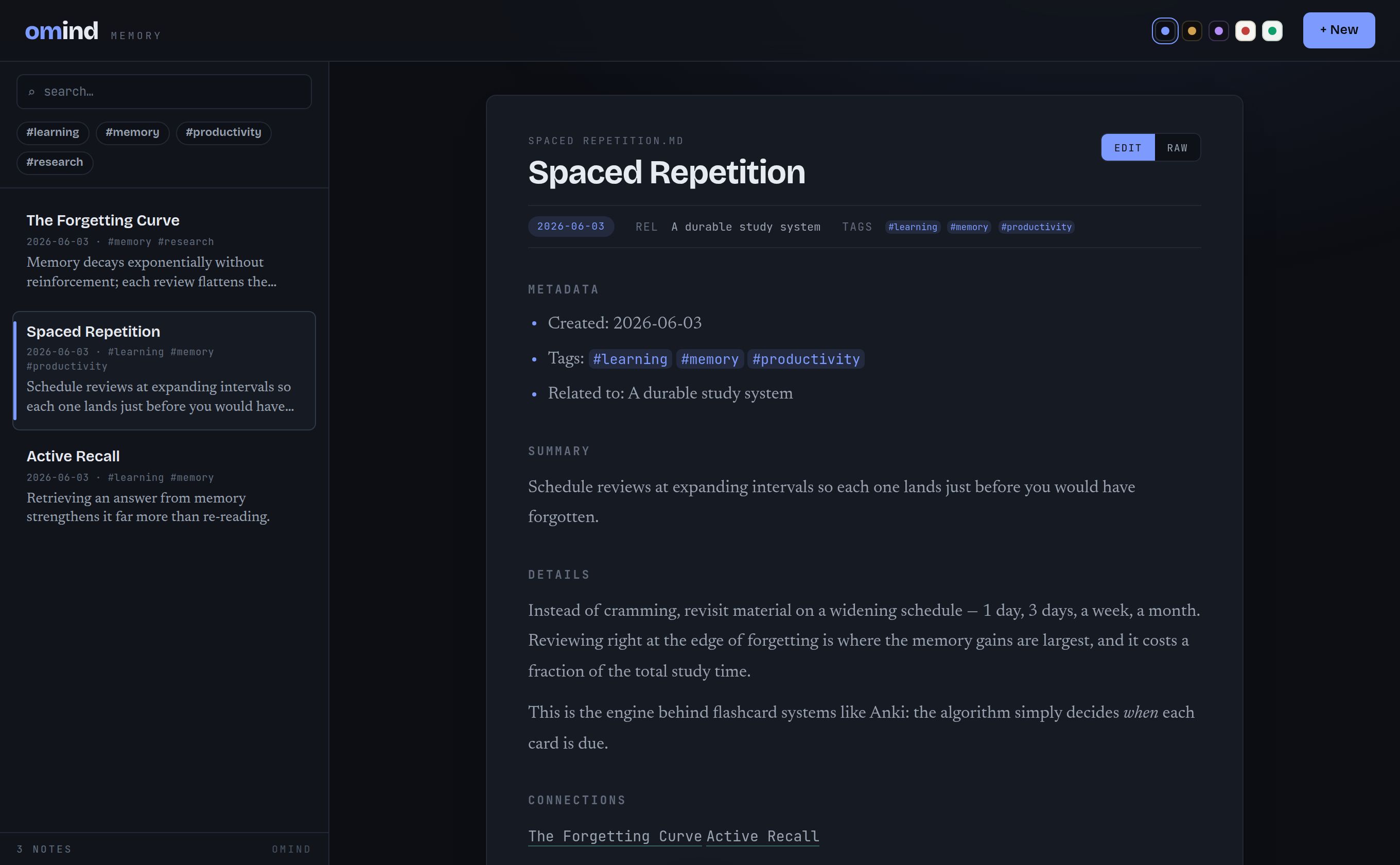
The omind serve web UI viewing a memory note in the Midnight theme — one of five built-in themes.
What it does
OMI ("Open Mind Interface") is a folder of Markdown notes that an AI agent
reads and writes as long-term memory. omind does two things with it:
omind setup— idempotently registers omind's own node MCP server (omind node) with the Claude Code CLI, pointed at an OMI folder inside an Obsidian vault, and initializes the folder as a mesh node (see below). After this, Claude Code persists memory across sessions through the MCP tools — and across machines through the mesh.omind mesh— peer-to-peer replication: every machine runs a full local node and nodes sync over git+ssh, with per-note Lamport versioning and a field-level merge driver. No central server, full offline operation. Deleting archives (restorable) instead of removing. See docs/mesh.md (design) and docs/mesh-ops.md (operation).omind serve— a small local web app (FastAPI + Tailwind) to view, edit, and add memory entries in that same folder, without opening Obsidian. Ships with five themes and a switchable UI in six languages (English, Spanish, French, Arabic, Russian, Chinese), including right-to-left layout for Arabic.omind doctor— diagnose the wiring in one shot: Claude CLI + git onPATH, theomiMCP server registered at user scope with the right command, the OMI folder readable, mesh health (node identity, merge driver, per-peer ahead/behind, last-sync age, unresolved conflicts), backup health (unconfigured / last-success age / failing), and whether the auto-memory hooks have recorded any recent failures.omind backup— encrypted, unattended off-machine backup of the OMI folder, wrapping restic (see Encrypted backup below).
The web UI works fully offline (fonts, styles, and the Markdown renderer are
vendored — no CDN). It shows backlinks for the open note, refreshes the list
live as other tools write the folder, guards against clobbering external edits,
and has keyboard shortcuts (/ search, n new, j/k to move, Ctrl/Cmd+S
to save, Esc to cancel).
Everything runs locally. No accounts, no cloud, no cost.
Install
One-step bootstrap (checks/installs dependencies, installs omind, verifies):
# clone, then:
scripts/bootstrap.sh                       # or: --remote codeberg, --vault PATH
It auto-installs uv (user-local, no root — and it bootstraps Python ≥3.10 for
you), checks for git/claude with install guidance if either is missing,
then runs omind setup + omind doctor. Note: omind has no Docker and no
Node.js dependency — only git and the Claude Code CLI.
Manual — an isolated CLI install straight from the git remote:
# via uv (recommended — also provides a compatible Python if the system one is <3.10)
uv tool install git+https://github.com/CryptoJones/omind.git

# or via pipx
pipx install git+https://github.com/CryptoJones/omind.git
Either puts the omind command on your PATH in its own virtualenv. Codeberg
works too — swap in git+https://codeberg.org/CryptoJones/omind.git.
For development, install editable from a clone (see CONTRIBUTING.md):
git clone https://github.com/CryptoJones/omind.git
cd omind
pip install -e ".[dev]"
Quick start
Provision the Claude Code MCP wiring (idempotent; safe to re-run):
omind setup --vault "$HOME/Documents/Obsidian Vault"
Prefer to wire things in yourself? Print the same steps as copy-paste shell commands and JSON, personalized to your paths — nothing is changed for you:
omind quickstart --vault "$HOME/Documents/Obsidian Vault"
It covers all four pieces (memory folder scaffold, mesh initialization, user-scope MCP registration, auto-memory hooks), each independently applicable. The annotated walkthrough lives in docs/manual-setup.md.
Run the web UI over the same memory folder:
omind serve --vault "$HOME/Documents/Obsidian Vault"
# open http://127.0.0.1:8765
Preview what setup would do without changing anything:
omind setup --vault "$HOME/Documents/Obsidian Vault" --dry-run
Check that everything is wired up correctly:
omind doctor --vault "$HOME/Documents/Obsidian Vault"
Add or update a single memory note safely — it creates the note, or updates it in place if the title already exists, through the same locked, atomic write path every other tool uses (body comes from stdin):
echo "the body of the note" | omind note --title "An Insight" --tags thesis,attention
Back up or migrate the whole memory dataset:
# export — json (default; portable & diffable) or targz (full-fidelity snapshot)
omind export --vault "$HOME/Documents/Obsidian Vault" --out omi-export.json
omind export --vault "$HOME/Documents/Obsidian Vault" --format targz --out omi.tar.gz

# import — format auto-detected by extension
omind import omi-export.json --vault "$HOME/Documents/Obsidian Vault"
Import adds new notes and leaves identical ones untouched; a note whose content
differs is kept as-is on disk and reported, unless you pass --force. Imports
never delete.
Encrypted backup
The vault is long-term memory on one disk; omind backup keeps an encrypted
copy off-machine, wrapping restic:
# one-time: generate the password file (0600) and create the encrypted repo
omind backup init --repo sftp:host:/path     # or a local path, s3:, b2:, …

# snapshot now, with 7-daily / 4-weekly / 6-monthly retention
omind backup run

# restic check + restore the latest snapshot's index.md and diff it live
omind backup verify

# unattended: a daily systemd user timer running `backup run`
omind backup install-timer
Every external command runs with a timeout, so a restic hung on a dead link
fails loudly instead of wedging the timer; three consecutive failures write a
BACKUP FAILING note into the vault so the problem surfaces in session
priming, and omind doctor reports backup health either way. If restic is
absent, run degrades to unencrypted rsync --link-dest snapshots and doctor
warns about the degradation.
Copy ~/.config/omind/backup.pass somewhere safe off-machine. It encrypts
every snapshot; losing it with the disk makes the backups unreadable.
Other agents: Hermes Agent and OpenClaw
Claude Code is the default, but the same OMI folder can back any agent. omind setup --agent ... provisions two more out of the box:
omind setup --agent hermes   --vault "$HOME/Documents/Obsidian Vault"   # Hermes Agent
omind setup --agent openclaw --vault "$HOME/Documents/Obsidian Vault"   # OpenClaw
Each does the same three things, adjusted for where that agent keeps its config:
- The shared steps — OMI folder scaffold, mesh initialization — identical to
the Claude Code path, so all agents talk to one memory folder through
the same
omind nodeserver. - Registers the MCP server where the agent looks for it: the
mcp_serversblock in~/.hermes/config.yaml(Hermes Agent), or themcp.serversblock in~/.openclaw/openclaw.json(OpenClaw — legacy~/.clawdbot/~/.moltbotinstalls are detected too). Only omind's own entry is ever touched; a config file that doesn't parse is never overwritten. - Installs an
omind-omi-memoryskill into the agent's skills directory that teaches it to read memory through the MCP tools and write it throughomind note— the single-writer path that keeps concurrently running agents from corrupting the folder (see docs/mesh.md → "Node types & the single-writer rule").
omind doctor --agent hermes|openclaw diagnoses that agent's wiring, and
omind quickstart --agent hermes|openclaw prints the manual steps (YAML/JSON
snippets personalized to your paths) if you'd rather merge them in yourself.
The auto-memory journal hooks remain Claude Code-only for now — Hermes Agent and OpenClaw emit different hook payloads; their actions reach OMI through the skill instead.
See CHANGELOG.md for release notes.
The memory mesh (2.0)
2.0.0 turned omind from a single-machine tool into a git-backed mesh —
every machine runs a full local memory node, and the nodes replicate to one
another peer-to-peer over git, so memory is shared across the house with
no central server and full offline operation. Concurrent writes build on
the per-node write safety (advisory flock + atomic os.replace +
note_version compare-and-swap) and add cross-node Lamport versioning
with a field-level merge; "deleting" a note archives it (hidden,
restorable) rather than tombstoning it. Design:
docs/mesh.md; operation:
docs/mesh-ops.md.
License
Apache 2.0. See LICENSE.
Proudly Made in Nebraska. Go Big Red! 🌽 https://xkcd.com/2347/