
Chronicle.MCP
Cratis/Chronicle.Mcp
Integração de event sourcing Chronicle com agentes de IA via MCP
Ver no GitHubServidor MCP que integra o Chronicle, um sistema de event sourcing, com ferramentas como Claude via protocolo stdio. Permite acesso a funcionalidades de Chronicle através de agentes de IA, com suporte a Docker e configuração flexível via variáveis de ambiente.
Instalação
npx convez-ai Cratis/Chronicle.Mcp1 comando no terminal: detecta o formato do repositório (marketplace ou plugin avulso) e instala via Claude Code. Requer Node 18+ e o Claude Code instalado.
Métricas
Casos de uso
- Integrar sistemas baseados em event sourcing com agentes Claude
- Gerenciar eventos e histórico de aplicações via IA
- Automatizar operações em infraestrutura Chronicle através de agentes
Veredito

MCP server robusto e bem-documentado para integração com Chronicle, com suporte Docker multi-arquitetura e configuração sensata para desenvolvimento local. Adequado para times que usam event sourcing e precisam expor operações via agentes de IA.
README
A tradução para o português deste README ainda está na fila.
Chronicle.MCP




Using
The Chronicle MCP server leverages Stdio and is packaged as a container. In your tool, configure it using that.
Note: You must have a Chronicle server running.
Example: VSCode
In VSCode you would do this by adding a tool to your agent.
This can done either by adding it to the global user settings or through an mcp.json file in
the .vscode folder of your project.
For the global user settings, you simply do the following:
"mcp": {
    "servers": {
        "Chronicle": {
            "type": "stdio",
            "command": "docker",
            "args": [
                "run",
                "-i",
                "--rm",
                "-eCratis__Chronicle__Mcp__ConnectionString=chronicle://host.docker.internal:35000",
                "cratis/chronicle-mcp"
            ]
        }
    }
}
Note: To configure the connection string for Chronicle you pass it an environment variable;
Cratis__Chronicle__Mcp__ConnectionStringrunning locally - on MacOS and Windows the host machine is found athost.docker.internal.
For a local mcp.json file, its almost the same:
{
    "servers": {
        "Chronicle": {
            "type": "stdio",
            "command": "docker",
            "args": [
                "run",
                "-i",
                "--rm",
                "-eCratis__Chronicle__Mcp__ConnectionString=chronicle://host.docker.internal:35000",
                "cratis/chronicle-mcp"
            ]
        }
    }
}
You can see this in action in the mcp.json in this repository.
Note: The
cratis/chronicle-mcpis a multi CPU architecture image supporting both x64 and arm64 automatically.
Configuration
Configuration is optional. The MCP server works out of the box with sensible defaults suitable for local development:
- Connection String:
chronicle://host.docker.internal:35000/?disableTls=true - Credentials: Development client ID (
chronicle-dev-client) and secret (chronicle-dev-secret) - Management Port:
8080
If you need to customize any settings, the MCP server can be configured entirely on its own and is also compatible with the Cratis CLI. For any value you do not set explicitly, the server resolves it in this order:
- Explicit MCP options (environment variables /
appsettings.json). - The
CHRONICLE_CONNECTION_STRING/CHRONICLE_MANAGEMENT_PORTenvironment variables. - The active context in the CLI configuration at
~/.cratis/config.json. - Built-in development defaults.
When client credentials are used, the server obtains and caches OAuth tokens in ~/.cratis/tokens,
the same location used by the CLI, so tokens are shared between the two.
All options live under the Cratis:Chronicle:Mcp configuration section. As environment variables
they use the Cratis__Chronicle__Mcp__ prefix:
| Option | Environment variable | Description |
|---|---|---|
ConnectionString | Cratis__Chronicle__Mcp__ConnectionString | The Chronicle connection string. Defaults to chronicle://localhost:35000/?disableTls=true. |
ManagementPort | Cratis__Chronicle__Mcp__ManagementPort | Management port for the HTTP API and token endpoint. Defaults to 8080. |
Context | Cratis__Chronicle__Mcp__Context | The CLI context to read connection details from (defaults to the active context). |
UseCliConfiguration | Cratis__Chronicle__Mcp__UseCliConfiguration | Set to false to ignore ~/.cratis/config.json entirely. |
ClientId / ClientSecret | Cratis__Chronicle__Mcp__ClientId / ...__ClientSecret | Client credentials for authentication. Defaults to development credentials if not specified. |
ApiKey | Cratis__Chronicle__Mcp__ApiKey | An API key to authenticate with, as an alternative to client credentials. |
EventStore | Cratis__Chronicle__Mcp__EventStore | The default event store used by tools when none is specified. Defaults to default. |
Namespace | Cratis__Chronicle__Mcp__Namespace | The default namespace used by tools when none is specified. Defaults to Default. |
Prompts / Tools
The server exposes the following tools. Every tool defaults the event store and namespace to the configured defaults when you do not specify them, so you can ask high-level questions and only mention a store or namespace when you need a specific one.
| Tool | Description |
|---|---|
| Tool | Description |
| ---- | ----------- |
list_event_stores | List all event stores on the server. |
list_namespaces | List namespaces within an event store. |
list_event_types | List registered event types. |
list_observers | List observers (reactors, reducers, projections), optionally filtered by type. |
get_observer | Show detailed information about a specific observer. |
list_failed_partitions | List observer partitions that have failed and are paused. |
list_projections | List projection definitions. |
list_read_models | List read model definitions. |
get_read_model_instances | List the current instances of a read model (paged). |
get_events | Read events from an event sequence, with optional filtering. |
get_tail_sequence_number | Get the highest used sequence number (tail) in an event sequence. |
list_recommendations | List active maintenance recommendations. |
get_server_version | Get version info from the server (also a connectivity check). |
list_jobs | List all jobs in a namespace, optionally filtered by job status. |
get_job | Get a specific job by ID, including full details and status changes. |
get_job_steps | Get the job steps for a specific job, optionally filtered by step status. |
stop_job | Stop a specific job (transitions to Stopped status). |
resume_job | Resume a specific stopped job. |
delete_job | Delete a specific job (transitions to Removing status). |
You can ask it things like:
- List all event stores
- List all event types in the [put name here] event store
- List all observers in the [put name here] event store and namespace [put namespace here]
- Show me the events in the [put name here] event store
- Are there any failed partitions?
- What observers in the [put event store name here] use event type [put event type name]
- List all jobs in the [put event store name here] event store
- Show me job [put job id here] in the [put namespace name here] namespace
- What steps does job [put job id here] have?
- Stop / Resume / Delete job [put job id here]
Local development
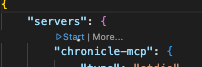
Using VSCode, the mcp.json in the .vscode folder of this repository is automatically supported.
Open it and click the Start button:
During development, compile and click the Restart button when having the mcp.json open:

Chronicle
To get Chronicle running, there is a docker-compose.yml file in the Source folder.
Simply do docker compose up -d and you'll have a Chronicle instance running.
If you want some data, we recommend using our samples and specifically the console to initialize it with some data.