
Claude Code Agent Radio
connerkward/claude-code-agent-radio
Notificações de agentes com rádio ATC e callsigns para Claude Code
Ver no GitHubAgent que adiciona notificações tipo RTS (real-time strategy) para Claude Code, com áudio em estilo transmissão de rádio, callsigns únicos por janela e overlay retrô não-invasivo. Cada agent que precisa de você fala seu próprio callsign, toca chatter de rádio temático e exibe um card portrait na tela, consciente do foco da janela ativa.
Instalação
npx convez-ai connerkward/claude-code-agent-radio1 comando no terminal: detecta o formato do repositório (marketplace ou plugin avulso) e instala via Claude Code. Requer Node 18+ e o Claude Code instalado.
Métricas
Casos de uso
- Monitorar múltiplas janelas de Claude Code simultaneamente
- Identificar auditivamente qual agente precisa de permissão ou atençãoparametros de throttling e rate-limiting
- Gerenciar workflows paralelos de coding com feedback visual e sonoro não-invasivo
Veredito

Solução criativa e altamente específica para power users de Claude Code que rodam múltiplos agents. Excelente UX por áudio + visuals, mas limitada a macOS e requer setup manual de hooks. Polida e bem documentada, ideal para quem quer feedback sensorial sério em workflows paralelos.
README
A tradução para o português deste README ainda está na fila.
claude-code-agent-radio
RTS-style "incoming transmission" notifications for Claude Code (and any agent that fires hooks). When an agent needs you — a permission prompt, or it's gone idle waiting — it speaks a short line of radio chatter via macOS say and shows a small retro portrait card in the corner of the screen. Each window gets its own callsign so you can tell, by ear and at a glance, which of your agents is calling.
Think StarCraft unit callouts meets ATC radio discipline, for a desk full of parallel coding agents.
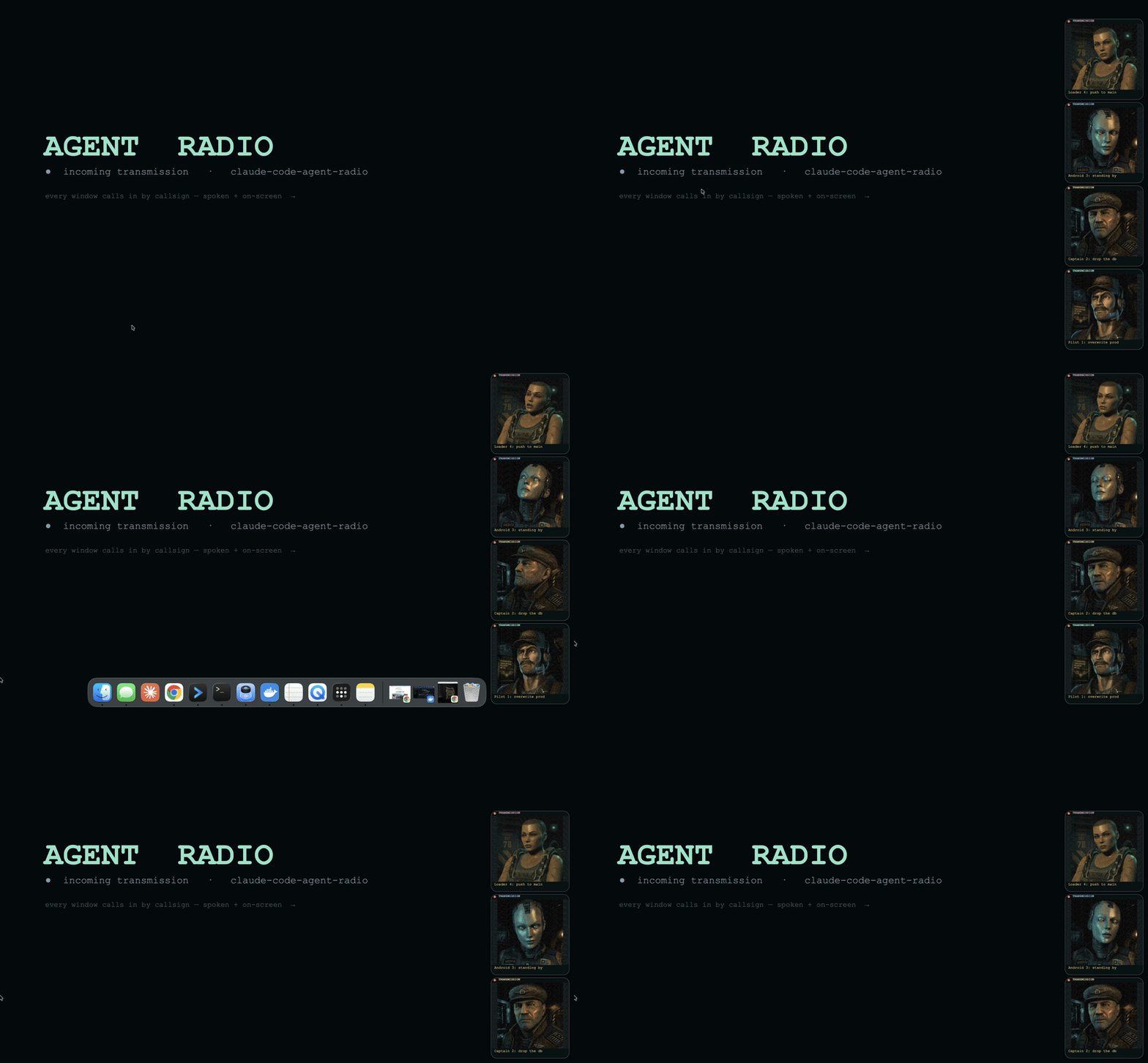
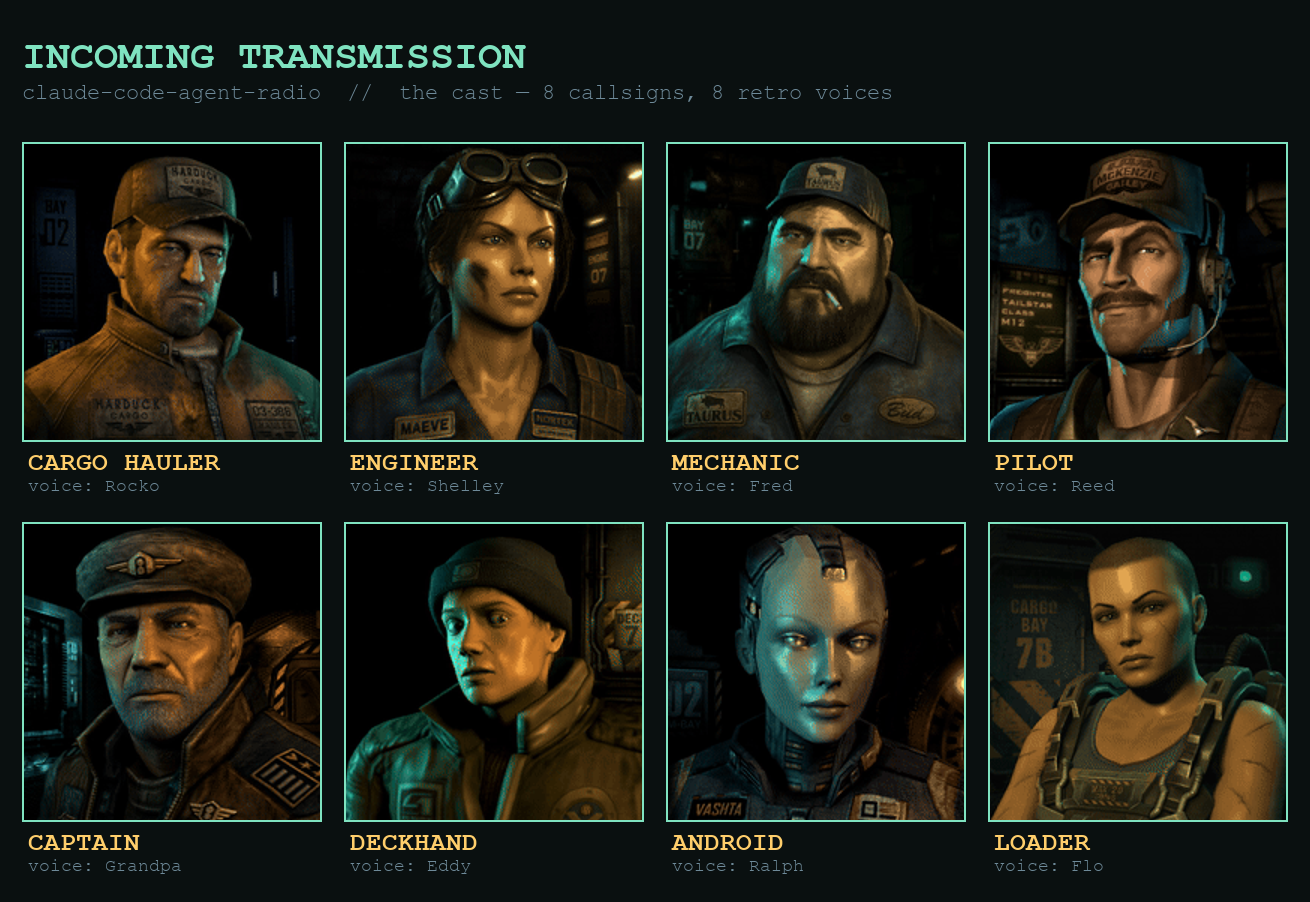
▶ Watch the demo with sound (docs/demo.mp4) — four windows calling in, each with its own callsign, portrait, and voice.
Why
If you run several Claude Code windows at once, you lose track of which one is blocked on you. A single system beep doesn't say who or why. agent-radio gives every window a named voice + face and only speaks when you're actually needed — and never over the window you're already looking at.
What you get
- Spoken radio chatter, routed by event: a warning tone for dangerous/mutating-tool permission ("danger close, weapons free?"), a clearance for benign permission, an idle sign-off when it hands back to you.
- Per-window callsign, derived from the conversation's own title (Claude's
/rename), with collision numbering ("Central 1", "Central 2") when two windows would clash. Any agent can name itself withsay-callsign.sh "Takeout Watch". - A floating RTS portrait card (a persistent, click-through, non-focus-stealing overlay daemon — it never steals your keyboard focus).
- Focus-aware quiet: silent for the window you're actively in; audio-only (no card) while you're typing in the terminal; the full card when you're in another app.
- Rate-limit "fuel gauge" callouts: JOKER (≥80%) → BINGO (≥95%) → WINCHESTER (≥100%), spoken in gas/fuel metaphors, fired once when you cross a threshold.
- TTS pronunciation that spells acronyms and reads CLI flags aloud (
API→"A P I",-rf→"dash r f"). - A lookdev studio (
say-notify-devserver.py) with live sliders to tune the card's look, voices, and timing.
Requirements
- macOS (uses
say,afplay, AppKit/ScreenCaptureKit via Swift,lsof). jq,swiftc(Xcode CLT) — the overlay binaries build on demand.- Optional:
cmuxfor per-window focus detection and/rename-based callsigns (degrades gracefully without it).
Install
-
Register the hook in
~/.claude/settings.json(Notification + Stop events):{ "hooks": { "Notification": [{ "matcher": "", "hooks": [{ "type": "command", "command": "/abs/path/to/claude-code-agent-radio/say-notify.sh" }] }], "Stop": [{ "matcher": "", "hooks": [{ "type": "command", "command": "/abs/path/to/claude-code-agent-radio/say-notify.sh" }] }] } }Stopis what fires in--dangerously-skip-permissions/ bypass mode, where permission Notifications never happen. -
(Optional) run the overlay daemon at login via a LaunchAgent pointing at
say-notify-overlayd, so its one-time window creation happens at login, never mid-typing.
Usage
- It just works once the hook is registered — agents call out when they need you.
say-callsign.sh "Strike Team"— name the current window's callsign (keyed by$CLAUDE_CODE_SESSION_ID). Renaming the chat in Claude afterwards (/rename) supersedes it — the most recent naming action wins:say-callsign.shrecords the chat title at set-time and steps aside once you rename past it.say-callsign.sh --resetclears the override entirely (back to the chat title / project name).say-addressee.sh "Boss"— set how the radio addresses you (replaces the default "Godfather").say-addressee.sh --autopulls a name you're already known by (git config user.name, else$USER);--resetrestores "Godfather". Per-call override:SAY_ADDRESSEE="Overlord".python3 say-notify-devserver.py— open the lookdev studio to tune the look/voices, then fire test transmissions.
Env knobs
SAY_ADDRESSEE (how it calls you) · SAY_OVERLAY=0 (audio only) · SAY_FORCE=1 (bypass focus suppression) · SAY_MODE=quotes (movie-quote flavor) · SAY_RATE · SAY_VOICE · SAY_PORTRAIT · SN_TEAL/SN_AMBER/SN_W/SN_IMG/SN_CORNER/SN_LEVEL (card look) · SAY_BEEPGAP/SAY_MSGGAP (audio timing) · SAY_LOG=1 (debug log).
How it works
say-notify.sh reads the hook JSON on stdin, derives the callsign, picks a routed line, normalizes it for TTS, and (a) drops a card-request file for the daemon and (b) speaks — serialized so agents never talk over each other. say-notify-overlayd is one long-lived borderless non-activating window; each transmission is a faded-in subview, so no window is ever created/ordered per alert and your terminal focus is never disturbed.
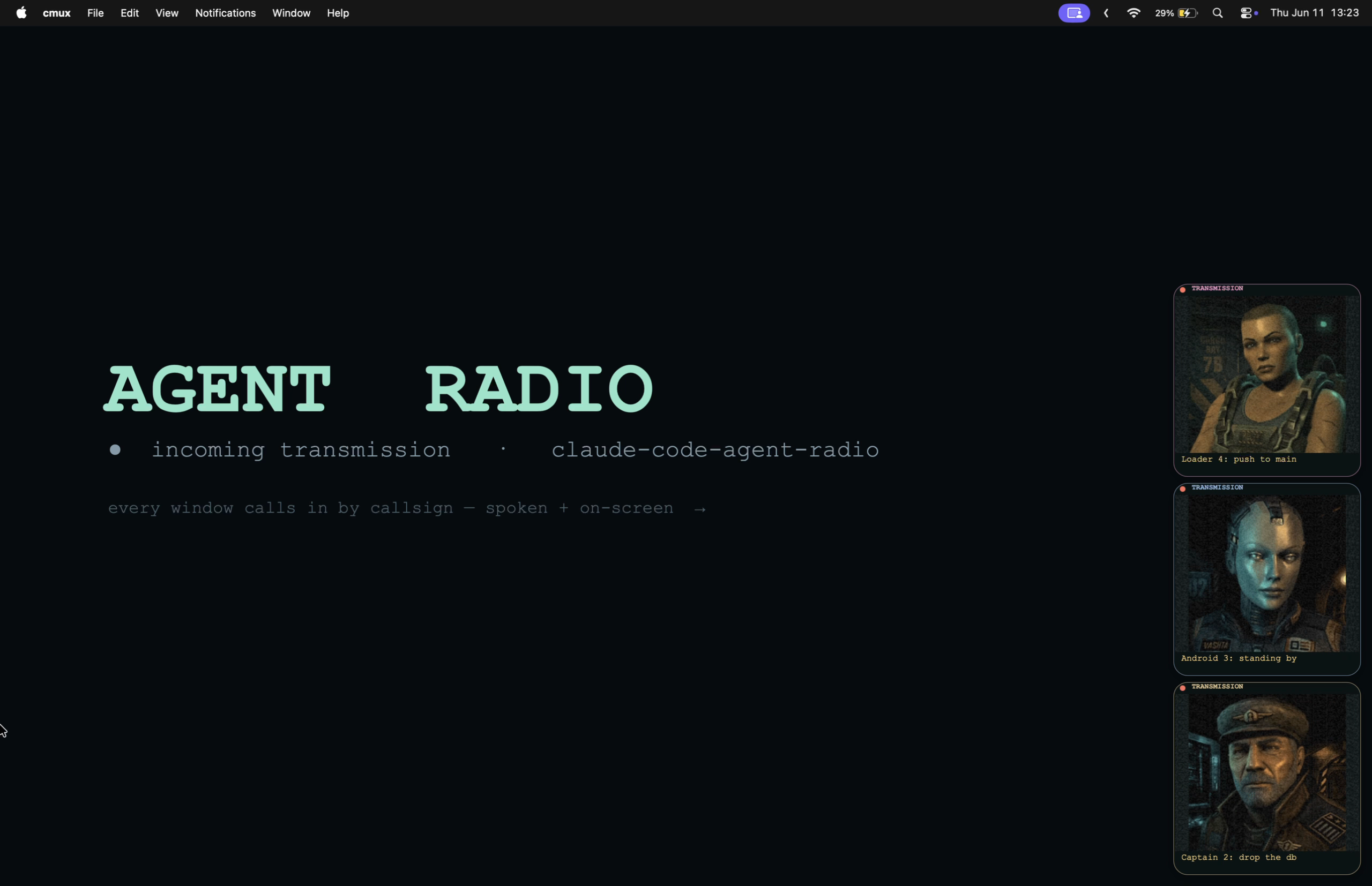
The cast — how the portraits were made
The eight characters (portraits/st*.gif) are deliberately late-90s / PS1-era pre-rendered — plasticky skin, low-poly read, baked CRT grain — so they're legible as tiny corner chips and don't read as generic "AI art."
- Stills: generated with OpenAI
gpt-image-2(via fal), prompted for 90s pre-rendered CG / PS1 character-select portrait with a transparent-background pass.gpt-image-2was chosen over FLUX specifically because FLUX kept producing modern photoreal skin no matter the prompt — it couldn't hit the retro-render look, where the OpenAI model could. - Animation: each still was driven to a short seamless loop with Luma Ray 3.2 (image-to-video,
loop=true) — chosen because it preserves the source art style instead of re-rendering it (idle breathing / subtle head motion, not a restyle). - Voices: each portrait is paired 1:1 with a matching macOS retro
sayvoice (Grandpa, Ralph, Fred, Reed, Rocko, Shelley, Eddy, Flo) by timbre — see the cast image above. The pairing lives inportraits/voices.tsv(basename<TAB>voice); an unmapped portrait falls back to Grandpa.
Re-generating or restyling the cast is done through say-notify-devserver.py (the lookdev studio) plus the fal image/video endpoints. To swap in a new cast: drop the portraits/*.gif in and add their voice rows to portraits/voices.tsv — that's all the runtime needs.
Development
The overlay binaries (say-notify-overlay, say-notify-overlayd) build on demand from their .swift sources — say-notify.sh rebuilds them when the binary is older than the source. After editing say-notify-overlayd.swift, the next notification rebuilds the binary and restarts the running daemon for you (it stops the old instance and, if a LaunchAgent supervises it, brings the new one up under launchd — converging to exactly one instance). The one-time focus blip from the relaunch only ever happens on your own dev edits, never on a normal alert. To restart by hand without waiting for a notification:
swiftc -O say-notify-overlayd.swift -o say-notify-overlayd
launchctl kickstart -k "gui/$(id -u)/com.conner.say-notify-overlayd"   # if under a LaunchAgent
# otherwise: pkill -f say-notify-overlayd   (relaunches on the next notification)
Copying the binary around can leave its mtime newer than the source, which suppresses the auto-rebuild (and so the auto-restart) — force a rebuild if a running card looks stale (e.g. wrong corner).
License
MIT — see LICENSE.