
Churro Coder
ChurroStack/churro-coder
Agent de código local com fluxo PR nativo e multi-modelo
Ver no GitHubAgent de codificação open-source que executa localmente sem cloud. Oferece fluxo completo de plano → código → revisão → PR com suporte a múltiplos modelos (Claude, Codex) em uma única interface, com execução sandboxed e rastreamento de custos integrado.
Instalação
npx convez-ai ChurroStack/churro-coder1 comando no terminal: detecta o formato do repositório (marketplace ou plugin avulso) e instala via Claude Code. Requer Node 18+ e o Claude Code instalado.
Métricas
Casos de uso
- Desenvolvimento de features com revisão automática de IA
- Workflow colaborativo arquiteto (plano) + implementador (código)
- Projetos sensíveis que não podem usar cloud ou sync remoto
Veredito

Ferramenta ambiciosa que reimplanta a experiência de agents de código (tipo Cursor) para desktop multiplataforma com sandbox real e orquestração multi-modelo. Produção-ready, mas ainda sem code-signing nativo — ideal para equipes que priorizam controle local sobre conveniência cloud.
README
A tradução para o português deste README ainda está na fila.
Churro Coder
Open-source, fully offline coding agent client. Run Claude Code, Codex, and more — locally, no cloud account needed.
Churro Coder is a desktop app for working with AI coding agents (Claude Code, Codex, …) on your own machine. Sub-chats, terminals, file viewers, plans, and diffs are first-class dock panels you can split and rearrange; each chat runs in its own git worktree so the agent can't trample your main branch; everything stays on-device — no login, no cloud sync, no analytics.
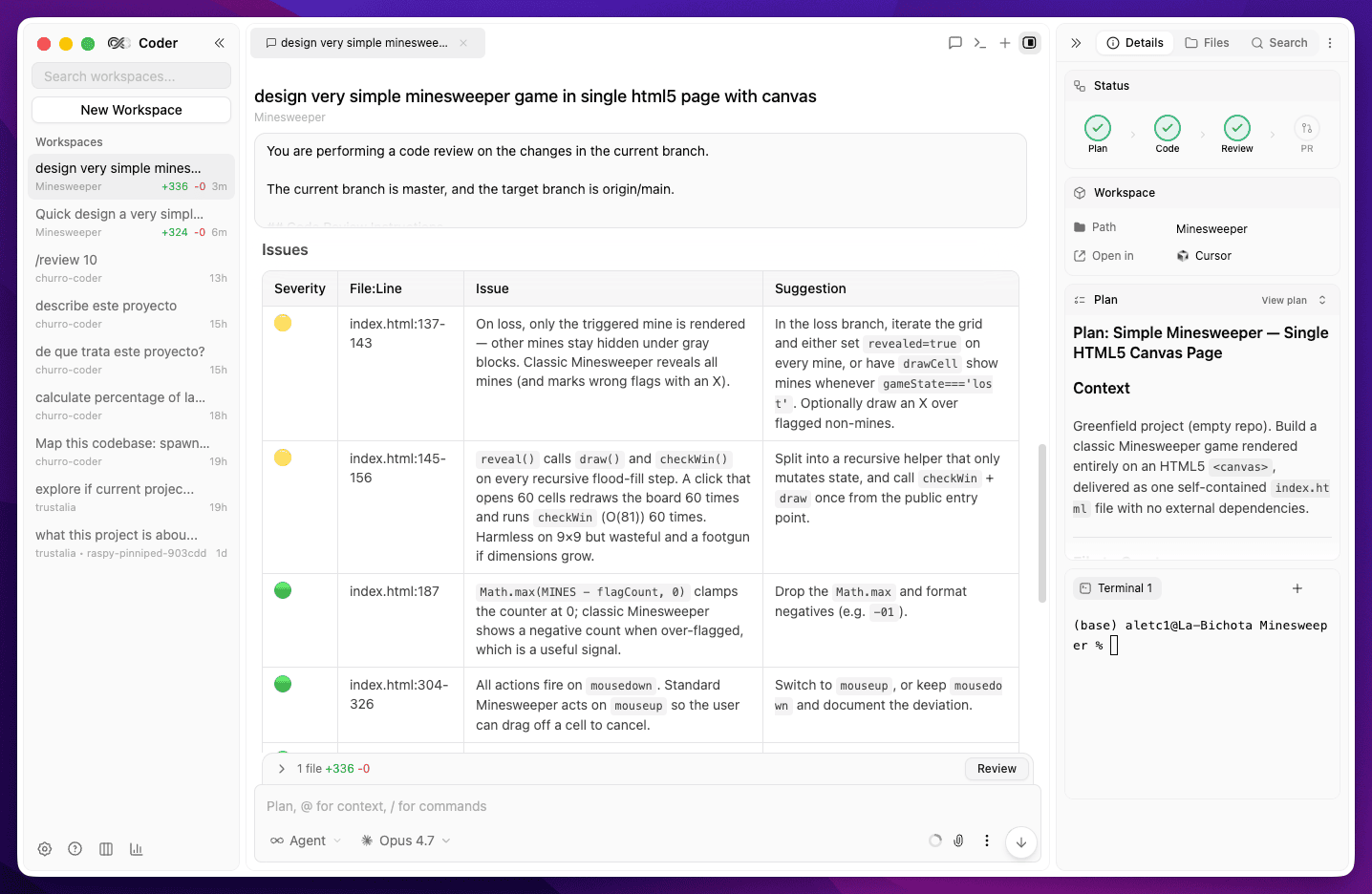
Highlights
- Plan → Code → Review → PR workflow. A first-class stepper for the way most engineers actually ship: the agent drafts a plan, you approve, it codes in an isolated worktree, runs an AI review on the diff, and opens the PR — each phase has its own panel and one-click actions.
- Mix Claude and Codex in a single chat. Route each phase to the model that's best at it — e.g. Claude Opus as architect to design the plan, Codex/GPT to implement it, Claude Opus again to review the outcome. No copy-pasting between tools; one chat orchestrates them and you get the best of every provider.
- Sandboxed execution. Agent file access is locked to the chat's worktree, your config dirs (
~/.claude,~/.codex,~/.churrostack), standard scratch space, and optionally toolchain caches — nothing else. On macOS and Linux the sandbox is enforced at the OS level (Seatbelt / bubblewrap); on other platforms the SDK-level path enforcement blocks reads and writes outside the allowed roots. Configurable per-project, per-chat, or globally from Settings → Sandbox. - Spend tracking built in. See total usage and per-chat cost broken down by provider and model (
usage.png), so the multi-model workflow above doesn't turn into a billing surprise.
Downloads & releases
Grab the latest installer for your platform from the GitHub Releases page:
| Platform | What you download |
|---|---|
| macOS | .dmg installer (and a .zip of the app), for both Apple Silicon (arm64) and Intel (x64) |
| Windows | NSIS installer .exe (choose install dir) or a standalone portable .exe |
| Linux | .AppImage (run-anywhere) or .deb package |
The macOS and Windows builds are not code-signed yet. They run fine, but the OS will warn you: on macOS, right-click the app → Open the first time (Gatekeeper); on Windows, click More info → Run anyway (SmartScreen). Linux AppImages just need
chmod +x.
Releases are automated with release-please: merged
Conventional Commits accumulate into a "release PR"; merging
that PR tags the version and triggers .github/workflows/release.yml,
which builds all three platforms on their native runners and attaches the installers to the Release.
Installers are only built when a release is cut, never on ordinary PRs. Deeper mechanics live in
apps/desktop/docs/release.md.
Enabling macOS code signing & notarization
The release workflow is already wired for signing + notarization but ships disabled until an Apple Developer ID certificate is available. To turn it on, add the following repository secrets under Settings → Secrets and variables → Actions → New repository secret — no workflow edit is needed; the next release will automatically sign and notarize the macOS build:
| Secret | What it holds | Needed for |
|---|---|---|
CSC_LINK | base64 of the exported Developer ID .p12 certificate — base64 -i cert.p12 | pbcopy | signing |
CSC_KEY_PASSWORD | the password you set when exporting the .p12 | signing |
APPLE_IDENTITY | Developer ID Application: Your Name (TEAMID) | signing |
APPLE_ID | your Apple ID email | notarization |
APPLE_APP_SPECIFIC_PASSWORD | an app-specific password from appleid.apple.com | notarization |
APPLE_TEAM_ID | your 10-character Apple Team ID | notarization |
The workflow treats CSC_LINK as the switch: present → it signs the macOS build with the cert;
absent → it forces a clean unsigned build. These secrets are scoped to the macOS runner only, and
notarization runs only when the three APPLE_* notarization secrets are all set. (The same variables
are listed in apps/desktop/.env.example for local signed builds.)
Windows and Linux currently ship unsigned; wiring Windows Authenticode signing is a separate,
not-yet-done step.
Repository layout
This is an Nx monorepo with three apps that share a single product surface but speak different stacks on purpose:
| App | Stack | What it does |
|---|---|---|
apps/desktop | Electron + Vite + React + TypeScript + Tailwind, bun-managed | The local UI on macOS / Windows / Linux. Hosts the agents, the dockview workspace, the SQLite store, and bundled CLI binaries. |
apps/gateway | ASP.NET Core (.NET 10) | Cloud-side NAT gateway between a daemon and clients (used for remote / browser access). |
apps/daemon | Go (cross-platform CLI) | Installable daemon that the gateway talks to on behalf of remote clients. |
The desktop app is the primary surface; the gateway + daemon are how Churro Coder reaches a machine you're not sitting in front of.
For app-level architecture, build pipelines, schema, and gotchas, read each app's AGENTS.md:
apps/desktop/AGENTS.md— windowing, tRPC routers, Drizzle schema, release pipelineAGENTS.md— repo-level conventions for AI coding agents working in the workspace (CLAUDE.mdis a symlink to it)
Quick start
Prerequisites
- Node.js ≥ 20
- pnpm (the version pinned in
package.json#packageManager— install viacorepack enable) - Bun (install) —
apps/desktopis bun-managed - .NET 10 SDK (only if you'll run
gateway) - Go ≥ 1.26 (only if you'll run
daemon) - Xcode Command Line Tools on macOS, build-essential on Linux — needed to compile native node modules (
better-sqlite3,node-pty)
Install + run
# Root: pnpm drives Nx + plugins
pnpm install

# apps/desktop is intentionally outside the pnpm workspace and uses bun
cd apps/desktop && bun install && cd -

# See every Nx project + the targets each one exposes
pnpm exec nx show projects        # → ["desktop","gateway","daemon"]
pnpm exec nx graph                # interactive dependency graph

# Run any single app
pnpm exec nx run desktop:dev      # Electron app with HMR
pnpm exec nx run gateway:run      # .NET API on http://localhost:5111
pnpm exec nx run daemon:serve     # Go daemon

# Or build everything (Nx caches; second run is instant)
pnpm exec nx run-many -t build
For platform installers (DMG / NSIS / AppImage / DEB) and the full release pipeline, see apps/desktop/README.md and apps/desktop/AGENTS.md.
A note on the two package managers
pnpm lives at the repo root and drives Nx + plugins. Bun manages apps/desktop exclusively — pnpm-workspace.yaml deliberately excludes that path. Don't run pnpm install inside apps/desktop; the two package managers will fight over the lockfile. This split is intentional, not a migration in progress.
Testing
# Run all test suites (Vitest + xUnit + go test), Nx-cached
pnpm exec nx run-many -t test

# Run only tests affected by your local changes
pnpm exec nx affected -t test
| App | Runner | How to run directly |
|---|---|---|
apps/desktop | Vitest | cd apps/desktop && bun run test |
apps/gateway | xUnit (WebApplicationFactory) | dotnet test apps/gateway/Gateway.Tests/Gateway.Tests.csproj |
apps/daemon | go test | cd apps/daemon && go test ./... |
Desktop tests run in Node.js (no Electron). Tests that need a DOM add // @vitest-environment jsdom at the top of the file. See AGENTS.md#running-tests for more details.
To generate an HTML coverage report for the desktop suite:
cd apps/desktop && bun run test --coverage && open coverage/index.html
CI
GitHub Actions runs nx run-many -t build lint test on every PR to main (see .github/workflows/ci.yml). Wire the CI / Build & check check into a branch protection rule / ruleset to gate merges.
Contributing
Issues and PRs welcome. The repo is set up for AI coding agents too — AGENTS.md (and the symlinked CLAUDE.md) is the single source of truth for any tool working in this codebase. If you're adding a new app, follow the patterns in AGENTS.md#adding-a-new-project.
License
GNU Affero General Public License v3.0 — see LICENSE for the full text.
Originally based on 21st-dev/1code.