
Petlibro MCP Server
christianprescott/petlibro-mcp
Controle comedouros e fontes Petlibro via Claude
Ver no GitHubServidor MCP que integra dispositivos inteligentes Petlibro (comedouros e fontes) com Claude, permitindo consultar agendamentos de alimentação, histórico e dispensar alimento remotamente via IA. Implementado em TypeScript com suporte a Docker e autenticação por credenciais Petlibro.
Instalação
npx convez-ai christianprescott/petlibro-mcp1 comando no terminal: detecta o formato do repositório (marketplace ou plugin avulso) e instala via Claude Code. Requer Node 18+ e o Claude Code instalado.
Métricas
Casos de uso
- Automatizar e monitorar alimentação de animais de estimação remotamente
- Consultar histórico e agendamentos de alimentação em conversas com IA
- Integrar dispositivos Petlibro em fluxos de automação residencial com Claude
Veredito

PoC funcional para integração Petlibro com Claude, mas é recomendado usar a solução completa via Home Assistant para casos em produção. Útil para explorar automação de IoT com MCP servers.
README
A tradução para o português deste README ainda está na fila.
Petlibro MCP Server 
This server offers tools enabling AI interactions with Petlibro smart feeder and fountain products. Check feeding schedules and history, emit food, and more.
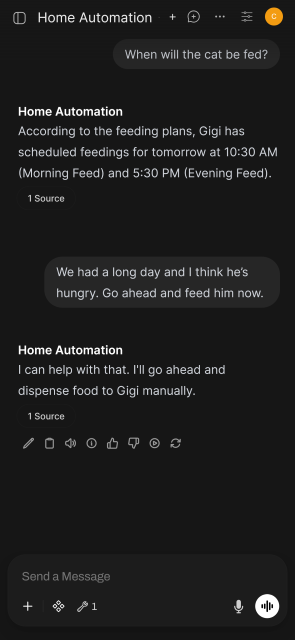
This project is only a proof-of-concept. Owners looking to automate their Petlibro devices should likely use the Home Assistant MCP server and petlibro integration for a more complete and better supported experience.
Getting Started
Set your email and MD5 hashed Petlibro password and start the server:
export PETLIBRO_USER="your_email"
export PETLIBRO_PASS_MD5=$(echo -n "your_password" | md5sum | cut -d' ' -f1)
docker compose up
Then connect your client to the server at http://your.host:3000/mcp. At this
time there is no further authentication, but in some clients it may be necessary
to select an Authorization: header with a fake value.
Development
Use the dev script to run tsx and watch for changes:
docker compose run --rm -e MD5_PASS -p 3000:3000 \
  -v "$PWD:/app" -v "/app/petlibro-client" \
  app sh -c "npm install && npm run dev"
Generate API Client
This project uses client code generated from OpenAPI spec. The client is built
into the app service's image. The spec is fetched directly from URL which
isn't ideal - maybe in the future it should have its version pinned or output
committed.
docker run -v ${PWD}/petlibro-client:/local --rm openapitools/openapi-generator-cli generate \
  --package-name petlibro-client \
  --additional-properties=npmName=petlibro-client \
  -i https://christianprescott.com/petlibro/docs/api/petlibro/openapi.yaml \
  -g typescript \
  -o /local/
Test
docker compose run --rm \
  -v "$PWD:/app" -v "/app/petlibro-client" \
  app npm test -- --watch