
CC-Connect
chenhg5/cc-connect
Conecte agentes de IA locais a qualquer plataforma de chat
Ver no GitHubAgent que conecta assistentes de IA para coding (Claude Code, Cursor, Gemini CLI, Codex) a plataformas de mensageria (Feishu, DingTalk, Slack, Telegram, Discord, LINE, WeChat Work). Integra desenvolvedores locais com seus agentes de IA sem necessidade de IP público.
Instalação
npx convez-ai chenhg5/cc-connect1 comando no terminal: detecta o formato do repositório (marketplace ou plugin avulso) e instala via Claude Code. Requer Node 18+ e o Claude Code instalado.
Métricas
Casos de uso
- Integrar assistentes de código com canais corporativos (Feishu, DingTalk)
- Usar Claude/Gemini em Slack, Telegram ou Discord para pair programming
- Desenvolver sem expor servidores locais (sem IP público)
Veredito

Solução prática e bem-estruturada para bridge entre agentes locais e plataformas de chat corporativas/públicas. Reduz fricção operacional de equipes distribuídas, embora requeira configuração prévia e compreensão das APIs de cada plataforma.
README
A tradução para o português deste README ainda está na fila.
❤️ Sponsor
Want to appear here? Contact: chg80333@gmail.com | WeChat: mongorz
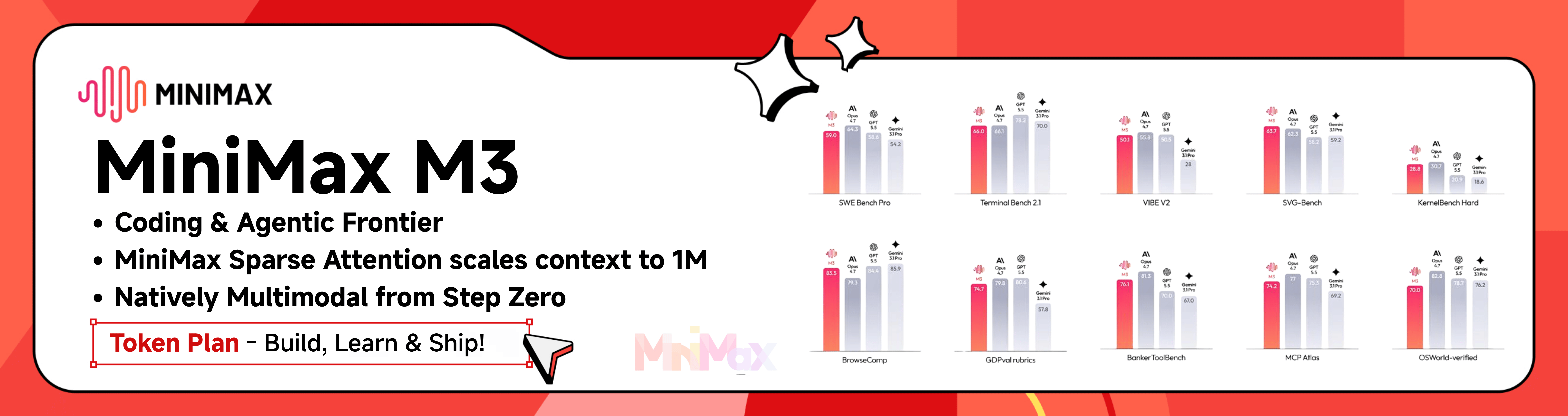
MiniMax-M3 pushes the frontier of coding and agentic AI, with a 1M-token context window powered by MiniMax Sparse Attention and natively multimodal capabilities from step zero. It leads across SWE-Bench Pro (59.0), Terminal Bench 2.1 (66.0), VIBE V2 (60.1), SVG-Bench (63.7), KernelBench Hard (28.8), BrowseComp (83.5), GDPval rubrics (74.7), Banker ToolBench (76.1), MCP Atlas (74.2), and OSWorld-verified (70.0). Build, learn, and ship with the MiniMax Token Plan.
Click here to get an exclusive 12% off the MiniMax Token Plan + voucher for cc-connect users!
🆕 What’s New in v1.3.0
- 🌐 Web Admin UI (Recommended) — Full management dashboard embedded in the binary — no extra dependencies. Create and edit projects, manage providers, monitor sessions, edit cron jobs, and chat with your agent directly from the browser. Supports 5 languages (en/zh/zh-TW/ja/es). We recommend managing cc-connect through the web UI instead of editing
config.tomlby hand. Runcc-connect webto configure and open the dashboard, then runcc-connectto start the service. - Lifecycle Event Hooks — New
[[hooks]]config triggers shell commands or HTTP webhooks on message, session, cron, permission, and error events. Async by default, fail-open. - Skill Management — New
/skillspage with local skill browser and recommended presets. - Global Provider Management — Add/edit/delete providers in the web UI; import from cc-switch config.
- Personal WeChat — Chat with your local agent from Weixin (personal) via ilink long-polling; QR
weixin setup, CDN media, no public IP. Setup →docs/weixin.md - Weibo DM — Chat with your agent via Weibo private messages over WebSocket; no public IP needed, text streaming supported.
- Feishu Enhancements — Auto-resolve
@namementions, multi-level reply chain recognition, done-emoji reactions. - New Agents — Kimi CLI and Pi agent support added.
🧩 Platform feature snapshot
High-level view of what each built-in platform can do in cc-connect.
Legend
| Symbol | Meaning |
|---|---|
| ✅ | Works in stable cc-connect with typical configuration |
| ⚠️ | Partial, needs extra config (e.g. speech / ASR), or limited by the vendor app or API |
| ❌ | Not supported or not applicable in practice |
† QQ (NapCat / OneBot) — unofficial self-hosted bridge; behaviour depends on your NapCat / network setup.
| Capability | Feishu | WPS Xiezuo | DingTalk | Telegram | Slack | Discord | LINE | WeCom | Weixin(personal) | QQ† | QQ Bot | |
|---|---|---|---|---|---|---|---|---|---|---|---|---|
| Text & slash commands | ✅ | ✅ | ✅ | ✅ | ✅ | ✅ | ✅ | ✅ | ✅ | ✅ | ✅ | ✅ |
| Markdown / cards | ✅ | ✅ | ✅ | ✅ | ✅ | ✅ | ⚠️ | ⚠️ | ❌ | ✅ | ✅ | ✅ |
| Streaming / chunked replies | ✅ | ✅ | ✅ | ✅ | ✅ | ✅ | ✅ | ✅ | ✅ | ✅ | ✅ | ✅ |
| Images & files | ✅ | ❌ | ✅ | ✅ | ✅ | ✅ | ⚠️ | ✅ | ❌ | ✅ | ✅ | ✅ |
| Voice / STT / TTS | ⚠️ | ❌ | ⚠️ | ✅ | ⚠️ | ⚠️ | ❌ | ⚠️ | ❌ | ✅ | ⚠️ | ⚠️ |
| Private (DM) | ✅ | ✅ | ✅ | ✅ | ✅ | ✅ | ✅ | ✅ | ✅ | ✅ | ✅ | ✅ |
| Group / channel | ✅ | ✅ | ✅ | ✅ | ✅ | ✅ | ⚠️ | ✅ | ❌ | ✅ | ✅ | ✅ |
WeCom: Webhook mode needs a public URL; long-connection / WS style setups often do not.
Voice row: many platforms need[speech]/ TTS providers enabled inconfig.toml; values are a best-effort summary.
Per-platform setup: Platform setup guides below.
✨ Why cc-connect?
🤖 Universal Agent Support
10+ AI Agents — Claude Code, Codex, Cursor Agent, Kimi CLI, Qoder CLI, Gemini CLI, OpenCode, iFlow CLI, Pi, Devin, Copilot — plus any agent that supports the Agent Client Protocol (ACP). Use whichever fits your workflow, or all of them at once.
📱 Platform Flexibility
12 Chat Platforms — Feishu, WPS Xiezuo, DingTalk, Slack, Telegram, Discord, WeChat Work, Weibo, LINE, QQ, QQ Bot (Official), plus Weixin (personal ilink) for personal WeChat. Most platforms need zero public IP.
🔄 Multi-Agent Orchestration
Multi-Bot Relay — Bind multiple bots in a group chat and let them communicate with each other. Ask Claude, get insights from Gemini — all in one conversation.
🎮 Complete Chat Control
Full Control from Chat — Switch models (/model), tune reasoning (/reasoning), change permission modes (/mode), manage sessions, all via slash commands.
Directory Switching in Chat — Change where the next session starts with /dir <path> (and /cd <path> as a compatibility alias), plus quick history jump via /dir <number> / /dir -.
🧠 Persistent Memory
Agent Memory — Read and write agent instruction files (/memory) without touching the terminal.
⏰ Intelligent Scheduling
Scheduled Tasks — Set up cron jobs in natural language. "Every day at 6am, summarize GitHub trending" just works.
🎤 Multimodal Support
Voice & Images — Send voice messages or screenshots; cc-connect handles STT/TTS and multimodal forwarding.
📦 Multi-Project Architecture
Multi-Project — One process, multiple projects, each with its own agent + platform combo.
🌍 Multilingual Interface
5 Languages — Native support for English, Chinese (Simplified & Traditional), Japanese, and Spanish. Built-in i18n ensures everyone feels at home.
🚀 Quick Start
🤖 Install & Configure via AI Agent (Recommended)
The easiest way — Send this to Claude Code or any AI coding agent, and it will handle the entire installation and configuration for you:
Follow https://raw.githubusercontent.com/chenhg5/cc-connect/refs/heads/main/INSTALL.md to install and configure cc-connect.
📦 Manual Install
Via npm:
npm install -g cc-connect
Via Homebrew (macOS / Linux):
brew install cc-connect
Download binary from GitHub Releases:
# Linux amd64 - Stable
curl -L -o cc-connect https://github.com/chenhg5/cc-connect/releases/latest/download/cc-connect-linux-amd64
chmod +x cc-connect
sudo mv cc-connect /usr/local/bin/
Build from source (requires Go 1.22+):
git clone https://github.com/chenhg5/cc-connect.git
cd cc-connect
make build
⚙️ Configure
💡 Tip: Use the Web UI to configure — After installing, run
cc-connect webto configure the web admin and open the dashboard in your browser. You can visually create projects, add platforms, manage providers, and chat with your agent — no need to manually edit TOML files. Note:cc-connect webonly configures and opens the browser — you still need to runcc-connectseparately to start the service.
If you prefer manual configuration:
mkdir -p ~/.cc-connect
cp config.example.toml ~/.cc-connect/config.toml
vim ~/.cc-connect/config.toml
Set admin_from = "alice,bob" in a project to allow those user IDs to run privileged commands such as /dir and /shell.
admin_from must be placed under [[projects]] (not under [projects.platforms.options]). You can use /whoami or /status to get your current User ID.
When a user runs /dir reset, cc-connect restores the configured work_dir and clears the persisted override stored under data_dir/projects/<project>.state.json.
▶️ Run
./cc-connect
🔄 Upgrade
# npm
npm install -g cc-connect

# Homebrew
brew upgrade cc-connect

# Binary self-update
cc-connect update           # Stable
cc-connect update --pre     # Include pre-releases
📊 Support Matrix
| Component | Type | Status |
|---|---|---|
| Agent | Claude Code | ✅ Supported |
| Agent | Codex (OpenAI) | ✅ Supported |
| Agent | Cursor Agent | ✅ Supported |
| Agent | Gemini CLI (Google) | ✅ Supported |
| Agent | Qoder CLI | ✅ Supported |
| Agent | OpenCode (Crush) | ✅ Supported |
| Agent | iFlow CLI | ✅ Supported |
| Agent | Kimi CLI (Moonshot) | ✅ Supported |
| Agent | Pi (Cursor Background Agent) | ✅ Supported |
| Agent | Copilot (GitHub) | ✅ Supported |
| Agent | ACP (Agent Client Protocol) | ✅ Any ACP-compatible agent |
| Agent | Devin (Cognition) | ✅ Supported (via ACP) |
| Agent | Goose (Block) | 🔜 Planned |
| Agent | Aider | 🔜 Planned |
| Platform | Feishu (Lark) | ✅ WebSocket — no public IP needed |
| Platform | DingTalk | ✅ Stream — no public IP needed |
| Platform | WPS Xiezuo | ✅ WebSocket — no public IP needed |
| Platform | Telegram | ✅ Long Polling — no public IP needed |
| Platform | Slack | ✅ Socket Mode — no public IP needed |
| Platform | Discord | ✅ Gateway — no public IP needed |
| Platform | ✅ WebSocket — no public IP needed | |
| Platform | LINE | ✅ Webhook — public URL required |
| Platform | WeChat Work | ✅ WebSocket / Webhook |
| Platform | Weixin (personal, ilink) | ✅— HTTP long polling — no public IP needed |
| Platform | QQ (NapCat/OneBot) | ✅ WebSocket |
| Platform | QQ Bot (Official) | ✅ WebSocket — no public IP needed |
📖 Platform Setup Guides
| Platform | Guide | Connection | Public IP? |
|---|---|---|---|
| Feishu (Lark) | docs/feishu.md | WebSocket | No |
| DingTalk | docs/dingtalk.md | Stream | No |
| WPS Xiezuo | docs/wps-xiezuo.md | WebSocket | No |
| Telegram | docs/telegram.md | Long Polling | No |
| Slack | docs/slack.md | Socket Mode | No |
| Discord | docs/discord.md | Gateway | No |
| docs/weibo.md | WebSocket | No | |
| WeChat Work | docs/wecom.md | WebSocket / Webhook | No (WS) / Yes (Webhook) |
| Weixin (personal) | docs/weixin.md | HTTP long polling (ilink) | No |
| QQ / QQ Bot | docs/qq.md | WebSocket | No |
🎯 Key Features
💬 Session Management
/new [name]       Start a new session
/list             List all sessions
/switch <id>      Switch session
/current          Show current session
/dir [path|reset] Show, switch, or reset work directory
Project configs rotate to a fresh session automatically after long inactivity. This prevents "context drift" where stale chat history (failed commands, debugging noise) is repeatedly re-ingested via --continue and starts to dominate the model's attention. The previous session is preserved and remains accessible via /list and /switch.
[[projects]]
reset_on_idle_mins = 30   # default when unset; set to 0 to disable
The default is 30 minutes when unset. Set reset_on_idle_mins = 0 to opt out and always continue the previous session.
🛡️ OS-User Isolation (run_as_user)
On Linux/macOS, a project can spawn its agent under a different Unix user for OS-level file-system isolation from the supervisor user that runs cc-connect. Currently supported by Claude Code.
[[projects]]
name = "claude-sandboxed"
run_as_user = "partseeker-coder"
run_as_env = ["PGSSLROOTCERT"]
The target user needs passwordless sudo from the supervisor, no sudo
of its own, read+write on work_dir, and its own ~/.claude/settings.json
with whatever credentials the agent uses. If you authenticate via
claude.ai OAuth, symlink the target user's ~/.claude/.credentials.json
to the supervisor's copy so token refresh stays in sync — see the
environment propagation checklist
for details. See
docs/usage.md
for the full setup.
Before starting cc-connect, audit the setup with:
cc-connect doctor user-isolation
This runs three go/no-go preflight gates and an isolation probe that reports what the target user can and cannot read. cc-connect refuses to start if any gate fails or if the probe detects a cross-user leak.
🔐 Permission Modes
/mode             Show available modes
/mode yolo        # Auto-approve all tools
/mode default     # Ask for each tool
🔄 Provider Management
/provider list              List providers
/provider switch <name>     Switch API provider at runtime
🤖 Model Selection
/model                      List available models (format: alias - model)
/model switch <alias>       Switch to model by alias
📂 Work Directory
/dir                         Show current work directory and history
/dir <path>                  Switch to a path (relative or absolute)
/dir <number>                Switch from history
/dir -                       Switch to previous directory
/cd <path>                   Compatibility alias for /dir <path>
⏰ Scheduled Tasks
/cron add 0 6 * * * Summarize GitHub trending
📎 Agent Attachment Send-Back
When an agent generates a local screenshot, chart, PDF, bundle, or other file, it can send that attachment back to the current chat.
First release supports:
- Feishu
- Telegram
If your agent does not natively inject the system prompt, run this once in chat after upgrading:
/bind setup
or:
/cron setup
This refreshes the cc-connect instructions in the project memory file so the agent knows how to send attachments back.
You can control this feature globally in config.toml:
attachment_send = "on" # default: "on"; set to "off" to block image/file send-back
This switch is independent from the agent's /mode. It only controls cc-connect send --image/--file. Voice send-back uses the TTS config instead.
Examples:
cc-connect send --image /absolute/path/to/chart.png
cc-connect send --file /absolute/path/to/report.pdf
cc-connect send --file /absolute/path/to/report.pdf --image /absolute/path/to/chart.png
cc-connect send --tts "Hello from cc-connect"
Notes:
- Absolute paths are the safest option.
--imageand--filecan both be repeated.--ttssends synthesized speech when the user asks for a voice reply.attachment_send = "off"disables only attachment send-back; ordinary text replies still work.- This command is for generated attachments, not ordinary text replies.
📖 Full documentation: docs/usage.md
📚 Documentation
- Usage Guide — Complete feature documentation
- INSTALL.md — AI-agent-friendly installation guide
- config.example.toml — Configuration template
- CONTRIBUTING.md — How to report issues and contribute pull requests
👥 Community
☕ Support the Project
If cc-connect has been helpful to you, consider buying us a coffee! Your support helps us:
- 🛠️ Maintain and improve the project
- 📚 Write better documentation and tutorials
- 🐛 Fix bugs and add new features faster
- ☕ Keep the developers caffeinated
How to Donate
Buy Me a Coffee: https://buymeacoffee.com/cg33
WeChat Pay / Alipay:
| WeChat Pay | Alipay |
|---|---|
Thank You, Donors! 🎉
We're grateful to everyone who has supported this project. Leave your GitHub username in the donation message if you'd like to be recognized here!
| Avatar | GitHub Username | Date |
|---|---|---|
| @thx0701 | 2026-04-29 |
🤝 Commercial Cooperation
We accept the following commercial collaborations:
- Enterprise Customization: Custom deployment for internal AI tooling (Feishu, DingTalk, WeChat Work, Slack, etc.)
- Technical Consulting: AI agent integration and architecture design
- Outsourcing Projects: AI-related system development
Contact: Email: chg80333@gmail.com | WeChat: mongorz | Telegram | Discord
🙏 Contributors
⭐ Star History
📄 License
MIT License