
LM Studio Code
cgaspard/lmstudio-vscode-chat
Agent de IA local para programação em VS Code via LM Studio
Ver no GitHubPainel agentic para codificação em VS Code que roda modelos locais do LM Studio. Oferece experiência tipo Claude Code/Codex usando o agent OpenCode de código aberto, sem nuvem, sem API keys. Integra ferramentas de edição de arquivo, shell e busca com raciocínio multi-etapas.
Instalação
npx convez-ai cgaspard/lmstudio-vscode-chat1 comando no terminal: detecta o formato do repositório (marketplace ou plugin avulso) e instala via Claude Code. Requer Node 18+ e o Claude Code instalado.
Métricas
Casos de uso
- Desenvolvimento de código com IA local e privada
- Refatoração e edição de arquivos assistida por IA
- Planejamento e raciocínio sobre tarefas de codificação
- Execução de comandos shell com assistência agentic
Veredito

Solução robusta para quem quer Claude Code sem cloud. O agente OpenCode bundled é sólido, documentação é clara. Principal limitação: qualidade depende do modelo local — Llama 3.1 405B+ recomendado para bons resultados.
README
A tradução para o português deste README ainda está na fila.
LM Studio Code
An agentic coding panel for your local LM Studio models — a Claude Code / Codex–style chat experience that runs entirely on your machine.
Under the hood it drives the open-source OpenCode agent (Apache/MIT) as a headless server, pointed at LM Studio's OpenAI-compatible endpoint. You get a real agent — file edits, shell tools, permissions, multi-step reasoning — with no cloud model and no API key.
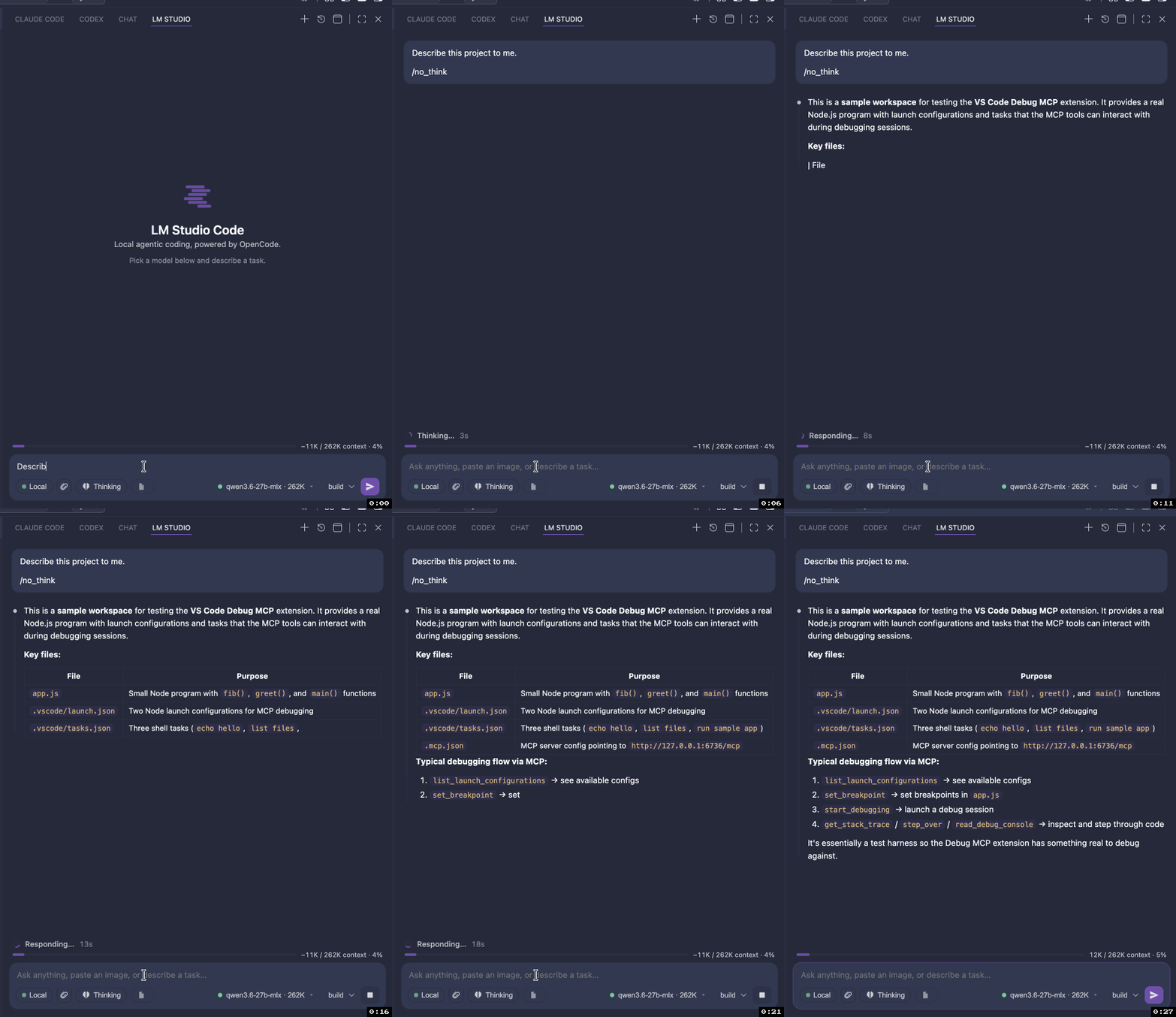
Demo
Why
The official Claude Code and Codex VS Code extensions are not open source, so they can't be adapted to local models. The CLIs behind several agents are open, though — and OpenCode in particular ships a headless server + provider-agnostic model layer that happily talks to LM Studio. This extension wraps that server in a native chat panel.
Features
- Chat panel in the Activity Bar (and "Open in Editor Tab" for parallel conversations)
- Streaming responses with markdown + code rendering
- Reasoning blocks (collapsible "Thinking")
- Agent tools — file reads/edits, shell, search — surfaced as tool cards
- Permission prompts — Allow once / Allow always / Deny, inline
- Model picker populated live from LM Studio (shows loaded ● / unloaded ○ + context size)
- Agent modes —
build(can edit) andplan(read-only) - Session history — browse, resume, rename-by-first-message, delete
- Auto-context — reloads the selected model with an adequate context window via the
lmsCLI so OpenCode's large system prompt doesn't overflow a 4096-token default
Requirements
- VS Code 1.104+
- LM Studio running with its local server started (default
http://127.0.0.1:1234) and at least one chat model - (recommended) the
lmsCLI for automatic context-window management
OpenCode is bundled — the matching platform binary ships inside the extension, so there's nothing extra to install and it works offline. Power users can point at their own build with
lmstudioCode.opencodePath; an install on yourPATHor in~/.opencode/binis preferred over the bundled copy if present.
Quick start
- Start LM Studio's server and load a model.
- Install this extension (or run it from source — see below).
- Click the spark icon in the Activity Bar.
- Pick a model, type a task, hit Enter.
Settings
| Setting | Default | Description |
|---|---|---|
lmstudioCode.lmStudioBaseUrl | http://127.0.0.1:1234/v1 | LM Studio OpenAI-compatible base URL |
lmstudioCode.opencodePath | (bundled) | Override path to an opencode binary; empty uses your own install (PATH / ~/.opencode) or the bundled one |
lmstudioCode.serverPort | 0 | Embedded server port (0 = auto) |
lmstudioCode.defaultModel | (first) | Default model id |
lmstudioCode.agent | build | build or plan |
lmstudioCode.autoEnsureContext | true | Reload model with adequate context before prompting |
lmstudioCode.minContextLength | 16384 | Context length to (re)load with |
lmstudioCode.gpuOffload | max | GPU offload for lms load |
How it works
VS Code webview (chat UI)
        │  postMessage
        ▼
Extension host (bridge)
        │  HTTP + SSE  (raw fetch)
        ▼
opencode serve   ──OpenAI /v1──▶  LM Studio (local model)
   (headless, config injected via OPENCODE_CONFIG_CONTENT)
The LM Studio provider is injected into OpenCode at launch via the
OPENCODE_CONFIG_CONTENT environment variable — nothing is written to your
workspace or global config. Discovered LM Studio models are declared in the
provider's models map (OpenCode requires this for custom OpenAI-compatible
providers).
Develop from source
npm install
npm run bundle:opencode      # fetch the pinned OpenCode binary into bin/ for your platform
npm run compile              # type-check + bundle (extension + webview)
# then press F5 in VS Code to launch the Extension Development Host
npm run package:vsix:bundled # build a platform .vsix with the binary embedded
The OpenCode binary is fetched at build time (pinned by opencodeVersion in
package.json) and is never committed — bin/ is git-ignored. Bump that field
to upgrade the bundled OpenCode. F5 also resolves the binary from bin/, so run
bundle:opencode once before launching the dev host.
License
MIT