
Codogotchi
cesarnml/codogotchi
Pet virtual que reage ao seu agente de IA enquanto você codifica
Ver no GitHubUm assistente de codificação em formato de pet virtual na barra de menu do macOS que reage em tempo real às atividades do seu agente de IA. O pet ganha pontos de vida conforme você trabalha, incluindo uma camada RPG local com níveis e XP sem enviar dados para a nuvem.
Instalação
npx convez-ai cesarnml/codogotchi1 comando no terminal: detecta o formato do repositório (marketplace ou plugin avulso) e instala via Claude Code. Requer Node 18+ e o Claude Code instalado.
Métricas
Casos de uso
- Monitorar atividade de agentes de IA em tempo real durante sessões de coding
- Gamificar sessões de desenvolvimento com RPG local (hearts, levels, XP)
- Customizar e trocar entre pets de uma galeria comunitária
Veredito

Ferramenta leve e criativa que humaniza a experiência de trabalhar com agentes de IA através de animações em tempo real. Bem executada para macOS, com bom equilíbrio entre gamificação local e simplicidade de uso — sem exigências de configuração complexa.
README
A tradução para o português deste README ainda está na fila.
Codogotchi
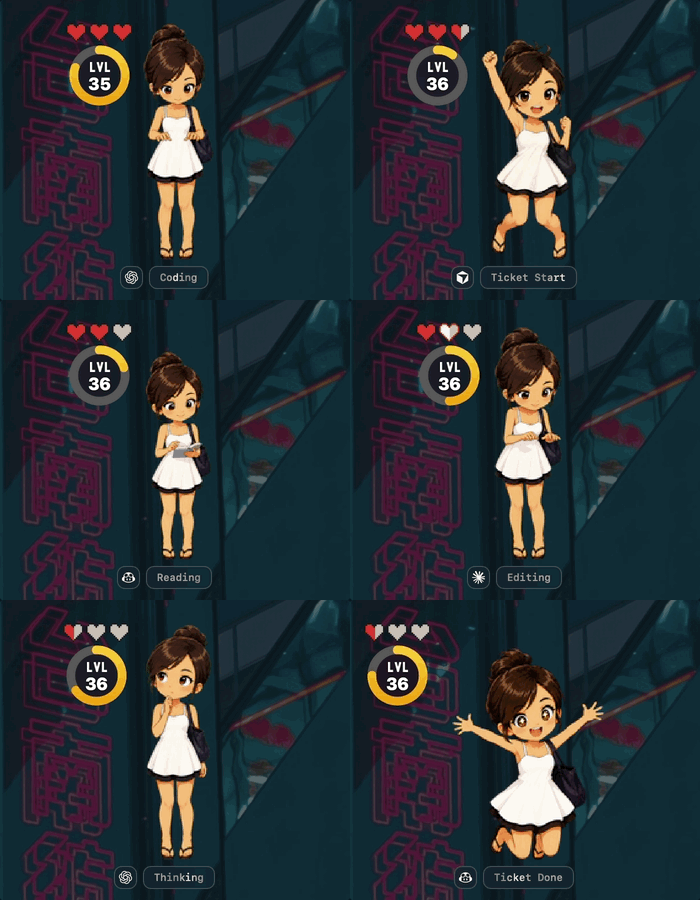
A macOS desktop companion that reacts to your AI coding agent in real time — idle, thinking, coding, testing, even dying when you neglect it. The pet lives on your menu bar and can float on your desktop while you work.
⬇ Download for macOS · Browse pets · codogotchi.app
Install
- Download Codogotchi.dmg, open it, and drag Codogotchi to your Applications folder.
- Clear the macOS quarantine flag (one-time — the build isn't notarized yet):
xattr -cr /Applications/Codogotchi.app - Launch it. On first run, approve the Welcome to Codogotchi sheet to turn on agent animations.
That's it. No Terminal setup, no global installs — everything Codogotchi needs is inside the app.
Using Cursor, VS Code, or another editor? After enabling hooks, restart your editor once so it picks them up.
How it works
Your AI agent fires lifecycle events as it works. Codogotchi listens and animates the matching mood — coding, reading, testing, waiting, erroring, and more. Stay active and your pet thrives; neglect it and its hearts drain. It's a Tamagotchi for your coding sessions.
Works with: Claude Code · Codex · Cursor · GitHub Copilot (VS Code) · Google Antigravity
Turn hooks on or off for any editor anytime in Settings → General → Install / Update hooks.
Getting a pet
Codogotchi ships with Maew, a cute-flirty buddy animated across every agent state. Want something else? Four ways to get one:
| How | |
|---|---|
| 🐾 Meet Maew | The default pet — already in the app. |
| ✨ Hatch your own | Describe a character or drop a seed image and let AI draw a full animated pet. → codogotchi.app/hatch |
| 👥 Adopt a community pet | Browse pets made by other developers and install them in a click. → codogotchi.app/gallery |
| 🎨 Draw your own | Hand-draw a spritesheet using the reference spec. → codogotchi.app/docs/spritesheet |
Switch between installed pets anytime in Settings → Pet. To publish a pet you made for others to adopt, sign in at codogotchi.app/upload.
Hearts & levels
Codogotchi includes a free, fully local RPG layer — hearts, levels 1–100, and an XP ring that fills as you code. It runs entirely on your machine; nothing is uploaded. Prefer just the animations? Hide the heart HUD in Settings → RPG.
FAQ
Do I need to install anything besides the app? No. The app is self-contained — drag, drop, approve the welcome sheet.
Where are my pets stored?
In ~/.codogotchi/pets/. Use the menu bar's Reveal pet folder item to open it in Finder.
My pet isn't animating. Make sure hooks are installed (Settings → General) and, if you use Cursor or VS Code, that you restarted the editor afterward.
Is my activity sent anywhere? No. The hearts/levels layer is local-only by default. Cloud sync and leaderboards are opt-in and not required to use Codogotchi.
Why the xattr command?
The app isn't notarized by Apple yet, so macOS quarantines the download. xattr -cr clears that flag — the same as right-click → Open. It'll go away once the app is notarized.
Links
- 🌐 Website — codogotchi.app
- 🖼 Pet gallery — codogotchi.app/gallery
- ✨ Hatch a pet — codogotchi.app/hatch
- 📖 Spritesheet reference — codogotchi.app/docs/spritesheet
- 🔒 Privacy · Terms
- ✉️ Support & takedowns — admin@codogotchi.app
Contributing & development
Codogotchi is open source. New to the codebase? START-HERE.md gives you the mental model in five minutes. To build from source or work on the macOS app, see CONTRIBUTING.md. We expect everyone to follow the Code of Conduct.
License
PolyForm Noncommercial 1.0.0 — free for personal and noncommercial use.