
MCP Readwise – Integração com Leitura e EPUB
CaseyRo/mcp-readwise
Markdown → EPUB nativo em Readwise Reader via email automático
Ver no GitHubServidor MCP que integra Readwise e Readwise Reader, permitindo salvar markdown como EPUB com estilo nativo e entregá-lo na biblioteca de leitura via SMTP. Inclui 14 ferramentas para gerenciar leituras, verificar recepção de documentos e automatizar fluxos de pesquisa e conteúdo. Ideal para levar outputs de agentes de IA direto para apps de leitura móvel.
Instalação
npx convez-ai CaseyRo/mcp-readwise1 comando no terminal: detecta o formato do repositório (marketplace ou plugin avulso) e instala via Claude Code. Requer Node 18+ e o Claude Code instalado.
Métricas
Casos de uso
- Exportar outputs de pesquisa de agentes Claude/OpenAI para Readwise
- Converter briefs markdown em EPUB com styling nativo para leitura em tablets
- Automatizar pipeline de markdown para biblioteca de leitura sem intervenção manual
Veredito

Solução técnica bem focada para um problema real: levar markdown de agentes de IA para apps de leitura premium. A abordagem via email-to-library é engenhosa e contorna limitações da API Readwise. Exige 3 variáveis de ambiente (Readwise, Resend, email) e Python 3.12+; ótimo para quem trabalha com research loops e precisa de leitura estruturada em mobile.
README
A tradução para o português deste README ainda está na fila.
mcp-readwise
MCP server for Readwise and Readwise Reader, built on FastMCP. Engagement-aware reads, the usual write tools, and one thing you can't easily do anywhere else: turn a markdown blob into a real, brand-styled EPUB and have it land in your Reader Library a minute later.
14 tools. Python 3.12. Deployed via Docker.
Why this exists
The most common source of "long markdown that needs a reading home" in 2026 is research output from Claude, OpenAI, and other agent loops. Deep-research mode produces 3000–8000 word briefs in a single tool turn. They arrive as markdown in a chat window, and they shouldn't stay there — they want chapter navigation, a TOC sidebar, downloadable export to a Kobo / Boox / Kindle, and most often the Readwise iOS and iPad apps, which are quietly the best long-form reading and highlighting clients on those devices.
This MCP server is the transporter for that markdown into Reader. An agent calls save_markdown_as_epub, the EPUB appears in your Library a minute later, and the chat window is no longer your reading place.
The niche-but-nice part: markdown → real EPUB in Reader
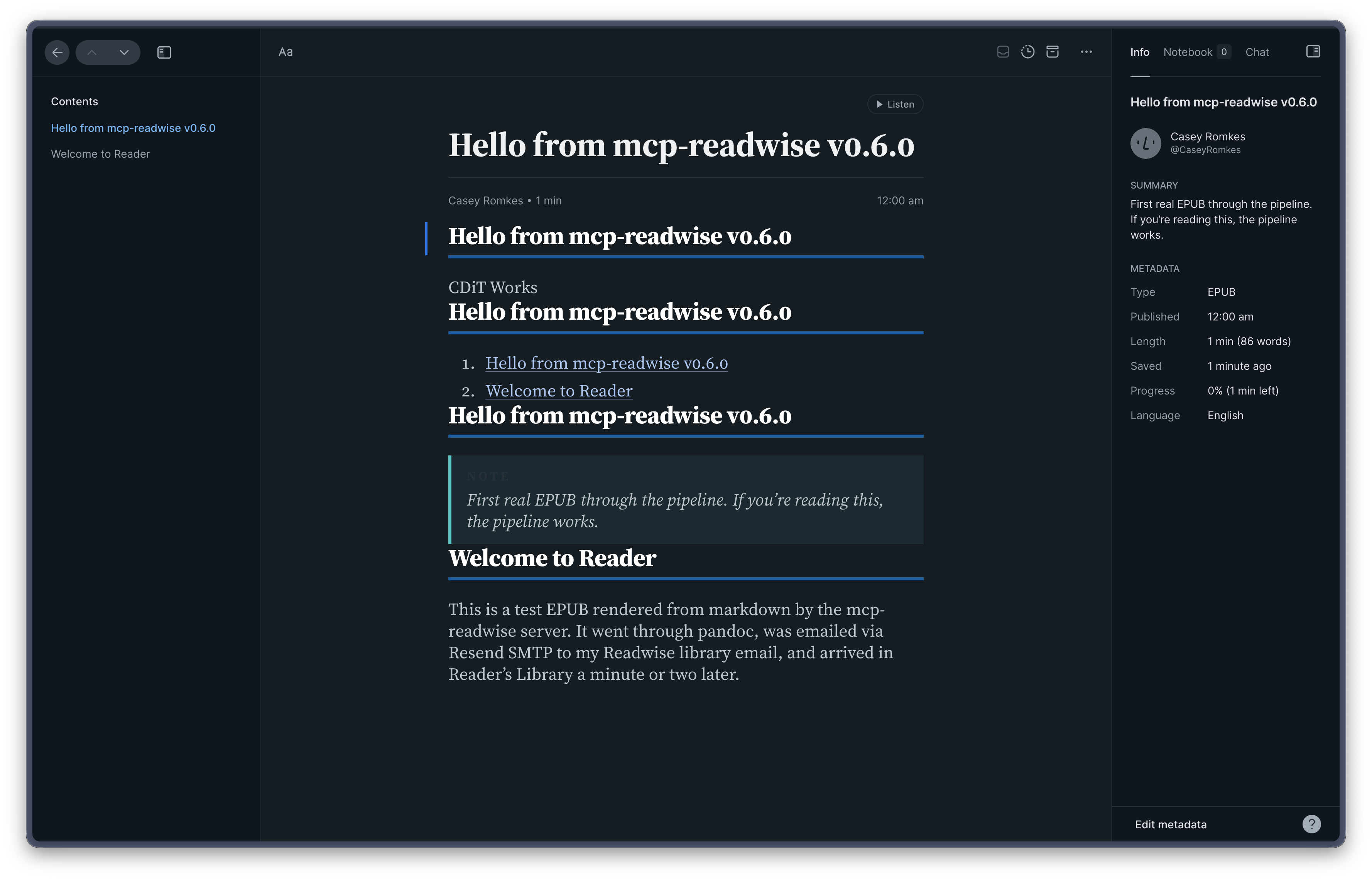
Readwise's Reader API has no file-upload endpoint — I verified this against their v3 docs and their own official CLI, which doesn't expose one either. The closest thing the API offers is "save URL" or "save HTML." Neither produces a true EPUB in Reader, which is the format with proper chapter nav, TOC, and downloadable export to Kobo / Boox / Kindle.
The one path that does produce a real EPUB is the email-to-library mechanism: every Reader account has a <custom>@library.readwise.io address that accepts EPUB attachments and ingests them properly. So save_markdown_as_epub automates that path:
markdown blob → pandoc renders to EPUB 3 (with CDIT brand styling)
             → aiosmtplib delivers via Resend SMTP
             → email lands at <custom>@library.readwise.io
             → Readwise ingest pipeline picks it up (1–5 min)
             → real EPUB appears in Library
The tool returns immediately after SMTP delivery — the ingest is async by nature. A companion tool verify_epub_received polls Reader to confirm the document landed, with time-aware retry guidance baked into the response so an LLM caller knows when to retry vs. when to surface a failure.
Setup
Three environment variables, all required (the server still boots without them — only the EPUB tools refuse to run; the other 12 work normally):
# Your custom Readwise Library email
# Find at: read.readwise.io → Account → Personalize email addresses
# Bearer credential — rotate via Readwise if it leaks.
READWISE_LIBRARY_EMAIL=casey-personal@library.readwise.io

# Resend API key, used as SMTP password (username is literal "resend")
RESEND_API_KEY=re_…

# Verified sender registered in Resend
EPUB_FROM_ADDRESS=mcp-readwise@cdit-dev.de
Calling it
# From any MCP client (Claude, agents, scripts):
result = save_markdown_as_epub(
    markdown="""---
    title: Q2 Planning Brief
    author: Casey
    tags: [planning, brief]
    note: Context for the team — read this before Thursday's call.
    ---
    # Background
    ...
    """,
    idempotency_key="brief-2026-q2-v1",  # optional — collapses retry duplicates
)
# → EpubSendResult(title=..., accepted_at=..., recipient=...,
#                  identifier_scheme="x-mcp-readwise-idempotency", ...)

# Wait 1–2 minutes, then:
verify = verify_epub_received(title=result.title, since=result.accepted_at)
# → VerifyResult(found=True, document=ReaderDocument(...),
#                note="Found in Reader Library.")
The docstring leads with the async contract loudly so LLM agents reading the schema know not to tell the human "done" until verify_epub_received confirms.
Brand stylesheet (CDIT)
EPUB output is styled by a hand-tuned CSS at mcp_readwise/assets/epub/cdit-style.css, inheriting the palette from cdit-works.de:
- Carbon
#272f38(body text), Cloud Dancer#f0eee9(page background) - Strong Blue
#1f5da0(links, H1 underline), Mint#5cc6c3(blockquote rail, Note preface) - Inter weights 400 / 700 / 800 embedded as static woff2 subsets (latin + latin-ext, ~170KB)
- Headings deliberately diverge from the website's display face: chapter heads use Inter weight 800 with tracking
-0.02em, not League Gothic — condensed display fonts fatigue across long-form chapter breaks body { line-height: 1.7; text-align: left; hyphens: auto; }tuned for sustained reading
To customize, fork the CSS file. It's a first-class editable asset, not generated from Python.
Frontmatter
Both save_markdown and save_markdown_as_epub accept YAML frontmatter for self-describing markdown:
---
title: My Note
author: Casey
summary: A brief description.
tags: [research, draft]
note: Context for the reader.
published_date: 2026-05-11
image_url: https://example.com/cover.jpg
---
# Body starts here

Content with **markdown** features — tables, footnotes, fenced code, smart quotes
all render properly through the `extra` + `sane_lists` + `smarty` extensions.
Title resolution (first non-empty wins): explicit title= param → frontmatter title: → first # H1 in body → "Untitled". Same precedence for other fields (without the H1 fallback).
Limits
- EPUB ceiling: 20 MiB raw binary (Readwise's email ingest caps at 30 MB; base64 inflates ~33%, MIME adds ~1 MB, so 20 MiB fits with margin). Larger EPUBs raise
EpubTooLargeErrorbefore SMTP. - Pandoc binary in the Docker image: ~150 MB. Accepted cost.
- Inline images in markdown must use absolute HTTPS URLs — pandoc fetches them at build time; relative paths don't resolve.
The other 12 tools
Read (engagement-aware)
These two collapsed an earlier 7-tool read surface into intent-shaped calls. They're built on a per-source engagement score that joins Readwise v2 books with their Reader v3 documents, so books and articles, finished and saved, recent and legacy, all sit on one comparable axis.
| Tool | Description |
|---|---|
reading_status | Single-call snapshot — recent activity, evergreen top, current attention, junk drawer, signal density. Accepts window_days (default 7) and week_offset (default 0). |
writing_material | Bundle highlights for drafting. Source-first (book_id / document_id / title_search) or topic-first (topic). Filters by min_engagement floor (default 0.7). |
Write
| Tool | Description |
|---|---|
save_url | Save a URL to Reader; Readwise fetches and parses. Synchronous. |
save_markdown | Save a markdown blob to Reader as rendered HTML with category="epub" UI hint. Synchronous, returns ReaderDocument. Use this for lightweight notes you don't need as a real EPUB. |
save_markdown_as_epub | The real-EPUB-via-email path described above. Async, returns EpubSendResult. |
verify_epub_received | Confirm a save_markdown_as_epub send has landed. Time-aware retry guidance in the response note. |
update_progress | Update reading progress (0.0–1.0). |
create_highlight / update_highlight / delete_highlight | Highlight CRUD with note and tags. |
Tags
| Tool | Description |
|---|---|
list_tags | List user-created custom tags. |
create_tag / delete_tag | Tag CRUD. |
tag_highlight | Add or remove a tag on a highlight. |
Three ways to save your own content into Reader
| You want | Use | Sync / Async | Fidelity | Setup |
|---|---|---|---|---|
| Save a URL (Readwise fetches & parses) | save_url | sync | HTML article | none |
| Save markdown as HTML with epub-UX hint | save_markdown | sync | HTML with category="epub" | none |
| Save markdown as a real EPUB book | save_markdown_as_epub | async (1–5 min) | true EPUB 3 with TOC, chapter nav, brand styling | three env vars |
Installation
uv sync
Pandoc is required for save_markdown_as_epub. It's baked into the Docker image; for local dev install it via brew install pandoc. Other tools work without it.
Configuration
| Variable | Required | Default | Description |
|---|---|---|---|
READWISE_TOKEN | Yes | — | Readwise API access token (get one) |
MCP_API_KEY | When TRANSPORT=http | — | Bearer token for the MCP Portal auth |
TRANSPORT | No | stdio | stdio or http |
HOST | No | 127.0.0.1 | HTTP server host |
PORT | No | 8000 | HTTP server port |
READWISE_BASE_URL | No | https://readwise.io | Readwise API base URL |
ENGAGEMENT_INDEX_TTL_SECONDS | No | 1800 | TTL for the engagement index cache |
ENGAGEMENT_TAG_DENYLIST | No | (built-in) | Tags excluded from the annotation bonus |
| EPUB sender (optional, but all three required together) | |||
READWISE_LIBRARY_EMAIL | Only for save_markdown_as_epub | — | Your <custom>@library.readwise.io |
RESEND_API_KEY | Only for save_markdown_as_epub | — | Resend SMTP password |
EPUB_FROM_ADDRESS | Only for save_markdown_as_epub | — | Verified Resend sender address |
SMTP_HOST | No | smtp.resend.com | Override to use Postmark, SES, etc. |
SMTP_PORT | No | 587 | |
EPUB_LANG | No | en | EPUB OPF dc:language metadata |
EPUB_MAX_BYTES | No | 20971520 | 20 MiB ceiling before send |
Usage
# Local stdio mode (default — for direct MCP client use)
READWISE_TOKEN=… uv run mcp-readwise

# HTTP mode (for MCP Portal / Cloudflare deployment)
READWISE_TOKEN=… MCP_API_KEY=… TRANSPORT=http uv run mcp-readwise

# Docker
cp .env.example .env  # fill in values
docker compose up -d
Health endpoint
GET /health
Returns build identifier, git commit, uptime, registered tool count, engagement index status, and the epub_sender configured flags (without ever exposing the API key or library email in plaintext).
{
  "status": "healthy",
  "version": "0.6.0",
  "build": "0.6.0+6ec5b6b",
  "tools": 14,
  "engagement_index": { "built": true, "source_count": 152, "age_seconds": 312 },
  "epub_sender": {
    "configured": true,
    "smtp_host": "smtp.resend.com",
    "smtp_port": 587,
    "from_address": "mcp-readwise@cdit-dev.de",
    "library_email_set": true
  }
}
How the engagement score works
Every source — book or article, Reader-imported or legacy Kindle — gets a vector engagement score with four components:
rawranks "current attention" (recency-weighted overall score)intensityranks "evergreen interests" (recency removed; pure depth)recencysmall modifier from how recently the source was last highlightedreturn_strengthcaptures multi-year highlight clusters and recent Reader re-opens
Computed from a layered sum of:
- Base layer —
legacy(v2-only Kindle/iBooks book),highlighted,finished_no_hl,reading,saved_warm,saved_cold - Density — non-discarded highlight count
- Recency — last-highlight age, banded (30d / 1y / 5y)
- Annotation — does any highlight carry a user note, a non-structural tag, or
is_favorite? - Return signal — multi-year highlight clusters AND/OR Reader-era reopens
See openspec/changes/archive/2026-05-11-workflow-shaped-tools/design.md for the full formula and decision rationale.
Project structure
mcp_readwise/
  server.py             # FastMCP app, tool registration, /health
  config.py             # pydantic-settings configuration
  client.py             # Centralized httpx client (auth, retries, rate limits)
  auth.py               # Bearer token verifier for MCP Portal
  engagement.py         # The engagement index + scoring formula
  markdown_render.py    # Frontmatter parser + Markdown → HTML helper
  epub_render.py        # Pandoc wrapper + EPUB metadata builder
  smtp_client.py        # Async SMTP transport (aiosmtplib)
  assets/epub/          # CDIT brand stylesheet + embedded Inter woff2 subsets
  models/               # Pydantic response models
  tools/
    status.py, writing.py             # Engagement-aware reads
    markdown.py                       # save_markdown (HTML path)
    epub_sender.py, epub_verifier.py  # Real-EPUB-via-email path
    reader.py, highlights.py, tags.py # Standard write tools
Deployment
Deployed via Komodo to ubuntu-smurf-mini, accessible through the Cloudflare MCP Portal at mcp-readwise.cdit-dev.de. Auto-deploys on push to main via GitHub webhook → Komodo listener.
License
MIT