
Agent Memory Hub
carloshpdoc/agent-memory-hub
Memória auditável e autodeterminada para agentes de IA entre sessões
Ver no GitHubMCP server que fornece memória persistente compartilhada para agentes de IA (Claude Code e ferramentas MCP), armazenada em seu próprio Supabase. Retém contexto entre sessões, máquinas e instâncias de ferramentas com auditabilidade total — sem black boxes ou lock-in de SaaS.
Instalação
npx convez-ai carloshpdoc/agent-memory-hub1 comando no terminal: detecta o formato do repositório (marketplace ou plugin avulso) e instala via Claude Code. Requer Node 18+ e o Claude Code instalado.
Métricas
Casos de uso
- Manter contexto e preferências do desenvolvedor entre sessões do Claude Code
- Compartilhar conhecimento e decisões entre múltiplos projetos e máquinas
- Criar um perfil de desenvolvedor auto-melhorável com aprovação humana
- Buscar e recuperar fatos históricos com proveniência e confiança rastreável
Veredito

Solução sofisticada para quem precisa de memória agnóstica de sessão em agentes de IA, com controle total dos dados e human-in-the-loop. Exige familiaridade com Supabase e Python, mas oferece transparência rara em sistemas de memória.
README
A tradução para o português deste README ainda está na fila.
agent-memory-hub
🇧🇷 Leia em Português.
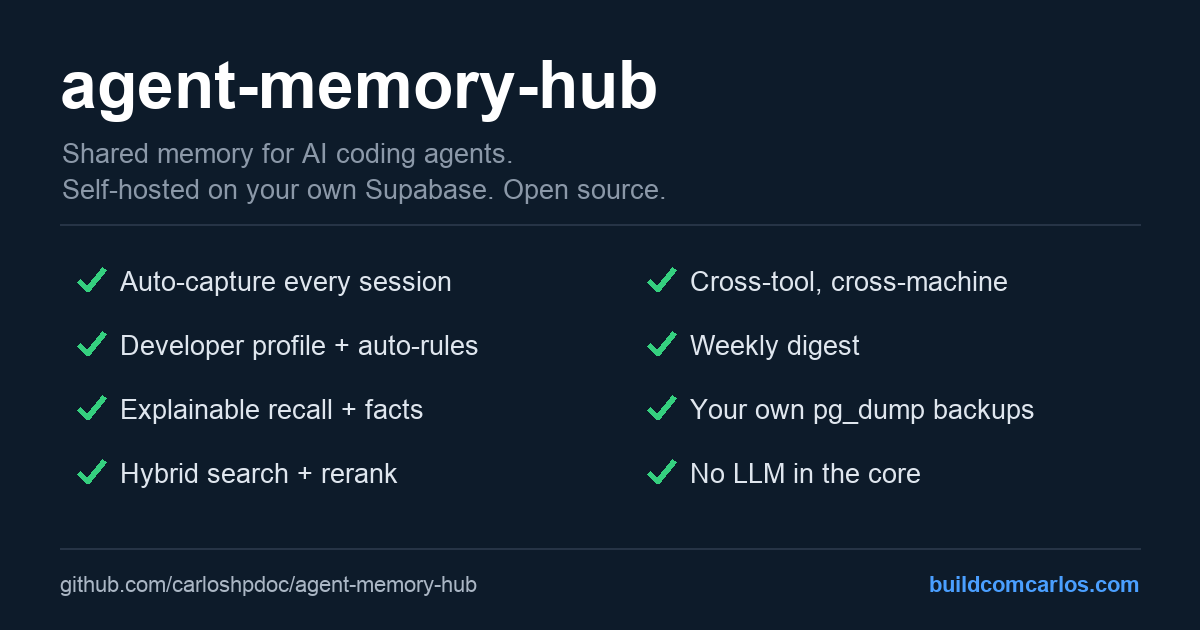
Persistent, shared memory for AI coding agents (Claude Code, and any MCP/REST-capable tool), backed by your own Supabase. Every session is auto-saved to a Postgres table and recalled at the start of the next one, across sessions, tool instances, and machines.
One stance sets it apart: memory you can trust, explain, and own. Not a black box.
- Explainable. Recall shows each item's provenance (a fact's confidence and age, a session's
session_id), and a fact's confidence decays with age, so stale memory fades on its own. - Human-gated. The cross-project developer profile and its rules are proposed, never applied on their own. You approve or reject; nothing silently rewrites how your agent works.
- Yours. Plain Postgres on your own Supabase.
pg_dumpanytime. No SaaS in the middle, no lock-in.
Why
Claude Code starts every session from zero. Tools like claude-mem or mem0 solve this, but either
store locally (no cross-machine) or run through a hosted service, and most auto-apply whatever they
extract. agent-memory-hub is the self-owned, auditable take: a Supabase table you own, optional
layers you switch on as you need them (semantic search, facts, a cross-project developer profile,
backups), and a human in the loop wherever memory changes how the agent behaves.
- Cross-session / instance / machine: any setup pointing at the same Supabase shares everything.
- Distilled, not dumped: recall injects compact, ranked, explainable context, not raw transcripts.
- Self-improving, on your terms: it learns how you work across projects and proposes rules; you decide.
Features
- Auto-capture of every session, with a per-turn checkpoint that survives crashes.
- Recall at session start: a clean one-line summary per relevant session, plus the durable
facts for the current project. Each item carries its provenance (facts: confidence and
since-when; sessions: the
session_id) so recall is explainable. Fact confidence decays with age (per-kind half-life), so stale facts fade from recall without being deleted. - Search your whole history: hybrid (keyword + semantic via
pgvector), with an optional LLM--reranksecond pass. - Facts layer (optional, bring-your-own-LLM): durable preferences / decisions / configs with temporal validity, deduped by meaning.
- Developer profile (optional): distills how you work across all your projects into a profile, and turns the patterns you approve into rules your agent follows. A self-improving loop, human-gated.
- Cross-tool: Claude Code via hooks, Codex CLI via an adapter, any tool via the adapter template.
- Memory console (
scripts/memory.py): browse, search and inspect from the terminal. - Weekly digest (
scripts/weekly_digest.py): a 7-day summary across all projects (LLM-free), with a hook into your content workflow. - Your own backups: daily
pg_dumpto a portable.sql. No lock-in. - No LLM in the core (the "semantic" part uses an embedded model, not a chat LLM); every LLM-powered piece is optional and has a free option.
How it works
flowchart TD
    subgraph S["AI coding session (Claude Code)"]
        direction TB
        SS["SessionStart"] --> RECALL["recall_session.py<br/>injects a digest of relevant past sessions"]
        STOP["Stop (each turn)"] --> CAP["capture_session.py<br/>continuous checkpoint, background, upsert"]
        SE["SessionEnd"] --> SAVE["capture_session.py<br/>final save"]
    end

    RECALL -.->|reads| DB[("Supabase, your project<br/>table public.sessions")]
    CAP -->|writes| DB
    SAVE -->|writes| DB

    DB -->|optional| DUMP["pg_dump<br/>cron on an always-on host"]
    DUMP --> GZ([".sql.gz"])
    GZ --> PULL["pull to your machine"]
- Capture is idempotent (upsert by
session_id). TheStopcheckpoint means even an abrupt kill keeps the session up to its last turn. - Recall injects only a compact digest (one extractive summary line per session, not raw transcript). Full transcripts stay queryable on demand via the Supabase MCP or REST.
- The summary is deterministic and LLM-free: the capture hook keeps the first substantive
user ask, the last one, and turn counts. Run
sql/04-summary.sqlto add the column.
Requirements and supported tools
The memory itself is just Postgres, so what's tool-specific is only the automatic capture/recall, which ships as Claude Code hooks.
- Auto-capture + recall (the hooks): Claude Code. The
hooks use its
SessionStart,Stop, andSessionEndevents. - Read and query the shared memory: any MCP or REST capable AI tool, for example Cursor, Codex CLI, Gemini CLI, or ChatGPT, through the Supabase MCP or the REST API.
- Capture from another tool: an adapter scans that tool's local transcripts and uploads
them. Codex CLI ships as
scripts/adapters/codex.py; see Capture from other tools to add more.
Also needed:
- A free Supabase project.
python3(hooks and backup are pure stdlib, no pip needed).
Getting started (also: how to set it up on a machine)
Shortcut: after cloning and filling
.env, run./scripts/setup.sh. It applies the SQL migrations and installs the Claude Code hooks in one idempotent step (it does not enable the optional LLM facts layer). The manual steps below explain what it does.
1. Clone
git clone https://github.com/carloshpdoc/agent-memory-hub.git
cd agent-memory-hub
2. Create a Supabase project
At supabase.com: new project. Enable Data API and RLS. Grab from Settings > API: Project URL, publishable key, secret key.
3. Apply the schema
Open SQL Editor in Supabase and run sql/01-schema.sql.
It creates the sessions table, the full-text index, and RLS.
4. Configure .env
cp .env.example .env
# edit .env with your SUPABASE_URL and SUPABASE_SECRET_KEY (and backup vars if used)
.env is gitignored. The hooks read it directly.
5. Wire the hooks into Claude Code
Add to your Claude Code settings.json (~/.claude/settings.json for user scope), using the
absolute path to your clone:
{
  "hooks": {
    "SessionStart": [
      { "matcher": "", "hooks": [
        { "type": "command", "command": "python3 /ABS/PATH/agent-memory-hub/hooks/recall_session.py", "timeout": 15 }
      ]}
    ],
    "Stop": [
      { "matcher": "", "hooks": [
        { "type": "command", "command": "payload=$(cat); echo \"$payload\" | python3 /ABS/PATH/agent-memory-hub/hooks/capture_session.py >/dev/null 2>&1 &" }
      ]}
    ],
    "SessionEnd": [
      { "matcher": "", "hooks": [
        { "type": "command", "command": "python3 /ABS/PATH/agent-memory-hub/hooks/capture_session.py", "timeout": 20 }
      ]}
    ]
  }
}
If you already have hooks for these events, add these entries to the existing arrays.
6. (optional) Add the Supabase MCP
Lets the agent query memories interactively:
claude mcp add --scope user --transport http supabase \
  "https://mcp.supabase.com/mcp?project_ref=<YOUR_PROJECT_REF>"
# then authenticate: /mcp > supabase
7. (optional) Backup module
On an always-on host with pg_dump at or above your Postgres major version, and the repo cloned:
- Put your pooler creds in
~/.pgpass(chmod 600):HOST:5432:postgres:postgres.<PROJECT_REF>:PASSWORD - Fill the
PG_POOLER_*vars in.env. - Cron:
30 3 * * * /ABS/PATH/agent-memory-hub/scripts/backup.sh >> .../backup.log 2>&1 - Pull copies locally with
scripts/pull-backups.sh(setREMOTE_SSHandSSH_KEYin.env).
Adding another machine
This is the whole point, and it's trivial:
- Clone the repo on the new machine.
- Copy the same
.env(same Supabase credentials). - Run
./scripts/setup.sh.
Done. That machine now writes to and reads from the same shared memory. The migrations are idempotent (and skipped if it has no DB creds, since the schema is shared). The optional facts layer stays off, so a weaker machine just captures and reads, while heavy fact extraction runs only where you enable it.
To also upload that machine's prior Claude Code history (sessions from before the hooks),
run python3 scripts/backfill_sessions.py --dry-run to preview, then without the flag to upload.
It is idempotent (skips sessions already in Supabase).
Capture from other tools (adapters)
The Claude Code hooks are one capture path. Tools without lifecycle hooks are handled by an
adapter that scans their local transcripts and uploads new ones (idempotent), the same way
backfill_sessions.py works for Claude Code. Adapters run on a cron and write with tool=<name>,
so recall, search and facts treat all tools uniformly.
- Codex CLI (
scripts/adapters/codex.py) reads~/.codex/sessions/**/rollout-*.jsonl. Run with--dry-runto preview, then put it on a cron. - Adding a tool: write a small adapter that maps the tool's transcripts to
(session_id, cwd, user/assistant turns)and upserts withtool=<name>. Usecodex.pyas the template. Cursor (chat in SQLite) and Gemini CLI are good first contributions.
Configuration reference
| Var | Used by | Meaning |
|---|---|---|
SUPABASE_URL | hooks, backup.py | https://<ref>.supabase.co |
SUPABASE_SECRET_KEY | hooks | service_role key (writes, bypasses RLS) |
PG_POOLER_HOST, PG_POOLER_USER | backup.sh | Session Pooler host, postgres.<ref> |
BACKUP_DIR, KEEP | backup.sh, backup.py | output dir, how many to keep |
REMOTE_SSH, SSH_KEY | pull-backups.sh | always-on host, SSH key |
EMBED_KEY | embed_pending.py, search.py | guard for the embedding function (Phase 2) |
Querying your memory
- Console:
python3 scripts/memory.pyopens an interactive prompt, or use it as subcommands:stats,recent [N],search [--project P] "<q>",facts [project],show <id-prefix>. Pure stdlib, no server, no key in a browser. - MCP: ask the agent. It runs SQL via the Supabase MCP.
- REST full-text:
GET /rest/v1/sessions?content_tsv=fts(simple).<term>with the secret key. - Filters: by
project,machine,started_at,session_id.
Semantic search (Phase 2)
Optional. Adds meaning-based recall on top of full-text search, using pgvector and the
gte-small model running inside a Supabase Edge Function (free, no external API).
- Run
sql/02-phase2-pgvector.sql. It adds theembeddingcolumn, the HNSW index, and thematch_sessionsRPC. Also runsql/03-hybrid-search.sqlfor thehybrid_searchRPC. - Set a guard secret and deploy the function:
Put the samesupabase secrets set EMBED_KEY=$(openssl rand -hex 24) supabase functions deploy embed --no-verify-jwt # new API keys are not JWTsEMBED_KEYin your.env. - Embed existing rows:
python3 scripts/embed_pending.py. Run it on a cron to keep new sessions embedded (for example*/15 * * * *on your always-on host). - Search:
python3 scripts/search.py "how did we set up backups". It runs hybrid search (keyword + semantic, fused with Reciprocal Rank Fusion), so exact terms that pure vector search would miss still surface, and vice versa. Add--rerankfor an optional LLM second pass that reorders the top candidates by relevance (needsFACTS_LLMset).
The Edge Function returns only vectors and counts, never session content.
Facts and preferences (optional, Phase 4)
Everything above needs no LLM (the "semantic" part uses the embedded gte-small, not a
chat model). This optional layer is the only part that uses an LLM, and it is
bring-your-own-LLM with free options, so it never forces a cost or a specific provider.
When enabled, an optional cron distills each session into durable atomic facts (preferences, decisions, configs) with temporal validity, deduped by meaning. Recall then injects the relevant facts (current project + global) at the top of the digest.
- Run
sql/05-facts.sql(facts table, validity model,match_factsRPC). - Pick a provider in
.envviaFACTS_LLM:ollama: local, free, private (needs Ollama running).gemini: Google AI Studio free tier (GEMINI_API_KEY).openai: OpenAI or any OpenAI-compatible endpoint (Groq, OpenRouter, local).off(default): disabled; the rest of the tool is unaffected.
- Run
python3 scripts/extract_facts.py(put it on a cron to process new sessions).
Deduping facts (optional, manual). Over time, facts can overlap. sql/06-find-fact-dupes.sql
plus scripts/consolidate_facts.py let an LLM judge near-duplicate pairs and supersede the
redundant one (non-destructively, via valid_until). Run it with --dry-run and review:
this is deliberately not automated, because a weak judge can over-merge useful specifics, so a
human should approve. Some redundancy is fine; only prune what you've checked.
Developer profile and self-improving rules (optional, Phase 9)
Most memory tools store facts per project. Because this hub holds every session across all your projects, it can do something they can't: distill a profile of how you work and turn the high-confidence patterns into rules your agent then follows. The loop is: the more you use it, the better-tuned the agent's own instructions get, with you as the gate.
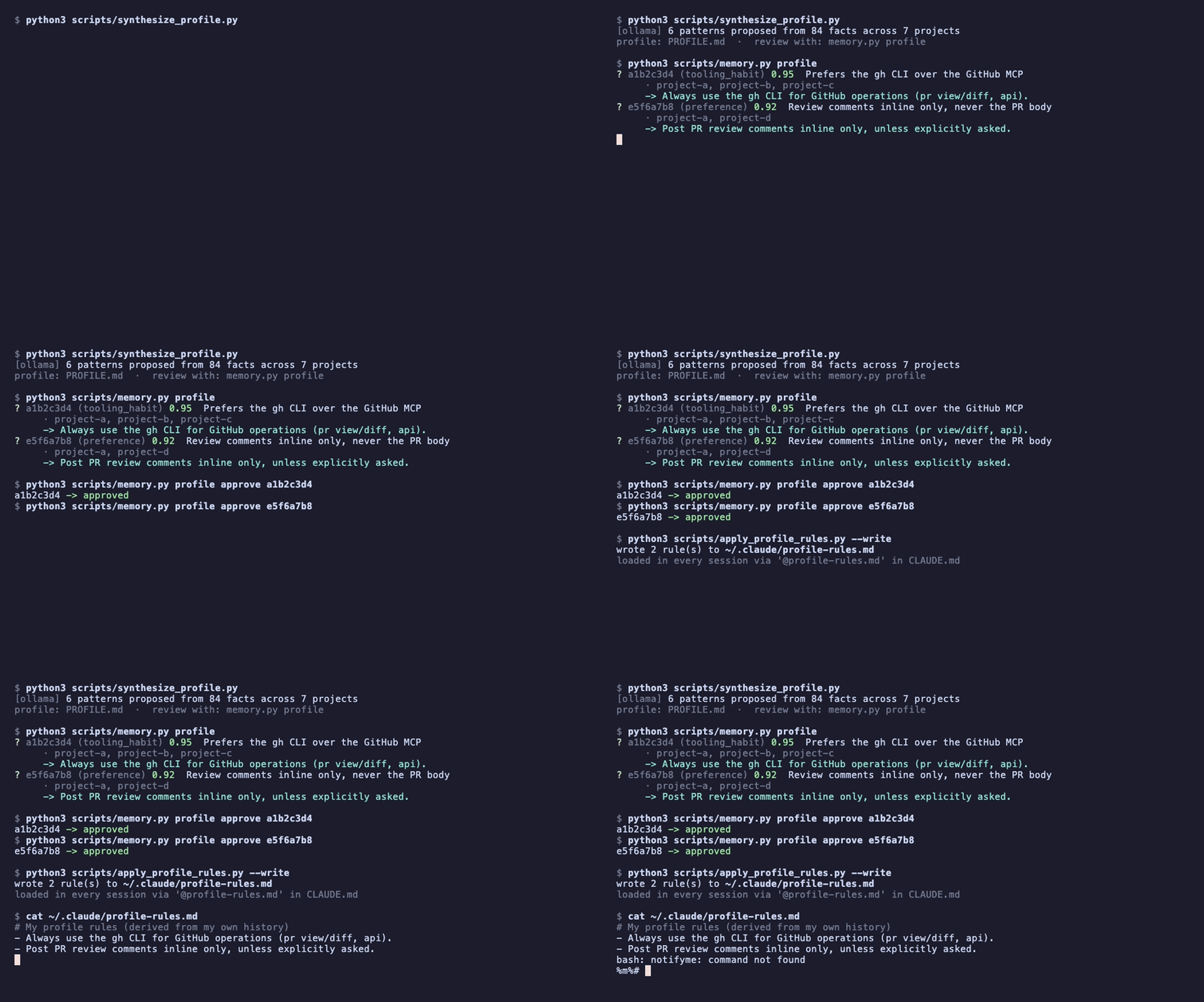
Illustrative run with generic data. The loop: synthesize a profile, review each pattern, approve, and the approved rules land in a file your
CLAUDE.mdimports.
- Run
sql/07-profile.sql(theprofile_patternstable). - With
FACTS_LLMset (same providers as above), runpython3 scripts/synthesize_profile.py. It reads your durable facts, keeps only patterns with evidence in 2+ different projects, and writes a human-readablePROFILE.md. High-confidence patterns get a proposed rule. - Review with
python3 scripts/memory.py profileand approve or reject each (profile approve <id>/profile reject <id>). Curation is deliberately human. - Run
python3 scripts/apply_profile_rules.py(dry-run) then--write. It writes the approved rules to a separate file (~/.claude/profile-rules.md), never touching your hand-writtenCLAUDE.md. Load them once by adding@~/.claude/profile-rules.mdtoCLAUDE.md.- Add
--per-projectto instead write one file per project (~/.claude/profile-rules/<project>.md), each with the rules whose evidence includes that project. Import the relevant one from that repo'sCLAUDE.md, so project-specific rules don't load in unrelated sessions.
- Add
Recall also proactively surfaces any detected-but-unreviewed patterns at the start of a session (with their confidence and project count), so the loop closes itself instead of waiting for you to remember to run the review.
Like the facts layer, this is optional, bring-your-own-LLM, and gated by human review: a weak judge over-merges, and "newer" is not always "better", so nothing is applied without your sign-off.
Security
- Secrets live only in
.envand~/.pgpass(gitignored, chmod 600). Never commit them. - RLS is on. The public (anon) key can't read without a policy. Hooks use the secret key.
- The secret key is powerful. Treat it like a password.
Files
scripts/setup.sh            one-shot setup/update: migrations + hooks (idempotent)
scripts/migrate.py          apply sql/*.sql to Supabase
scripts/install_hooks.py    add the hooks to settings.json
scripts/backfill_sessions.py  upload this machine's prior Claude Code history (one-time)
scripts/adapters/codex.py   capture adapter for Codex CLI (template for other tools)
scripts/memory.py           memory console: browse/search/inspect (Phase 8)
scripts/weekly_digest.py    7-day cross-project digest, LLM-free (Phase 10)
hooks/capture_session.py    capture (Stop + SessionEnd)
hooks/recall_session.py     recall  (SessionStart)
sql/01-schema.sql           table + full-text + RLS
sql/02-phase2-pgvector.sql  pgvector + match_sessions RPC (Phase 2)
sql/03-hybrid-search.sql    hybrid_search RPC: keyword + semantic via RRF (Phase 3)
sql/04-summary.sql          summary column (extractive, LLM-free)
sql/05-facts.sql            facts/preferences layer + match_facts RPC (Phase 4, optional)
supabase/functions/embed/   gte-small embedding Edge Function (Phase 2)
scripts/backfill_summaries.py  fill summary for existing rows (one-time)
scripts/extract_facts.py    distill sessions into facts via your LLM (Phase 4, optional)
scripts/consolidate_facts.py  review/merge duplicate facts via LLM (Phase 5, manual)
sql/06-find-fact-dupes.sql  find near-duplicate fact pairs (Phase 5)
sql/07-profile.sql          developer-profile patterns table (Phase 9, optional)
scripts/synthesize_profile.py  distill a cross-project dev profile via LLM (Phase 9, optional)
scripts/apply_profile_rules.py  write approved profile rules to ~/.claude/profile-rules.md (Phase 9)
scripts/backup.sh           pg_dump backup (cron on an always-on host)
scripts/pull-backups.sh     rsync backups to this machine
scripts/backup.py           portable logical backup (REST/NDJSON, no pg client)
scripts/embed_pending.py    embed sessions missing a vector (Phase 2)
scripts/search.py           semantic search CLI (Phase 2)
docs/                       architecture and design decisions
License
Star, share, contribute
If this saved you from re-explaining your project to your agent for the tenth time today, give the repo a star. It genuinely helps other people find it.
Ideas, rough edges, or a capture adapter for your tool (Cursor, Gemini CLI...)? Open an issue or a pull request. If you build something on top of agent-memory-hub, I would love to see it.
Built by
Made by buildcomcarlos.com: articles and open tools on AI agents, iOS, and shipping software solo. If this project was useful, the site is where the deep dives and the next experiments live. Come say hi.