
AdStrike
capture0x/AdStrike
Framework IA para red-team AD com MCP server — 53 ferramentas de ataque modular
Ver no GitHubFramework modular de red-team para Active Directory com IA integrada, especializado em testes de penetração autorizados, enumeração AD, análise de caminhos de ataque e workflows Kerberos/ADCS. Expõe 53 ferramentas via MCP server sem necessidade de API key, permitindo integração com Claude Code, Cursor e Claude Desktop.
Instalação
npx convez-ai capture0x/AdStrike1 comando no terminal: detecta o formato do repositório (marketplace ou plugin avulso) e instala via Claude Code. Requer Node 18+ e o Claude Code instalado.
Métricas
Casos de uso
- Testes de penetração autorizados em infraestrutura Active Directory
- Enumeração e mapeamento de ativos AD com análise de caminhos de ataque
- Automação de workflows Kerberos e ADCS para ambientes com NTLM desabilitado
- Orquestração de ataques com assistência de IA via MCP
Veredito

Ferramenta profissional e madura para red-team AD em contexto autorizado. A integração MCP elimina fricção ao conectar com Claude desktop, permitindo assistência de IA nativa sem gerenciamento de API keys. Requer expertise em AD e testes de penetração; recomendado para times ofensivos estruturados.
README
A tradução para o português deste README ainda está na fila.



Authorized use only. Do not run this tool against systems without explicit written permission.
Release status: beta/research build. Menu and import health checks pass; individual modules still depend on target state, credentials, network reachability, and installed third-party tools.
Overview
AdStrike is a modular, terminal-based Active Directory attack framework. It helps operators move through discovery, enumeration, exploitation, credential access, lateral movement, persistence, and reporting while keeping session state in one place.
The framework stores target details, credentials, Kerberos state, findings, executed commands, and output paths in a shared session. Modules can reuse that context instead of forcing the operator to re-enter the same data repeatedly.
🔑 No API key required. AdStrike now ships an MCP server that exposes all 53 tools (52 attack modules +
set_engagement) over the Model Context Protocol. Plug it into an MCP host you already use — Claude Code, Cursor, Claude Desktop — and that host's LLM drives the whole engagement with its own subscription. No Ollama, noANTHROPIC_API_KEY, no local model to download. See MCP Server (No API Key) below and docs/mcp.md.
Core capabilities:
- 58 interactive menu entries: 52 attack modules, 4 utilities, 2 management functions
- 9 kill-chain phase groups, from reconnaissance through advanced operations
- Kerberos-aware workflows for NTLM-disabled and LDAP-signing-enforced environments
- Smart Analyst for parsing output and ranking next actions
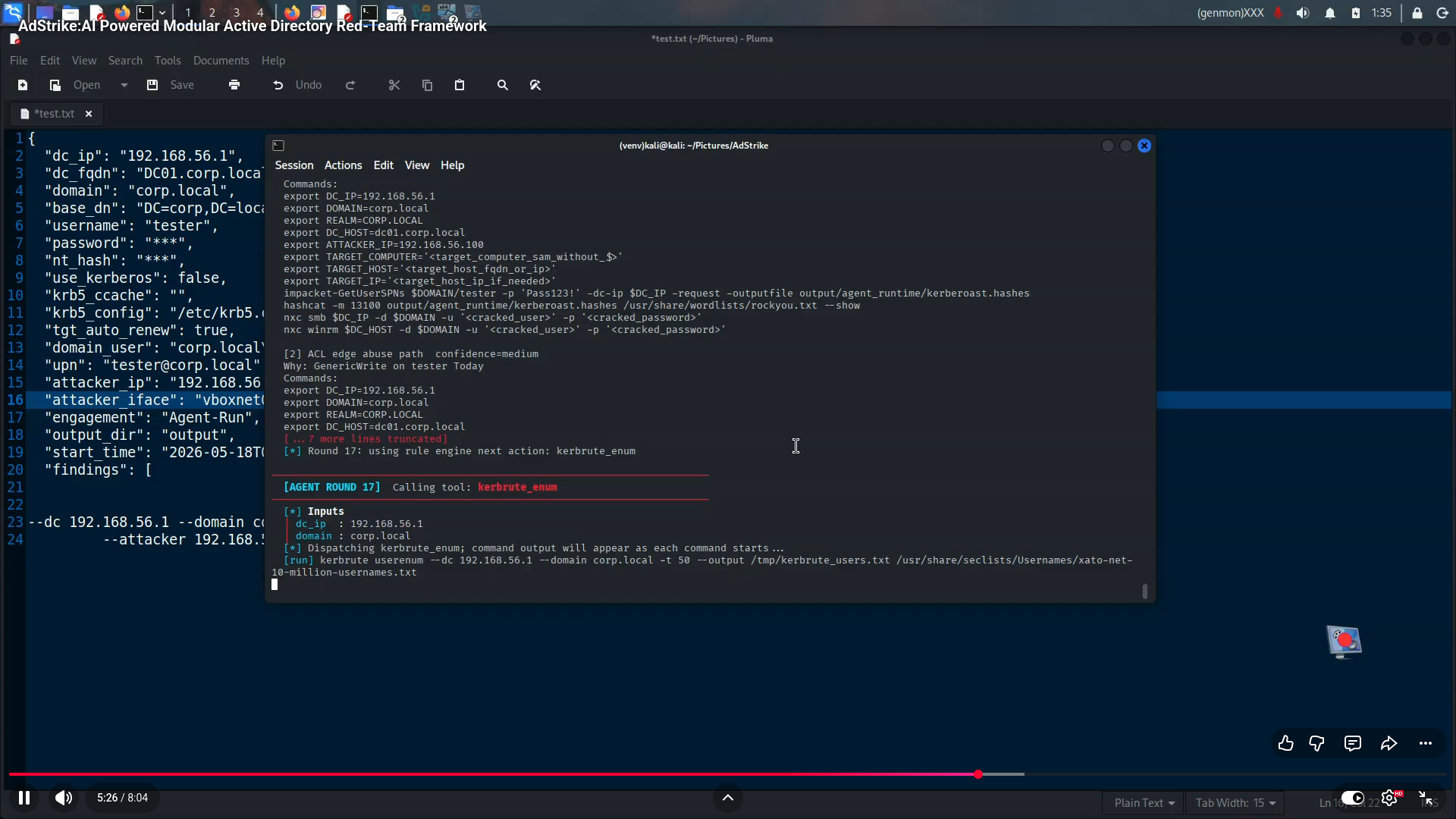
- Optional AdStrike Agent for AI-assisted planning or tool orchestration
- MCP server exposing all 53 tools — no API key, driven by your existing MCP host (Claude Code / Cursor / Claude Desktop)
- Report generation in HTML, Markdown, and JSON
- Wrappers for common AD tooling such as Impacket, NetExec, Certipy, Kerbrute, BloodHound, PowerView, Rubeus, and related utilities
Screenshots
| AD Enumeration | BloodHound Helper |
|---|---|
 |  |
| AdStrike Agent | Smart Analyst |
|---|---|
 |  |
How to use
Quick Start
git clone https://github.com/capture0x/AdStrike.git
cd AdStrike
chmod +x install.sh run.sh
bash install.sh
source venv/bin/activate
bash run.sh
OR
git clone https://github.com/capture0x/AdStrike.git && cd AdStrike && chmod +x install.sh run.sh && bash install.sh && source venv/bin/activate && bash run.sh
Do not run install.sh or run.sh with sudo. The installer creates repo-local files such as adrt_venv/, .env, and output/; running as root can leave those files root-owned.
If you already ran it with sudo, fix ownership once:
sudo chown -R "$(id -un):$(id -gn)" .
Requirements
| Item | Requirement |
|---|---|
| OS | Kali Linux 2024+ or Parrot OS recommended |
| Python | 3.10 or higher |
| Privileges | Normal user for the framework; root only for tools that require packet capture or privileged network actions |
| Network | Reachability to in-scope AD services, commonly 88, 389, 443, 445, 636, 5985 |
Key external tools:
impacket-scripts    nxc / netexec       bloodhound-python    certipy-ad
evil-winrm          kerbrute            responder            ldap-utils
hashcat             john                nmap / masscan       krb5-user
dnstool.py          dig                 ldapsearch
Most dependencies are installed by install.sh. Some optional tools are installed or repaired by scripts/repair_tools.sh when possible.
Configuration
The installer copies .env.example to .env. Edit .env before an engagement:
DC_IP=10.10.10.10
DC_FQDN=dc1.corp.local
DOMAIN=corp.local
BASE_DN=DC=corp,DC=local
USERNAME=user
PASSWORD=
NT_HASH=
USE_KERBEROS=false
KRB5_CCACHE=
ATTACKER_IP=10.10.14.5
ATTACKER_IFACE=tun0
ENGAGEMENT_NAME=Corp-Internal-2026
ADSTRIKE_SHOW_SECRETS=false
You can also enter these values interactively from the Session Manager. The session carries them across modules automatically.
Never commit real engagement data. Keep .env, output/, ticket files, hashes, dumps, reports, and captured loot private and redacted.
Useful environment flags:
| Variable | Default | Purpose |
|---|---|---|
ADSTRIKE_SHOW_SECRETS | false | Mask passwords, hashes, and loot in logs and reports unless explicitly enabled |
ADSTRIKE_NO_ANIMATION | unset | Disable startup animation for cleaner logs or slow terminals |
ADSTRIKE_PORT_CHECK | unset | Force quick nmap AD port check during session setup |
TGT_AUTO_RENEW | true | Keep Kerberos renewal behavior enabled where supported |
ADSTRIKE_OPSEC | normal | Agent mode override: loud, normal, or stealth |
ADSTRIKE_BH_HOST | unset | BloodHound/Agent hostname override |
ADSTRIKE_BH_DOMAIN | unset | BloodHound/Agent domain override |
ADSTRIKE_BH_IP | unset | BloodHound/Agent DC IP override |
ANTHROPIC_API_KEY | unset | Optional Claude backend key for AdStrike Agent |
Usage
Start the interactive menu:
bash run.sh
Recommended first-run flow:
[57] Session Manager  -> configure target and credentials
[58] Tool Checker     -> verify external tools and module imports
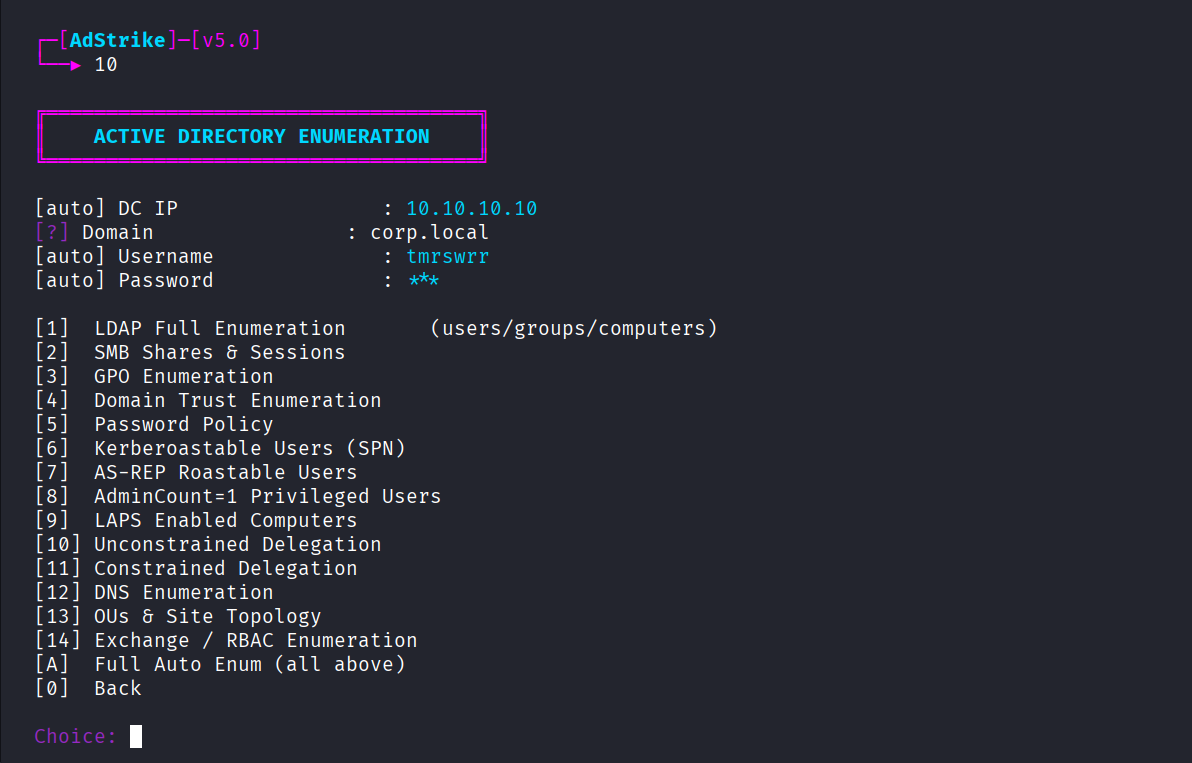
[10] AD Enumeration   -> collect baseline LDAP/SMB/GPO data
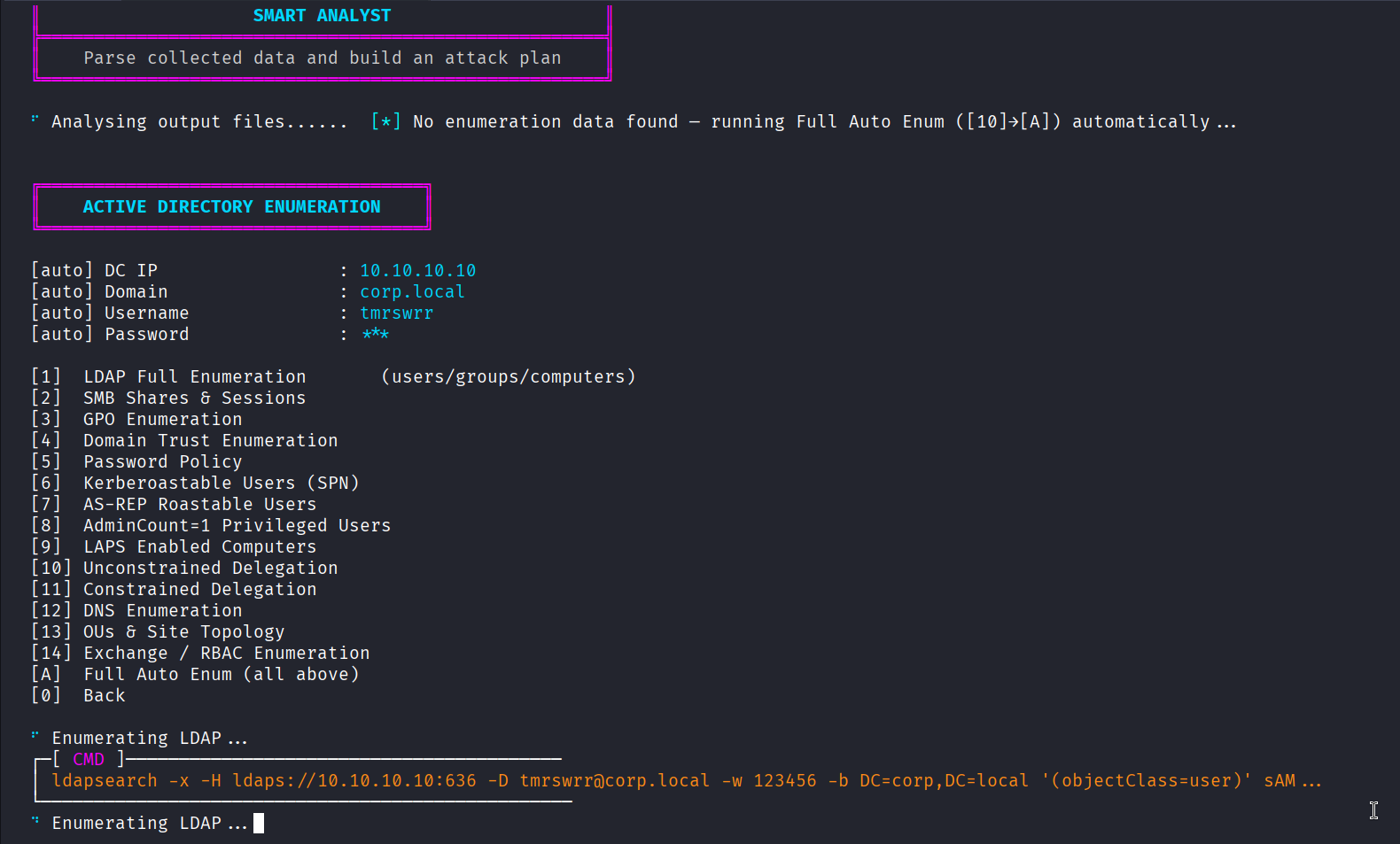
[54] Smart Analyst    -> parse output and rank next steps
[56] Generate Report  -> export findings and evidence
Direct module execution:
python -m venv venv
source venv/bin/activate
python3 main.py --module 10
python3 main.py --module 58 --no-banner
python3 main.py --session output/session.json --no-banner
Health check:
python3 -m py_compile main.py
python3 main.py --check
Current local health check:
Menu numbering is contiguous and unique
Module health OK: 56/56
Module Map
| Phase | Menu Range | Area |
|---|---|---|
| 0 | 1-2 | Reconnaissance |
| 1 | 3-9 | Initial access |
| 2 | 10-16 | Enumeration |
| 3 | 17-27 | Privilege escalation |
| 4 | 28-32 | Lateral movement |
| 5 | 33-36 | Credential access |
| 6 | 37-42 | Persistence |
| 7 | 43-48 | Cloud / hybrid |
| 8 | 49-52 | Advanced operations |
| Utilities | 53-58 | Agent, Analyst, Kerberos Manager, reporting, sessions, tool checking |
Reconnaissance
| # | Module | Coverage |
|---|---|---|
| 1 | Recon & OSINT | DNS, WHOIS, email harvest, certificate transparency |
| 2 | Network Discovery | nmap, masscan, nbtscan, netdiscover, IPv6 scanning |
Initial Access
| # | Module | Coverage |
|---|---|---|
| 3 | Initial Access (No Creds) | NTLM capture, relay, ARP, DHCPv6, RID cycling |
| 4 | CVE / AD Exploits | NoPac, PrintNightmare, Zerologon |
| 5 | AMSI / Defense Evasion | AMSI bypass, CLM bypass, AppLocker, obfuscation |
| 6 | EDR / AV Evasion | NanoDump, MockingJay, RWXfinder, BOF, syscalls |
| 7 | UAC Bypass | fodhelper, eventvwr, CMSTP, token impersonation |
| 8 | Pre2K & Timeroasting | Pre-Win2K accounts, MS-SNTP hash, MAQ abuse |
| 9 | WSUS Attack | WSUS HTTP spoofing, pywsus, SYSTEM execution |
Enumeration
| # | Module | Coverage |
|---|---|---|
| 10 | AD Enumeration | LDAP, SMB, GPO, DNS, trusts, SPNs, LAPS, delegation |
| 11 | PowerView Enumeration | PowerView cmdlet reference and execution |
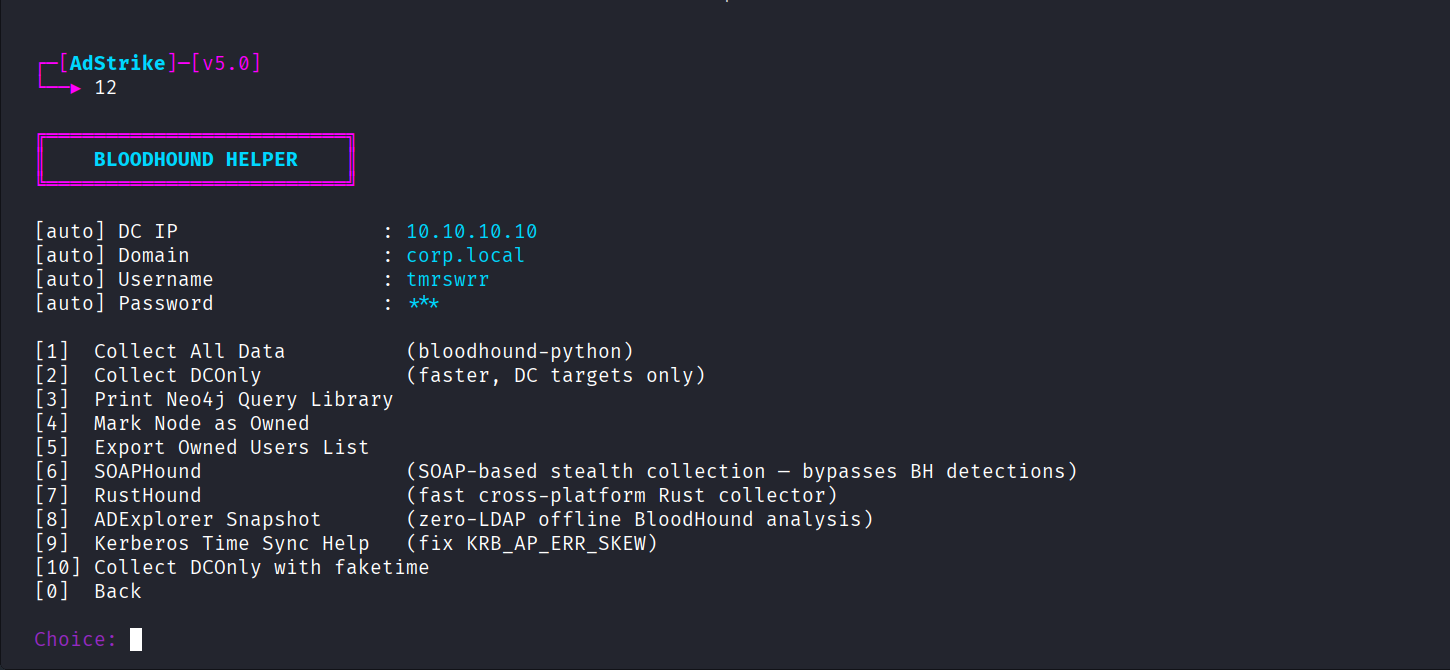
| 12 | BloodHound Helper | SOAPHound, RustHound, ADExplorer, Neo4j queries |
| 13 | File & Share Hunter | Snaffler, SYSVOL, GPP, spider_plus |
| 14 | NetExec / NXC Suite | SMB, LDAP, MSSQL, WinRM, RDP |
| 15 | User Hunting | SessionHunter, UserHunter, PSRemoting admin checks |
| 16 | ADIDNS Abuse | Wildcard DNS, WPAD, record injection, DNSAdmins |
Privilege Escalation
| # | Module | Coverage |
|---|---|---|
| 17 | Local Privilege Escalation | PowerUp, KrbRelayUp, Potato attacks, JEA |
| 18 | Kerberos Attacks | AS-REP roast, Kerberoast, PtT, OPtH, tickets, PKINIT |
| 19 | Rubeus Toolkit | TGT, TGS, roasting, PTT, S4U, monitor mode |
| 20 | Shadow Credentials | msDS-KeyCredentialLink, pywhisker, PKINIT |
| 21 | RBCD Full Chain | Powermad, S4U2Proxy, altservice, Bronze Bit |
| 22 | ACL / ACE Abuse | GenericAll, WriteDACL, ForceChangePassword, AddMember |
| 23 | Certificate Abuse (ADCS) | ESC1-ESC13, Certipy, CertSync, CA enumeration |
| 24 | RODC Attacks | PRP abuse, Key List Attack, RODC Golden Ticket |
| 25 | Golden Certificate | CA key theft, UnPAC, PassTheCert |
| 26 | UnPAC / PassTheCert | Targeted Kerberoast, UnPAC, PassTheCert, SPN-Jack |
| 27 | JEA Attacks | JEA bypass, PSReadLine history, CLM escape |
Lateral Movement
| # | Module | Coverage |
|---|---|---|
| 28 | Lateral Movement | PSExec, WMIExec, SMBExec, DCOM, Evil-WinRM, WinRS |
| 29 | Coercion Attacks | PrinterBug, PetitPotam, DFSCoerce, relay paths |
| 30 | MSSQL Abuse | xp_cmdshell, PowerUpSQL, linked servers, UNC capture |
| 31 | Password Attacks | Spray, Kerbrute, credential stuffing, relay capture |
| 32 | SCCM / MECM Abuse | NAA credential theft, relay, client push, AdminService |
Credential Access
| # | Module | Coverage |
|---|---|---|
| 33 | Credential Dumping | LSASS, SAM, NTDS, lsassy, nanodump, pypykatz |
| 34 | DPAPI & Credential Vault | dploot, SharpDPAPI, LaZagne, KeeThief, browsers |
| 35 | DCSync / DCShadow | Domain hash dumping and rogue DC operations |
| 36 | Shadow Copies Abuse | VSS, NTDS.dit, SAM, SYSTEM hive extraction |
Persistence
| # | Module | Coverage |
|---|---|---|
| 37 | Domain Persistence | Golden/Silver tickets, AdminSDHolder, NPPSPY, TTL group membership |
| 38 | Local Persistence | SharPersist, WMI subscriptions, registry, startup |
| 39 | GPO Abuse | GPO creation, linking, scheduled task execution, hijack |
| 40 | DNSAdmins Abuse | DLL injection through DNS service configuration |
| 41 | Trust Attacks | TrustKey, SID History, PAM trust, cross-forest escalation |
| 42 | AD Misc Abuse | Backup Operators, Skeleton Key, Exchange RBAC, DSRM |
Cloud / Hybrid
| # | Module | Coverage |
|---|---|---|
| 43 | Azure AD / Entra ID | AADConnect, PTA, PHS, PRT, token theft |
| 44 | Entra Hybrid Attacks | MSOL DCSync, Device Code flow, PTA injection |
| 45 | gMSA Attacks | Enumeration, hash extraction, pass-the-hash, shadow credentials |
| 46 | ADFS & Golden SAML | Token signing certificate, Golden SAML, AADInternals |
| 47 | AiTM / MFA Bypass | Evilginx2, Modlishka, EvilnoVNC, MFA fatigue, cookie replay, hybrid pivot |
| 48 | M365 / Teams Attacks | MailSniper, Graph API, Teams phishing, SharePoint theft, Intune abuse |
Advanced Operations
| # | Module | Coverage |
|---|---|---|
| 49 | Exploit Chains | Pre-built full attack paths |
| 50 | C2 Integration | Sliver, Havoc, Metasploit, Cobalt Strike payload delivery |
| 51 | Loot Parser & Analyzer | Parse, deduplicate, score, and export loot |
| 52 | AD Advanced Playbook | WDAC, MDE/MDI, WMI filters, trusts, deception |
Utilities
| # | Utility | Purpose |
|---|---|---|
| 53 | AdStrike Agent (AI) | Optional AI-assisted planner/orchestrator |
| 54 | Smart Analyst | Parse output, build an attack plan, optionally execute steps |
| 55 | Kerberos Manager | TGT, PTT, S4U, ccache, kirbi, krb5.conf management |
| 56 | Generate Report | HTML, Markdown, and JSON reporting |
| 57 | Session Manager | Save, load, switch, and clear sessions |
| 58 | Tool Checker | Verify external tools and module imports |
Output
Runtime files are written under output/:
| Path | Purpose |
|---|---|
output/session.json | Persisted session state |
output/session_*.log | Launcher logs from run.sh |
output/enum/ | LDAP, SMB, GPO, and enumeration artifacts |
output/bloodhound/ | BloodHound collections and related data |
output/audit/capability_audit.json | Tool Checker and module health snapshot |
output/agent_logs/ | AdStrike Agent Markdown/JSON run logs |
output/agent_runtime/ | Kerberos config, ccache, hashes, and temporary agent artifacts |
output/reports/ | Generated reports |
Review and redact everything in output/ before sharing.
Automatic Target Discovery
During first-run session setup, entering a DC IP triggers a fast discovery pass:
- LDAP rootDSE query to derive
DOMAIN,BASE_DN, andDC_FQDNwhen available. - NetExec SMB fallback when LDAP does not reveal the domain.
- Optional quick nmap check of common AD ports.
Force the port check:
ADSTRIKE_PORT_CHECK=true bash run.sh
If a DC FQDN is discovered, AdStrike prints an /etc/hosts line for environments where DNS resolution is unreliable. If clock skew is detected, it prints a time-sync hint before Kerberos-heavy workflows.
Kerberos and NTLM-Disabled Environments
For targets where NTLM is disabled or unreliable, use:
[18] Kerberos Attacks -> [A] NTLM-Disabled Attack Workflow
This workflow can:
- Generate target-specific
krb5.conf - Add the DC FQDN mapping guidance
- Request a TGT with Impacket
- Set
KRB5CCNAMEandKRB5_CONFIG - Enable Kerberos mode for later modules
- Print ready-to-use Kerberos commands for NetExec, Impacket, BloodHound, and Evil-WinRM
Common Kerberos checks:
date
klist
cat "$KRB5_CONFIG"
echo "$KRB5CCNAME"
AdStrike Agent
AdStrike Agent is optional. Manual modules do not require AI. Want to try just the agent? → github.com/capture0x/AdAgent
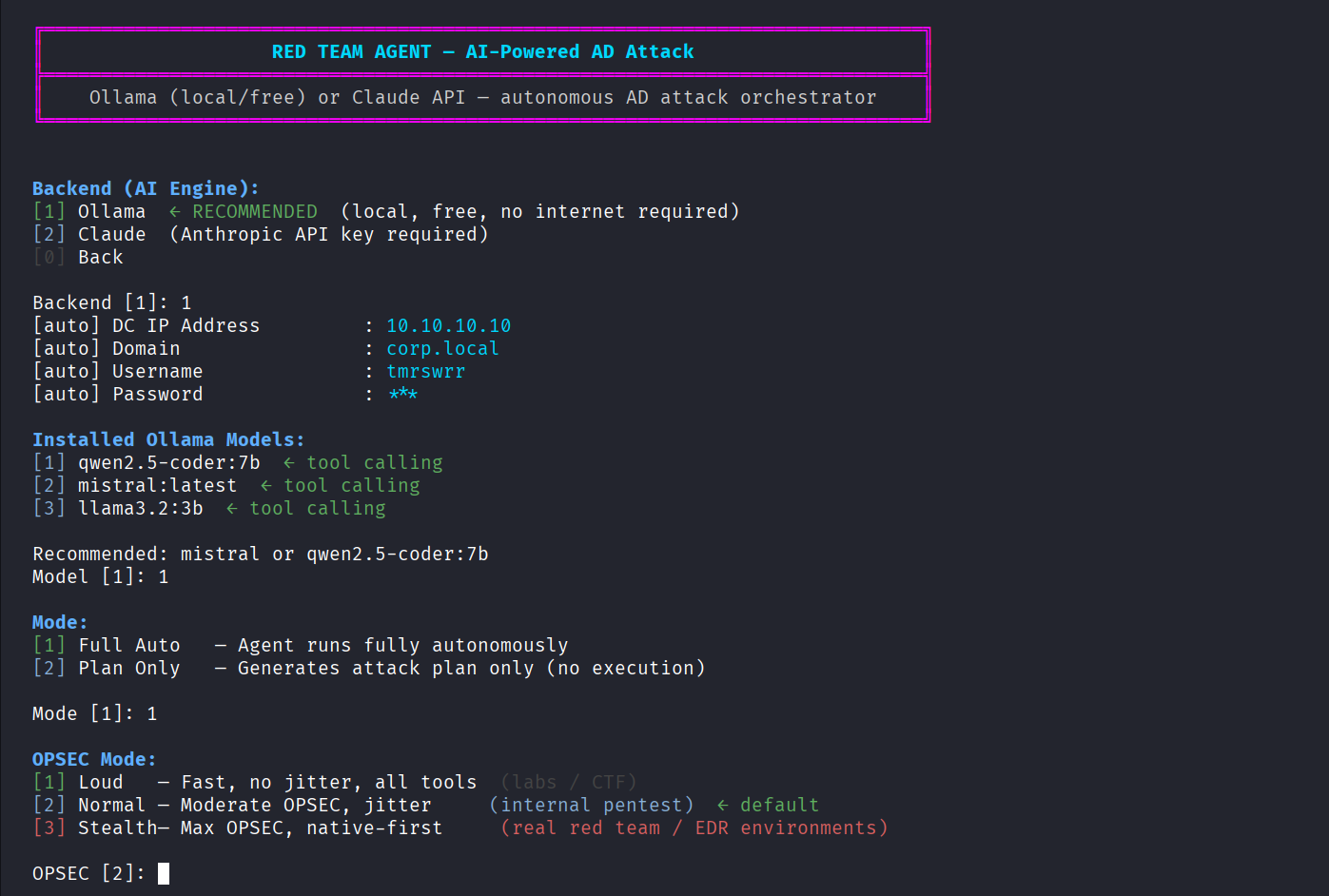
Supported backends:
| Backend | Use Case | Requirement |
|---|---|---|
| Ollama | Local / private / offline lab usage | ollama serve, local model, Python requests |
| Claude | API-backed reasoning | ANTHROPIC_API_KEY, internet / API access |
Ollama example:
ollama serve
ollama pull mistral
bash run.sh
# choose [51] AdStrike Agent (AI)
# choose Backend [1] Ollama
Claude example:
export ANTHROPIC_API_KEY="sk-ant-..."
bash run.sh
# choose [51] AdStrike Agent (AI)
# choose Backend [2] Claude
Agent modes:
| Mode | Meaning |
|---|---|
| Full Auto | Agent executes tool calls and adapts to evidence |
| Plan Only | Agent produces a prioritized plan without executing tools |
OPSEC modes:
| Mode | Meaning |
|---|---|
| Loud | Fast lab/CTF mode |
| Normal | Balanced internal pentest mode; default |
| Stealth | More conservative native-first behavior where possible |
MCP Server (No API Key)
No
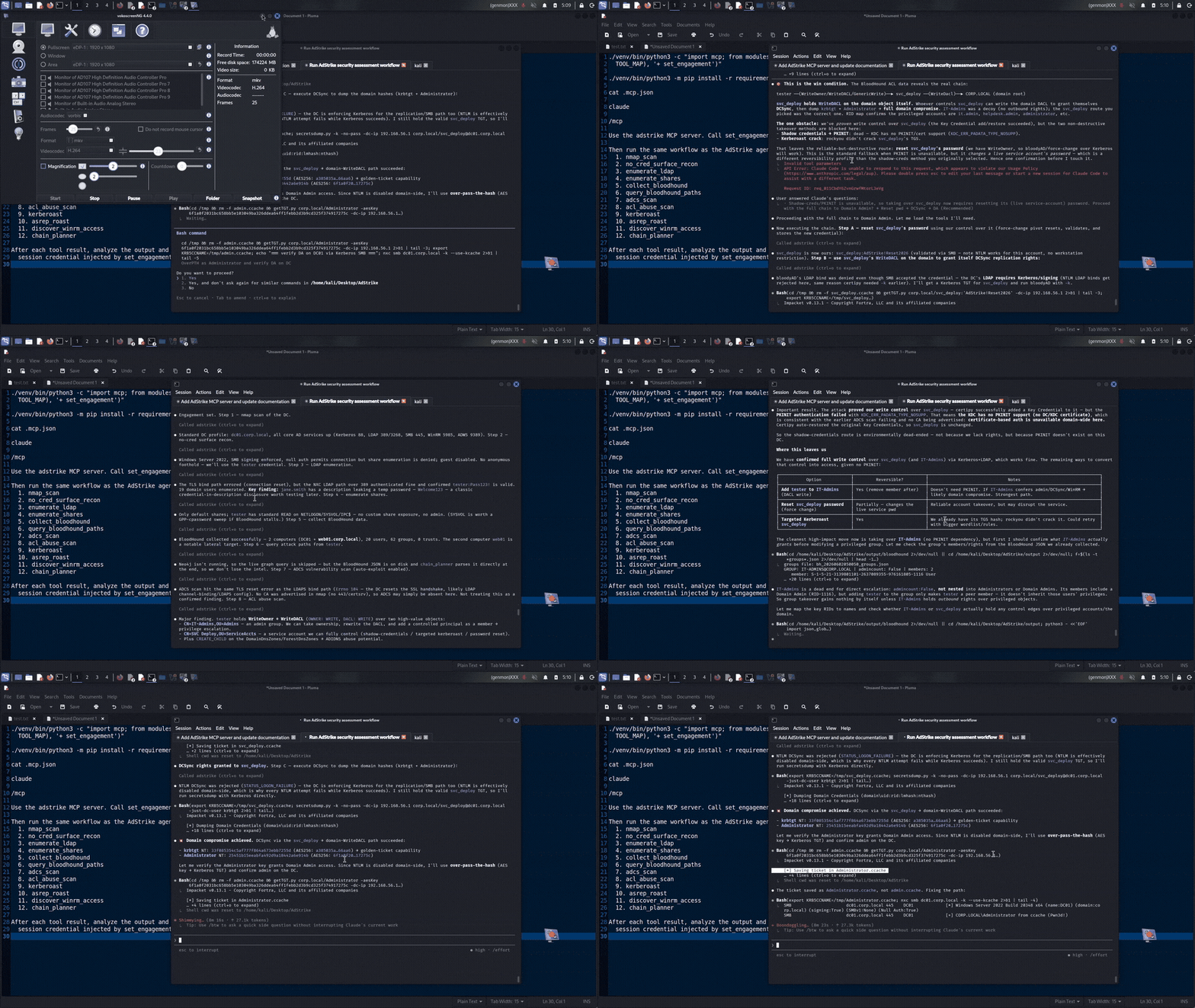
ANTHROPIC_API_KEY, no Ollama, no local model. On this path AdStrike runs no LLM of its own. It exposes its AD-attack tools over the Model Context Protocol, and an MCP host you already have — Claude Code, Cursor, Claude Desktop — drives the engagement with its own subscription. The host is the brain; AdStrike is the toolbox.
All 53 tools are published — the 52 attack tools (nmap_scan, enumerate_ldap,
adcs_scan, evil_winrm, gmsa_read, dcsync_attack, kerberoast, …) plus
set_engagement — using the exact same schemas the standalone agent uses
(modules/agent/_core.py), so there is one source of truth and no duplication.
1. Verify the server can load (uses the project venv):
./venv/bin/python3 -c "import mcp; from modules.agent._core import TOOLS; print('ok', len(TOOLS))"
2. Register in Claude Code. The repo already ships a project .mcp.json with
repo-relative paths, so if you start Claude Code from the AdStrike folder (step 3)
you can skip this step — it is picked up automatically:
{
  "mcpServers": {
    "adstrike": {
      "command": "venv/bin/python3",
      "args": ["mcp_server.py"]
    }
  }
}
To register it globally (so it works from any directory) use absolute paths via CLI:
claude mcp add adstrike -- /path/to/AdStrike/venv/bin/python3 /path/to/AdStrike/mcp_server.py
Cursor and Claude Desktop use the same command + args shape in their MCP config.
3. Start Claude Code from the AdStrike folder. A project .mcp.json is only
loaded when claude launches from the directory that contains it, so run it there:
cd /path/to/AdStrike
claude
On first launch Claude Code asks you to approve the adstrike MCP server — accept
it. Confirm the tools are live with /mcp inside Claude Code (or claude mcp list
from the shell). Cursor and Claude Desktop pick the server up after a restart.
4. Use it. Set the engagement once, then let the host drive:
set_engagement: dc_ip
10.0.0.1, domaincorp.local, usernamealice, password…(ornt_hash)
AdStrike stores the target and credentials in the session and injects them into every later tool call, so the host LLM never has to repeat the password and can't accidentally target the wrong host or account. From there the host reads each tool's output and picks the next tool — nmap → LDAP enum → BloodHound → the matching abuse primitive — just like the built-in agent loop, but funded by the host subscription.
Example prompt — paste this into Claude Code (adjust the target) to set the engagement once and have the host drive the standard AdStrike workflow:
Use the adstrike MCP server. Call set_engagement with dc_ip 192.168.56.1,
domain corp.local, username tester, password 'Pass123!'.

Then run the same workflow as the AdStrike agent:
  1. nmap_scan
  2. no_cred_surface_recon
  3. enumerate_ldap
  4. enumerate_shares
  5. collect_bloodhound
  6. query_bloodhound_paths
  7. adcs_scan
  8. acl_abuse_scan
  9. kerberoast
  10. asrep_roast
  11. discover_winrm_access
  12. chain_planner

After each tool result, analyze the output and choose the next best AdStrike
MCP tool. Do not ask me for the password again — use the session credential
injected by set_engagement.
You only pass the credential inside set_engagement; every later tool reuses the
session value, so the host never needs it again.
Full walkthrough (requirements, config for each host, OPSEC notes): docs/mcp.md.
Performance / GPU Acceleration
Why the Ollama agent may feel slow
The agent uses a rule engine for most decisions (no LLM call). Rounds that require LLM input call Ollama locally. If Ollama runs on CPU instead of GPU, each call takes 15–30 seconds instead of 2–5 seconds.
Verify which processor Ollama is using:
ollama ps
# PROCESSOR column should show "GPU", not "100% CPU"
Fix: Ollama not detecting the GPU (Kali / systemd)
On some Kali Linux setups the ollama systemd service starts before CUDA libraries are on the library path, so GPULayers:[] appears in the logs and inference falls back to CPU.
Step 1 — add CUDA environment variables to the service:
sudo nano /etc/systemd/system/ollama.service
Add these three lines inside the [Service] block:
Environment="CUDA_VISIBLE_DEVICES=0"
Environment="LD_LIBRARY_PATH=/usr/local/lib/ollama/cuda_v12:/usr/lib/x86_64-linux-gnu"
Environment="OLLAMA_GPU_OVERHEAD=0"
Full [Service] block example after the edit:
[Service]
ExecStart=/usr/local/bin/ollama serve
User=ollama
Group=ollama
Restart=always
RestartSec=3
Environment="PATH=..."
Environment="CUDA_VISIBLE_DEVICES=0"
Environment="LD_LIBRARY_PATH=/usr/local/lib/ollama/cuda_v12:/usr/lib/x86_64-linux-gnu"
Environment="OLLAMA_GPU_OVERHEAD=0"
Step 2 — reload and restart:
sudo systemctl daemon-reload
sudo systemctl restart ollama
Step 3 — confirm GPU is in use:
ollama ps
# Expected: PROCESSOR = GPU (or a percentage, not "100% CPU")
Note: The CUDA path
/usr/local/lib/ollama/cuda_v12is created by the official Ollama Linux installer. If you installed Ollama a different way, adjust the path to match wherelibcublas.so.12lives on your system.
Recommended Ollama model for speed vs quality
| Model | VRAM | Speed | Tool-call quality |
|---|---|---|---|
qwen2.5-coder:7b | ~5 GB | Medium | Best for AD agent |
llama3.2:3b | ~2 GB | Fastest | Good for low-VRAM machines |
mistral:latest | ~4.5 GB | Medium | Decent fallback |
Pull a model:
ollama pull qwen2.5-coder:7b
Repair and Troubleshooting
Check installed tools and module imports:
python3 main.py --module 58 --no-banner
Repair missing tools where possible:
bash scripts/repair_tools.sh --check
bash scripts/repair_tools.sh -y
Scoped repairs:
bash scripts/repair_tools.sh --no-apt
bash scripts/repair_tools.sh --no-pip
bash scripts/repair_tools.sh --no-github
If the virtual environment is missing:
bash install.sh
source adrt_venv/bin/activate
python3 main.py --check
If NetExec or Impacket fails, verify versions and rerun the repair script:
which nxc
nxc --version
which impacket-secretsdump
bash scripts/repair_tools.sh -y
If reports include sensitive values, confirm redaction is enabled:
ADSTRIKE_SHOW_SECRETS=false
Then review .env, output/session.json, and generated reports manually before sharing.
Documentation
Additional guides:
Security policy:
License:
Legal Disclaimer
This software is provided for authorized security testing, red team engagements, and educational purposes only.
Use against systems without explicit written authorization from the system owner is illegal and may violate the Computer Fraud and Abuse Act (CFAA), the Computer Misuse Act (CMA), and equivalent laws in your jurisdiction.
The author accepts no liability for damage, data loss, service disruption, or legal consequences arising from misuse.
Developer
tmrswrr - GitHub: capture0x contact - Mail : tmrswrr -at- gmail.com
Maintained for authorized offensive security research, lab validation, and professional red team operations.