
claude-code-session-ledger
buldiei/claude-code-session-ledger
Self-hosted web UI + MCP server that saves your Claude Code sessions as curated, versioned cards to browse and resume.
Instalação
npx convez-ai buldiei/claude-code-session-ledger1 comando no terminal: detecta o formato do repositório (marketplace ou plugin avulso) e instala via Claude Code. Requer Node 18+ e o Claude Code instalado.
Métricas
README
A tradução para o português deste README ainda está na fila.
session-ledger


Self-hosted web app that turns your Claude Code sessions into curated, versioned cards — Claude writes each one via MCP; you browse, search, and one-click
claude --resume.
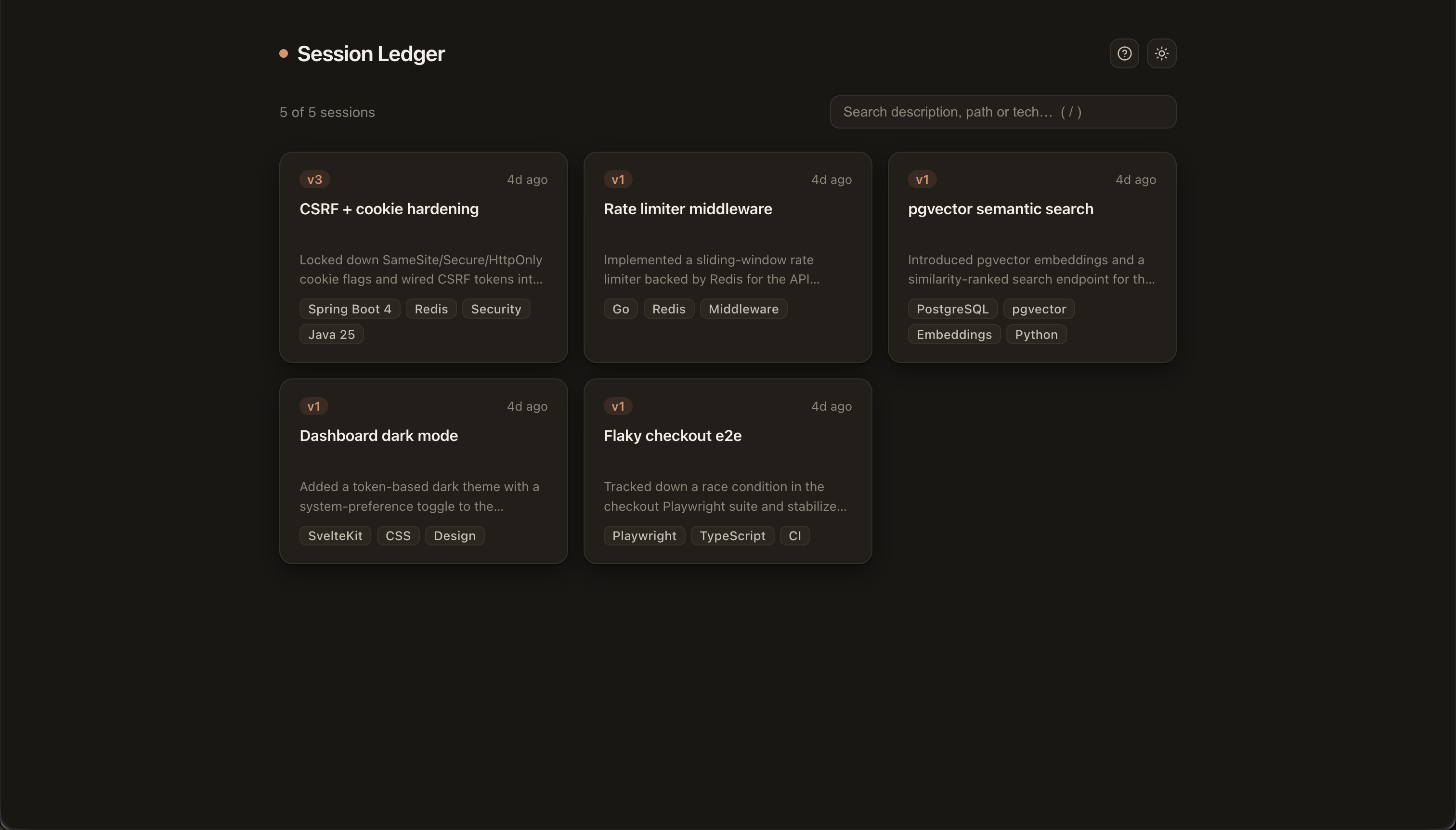
Claude Code sessions are ephemeral and pile up fast — which one had that refactor, where did I leave off, how do I jump back in? session-ledger keeps them as curated, searchable cards you can resume in one click — a session ledger you maintain, not a raw-transcript browser.
One self-hosted service, two contracts with deliberately split CRUD:
| Side | Who | CRUD | Channel |
|---|---|---|---|
| Web UI | you | R + D (browse, search, delete) | REST /api/sessions |
| Claude | the model | C + U (save, append a version) | MCP tool over streamable-HTTP /mcp |
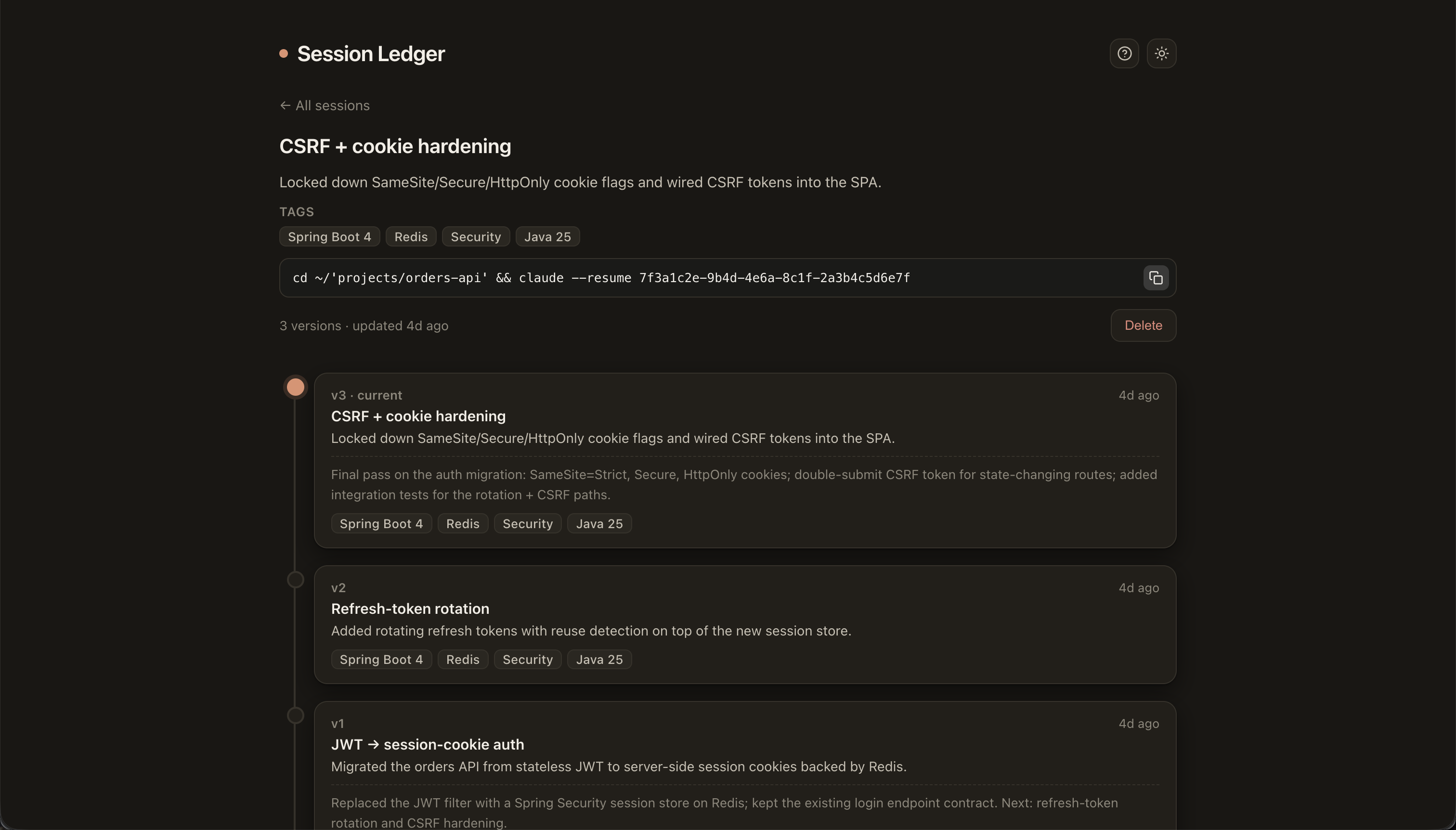
Each session is a card: session_id + a chain of context versions. Re-saving the same session
appends a new version (history is preserved) — the UI renders it as a vertical graph with the
latest version on top, plus technology tags, search, and a one-click claude --resume … to
continue in the CLI.
It ships as one container (Spring serves the API, the MCP endpoint, and the built SvelteKit SPA from a single origin) plus a one-command client installer for Claude Code.
How it works
- Claude saves the session — run
/savein any Claude Code session and the model writes a card (title, one-line summary, tags) through the MCP tool. Re-running/saveappends a new version. - You browse them — the web UI lists every session as a card, searchable by text and tags, each with its full version-history graph.
- Resume in one click — copy the
claude --resume …command from a card and pick up exactly where you left off.
Screenshots
Browse and search your saved sessions:
A session's vertical version-history graph, with technology tags and a copy-paste claude --resume command:
Pick how to run it
Let your agent set it up — git clone the repo and tell Claude Code “set this up”. It follows AGENTS.md to choose a mode, spin up the Docker image, and wire the /save skill + MCP into your client. Prefer to do it by hand? Pick a mode:
| When | Database | Guide | |
|---|---|---|---|
| Standalone | just want it on your machine, no infra | SQLite (a file) | docs/run-standalone.md |
| Server | host it on another machine, reachable on your network | PostgreSQL | docs/run-server.md |
Try it in seconds with the prebuilt image (multi-arch amd64/arm64):
docker run -d -p 8080:8080 -e SPRING_PROFILES_ACTIVE=sqlite \
  -v session-ledger-data:/app/data ghcr.io/buldiei/claude-code-session-ledger:latest
# → http://localhost:8080  (then wire up Claude Code: see docs/run-standalone.md)
The DB is chosen by Spring profile: sqlite (Hibernate creates the schema) or postgres
(default; Flyway migrations). Switch with SPRING_PROFILES_ACTIVE.
Client integration
However you run the service, wire Claude Code to it with one command:
client/install.sh <service-url> <mcp-token>
It installs, idempotently:
- the
/saveskill at user scope (~/.claude/skills/save) — available in every session; - the MCP server at user scope (
claude mcp add --scope user; the default local scope binds it to one directory).
Restart Claude Code afterwards. Then /save summarises the session, picks tech tags, and calls
the save_session MCP tool. Run it again later in the same session to append a new version. The
skill gets the live session id from the ${CLAUDE_SESSION_ID} template variable — no hook needed.
Configuration (env)
| Variable | Meaning |
|---|---|
SPRING_PROFILES_ACTIVE | postgres (default) or sqlite |
SPRING_DATASOURCE_URL/USERNAME/PASSWORD | Postgres connection (postgres profile) |
SESSION_LEDGER_SQLITE_PATH | SQLite file path (sqlite profile) |
SESSION_LEDGER_MCP_TOKEN | Bearer token required on /mcp (blank = open, local only) |
SESSION_LEDGER_WEB_BASE_URL | Optional public URL for card links; derived from the request host when unset |
SESSION_LEDGER_CORS_ORIGINS | Allowed browser origins (only if UI served from a different origin) |
SERVER_PORT | Host port (default 8080) |
.env is gitignored. .env.example and db/bootstrap.sql carry placeholders only — never commit real secrets.
Local development
JDK 25 (sdk install java 25-amzn), Maven, Node 20+.
mvn spring-boot:run                          # backend (default postgres profile; or set SPRING_PROFILES_ACTIVE=sqlite)
cd frontend && npm install && npm run dev    # Vite dev server on :5173, proxies /api to :8080
macOS: if Tomcat logs
Error setting socket options: Invalid argument, add-Djava.net.preferIPv4Stack=true(a JDK/macOS quirk; not needed in the container).
Tests
mvn test
Security & permissions
- No elevated access. It does not require
--dangerously-skip-permissionsor any elevated Claude Code permission. There are no lifecycle/auto hooks —/saveis explicit (disable-model-invocation: true) and its only inline command ispwd. - Network: the client talks only to your own session-ledger instance (the URL you configure).
The service makes no third-party calls or telemetry and does not call the Anthropic API itself.
Images are pulled from
ghcr.io; the Docker build fetches from npm and Maven Central. - Secrets: the MCP endpoint is protected by a bearer token; real secrets live only in
.env(gitignored).client/install.shwrites only under~/.claude(the skill + MCP registration) and is fully commented.
Uninstall
Client (Claude Code):
claude mcp remove session-ledger -s user
rm -rf ~/.claude/skills/save
Nothing else is installed on the client (no hooks, no extra permissions). Restart Claude Code.
Service & data:
docker compose -f docker-compose.standalone.yml down     # stop (keeps data)
docker compose -f docker-compose.standalone.yml down -v   # also delete the SQLite volume (cards)
docker rmi ghcr.io/buldiei/claude-code-session-ledger     # drop the image (optional)
For the server profile use docker compose down [-v]; drop the Postgres DB/role from
db/bootstrap.sql if you no longer need them.
Architecture (Clean Architecture, single Maven module)
domain/        model (Session, SessionVersion) + ports — no Spring/JPA
application/   use cases: SaveSession (C/U), Query (R), Delete (D)
adapter/in/web   REST controller (R/D) + DTOs
adapter/in/mcp   Spring AI @Tool save_session (C/U only)
adapter/out/persistence   JPA entities + SessionRepository impl
config/        SPA serving, CORS, MCP tool registration, MCP bearer auth
License
MIT — see LICENSE.
Caveats
- Spring AI 2.0.0 (GA 2026-06-12) is recent; MCP transport is
spring.ai.mcp.server.protocol=STREAMABLE. - SQLite uses Hibernate's community
SQLiteDialectwithddl-auto=update(no Flyway); intended for a single-user local file, not concurrent/production use. - Web read/delete is unauthenticated — intended for a trusted machine/LAN.