
npm-search MCP Server
btwiuse/npm-search-mcp-server
Busca pacotes npm nativamente via MCP para Claude e Zed
Ver no GitHubServidor MCP que integra busca de pacotes npm diretamente ao Claude e outras ferramentas compatíveis. Permite consultar o registro npm através de chamadas de função estruturadas, sem sair do seu fluxo de trabalho.
Instalação
npx convez-ai btwiuse/npm-search-mcp-server1 comando no terminal: detecta o formato do repositório (marketplace ou plugin avulso) e instala via Claude Code. Requer Node 18+ e o Claude Code instalado.
Métricas
Casos de uso
- Descobrir dependências e alternativas de pacotes durante desenvolvimento
- Pesquisar versões e metadados de bibliotecas npm em tempo real
- Integrar busca de pacotes em workflows de IA com Claude
Veredito

Ferramenta prática para desenvolvedores que usam Claude e precisam consultar o ecossistema npm sem interrupções. Implementação limpa com suporte a múltiplos transportes (stdio/HTTP) e integração direta em Claude Desktop e Zed.
README
A tradução para o português deste README ainda está na fila.
npm-search MCP Server
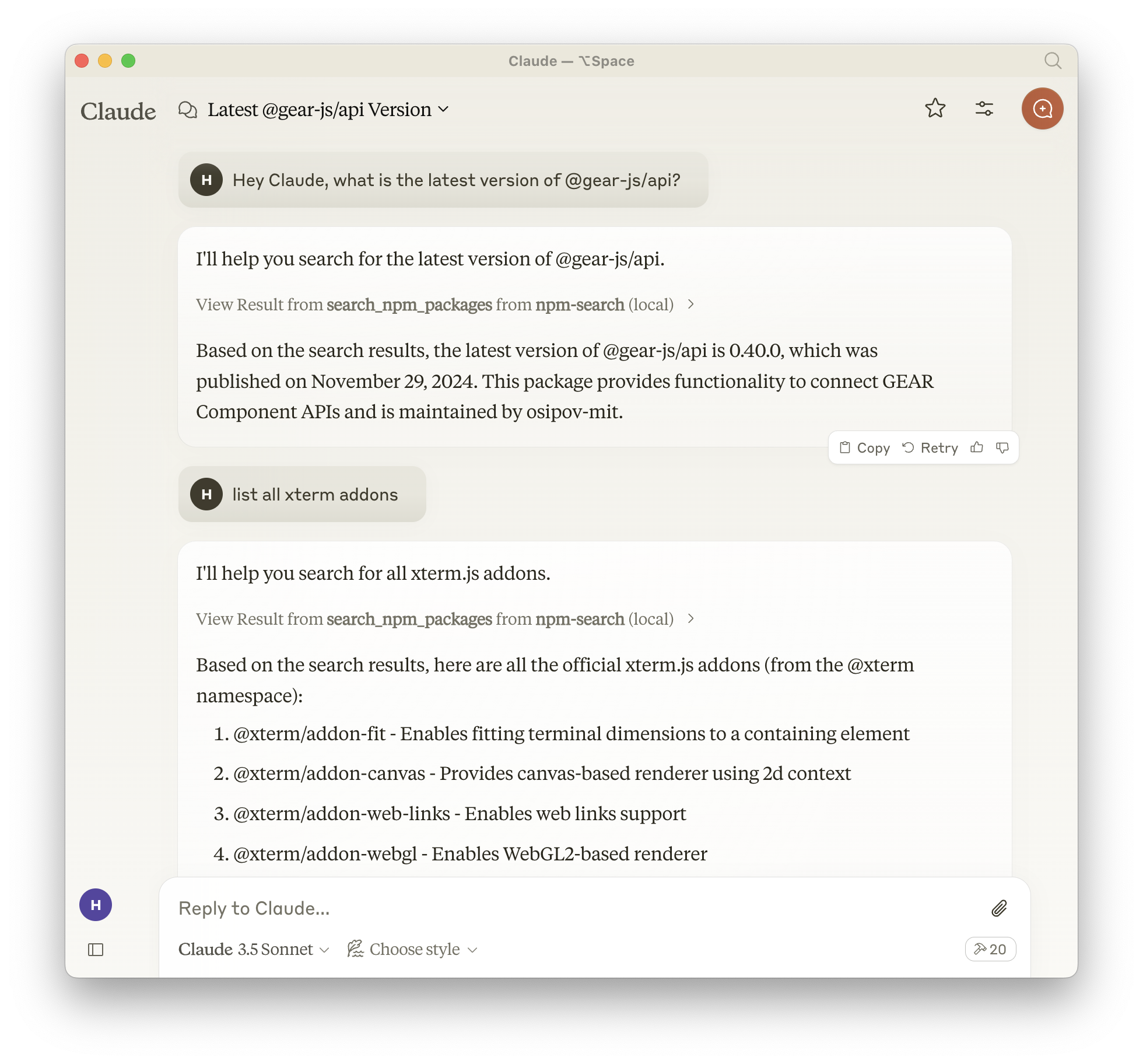
A Model Context Protocol server that allows you to search for npm packages by calling the npm search command.
Features:
- Search npm packages using the
npm searchcommand - Supports both stdio and HTTP (streamable-http) transport modes
- HTTP mode automatically enabled when
PORTenvironment variable is set - Structured logging with Pino
- Graceful shutdown handling
- Health check endpoint (
/health) - Session management for HTTP transport
Available Tools
search_npm_packages- Search for npm packages.- Required arguments:
query(string): The search query.
- Required arguments:
Installation
Installing via Smithery
To install npm-search for Claude Desktop automatically via Smithery:
npx -y @smithery/cli install npm-search-mcp-server --client claude
Using NPM (recommended)
Alternatively you can install npm-search-mcp-server via npm:
npm install -g npm-search-mcp-server
After installation, you can run it as a command using:
npm-search-mcp-server
Using uv
When using uv no specific installation is needed. We will
use uvx to directly run npm-search-mcp-server.
Configuration
Configure for Claude.app
Add to your Claude settings:
"mcpServers": {
  "npm-search": {
    "command": "npx",
    "args": ["-y", "npm-search-mcp-server"]
  }
}
"mcpServers": {
  "npm-search": {
    "command": "uvx",
    "args": ["npm-search-mcp-server"]
  }
}
Configure for Zed
Add to your Zed settings.json:
"context_servers": {
  "npm-search-mcp-server": {
    "command": "npx",
    "args": ["-y", "npm-search-mcp-server"]
  }
},
"context_servers": [
  "npm-search-mcp-server": {
    "command": "uvx",
    "args": ["npm-search-mcp-server"]
  }
],
Example Interactions
- Search for npm packages:
{
  "name": "search_npm_packages",
  "arguments": {
    "query": "express"
  }
}
Response:
{
  "results": [
    {
      "name": "express",
      "description": "Fast, unopinionated, minimalist web framework",
      "version": "4.17.1",
      "author": "TJ Holowaychuk",
      "license": "MIT"
    },
    ...
  ]
}
Debugging
You can use the MCP inspector to debug the server. For uvx installations:
npx @modelcontextprotocol/inspector npx -y npm-search-mcp-server
Or if you've installed the package in a specific directory or are developing on it:
cd path/to/servers/src/npm-search
npx @modelcontextprotocol/inspector uv run npm-search-mcp-server
Examples of Questions for Claude
- "Search for express package on npm"
- "Find packages related to react"
- "Show me npm packages for web development"
Docker
The server can be run in a Docker container with HTTP transport support:
# Build the image
docker build -t mcp/npm-search .

# Run the container (default port 3009)
docker run -p 3009:3009 mcp/npm-search

# Run with custom port via environment variable
docker run -p 3009:3009 -e PORT=3009 mcp/npm-search
The Docker image uses HTTP transport when the PORT environment variable is set. The server exposes:
POST /mcp- Main MCP endpoint for tool calls and session initializationGET /mcp- SSE stream endpoint for streaming responses (requires session ID)DELETE /mcp- Session termination endpointGET /health- Health check endpoint with service status and active session count
For Docker Compose integration:
services:
  npm-search-mcp:
    build: .
    ports:
      - "3009:3009"
    environment:
      PORT: 3009
Contributing
We encourage contributions to help expand and improve npm-search-mcp-server. Whether you want to add new npm-related tools, enhance existing functionality, or improve documentation, your input is valuable.
For examples of other MCP servers and implementation patterns, see: https://github.com/modelcontextprotocol/servers
Pull requests are welcome! Feel free to contribute new ideas, bug fixes, or enhancements to make npm-search-mcp-server even more powerful and useful.
License
npm-search-mcp-server is licensed under the MIT License. This means you are free to use, modify, and distribute the software, subject to the terms and conditions of the MIT License. For more details, please see the LICENSE file in the project repository.