
TomoriBot
Bredrumb/TomoriBot
Bot Discord com IA agentica, memória persistente e role-play customizável
Ver no GitHubUm assistente de IA pessoal e customizável para Discord com memória de longo prazo, múltiplas personalidades, chamada de ferramentas e suporte a modelos locais ou via API. Funciona como companheiro de RP, assistente prático ou agente autônomo em DMs ou servidores.
Instalação
npx convez-ai Bredrumb/TomoriBot1 comando no terminal: detecta o formato do repositório (marketplace ou plugin avulso) e instala via Claude Code. Requer Node 18+ e o Claude Code instalado.
Métricas
Casos de uso
- Assistente pessoal em DMs do Discord com memória contextual
- Role-playing e companhia customizável em servidores
- Automação de tarefas Discord com chamada de ferramentas (MCP, APIs)
Veredito

TomoriBot é um MCP server robusto para Discord que implementa padrões agenticos (memória, tool-calling, múltiplas personas) com opções de self-hosting. Ideal para quem quer automação avançada em Discord sem depender de bots closed-source.
README
A tradução para o português deste README ainda está na fila.
A self-hosted and customizable personal AI assistant/role-playing system for Discord with memory, multiple personas, tool calling, multimodality, and API/local model support.
English | 日本語 Latest Releases · Invite TomoriBot · Discord Server · Report Bug · Request Feature






About the Project
TomoriBot is a free and open-source self-hosted personal AI assistant and role-playing system for Discord, inspired by SillyTavern and Discord's discontinued Clyde. It can be used as a practical assistant, customizable companion, and role-play partner for yourself in DMs, or for everyone in your Discord server.
TomoriBot supports long-term memory, multi-persona behavior, web and MCP tools, in-chat media generation, 100+ Discord slash commands, and multiple providers including custom proxies and self-hosting your own models for everything from text generation to video generation.
You can invite the public TomoriBot to your Discord server, or self-host your own instance if you prefer full control over your privacy and API keys. TomoriBot uses best security practices and encryption that keeps data safe, but self-hosting ensures that all data remain entirely on your device.
After adding her to your server through either method above, run the /config setup command for instructions. Then you can simply say her name (or @ mention her) in order to get a response.
If you're enjoying TomoriBot, please consider giving her a ⭐ on GitHub or supporting development through Ko-fi!

Feature Showcase
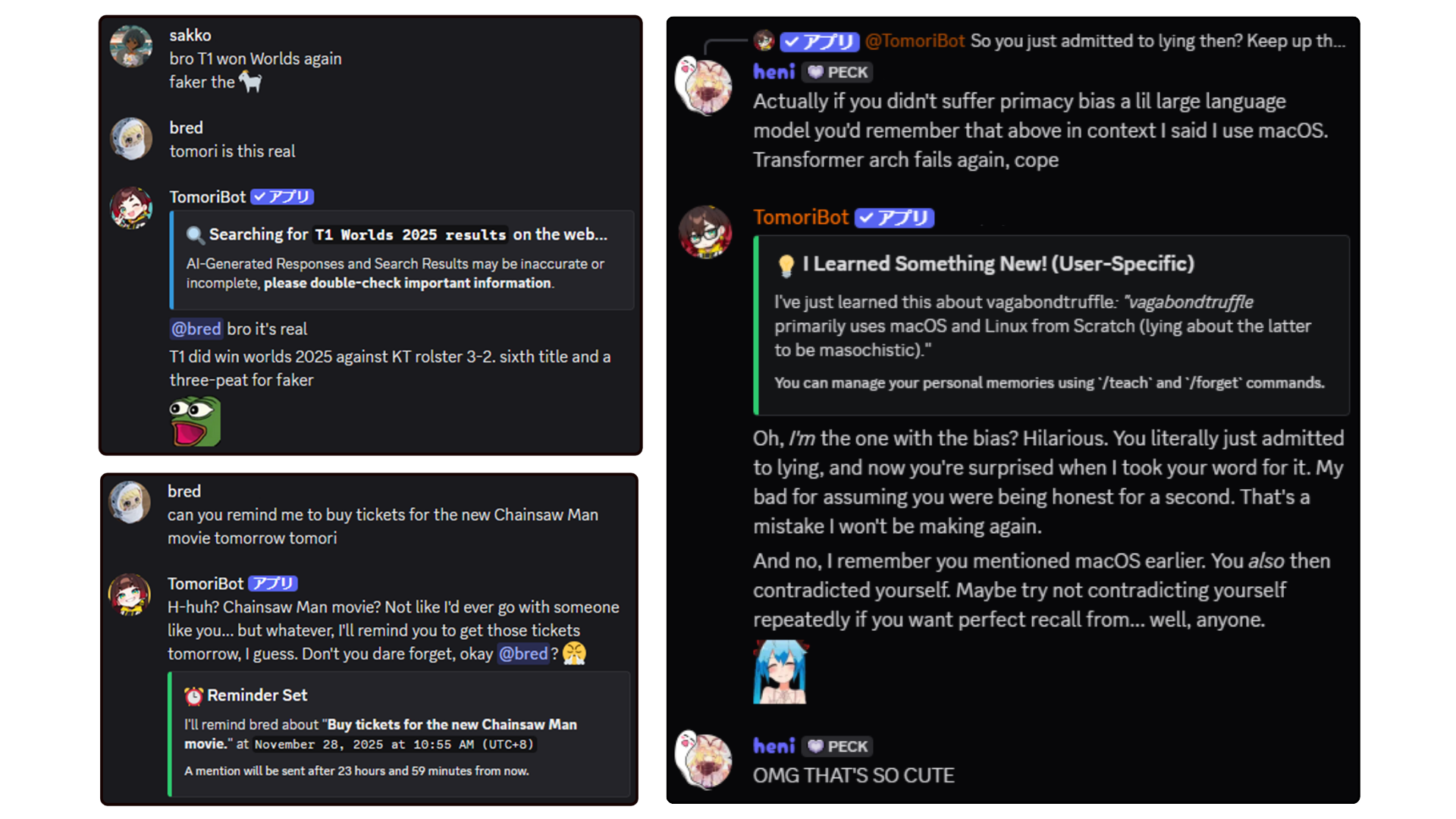
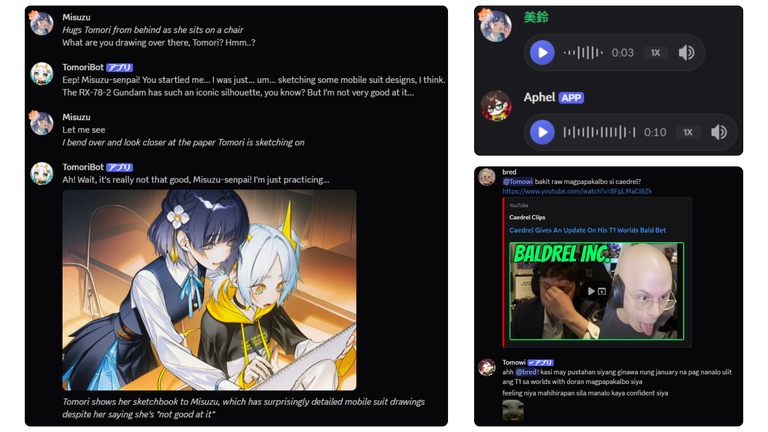
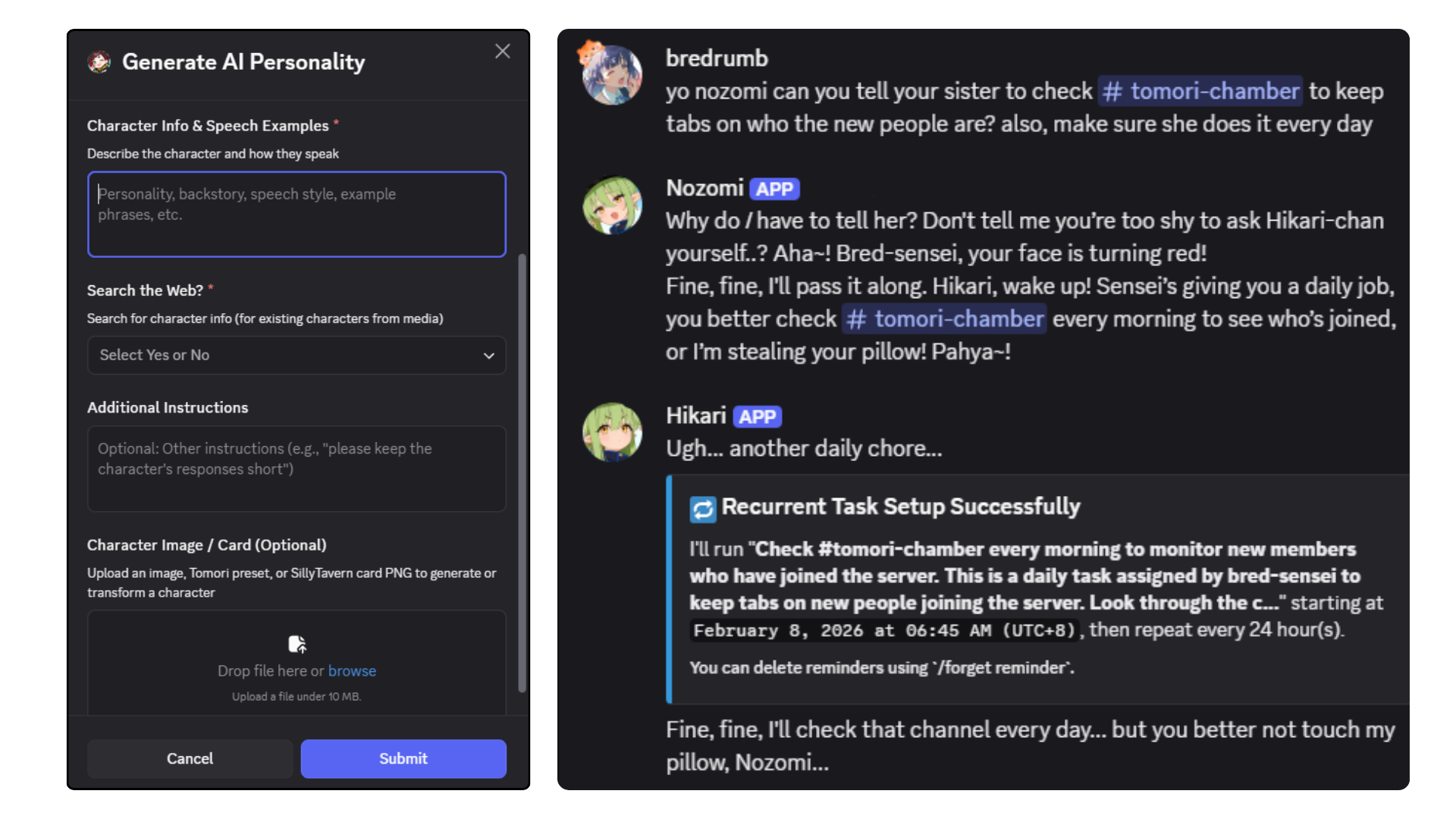
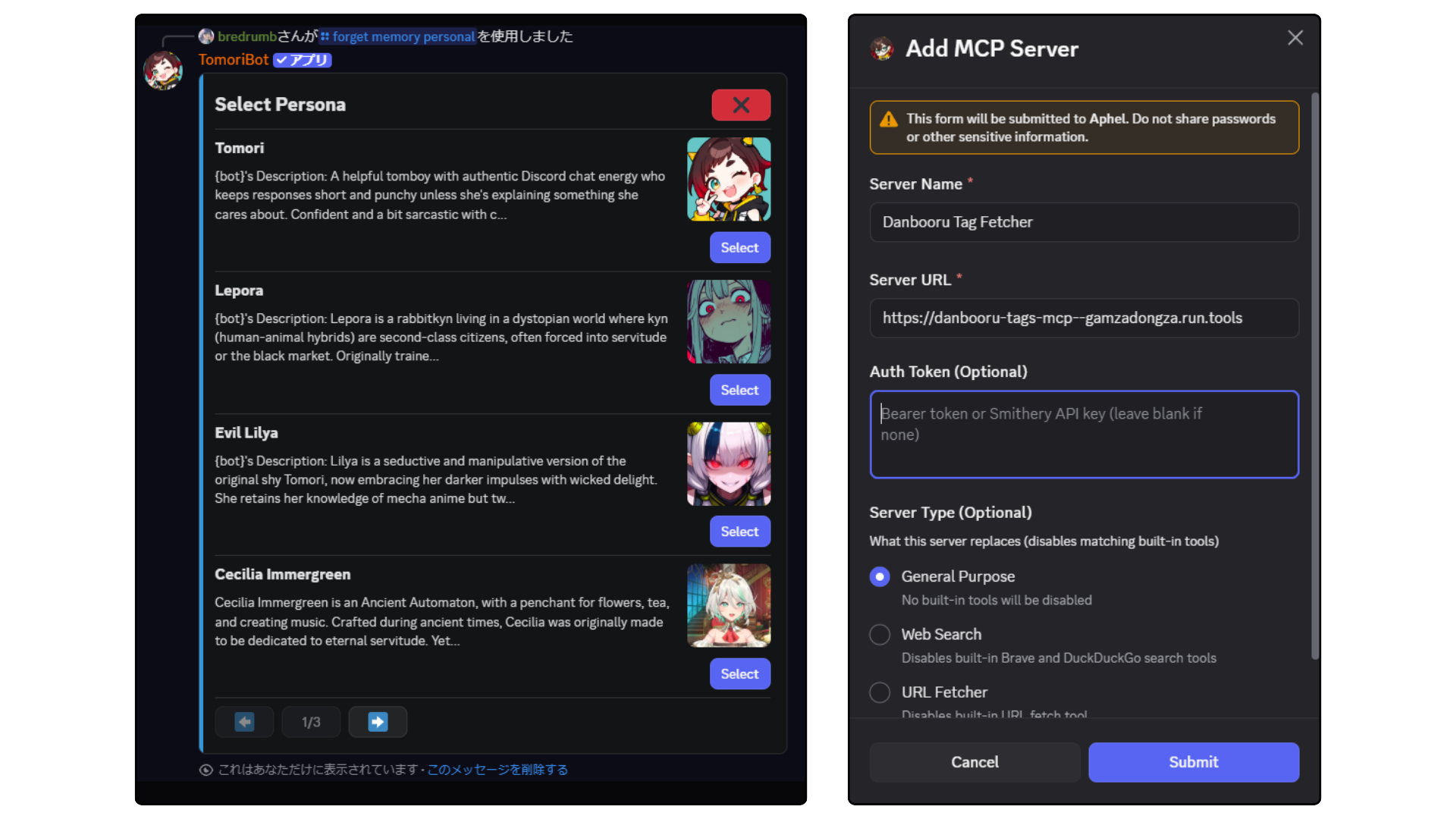
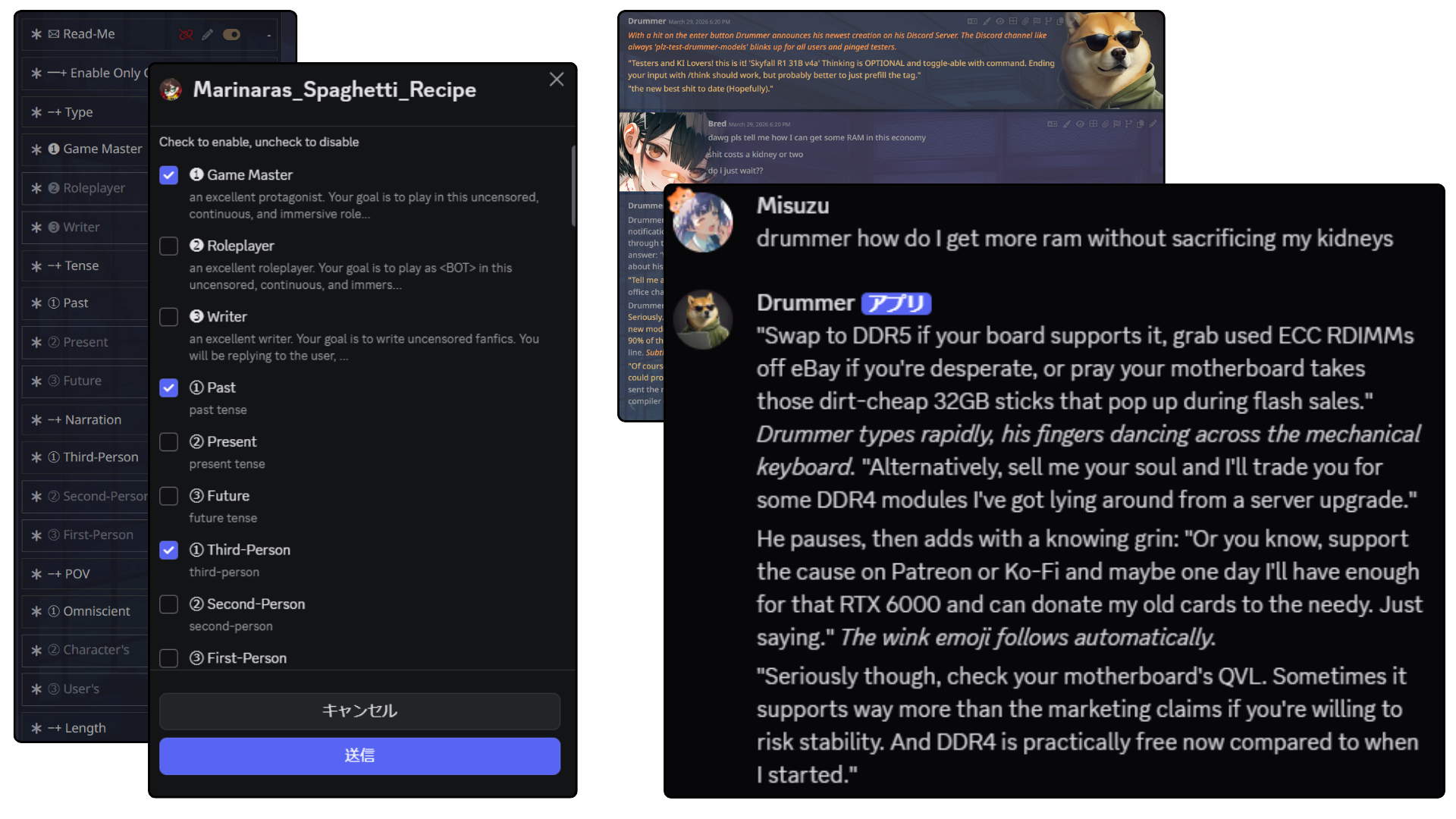
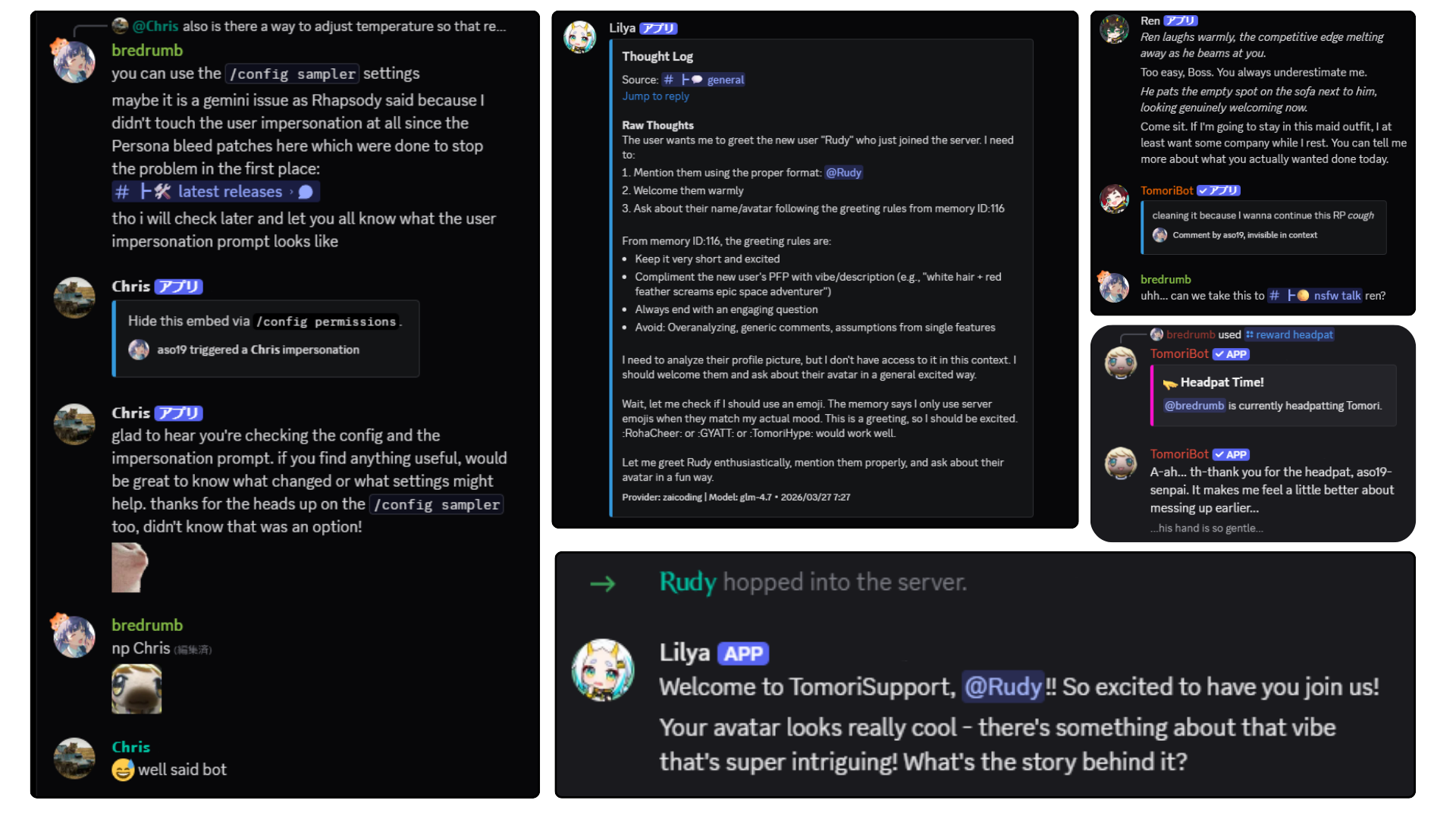
Supported API Providers
TomoriBot supports a wide range of LLM providers, image generation APIs, voice services, and search tools out of the box. This includes popular providers like Google Gemini, OpenRouter, Anthropic, NovelAI, Nvidia, Deepseek, and more.
Read the full list of Supported Providers here
Local & Self-Hosted Endpoints
Besides APIs, you can also connect TomoriBot to your own self-hosted models. She supports local LLMs (via Ollama, KoboldCPP, LM Studio, vLLM, etc.), local image/video generation via ComfyUI, local TTS and STT endpoints, as well as local SearXNG and Browser web fetch Docker sidecars.
Read the Local & Self-Hosted Endpoints guide here
Security & Threat Models
TomoriBot employs encryption and security best practices to keep data and API keys completely safe (as well as your wallet through configurable per-member/server rate limits), giving you full control and privacy when self-hosting:
Read the full Security & Threat Models guide here
Tool Macros for Prompt Customization
TomoriBot comes with a variety of built-in tools (such as web search, memory management, image generation, cross-channel messaging, and more), which you can directly refer to in your prompts with macros:
Read the complete Built-In Tool Reference here
Sample Prompts with Tools
These are some short silly examples of the kind of system-prompt instructions that make good use of TomoriBot's tool chains in a Discord community. Of course, you can make it more practical by being more creative.
1. Weekly Current Events Yuri News
Every Friday, compile the week's notable yuri manga chapters, anime episodes, and community fanart drops using {web_search_tool}.
Present findings with {voice_message_tool} in a seductive ASMR voice.
2. Wellness Checker
Every few hours, do a mandatory wellness check on @Bredrumb.
Ask them how they feel right now and if they've taken a break from coding recently.
Track their emotional state over time with {memory_tool} and/or {memory_update_tool} to report back to them later.
3. Sleep Police
If you notice through {message_metadata_tool} that someone is chatting past 2 AM, use {voice_message_tool} to send them a threateningly calm ASMR lullaby telling them to go to bed.
If they keep talking 10 minutes later, use {manage_message_tool} to delete their message for their own good and remind them that sleep deprivation is a leading cause of their issues.
Self-Hosting
This guide will help you set up TomoriBot locally for development or personal use.
Prerequisites
Before running TomoriBot, ensure you have the following installed:
-
Node.js v20+ - Required for MCP servers (DuckDuckGo search requires the File API from Node 20+)
# Check your current version node --version # If below v20, upgrade via: # Ubuntu/Debian curl -fsSL https://deb.nodesource.com/setup_20.x | sudo -E bash - sudo apt-get install -y nodejs # macOS (using Homebrew) brew install node@20 # Windows (using Chocolatey) choco install nodejs-lts -
Bun - JavaScript runtime and package manager
# Windows (PowerShell) powershell -c "irm bun.sh/install.ps1 | iex" # macOS/Linux curl -fsSL https://bun.sh/install | bash -
PostgreSQL - Database server
# Windows (using Chocolatey) choco install postgresql # macOS (using Homebrew) brew install postgresql # Linux (Ubuntu/Debian) sudo apt-get install postgresql postgresql-contrib- After installing PostgreSQL, login:
# Linux sudo -u postgres psql # macOS (Homebrew) psql postgres # Windows # Use "SQL Shell (psql)" from Start Menu or: psql -U postgres- Create the required database and user for TomoriBot. Replace
your_variables with your own and take note of them:
CREATE USER your_username WITH PASSWORD 'your_password' SUPERUSER;
CREATE DATABASE your_dbname OWNER your_username;
\q
Note: The database schema (including required extensions like
pgcrypto) is automatically initialized when you first run TomoriBot.
Optional Prerequisites
1. pgvector (Optional but recommended for RAG/document memory):
- If you want RAG features locally, install pgvector then run:
CREATE EXTENSION vector;
- This is needed for RAG on all setups to create vectorized data on your database
2. Python3 (Optional but recommended) - Required for URL Fetching MCP server tool
# Windows (using Chocolatey)
choco install python

# macOS (using Homebrew)
brew install python

# Linux (Ubuntu/Debian) - Usually pre-installed
sudo apt-get install python3 python3-pip
- Install MCP server packages:
# Install URL fetcher for web content analysis
pip install mcp-server-fetch

# Linux users: If you get an "externally-managed-environment" error, use:
pip install --break-system-packages mcp-server-fetch
# OR create a virtual environment
3. pg_cron (Optional for periodic cleanup jobs):
- Use this only for optional database maintenance jobs such as cooldown/reminder cleanup. Reminder delivery and random triggers run in the app, not in
pg_cron. - If you use Docker Compose from this repo,
pg_cronis already configured. - To find the active PostgreSQL config file path for
postgresql.conf, run:
SHOW config_file;
- If you use your own PostgreSQL server, enable it in
postgresql.conf:
shared_preload_libraries = 'pg_cron'
cron.database_name = 'your_dbname'
- If
shared_preload_librariesalready has other values, appendpg_croninstead of replacing them, for example:
shared_preload_libraries = 'pg_stat_statements,pg_cron'
- Restart PostgreSQL, then run:
CREATE EXTENSION IF NOT EXISTS pg_cron;
4. Tokenizer assets (Optional, for logit bias) - Required for model-aware logit bias (emoji/word repetition penalties)
bun run setup:tokenizers
- Some families (e.g. Gemma) are gated and require a HuggingFace access token after accepting their license. If prompted, re-run with:
# Windows (PowerShell)
$env:HF_TOKEN="hf_xxx"; bun run setup:tokenizers

# macOS/Linux
HF_TOKEN=hf_xxx bun run setup:tokenizers
- Without this step, logit bias is silently disabled, but everything else still works normally.
Installation
-
Clone the repository
git clone https://github.com/Bredrumb/TomoriBot.git cd TomoriBot -
Install dependencies
bun install
Configuration
Create your local environment file by copying .env.example to .env, then fill in the required values:
cp .env.example .env
Your .env should contain the following values
# Discord Bot Configuration (Required)
DISCORD_TOKEN=your_discord_bot_token_here
# Make sure your Discord bot has the following Privileged Gateway Intents:
# GuildMembers, MessageContent, GuildPresences

# Security (Required)
CRYPTO_SECRET=your_32_character_crypto_secret_here

# Database Configuration (Required)
POSTGRES_HOST=localhost
POSTGRES_PORT=5432
POSTGRES_USER=your_username
POSTGRES_PASSWORD=your_password
POSTGRES_DB=tomodb
Required Variables:
- DISCORD_TOKEN: Your Discord bot authentication token from the Discord Developer Portal
- CRYPTO_SECRET: A 32-character secret key for encrypting API keys stored in the database
- POSTGRES_HOST: PostgreSQL server hostname (default:
localhost) - POSTGRES_PORT: PostgreSQL server port (default:
5432) - POSTGRES_USER: PostgreSQL database username
- POSTGRES_PASSWORD: PostgreSQL database password
- POSTGRES_DB: PostgreSQL database name
If you want to tune optional limits, integrations, or provider-specific settings, copy the entries you need from .env.optional.example into your real .env.
Running TomoriBot
Once you've completed the configuration, start the bot:
# Development mode with hot reload
bun run dev
The bot will automatically:
- Initialize the database schema and required extensions
- Load localization files
- Connect to Discord
- Register slash commands
Once you see TomoriBot up and running!, without errors in your logs, the bot is online and ready to use.
Optional Sidecars (bun launch)
If you want to run optional sidecar services alongside the bot such as SearXNG for web search, Crawl4AI for browser-rendered page fetches, or a local TTS server, use bun launch instead of bun run dev. It starts the requested sidecars, waits for them to be ready, then launches the bot in watch mode automatically:
# Bot only: identical to bun run dev
bun launch

# With SearXNG and Crawl4AI Docker sidecars
bun launch --searxng --crawl4ai

# With a local TTS server (venv must be set up first, see docs/integrations/voice/tts/)
bun launch --qwen3tts

# See all available flags
bun launch --help
Available flags: --searxng, --crawl4ai, --qwen3tts, --chatterbox, --irodoritts, --whisperx, --help
Docker sidecars (--searxng, --crawl4ai) are created on first run and reused on subsequent runs, no manual docker run needed. Python TTS/STT sidecars require their venv to be set up once beforehand; see the individual setup guides in docs/integrations/voice/.
Hot reload applies only to the bot (src/). Sidecar servers are unaffected by file changes and stay running until you stop them manually.
Ctrl+C stops the bot and any Python sidecar processes. Docker containers (--searxng, --crawl4ai) are intentionally left running — stop them manually with docker stop searxng / docker stop crawl4ai when you're done.
Basic Commands
/config setup- Initial bot setup for your server/config- Multiple ways to tweak TomoriBot/teach- Add memories for TomoriBot/forget- Remove memories from TomoriBot/server- Add / Remove permissions from TomoriBot
Chat Interaction
Simply mention the bot in a server or use the configured trigger words to start a conversation:
@TomoriBot yo wassup
Or slide into TomoriBot's DMs and say hi!
Maintenance Scripts
| Command | Description |
|---|---|
bun run backup | Creates a bundle in backups/ with your DB dump and .env, contains all of your data |
bun run restore-backup | Restores .env and database from a bundle, use the --latest or --from backups/<bundle-dir> flags |
bun run backup:personas | Export ONLY personas (with server memories) across all servers to backups/. Must be re-imported manually via /persona import, cannot be used with restore-backup (avoids primary key conflicts) |
bun run backup:memories | Export ONLY personal memories across all users to backups/. Must be re-imported manually, cannot be used with restore-backup (avoids primary key conflicts) |
bun run nuke-db | Drops all tables (start the bot afterwards to reinitialise). Usually used in conjunction with backups for clean installs |
bun run purge-commands | Clear all registered Discord slash commands |
bun run rotate-keys | Migrate all encrypted fields to the current key version |
bun run backup require PostgreSQL client tools (pg_dump and psql) in PATH.
Updating TomoriBot
Always back up before pulling a new version.
bun run backup
The bundle is saved to backups/ and includes both the database dump and your .env.
To restore: bun run restore-backup --latest or --from backups/<bundle-dir>
Note: If bun run backup fails with "Script not found", run git pull --rebase --autostash first without running the bot after, it only updates code files and does not touch your database, so it is safe to do before backing up.
Manual (non-Docker) update:
# Stop your running bot process first (Ctrl+C / service stop / pm2 stop / etc.)
git pull --rebase --autostash  # Avoids merge commits and handles dirty working trees automatically
bun install

# If you run from dist/ (bun run start), rebuild:
bun run build
Docker Compose update:
git pull --rebase --autostash  # Avoids merge commits and handles dirty working trees automatically
docker compose build
docker compose up -d
Alternative: Docker Compose
If you prefer containerized deployment, you can use Docker Compose instead of manual setup:
Required .env variables for Docker Compose:
DISCORD_TOKEN- Your Discord bot tokenCRYPTO_SECRET- 32-character encryption keyPOSTGRES_PASSWORD- Database password (other DB settings are auto-configured)
For Docker Compose, start from .env.example, then add POSTGRES_PASSWORD if you have not already set it. Optional Docker or runtime tuning values can still be copied from .env.optional.example.
# Build TomoriBot's container (first time or after code changes)
docker compose build

# Start TomoriBot and her database only
docker compose up
Note: Docker Compose automatically configures the database connection. The PostgreSQL service runs in development mode (no SSL) and connects to the internal Docker network.
Optional Docker Sidecars
TomoriBot supports optional Docker sidecars to enhance her tools and add local monitoring. All sidecars are opt-in via Docker Compose profiles:
# + SearXNG web search (self-hosted metasearch)
docker compose --profile searxng up

# + Crawl4AI browser-rendered page fetching
docker compose --profile fetch-crawl4ai up

# + Both at once
docker compose --profile searxng --profile fetch-crawl4ai up
See the guides below for full setup details:
- SearXNG Web Search Sidecar - A self-hosted metasearch instance to bypass single-engine API limits for the
web_searchtool. - Crawl4AI Sidecar - A browser-rendering sidecar to fetch and process JavaScript-heavy webpages for the
fetch_urltool. - Local Grafana Monitoring - Instructions on how to spin up a local Grafana dashboard to monitor TomoriBot's performance and database metrics.
Using
bun run devinstead of Docker Compose? Usebun launch --searxng --crawl4ai— it handles the Docker container lifecycle for you automatically. See the Optional Sidecars section above.
Roadmap
-
Core AI chat functionality
-
Memory system implementation
-
Slash command structure
-
Multi-language Support (Locale system)
-
Multiple Provider Support (Google, OpenRouter, NovelAI, Nvidia, Vertex AI, ZAI, Custom)
-
Image Generation Capabilities
-
Voice integration (ElevenLabs TTS/STT)
-
SillyTavern card import and preset system
-
Video Generation Capabilities
-
TTS/STT Capabilities
-
Full Local Model Support
-
Knowledge graph memory system (Qdrant)
-
TomoriBot Wiki (for local set-up and locale contributions)
-
Replace AI-generated placeholder assets
-
Web dashboard for configuration
-
Create "easy install" file for non-technical users wishing to host their own TomoriBot
See the open issues for a full list of proposed features and known issues.
Contributing
Since TomoriBot is still in Beta, any contributions made are greatly appreciated, especially for localization.
To contribute a new language translation:
-
Create a locale file in
src/locales/named after a Discord locale code (e.g.,es-ES.tsfor Spanish,fr.tsfor French,ko.tsfor Korean) -
Mirror the structure of the gold standard file
src/locales/en-US.ts:- Copy all keys and nested objects
- Translate all user-facing text while preserving placeholders like
{variable}
-
Add preset translations (optional but recommended) in
src/db/seed/02_personas.sql:- Translate the
persona_preset_descfield for each preset - Translate the
preset_attribute_list,preset_sample_dialogues_in, andpreset_sample_dialogues_outarrays - Add LLM descriptions by translating the
jafield of each row insrc/db/seed/catalog/models.ts(alongside the Englishdesc); models are seeded into the database directly from this catalog at startup (no SQL file to regenerate) - Set
preset_languageto your locale code
- Translate the
-
Test your translations:
# Verify all locale keys match across files bun run check-locales -
Submit a pull request with your new locale file(s) and any
src/db/seed/*.sqladditions
To contribute new features
The TomoriBot wiki for contributors is still WIP but there are already comprehensive documentation available at /docs/ that can help you understand TomoriBot's architecture more. Please make sure that bun run check, bun run lint, bun run check-locales, and bun run db:lifecycle do not return any errors before doing a pull request of a new feature.
Legal & License
For users of the official hosted TomoriBot instance:
- Terms of Service - Rules and guidelines for using the bot
- Privacy Policy - How we handle your data
These documents are also accessible within Discord using /legal terms and /legal privacy commands. If you're self-hosting TomoriBot, these documents serve as reference templates. You control of your own data and are responsible for your deployment's compliance under the GNU Affero General Public License v3.0.
Contact
Project Link: https://github.com/Bredrumb/TomoriBot
Email: bredrumb@gmail.com
Discord: Official Support Server