
GOAT Flow
blundergoat/goat-flow
Dashboard e harness estruturado para agentes IA codificadores
Ver no GitHubSistema estruturado de fluxo de trabalho para agentes de IA codificadores, com dashboard local integrado. Oferece auditoria de instruções, guardrails, workflows determinísticos e loop de aprendizado para Claude Code, Copilot e outros agentes suportados.
Instalação
npx convez-ai blundergoat/goat-flow1 comando no terminal: detecta o formato do repositório (marketplace ou plugin avulso) e instala via Claude Code. Requer Node 18+ e o Claude Code instalado.
Métricas
Casos de uso
- Auditar e melhorar configurações de agentes IA em projetos
- Executar fluxos de trabalho determinísticos com prompts estruturados
- Gerenciar múltiplas sessões de terminal com agentes codificadores
- Implementar guardrails e hooks de segurança em agentes IA
Veredito

Ferramental robusto para equipes que trabalham intensivamente com agentes de IA codificadores. O dashboard local e a auditoria estruturada resolvem um gap real de governança e observabilidade, embora exija curva de aprendizado inicial na configuração de harness.
README
A tradução para o português deste README ainda está na fila.
GOAT Flow
An AI coding agent harness and local dashboard for Claude Code, OpenAI Codex, Google Antigravity, and GitHub Copilot.
GOAT Flow helps teams find and fix weak AI-agent setup: it audits agent instructions, installs guardrails and deny hooks, provides structured /goat-* workflows, preserves a learning loop, and runs supported coding agents from one local dashboard.
One command opens a local menu for auditing, deterministic setup, guided agent prompts, and the dashboard. The manifest-backed support matrix currently covers Claude Code, OpenAI Codex, Google Antigravity, and GitHub Copilot/Copilot CLI.


npx @blundergoat/goat-flow@latest
output:
What do you want to do?
  1. Start dashboard
  2. Install/update goat-flow files
  3. Generate setup prompt
  4. Audit current project
  5. Show project status
Install locally (optional)
npm install --save-dev @blundergoat/goat-flow # npm
then run this for the dashboard:
npx goat-flow dashboard .
For the dashboard's embedded terminal, you'll need node-pty to compile. See Troubleshooting if the terminal doesn't appear.
Dashboard views
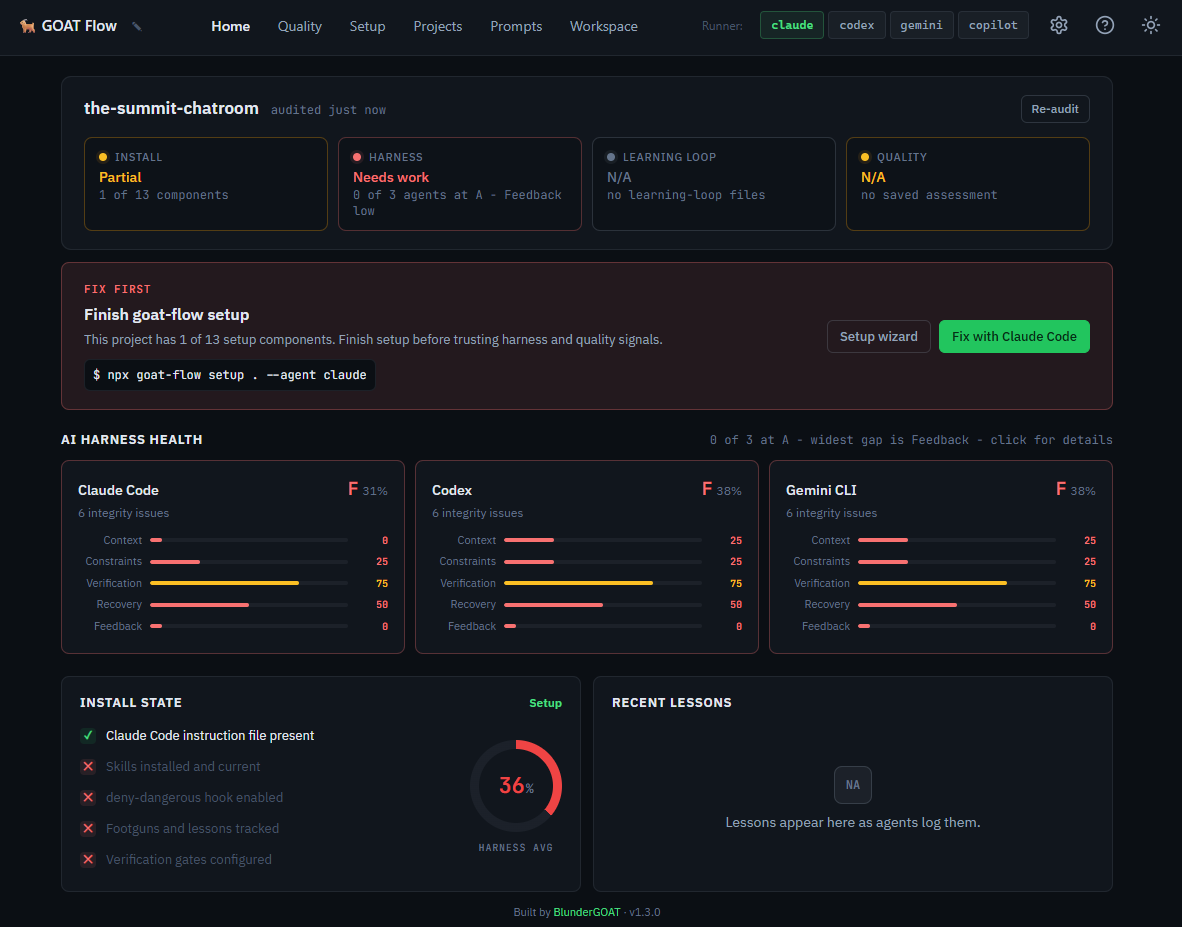
The desktop dashboard uses a persistent side menu for primary navigation. The header keeps the current project switcher, runner switcher, and utility actions available while you move between views.
Home
Live audit results for every supported agent. Per-agent cards show pass/fail across two scopes (GOAT Flow Setup, Agent Setup) with actionable fix hints. An AI Harness section scores each agent across five concerns - Context, Constraints, Verification, Recovery, and Feedback Loop - so you can see exactly where your setup is strong and where it's weak. "What to do next" action cards surface the highest-priority gaps. Re-audit after changes without leaving the page.
Plans
Plan milestone view for the selected project. Surfaces .goat-flow/plans/ plan
directories, milestone status, and checkbox progress, and lets you set the
active plan.
Setup
Guided setup flow. Detects your project stack and existing configuration, lets you pick a target agent, then generates a setup prompt you can preview and launch directly in a terminal session. The agent configures your project: instruction file, skills, hooks, and learning loop.
Prompts
A library of 24 visible preset prompts across six categories: critique, debug, plan, QA, review, and security, plus 2 internal quality prompts used by dashboard workflows. Two-pane layout with search, category filters, and favorites. Select a prompt and launch it in a new terminal, send it to an active session, or copy it to clipboard. Keyboard-navigable: / to search, arrows to browse, Enter to launch.
Prompts include structured workflows like pre-walk-through notes with targeted testing plans, multi-lens critiques, full threat assessments, dependency scans, coverage audits, and milestone planning.
Workspace
Split layout for terminal work. A sessions rail lists all running terminal sessions (up to 10) with runner, age, and idle indicators, plus collapsed-rail tooltips and an active-session status pip. Single-click switching between sessions. The right pane is a full xterm.js terminal with WebSocket-based PTY - run Claude, Codex, Antigravity, or Copilot directly in the browser. Drag and drop images onto the terminal pane to attach them to the next prompt.
Projects
Multi-project browser. Register multiple projects, view their audit status at a glance, and "Audit All" in one click. Titles and favorites follow a stable identity where possible: git remote hash first, then a local .goat-flow/project-id marker for non-git goat-flow projects, then path fallback. Select a project to switch context across the entire dashboard.
Quality
Generate agent quality-assessment prompts. Select a target agent, generate the prompt, and preview the full output with embedded audit results. Passive page loads use cached audit enrichment when available so the view opens quickly; Regenerate requests a fresh audit before composing the prompt.
What's under the hood
The dashboard is the interface. Underneath, GOAT Flow installs a harness that makes agents more reliable:
| Component | What it prevents |
|---|---|
| Execution Loop (READ → SCOPE → ACT → VERIFY) | Guessing at unread code, shipping without checks |
Skills (six /goat-* commands + dispatcher) | Free-form prompting that drifts mid-task |
| Enforcement Hooks (guardrails) | rm -rf, all git push, secret file access |
| Learning Loop (footguns, lessons, decisions) | Same mistake recurring next session |
| Autonomy Tiers (Always / Ask First / Never) | Agent overreach, missed approvals |
Skills have phases and human gates. Hooks intercept tool calls before they execute. The learning loop gets read at session start so mistakes compound into context, not repetition. Re-run goat-flow index after adding, editing, renaming, or resolving entries; goat-flow stats --check fails while the index is stale, and the dashboard Home learning-loop card can regenerate indexes for the selected project.
Why not just CLAUDE.md / Cursor rules?
Instruction files tell the agent what to do. They don't enforce it.
| Instruction file alone | GOAT Flow | |
|---|---|---|
| Tell the agent the rules | yes | yes |
| Block dangerous commands at tool level | no | yes |
| Structured workflows with human gates | no | yes |
| Capture lessons across sessions | no | yes |
| Audit whether setup is actually correct | no | yes |
Use an instruction file for rules the agent should remember. Use GOAT Flow for rules the agent cannot skip.
Getting started
Requires Node.js 20+.
1. Start with the menu
npx @blundergoat/goat-flow@latest
No install required. Choose dashboard, deterministic install/update, setup prompt generation, audit, or status from the menu.
2. Install/update system files
For a brand new project, copy the goat-flow system files first. This step is deterministic and does not require an agent:
npx @blundergoat/goat-flow@latest install . --agent claude
Use --force only when you want to overwrite existing settings, .goat-flow/config.yaml, and remove deprecated skills. For outdated or v0.9 projects, the installer automatically updates the config version and cleans deprecated skill directories.
The installer keeps .goat-flow/config.yaml free of agent allowlists by default. Dashboard Home and aggregate goat-flow audit . read the supported agent registry from workflow/manifest.json, so they always show or check the current manifest-backed setup status. Use --agent <id> when you intentionally want one agent.
The install includes .goat-flow/skill-docs/ for shared meta references and .goat-flow/skill-docs/playbooks/ for tool/capability playbooks. Generated or repaired instruction files route agents to .goat-flow/skill-docs/playbooks/ before declaring a requested tool unavailable.
3. Generate the setup prompt
The installer copies shared system files. The setup prompt still creates or refreshes project-specific content such as the instruction file, architecture, code map, and real project footguns/lessons.
npx @blundergoat/goat-flow@latest setup . --agent claude
Equivalent deterministic setup/update command:
npx @blundergoat/goat-flow@latest setup . --agent claude --apply
4. Re-audit
Back on the Home view, click Re-audit. All checks should pass. The AI Harness cards now show scores across the five concerns.
5. Use a prompt
Open the Prompts view, pick a workflow (code review, bug diagnosis, UI debugging with browser evidence, security assessment, test planning), and launch it in a terminal session. Each prompt invokes a structured /goat-* skill with phases and human gates.
Multi-agent support
GOAT Flow's current manifest-backed registry supports Claude Code, Codex, Google Antigravity, and Copilot CLI. All agents share the same execution loop, autonomy tiers, skills, and learning loop. The dashboard's runner switcher in the header lets you toggle between agents and see per-agent audit results side by side.
Run npx @blundergoat/goat-flow@latest manifest to inspect the live agent matrix from workflow/manifest.json.
CLI commands
The dashboard covers most workflows visually. For CI or scripting, the same features are available as CLI commands:
npx goat-flow dashboard .                  # Launch the dashboard
npx goat-flow audit .                      # Run audit (pass/fail output)
npx goat-flow audit . --harness            # Add AI harness scoring
npx goat-flow audit . --format json        # JSON output for CI
npx goat-flow audit . --format sarif       # SARIF output for code scanning upload
npx goat-flow install . --agent claude     # Copy/update system files
npx goat-flow setup . --agent claude       # Generate setup prompt
npx goat-flow quality . --agent claude     # Generate quality-assessment prompt
npx goat-flow status .                     # Project state (bare/partial/v0.9/outdated/current/error)
npx goat-flow manifest                     # Agent support matrix
The dashboard prints a tokenized localhost URL. Open that URL from the terminal output; the token is process-local and is removed from the visible address bar after the page boots.
See docs/cli.md for the full reference.
The five harness concerns
Every major source in harness engineering (Hashimoto, Fowler/Böckeler, Anthropic, HumanLayer) converges on the same concerns. The dashboard's AI Harness section scores each agent across all five:
| Concern | Question |
|---|---|
| Context | Is the agent's context accurate, lean, and useful? |
| Constraints | Do deterministic rules catch failures before the LLM runs? |
| Verification | Can the agent verify its work, and does failure feed back? |
| Recovery | Can the agent resume after crash or interruption? |
| Feedback Loop | Is the harness getting smarter from failures over time? |
See docs/audit-and-quality.md for the full framework and sources.
Troubleshooting
Terminal not showing in dashboard?
goat-flow installs without a C++ toolchain as of v1.2.4. If you need the dashboard's embedded terminal, you'll also need node-pty to compile. Install build tools (sudo apt install build-essential python3 on Debian/Ubuntu, xcode-select --install on macOS), then run npm rebuild node-pty. To skip the native build entirely: npm install @blundergoat/goat-flow --omit=optional.
Audit fails on a fresh project?
Expected. Run npx @blundergoat/goat-flow@latest install . --agent claude, then generate the setup prompt with npx @blundergoat/goat-flow@latest setup . --agent claude.
Audit still fails after setup?
Re-run npx @blundergoat/goat-flow@latest audit . --verbose to see which check failed. The howToFix hint on each failure points at the missing file or config key.
Agent isn't following the execution loop? Restart the agent session after setup so it re-reads the instruction file. Agents only pick up instruction-file changes on session start.
Setup prompt looks wrong or incomplete? Regenerate from the dashboard Setup page, which shows detected stack info alongside the prompt.
Documentation
| Document | What it covers |
|---|---|
| CLI Reference | All commands, flags, and output formats |
| Dashboard | Views, terminal, API endpoints |
| Skills Reference | All 7 skills: modes, phases, gates, outputs |
| Audit & Quality | The two evaluation commands, 5 harness concerns, and when to use each |
Author
Built by Matthew Hansen.