
Woosh Studio — Gerador de Efeitos Sonoros com MCP
bluevisor/woosh-webui
Gerador de efeitos sonoros via IA com interface web e MCP para Jetson Orin
Ver no GitHubInterface web, API REST e servidor MCP para o modelo foundation de efeitos sonoros Woosh da Sony Research, otimizado para GPU NVIDIA Jetson Orin. Gera efeitos sonoros de alta qualidade a partir de prompts textuais usando modelos DFlow (rápido) ou Flow (completo), com suporte a batch, múltiplos formatos de áudio e integração MCP nativa.
Instalação
npx convez-ai bluevisor/woosh-webui1 comando no terminal: detecta o formato do repositório (marketplace ou plugin avulso) e instala via Claude Code. Requer Node 18+ e o Claude Code instalado.
Métricas
Casos de uso
- Produção de efeitos sonoros para games e mídia
- Prototipagem rápida de áudio via Claude e MCP clients
- Deployment GPU-acelerado em edge devices NVIDIA
Veredito

Ferramenta técnica robusta com dupla exposição (REST + MCP SSE), bem documentada para integração com Claude Desktop e agentes MCP. Exige infraestrutura Jetson Orin específica e checkpoints de modelo, tornando-a viável apenas para equipes com hardware dedicado e profundo conhecimento de deployment GPU.
README
A tradução para o português deste README ainda está na fila.
Woosh Studio — Web UI
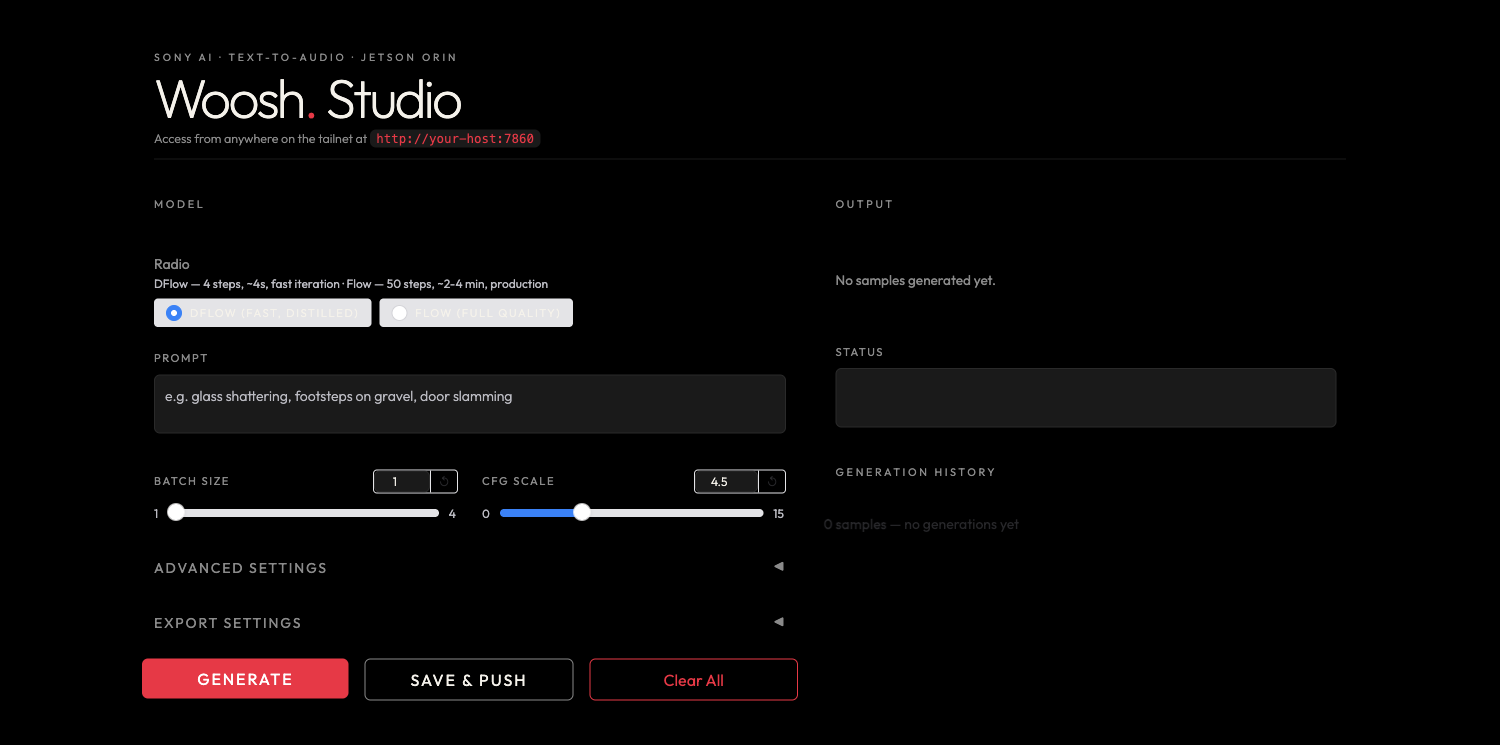
A web UI, REST API, and MCP server for Sony Research's Woosh sound-effect foundation model, packaged for GPU-accelerated deployment on an NVIDIA Jetson Orin.
Type a prompt — laser firing, glass shattering, thunderstorm rain — and generate sound
effects with either the fast distilled DFlow model or the full-quality Flow model.
Features
- Two models — DFlow (distilled, ~4 steps, sub-second on GPU) and Flow (full quality, adaptive ODE solver).
- Batch generation — up to 4 variations per prompt, shown as a thumbnail grid with inline players, filenames, sizes, and download links.
- Export settings — OGG / MP3 / WAV at a selectable sample rate (8–96 kHz) and bitrate; the download links are encoded to match.
- Live progress that tracks the sampler's steps (DFlow steps / Flow solver evaluations).
- REST API (Gradio) with copy-paste CLI / JavaScript / Python snippets in the UI.
- MCP server exposing a
generate_soundtool for MCP clients (Claude Code, Claude Desktop, …).
Running
The app runs as a systemd --user service (woosh-ui.service) that auto-starts on boot and
auto-restarts on failure:
systemctl --user status  woosh-ui.service
systemctl --user restart woosh-ui.service
journalctl --user -u woosh-ui.service -f
It serves on port 7860 — open http://localhost:7860 (or http://<host>:7860 from another
machine on your network, where <host> is the server's hostname or IP).
To run it manually instead:
uv run python woosh_ui.py --server-name 0.0.0.0 --server-port 7860
The Woosh model checkpoints are not included in this repo. Place them under checkpoints/
(checkpoints/Woosh-DFlow, checkpoints/Woosh-Flow) — see the upstream repo for download links.
MCP
The MCP server (SSE transport) is exposed at http://<host>:7860/gradio_api/mcp/sse (replace
<host> with the server's hostname or IP).
Add it to an MCP client — e.g. Claude Code:
claude mcp add --transport sse woosh http://<host>:7860/gradio_api/mcp/sse
…or in .mcp.json / claude_desktop_config.json:
{
  "mcpServers": {
    "woosh": {
      "type": "sse",
      "url": "http://<host>:7860/gradio_api/mcp/sse"
    }
  }
}
Tool: generate_sound(prompt, model="DFlow", batch_size=1, cfg_scale=4.5, seed=-1, output_format="ogg", sample_rate=48000, bitrate="256k") → list of audio file URLs.
GPU build (Jetson Orin)
This deployment targets JetPack 6 / CUDA 12.6 / Python 3.10. torch, torchaudio, and
torchvision are sourced from the Jetson AI Lab index (see
pyproject.toml), and numpy is pinned <2 to match the Jetson torch ABI. uv sync reproduces
the CUDA-enabled environment:
uv sync
python -c "import torch; print(torch.__version__, torch.version.cuda, torch.cuda.is_available())"
# -> 2.8.0 12.6 True
Credits
Built on SonyResearch/Woosh (Apache-2.0). Model weights are © their respective authors and are not redistributed here.