
Slaude - Runtime Claude Code no Slack
barockok/slaude
Integre Claude como teammate no Slack com sessões persistentes e aprovações.
Ver no GitHubAgent de IA baseado em Claude que funciona nativamente dentro do Slack como um colega de trabalho. Mantém sessões persistentes por thread, integra um MCP server exclusivo para output formatado no Slack, e implementa fluxos de aprovação estilo manager antes de operações críticas.
Instalação
npx convez-ai barockok/slaude1 comando no terminal: detecta o formato do repositório (marketplace ou plugin avulso) e instala via Claude Code. Requer Node 18+ e o Claude Code instalado.
Métricas
Casos de uso
- Automatizar tarefas operacionais dentro do Slack com contexto de equipe
- Executar código e scripts sob supervisão com gate de aprovação
- Manter histórico de sessões de IA por thread do Slack para referência futura
Veredito

Solução madura e bem pensada para integrar Claude no Slack como agente produtivo. Arquitetura sólida com limites de confiança claros, persistência robusta e controles de aprovação — exige DevOps para deploy, mas entrega automação seria com governança.
README
A tradução para o português deste README ainda está na fila.
slaude


Slack-native Claude Code runtime. Onboard an AI agent as a teammate in your Slack workspace.
Inspired by NousResearch/hermes-agent, but Slack-only and powered by the official
@anthropic-ai/claude-agent-sdk.
What it is
- One Slack thread = one persistent claude-code session. SDK
resume:keeps the conversation across idle restarts. - A two-layer persona: hardcoded runtime baseline (Slack output, formatting, approval discipline, engagement) + operator-defined
~/.slaude/SOUL.md(name, role, voice, manager, audience, mandate). - Slack output flows exclusively through an in-process MCP server (
mcp__slaude_slack__*) — no auto-streaming, no tool-call noise. - Manager-style approvals: agent runs in YOLO and self-organizes a high-level approval checkpoint before mutating ops; SOUL.md defines who's authorized to approve which kind of work.
- Headless. Run on a server, point Slack at it via Socket Mode.
Architecture at a glance
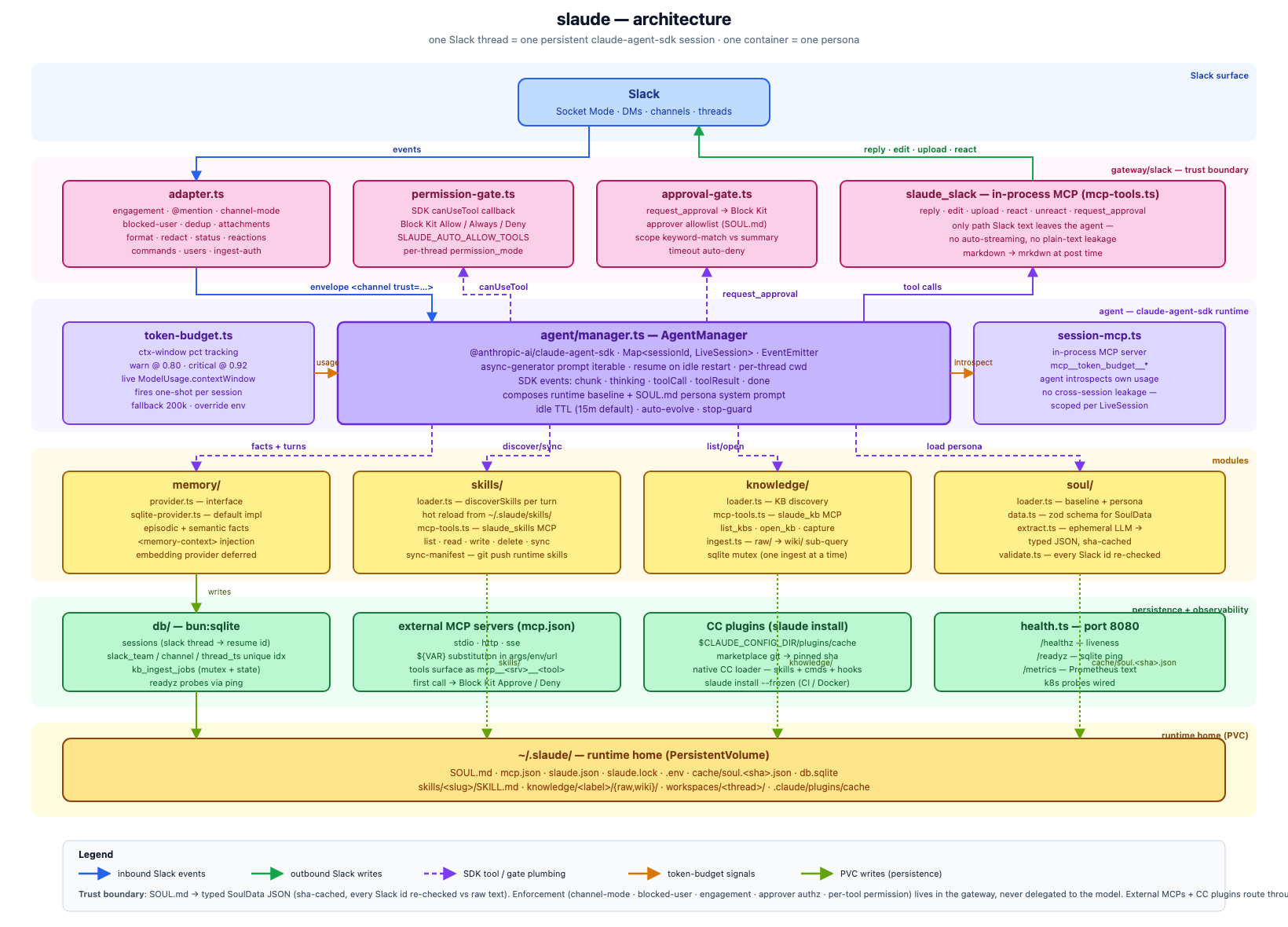
Source: docs/architecture.html (regenerate the PNG via headless Chrome — see file header).
Trust boundary: the LLM extracts SOUL.md into typed JSON; every Slack id it returns is checked against the raw SOUL.md text before any gate uses it. Enforcement (channel-mode, blocked-user, engagement, approver authorization, per-tool permission) lives in the gateway, never the model. A jailbroken persona can mislead an approver but cannot redirect or self-approve. See Trust boundary.
Persistence: sqlite holds per-thread session state (resume ids, slack thread mapping, permission mode); markdown lives on the PVC under ~/.slaude/ (SOUL.md, manifest, lockfile, skills, KB wikis, per-thread workspaces, soul-extraction cache).
Features
- Channel-style output — agent replies via
mcp__slaude_slack__reply/edit/upload/react/unreact/request_approval. Plain assistant text never reaches Slack. - Markdown → Slack mrkdwn —
**bold**/*italic*/ lists / fenced code / links / headings auto-converted at post time. Tables render as monospace blocks (narrow) or definition lists (wide). - Slack Agents API status — animated "thinking…" / "running
<cmd>" / "reading<file>" next to the bot name (whenassistant:writescope granted). - Engagement model —
@mentionengages a thread,@mentionsomeone else disengages, plain replies in an engaged thread are handled. DMs always engaged. - File attachments both ways — Slack files attached by users are downloaded to the session working dir and surfaced as
<attachment>blocks; agent uploads files viamcp__slaude_slack__upload. - Approval gate —
mcp__slaude_slack__request_approval(summary, …)posts Block Kit Approve/Deny. Approver allowlist parsed from SOUL.md scope-described entries; runtime keyword-matches the agent's plan summary against each approver's scope; the agent never picks user IDs. - LLM-extracted SoulData — at boot, an ephemeral Claude turn projects SOUL.md into a typed JSON (approvers, identity, manager, allowedUsers, mandate, values), sha-cached at
$SLAUDE_HOME/cache/soul.<sha>.json. The approval gate consumes the structured approvers as the preferred tier; regex parser is the fallback. Persona prose can drift from rigid bullet format without breaking allowlist resolution. - External MCP servers — declare stdio / SSE / streamable-HTTP MCP servers in
~/.slaude/mcp.json(same shape as Claude Code's mcp.json). Tools surface asmcp__<server>__<tool>and route through the standard approval gate on first call. See External MCP servers (mcp.json). - Contextual per-user connections — ephemeral, thread-scoped service connections (e.g. Jira) owned by the requesting Slack user, not a shared bot identity. A user logs in via a confined web-CDP browser; credentials are AES-256-GCM-encrypted at rest with a TTL. Another thread member can borrow a connection only with the owner's per-thread, revocable approval. Off by default — enable with
SLAUDE_ENABLE_CONNECT_BROKER+SLAUDE_ENCRYPTION_KEY. See Contextual connections (slaude_connect). - Dependency manifest — declarative
slaude.json+slaude.lockfor three surfaces: Claude Code plugins (marketplace git), skills (git repo per skill), knowledge bases (Karpathy-style markdown wikis). Install runs at image build (slaude install --frozen), runtime ships self-contained. See Dependency manifest (slaude.json). - Runtime manifest sync —
mcp__slaude_skills__sync_manifestsyncs runtime-created skills and knowledge bases back toslaude.json+slaude.lock. Push target resolved viaslaude_skillsmanifest field, env varSLAUDE_SKILLS_REPOas fallback.slaude_knowledgewritable KB pushesraw/on each sync; read-onlyknowledge[]entries are pulled fresh. See Dependency manifest (slaude.json). - Writable KB + /ingest — the agent captures material into
raw/during normal Slack turns;sync_manifestpushes it to git. Manager/approver runs/ingestto synthesiseraw/→wiki/via a dedicated SDK sub-query. Sqlite mutex ensures at most one ingest at a time. - Slash commands in thread —
/mode <ask|accept-edits|bypass|plan|dont-ask>,/abort,/ingest,/help. Per-sessionpermission_modepersists. /1on1(and/1on1 off) — lock the current thread to you + the manager; everyone else is ignored until released. Approvers can still approve.- Idle TTL with resume —
SLAUDE_IDLE_MINUTES(default 15). On expiry the SDK Query closes silently; next inbound message re-boots withresume: row.id. - Provider-agnostic — any Anthropic-compatible API (Anthropic direct, OpenRouter, DeepSeek, Z.ai, self-hosted gateway, …). Telemetry / autoupdater / bug-reporter disabled in the SDK child so non-Anthropic gateways don't crash the CLI.
- Health endpoints —
/healthz(liveness) +/readyz(sqlite ping) onSLAUDE_HEALTH_PORT(default 8080). K8s probes wired indeploy/k8s/slaude.yaml. - One container = one persona — multi-agent via multi-deploy.
- Simulation gateway — Slack-free verification of engagement, channel-mode, approval + connect-grant buttons, and slash-command authz. Runs the same
createGatewaycode as production against an in-memory transport. See Simulation gateway.
Setup
1. Install
git clone <this repo> slaude
cd slaude
bun install
2. Create the Slack app
Generate an app manifest:
bun run manifest > manifest.json
In Slack:
- https://api.slack.com/apps → Create New App → From manifest → paste
manifest.json. - Basic Information → App-Level Tokens → create a token with scope
connections:write(this is yourSLACK_APP_TOKEN, starts withxapp-). - OAuth & Permissions → Install to workspace → grab the bot token (
xoxb-…). Reinstall any time the manifest's scopes change. - Agents & AI Apps → enable assistant view (unlocks
assistant.threads.setStatusfor the animated status indicator). - Socket Mode → enable.
3. Configure env
Copy .env.example to ~/.slaude/.env (or to ./.env if you're using docker compose / running with bun src/server.ts from the repo root — Bun auto-loads ./.env).
Any Anthropic-compatible provider works — point ANTHROPIC_BASE_URL at your gateway and set SLAUDE_MODEL to its provider-qualified model id. Two auth modes:
- API key —
ANTHROPIC_API_KEY=sk-ant-…(metered, works with any compatible gateway). - Claude Pro / Max subscription —
CLAUDE_CODE_OAUTH_TOKEN=sk-ant-oat01-…. Generate the token on a machine logged into Claude Code viaclaude setup-token, then paste it into slaude's env. The SDK child + soul extractor auto-detect and authenticate againstapi.anthropic.comvia OAuth Bearer.
SLAUDE_MODEL is an override, not a default. When unset, slaude doesn't pass --model to the SDK child and the Claude Code CLI picks its own default — which is what you usually want with CLAUDE_CODE_OAUTH_TOKEN (you inherit the subscription's default model). Set SLAUDE_MODEL only when you need to pin a specific tier-allowed model, or when pointing ANTHROPIC_BASE_URL at a non-Anthropic gateway (OpenRouter, Z.ai, self-hosted) — those endpoints don't recognise Anthropic's default model id, so a provider-qualified id is required.
Beyond SLAUDE_MODEL, the Claude Code CLI also honours two of its own model env vars. slaude forwards all parent env to the SDK child, so they flow through transparently:
| Env var | Purpose |
|---|---|
SLAUDE_MODEL | slaude-side override. Wins over ANTHROPIC_MODEL when both set. |
ANTHROPIC_MODEL | CLI-native fallback for the main-session model when SLAUDE_MODEL is unset. |
ANTHROPIC_SMALL_FAST_MODEL | Haiku-class model for compaction, tool routing, and sub-tasks. Orthogonal to main model. |
Precedence in the SDK child: options.model (= SLAUDE_MODEL) → ANTHROPIC_MODEL → CLI's built-in default for the active auth mode (subscription default under OAuth). There is no per-tier env var like ANTHROPIC_OPUS_MODEL / ANTHROPIC_SONNET_MODEL — only the two above.
SLACK_BOT_TOKEN=xoxb-...
SLACK_APP_TOKEN=xapp-...
ANTHROPIC_API_KEY=sk-ant-...
# OR: CLAUDE_CODE_OAUTH_TOKEN=sk-ant-oat01-...   # run on your Claude subscription; leave SLAUDE_MODEL unset
# ANTHROPIC_BASE_URL=https://openrouter.ai/api/v1   # optional; if set, SLAUDE_MODEL becomes required
# SLAUDE_MODEL=claude-sonnet-4-6                  # override only

# Optional: env-level fallback approver allowlist when SOUL.md has no
# `## Approvers` section. Manager/channel rules live in SOUL.md, not env.
SLAUDE_APPROVERS=U01ABCD

# Contextual per-user connections (slaude_connect broker) — OFF by default.
# Mounts only when BOTH are set: SLAUDE_ENABLE_CONNECT_BROKER (truthy) AND
# SLAUDE_ENCRYPTION_KEY (32-byte base64, `openssl rand -base64 32`). Default
# deploy exposes no connection tools; /1on1 mode is the shipped per-thread feature.
SLAUDE_ENABLE_CONNECT_BROKER=
SLAUDE_ENCRYPTION_KEY=

# Defaults — see .env.example for the full list.
SLAUDE_DEFAULT_MODE=bypass                            # YOLO; rely on approval-gate + soul mandate
SLAUDE_AUTO_ALLOW_TOOLS=Read,Grep,Glob,LS
SLAUDE_IDLE_MINUTES=15
SLAUDE_HEALTH_PORT=8080
4. Edit the persona
~/.slaude/SOUL.md is auto-seeded with a starter scaffold on first run. Validate at any time with bun run validate-soul (exit 0 = ok, 1 = missing required fields, 2 = extraction failure).
Supported SOUL.md schema
Parsed at boot by an ephemeral Claude pass into typed JSON. Required fields block validate-soul; the rest are optional with warnings when notable defaults kick in.
| Section | Field | Required | Notes |
|---|---|---|---|
## Identity | identity.name / role / voice | name | Agent display name + free-text role + voice guidance |
## Reporting | manager.userId / manager.handle | manager.userId | Sole user accepted in DMs and non-public channels |
## Reporting | backupManager.userId / backupManager.handle | optional | Fallback manager — same engagement authority as primary |
## Allowed channels | allowedChannels: Cxxx/Gxxx[] | optional | Public zones — anyone in channel chats; agent guards info exposure |
## Trusted channels | trustedChannels: Cxxx/Gxxx[] | optional | Team zones — anyone in channel chats; agent free to show MCP/skills/internals. Per-turn trust="trusted" hint in inbound envelope |
## Blocked | blockedUsers: Uxxx[] | optional | Hard drop at gateway — never reaches Claude |
## Approvers | approvers: [{userId, scope, catchall}] | optional | Click Approve/Deny on request_approval blocks. Scope is keyword-matched against plan summary |
## Redaction | redactPatterns: string[] | optional | Regex sources (no flags); applied global+case-insensitive after md→mrkdwn on every outbound Slack reply |
## Approval timeout | approvalTimeoutSeconds: number | optional | Auto-deny request_approval after N seconds with no click. 0 = wait forever |
## Values | values: string[] | optional | Operating principles, one per line |
## Mandate | mandate: string | yes | What this deploy is for, drives every turn |
Channel-trust tiers in priority order: trusted > allowed > restricted (DM / unlisted; manager + backup only). The agent receives a <channel … trust="…"> envelope every turn and calibrates info exposure accordingly.
## Identity
- Name: aria
- Role: senior platform engineer
- Voice: terse, fragments OK

## Reporting
- Manager: U06ENBS6PV0
- Manager handle: @barock
- Backup manager: U0DEPUTY123

## Allowed channels
- <#C0123456789|engineering>

## Trusted channels
- <#C0AAATEAM00|squadron-team>

## Blocked
- <@U0SPAMUSR00>

## Approvers
- <@U06ENBS6PV0>: anything                ; manager, catchall
- <@U999>:        database migrations, schema, prod data, SQL
- <@U777>:        deploys, infra, kubernetes, rollbacks
- <@U888>:        external comms, customer messages, emails

## Redaction
- AKIA[0-9A-Z]{16}                  ; AWS keys
- ghp_[0-9A-Za-z]{36}               ; GitHub tokens
- xox[baprs]-[0-9A-Za-z-]{10,}      ; Slack tokens

## Approval timeout
- 600

## Mandate
- Help the team ship; refuse destructive ops without explicit approval.
The hardcoded runtime baseline (Slack output discipline, formatting rules, approval discipline, engagement model, channel-trust tiers, context-budget guidance, skill evolution) is composed in front of your persona automatically — don't re-state those in SOUL.md.
Trust boundary: where the LLM ends and the gateway begins
The persona is free-form prose. To safely turn that into security-sensitive state (which channels slaude answers in, who can DM it, who can click Approve), slaude separates parsing from enforcement:
- Parsing — at boot, an ephemeral Claude turn projects SOUL.md into a typed
SoulDataJSON (identity,manager,backupManager,allowedChannels,trustedChannels,blockedUsers,approvers,redactPatterns,approvalTimeoutSeconds,mandate,values). The result is validated with zod, then every Slack id it returns is checked against the raw SOUL.md text — any id the extractor invented is rejected and the loader falls back to the regex parser. The validated JSON is sha-cached at$SLAUDE_HOME/cache/soul.<sha>.json; subsequent boots skip the LLM call entirely until SOUL.md changes. - Enforcement is fully deterministic and runs in the gateway, never delegated to the model:
- Channel-mode gate (
adapter.ts) — for each inbound message:- If the channel id is in
trustedChannelsorallowedChannels→ public zone: any user accepted. - Otherwise (DM or unlisted channel) → only
manager.userIdandbackupManager.userIdaccepted. Other users dropped before any session sees the message. blockedUsersis a hard drop before any other gate — works inside trusted/allowed channels too.
- If the channel id is in
- Engagement model —
@mentionengages a thread;@mentionof someone else disengages. Plain replies in a disengaged thread are dropped. - Approver authorization — when a user clicks Approve / Deny on an
mcp__slaude_slack__request_approvalblock, the action handler verifies the clicker's user id is in the resolved approver Set (computed server-side from the structuredapproverslist + token-overlap match against the agent's plan summary). Approvers can authorize but cannot chat from non-whitelisted channels or DMs — the chat-gate above still applies. The agent never passes user ids — it only writes the summary text. - Per-tool permissions —
permission-gate.tscanUseToolcallback decides Allow / Ask / Deny; mutating tools require explicit user click on a Block Kit prompt.
- Channel-mode gate (
What this buys: a jailbroken or buggy persona can produce a misleading approval summary, but it cannot redirect approval to a friendlier user, smuggle a new user into the DM gate, or self-approve. The worst case is a real authorised approver reads a misleading summary and clicks Approve anyway — which is the same risk any human-in-the-loop system carries.
External MCP servers (mcp.json)
Drop a Claude-Code-style mcp.json at ~/.slaude/mcp.json (override path via SLAUDE_MCP_CONFIG). Loaded once at boot — restart slaude after edits.
{
  "mcpServers": {
    "filesystem": {
      "command": "npx",
      "args": ["-y", "@modelcontextprotocol/server-filesystem", "${MCP_FS_ROOT}"]
    },
    "github": {
      "command": "npx",
      "args": ["-y", "@modelcontextprotocol/server-github"],
      "env": { "GITHUB_TOKEN": "${GITHUB_TOKEN}" }
    },
    "remote": {
      "type": "http",
      "url": "https://example.com/mcp",
      "headers": { "Authorization": "Bearer ${MCP_AUTH}" }
    }
  }
}
- Types — implicit stdio when
commandis set; explicit"type": "http"or"type": "sse"for remote servers (urlrequired). ${VAR}substitution — applied tocommand, every entry ofargs[], every value ofenv,url, every value ofheaders. Missing vars expand to""(POSIX shell semantics).- Tool surface — each server's tools appear as
mcp__<server>__<tool>(e.g.mcp__filesystem__read_file). - Approval posture — external tools are not auto-allowed. First call posts a Block Kit Approve / Deny prompt; click Always allow to grant session-scoped auto-approval.
- Reserved names —
slaude_slackandslaude_skillsinmcp.jsonare dropped with a warning so user config can't shadow the in-process Slack output server (would deadlock the agent). - Secret isolation — stdio child processes inherit
process.envby default. To restrict what a server sees, set an explicitenv: { … }on its entry; the loader only passes through what's listed there.
Contextual connections (slaude_connect)
External MCP servers above run as one shared identity for the whole deploy. Contextual connections are the opposite: per-Slack-user, thread-scoped, ephemeral. When Alice asks "list my Jira issues", slaude acts through Alice's connection — not a shared bot token.
Off by default. Enable by setting BOTH SLAUDE_ENABLE_CONNECT_BROKER (truthy) and SLAUDE_ENCRYPTION_KEY (see env above) — the flag is an explicit switch decoupled from the key, so a default deployment exposes no connection tools and /1on1 mode is the shipped per-thread feature. Without the flag the broker stays disabled and the rest of slaude is unaffected. Operator/deploy details — the web-CDP login host and the deploy-time seams — live in docs/connect-broker-login.md.
How a user experiences it (in a Slack thread):
- Ask for something needing a service (e.g. Jira). If you have no connection, slaude posts a Connect link.
- Open the one-time link, log in interactively in a confined remote browser. slaude captures the credential (OAuth token preferred, cookies as fallback), encrypts it (AES-256-GCM) and stores it with a TTL. The browser is torn down.
- slaude answers as you. The connection lives only in this thread and expires on idle / TTL — re-connect in a new thread.
- Another member borrowing your connection triggers a one-time approval DM to you: Allow for thread / Just once / Deny. "Allow for thread" lets later calls run silently; every use is still audited. Revoke anytime with
/connections.
Broker tools (namespace mcp__slaude_connect__*; fixed set — vendor tools are reached through mcp_call, so the agent's tool list never changes):
| Tool | Purpose |
|---|---|
mcp_call(service, tool, args, on_behalf_of) | Invoke a vendor tool on the caller's connection. on_behalf_of = the Slack user id being answered (server cross-checks it against the live turn caller; it is not the authorization principal). Gated, not auto-allowed. |
mcp_describe(service) | Return the vendor service's tool schemas so the agent can build a correct mcp_call. |
connect(service) | Start the login flow; returns a one-time, single-user, short-TTL live-view URL to post back. |
connections_list() | List connections visible in this thread (yours + members'), with expiry. |
connections_revoke(service?) | Revoke your own connection(s) and any borrow grants; omit service for all. |
Security posture (full threat model in the design spec): credentials AES-256-GCM-encrypted at rest (per-row nonce, AAD-bound to the connection id); SLAUDE_ENCRYPTION_KEY scrubbed from the SDK child env; per-tool borrowable vs owner-only flags (owner-only tools never run under a borrow); personal tools never silently fall back to slaude's own identity (fail-closed for unclassified tools); borrow approval reuses the Slack approval gate targeted at the connection owner.
Dependency manifest (slaude.json)
Declare the agent's third-party dependencies in a single manifest at ~/.slaude/slaude.json. Five surfaces (three read-only, two writable):
{
  "plugins": [
    {
      "marketplace": "github:anthropics/claude-plugins-official",
      "plugin": "superpowers",
      "ref": "5.1.0"
    }
  ],
  "skills": [
    {
      "git": "github:barockok/skill-release-notes",
      "ref": "v1.2.0"
    }
  ],
  "knowledge": [
    {
      "label": "amartha-runbooks",
      "git": "github:amartha/runbooks-wiki",
      "ref": "v3.0.0"
    }
  ],
  "slaude_skills": {
    "git": "github:barockok/my-slaude-skills",
    "ref": "main"
  },
  "slaude_knowledge": {
    "label": "ops-wiki",
    "git": "github:barockok/ops-wiki",
    "ref": "main"
  }
}
Surfaces:
| Section | Source | Install target | Runtime pickup |
|---|---|---|---|
plugins | Marketplace git (marketplace + plugin + ref) | $CLAUDE_CONFIG_DIR/plugins/cache/… | Claude Code native loader |
skills | Git repo per skill | ~/.slaude/skills/<slug>/ | discoverSkills() per inbound message |
knowledge | Git wiki (Karpathy-style, read-only) | ~/.slaude/knowledge/<label>/ | mcp__slaude_kb__list_kbs / open_kb (pulled on sync) |
slaude_skills | Push target for runtime-authored skills | ~/.slaude/skills/ | sync_manifest push |
slaude_knowledge | Single writable KB (label + git + ref) | ~/.slaude/knowledge/<label>/ | sync_manifest (raw/) + /ingest (wiki/) |
Writable surfaces. slaude_skills is the git repo where the agent pushes runtime-authored skills via sync_manifest. slaude_knowledge is the single writable knowledge base — the agent writes captured material into raw/ from normal Slack turns; the manager or an approver runs /ingest to synthesise raw/ into wiki/ and push. Everything in skills[] and knowledge[] is strictly read-only (pulled on sync_manifest).
MCP servers are NOT in the manifest. ~/.slaude/mcp.json stays the single source of truth for MCP.
Installer (slaude install):
bun run install-deps --frozen   # CI / Docker build: fail if lockfile doesn't cover manifest
bun run install-deps --update   # resolve fresh from declared refs, rewrite lockfile
bun run install-deps --check    # exit 0 if lock satisfies manifest, 1 otherwise
The default (no flags) honours the lockfile; only resolves entries the lock doesn't cover.
Lockfile (slaude.lock) — auto-generated, sha-pinned. Commit to the repo so image builds are reproducible.
Plugins: Slaude does not reimplement plugin loading. The installer clones marketplace repos and copies plugins into Claude Code's native cache layout ($CLAUDE_CONFIG_DIR/plugins/cache/<marketplace>/<plugin>/<version>/). Claude Code's built-in loader picks them up. Full CC plugin compat — plugin.json at root, slaude fans out skills / commands / agents / hooks. MCP servers bundled inside plugins (plugin.json → mcpServers) work through CC's native loader.
Knowledge bases: Karpathy's LLM-wiki framework — plain markdown wikis the agent navigates by reading. Each KB is a cloned git repo; the agent discovers what's available via mcp__slaude_kb__list_kbs, opens the entry page (README.md / index.md) via mcp__slaude_kb__open_kb, then navigates with native Read / Grep / Glob. No embeddings, no chunking — the wiki author owns structure; the LLM is the search engine.
Skills are the same flat SKILL.md format slaude already supports — the installer just sources them from git instead of the operator dropping them in by hand.
Install layout (baked into the image, not PVC-mounted):
~/.slaude/
  .claude/plugins/cache/<marketplace>/<plugin>/<version>/   ← CC native cache
  skills/<slug>/SKILL.md                                    ← hot-reloaded each turn
  knowledge/<label>/README.md                               ← navigated via Read/Grep
Docker build integration — the Dockerfile has a builder stage that runs slaude install --frozen and copies the artifacts into the runtime image. Operator-authored files (slaude.json, slaude.lock, mcp.json, SOUL.md) live on the PVC. Full design spec at docs/superpowers/specs/2026-05-21-dependency-manifest-design.md.
Runtime sync (sync_manifest): The mcp__slaude_skills__sync_manifest tool syncs skills and knowledge bases the agent creates at runtime back to the manifest so they survive container redeploys. The baseline soul instructs the agent to call it after batching related changes (not after every single write). The tool is not auto-allowed — it falls through to Block Kit approval like write_skill / delete_skill.
Behavior by resource type:
| Resource | SLAUDE_SKILLS_REPO set | SLAUDE_SKILLS_REPO unset |
|---|---|---|
| Skills | Pushed to git repo, recorded as {git, ref: "main", slug} in manifest + sha in lockfile | Recorded as local-only {slug} entry (PVC-surviving) |
| Knowledge bases | Recorded as local {label} entry (no git — wiki content lives on PVC) | Same — KBs are always local entries |
Git push failure falls back to local entries with a warning. Calling sync_manifest when nothing has changed is a safe no-op (idempotent).
5. Run
Local dev:
bun run dev      # autoreload
# or
bun run start
Container (one container = one persona = one SOUL.md):
docker compose up -d --build
Kubernetes — see deploy/k8s/slaude.yaml. Replicas pinned to 1 because Slack Socket Mode is single-leader. Onboard additional agents via additional Deployments.
Invite the bot to a channel, @slaude do something, or DM it directly.
Metrics (Prometheus)
Slaude exposes /metrics on the health-server port (default :8080, same process as /healthz + /readyz) in Prometheus text format. Scrape with Prometheus or Grafana Agent.
Metric surface:
| Metric | Type | Labels |
|---|---|---|
slaude_sessions_live | gauge | — |
slaude_turns_total | counter | result=success|error |
slaude_tool_calls_total | counter | tool |
slaude_tokens_total | counter | kind=input|output|cache_read|cache_creation |
slaude_context_window_pct | gauge | — |
slaude_stop_guard_blocked_total | counter | — |
slaude_stop_guard_failed_total | counter | — |
slaude_errors_total | counter | kind=sdk|turn|stop_guard_failed |
slaude_slack_drops_total | counter | reason=dedup|whitelist|engagement|mention_other|blocked_user |
slaude_user_turns_total | counter | user_id, user_name (opt-in) |
Static labels applied to every series via SLAUDE_METRICS_LABELS="agent=aria,env=prod,team=ai". Per-user counter is opt-in (SLAUDE_METRICS_PER_USER=1) — leaving it off keeps Prometheus cardinality bounded in public channels.
Layout
src/
  agent/
    manager.ts              # claude-agent-sdk runtime, multi-session, idle TTL
    session-mcp.ts          # in-process MCP — token_budget introspection
    token-budget.ts         # ctx-window tracking + warn/critical threshold events
  gateway/slack/
    adapter.ts              # bolt Socket Mode wiring + channel-mode / engagement gate
    mcp-tools.ts            # slaude_slack MCP (reply/edit/upload/react/request_approval)
    permission-gate.ts      # SDK canUseTool → Block Kit Allow/Always/Deny
    approval-gate.ts        # agent-driven request_approval Block Kit Approve/Deny
    ingest-auth.ts          # /ingest authorization — manager + approvers only
    status.ts               # assistant.threads.setStatus indicator
    reactions.ts            # 👀/⚙️/✅/❌ status reactions
    presence.ts             # users.profile.set (xoxp only)
    format.ts               # markdown → Slack mrkdwn (incl. tables)
    redact.ts               # regex redaction from soul.redactPatterns
    attachments.ts          # download Slack files into session dir
    users.ts                # users.info name resolution (TTL cache)
    commands.ts             # /mode /abort /ingest /help
  soul/
    loader.ts               # runtime baseline + SOUL.md persona, regex approver parser
    data.ts                 # zod schema for SoulData
    extract.ts              # ephemeral-LLM SOUL.md → SoulData JSON, sha-cached
    validate.ts             # boot-time SoulData validation helpers
  skills/
    loader.ts               # discoverSkills() per inbound message (hot reload)
    mcp-tools.ts            # slaude_skills MCP (list/read/write/delete/sync_manifest)
    sync-manifest.ts        # runtime → manifest sync (git push + atomic writes)
  knowledge/
    loader.ts               # KB discovery — installed + writable wiki
    mcp-tools.ts            # slaude_kb MCP (list_kbs / open_kb / capture)
    ingest.ts               # /ingest engine — raw/ → wiki/ synthesis sub-query
  memory/
    provider.ts             # MemoryProvider interface
    sqlite-provider.ts      # default impl — sqlite turns + facts table
  db/                       # bun:sqlite schema (sessions, kb_ingest_jobs)
  config/
    env.ts                  # env getters (+ ~/.slaude/.env auto-load)
    home.ts                 # $SLAUDE_HOME paths
    manifest-schema.ts      # zod schema for slaude.json / slaude.lock
    plugins.ts              # mcp.json loader + installed-plugin discovery
  cli/
    manifest.ts             # slack app manifest emitter
    install.ts              # slaude install (dependency manifest --frozen/--update/--check)
    validate.ts             # validate-soul entry — exit 0/1/2
    cc-plugin-metadata.ts   # CC plugin manifest helpers
  metrics.ts                # hand-rendered Prometheus text registry
  health.ts                 # /healthz + /readyz + /metrics
  server.ts                 # headless entry
~/.slaude/                  # runtime home (PVC)
  SOUL.md                   # persona (operator-defined)
  mcp.json                  # external MCP servers (optional)
  slaude.json               # dependency manifest (operator-authored)
  slaude.lock               # pinned dependency shas (auto-generated, committed)
  .env                      # operator secrets (optional, auto-loaded)
  cache/soul.<sha>.json     # LLM-extracted SoulData, keyed by sha256(SOUL.md)
  db.sqlite                 # bun:sqlite — sessions, ingest jobs
  skills/<slug>/SKILL.md    # installed skills (baked at image build)
  knowledge/<label>/        # installed KB wikis + writable KB (raw/ + wiki/)
  .claude/plugins/cache/    # CC native plugin cache (CLAUDE_CONFIG_DIR)
  workspaces/<thread>/      # per-session cwd
    attachments/<ts>/       # downloaded Slack files
See CLAUDE.md for the project mandate and the Findings Log for date-stamped decision notes.
Simulation gateway
Verify Slack-dependent behavior (engagement, channel-mode, approval + connect-grant
buttons, slash-command authz) with no Slack workspace. The simulation runs the same
createGateway code as production against an in-memory transport, so behavior cannot drift.
bun sim run                 # run every scenario transcript (CI gate), exit non-zero on failure
bun sim run path/to/*.yaml  # run specific transcripts
bun sim                     # interactive REPL
REPL is scenario-first:
> /scenario 5          # load approval-flow (U0ALICE in C0TEAM, request_approval behavior)
> deploy prod          # send as the current actor
> /as U0APP            # become the approver
> /click 1 approve     # click the approval card
Built-in scenarios: manager-dm, member-public, member-trusted, restricted-blocked,
approval-flow, borrow-grant. Override any field with /as, /channel, /dm,
/behavior. Transcripts (src/gateway/sim/scenarios/) drive the same engine and gate CI.
Roadmap / TODO
- Wiki-style memory (collaborative + portable) — replace the sqlite-only memory store with a portable, mountable directory of markdown files (think Karpathy's LLM Wiki, or a git wiki). Goals:
- Mountable as a volume → swap, back up, ship between deploys.
- Git-collaborative → multiple slaude runtimes (different personas / different machines) commit, pull, merge. Memory compounds across the fleet over time.
- Per-runtime contributions → each runtime can write back what it learned; another runtime picks it up on next pull.
- Two scopes side-by-side: shared wiki (cross-persona knowledge) + persona-private (this agent's own episodic + semantic memory, never shared).
Skill evolution✅ shipped —mcp__slaude_skills__{list_skills,read_skill,write_skill,delete_skill,sync_manifest}lets the agent author / refine its own~/.slaude/skills/<slug>/SKILL.md. Discovery runs per inbound message, so writes are hot-reloaded next turn without restart. Baseline soul mandates per-turn self-reflection ("did this turn show a repeatable workflow? → write/refine a skill"). Write/delete go through the existingrequest_approvalflow (category: 'skills').sync_manifestpersists runtime-created skills and KBs toslaude.json+slaude.lockso they survive redeploys.- Session control tools — MCP tool to restart / reset / fork the current Slack-thread session (clear
claude_started, drop working dir, re-boot with a fresh resume id). Manager session via DM✅ shipped — the manager's DM thread doubles as the runtime-config console. The channel-mode gate locks DMs tomanager.userId+backupManager.userIdonly and serves them astrust="restricted", so the agent can be candid + privileged there. Operators ask the agent to install MCP servers, edit SOUL.md, swap models, reconfigure approvers from DM — no separate persona / thread / dashboard needed. (Tools that mutate persistent state still go throughrequest_approval.)- Live monitor web view — read-only browser UI to peek inside any active session. Shows the live SDK event stream (thinking, tool calls + args, tool results, MCP traffic, permission prompts, current cwd) for a chosen Slack-thread session. Pure observability, no interaction — like attaching a read-only Claude Code window to a running agent.
- Static web server for generated dashboards — serve agent-produced HTML/JS/CSS artifacts (reports, dashboards, one-off visualizations written to a known dir) over HTTP so the operator can link to them from Slack. Configurable auth mode:
none(open, dev/internal only) orauthn(Slack OAuth / shared-token / basic-auth gate) so dashboards posted to a public URL aren't world-readable by default.
License
UNLICENSED — private project. Author: Zidni Mubarok.