
Migração de EC2 para ECS/EKS com Kiro CLI e MCP
aws-samples/sample-ec2-migrations-to-ecs-express-mode-using-kiro-cli-and-mcp-server
Automatiza migrações EC2 → ECS/EKS com agents inteligentes
Ver no GitHubMCP server que automatiza a migração de aplicações EC2 para deployments containerizados em Amazon ECS Express Mode ou EKS Auto Mode. Inclui skills e agents Kiro para orquestrar a transformação de VMs tradicionais em containers serverless ou Kubernetes gerenciado.
Instalação
npx convez-ai aws-samples/sample-ec2-migrations-to-ecs-express-mode-using-kiro-cli-and-mcp-server1 comando no terminal: detecta o formato do repositório (marketplace ou plugin avulso) e instala via Claude Code. Requer Node 18+ e o Claude Code instalado.
Métricas
Casos de uso
- Migrar aplicações Node.js de EC2 para ECS Fargate
- Converter infraestrutura VM para Kubernetes gerenciado (EKS Auto Mode)
- Automatizar containerização e reconfiguração de stacks AWS
- Orquestrar migrações multi-fase com validação integrada
Veredito

Solução pronta para empresas AWS migrando workloads legados. O MCP server com agents Kiro reduz complexidade operacional, mas requer domínio de ECS/EKS e CDK. Altamente relevante para equipes de infraestrutura em transição cloud.
README
A tradução para o português deste README ainda está na fila.
Amazon EC2 Migration to Containers using Kiro CLI and MCP Servers
Automated migration of EC2 applications to containerized deployments on Amazon ECS Express Mode or Amazon EKS Auto Mode using Kiro CLI and MCP servers.
📝 Blog Walkthroughs
This repository supports two blog posts. Start with the one matching your target:
| Blog | Target | Key Files |
|---|---|---|
| EC2 to ECS Express Mode | ECS Express Mode (Fargate) | kiro/mcp.json |
| EC2 to EKS Auto Mode | EKS Auto Mode (Kubernetes) | .kiro/skills/ec2-to-eks-auto-mode/, .kiro/agents/eks-migration.json |
Both blogs use the same sample Node.js application and initial EC2 infrastructure.
🏗️ Architecture Overview
Initial Architecture (EC2)
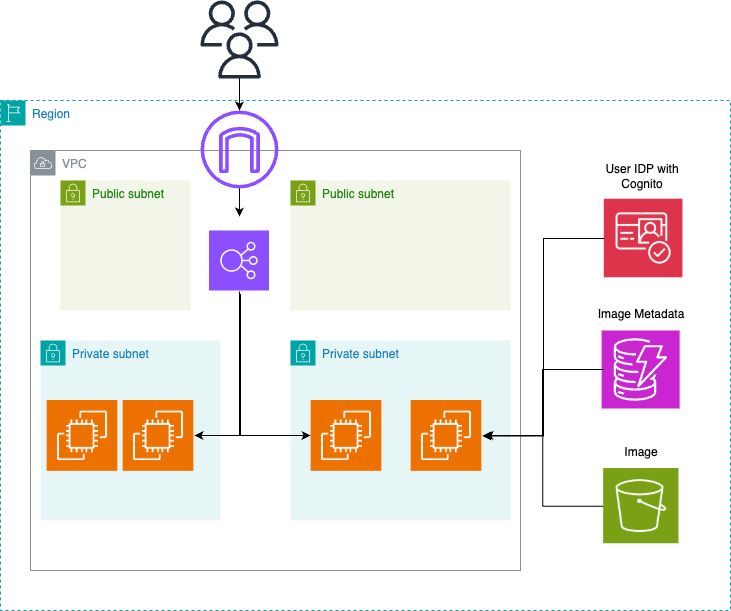
Traditional VM deployment: Node.js app on EC2 behind ALB, with Amazon Cognito authentication, Amazon S3 for images, and Amazon DynamoDB for metadata. Deployed via AWS CDK.
Target Architectures
ECS Express Mode — Serverless containers with automatic load balancer integration and auto-scaling.
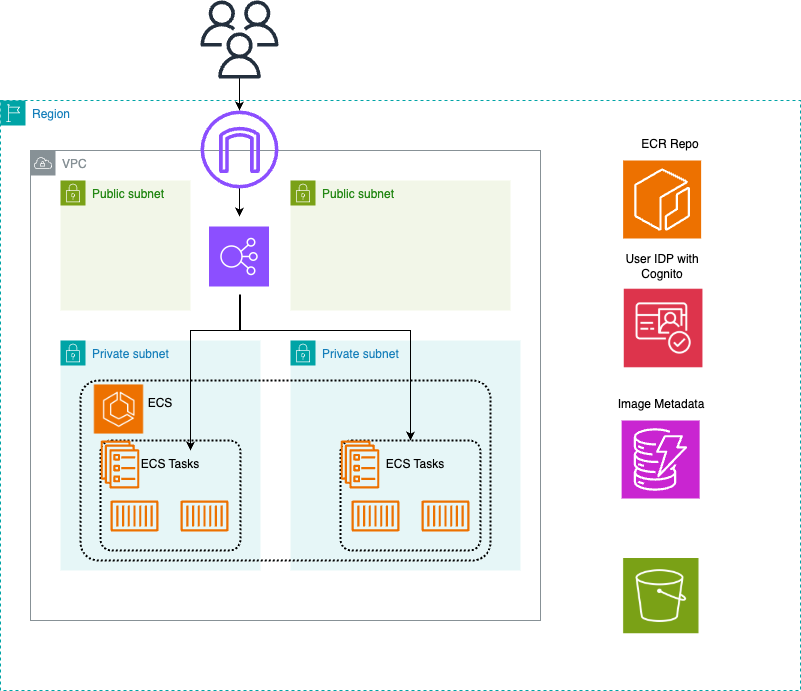
EKS Auto Mode — Managed Kubernetes with automatic node provisioning, scaling, and patching.
📁 Project Structure
├── .kiro/
│   ├── agents/eks-migration.json       # Kiro agent config for EKS blog (MCP servers)
│   └── skills/ec2-to-eks-auto-mode/    # 7-phase EKS migration skill
├── kiro/
│   └── mcp.json                        # Kiro MCP config for ECS blog
├── sample-application/                 # Node.js blog app (used by both blogs)
│   ├── Dockerfile
│   ├── src/server.js
│   └── public/index.html
├── infrastructure/
│   ├── cdk/                            # CDK stack for initial EC2 deployment
│   └── eks-auto-mode/                  # CDK stack for EKS Auto Mode cluster
├── scripts/
│   ├── deployment/deploy.sh            # Deploy initial EC2 app
│   ├── deployment/deploy_eks_cluster.sh # Deploy EKS cluster (alternative to skill)
│   └── cleanup/legacy_destroy.sh       # Remove EC2 infrastructure
└── docs/
    ├── ENV_SETUP.md
    └── diagrams/
🚀 Quick Start
Prerequisites
- AWS CLI 2.15.0+
- Kiro CLI 1.25.0+
- AWS CDK v2 2.238.0+
- Node.js 20+
- Docker or Finch
- kubectl (EKS blog only)
Step 1: Deploy the Initial EC2 Application
git clone https://github.com/aws-samples/sample-ec2-migrations-to-ecs-express-mode-using-kiro-cli-and-mcp-server
cd sample-ec2-migrations-to-ecs-express-mode-using-kiro-cli-and-mcp-server

cd infrastructure/cdk && npm install && cd ../..
./scripts/deployment/deploy.sh <your-region>
Step 2: Follow Your Target Blog
For ECS Express Mode:
kiro-cli
Then follow the ECS blog from Step 3 onwards.
For EKS Auto Mode:
kiro-cli chat --agent eks-migration
Then follow the EKS blog's migration prompt.
🧹 Clean Up
ECS Express Mode
Use Kiro CLI to delete the ECS service, or run cdk destroy in the infrastructure directory.
EKS Auto Mode
# Via Kiro CLI (uses manage_eks_stacks MCP tool)
# Or manually:
cd infrastructure/eks-auto-mode && cdk destroy
EC2 Infrastructure (both blogs)
./scripts/cleanup/legacy_destroy.sh <your-region>
🔐 Security
See CONTRIBUTING for security issue reporting. This project follows AWS Shared Responsibility Model best practices:
- Non-root container execution
- IAM least-privilege policies
- Health checks for automatic recovery
- No hardcoded credentials
📖 Learn More
© 2026 Amazon Web Services, Inc. or its affiliates. All rights reserved.