
Prompt English Coach
awkoy/prompt-english-coach
Pratique inglês enquanto escreve prompts no Claude Code
Ver no GitHubPlugin para Claude Code que oferece feedback em tempo real sobre a qualidade do inglês em seus prompts enquanto você trabalha. Funciona em modo não-bloqueante (coach/gentle) ou deliberado (gate/strict), ensinando gramática e clareza sem alterar seu prompt original.
Instalação
npx convez-ai awkoy/prompt-english-coach1 comando no terminal: detecta o formato do repositório (marketplace ou plugin avulso) e instala via Claude Code. Requer Node 18+ e o Claude Code instalado.
Métricas
Casos de uso
- Melhorar a clareza de prompts em inglês durante desenvolvimento
- Aprender gramática e construções idiomáticas de forma contextual
- Praticar escrita técnica em inglês sem interrupção do workflow
Veredito

Plugin bem-pensado que captura um nicho real: desenvolvedores que escrevem em inglês e querem feedback imediato. A abordagem não-destrutiva (nunca altera o prompt original) é inteligente, e os múltiplos modos oferecem flexibilidade. Recomendado para quem trabalha bilíngue no Claude Code.
README
A tradução para o português deste README ainda está na fila.
Prompt English Coach
Learn English while you prompt Claude Code.
Prompt English Coach is a Claude Code plugin for developers who write prompts in English and want short, useful feedback without leaving the terminal. It checks English prompts, teaches with concise corrections, and can optionally block unclear prompts until you rewrite them yourself.
It never auto-corrects or replaces your prompt. Claude gets your original words.
Quick Install
In Claude Code:
/plugin marketplace add awkoy/prompt-english-coach
/plugin install prompt-english-coach@prompt-english-coach
When Claude Code asks for mode, enter:
coach
Then reload plugins:
/reload-plugins
Check that it loaded:
/hooks
You should see hooks from prompt-english-coach: UserPromptSubmit, Stop, StopFailure, and SessionEnd.
Why Use It
- You practice English inside Claude Code, where you already write prompts.
- You see your original prompt next to a better version.
- You get practical grammar and clarity notes, not vague corrections.
- You can keep it non-blocking, or use a gate mode for deliberate practice.
- You do not need a separate API key; it uses your existing Claude Code auth through the local
claudeCLI.
Modes
| Mode | Blocks Claude? | Use it when you want... |
|---|---|---|
coach | No | The recommended default. Claude answers first, then you get a corrected version and 1-3 explanations. |
gentle | No | Very light feedback: one short hint after Claude answers. |
gate | Yes, for meaningful issues | Deliberate practice. The prompt is blocked until you rewrite it yourself. |
strict | Yes, for meaningful issues | Gate behavior with fuller feedback. |
Gate modes do not block minor style preferences. They are meant for grammar or clarity issues that could confuse the request.
Change Mode
Choose the mode during install when Claude Code asks for mode.
If you prefer shell commands, install with an explicit mode:
claude plugin install prompt-english-coach@prompt-english-coach --config mode=coach
To change mode later, the reliable path is reinstalling with a new mode value:
/plugin uninstall prompt-english-coach@prompt-english-coach
/plugin install prompt-english-coach@prompt-english-coach
/reload-plugins
Then enter one of:
coach
gentle
gate
strict
Fast On/Off
Disable the coach without uninstalling:
/plugin disable prompt-english-coach@prompt-english-coach
/reload-plugins
Enable it again:
/plugin enable prompt-english-coach@prompt-english-coach
/reload-plugins
What It Looks Like
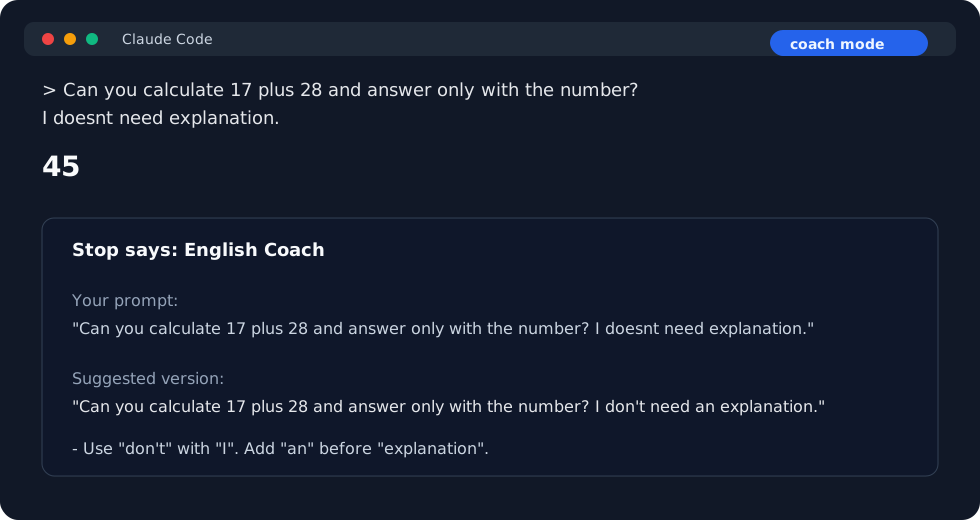
Coach Mode: Non-Blocking Feedback
Claude answers your original prompt first. Then the coach note appears after the answer.
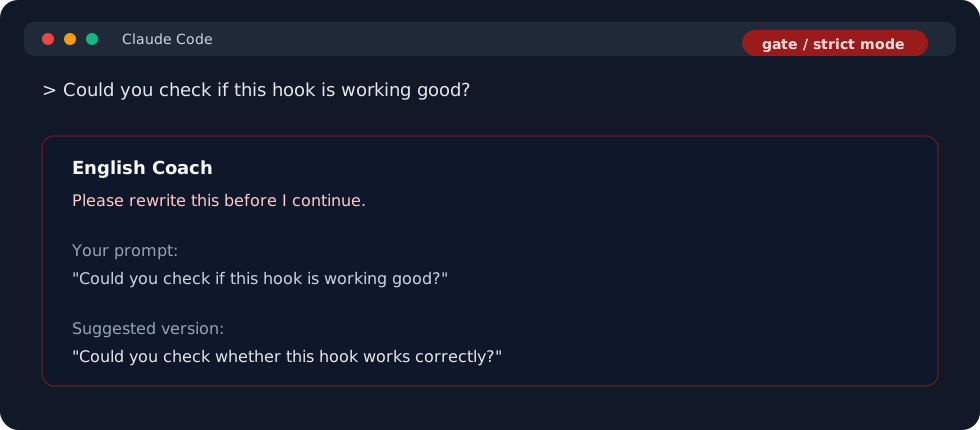
Gate / Strict Mode: Rewrite Before Continuing
If the prompt has a meaningful grammar or clarity issue, Claude Code stops and asks you to rewrite it yourself.
Technical Details
How It Works
- You write a prompt and press Enter.
- Claude Code runs the plugin's
UserPromptSubmithook. - The plugin ignores Russian, non-English, mixed-language, and very short prompts.
- For English prompts, it calls the local
claudeCLI with an internal teacher prompt. - In
coachandgentle, the plugin stores feedback and lets Claude answer your original prompt. - After Claude finishes, the
Stophook displays the English feedback. - In
gateandstrict, meaningful issues returndecision: "block"and Claude does not continue until you rewrite the prompt.
No manual system prompt is required. The teacher instructions live inside the hook script and are sent only to the local evaluator.
Why Feedback Appears After the Answer
Non-blocking feedback is delayed until Claude Code fires the Stop hook. This keeps the coach note out of the UserPromptSubmit output path, where stdout can be added to Claude's context.
In short: coach and gentle do not affect the prompt that Claude answers.
Requirements
- Claude Code installed and authenticated.
- Node.js 18 or newer.
- The
claudeCLI available onPATH.
Limitations
- Claude Code controls hook message styling. Plugins cannot set a custom color for one
systemMessage. - The displayed
Your promptblock is capped at 240 characters so long prompts do not flood the terminal. - Very large prompts are truncated to the first 6,000 characters for English evaluation only. The original prompt continues unchanged in non-blocking modes.
- Delayed feedback is stored briefly in the plugin data directory when available, otherwise in the OS temp directory. Files are user-private, expire after 24 hours, and are cleaned up by
Stop,StopFailure, orSessionEnd. - The plugin currently targets Claude Code only.
Install From a Local Clone
/plugin marketplace add /absolute/path/to/prompt-english-coach
/plugin install prompt-english-coach@prompt-english-coach
/reload-plugins
On macOS, Claude Code may not be allowed to read plugin marketplaces directly from ~/Documents unless you grant broader privacy access. If local install fails with EPERM, move the clone outside protected folders or install from GitHub instead.
Update
/plugin marketplace update prompt-english-coach
/plugin update prompt-english-coach@prompt-english-coach
/reload-plugins
If the update does not apply in the current session, restart Claude Code.
Clean Reset
/plugin uninstall prompt-english-coach@prompt-english-coach
/plugin marketplace remove prompt-english-coach
/plugin marketplace add awkoy/prompt-english-coach
/plugin install prompt-english-coach@prompt-english-coach
/reload-plugins
Development
npm run validate
claude plugin validate . --strict
claude plugin validate ./plugins/prompt-english-coach --strict
Before release, verify install from a fresh Claude Code session:
/plugin marketplace add awkoy/prompt-english-coach
/plugin install prompt-english-coach@prompt-english-coach
/hooks
License
MIT