
Agent Screensaver
Atomics-hub/agent-screensaver
Torna esperas de agents divertidas com Nyan Cat e GIFs customizados no terminal
Ver no GitHubAgent que transforma a espera de execução de Claude Code e Codex em entretenimento visual direto no terminal. Oferece animações ANSI customizáveis (Nyan Cat clássico ou GIFs próprios) em modo compacto (uma linha) ou completo, sem dependências externas e totalmente local.
Instalação
npx convez-ai Atomics-hub/agent-screensaver1 comando no terminal: detecta o formato do repositório (marketplace ou plugin avulso) e instala via Claude Code. Requer Node 18+ e o Claude Code instalado.
Métricas
Casos de uso
- Melhorar experiência visual enquanto agents executam tarefas
- Adicionar feedback visual personalizado em workflows com Claude Code e Codex
- Demonstrações técnicas com animações terminal customizadas
Veredito

Projeto criativo e bem executado que resolve um problema real (feedback visual durante execução) com solução leve e zero dependências. Instalação local reversível, customizável e sem tracking. Útil principalmente para devs que usam Claude Code/Codex regularmente e querem melhorar a experiência do terminal.
README
A tradução para o português deste README ainda está na fila.
Agent Screensaver
Make Claude/Codex waiting stupidly fun.
Agent Screensaver is an installer-first local toy for coding agents. The product surface is Claude Code and Codex: lifecycle hooks, terminal statusline text, spinner verbs, compact/full terminal animations while non-interactive agent commands are running, and a quiet local sidecar that stores the current GIF. The browser page is only the debug/settings room for custom GIFs, mode settings, and video capture.
Demos
Daily-driver compact mode stays on one terminal line:
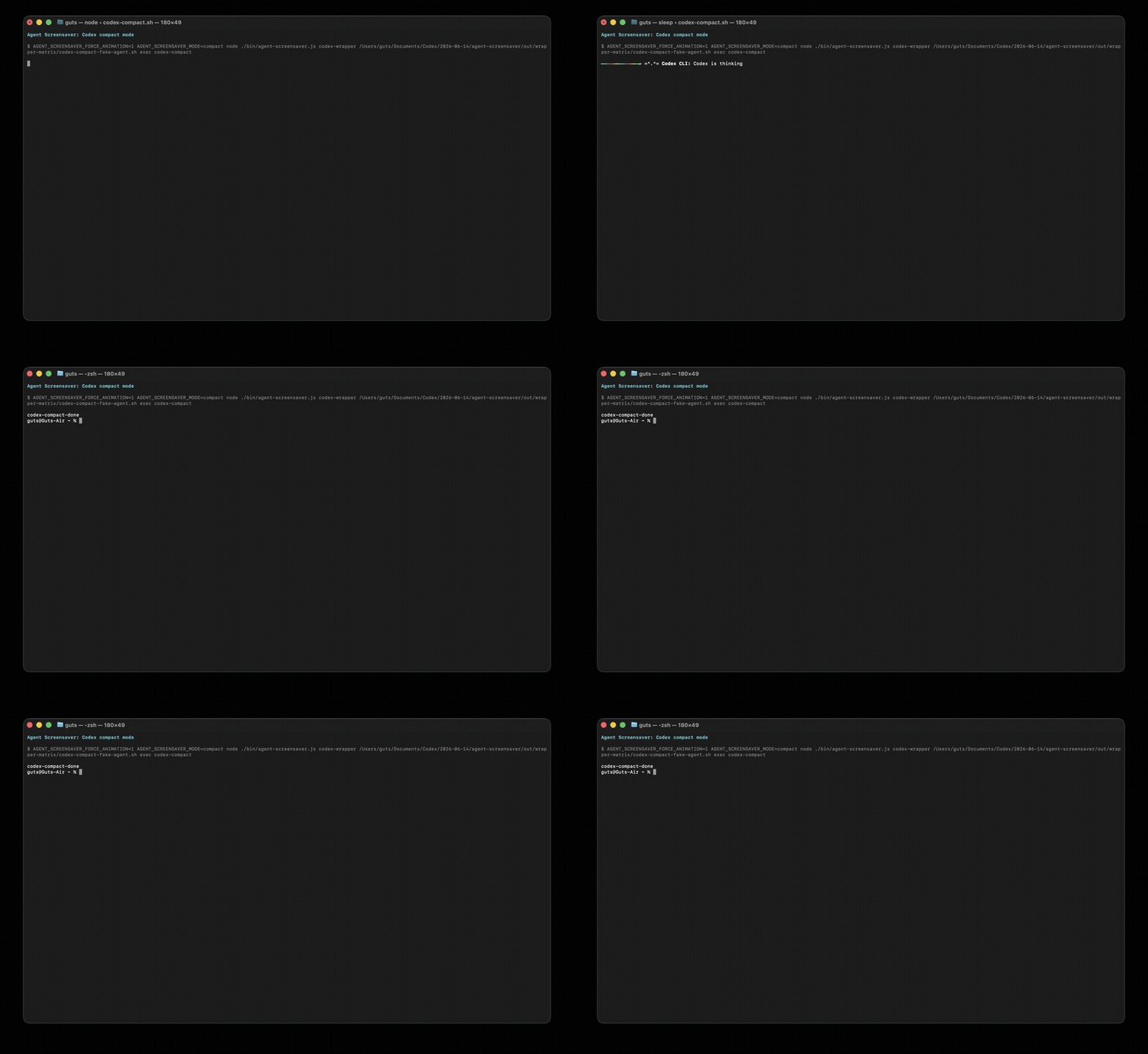
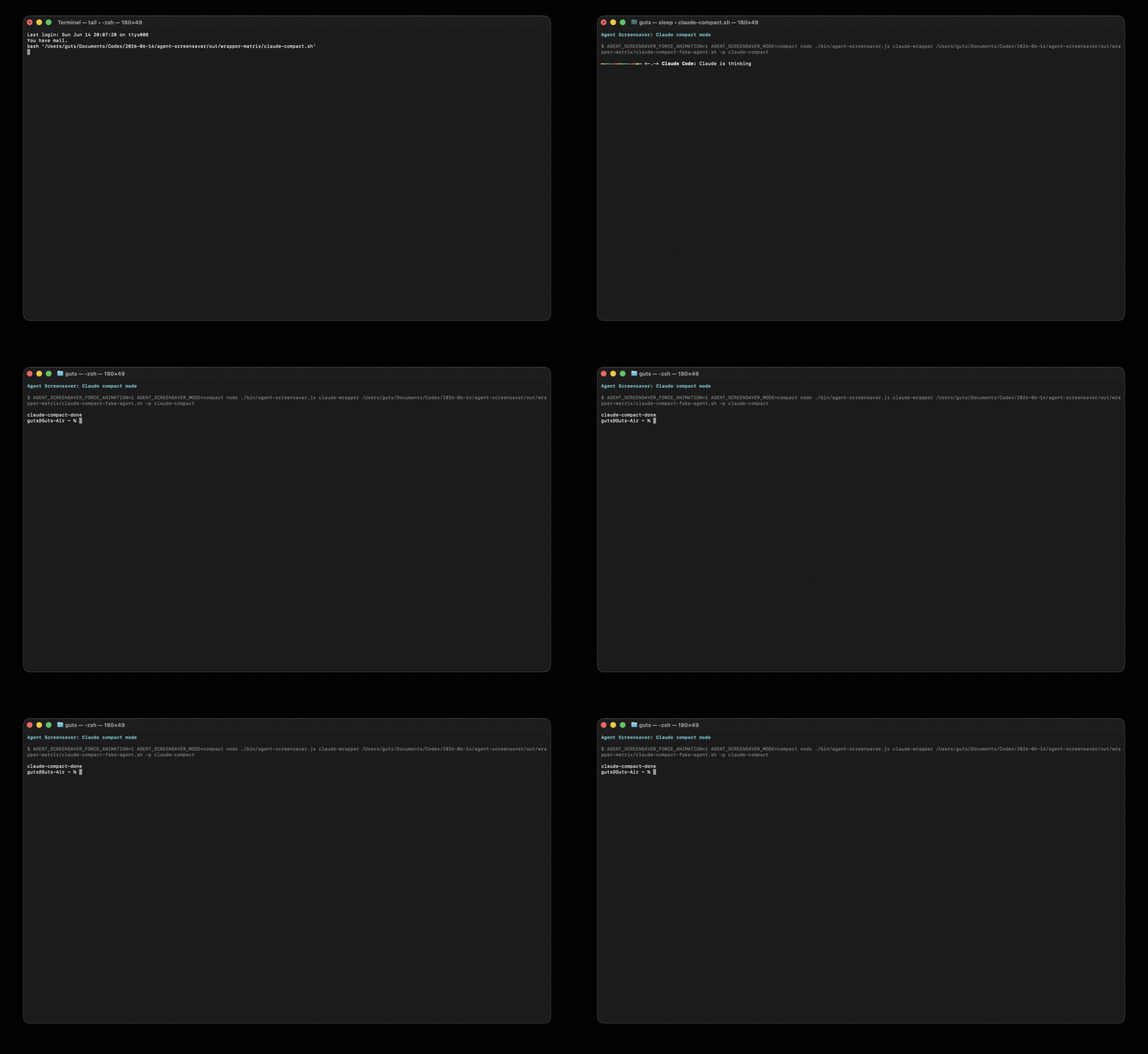
Full proof mode is the big terminal Nyan:
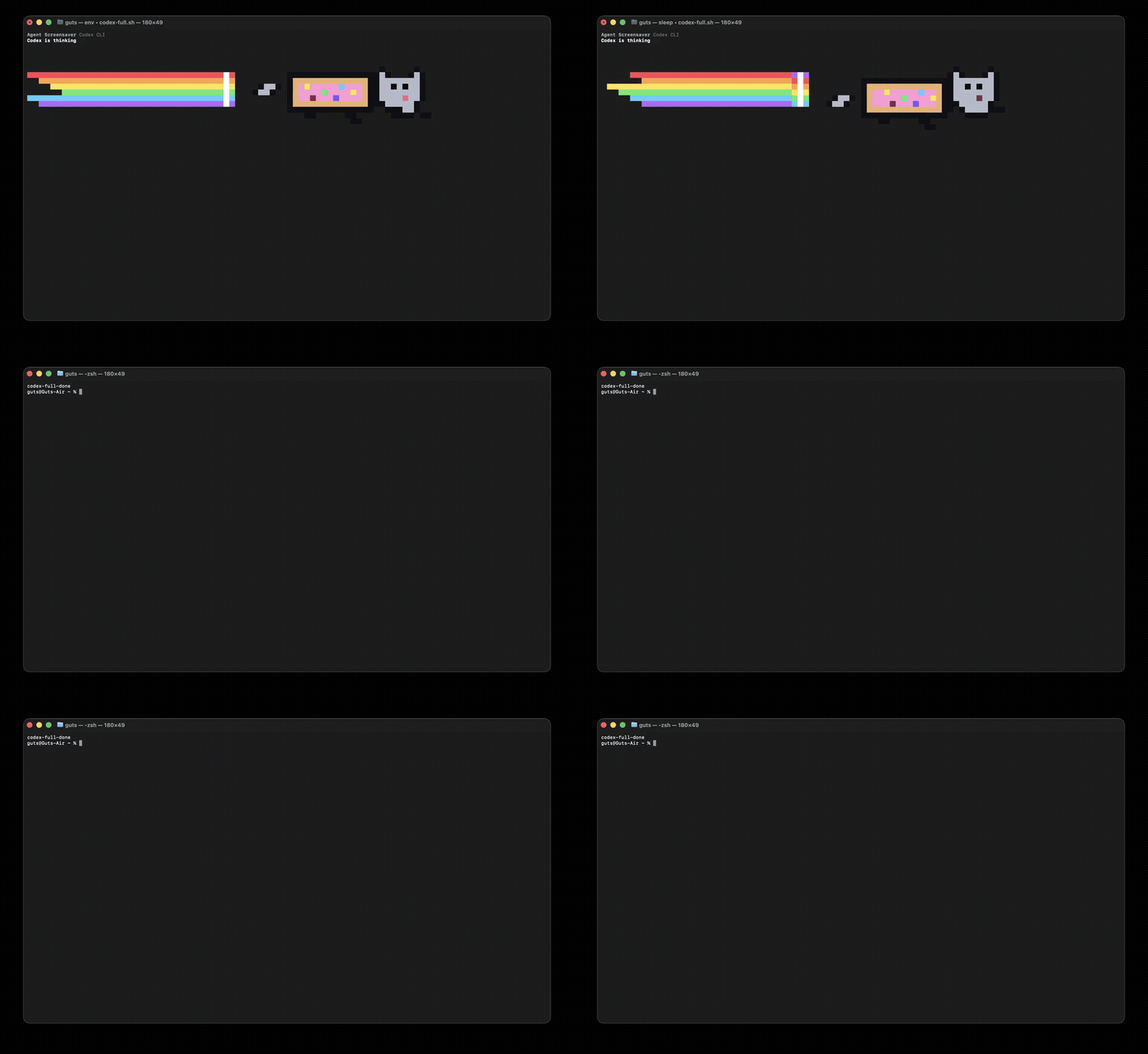
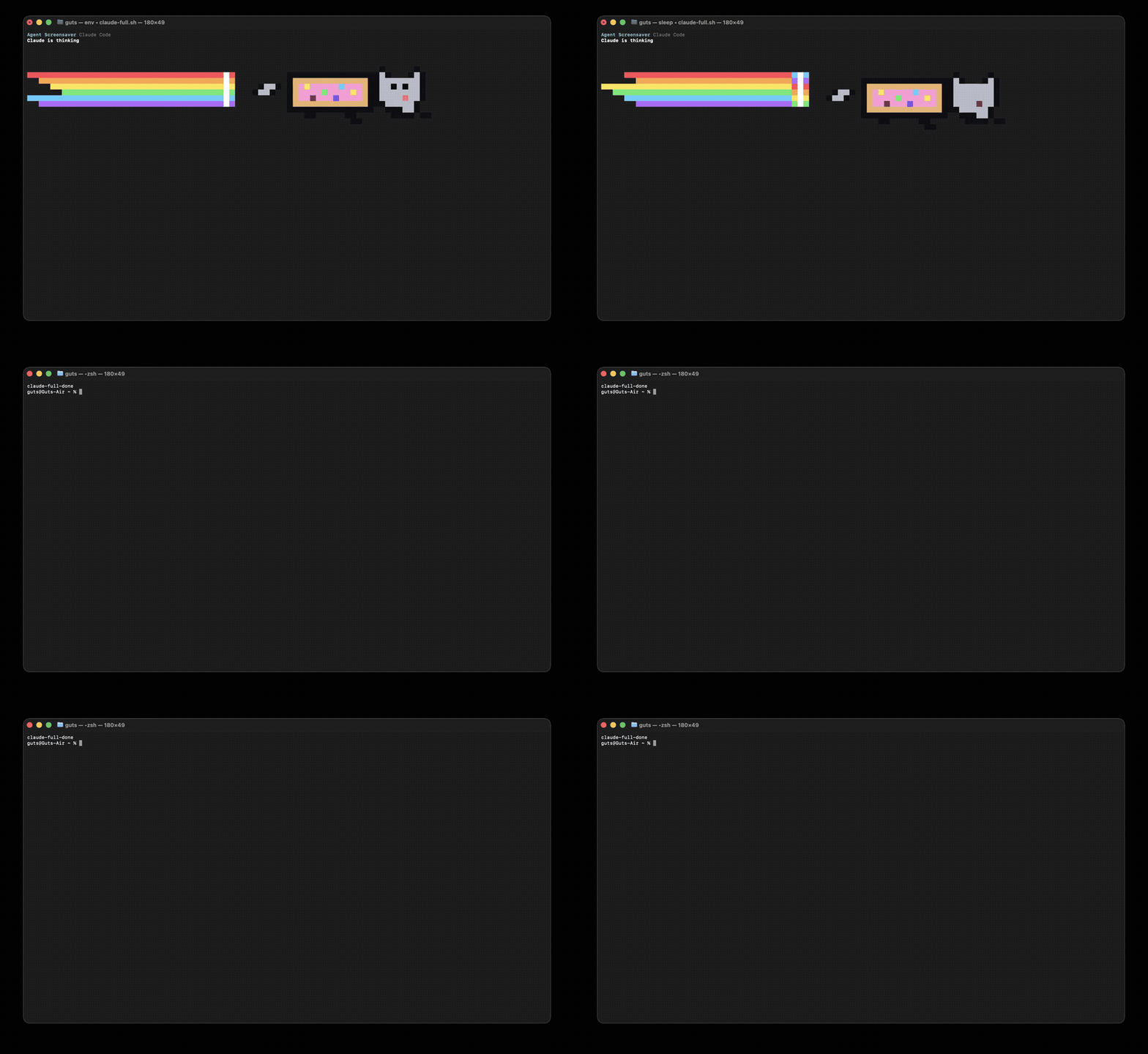
MP4 versions: Codex compact, Codex full, Claude compact, Claude full.
The demo clips use a local sleeping child process, so the repo can show the wrapper behavior without spending model calls.
What ships in v0
- Claude Code lifecycle hook bridge
- Codex lifecycle hook bridge
- Claude Code terminal statusline injection
- Claude Code
spinnerVerbsinjection - Compact one-line ticker mode for daily use
- Full hand-animated ANSI Nyan Cat proof mode for demos
- Codex CLI wrapper for
codex exec - Claude Code CLI wrapper for
claude -p/--print - Quiet Codex CLI wrapper that arms Agent Screensaver
- Default Classic Nyan GIF
- Custom GIFs from browser upload, local file, or URL
- Optional local debug/settings page
- VS Code companion status bar/debug panel
- Zero npm dependencies
Install It
git clone https://github.com/Atomics-hub/agent-screensaver.git
cd agent-screensaver
npm link
agent-screensaver install all
That installs:
~/.claude/settings.jsonstatusline, spinner verbs, and lifecycle hooks- a reversible
~/.local/bin/claudewrapper ~/.codex/hooks.jsonlifecycle hooks- a reversible Codex CLI wrapper
Hooks auto-start the local sidecar on 127.0.0.1:4555. You do not need to open a browser for the product to work.
Codex requires one local trust pass before new hooks run. Open Codex once after install and choose Trust all and continue, or use /hooks inside Codex to review/trust Agent Screensaver.
Restore everything:
agent-screensaver restore all
Change The GIF
Current GIF:
agent-screensaver gif current
List saved GIFs:
agent-screensaver gif list
Use a URL:
agent-screensaver gif set "https://media.giphy.com/media/sIIhZliB2McAo/giphy.gif"
Use or upload a local file:
agent-screensaver gif set ~/Downloads/my-agent.gif
agent-screensaver gif upload ~/Downloads/my-agent.gif
Reset to Classic Nyan:
agent-screensaver gif reset
Custom files are copied to:
~/.agent-screensaver/gifs
No cloud. No account. No analytics.
Change The Terminal Mode
Compact mode is the default and stays on one terminal line:
agent-screensaver mode current
agent-screensaver mode set compact
Full mode is for demos and proof videos:
agent-screensaver mode set full
You can also override per command:
AGENT_SCREENSAVER_MODE=full codex exec "..."
AGENT_SCREENSAVER_MODE=compact claude -p "..."
Classic Nyan gets a tuned terminal pixel loop in full mode and a one-line ticker in compact mode. Uploaded GIFs play exactly in the debug/settings page, use iTerm2 inline image playback when that terminal is available, and otherwise use an animated terminal poster fallback so arbitrary GIFs do not get jammed through the Nyan sprite.
Claude Code Notes
Interactive Claude Code owns its terminal UI, so Agent Screensaver does not take
over the whole screen there. In interactive Claude, the integration is the
statusline, spinner verbs, and lifecycle hooks. The wrapper animation runs for
non-interactive claude -p / claude --print commands.
Debug Page
The page exists for settings, visual checks, and X/Twitter capture. It is not the primary product surface.
agent-screensaver start --open
Default URL:
http://127.0.0.1:4555
Manual test events:
agent-screensaver event thinking --message "Agent launched"
agent-screensaver event working --message "Tool call running"
agent-screensaver event success --message "Done"
Terminal Nyan preview:
agent-screensaver nyan --message "Codex is thinking" --frames 1
VS Code Companion
This is a companion layer: a status bar item and debug panel that mirror the local sidecar. It does not yet patch private Claude/Codex extension webviews directly.
npm run package:vsix
code --install-extension agent-screensaver-0.1.0.vsix
Command palette:
Agent Screensaver: Open Debug Panel
Agent Screensaver: Start Local Sidecar
Agent Screensaver: Test Working
Agent Screensaver: Test Success
Record Proof
Real Codex CLI proof with full terminal Nyan plus hook receipt:
npm run record-cli-proof
Debug page proof driven by real Codex hooks:
npm run record-demo
VS Code companion proof:
npm run record-vscode-proof
Wrapper demo matrix used in this README:
npm run record-wrapper-matrix
Outputs:
out/agent-screensaver-cli-proof.mp4
out/agent-screensaver-demo.mp4
out/agent-screensaver-vscode-proof.mp4
docs/media/codex-compact.mp4
docs/media/codex-full.mp4
docs/media/claude-compact.mp4
docs/media/claude-full.mp4
macOS may ask for Screen Recording permission the first time.
Hook Notes
Claude Code hooks receive JSON on stdin. Agent Screensaver installs one command hook:
agent-screensaver hook claude
Codex hooks receive JSON on stdin. Agent Screensaver installs one command hook:
agent-screensaver hook codex
Both adapters log proof events locally:
~/.agent-screensaver/hook-runs.jsonl
Research Notes
Patterns checked before building:
- Claude Code hooks and status lines
- Codex hooks
- Agent Arcade-style transparent overlays
- Claude statusline tools
- Tamagotchi-style Claude Code toys
- Kickbacks-style install surface: terminal/statusline/webview integration first, website second
Useful docs:
- https://code.claude.com/docs/en/hooks
- https://code.claude.com/docs/en/statusline
- https://developers.openai.com/codex/hooks
- https://developers.openai.com/codex/config-advanced
Tags
#ClaudeCode #Codex #AIAgents #Terminal #OpenSource