
Chorus — Gerenciador de Terminais Claude Code em Paralelo
AshokNaik009/Chorus
Execute 6 agentes Claude em paralelo com grid, workspaces e persistência
Ver no GitHubCentro de comando para executar múltiplos agentes Claude Code em paralelo dentro de uma única janela. Oferece grid redimensionável de panes de terminal, workspaces nomeados, persistência de sessões, suporte a enxames de agentes com isolamento git e status ao vivo de cada sessão.
Instalação
npx convez-ai AshokNaik009/Chorus1 comando no terminal: detecta o formato do repositório (marketplace ou plugin avulso) e instala via Claude Code. Requer Node 18+ e o Claude Code instalado.
Métricas
Casos de uso
- Coordenar múltiplos agentes Claude Code em tarefas paralelas
- Gerenciar fluxos de trabalho complexos com isolamento de branches git
- Revisar e mesclar trabalho de enxames de agentes automaticamente
- Monitorar saúde de contexto em tempo real durante execução de sessões
Veredito

Solução robusta e de código aberto para orquestração de agentes Claude Code. Bem arquitetada com persistência, suporte a swarms com isolamento git e interface desktop/web unificada — ideal para workflows que exigem paralelismo e rastreabilidade.
README
A tradução para o português deste README ainda está na fila.
Chorus — Parallel Claude Code Terminal Manager
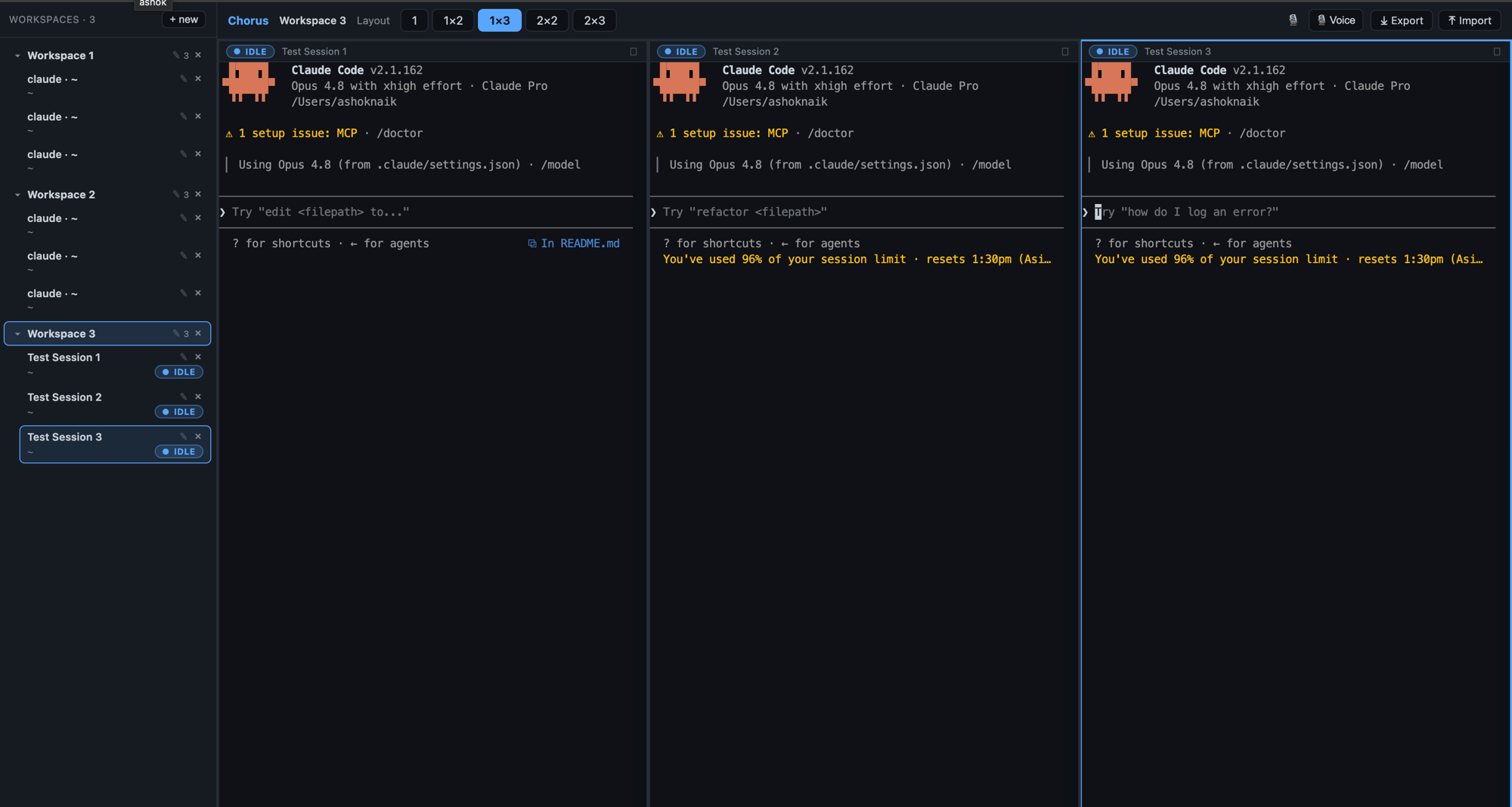
Run multiple Claude Code sessions in parallel inside a single window: a resizable grid of terminal panes grouped into workspaces, a two-tier sidebar with live status badges, adjustable layouts, and pane maximize. Workspaces, layouts and sessions are persisted and restored on relaunch. A focused, open-source take on the BridgeSpace / cmux idea, scoped to Claude Code.
Built bottom-up against a stable
PtyBackendseam so the whole UI runs in a browser dev harness and the Electron desktop app from the same@app/ui— only the host transport differs (websockets vs. Electron IPC).
Features
- Layout templates — 1, 1×2, 1×3, 2×2, 2×3 panes (the layout tree supports arbitrary nesting), with draggable dividers that reflow the PTYs.
- Multi-workspace — a workspace is a named group of sessions with its own layout and a default working directory new panes inherit. The two-tier sidebar shows workspaces as collapsible groups with their sessions nested underneath.
- Naming — name a session when you launch it, and rename any workspace or session anytime (✎ button, or double-click).
- Live status — per-session badges (idle / waiting / running …) driven by Claude Code hooks → OSC, with a stream heuristic fallback. A workspace with a waiting session shows an attention dot.
- Maximize — zoom one pane to fill the area; other panes stay mounted and their PTYs keep running.
- Persistence — workspaces, layouts, sessions and cwds survive a reload (web: localStorage) or relaunch (desktop: a JSON file in userData). Saved sessions are re-spawned automatically.
- Manual vs Swarm modes — a workspace is either a hand-driven grid of terminals (pick 1–6 panes from a dropdown) or a swarm board; switching modes confirms first if live sessions would be lost.
- Agent swarms — fan one task out to up to 6 role-named agents (one pane each — the grid's limit), each launched as a real Claude Code TUI with its task as the first prompt and a role system-prompt. Broadcast a message to all (or selected) agents, or stop every agent with one click.
- Git worktree isolation — each swarm agent whose directory is a git repo gets its own branch + worktree so agents never trample each other's files (see Agent swarms & git worktrees).
- Review & merge — when the agents finish, review each branch's diff (files ±, commits, dirty state) and Merge / Squash / Discard it into the repo's current branch, right from the app.
- Context health — every pane shows a live
NN%context-window occupancy badge (green < 50%, amber < 70%, red ≥ 70%; tune viaCHORUS_HANDOFF_PCT/CHORUS_HANDOFF_WATCH_PCT). Past the red line, a Hand off button copies a handoff-brief scaffold for starting a fresh session. - Voice dictation — on-device WASM Whisper into the focused pane (no cloud STT).
- Export / import — portable
.chorusbundles: workspace layout everywhere, plus full conversation transcripts on desktop. Every Claude pane's session id is pinned at launch (--session-id) and saved, so an import resumes exactly that conversation (--resume <id>); importing a session that is still live in the current list forks it (--fork-session) instead of clobbering the running one.
Architecture
TypeScript monorepo (npm workspaces + Turborepo). The UI depends only on
@app/core interfaces; each host injects a concrete PtyBackend +
Persistence.
packages/
  core/          @app/core — framework-agnostic models, the PtyBackend +
                 Persistence seams, status reducer, layout tree, workspace
                 ops, OSC scanner (zero UI/host deps)
  ui/            @app/ui   — React + xterm.js (TerminalPane, LayoutView,
                 two-tier Sidebar, PaneLauncher, StatusBadge, App)
  app-web/       dev harness — Vite page + ws server + node-pty;
                 WebPtyBackend + WebPersistence (localStorage)
  app-electron/  Electron host — main: node-pty over IPC; preload:
                 contextBridge; renderer: ElectronPtyBackend +
                 ElectronPersistence + the same @app/ui App
The single seam between UI and host is PtyBackend (terminal I/O) and
Persistence (workspace state). See packages/core/src/.
Agent swarms & git worktrees
Fan-out (Swarm mode → Fan out) turns one task into up to 6 parallel
Claude Code agents. Per agent, Chorus:
- Checks the agent's directory — each worker can point at its own dir, so one swarm can span several repos.
- Creates an isolated worktree when that dir is a git repo:
- branch
chorus/<swarm>-<runid>/<role>off the repo's currentHEAD(the<runid>keeps re-runs of a same-named swarm from colliding with the previous run's branches); - worktree at
<repo>/.chorus/<swarm>-<runid>/<role>— under the repo so the work is visible where you asked for it;.chorus/is added to the repo's local ignore (.git/info/exclude), never to a tracked.gitignore. - If worktree creation fails (or the dir isn't a repo, or the host is the web harness), the agent falls back to running directly in the directory and its system prompt says so honestly — isolated agents are told to commit when done, shared-dir agents are told to stay in their lane.
- branch
- Launches the agent in that worktree via CLI args (task as the positional
first prompt, role framing via
--append-system-prompt, optional--dangerously-skip-permissionswhen auto-start is on). No TUI typing, no MCP server. Each agent self-verifies its own slice — there is no separate verifier agent.
When agents finish, the Review view summarizes each branch vs. the repo's current branch (files ±, commits, uncommitted edits) and offers Merge (auto-commits dirty worktree edits first), Squash, or Discard (removes the worktree and deletes the branch). On a merge conflict the merge is aborted and the base branch left intact. Worktrees are cleaned up on swarm end, workspace close, or the next fan-out, so they don't accumulate.
Requirements
- Node >= 20 (developed on Node 22)
- A C toolchain for
node-pty(Xcode CLT on macOS, build-essential on Linux, VS Build Tools on Windows) claudeon yourPATHto launch real Claude Code sessions
Build, run & verify
1. Install + build the packages
npm install          # installs all workspaces; builds node-pty natively
                     # (postinstall fixes the node-pty spawn-helper exec bit)
npm run build        # turbo build across all packages
npm run typecheck    # type-check everything
npm run test         # unit tests (status reducer, layout + workspace ops, …)
2. Browser harness
The dev harness runs the exact same @app/ui + @app/core the desktop app uses
— only the host transport differs (websockets here, Electron IPC there).
npm run dev:web # starts the ws/pty server AND Vite together
Open the printed URL (default http://localhost:5173).
Verify:
- Pick a layout — 1 / 1×2 / 1×3 / 2×2 / 2×3 → that many panes appear.
- In an empty pane, optionally set a session name, set a working directory,
and click Run Claude (or Shell). The terminal becomes interactive and
the
claudeTUI renders. - Drag the dividers between panes — terminals resize and the PTY reflows.
- Each pane is an independent session; input/output never cross panes.
- Watch the status badge on each pane/sidebar row change as a turn runs.
- Use the pane header's maximize button to zoom one pane and restore it.
- In the sidebar: create workspaces (+ new), collapse groups, rename a workspace or session (✎ / double-click), click a session to focus its pane, × to close (kills the PTY and collapses the layout).
- Reload the page → your workspaces, layouts and sessions come back (saved sessions are re-spawned).
- Close the browser tab → all child PTYs are killed (no orphan processes).
3. Desktop app — Electron
packages/app-electron is a real Electron host built with electron-vite. Because
node-pty is a native module, rebuild it for Electron's ABI once before running:
npm run rebuild -w app-electron   # @electron/rebuild for node-pty (one-time)
npm run dev     -w app-electron   # hot-reload Electron window
npm run dist    -w app-electron   # electron-builder: dmg / nsis / AppImage
npm run dist:dir -w app-electron  # unpacked build (no installer) for quick checks
Installers land in packages/app-electron/release/. Persistence is a JSON file
in the app's userData directory.
Milestones
| Milestone | Epics | Outcome | Status |
|---|---|---|---|
| M0 | 0, 1 | Browser page: one live terminal, then claude running in it | ✅ |
| M1 | 2 | UI drives sessions purely through core + PtyBackend | ✅ |
| M2 | 3, 4 | 1 / 1×2 / 2×2 layouts, resizable panes, session sidebar | ✅ |
| M3 | 5 | Live status badges via Claude Code hooks → OSC | ✅ |
| M4 | 6 | Multi-workspace model, 1×3 / 2×3 layouts, maximize, persistence + restore | ✅ |
| M5 | 7 | Installable Electron app (main: node-pty over IPC; renderer: @app/ui) | ✅ |
| M11 | 11 | Workspace export/import — portable .chorus bundle (both hosts) | ✅ |
| M9 | 9 | Voice dictation into the focused pane (on-device WASM Whisper) | ✅ |
| M10 | 10 | Agent swarm — broadcast, fan-out, shared blackboard, swarm view | ✅ |
| M12 | 11 | Conversation/memory export/import + resume (Electron, Layer 2) | ✅ |
| — | 10 | Swarm v2 — CLI-arg agent launch, git worktree isolation per agent, per-agent self-verification | ✅ |
| — | 10 | Review & merge — per-agent branch diff, Merge / Squash / Discard into the current branch | ✅ |
| — | — | Explicit Manual vs Swarm workspace modes; swarm fan-out capped at 6 agents | ✅ |
| — | — | Context-health badge (% of model window) + handoff-brief export | ✅ |
| — | 11 | Exact session resume — ids pinned at launch (--session-id), --resume on import, --fork-session when the conversation is still live | ✅ |
Beyond the PRD v1: the multi-workspace model, the two-tier sidebar, the 1×3 / 2×3 layouts, pane maximize, and session naming are agreed extensions. Chorus v2 adds voice dictation (Epic 9), agent swarms (Epic 10), and portable session memory (Epic 11) — all on-device / local, no cloud STT.
Notes
- Uses npm workspaces (not pnpm).
- One dark theme only in v1.
@app/uidepends only on@app/coreinterfaces — never a host package ornode-ptydirectly. Hosts inject aPtyBackend+Persistence.- Auto-update (
electron-updater) is not wired yet — a future addition.