
Applire
Applire/Applire
Open-source AI-powered CV tailoring platform for the DACH job market
Instalação
npx convez-ai Applire/Applire1 comando no terminal: detecta o formato do repositório (marketplace ou plugin avulso) e instala via Claude Code. Requer Node 18+ e o Claude Code instalado.
Métricas
README
A tradução para o português deste README ainda está na fila.
Applire
Open-Source Career Intelligence Platform for the DACH Market
Transform hours of CV tailoring into seconds. Upload your CVs, paste a job description, and let AI guide you through an intelligent interview to create perfectly matched application documents.


🚀 Quick Start • 📖 Documentation • 💬 Community • 🐛 Report Bug
📸 See it in action
From a CV and a job ad to a complete application package — in minutes.
1. Upload your CV & paste the job ad
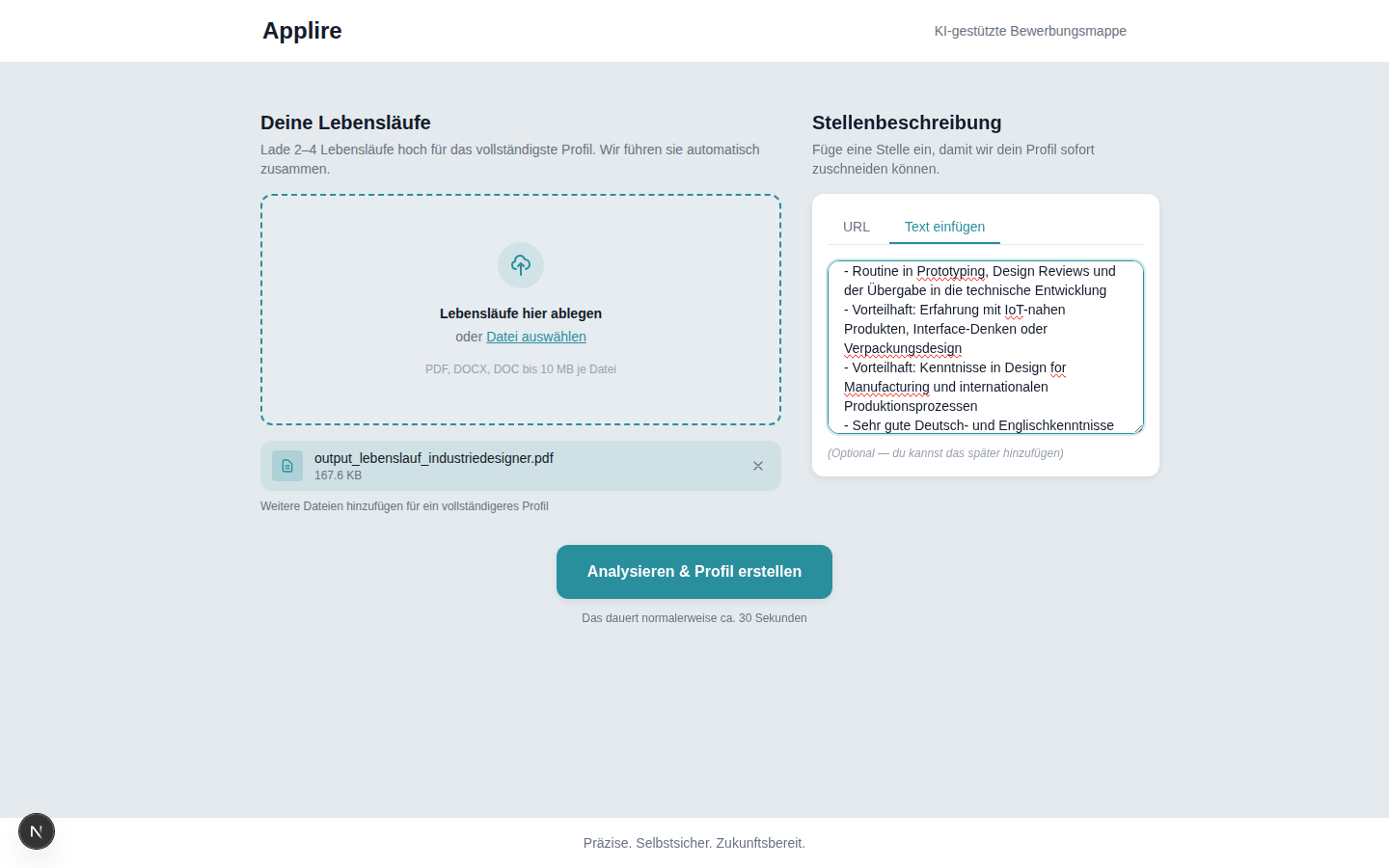
Drop in one or more CVs and add the job posting as text or URL.
2. Match score & gap analysis at a glance
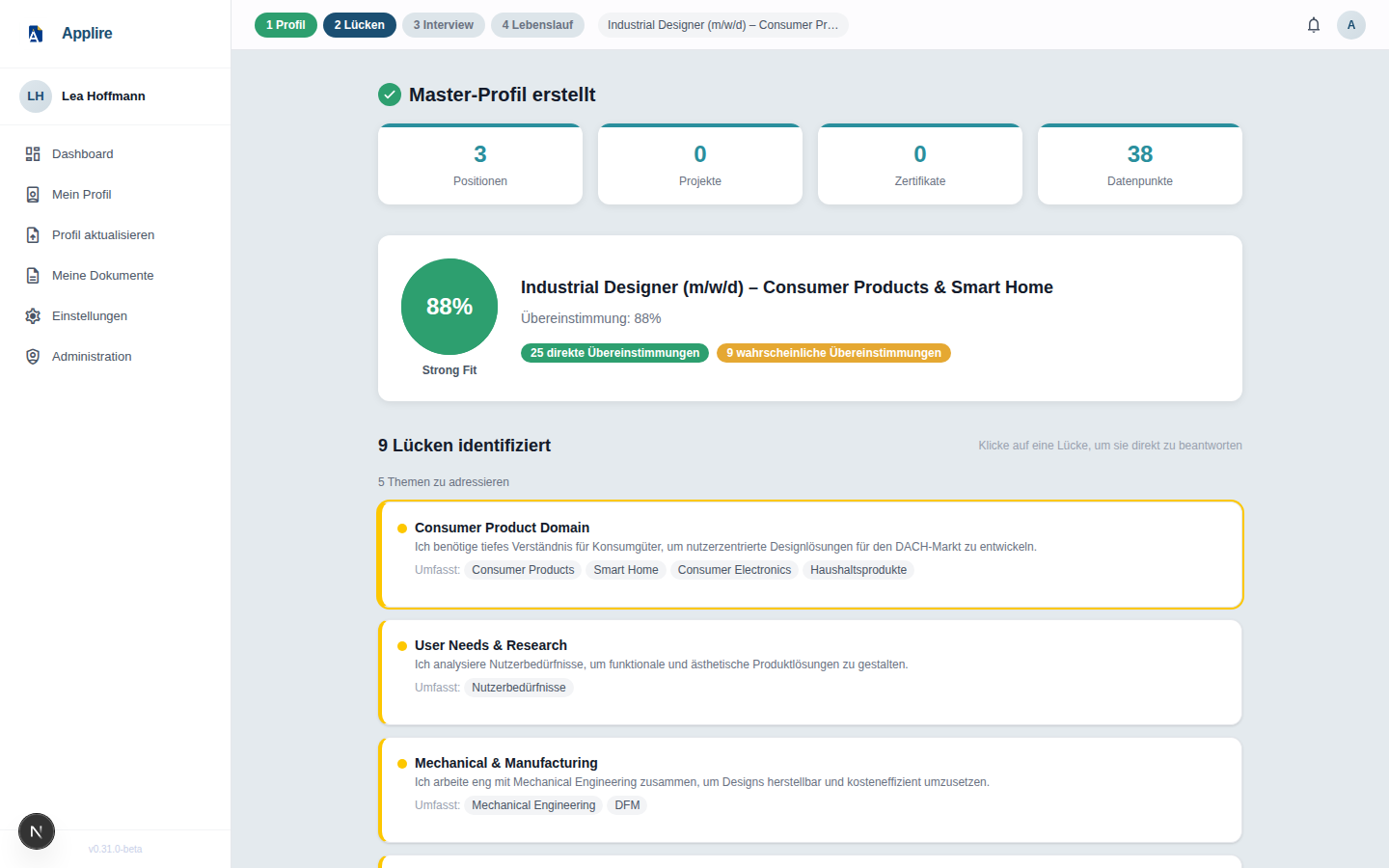
Applire builds your Master Profile and instantly shows your fit for the role (88% "Strong Fit" here) plus thematically grouped gaps.
3. Targeted AI interview
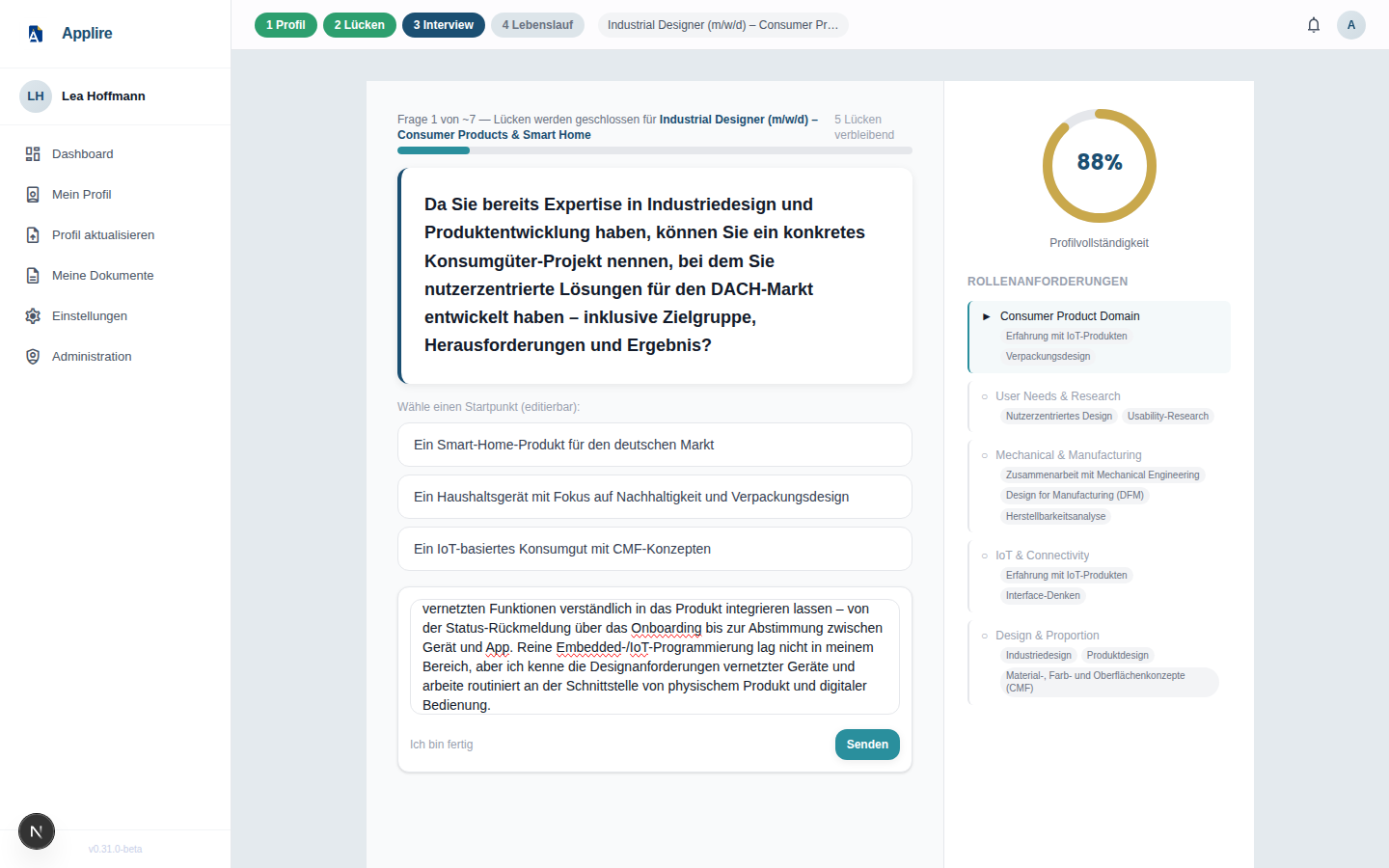
A short, job-specific interview closes those gaps and sharpens your story — with editable answer suggestions, progress tracking and a live profile-completeness ring.
4. A tailored CV & matching cover letter
The result is a DACH-ready Lebenslauf tailored to the target role — in seven templates (Classic German, Modern Swiss, Executive, Academic, and more) and colour variants — plus, on request, a matching cover letter (Anschreiben) in the same design, with recipient and subject auto-extracted from the job ad.
Screenshots use synthetic demo data (example profile "Lea Hoffmann") and show the German UI; Applire ships in both German and English (English by default, switchable in Settings).
💡 What is Applire?
Applire is an open-source AI platform that combines deep career intelligence with DACH-specific cultural expertise to automate high-quality CV tailoring.
Built for all job seekers in the DACH market — from career changers consolidating years of CV versions to international professionals adapting to German application conventions.
Unlike generic CV builders, Applire:
- 🧠 Learns from you: Builds a persistent Master Profile that gets smarter with every CV you upload
- 💬 Interviews you intelligently: Asks targeted questions to fill gaps between your experience and job requirements
- ✨ Tailors with precision: Generates culturally appropriate CVs optimized for DACH recruiters and ATS systems
- 🤖 Agent-first design: Accessible to AI assistants via the Model Context Protocol (MCP)
- 🔒 Privacy by design: GDPR-compliant, self-hosted, full data sovereignty
In 3 simple steps:
- 📄 Upload 2-4 versions of your CV
- 🔗 Paste the job description
- 💬 Answer a few intelligent questions → ✨ Get a perfectly tailored CV
👥 Who is Applire for?
Applire is built around two everyday problems job seekers actually have — plus a third, agent-first way to solve them.
📚 "I have five versions of my CV and I'm afraid of copy-paste mistakes"
Most professionals keep several CVs — some in English, some in their native language — and every new application means copy-pasting fragments between them, rebuilding the layout, and hoping nothing important slipped through. Applire stores every fact about your career in one place, retrieves exactly the parts that fit a specific job, and interviews you to close the remaining gaps as well as possible — so each CV is complete, consistent, and tailored without the manual shuffle.
🌍 "I want to apply in the DACH region, but my CV is from somewhere else"
You have your existing CV — say, an Indian one — but how do you turn it into something a German, Austrian, or Swiss recruiter expects? Applire converts your profile into a CV fine-tuned for DACH conventions (Lebenslauf structure, expected sections, cultural signals), so you compete on equal footing.
🤖 "Let my AI agent handle it"
Applire is agent-first. Connect your AI agent — Claude, ChatGPT, or any MCP-capable assistant — and have it run the whole loop for you interactively over the Model Context Protocol: import your CVs, analyse the job ad, fill gaps, and generate the finished CV. No UI required.
✨ Key Features
🧠 Intelligent Master Profile
- Multi-CV Consolidation: Upload multiple CVs and automatically merge them into a rich, conflict-aware Master Profile
- Additive Enrichment: Every CV upload, interview session, and edit enriches your profile — it never overwrites, only accumulates
- Source Tracking: Full audit trail of where every piece of information came from
- Conflict Resolution: Smart detection of factual contradictions (dates, degrees) with user-controlled resolution
🎯 Job-First Analysis & Gap Detection
- Deep JD Analysis: Extracts requirements, skills, cultural signals, and industry context from job descriptions
- Transparent Gap Scoring: 0-100% match score with detailed explanations of what's missing
- Categorized Gaps:
- Category A (Hard blockers): Must-have requirements you don't meet
- Category B (Confirmation needed): You likely have this, but it's not stated clearly
- Category C (Exploratory): Soft requirements worth discussing
💬 Conversational Interview Orchestrator
- Two Modes:
- Targeted Mode (for experienced users): Focuses on filling specific gaps identified in your profile
- Guided Mode (for new users): Systematically builds your profile section by section
- Stateful Backend: Pause and resume anytime — your progress is saved server-side
- Smart Completion: Automatically detects when you're done or when all gaps are resolved
- Profile Updates: Every answer enriches your Master Profile in real-time
📄 CV Generation & Fine-Tuning
- ATS-Optimized PDFs: Generated via Playwright/Chromium with CSS-based themes
- Live Browser Preview: See exactly what your CV will look like before downloading
- Section-Level Editing: Fine-tune individual sections (introduction, positions, skills) with live re-rendering
- Dual Save Path: Save edits to your Master Profile (permanent) or just to this CV (one-time)
- AI-Assisted Editing: Optional "Let Kaile help" for targeted gap completion within the editor
- Cover Letter Generation: AI-powered cover letter creation based on JD and Master Profile
- Cultural Adaptation: Automatic detection and formatting for German, Austrian, and Swiss CV conventions
🗺️ DACH Cultural Intelligence
- Market-Specific Formatting: Lebenslauf vs. international CV formats
- Cultural Signal Detection: Identifies when a CV needs adaptation (e.g., Indian-format CV → German Lebenslauf conventions)
- Multilingual Support: German and English UI (English by default, switchable in Settings). Interview questions follow your UI language, while the generated CV and cover letter follow the language the job ad is written in — detected from the ad itself, so an English source CV becomes a German Lebenslauf for a German posting. French and Spanish planned.
🔒 Privacy & GDPR Compliance
- Privacy by Design (GDPR Art. 25): Minimal data collection, encryption at rest
- Automated Retention: Daily cron job enforces TTLs:
- Uploaded files: 7 days
- Interview sessions: 30 days
- Generated CVs: 90 days (human) / 24 hours (agent)
- Right to Erasure (GDPR Art. 17): One-click full data deletion
- Self-Hosted: Your data never leaves your infrastructure
🤖 Built for the AI Agent Era
Applire is the first career platform optimized for AI agents as customers:
Model Context Protocol (MCP)
- Seamless Integration: First-class support for Claude Desktop, ChatGPT, Cursor, and custom AI agents
- Agent-supplied documents: Agents can ingest CVs (base64-encoded PDF, with a plain-text fallback) and job descriptions (raw text or a URL scraped server-side) directly over stdio — no UI required
- Stateful Sessions: Agents can pause, resume, and recover from interruptions via a stable
flow_id - Flow Orchestrator: Guides agents through the correct sequence (JD analysis → CV import → gap analysis → interview → generation)
- Privacy-preserving: The Master Profile is a black box — tools return extraction summaries, never raw profile data
- Async Generation: Non-blocking CV generation with polling-based status checks
REST API
- Full HTTP API: Programmatic access for remote integrations
- OpenAPI Documentation: Interactive Swagger UI at
/docs
Agent Workflow Example
# Start MCP server (stdio transport)
python -m applire.mcp

# A typical agent session:
1. start_flow()                              → flow_id  (stable recovery handle)
2. import_cv(file_base64="<base64 PDF>")     → profile summary
3. analyze_jd(url="https://.../job-posting") → job_id
4. analyze_gaps(job_id)                      → gap_report
5. run_interview(job_id)                     → session_id + first question
6. send_message(session_id, "I have 5 yrs…") → next question / {complete: true}
7. generate_cv(job_id)                       → cv_id  (async)
8. get_cv_status(cv_id)                      → {status: "ready", pdf_url: "…"}
9. create_application(job_id)                → application logged to pipeline
🏗️ Architecture & Tech Stack
Backend
- Python 3.12+: Modern async Python with type hints
- FastAPI: High-performance async web framework
- PostgreSQL 16: JSONB for flexible Master Profile schema
- Pydantic: Type-safe data validation and serialization
- SQLAlchemy 2.0: Async ORM with full type support
- Alembic: Database migrations
Frontend
- Next.js 15: React framework with App Router
- TypeScript: Type-safe JavaScript
- ShadCN/UI: Accessible component library
- Tailwind CSS v4: Utility-first styling
AI/ML
- Bring your own key: You choose the LLM provider and supply the API key — your data goes only where you point it
- LLM Provider Abstraction: Pluggable backends — OpenRouter (multi-model gateway), Mistral, OpenAI (or any OpenAI-compatible endpoint), and Ollama (fully offline, self-hosted)
- Custom State Machine: Async interview orchestrator (no LangGraph dependency)
- Playwright: Headless Chromium for PDF generation
Infrastructure
- Docker & Docker Compose: Containerized deployment
- PostgreSQL 16: Primary database with JSONB support
- Retention Worker: Daily cron for GDPR TTL enforcement
- GitHub Actions: CI/CD pipeline with pytest and Playwright E2E tests
Agent Integration
- Model Context Protocol (MCP): stdio transport for local AI agents
- REST API: Full HTTP API for remote integrations
- Flow Orchestrator: State machine for multi-step agent workflows
- Session Recovery: Agents can resume interrupted sessions via
flow_id
🚀 Installation
Prerequisites
- Docker & Docker Compose
- An LLM provider of your choice (bring your own key): OpenRouter, Mistral, OpenAI (or any OpenAI-compatible endpoint), or Ollama (local/free, no key needed)
Self-hosting (no clone required)
# 1. Download the required files (compose, env template, and nginx config)
curl -O https://raw.githubusercontent.com/Applire/Applire/main/docker-compose.yml
curl -O https://raw.githubusercontent.com/Applire/Applire/main/.env.example
mkdir -p nginx && curl -o nginx/self-hosted.conf https://raw.githubusercontent.com/Applire/Applire/main/nginx/self-hosted.conf

# 2. Configure your environment
cp .env.example .env
# Edit .env: set LLM_PROVIDER and the matching API key (see Configuration below)

# 3. Start all services
docker compose up -d

# 4. Run database migrations (first run only)
docker compose exec backend alembic upgrade head
Access the application at http://localhost — the bundled nginx reverse proxy serves the frontend and routes /api/* to the backend. Port 80 is the only one you need to publish; the backend and frontend containers stay internal. For the full entry-point and port topology, see docs/ARCHITECTURE.md.
To update to the latest release:
docker compose pull && docker compose up -d
Contributing? See CONTRIBUTING.md for the build-from-source developer setup.
⚙️ Configuration
Environment Variables
Applire is bring-your-own-key: pick any supported provider and supply its key — your data goes only to the provider you choose. Copy .env.example to .env and configure:
# Database
DATABASE_URL=postgresql+asyncpg://applire:applire@postgres:5432/applire

# LLM Provider — choose one: mistral | openrouter | openai | ollama
LLM_PROVIDER=mistral

# Mistral AI — EU-hosted, strong German proficiency
MISTRAL_API_KEY=your-mistral-api-key-here
MISTRAL_MODEL=mistral-medium-latest

# OpenRouter — multi-model gateway: one key for Mistral, Claude, and more
# Get a key at https://openrouter.ai/keys
OPENROUTER_API_KEY=your-openrouter-api-key-here
OPENROUTER_MODEL=mistralai/mistral-medium-3

# OpenAI or any OpenAI-compatible server (e.g. LM Studio)
OPENAI_API_KEY=your-openai-api-key-here
#OPENAI_MODEL=gpt-4o
#OPENAI_BASE_URL=http://host.docker.internal:1234/v1

# Ollama — fully offline (docker compose --profile ollama up)
OLLAMA_BASE_URL=http://ollama:11434
OLLAMA_MODEL=llama3.2

# LLM timeout in seconds (raise for reasoning models)
LLM_TIMEOUT=180

# Auth (none for Community Edition single-user mode)
AUTH_PROVIDER=none

# CORS — comma-separated list of allowed origins
# Default "*" (allow all) is fine for single-user self-hosting with AUTH_PROVIDER=none
#CORS_ORIGINS=*

# nginx proxy timeout — must be greater than LLM_TIMEOUT
#NGINX_PROXY_TIMEOUT=300

# Frontend API URL
# docker compose: leave empty — nginx at :80 routes /api/* to the backend
# standalone dev: set to http://localhost:8001
#NEXT_PUBLIC_API_URL=http://localhost:8001
LLM Provider Options
Applire is bring-your-own-key — no provider is privileged. Pick whichever fits your needs and supply the matching key via a pluggable abstraction layer:
| Provider | Configuration | Use Case |
|---|---|---|
| OpenRouter | LLM_PROVIDER=openrouterOPENROUTER_API_KEY=... | Multi-model gateway; access Mistral, Claude, and others with one key |
| Mistral AI | LLM_PROVIDER=mistralMISTRAL_API_KEY=... | EU-hosted, strong German proficiency |
| OpenAI | LLM_PROVIDER=openaiOPENAI_API_KEY=... | High quality, widely available; also supports LM Studio via OPENAI_BASE_URL |
| Ollama (local) | LLM_PROVIDER=ollamaOLLAMA_BASE_URL=http://localhost:11434 | Fully offline, no API costs, no key required |
📖 API Documentation
REST API
In the Docker stack the REST API is reached through nginx at http://localhost/api/*; the interactive Swagger UI is available when running the backend standalone in development. See docs/ARCHITECTURE.md for the entry-point and port topology.
Core Endpoints
# Job Description Analysis
POST /api/job/analyze
{
  "text": "Senior Software Engineer role...",
  "url": "https://example.com/job"  # Optional
}

# CV Upload & Profile Enrichment
POST /api/profile/upload
Content-Type: multipart/form-data
files: [cv1.pdf, cv2.pdf]

# Gap Analysis (session-scoped)
POST /api/session/{session_id}/analyze-gaps

# Start Interview Session
POST /api/session
{ "job_id": "uuid", "mode": "targeted" }

# Send Interview Message
POST /api/session/{session_id}/message
{ "message": "I have 5 years of experience with Python..." }

# Generate CV
POST /api/cv/generate
{ "job_id": "uuid", "theme": "classic_german" }

# Check CV Generation Status
GET /api/cv/{cv_id}/status
# Returns: { "status": "pending" | "ready" | "failed" }

# Download CV
GET /api/cv/{cv_id}/pdf
Model Context Protocol (MCP)
# Start MCP server (stdio transport)
python -m applire.mcp
MCP Tools
Ingestion & profile
| Tool | Description |
|---|---|
import_cv(file_base64?, filename?, text?) | Seed or extend the Master Profile from a CV. Primary: base64-encoded PDF (≤10 MB); fallback: pre-extracted text. Returns an extraction summary (never the raw profile) |
analyze_jd(text?, url?) | Analyze a job description. Provide exactly one of text (JD body) or url (scraped server-side) |
get_profile() | Return the current Master Profile |
update_profile(section, data) | Patch one section (work_history, skills, education, languages, contact) |
add_role(title, company, start_date, location?, industry?, close_role_ids?) | Add a new ongoing role (post-hire update); close_role_ids closes prior open roles |
Flow & tailoring
| Tool | Description |
|---|---|
start_flow(job_id?) | Create or resume a flow session (idempotent per user+job); returns flow_id + state |
advance_flow(flow_id, step, artifact_id?) | Advance to the next step; artifact-producing steps require artifact_id |
get_flow_state(flow_id) | Get current flow state and available actions |
analyze_gaps(job_id) | Detect gaps between profile and JD |
run_interview(job_id) | Start a gap-fill interview; returns session_id + first question |
send_message(session_id, message) | Send a message in an active interview; returns next question or {complete: true} |
generate_cv(job_id) | Initiate async CV generation; returns cv_id, html_url, pdf_url |
get_cv_status(cv_id) | Poll CV generation status (pending / generating / ready / failed) |
Applications
| Tool | Description |
|---|---|
create_application(job_id, start_workflow?, company_name?, role_title?, deadline?) | Log an application to the pipeline; start_workflow=true atomically creates the flow session |
list_applications(status_filter?) | List the application pipeline (tracking, applied, rejected, offer) |
get_application(application_id) | Get details for a specific application |
MCP Resources
profile://current— Current Master Profile (JSON)job://{job_id}— Job analysisflow://{flow_id}— Flow session statecv://{cv_id}— Generated CV
🧪 Testing
Backend Tests
# Run all tests
pytest

# Run with coverage (enforces ≥75% threshold)
pytest --cov=applire --cov-fail-under=75

# Generate HTML coverage report
pytest --cov=applire --cov-report=html
Frontend Tests
# Run unit tests
npm test

# Run E2E tests (Playwright)
npm run test:e2e

# Run E2E tests in UI mode
npm run test:e2e:ui
CI/CD Pipeline
GitHub Actions runs:
- Backend unit tests (pytest, ≥75% coverage)
- Backend integration tests (Docker stack)
- E2E tests (Playwright, Chromium + Firefox)
All tiers must pass before merge.
📁 Project Structure
Applire/
├── backend/
│   ├── applire/
│   │   ├── main.py              # FastAPI application entry point
│   │   ├── models/              # SQLAlchemy ORM models
│   │   ├── schemas/             # Pydantic request/response schemas
│   │   ├── routers/             # FastAPI route handlers
│   │   ├── services/            # Business logic layer
│   │   │   ├── interview/       # Interview Orchestrator (state machine)
│   │   │   ├── flow/            # Flow Orchestrator
│   │   │   ├── profile/         # Master Profile merge logic
│   │   │   ├── cv/              # CV generation & section editing
│   │   │   └── gap/             # Gap analysis
│   │   ├── providers/           # LLM, Auth, Storage abstractions
│   │   ├── mcp/                 # Model Context Protocol server
│   │   ├── retention/           # GDPR retention worker
│   │   └── templates/           # Jinja2 CV templates
│   ├── alembic/                 # Database migrations
│   ├── tests/                   # Pytest test suite
│   └── requirements.txt
├── frontend/
│   ├── app/                     # Next.js App Router pages
│   ├── components/              # React components
│   ├── lib/                     # Utilities and API clients
│   └── public/
├── docs/
│   ├── TESTING.md               # Testing strategy and commands
│   └── CI_CD_GUIDE.md           # CI/CD pipeline documentation
├── tests/                       # Integration and E2E tests
├── docker-compose.yml
├── .env.example
└── README.md
🗺️ Roadmap
✅ Current Release (v0.36.2-beta)
- Multi-CV upload and parsing (PDF, DOCX, images via OCR)
- Master Profile consolidation with conflict resolution
- Job description analysis (text + URL scraping)
- Gap detection and match scoring
- Conversational interview flow (Targeted + Guided modes)
- CV generation (PDF via Playwright, multiple templates)
- CV Section Editor (Finetuner) with live preview and AI-assisted editing
- Cover letter generation
- Photo management (upload, crop, remove)
- Cultural adaptation detection (DACH-specific)
- MCP Server (stdio transport for AI agents)
- Flow Orchestrator (state machine for user journey)
- GDPR Retention Worker (automated TTL enforcement)
- Multilingual UI (de/en via next-intl)
⏳ Next Up
Core Experience Improvements
- Gap Interview Refinement: Enhanced question quality and relevance
- Additional CV Layouts: Expanding template library
Market Expansion
- European Country Support: Gradual rollout beyond DACH (France, Italy, Spain, Portugal, Poland) with localized formats and language support
Developer Experience
- MCP Marketplace Listing: Distribution via Anthropic, OpenAI, and Cursor marketplaces
🔭 Future Vision
- Mock Interview Preparation: AI-powered practice sessions with role-specific questions
- Career Path Advisory: Skill gap analysis and training recommendations
- Job Search & Recommendation: Curated job suggestions based on Master Profile
- Mobile App: iOS and Android native applications
🤝 Contributing
We welcome contributions! Please follow these steps:
- Fork the repository
- Create a feature branch:
git checkout -b feature/amazing-feature - Commit your changes:
git commit -m 'feat: add amazing feature' - Push to the branch:
git push origin feature/amazing-feature - Open a Pull Request
Development Guidelines
- Follow PEP 8 for Python code (enforced by
black) - Use TypeScript for all frontend code (strict mode, no
any) - Write tests for new features (≥75% backend coverage)
- Keep commits atomic and use Conventional Commits
- All schema changes go through Alembic migrations — never raw DDL
Code Style
# Backend: Format with Black
black .

# Frontend: Lint with ESLint
npm run lint
Contributor License Agreement
By submitting a pull request you agree to the Applire CLA. This allows us to maintain the open-core model while keeping the Community Edition fully open-source. See CONTRIBUTING.md for details.
💬 Community & Support
Get Help
- 📖 Documentation — Testing, CI/CD, and architecture guides
- 🐛 GitHub Issues — Report bugs and request features
- 💬 GitHub Discussions — Ask questions and share ideas
📄 License
This project is licensed under the GNU Affero General Public License v3.0 (AGPL-3.0) — see the LICENSE file for details.
Why AGPL?
We chose AGPL to ensure that:
- ✅ The software remains free and open source — Always accessible to everyone
- ✅ Modifications must be shared — Even when used as a service (SaaS)
- ✅ The community benefits — All improvements flow back to the project
- ✅ Your privacy is protected — Full transparency in how your data is processed
- ✅ No vendor lock-in — You control your data and infrastructure
Commercial Licensing
For organizations that cannot comply with AGPL requirements (e.g., proprietary SaaS offerings), commercial licenses are available. Contact kontakt@applire.de for details.
🙏 Acknowledgments
- Mistral AI for EU-hosted LLM infrastructure
- FastAPI and Next.js communities
- All contributors and early adopters
- DACH industry professionals who provided domain expertise
- The open-source community for inspiration and tools
📬 Contact
- Website: applire.de (coming soon)
- Email: kontakt@applire.de
- Issues: GitHub Issues
- Security: kontakt@applire.de (see SECURITY.md)
Built with ❤️ for job seekers in the DACH market
Open-source career intelligence. Privacy-first. Agent-ready.