
ShellShot
APIANT/shellshot
Capture e envie screenshots direto para Claude Code no iTerm2
Ver no GitHubApp de menu da macOS que captura screenshots e gravações de tela, enviando-os diretamente para sessões Claude Code no iTerm2. Suporta também compartilhamento de capturas de iPad/iPhone na mesma rede WiFi, com anotações e deduplica de frames para otimizar tokens.
Instalação
npx convez-ai APIANT/shellshot1 comando no terminal: detecta o formato do repositório (marketplace ou plugin avulso) e instala via Claude Code. Requer Node 18+ e o Claude Code instalado.
Métricas
Casos de uso
- Enviar capturas de tela anotadas para análise em sessões Claude Code
- Compartilhar screenshots de iPad/iPhone para debugging remoto
- Capturar sequências de frames para análise de UI/UX com IA
Veredito

Ferramenta prática e bem pensada para fluxo de desenvolvimento em macOS, integrando captura visual direta com Claude Code. Limitado ao ecossistema Apple (macOS + iTerm2), mas solve um problema real de compartilhamento visual em sessões de coding.
README
A tradução para o português deste README ainda está na fila.
ShellShot
A macOS menubar app that sends screenshots and short recordings directly into a running Claude Code iTerm2 terminal session. Also supports sending screenshots from an iPad/iPhone on the same WiFi network.
⬇ Download for Apple Silicon (v0.1.0) — or build from source.
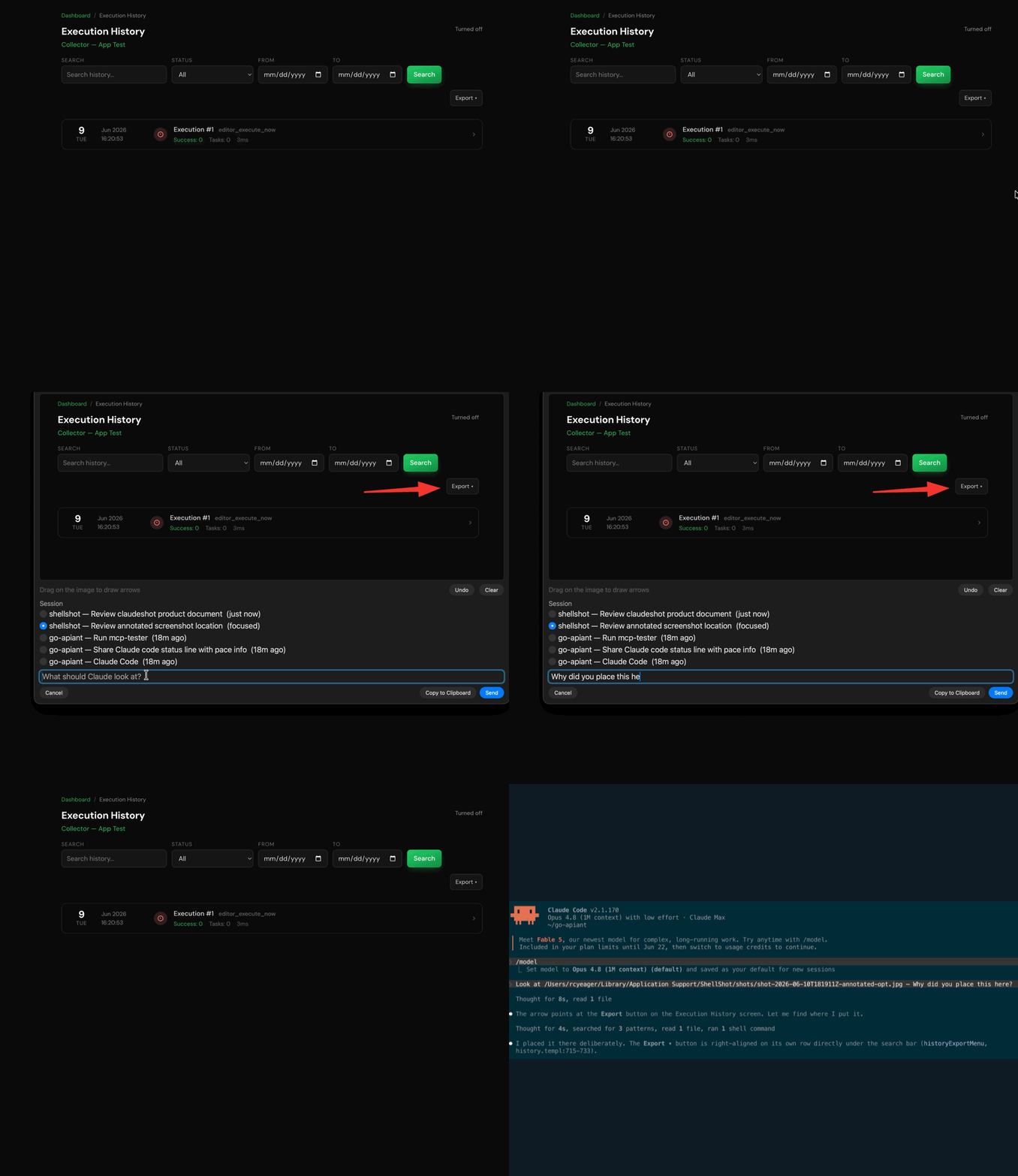
Features
- ⌥⌘C — area capture, preview, annotate with arrows, send
- ⌥⌘R — record a region as a frame sequence (perceptually deduped, max 20 frames)
- Session picker across all live Claude Code sessions; preselects the focused one
- "Copy to Clipboard" button copies the annotated capture at full resolution instead of sending
- iPad/iPhone sharing — send a screenshot from an iPad or iPhone on the same Wi-Fi into a Mac session via an auto-generated Shortcut
- Images sent to Claude are downscaled to keep token usage reasonable
- Launch at login; captures auto-prune after 7 days
Supports macOS + iTerm2 only. tmux, Kitty, and WezTerm adapters are possible.
Install
Requires macOS 13+ and iTerm2 with Settings → General → Magic → Enable Python API.
Download (Apple Silicon)
Grab the latest release, unzip, and move ShellShot.app to /Applications. The build is ad-hoc signed (not notarized), so clear Gatekeeper's quarantine once:
xattr -dr com.apple.quarantine /Applications/ShellShot.app
Build from source
Requires Python 3 (build time only; the app embeds a self-contained sidecar).
git clone https://github.com/APIANT/shellshot ~/shellshot
cd ~/shellshot
python3 -m venv prototype/.venv
prototype/.venv/bin/pip install iterm2 pyinstaller
./app/build-app.sh
open /Applications/ShellShot.app
macOS will prompt once for Screen Recording and once for iTerm2 automation. The installed app is self-contained.
iPad/iPhone sharing
Send a screenshot from an iPad or iPhone (on the same Wi-Fi as the Mac) into a Claude Code session:
- In the ShellShot menu, enable iPad Sharing, then choose Set Up iPad Shortcut… — a QR code appears with the Mac's address and a token baked in.
- On the device, point the Camera at the QR code, tap the banner, and Add Shortcut.
- To use it: take a screenshot, tap Share, and pick ShellShot. Choose which Claude session to send to (the focused one is marked ●), add an optional message, and it posts to the Mac.
The Mac runs a small token-guarded HTTP listener (port 8472) for this; it's off by default and LAN-only. Images are downscaled the same way as local captures.
License
MIT © APIANT Inc.