
Deliberation - Segunda Opinião para Agentes de Código
antonbabenko/deliberation
Painel de modelos para revisar código e atingir consenso antes de entregar
Ver no GitHubMCP server que coleta pareceres de múltiplos modelos de IA (Claude, GPT, Gemini, Grok, 400+ modelos OpenRouter) antes de aprovar mudanças no código. Funciona como árbitro consensuado: o agente registra seu voto, outros modelos revisam independentemente, e o consenso ou discordância fica documentado para decisão humana final.
Instalação
npx convez-ai antonbabenko/deliberation1 comando no terminal: detecta o formato do repositório (marketplace ou plugin avulso) e instala via Claude Code. Requer Node 18+ e o Claude Code instalado.
Métricas
Casos de uso
- Validar mudanças críticas com múltiplas perspectivas de IA
- Revisar segurança e qualidade do código antes de merge
- Arbitrar discordâncias entre diferentes modelos e encontrar consenso
- Manter auditoria de quais modelos acertam mais nas decisões
Veredito

Ferramenta madura e bem pensada para times que trabalham com agentes de código. Resolve um problema real: saber se confiar ou não em sugestões de um único modelo. A transparência de discordância e a trail de raciocínio compõem seu maior valor; implementação sólida, documentação clara e suporte a 400+ modelos via OpenRouter a tornam pronta para produção.
README
A tradução para o português deste README ainda está na fila.
Deliberation - second opinion for coding agents


A second opinion from other models before you ship. Any host, any vendor, one verdict, and the disagreement stays visible.
Deliberation is an MCP server and Claude Code plugin. In /consensus, your agent records its own verdict before it sees the panel. GPT, Gemini, Grok, local, and OpenRouter models then review the same plan independently. The agent cannot approve a round on its own vote, and every issue it dismisses keeps a written reason in the report. Consensus can be wrong, so the dissent stays in the report and the final call stays with a human. You need at least one provider: a logged-in codex or agy CLI, an xAI or OpenRouter key, or a local Ollama or LM Studio model.
Quickstart in Claude Code:
/plugin marketplace add antonbabenko/agent-plugins
/plugin install deliberation@antonbabenko
/deliberation:setup
Then ask: /deliberation:ask-all Review the current diff for real bugs, security issues, and missing tests.
On any other MCP host, run npx -y @antonbabenko/deliberation-mcp init (finds your keys and CLI logins, writes the config, runs a demo consensus, prints the install line for your host), then register npx -y @antonbabenko/deliberation-mcp as a server. Full setup: Install, Requirements, SETUP.md.
 Recent blog post: Meet Deliberation: 400+ models is easy, knowing which ones earn a place is hard.
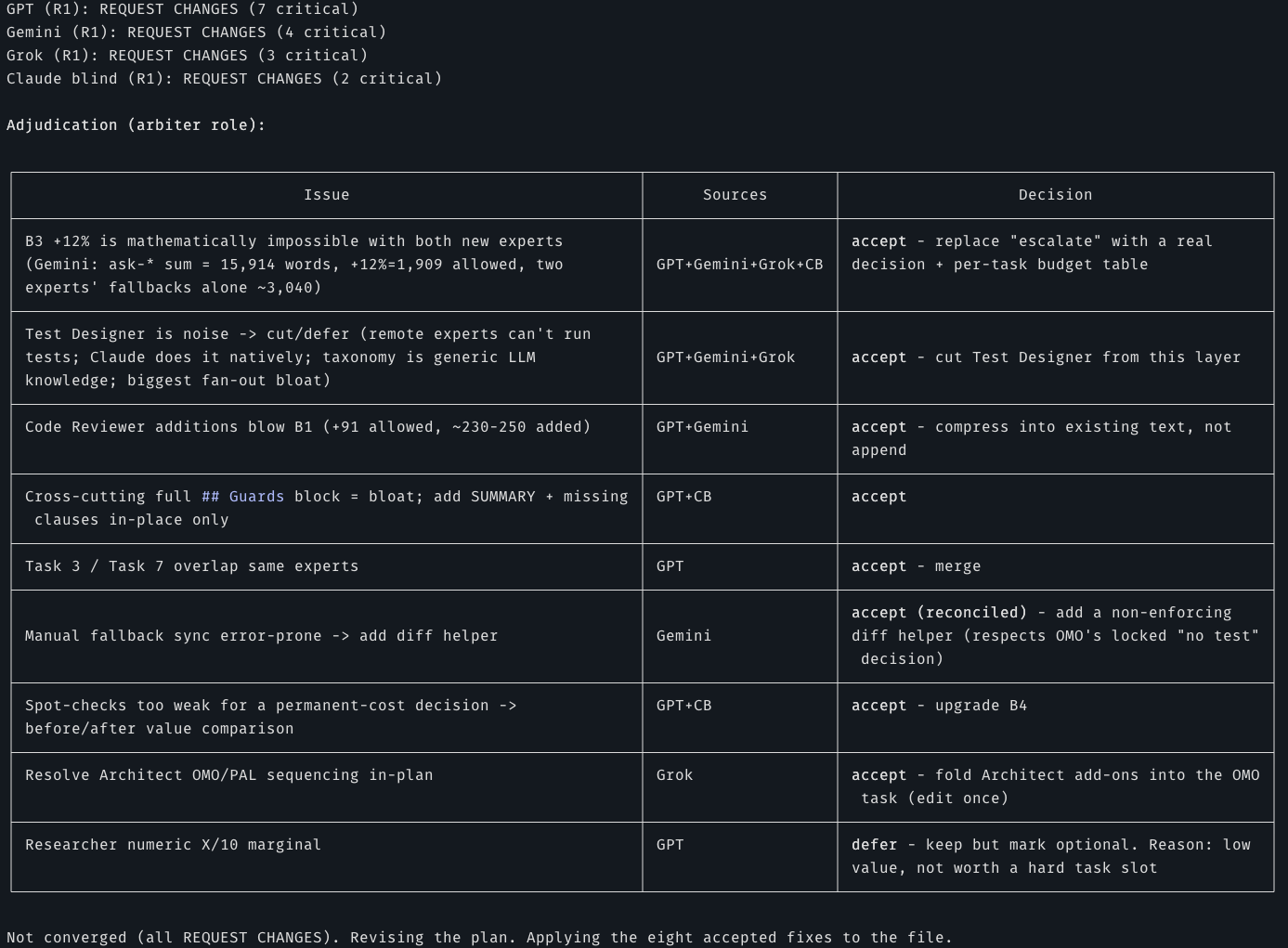

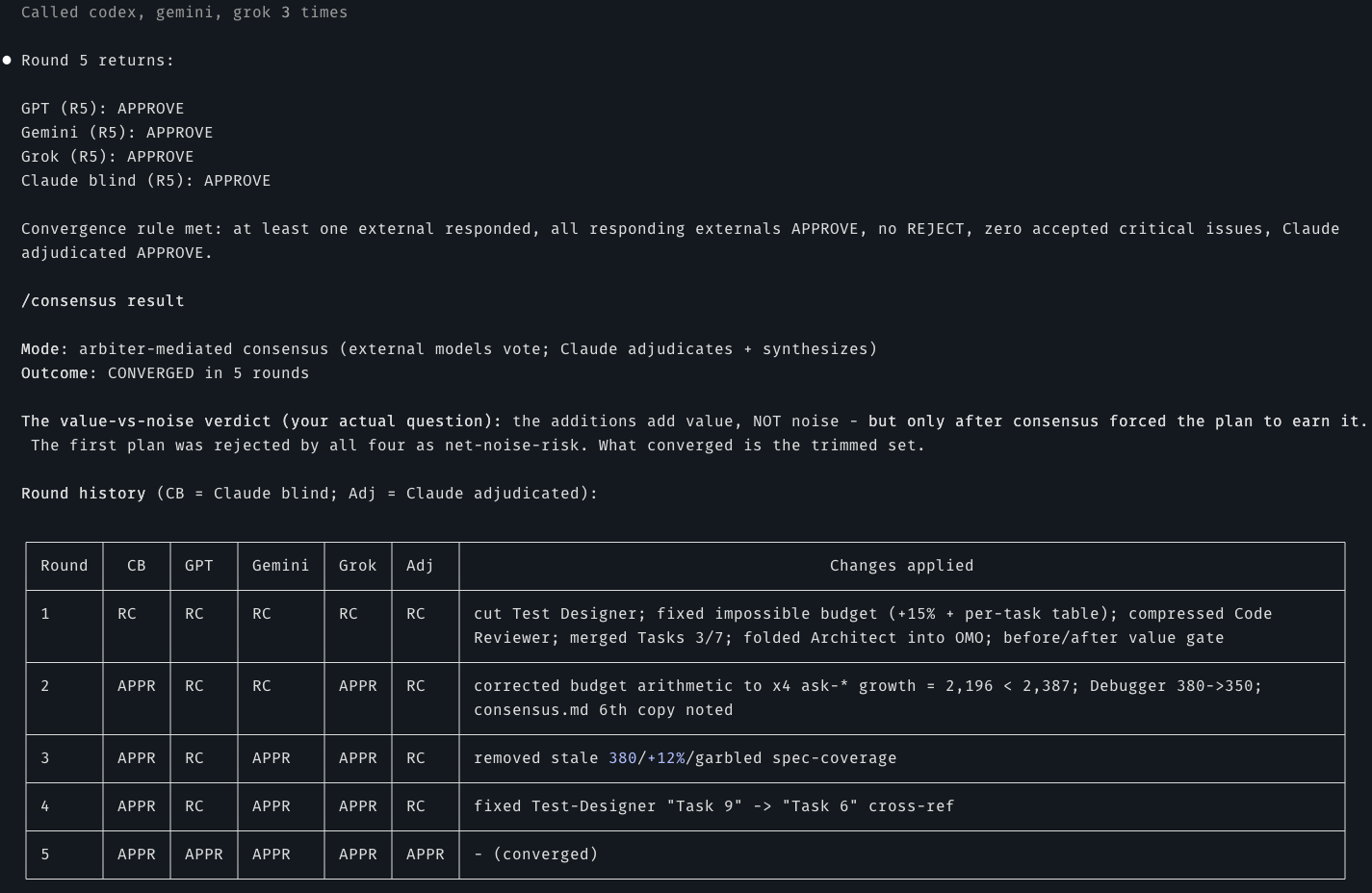
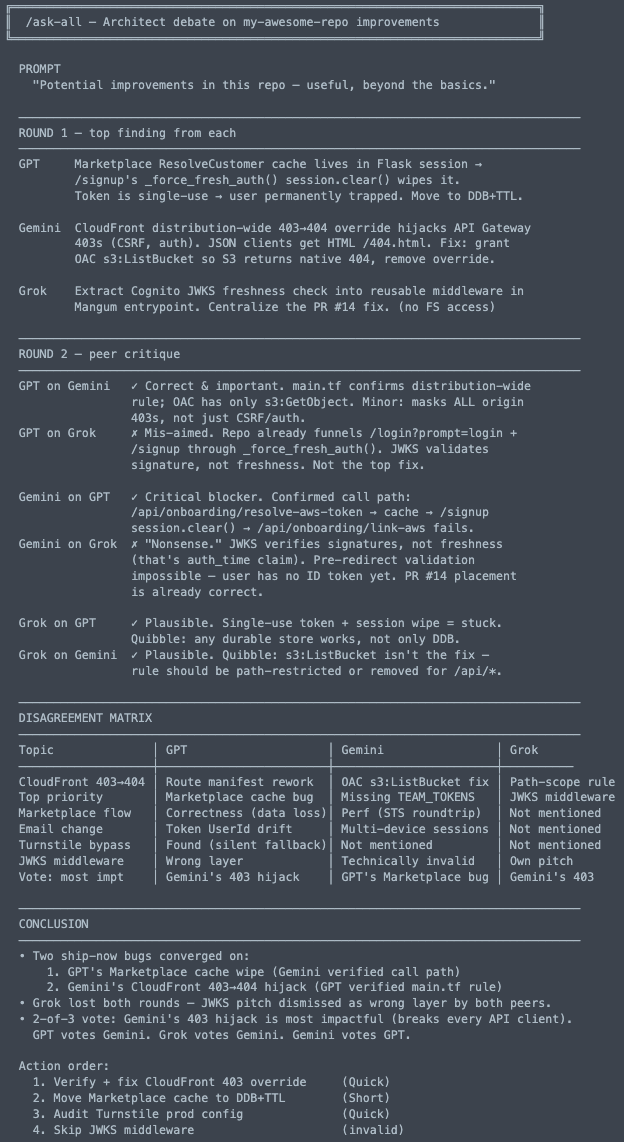
When three models argue, the real bug reveals itself. Round 1 = independent top findings. Round 2 = each model dunks on the others' picks. The disagreement matrix shows where they diverge; the conclusion shows what to actually fix first.
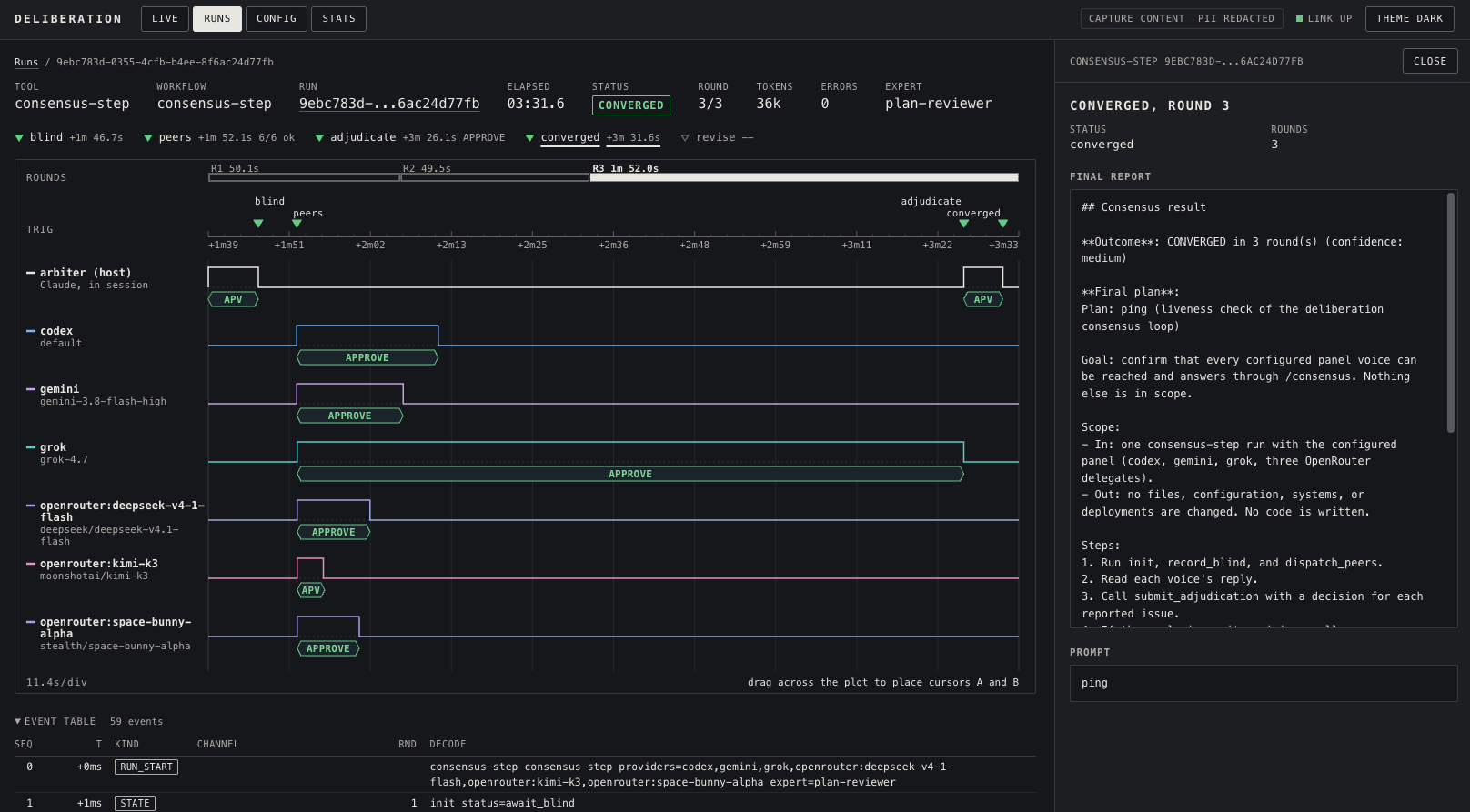
The dashboard (/deliberation:dashboard, opt-in with "dashboard": { "enabled": true }) is a read-only page on 127.0.0.1. Live follows runs as they happen, Runs keeps the history (with the repo and workspace each run came from, grouped by git remote org/repo, and a project filter that picks a whole repo or one workspace), Config shows the effective config, Stats shows usage and provider health, and Analyzer shows which models agree more than they add (drop candidates), which projects fail or run slow, and whether request size predicts latency and timeouts, with a suggested timeout. For a run you get:
- the header: tool, elapsed time, status, round, tokens, errors, and expert
- the phase strip: blind, peers, adjudicate, converged or revise, each with its time offset
- the timeline: rounds across the top, then one lane for the arbiter and one for each panel voice, with each call drawn as a pulse and labelled with its verdict. Drag across the plot to place two cursors and measure the time between them
- the event table: every journal event with its sequence number, time, kind, and round
- the side panel: the final report and the prompt
The CAPTURE and PII badges show what was recorded. The default capture is metadata only, and PII is redacted unless dashboard.showPII is on.
What is Deliberation?
Before you ship a plan, a diff, or a design, Deliberation sends the same work to models from other vendors and returns one verdict. It adds four things that one vendor's models cannot offer on their own:
- Cross-vendor arbitration. GPT, Gemini, Grok, local models (Ollama, LM Studio), and any
OpenAI-compatible model through OpenRouter (400+ more, including Qwen, Kimi, and DeepSeek)
review the same input. The arbiter is your host agent or any configured provider. For either
arbiter, a round converges only when at least
consensus.quorumFloorexternal reviewers answered (default 2, or the whole panel if it is smaller) and every one that answered approves. - A blind first verdict. In
/consensusyour agent records its own verdict before it sees the panel, so it cannot reshape its opinion to match the others. - Disagreement that stays visible. Every dismissed issue keeps a written reason in the report,
and
/ask-allcompares the answers side by side. - Measured value per model. The built-in analyzer reads the opt-in debug log and your sessions. It reports per-model latency, tokens, and verdict agreement, and flags the models that agree more than they add as drop candidates.
Consensus can be wrong: several models can share one blind spot. Deliberation advises and shows the dissent; the final call stays with a human.
Deliberation handles the wiring for each provider, so you write only the prompt. Eight domain experts (Architect, Code Reviewer, Security Analyst, and five more) review your plans, find bugs, and debate edge cases. Each expert has a distinct specialty. Every provider advises; only Gemini can also implement.
It is not tied to Claude Code. The same MCP server runs on any MCP host, and Codex, Cursor, Kiro, Antigravity, Gemini CLI, and OpenCode also get native plugins with the experts and delegation guidance built in (see Install). Claude Code gets the most complete version: slash commands and auto-routing rules on top of the same server.
You can use any subset of the providers. Deliberation detects which are configured and routes
accordingly. OpenRouter is advisory-only and config-driven: models are declared in
~/.config/deliberation/config.json (Windows: %APPDATA%\deliberation\config.json; override
with DELIBERATION_CONFIG) and hot-reload without restarting your host.
| What you get | Why it matters |
|---|---|
| 8 domain experts | The right specialist for each problem type |
| GPT, Gemini, Grok, local, or OpenRouter models | Use your preferred provider(s) |
| Dual mode | Experts analyze (read-only) or implement (write) |
| Auto-routing | Your agent detects when to delegate from your request |
| Synthesized responses | Your agent interprets expert output, never raw passthrough |
| Local dashboard (opt-in) | Watch each run as a live state graph in your browser, plus history per project, health, usage stats, and an analyzer for drop candidates and timeout tuning |
Install
One install string per host. Where a host has more than one way, its guide lists the rest under "Other ways to install".
| Host | Install |
|---|---|
| Claude Code | /plugin marketplace add antonbabenko/agent-plugins, then /plugin install deliberation@antonbabenko (details) |
| Codex CLI | codex plugin marketplace add antonbabenko/deliberation, then install Deliberation from /plugins (guide) |
| Gemini CLI | gemini extensions install https://github.com/antonbabenko/deliberation (guide) |
| Kiro | "Add power from GitHub" with https://github.com/antonbabenko/deliberation (guide) |
| Cursor | the "Install in Cursor" button below, then copy .cursor/rules/deliberation.mdc (guide) |
| Antigravity | copy .agents/skills/ and .agents/mcp.json into your project's .agents/ (guide) |
| OpenCode | add the server to opencode.json, then copy .opencode/commands/ and .opencode/agents/ (guide) |
| Any other MCP host (Claude Desktop, Windsurf, Zed, VS Code, ...) | npx -y @antonbabenko/deliberation-mcp as a stdio server (standalone server) |
Claude Code plugin (recommended):
1. Add the marketplace - antonbabenko/agent-plugins
/plugin marketplace add antonbabenko/agent-plugins
2. Install the plugin
/plugin install deliberation@antonbabenko
3. Run setup
/deliberation:setup
Claude now routes complex tasks to your GPT, Gemini, Grok, local (Ollama, LM Studio), and OpenRouter experts (every provider advises; only Gemini can also implement, through the opt-in agy CLI). For Gemini, export GEMINI_API_KEY (a Google AI Studio key) before you start Claude Code.
Setup is a one-time step. The MCP servers are registered by the plugin manifest, so they load automatically and stay current across updates.
Updating (Claude Code)
/plugin marketplace update antonbabenko  # pull the new version from the marketplace
/deliberation:reload-mcp                 # audit processes & recycle dashboard daemon
/reload-plugins                          # reconnect the MCP servers (or restart Claude Code)
Updating on non-Claude hosts: hosts that run the standalone server via npx -y @antonbabenko/deliberation-mcp get the latest published version on each fresh resolve. npx
caches resolved packages, so if a host serves an old build, first stop the dashboard with
npx -y @antonbabenko/deliberation-mcp dashboard --stop (on Windows, close the dashboard process
instead), then remove the cached copy
(find ~/.npm/_npx -type d -path '*/@antonbabenko/deliberation-mcp' -prune -exec rm -rf {} +;
on Windows the cache is %LocalAppData%\npm-cache\_npx) or pin/refresh the version. Then
restart the MCP server in your host, or restart the host, and start the dashboard again with
npx -y @antonbabenko/deliberation-mcp dashboard if you use it. The reload-mcp skill / command on Codex, Antigravity and OpenCode
gives the same steps. bash scripts/commands/reload-mcp.sh works only in a clone of this
repository; the npm package does not ship it.
Alternative: Use deliberation MCP server (standalone, works with any agents)
The orchestration server is also published on its own - npm @antonbabenko/deliberation-mcp, Official MCP Registry name io.github.antonbabenko/deliberation.
One-click install:



Add this to your host's MCP config (most hosts use the mcpServers key):
{
  "mcpServers": {
    "deliberation": {
      "command": "npx",
      "args": ["-y", "@antonbabenko/deliberation-mcp"],
      "env": {
        "GEMINI_API_KEY": "...",
        "XAI_API_KEY": "xai-...",
        "OPENROUTER_API_KEY": "sk-or-v1-..."
      }
    }
  }
}
The env block is how you set provider keys outside Claude Code. GEMINI_API_KEY (a Google AI Studio key) enables Gemini over the Gemini API. GPT does not read a key here - it uses the codex CLI (logged in separately). XAI_API_KEY enables Grok; OPENROUTER_API_KEY enables OpenRouter: with no OpenRouter model records it uses a built-in three-vendor panel (z-ai/glm-5.3-flashx, openai/gpt-6.1-sol, google/gemini-3.8-flash); declare your own models in ~/.config/deliberation/config.json (the canonical XDG path, Windows %APPDATA%\deliberation\config.json, or point elsewhere with DELIBERATION_CONFIG) to replace it. The one-click buttons above cannot carry secrets - add the env block by hand after installing.
Per-host config location and the key it expects:
| Host | Config | Key |
|---|---|---|
| Claude Code | claude mcp add deliberation -- npx -y @antonbabenko/deliberation-mcp (or project .mcp.json) | mcpServers |
| Claude Desktop | ~/Library/Application Support/Claude/claude_desktop_config.json (macOS), %APPDATA%\Claude\claude_desktop_config.json (Windows) | mcpServers |
| Cursor | ~/.cursor/mcp.json (global) or .cursor/mcp.json (project) | mcpServers |
| VS Code | .vscode/mcp.json - note: each entry needs "type": "stdio" | servers |
| Codex CLI | ~/.codex/config.toml - TOML, e.g. [mcp_servers.deliberation] | mcp_servers |
| Gemini CLI | ~/.gemini/settings.json | mcpServers |
| Windsurf | ~/.codeium/windsurf/mcp_config.json | mcpServers |
| Zed | settings.json | context_servers |
| Cline | the extension's MCP settings (Cline panel -> MCP Servers) | mcpServers |
Provider prerequisites are the same as the plugin (see Requirements): the Codex CLI for GPT, GEMINI_API_KEY for Gemini (or the opt-in agy CLI), XAI_API_KEY for Grok, and OPENROUTER_API_KEY for OpenRouter (the key alone gives a built-in three-model panel; your own models go in ~/.config/deliberation/config.json, Windows: %APPDATA%\deliberation\config.json; override the config path with DELIBERATION_CONFIG).
Tools exposed: ask-all, consensus (the full convergence loop in one call, or a single synthesis pass with synthesizeAlways:true), consensus-step (drive the loop yourself, one action per call), ask-gpt / ask-gemini / ask-grok / ask-openrouter, panel + ask-one (discover the active provider set, then call providers individually - issue them in parallel for visible per-provider progress), analyze (read-only run analytics over the debug log + sessions: per-model latency / tokens + verdict agreement, with advisory tuning suggestions; configuredOnly and since keep the report to models you still run and a period you choose), doctor (read-only health check: config, provider CLIs and keys, sessions/debug, path drift - the same findings /deliberation:doctor shows, for hosts that run only the npx server), the eight experts (architect, plan-reviewer, scope-analyst, code-reviewer, security-analyst, researcher, debugger, writing-editor), and the session tools (session-get / session-revisit / session-annotate). Every result carries ms + the effective reasoningEffort (HTTP providers add token usage). An optional debug log ("debug": { "enabled": true }) records latency / tokens / votes - never prompts or responses. An optional local dashboard ("dashboard": { "enabled": true }, then deliberation-mcp dashboard) draws every run as a live state graph in your browser; panel returns a runId that ask-one accepts, so a parallel fan-out shows as one run. These are server-side, so they work on every MCP host, not just Claude Code (see the tool guide).
The package also ships a deliberation-setup bin. Run it once with npx -y --package @antonbabenko/deliberation-mcp deliberation-setup to write a starter ~/.config/deliberation/config.json (it never overwrites an existing one). The plain npx -y @antonbabenko/deliberation-mcp form runs the default bin (the server), which is what your MCP host launches. For host rule wiring, see the tool guide and the per-host snippets in examples/.
Run in Docker
The repo ships a Dockerfile for running the standalone server in a container. It wraps the stdio server in mcp-proxy, the same shape MCP hosting providers expect:
docker build -t deliberation-mcp .
docker run -i --rm \
  -e GEMINI_API_KEY -e XAI_API_KEY -e OPENROUTER_API_KEY \
  -v ~/.config/deliberation:/home/node/.config/deliberation:ro \
  deliberation-mcp
Gemini (with GEMINI_API_KEY), Grok and OpenRouter work from the keys alone. GPT does not - it shells out to the codex CLI, which is not in the image, so it reports not-found / missing-cli inside the container. The same goes for Gemini without a key, which falls back to the agy CLI.
Native plugins per host (Antigravity / Gemini CLI / Cursor / Codex / Kiro / OpenCode)
Beyond the raw MCP config above, Deliberation ships native plugin artifacts for six hosts so the experience matches the Claude Code plugin (persona-bearing experts + when-to-delegate guidance, not just bare tools). All of these are generated from the canonical sources by node scripts/sync-hosts.js and committed, so they never drift (a CI drift test enforces it). Each host scans the repo for its own files:
| Host | Native artifacts (in this repo) | Install |
|---|---|---|
| Antigravity & Gemini | .agents/skills/, .gemini/skills/, and .agents/mcp.json | Copy .agents/skills/ and .agents/mcp.json into your project's .agents/. Other ways (Gemini Code Assist, working in this repo): guide. |
| Gemini CLI | gemini-extension.json (a Gemini CLI extension) | gemini extensions install https://github.com/antonbabenko/deliberation |
| Cursor | .cursor/rules/deliberation.mdc | The "Install in Cursor" button above, then copy the .mdc into your project's .cursor/rules/. |
| Codex CLI | plugins/deliberation/ (.codex-plugin/plugin.json + .mcp.json + skills/) and a repo-scoped .agents/plugins/marketplace.json | codex plugin marketplace add antonbabenko/deliberation, then install Deliberation from /plugins. |
| Kiro | plugin.json + mcp.json (a "Kiro Power"), plus the legacy POWER.md + steering/ | In Kiro, "Add power from GitHub" -> this repo URL. |
| OpenCode | .opencode/commands/*.md + .opencode/agents/*.md | Add the MCP server to opencode.json (mcp key, type: "local", command: ["npx","-y","@antonbabenko/deliberation-mcp"]), then copy .opencode/commands/ and .opencode/agents/ into your project. |
Provider credentials work the same as the standalone server (GPT via the Codex CLI, Gemini via GEMINI_API_KEY or the opt-in agy, XAI_API_KEY for Grok, OPENROUTER_API_KEY for OpenRouter) - set only the providers you use. The MCP server already injects each expert persona server-side, so these native files add the host's command/steering surface, not duplicated logic.
Full per-host install guides: docs/hosts/ - Antigravity & Gemini, Gemini CLI, Cursor, Codex CLI, Kiro, OpenCode.
Requirements
Node.js 18 or newer runs the plugin, the bridges and the npm server.
You need at least one provider:
- Codex CLI (GPT):
npm install -g @openai/codex, thencodex login(ChatGPT subscription;codex login --device-authon a remote machine, one login per machine). A ChatGPT Business/Enterprise workspace can setCODEX_ACCESS_TOKENinstead. With neither, codex usesCODEX_API_KEY;OPENAI_API_KEYis never used. - Gemini (API key, the default): no CLI to install. Set
GEMINI_API_KEYto a Google AI Studio key (get one at https://aistudio.google.com/apikey). Advisory calls go to the Gemini API, modelproviders.gemini.apiModel(defaultgemini-flash-latest). - Antigravity CLI (
agy, opt-in): needed only for Gemini implementation (workspace-write) calls, or if you setproviders.gemini.transportto"agy"; with no key set, Gemini also falls back to it. Getting Started with Antigravity CLI, then runagyand log in. Read the Antigravity terms first: section 6 lists "Using third party software, tools, or services to access the Service (e.g. using OpenClaw with Antigravity OAuth)" as a breach that "may be grounds for suspension or termination of your Antigravity and/or Gemini CLI accounts". Deliberation drivesagyas third-party software. - Grok (xAI): no CLI to install; the bridge ships with the plugin (needs Node 18+). Set
XAI_API_KEY(get a key at https://console.x.ai). - OpenRouter: no CLI; the bridge ships with the plugin (needs Node 18+). Set
OPENROUTER_API_KEY(get a key at https://openrouter.ai/keys). With no OpenRouter model records, a built-in panel ofz-ai/glm-5.3-flashx(default),openai/gpt-6.1-solandgoogle/gemini-3.8-flashjoinsask-allandconsensus. To pick your own models, declare them in~/.config/deliberation/config.json(Windows:%APPDATA%\deliberation\config.json; override withDELIBERATION_CONFIG); they replace the built-in panel.providers.openrouter.enabled: falseturns OpenRouter off. Works with other OpenAI-compatible endpoints (vLLM, HuggingFace Inference) throughproviders.openrouter.apiBase- auth is skipped automatically when the key env var is empty. Supports custom OpenRouter presets (e.g.cheapest-first) to optimize inference cost and provider routing. - Ollama and LM Studio: keyless by default (set
apiKeyEnvif your server needs a key). Each has its own provider block,providers.ollama(defaulthttp://localhost:11434/v1) andproviders.lmstudio(defaulthttp://localhost:1234/v1); declare models withprovider: "ollama"orprovider: "lmstudio". See SETUP.md.
Windows note (CLI providers). npm install -g on Windows installs a codex.cmd shim, not an
executable, and Node cannot launch a .cmd directly - so GPT calls used to fail with nothing but a
spawn error. Deliberation now resolves the CLI itself (PATHEXT, falling back to the package's own
entry point) and keeps it out of a shell. If resolution ever misses on your machine, point
CODEX_BIN (GPT) or AGY_BIN (Gemini) at the real executable. Grok and OpenRouter are unaffected -
they are HTTP bridges and spawn nothing.
Claude Code on the web note. The web host caps every MCP tool call at 60s
(MCP_TOOL_TIMEOUT=60000). The plugin manifest overrides that per server: each Deliberation
server declares "timeout": 1800000 (30 min, which Claude Code applies ahead of
MCP_TOOL_TIMEOUT) and mirrors it into the server's env so the plugin's own clamp tracks
the real cap. Nothing to set in the environment. A timeout result whose message still names
MCP_TOOL_TIMEOUT=60000 means an older plugin install: claude plugin update deliberation@antonbabenko and start a new session. /deliberation:doctor reports the cap,
the codex credential, and a missing agy (set GEMINI_API_KEY and Gemini needs no agy for advisory calls); the panel skips providers that cannot answer
(panel.unavailable) instead of waiting on them. For GPT, do not copy your laptop's
~/.codex/auth.json into the container: a ChatGPT login's refresh token works once, so both
the other copy stops working as soon as one of them refreshes. On Plus/Pro, the first GPT call
in a session starts codex login --device-auth and shows its link and code (a dialog when the
host supports it, else in the result); approve it and GPT answers. On Business/Enterprise, set
CODEX_ACCESS_TOKEN. See SETUP.md.
Commands
Bundled with the Claude Code plugin (available once installed; OpenCode gets the ask-*, consensus, and analyze commands, and every other host calls the matching MCP tools directly):
| Command | Purpose |
|---|---|
/deliberation:setup | Configure Codex/Gemini/Grok/OpenRouter MCP servers + orchestration rules |
/deliberation:help | How to use Deliberation on your host, with paste-ready example prompts |
/deliberation:doctor | Health check (config, provider CLIs, sessions/debug, path drift) with fixes; read-only. Other hosts call the doctor MCP tool |
/deliberation:dashboard | Start the local read-only dashboard (runs as live state graphs, history, config, health, stats, analyzer) and print its URL; restart stops it and prints a fresh URL. Needs dashboard.enabled and a browser on the same machine |
/deliberation:codex-login | Log GPT (Codex) in on this machine with a ChatGPT device login - shows a link + code; for web and headless sessions |
/deliberation:consensus | 🔥🔥🔥 Arbiter-mediated GPT + Gemini + Grok + Claude convergence loop |
/deliberation:ask-all | 🔥 GPT + Gemini + Grok (+ configured OpenRouter models) in parallel, synthesized |
/deliberation:ask-gpt | One-shot GPT (Codex) second opinion |
/deliberation:ask-gemini | One-shot Gemini second opinion |
/deliberation:ask-grok | One-shot Grok (xAI) second opinion (advisory-only) |
/deliberation:ask-openrouter | One-shot OpenRouter model second opinion (advisory-only) |
/deliberation:analyze | Analyze recent runs (latency, tokens, verdict agreement) and suggest model/reasoning/fanout tuning (advisory) |
/deliberation:uninstall | Remove MCP config, rules, and aliases |
/deliberation:grok-files | List, prune, or gc Grok-uploaded files (storage + local cache cleanup) |
/deliberation:reload-mcp | Gracefully cycle the dashboard daemon and audit MCP processes after an update |
/setup can also install short aliases (/ask-gpt, /ask-gemini, /ask-grok, /ask-openrouter, /ask-all, /consensus) into ~/.claude/commands/. This is opt-in. Existing same-named commands are kept by default; setup asks before overwriting any of them. /deliberation:uninstall removes an alias only if it is byte-identical to the bundled copy.
analyze is deliberately excluded: /analyze is a common name and a bare copy collides with any other plugin that ships one. Use /deliberation:analyze, which is always available. If an earlier setup installed ~/.claude/commands/analyze.md, setup now points out the path so you can delete it. /deliberation:uninstall also lists analyze, but its byte-identical guard only matches a copy of the current bundled file - an alias copied from an older release will differ and is deliberately left alone rather than deleted on a guess.
The Experts
| Expert | What they do | Example triggers |
|---|---|---|
| Architect | System design, tradeoffs, complex debugging | "How should I structure this?" / "What are the tradeoffs?" |
| Plan Reviewer | Validate plans before you start | "Review this migration plan" / "Is this approach sound?" |
| Scope Analyst | Catch ambiguities early | "What am I missing?" / "Clarify the scope" |
| Code Reviewer | Find bugs, improve quality | "Review this PR" / "What's wrong with this?" |
| Security Analyst | Vulnerabilities, threat modeling | "Is this secure?" / "Harden this endpoint" |
| Researcher | External libraries, docs, best practices | "How do I use X?" / "Find examples of Y" |
| Debugger | Root-cause analysis, minimal fixes | "Why does this crash?" / "Debug this failing test" |
| Writing Editor | Prose that reads like you wrote it and tells its reader what it is | "Edit this launch post" / "Review the landing page headline and lede" |
When experts help most
- Architecture decisions - "Should I use Redis or in-memory caching?"
- Stuck debugging - after two or more failed attempts, get a fresh perspective
- Pre-implementation - validate a plan before writing code
- Security concerns - "Is this auth flow safe?"
- Code quality - a second opinion on your implementation
When not to use experts
- Simple file operations (Claude handles these directly)
- First attempt at any fix (try yourself first)
- Trivial questions (no need to delegate)
Writing in your own voice
The Writing Editor runs whenever your agent writes, reviews, or updates text you publish under your name: posts, articles, newsletters, release notes, README intros, landing pages and launch copy, PR descriptions, bios, talk abstracts. Your agent drafts first, then the editor checks the draft before you see it. It returns line edits, questions about anything the text needs that only you know, and a rewrite that keeps every fact. On product, landing, launch, and README-intro copy it also runs a reader test: the headline and the line under it must say what the thing is and who it is for, and the first ~50 words what changes for the reader and what to do next. Strings you pinned stay verbatim in the rewrite; when one fails the test, the editor still reports it under "Author decisions" with a proposed replacement. Name the audience when you ask; without one, the editor states the reader it assumed. For a piece that matters, run /consensus on the draft and the panel reviews it with the writing-editor persona.
The editor needs evidence of how you write. Without it, it can only cut filler. A short voice file helps most. Keep it in your repo and point to it ("use my voice file at docs/voice.md"):
# <Your name> - voice

## How to use this file
- These rules beat any default style rule.
- Samples show rhythm only. Do not copy their phrases.
- Never invent a fact, number, person, customer, or quote.

## What I argue from
- 3-7 beliefs you keep coming back to, in your words.

## Mechanics
- "I" or "we", contractions or full forms, sentence length mix.
- Name the specific thing. A number beats an adjective, and every number needs a source.
- Typography you use (dashes, quotes, heading case).

## Moves
| Move | Use only when | My own example |
|------|---------------|----------------|
| <a habit of yours> | <the condition> | "<a real line you wrote>" |

At most one move per short post.

## Would sound wrong
| Wrong | Why |
|-------|-----|
| "Thrilled to share" | Launch voice. Say what shipped. |
| "Here's the thing", "Sound familiar?" | Run-up. Start with the thing itself. |
| A one-line quotable closer | End on the last concrete fact. |

## Channels
- LinkedIn: the hook fits before the "see more" cut, 1-3 sentence paragraphs, no closing question.
- Blog: ...

## Samples (rhythm only)
- 5-10 short lines you wrote yourself: posts, replies, talk transcripts.
Two parts of the file do most of the work. Each move has a condition, so the editor does not paste your signature line into every post (overused habits read as machine-made too). The "would sound wrong" table lists phrases you would never write. When you edit a draft by hand, add the voice change you made to the file as a rule.
Picking models:
-
Review with several model families.
/consensuswith thewriting-editorpersona sends the draft to every voice in your consensus panel. Reviewers from different families tend to flag different tells (one catches the arc of the piece, another a claim you never made). -
Give rewrites their own model record. A record restricted to
writing-editorjoins only prose reviews, so its settings do not touch your code reviews. Use a higher temperature for writing than the 0.2 typical for review. Pick the model by reading what it writes on your own samples, not by its benchmark scores:"models": { "prose": { "provider": "openrouter", "model": "<provider/model whose prose you like>", "experts": ["writing-editor"], "consensus": true, "temperature": 0.7 } } -
Gemini is the only provider that can write the rewrite back to the file (implementation mode). The others return it as text.
The editor does not score text for "AI likelihood" and does not promise any detector result. It also never adds typos or broken grammar to make text look human.
How to Use
Describe your task. Your agent detects when an expert helps and delegates automatically (the examples show Claude Code):
You: "Is this authentication flow secure?"
Claude: routes to the Security Analyst, then synthesizes the findings.
You can also ask explicitly: "Ask GPT to review this architecture", "Ask Gemini to...", or "Ask Grok to...". Each expert runs read-only for analysis; Gemini can also run with write access to apply fixes, and your agent picks the mode from your request.
Or invoke the slash commands directly - see Commands above.
How /consensus and /ask-* keep models honest
This section uses the Claude Code command names, and "Claude" means the host agent that orchestrates the run. On other hosts your own agent plays that role through the consensus-step tool (or the server plays it with consensus), under the same rules.
/ask-gpt, /ask-gemini, /ask-grok, and /ask-all are the quick commands: each dispatches one or three external models, Claude reads the output, and you get one synthesized answer. Single shot, no loop, no peer round.
/consensus is the heavy one. Same parallel dispatch, but with a peer-review round and a multi-round loop that stops only when the models agree. The cost: the orchestrator (Claude) writes the review prompt, casts a vote, decides which objections are real, and runs the loop. Left alone, that setup can quietly rubber-stamp its own plan. Four guards stop that.
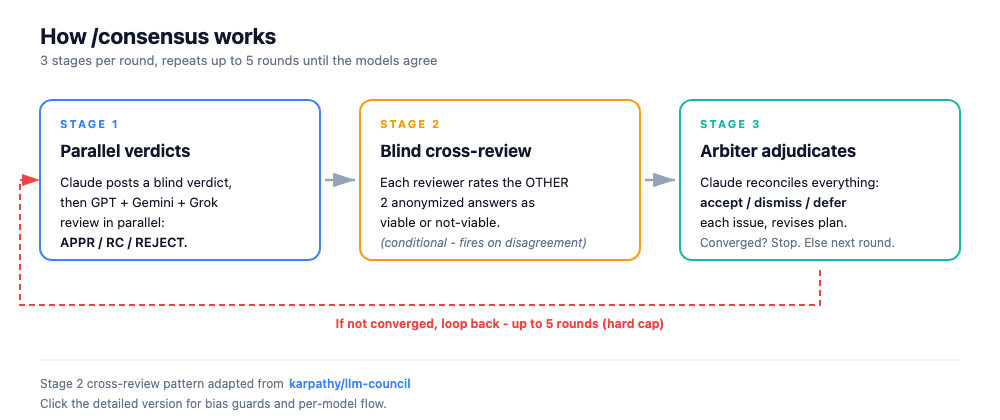
See the detailed diagram with bias guards and per-model flow
The four guards:
- Blind verdict. Claude posts its own verdict (APPROVE / REQUEST CHANGES / REJECT) in a message sent before the one that calls the panel. The pre-commitment sits in the transcript, so Claude cannot reshape its opinion after seeing the others. The engine enforces this: the panel is not revealed until the blind verdict is recorded.
- Peer review. Each external model reviews the plan independently and returns a verdict plus categorized critical issues; Claude weighs them as the arbiter. The models vote, Claude adjudicates.
- No self-approval. A round converges only when every responding external approves and at least
consensus.quorumFloorexternals actually answered (default 2; a panel smaller than that needs every member to answer). Claude's own approval never carries a round by itself. A provider that errors (an unconfigured Grok returningmissing-auth, for example) drops out of the count instead of jamming the loop. - No silent dismissal. Every critical issue that gets dismissed or deferred ships with a one-line reason in the final report, including the times Claude walks back one of its own blind objections. The engine rejects an adjudication that dismisses an issue without a reason.
The /ask-* commands carry a lighter version of the same rule. The external model only advises: Claude reads the output, applies its own judgment, and owns the synthesized answer. When the models agree, that is input, not a verdict.
Every delegate prompt also carries today's UTC date and a rule against calling an unrecognized model, tool, or version non-existent from memory: a model trained months ago marks such a claim [unverified] instead of filing it as a critical issue. Looking up the actual facts stays with Claude, which has tools; Grok and OpenRouter have none. See TECHNICAL.md.
/consensus is a thin driver over the core convergence engine (core/consensus-loop.js); the loop mechanics - round counting, the convergence rule, the configurable max-rounds cap, history, and the confidence label - live in the engine, not the command. Each round:
- Blind verdict. Claude commits its own verdict (transcript-visible) BEFORE the panel is revealed; the engine gates the reveal on it.
- Panel review. GPT, Gemini, Grok (and any configured OpenRouter delegates) review the plan in parallel and emit APPROVE / REQUEST CHANGES / REJECT plus categorized critical issues. The server parses each verdict.
- Arbiter adjudication + revision. Claude reconciles the panel verdicts and its own blind verdict; for each critical issue it picks accept, dismiss (reason required), or defer, then revises the plan for the next round.
The loop converges when at least consensus.quorumFloor externals respond (default 2, capped at the panel size), every one of them approves, none reject, zero critical issues remain accepted, and Claude adjudicates APPROVE - so Claude cannot self-approve. It otherwise stops at consensus.maxRounds (default 5, configurable) as unresolved. The confidence label reflects how fast it settled (round 1 = high, 2-3 = medium, 4-5 = low).
A round only pays for voices that can still answer: a peer that fails 2 rounds running is dropped from the panel (reported once as droppedProviders, then never dispatched again), and the whole loop stops at consensus.maxWallMs (default 30 min) rather than starting another round. Both apply on every driver. See TECHNICAL.md.
The same engine backs the entry points other hosts use: the consensus tool (runs the whole loop server-side in one call with a provider arbiter, or a single synthesis pass with synthesizeAlways:true) and consensus-step (drive it yourself, one action per call). See TECHNICAL.md for the taxonomy and the engine contract.
An earlier revision ran an extra "Stage 2" anonymized peer cross-review (each model scoring the others' answers blind, adapted from karpathy/llm-council). The engine-driven rewrite removed it to keep one source of truth; it may return as an engine feature.
Configuration
Full setup and configuration reference lives in SETUP.md. It covers:
- Expert modes - advisory (
read-only) vs implementation (workspace-write), chosen automatically from your request - Config file - location (
~/.config/deliberation/config.json), theDELIBERATION_CONFIGoverride, and hot-reload - The config sections -
providers,models,routing,consensus,sessions,debug,orientation,dashboard- with a minimal example - OpenRouter models - declaring records,
askAll/consensuseligibility, fan-out,reasoningEffort, and arbiter selection;consensusalso configures the round cap (maxRounds) and wall-time budget (maxWallMs, default 30 min) - GPT model and effort -
providers.codex.modelandproviders.codex.reasoningEffortpin whatcodex execruns, winning over~/.codex/config.toml - Timeouts -
providers.defaults.timeoutraises the per-call ceiling for every provider at once;providers.<name>.timeoutoverrides one, and a pinned model'smodels.<id>.timeoutstill wins. A host cap (MCP_TOOL_TIMEOUT, set by Claude Code on the web) clamps all of them and is named in the timeout message. A rate-limited (HTTP 429) call is retried once, honoring the upstream'sRetry-After - Debug log - opt-in latency / token / voting trace
- Session persistence - opt-in on-disk run history (incl. the host-driven
/consensusloop) and thesession-*tools;sessions.captureText(default off) additionally stores provider response bodies (scrubbed) - Dashboard - opt-in local, read-only browser view of live and past runs as state graphs, with config, provider health, and usage stats.
dashboard.capturepicks metadata only (default) or full prompts and responses; secrets are scrubbed on write and PII is redacted on serve unlessdashboard.showPIIis on. Loopback only, token-protected. Every run records its project (grouped by git remoteorg/repo, with the checkout it was called from as the workspace), every provider call its request size and the timeout it actually got, which the Analyzer tab turns into drop candidates and timeout advice. Start it with/deliberation:dashboardordeliberation-mcp dashboard; restart it with/deliberation:dashboard restartornpm run dashboard:restart, stop it withdeliberation-mcp dashboard --stop
Config history records sanitized effective snapshots and run provenance when
telemetry is enabled. Dashboard Stats shares analyze time/config filters; Config
shows separate Ask/Consensus effort and observed runtime active/pending settings.
Parallel peers share the longest selected timeout within host/consensus budgets
(routing.timeoutPolicy: "per-provider" opts out). Pass the panel fanoutId to
every progressive ask-one to pin settings and share a deadline, even without
dashboard logging. Use analyze {groupBy:"config", since:"24h"} for historical
cohorts, optionally narrowed by full configId or activationId.
For provider internals, environment variables, and manual MCP setup, see TECHNICAL.md.
Coming from Zen or PAL, or using the Codex plugin? See comparisons and migration.
Author
Maintained by Anton Babenko - LinkedIn, X/Twitter.
Contributing
Contributions welcome. See CONTRIBUTING.md for the workflow, commit conventions, and the automated release process.
License
Privacy: see PRIVACY.md for what Deliberation sends and stores.
Support: open an issue in the issue tracker.