
Apple Music Skill para Claude
anthonymaley/apple-music
Controle Apple Music e AirPlay via Claude ou terminal no macOS
Ver no GitHubSkill Swift que integra Apple Music ao Claude Code, permitindo controlar reprodução, AirPlay multi-sala e playlists via linguagem natural ou CLI no macOS. Inclui TUI interativa, equalizador com presets de ambiente e visualizador de áudio.
Instalação
npx convez-ai anthonymaley/apple-music1 comando no terminal: detecta o formato do repositório (marketplace ou plugin avulso) e instala via Claude Code. Requer Node 18+ e o Claude Code instalado.
Métricas
Casos de uso
- Reproduzir músicas em múltiplas salas via comando natural
- Criar e gerenciar playlists através do Claude Code
- Controlar volume e configurações de AirPlay speakers remotamente
Veredito

Skill bem executada que tira proveito real da integração Claude + macOS, com suporte a automação natural. Limitado ao ecossistema Apple/macOS, mas robustamente implementado para seus casos de uso.
README
A tradução para o português deste README ainda está na fila.
Apple Music TUI and Claude Code Skill
     ___              __        __  ___         _
    / _ | ___  ___   / /__     /  |/  /_ _____ (_)___
   / __ |/ _ \/ _ \ / / -_)   / /|_/ / // (_-</ / __/
  /_/ |_/ .__/ .__/_/\__/   /_/  /_/\_,_/___/_/\__/
       /_/  /_/
                    TUI, Claude Skill and Apple Developer CLI




Control Apple Music, AirPlay speakers, and AirPods from Claude Code or the terminal — a Claude Code skill, CLI, and interactive Apple Music TUI for macOS. Multi-room playback, playlists, a real equalizer with venue presets, the on-screen visualizer, and shuffle/repeat/Genius controls.
  ┌─────────────────────────────────────────────────────────────────────┐
  │                                                                     │
  │  you:  Go find the latest deep house tracks, put them in a          │
  │        playlist, shuffle it on the kitchen at 60%, and list         │
  │        the tracks here for me.                                      │
  │                                                                     │
  │  ┌ ─ ─ ─ ─ ─ ─ ─ ─ ─ ─ ─ ─ ─ ─ ─ ─ ─ ─ ─ ─ ─ ─ ─ ─ ─ ─ ─ ─ ┐  │
  │    music search "deep house 2026" --limit 15                       │
  │  │ music playlist create "Deep House Finds" 1 3 5 7 9           │  │
  │    music speaker kitchen 60                                        │
  │  │ music shuffle on                                              │  │
  │    music play "Deep House Finds"                                   │
  │  └ ─ ─ ─ ─ ─ ─ ─ ─ ─ ─ ─ ─ ─ ─ ─ ─ ─ ─ ─ ─ ─ ─ ─ ─ ─ ─ ─ ─ ┘  │
  │                                                                     │
  │  claude:  Playing Deep House Finds on Kitchen [60]                  │
  │                                                                     │
  │    1. Silhouette — Kerri Chandler                                   │
  │    2. Night Ride — Fouk                                             │
  │    3. Body Movement — DJ Seinfeld                                   │
  │    4. Midnight Sun — Jimpster                                       │
  │    5. Inner City Blues — Moodymann                                   │
  │                                                                     │
  │  you:  It's great. Share it with Julie on iMessage.                 │
  │  claude:  Shared "Deep House Finds" with Julie via iMessage.        │
  │                                                                     │
  ├─────────────────────────────────────────────────────────────────────┤
  │  ▶ Silhouette — Kerri Chandler  ·  Kitchen [60]                    │
  └─────────────────────────────────────────────────────────────────────┘
Four Ways to Use It
| Layer | How | Setup | Token cost |
|---|---|---|---|
| Media keys (⏯ ⏭ ⏮) | Transport: play/pause, next, previous — your keyboard already does this | None | None |
Natural language (/music play Kid A in the kitchen and living room at 60%) | Everything in words: playback with routing, search, playlists, discovery | Build CLI from source | Normal |
CLI + TUI (music, music now, music speaker) | Terminal commands, interactive shell, scriptable | Build from source | None |
CLI + API (music search, music playlist create) | Catalog, library, discovery | + Apple Developer account | None |
There are no per-action slash commands — /music (the skill) is the single entry point, and bare transport belongs to the keys your Mac already has.
Install
Claude Code (CLI)
# Add the marketplace
/plugin marketplace add anthonymaley/apple-music

# Install the plugin
/plugin install music@apple-music-marketplace
Claude Desktop App (Cowork)
- Click + next to the prompt box
- Select Plugins
- Choose Add plugin
- Browse and select Apple Music
Build the CLI (one command, no account needed)
The plugin drives the music CLI, so build it once after installing (Swift 5.9+, ships with Xcode):
# The trailing version segment changes on each plugin update
cd ~/.claude/plugins/cache/apple-music-marketplace/music/*/
scripts/install.sh
That unlocks playback, multi-room AirPlay routing, volume, the TUI, and the status line — no Apple Developer account required.
Update
# CLI
claude plugin update music@apple-music-marketplace

# Desktop — Manage plugins → Update
After updating the plugin, rebuild the CLI: scripts/install.sh
Advanced Features (optional, requires Apple Developer account)
For catalog search, library management, playlists via API, and music discovery, you also need:
- An Apple Developer account ($99/year at developer.apple.com)
- A MusicKit key configured via guided setup
# Guided auth setup — walks you through creating a MusicKit key
music auth setup

# Get your user token (opens browser, auto-saves)
music auth

# Verify
music auth status
Playback, Speakers & Volume (CLI — zero auth)
Transport tip: play/pause, next, and previous are on your keyboard (⏯ ⏭ ⏮ media keys) — they control Apple Music natively, from any app, with nothing installed. The commands below are for everything the keys can't say: what to play, where, and how loud.
Playback
| Command | What it does |
|---|---|
music play | Resume playback |
music play Working Vibes | Play a playlist |
music play kid a in the kitchen and living room at 60 | Multi-room: route to several speakers at a volume, filler words welcome |
music play Working Vibes kitchen 60 shuffle | Speaker + volume + shuffle in one shot |
music play 3 | Play result #3 from last search/playlist |
music play "Gypsy Woman" "Tom Misch" | Play a song by title + artist; falls back to catalog add if authenticated |
music play "https://music.apple.com/...?...i=1581424482" | Add/play a catalog song URL when authenticated |
music play --album "Kid A" --artist "Radiohead" | Explicit flags when the name could collide with a speaker |
music pause / music skip / music back / music stop | Transport from the terminal |
music now | What's playing (track, album, speakers) |
music shuffle / music repeat off|one|all | Shuffle and repeat modes |
music seek +30 / music seek 1:30 | Seek within the current track (relative or absolute) |
music love / music unlove | Favorite / unfavorite the current track |
Naming speakers in music play routes playback to exactly those speakers — it selects the ones you name and deselects the rest. Routing never forces a wake/reset cycle during normal playback; if a speaker shows connected but stays silent, run music speaker wake [name].
Speakers & Volume
| Command | What it does |
|---|---|
music speaker | Interactive picker with ←→ volume control |
music speaker kitchen | Add kitchen to active speakers |
music speaker kitchen 40 | Add kitchen at volume 40 |
music speaker kitchen stop | Remove kitchen from group |
music speaker airpods only | Switch to AirPods only |
music speaker wake [kitchen] | Wake all (or one) active speakers — fixes ghost connections |
music speaker 1 2 5 | Add speakers by number from last list |
music volume | Interactive per-speaker volume mixer |
music volume 60 | Set all active speakers to 60 |
music volume up / down | Volume ±10 |
music volume kitchen 80 | Set a specific speaker to 80 |
Equalizer
| Command | What it does |
|---|---|
music eq | Show active preset + EQ status |
music eq nightclub | Select a venue preset (fuzzy; created as a real Music.app preset on first use) |
music eq "Bass Booster" | Select any Music built-in preset by name |
music eq list | List all available presets (venue pack first, then Music's built-ins) |
music eq on / music eq off | Enable or disable EQ |
music eq remove-pack | Delete the venue preset pack |
Venue pack (Nightclub, Dungeon, Open Air, Concert Hall, Jazz Club, Stadium, Cathedral, Late Night) — each is a real Music.app preset created on first selection and visible in Music's own EQ window. Selecting any preset auto-enables EQ. Unknown names print near-matches.
Equalizer requires Accessibility permission. Music's scripting interface for live EQ state is broken in current macOS builds, so
music eqdrives the real Equalizer window instead (which it opens and leaves open). Grant your terminal app access under System Settings → Privacy & Security → Accessibility — the command tells you if it's missing. Preset creation and deletion need no extra permission.
Visualizer
| Command | What it does |
|---|---|
music visualizer | Show visualizer on/off status |
music visualizer on / off | Toggle Music's on-screen visualizer (the Cmd-T visuals) |
Toggles Music's built-in visualizer — the animated graphics that render in the Music app window on your Mac's display (not on AirPlay outputs). Turning it on brings Music to the front. Same Accessibility permission as the equalizer; in the TUI, the Speakers scene has a Visualizer row (Enter or v toggles).
CLI Commands
  ┌─────────────────────────────────────────────────────────────┐
  │  Requires Apple Developer account ($99/yr) + build from     │
  │  source. See "Advanced Features" above for setup.           │
  └─────────────────────────────────────────────────────────────┘
Playlist Management
| Command | What it does |
|---|---|
music playlist create "Friday Mix" | Create an empty playlist |
music playlist create "Friday Mix" 1 3 5 | Create from search result indices |
music playlist add "House" 1 3 5 | Add search results to existing playlist |
music playlist delete "Old Playlist" | Delete a playlist |
music playlist remove "House" "Song" | Remove a track from a playlist |
music playlist share "Mix" --imessage "+1234567890" | Share via iMessage |
music playlist share "Mix" --email "a@b.com" | Share via email |
music playlist create-from "Song" "Artist" ... --name "Mix" | Create + populate from title/artist pairs |
music playlist temp "Song" "Artist" ... | Temp playlist, auto-cleanup |
Library
| Command | What it does |
|---|---|
music add --to "House" | Add current song to a playlist |
music add 3 --to "House" | Add result #3 to a playlist |
music remove | Remove current song from current playlist |
music remove "House" | Remove current song from "House" |
music remove all | Remove current song from all playlists |
Discovery
| Command | What it does |
|---|---|
music similar | Similar to what's playing |
music suggest 10 --from "Working Vibes" | Suggest tracks from playlist vibe |
music new-releases --like-current | New releases from current artist |
music mix --artists "Fouk,Floating Points" --name "Friday Mix" | Mixed playlist |
music recent | Recently played tracks (numbered, so music play 3 works) |
music rotation | Your heavy-rotation music |
Diagnostics
Add --verbose (-v) to any command for diagnostic output on stderr:
music speaker smart --verbose wake kitchen   # see deselect/reselect/verify steps
music play --playlist "Working Vibes" -v     # see AppleScript calls
music speaker smart --verbose list --json    # verbose on stderr, JSON on stdout
JSON Output
Every command supports --json for scripting and automation:
music now --json          # structured now-playing
music search "Fouk" --json --limit 20   # structured search results
music playlist list --json               # structured playlist list
  ┌─────────────────────────────────────────────────────────────┐
  │  End of Apple Developer account section. Everything below    │
  │  works with zero setup.                                      │
  └─────────────────────────────────────────────────────────────┘
Natural Language (Skill)
For anything multi-step, just talk. Claude composes the right sequence of CLI calls automatically.
> Look at the Working Vibes playlist. See the last ten tracks on that
  playlist. Make a separate playlist with those ten tracks and shuffle
  them. Play it on the kitchen and Sonos Arc at 60%.

> Take the current track and search for new records that match this
  style. Put them in a playlist and shuffle them.

> It's great. Share it with Julie on iMessage.

> Play Kid A by Radiohead in the kitchen and living room at 60%.

> Switch to my AirPods and turn it down to 30.

> Add the bedroom to the group and turn the kitchen down to 40.

> What's new from Radiohead? Make a playlist of the best ones.
Claude handles multi-step orchestration — searching the catalog, creating playlists, routing to speakers, setting volume, sharing — all from one sentence.
Apple Music TUI
Run bare music in a real terminal (not inside Claude Code — TUI requires a TTY). Install chafa (brew install chafa) for album art in now-playing.
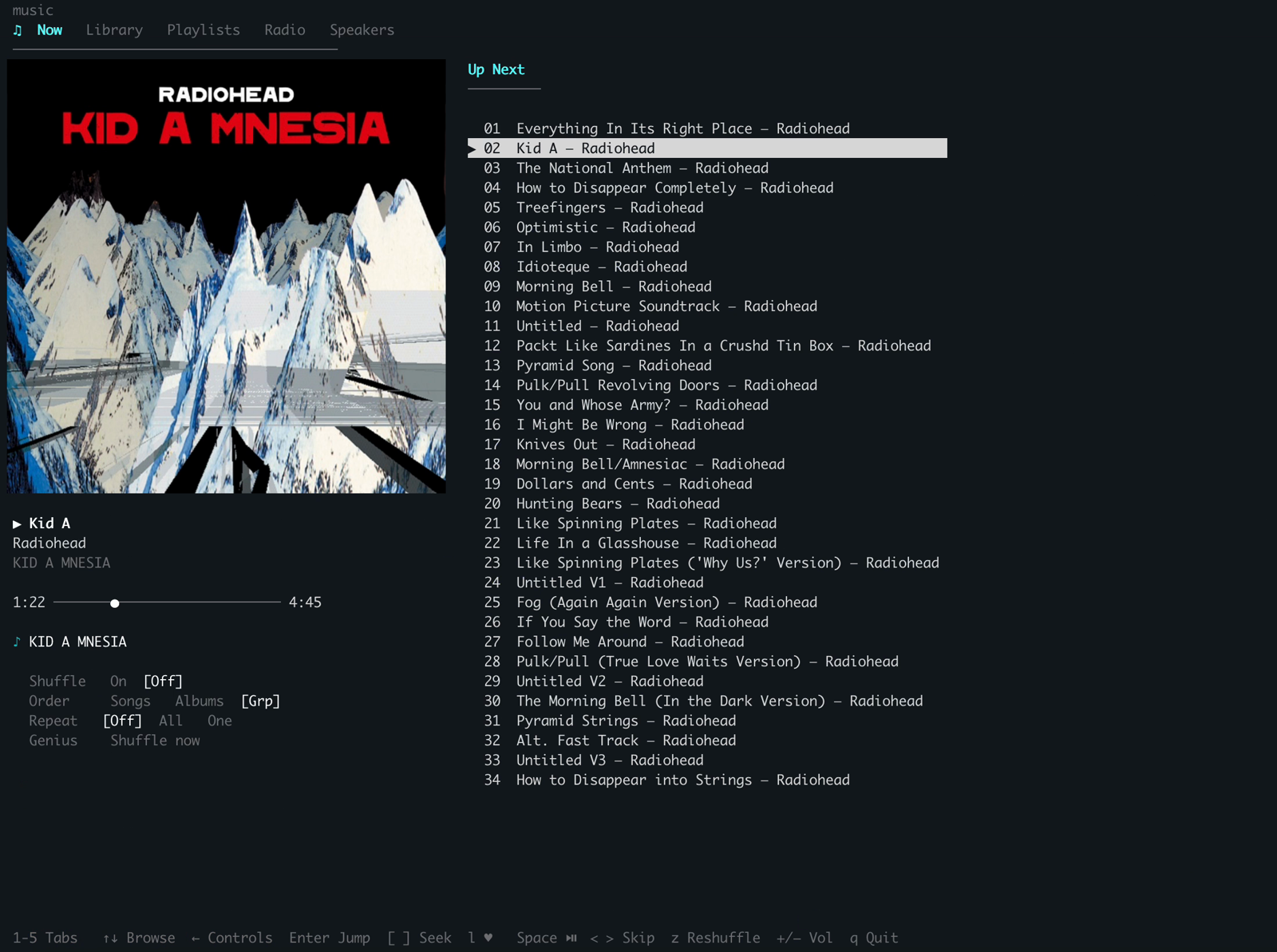
Unified shell (music) — a tabbed interface with Now, Playlists, and Speakers tabs. The Now tab shows a 3-column layout: album art, playback metadata, and a right pane. Select a playlist on the Playlists tab to pin it on the Now tab so you can browse and replay any track while playback continues.
Turn off Music's Autoplay (∞). Playlist track-selection and up/down navigation drive playback track-by-track and rely on a track stopping at its end. With Autoplay on, Music bleeds into the library between tracks. Disable it once in Music's Up Next panel (the ∞ button).
Global keys (work on every tab):
| Key | Action |
|---|---|
1/2/3 | Jump to Now / Playlists / Speakers tab |
Tab / Shift-Tab | Cycle tabs forward / backward |
Space | Play/pause |
< / > | Previous / next track (full up/down through the playlist) |
z | Shuffle-play the current context |
+/- | Master volume ±5 |
q | Quit |
Now tab:
| Key | Action |
|---|---|
↑/↓ | Navigate the track pane (or control rows, when the grid is focused) |
PgUp/PgDn/Home/End | Page and jump in long lists |
Enter | Play selected track (or cycle the focused control's value) |
← / → | Focus the control grid / return to the Up Next list |
[ / ] | Seek ±30s |
s / m | Shuffle on/off / cycle order (Songs → Albums → Groupings) |
r / g | Cycle repeat (Off → All → One) / Genius Shuffle |
l | Favorite the current track |
n | Next-up options (shuffle / playlist / quiet) |
Esc | Back / dismiss menu |
Under the track progress is a control grid (Shuffle / Order / Repeat / Genius) showing each value live with the active one lit — press ← to focus it, ↑↓ to move rows, Enter to cycle. Two markers in the track pane: green ▶ = currently playing, inverse video = cursor position. Genius Shuffle's queue isn't readable via Apple's scripting, so while it's active the Up Next reads "Genius Shuffle Active" rather than a (wrong) track list.
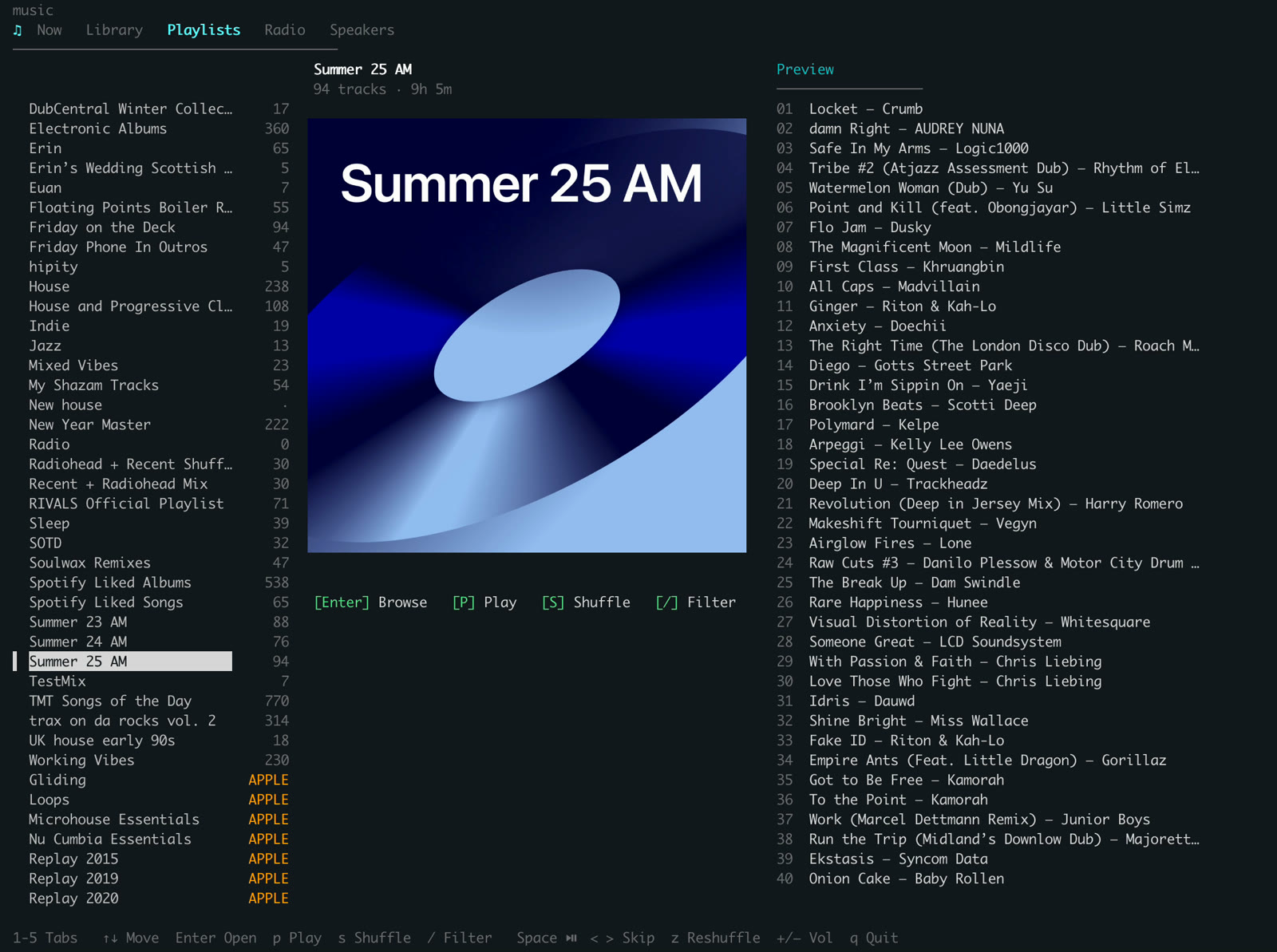
Playlists tab — left: playlists (instant highlight on ↑↓, no fetch; / filters as you type, arrows still navigate). Right: tracks (loaded on Enter, which also pins the playlist on the Now tab). p plays playlist, s shuffles, b/Esc goes back. Apple-curated playlists you've added to your library (Replay, Essentials, etc.) appear with an APPLE badge — no need to duplicate them, so they keep receiving Apple's weekly/monthly updates.
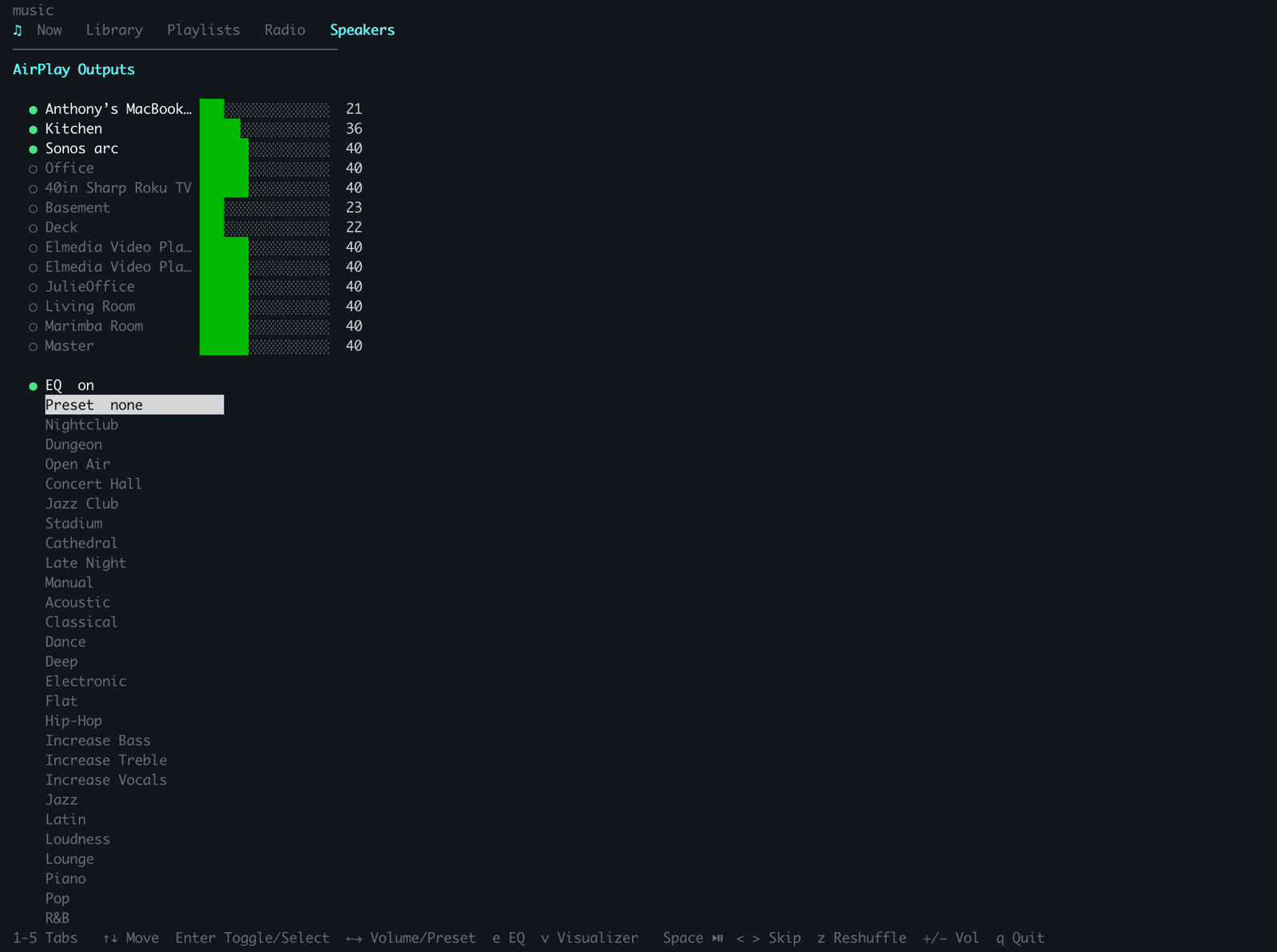
Speakers tab — ↑↓ select, Enter toggles AirPlay outputs on/off, ←→ adjusts per-speaker volume. Active speakers show volume bars. Below the outputs: an EQ block (power row + preset picker — Enter toggles/expands, e toggles from anywhere) and a Visualizer row (Enter or v toggles Music's on-screen visuals). (The music speaker, music eq, and music visualizer CLIs drive these non-interactively.)
Status Line
See what's playing at the bottom of Claude Code. Always visible, no token cost.
┌──────────────────────────────────────────────────────────────┐
│  claude >                                                    │
│                                                              │
├──────────────────────────────────────────────────────────────┤
│  ▶ Everything In Its Right Place — Radiohead  ·  Kitchen [60]│
└──────────────────────────────────────────────────────────────┘
Add to ~/.claude/settings.json (adjust the path to your plugin cache location):
{
  "statusLine": {
    "type": "command",
    "command": "~/.claude/plugins/cache/apple-music-marketplace/music/3.0.0/scripts/statusline.sh"
  }
}
The
2.0.0segment is the installed plugin version — it changes every time the plugin updates. Afterclaude plugin update, update this path to match (ls ~/.claude/plugins/cache/apple-music-marketplace/music/shows the current version).
What Needs Auth?
| Feature | No auth | Developer token | + User token |
|---|---|---|---|
| Play, pause, skip, stop, seek, shuffle, repeat | Yes | Yes | Yes |
| Speakers, volume, now playing, love/unlove | Yes | Yes | Yes |
| Catalog search | — | Yes | Yes |
| Add to library | — | — | Yes |
| Playlist CRUD via API | — | — | Yes |
| Similar, suggestions, new releases, mix | — | — | Yes |
| Recently played, heavy rotation | — | — | Yes |
How It Works
Everything routes through the music CLI. The /music skill turns natural language into CLI calls; the TUI and terminal use the CLI directly; transport keys talk to Music.app natively.
  Media keys ─────────────────────► Music.app (play/pause, next, previous)
  /music skill ──► music CLI ──► AppleScript (playback, speakers, volume)
  TUI / terminal ─┘          └──► REST API (catalog, library, playlists, discovery)
Search results are cached locally (~/.config/music/last-songs.json). When you run music search, music similar, or view playlist tracks, the numbered results persist so you can reference them by index in follow-up commands like music play 3 or music add 3 --to "House". Play commands show full now-playing info (track, album, speakers) after starting playback.
Speaker lists work the same way (~/.config/music/last-speakers.json). Run music speaker list, then music speaker 1 2 5 to add speakers by their numbers.
Requirements
- macOS (AppleScript is macOS only)
- Apple Music (comes with macOS)
- Automation permission (System Settings > Privacy & Security > Automation > enable for your terminal)
- Swift 5.9+ (only if building the music CLI)
- AirPods must be connected via Bluetooth to appear as a device
- chafa (optional,
brew install chafa— enables album art in now-playing TUI)
License
MIT