
Gerador de Campanhas de Prospecção Presencial para B2B SaaS
ammartaher/inperson-sales
Planeja e executa campanhas de prospecção presencial com rotas otimizadas
Ver no GitHubSkill para Claude Code que automatiza campanhas de cold-outreach físico/presencial. Pesquisa prospects em uma região, gera PDFs personalizados com branding de cada cliente, organiza em clusters geográficos otimizados para visitas, e exporta tudo pronto para impressão e navegação em Google Maps.
Instalação
npx convez-ai ammartaher/inperson-sales1 comando no terminal: detecta o formato do repositório (marketplace ou plugin avulso) e instala via Claude Code. Requer Node 18+ e o Claude Code instalado.
Métricas
Casos de uso
- Planejamento de campanhas de door-to-door para SaaS B2B
- Geração de artefatos personalizados (PDFs) por prospect com branding local
- Otimização de rotas de visita em clusters geográficos inteligentes
Veredito

Ferramenta niche e bem-construída para vendas presenciais de SaaS, com automação inteligente de pesquisa, personalização visual e otimização logística. Prático para equipes que ainda usam prospecção física como canal complementar.
README
A tradução para o português deste README ainda está na fila.
inperson
A Claude Code skill that plans and runs a physical / in-person cold-outreach campaign for any B2B SaaS — walks you through targeting → per-target branded artefacts → a clustered driving route, then packages everything ready to print and drive.
/inperson
What you get
Run the skill in any project, answer a handful of questions, and you end up with:
- A list of 20–50 prospects in your target region, researched from the web + any CSV / Notion / CRM you have.
- One branded PDF per prospect that looks like it came out of their own account on your SaaS — their logo, their colours, their company name on it. With a short "made by us, call X for a demo" CTA at the end.
- Geographic clusters — all prospects grouped into 5–10 driving areas so you do one neighbourhood per trip.
- A clusters page with one big "Open in Google Maps" button per cluster, plus links to print each prospect's PDF.
- A Google My Maps KML — import once, get all prospects as colour-coded pins, accessible from the Google Maps app on your phone.
Here's what the clusters page looks like:
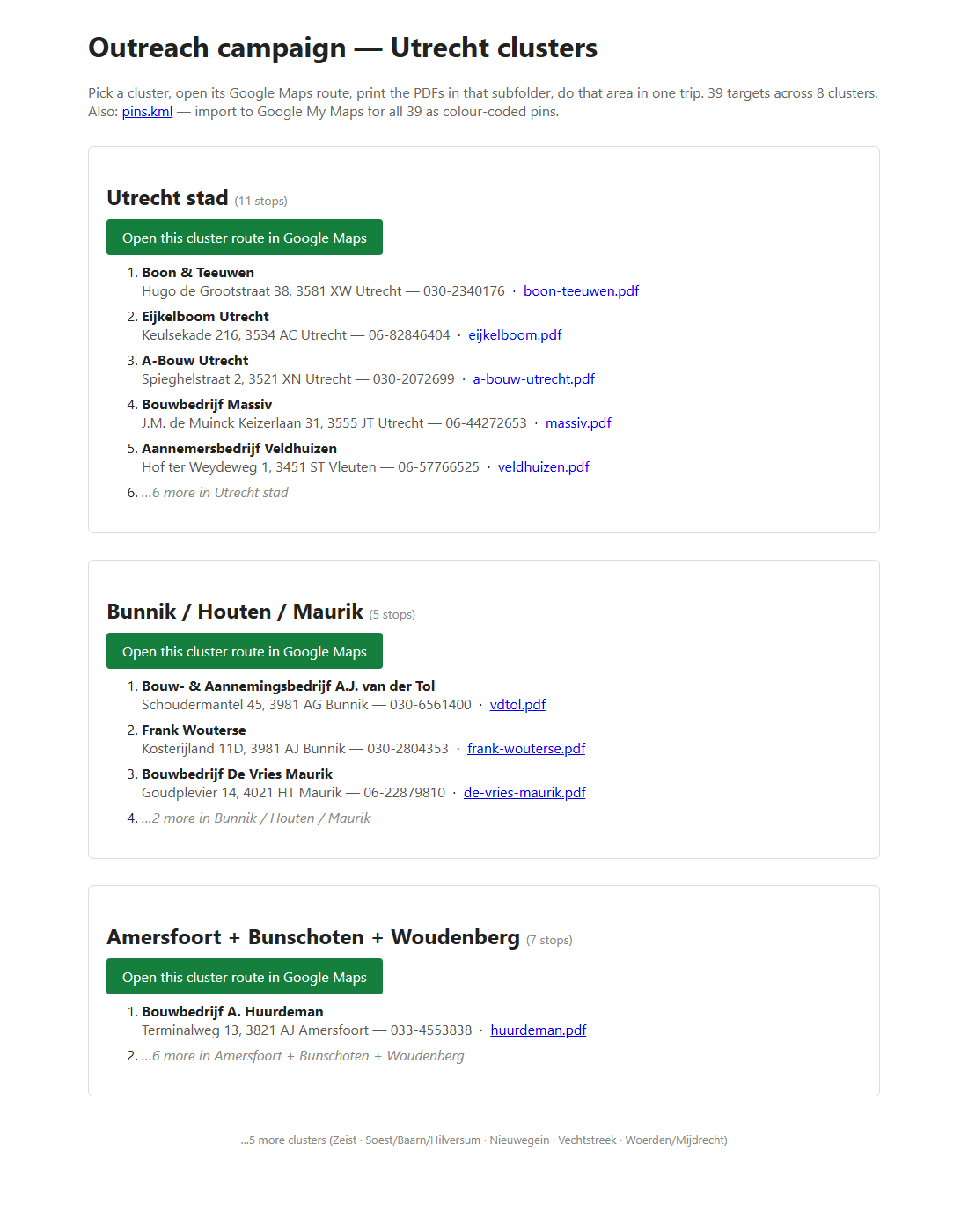
Each green button opens a real driving route in Google Maps with all stops in that cluster pre-filled. Each .pdf link opens the branded artefact for that prospect, ready to print.
Install
Pick the one that matches you.
👶 No-terminal install (easiest — for non-developers)
You just need to drop one folder into the right place on your computer. No commands.
- Download the skill. On this GitHub page, click the green
Codebutton (top right) →Download ZIP. Unzip wherever (usually goes to your Downloads folder). - Open the Claude skills folder.
- Windows: open File Explorer, click the address bar, paste this, press Enter:
(Creates the folder if it doesn't exist.)%USERPROFILE%\.claude\skills - Mac: in Finder press
Cmd + Shift + G, paste this, press Enter:~/.claude/skills
- Windows: open File Explorer, click the address bar, paste this, press Enter:
- Drag the
skills/inpersonfolder from the unzipped repo into the skills folder you just opened. (Only theinpersonfolder — not the whole repo.) - Restart Claude Code (close + reopen), or in a running session type
/reload-plugins. - Type
/inpersonin any project — it'll walk you through the rest.
⚡ One-line install (any AI coding agent)
If you're comfortable opening a terminal, this installs it cross-agent (Claude Code, Cursor, GitHub Copilot, Codex, Gemini, Cline, and others), via skills.sh:
npx skills add ammartaher/inperson-sales
🔧 Developer install (Claude Code plugin mode)
Load directly from this repo without installing — useful for testing the latest commit:
claude --plugin-dir https://github.com/ammartaher/inperson-sales
Then in your session: /inperson-sales:inperson.
The five phases the skill walks you through
- Intake — 10 quick questions: what your SaaS is, your ideal customer, your region, your phone number.
- Targets — finds 20–50 prospects via web search + any CSV / Notion / CRM you provide.
- Customise — finds your SaaS's per-customer template, builds a branding pack per target, writes a small script that rebrands and exports one artefact per prospect.
- Route — groups prospects into driving clusters, builds Google Maps routes + a KML for Google My Maps.
- Package — drops everything into
<your-project>/inperson/, ready to print.
Full phase details live in the skill files.
Honest things to know
- ~15% of B2B sites have logos that can't be auto-fetched (inline base64, white-only on transparent, behind a CDN with weird query params). The skill renders the artefact without a logo and flags those — it never blocks the run.
- The skill writes to your SaaS's dev/internal tenant only. It backs up the tenant's template before any write and restores it at the end. There's a safety check before it touches anything.
- The salesperson CTA on the artefact is gated behind an opt-in template field, so your real paying customers' artefacts never carry "made by us, call X" — only the ones generated by this skill do.
- Google Maps "Reorder stops" is mobile-only on the web UI. For clusters of more than 8 stops, the skill ships a path-format URL you can hit
Reorderon in the Google Maps app.
Origin
Distilled from a 9-day revenue sprint where a founder generated 39 per-target branded artefacts for prospects in one Dutch province, clustered them into 8 driving routes, and packaged everything for a Monday-morning blitz. The methodology turned out general enough for any B2B SaaS doing in-person cold outreach, so we extracted it into this skill.
Author
Built by Ammar Taher. Reach out on LinkedIn if you adapt this for your SaaS or want to swap notes on physical outreach.
License
MIT — see LICENSE.