
AI Sandbox
aktech/ai-sandbox
Sandbox Docker por projeto para agentes IA com isolamento de segurança
Ver no GitHubCria contêineres Docker isolados por projeto para executar agentes de codificação IA (Claude Code, Pi) com segurança. Cada projeto roda em seu próprio sandbox, impedindo que falhas afetem sua máquina local. A ferramenta oferece controle fino sobre mounts, recursos e portas via CLI simples.
Instalação
npx convez-ai aktech/ai-sandbox1 comando no terminal: detecta o formato do repositório (marketplace ou plugin avulso) e instala via Claude Code. Requer Node 18+ e o Claude Code instalado.
Métricas
Casos de uso
- Executar agentes de IA sem risco à máquina host
- Isolar projetos com dependências conflitantes
- Testar código gerado por IA em ambiente controlado
- Expor portas de desenvolvimento de forma segura
Veredito

Ferramenta prática para quem trabalha com agentes IA e quer isolamento sem overhead. Implementação clara em Go, documentação direta. Útil especialmente para times que executam code-gen frequentemente.
README
A tradução para o português deste README ainda está na fila.
ai-sandbox


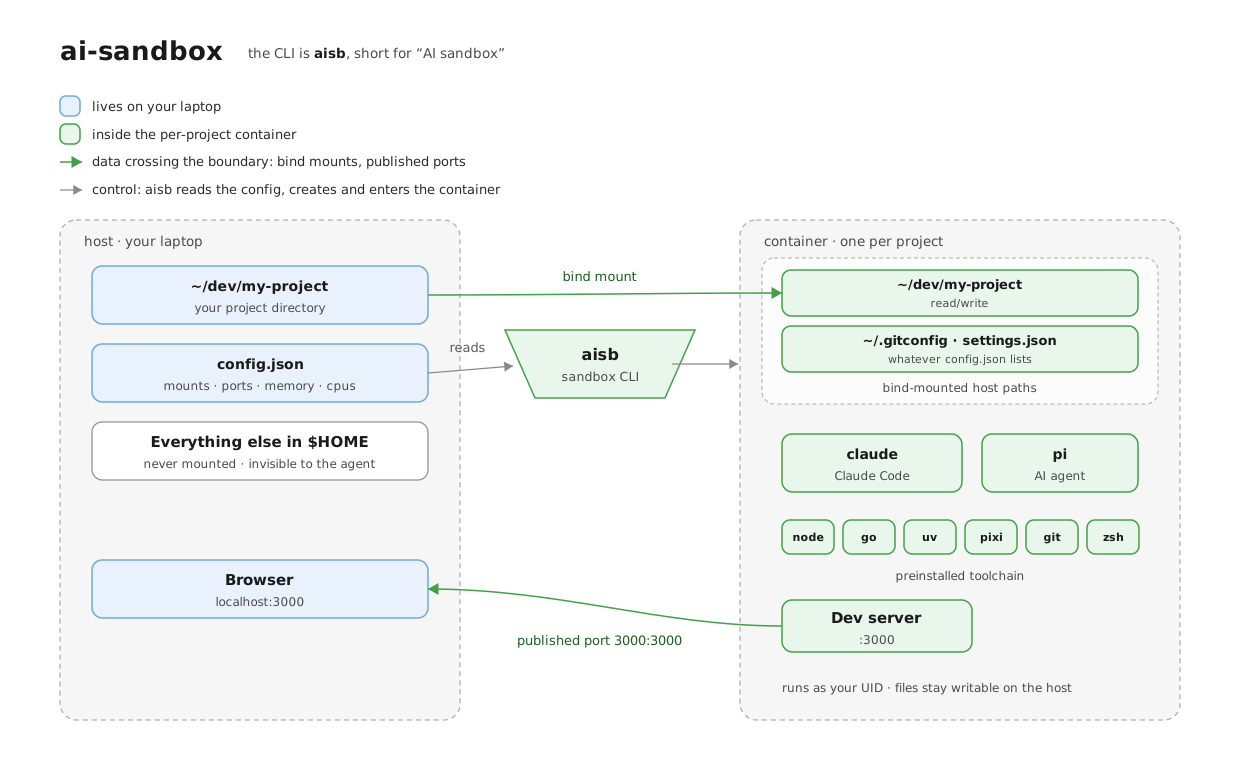
Run AI coding agents (Claude Code, pi, etc.) in a Docker container instead of directly on your laptop. Each project gets its own container, and the container can only see the folders you explicitly mount in. If the agent goes wrong, you lose the container — not your home directory.
The CLI is called psb. One command spins up (or re-enters) a sandbox
for the current project and drops you into a shell where claude and
pi are already installed.
Install
make build       # builds ./bin/psb — put it on your $PATH
psb build        # builds the Docker image (one-time, ~5 min)
You need Docker running. On macOS, colima
works well (colima start).
Use it
cd ~/dev/my-project
psb              # first run: creates a container, drops you into zsh
                 # next runs: re-enters the same container
Inside the container, run claude or pi like you normally would.
| Command | What it does |
|---|---|
psb | Enter the sandbox for the current project. |
psb stop | Stop the current project's container. |
psb rm | Delete the current project's container. |
psb ls | List all sandboxes. |
psb status | Show one container's status. |
psb build | Rebuild the image. |
What gets mounted
By default the container only sees the project directory. Anything else
you want available — your .gitconfig, dotfiles, a shared library — you
list in a config file:
~/.config/ai-sandbox/config.json
{
  "default": {
    "mounts": [
      "{{HOME}}/.gitconfig",
      "{{HOME}}/.claude/settings.json",
      "{{CWD}}"
    ]
  },
  "projects": {
    "/Users/me/dev/my-project": {
      "extra_mounts": ["~/dev/shared-lib"],
      "memory": "8g",
      "cpus": 4,
      "ports": ["3000:3000", "8000:8000"]
    }
  }
}
mounts— the full list. Each entry becomes a-vbind mount. Writesrcto mount a host path at the same path inside the container, orsrc:destto mount it at a different path (e.g. a repo-local gitconfig at~/.gitconfiginside the sandbox).extra_mounts— appended tomounts. Use for per-project additions.memory,cpus,image— optional per-project overrides.ports— each entry becomes a-p host:containerpublish, so a server you start inside the sandbox is reachable from your laptop browser. With"3000:3000", a dev server on:3000inside shows up athttp://localhost:3000on the host.
Two sandboxes can both serve :3000 inside, but the host side of a
publish is shared: if two projects map to the same host port (e.g. both
"3000:3000"), only the first container binds and the second fails with
port is already allocated. Give each project a distinct host port for
the same container port: "3001:3000", "3002:3000", and so on. Ports are
fixed when the container is created, so changing them needs psb rm
followed by psb.
Placeholders: {{HOME}}, {{CWD}}, {{SHARED_DIR}}. Shell-style ~/
and $VAR also work, on both sides of a src:dest entry. Paths that
don't exist on the host are skipped with a warning.
Environment overrides
| Var | Default |
|---|---|
PSB_IMAGE_NAME | ai-sandbox-pi:latest |
PSB_MEMORY | 4g |
PSB_CPUS | 2 |
PSB_SHARED_DIR | ~/sb-shared |
PSB_CONFIG_FILE | ~/.config/ai-sandbox/config.json |
ANTHROPIC_API_KEY | passed through to the container |
What's in the image
Debian slim with claude, pi, Node, Go, uv, pixi, git, zsh.
The container runs as a non-root user whose UID/GID matches your host,
so files you create inside stay writable from outside.