
AEO Auditor
AJ-EN/aeo-audit
PageSpeed para agentes de IA — audita readiness de websites
Ver no GitHubMCP server que audita sites para medir readiness de IA, analisando 26 verificações em 5 dimensões: Discovery, Identity, Capabilities, Commerce e Trust. Gera relatórios em terminal, HTML, PDF e JSON com scores comparativos contra benchmark de agent-readiness.
Instalação
npx convez-ai AJ-EN/aeo-audit1 comando no terminal: detecta o formato do repositório (marketplace ou plugin avulso) e instala via Claude Code. Requer Node 18+ e o Claude Code instalado.
Métricas
Casos de uso
- Avaliar se um website está otimizado para descoberta e integração por agentes de IA
- Diagnosticar pontos fracos em identidade digital, capacidades e sinais de confiança
- Gerar relatórios estruturados (HTML, PDF, JSON) de conformidade AEO para stakeholders
Veredito

Ferramenta especializada e bem-arquitetada para avaliar a prontidão de websites para agentes de IA. Preenche um nicho claro com abordagem rigorosa (26 checks, scoring relativo), mas o mercado de AEO é ainda emergente — útil principalmente para desenvolvedores de plataformas de agentes ou empresas que buscam otimização proativa.
README
A tradução para o português deste README ainda está na fila.
AEO Auditor CLI


PageSpeed for AI agents. Scan any website and score its Agent/Engine Optimization (AEO) readiness across 5 dimensions — Discovery, Identity, Capabilities, Commerce, and Trust — then get a graded report with prioritized, actionable fixes.
Grades are relative: a site is ranked against a benchmark corpus (A = top tier of agent-readiness today), so the score stays a meaningful, movable target while agent-native standards are still emerging.
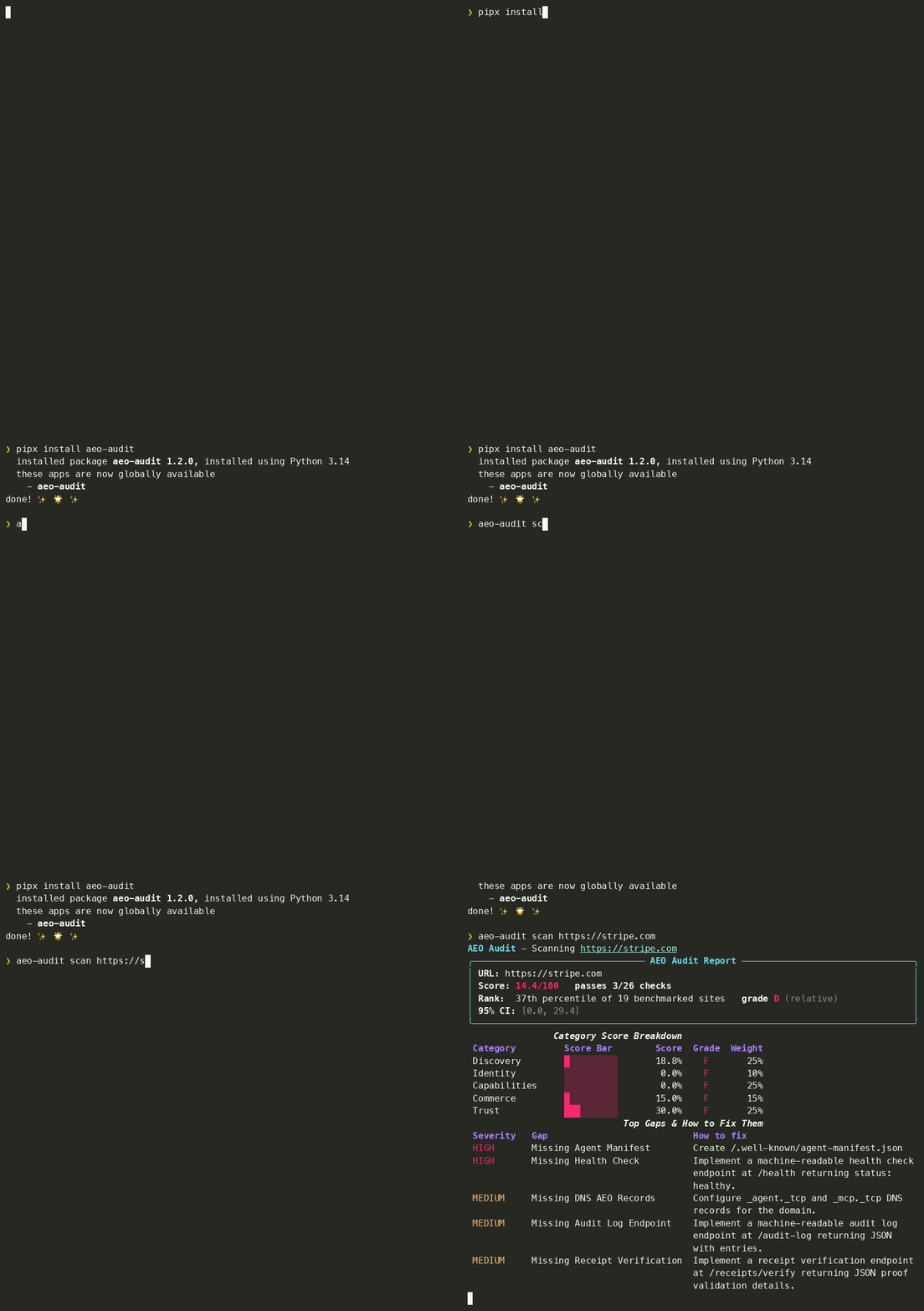
⚡ Try it in your browser — paste a URL, get a scorecard in ~30s — no install, no signup. (Rate-limited; the CLI below is unlimited.)
🔗 Live leaderboard, methodology & example report → aj-en.github.io/aeo-audit
Architecture Overview
graph TD
    CLI[CLI: aeo-audit] --> Engine[ScanEngine]
    Engine --> Config[ConfigLoader]
    Engine --> Crawler[Playwright Crawler]
    Engine --> Registry[CheckRegistry]
    Crawler --> Fetch[Fetch URL & Render DOM]
    Registry --> Run[Run 26 Audit Checks]
    Run --> Score[Scoring Pipeline]
    Score --> Reporter[ReporterFactory]
    Reporter --> Terminal[Rich Terminal]
    Reporter --> HTML[HTML Report]
    Reporter --> PDF[WeasyPrint PDF]
    Reporter --> JSON[JSON Metadata]
Installation
1. System Dependencies (Required for WeasyPrint PDF)
PDF reports require external layout libraries installed on your OS:
-
macOS (Homebrew):
brew install pango cairo gdk-pixbuf upx -
Ubuntu/Debian:
sudo apt-get update
sudo apt-get install -y libpango-1.0-0 libcairo2 libgdk-pixbuf-2.0-0 upx
2. Install Methods
Method A: Via pip / pipx (Recommended)
pipx install aeo-audit      # isolated CLI install (recommended)
# or:  pip install aeo-audit

# bleeding edge from main:
# pipx install git+https://github.com/AJ-EN/aeo-audit.git
That's it — on your first scan, aeo-audit downloads the headless Chromium it needs automatically (one-time, ~30s). To pre-install it yourself:
playwright install chromium
Method B: Standalone Binary Installer (No Python Needed)
Run the automated installation script:
curl -fsSL https://raw.githubusercontent.com/AJ-EN/aeo-audit/main/scripts/install.sh | bash
[!IMPORTANT] The binary still needs a Chromium runtime. If a scan reports a missing browser, install one with
playwright install chromiumand point the binary at it:export PLAYWRIGHT_BROWSERS_PATH="$HOME/Library/Caches/ms-playwright"(macOS) or the equivalent cache path on your OS.
Method C: Source installation
git clone https://github.com/AJ-EN/aeo-audit.git
cd aeo-audit
pip install -e .
playwright install chromium
[!NOTE] If WeasyPrint throws rendering or font warnings on Python 3.14+, we recommend pinning
pydyf==0.10.0.
Quick Start
Scan a site and generate reports using the scan command:
# Terminal report (default)
aeo-audit scan https://api.example.com --format terminal

# Premium HTML report with embedded graphs
aeo-audit scan https://api.example.com --format html --output report.html

# Accessible PDF report
aeo-audit scan https://api.example.com --format pdf --output report.pdf

# Machine-readable JSON report
aeo-audit scan https://api.example.com --format json --output report.json
Scoring & Grading
Each of the 26 checks returns a raw score (0.0–1.0). Checks roll up into 5 weighted category scores, which roll up into a single 0–100 overall score. The grade is then assigned by percentile rank against a benchmark corpus — so it reflects how a site compares to the field, not an absolute bar that nobody clears yet.
Category weights
aeo-audit is foundation-weighted: dimensions where well-run APIs already differ today (Trust, Capabilities, Discovery) carry the most weight, while emerging agent-native dimensions (Identity, parts of Commerce) contribute upside without dominating the score.
| Category | Weight | What it measures |
|---|---|---|
| Discovery | 0.25 | robots/agent access, sitemap, .well-known, DNS, and MCP discovery. |
| Capabilities | 0.25 | Interface docs — OpenAPI, JSON Schema, GraphQL, async webhooks. |
| Trust | 0.25 | SLA/status page, structured errors, health checks, audit logs. |
| Commerce | 0.15 | Agent transactions — pricing, Stripe/crypto hints, usage metering. |
| Identity | 0.10 | Ownership & auth — DID docs, OAuth metadata, wallet hints. |
Grade bands (percentile)
| Grade | Percentile | Meaning |
|---|---|---|
| A | top 10% | Leading the field on agent-readiness. |
| B | top 30% | Strong; a few high-leverage gaps. |
| C | top 60% | Foundational signals present, frontier gaps. |
| D | top 85% | Minimal agent-readiness. |
| F | bottom 15% | Not addressed. |
Weights, thresholds, and grade bands are all defined in config.yaml and overridable via a custom config. See docs/CONFIG_REFERENCE.md.
CI/CD Pipeline Integration
You can easily configure aeo-audit as a compliance block (exits with code 2 if scores drop below requirements). Here's a brief example for GitHub Actions:
- name: AEO Compliance Gate
  run: aeo-audit scan https://preview.example.com --fail-on-grade B --format terminal
See docs/CI_RECIPES.md for GitHub Actions, GitLab CI, and Git hooks code snippets.
Extending: Custom Check Plugins
To implement custom checking rules, subclass BaseCheck and expose it under the aeo_audit.checks entrypoint.
See docs/CUSTOM_CHECKS.md for a complete template walkthrough.
FAQ
1. How do I install Playwright browser binaries?
If running the scanner for the first time, you may need to install Playwright's headless browser binaries:
playwright install chromium
2. Where is the SQLite cache stored?
By default, the SQLite cache database is created in your working directory as .aeo_cache.db to speed up consecutive audit scans. This can be customized or disabled using --no-cache.
3. Why are my PDF files empty or raising font errors?
Ensure you have installed the native pango and cairo system dependencies (see Step 1 of installation).
4. Can I self-host the browser demo?
Yes — the hosted "paste a URL, get a scorecard" demo lives in webdemo/ and wraps the exact same ScanEngine the CLI runs. It ships with a Dockerfile (Chromium baked in), a Fly.io config that scales to zero, SSRF guarding, and per-IP rate limiting. See webdemo/README.md.