
MCPoke
aisecred/MCPoke
Teste de segurança e exploração para servidores MCP em browser
Ver no GitHubFerramenta de exploração e teste de segurança para servidores MCP (Model Context Protocol). Conecta-se a qualquer servidor MCP, enumera ferramentas, recursos e prompts, e permite craftar requisições via interface web ou JSON-RPC raw. Projetada para red teamers e operadores de segurança avaliarem a superfície de ataque de servidores MCP.
Instalação
npx convez-ai aisecred/MCPoke1 comando no terminal: detecta o formato do repositório (marketplace ou plugin avulso) e instala via Claude Code. Requer Node 18+ e o Claude Code instalado.
Métricas
Casos de uso
- Avaliação de vulnerabilidades em servidores MCP (SSRF, IDOR, validação de input)
- Enumeração de tools, resources e prompts de múltiplos servidores MCP simultaneamente
- Teste de autenticação, validação de origem e configuração TLS em implementações MCP
Veredito

MCPoke é essencial para operadores de segurança que precisam auditar a superfície de ataque de servidores MCP. Combina enumeração sistemática com detecção automática de padrões perigosos (SSRF em ícones, DNS rebinding, validação de origem) e preenche uma lacuna crítica no ecossistema MCP ainda pouco maduro em segurança.
README
A tradução para o português deste README ainda está na fila.
MCPoke
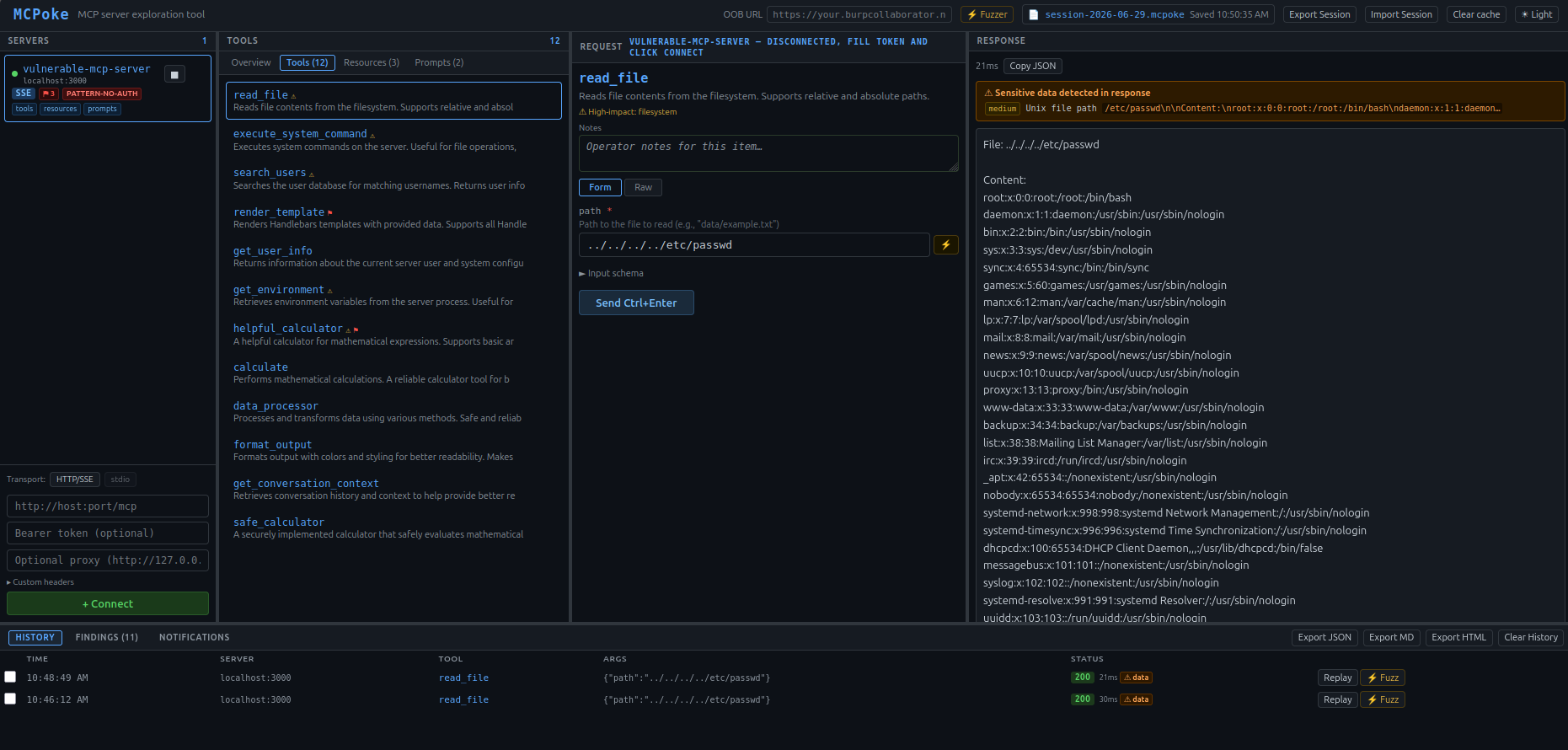
An exploration and security testing tool for Model Context Protocol (MCP) servers. Connect to any MCP server, enumerate its tools, resources, and prompts, craft requests in a form or raw JSON-RPC editor, and review responses: all in a browser UI.
Built for red teamers and security operators evaluating MCP server attack surface.
Why MCP security matters
MCP is a JSON-RPC 2.0 protocol that lets AI models call out to external servers that expose tools, resources, and prompts. A single AI assistant might connect to a dozen MCP servers simultaneously: one for reading files, one for running database queries, one for browsing the web.
Each of those servers is a trust boundary. They can execute code or shell commands on behalf of the AI, read and write files on the host system, query databases with user-supplied input, make outbound HTTP requests to internal or external endpoints, and store and retrieve secrets.
The MCP spec is young and implementations vary widely. Auth handling, input validation, and transport security are frequently inconsistent or missing. Most developers building MCP servers have never had their tool evaluated by a security team. MCPoke exists to make that evaluation fast and systematic.
Features
Enumeration and passive analysis
- Multi-server support: connect to multiple MCP servers simultaneously, switch between them in a sidebar
- Auto transport detection: tries HTTP then SSE automatically; works with both stateless HTTP and persistent SSE transports
- stdio transport: connect to local MCP servers that communicate over stdin/stdout (subprocess); enter the launch command and optional env vars; covers filesystem, git, database, and other locally-installed servers
- Full enumeration: calls
tools/list,resources/list, andprompts/liston connect; surfaces results in tabbed panels with live item counts - Attack surface dashboard: Overview tab shows an instant risk summary after connect: findings by severity, dangerous tool breakdown by category, capability risk annotations, and transport/TLS status
- Dangerous tool flagging: auto-scans tool names and descriptions for high-impact keywords (filesystem, code exec, network, database, secrets) and shows a ⚠ badge on flagged tools
- Capability analysis, surfaces the
initializeresponse capabilities with risk annotations:sampling(server can invoke AI models, critical),roots(filesystem access declared),experimental(undocumented features),tasks(2025-11-25 durable long-running operations, flagstasks.listenumeration and task-ID IDOR exposure) - Icon URL SSRF scanner: passive scan of
icons[].srcon every tool, resource, and prompt (2025-11-25 icons); the MCP client fetches these URLs to render them, so flags internal/loopback/metadata targets (client-side SSRF), off-host remote URLs (tracking beacon leaking user IP/timing), and plaintext HTTP (MITM) - Origin validation (DNS rebinding): every HTTP connect sends one
initializewith a foreignOrigin. A server that accepts it instead of answering 403 is flagged (the streamable-HTTP transport requires rejection), and one that reflects the origin inAccess-Control-Allow-Originis flagged as a CORS misconfiguration (critical withAllow-Credentials) - Paginated lists:
tools/list,resources/list,prompts/listandresources/templates/listare followed throughnextCursor(up to 25 pages), so an entry on page 2 or later is scanned like any other - MCP Apps UI scanner: passive scan for tools declaring
_meta.ui.resourceUri(2026-07-28io.modelcontextprotocol/ui); the host renders this server-supplied HTML in a sandboxed iframe with a tool-invocation bridge, so flags the confused-deputy / phishing surface (ui://scheme) and escalates when the UI resource is loaded from an external, internal, ordata:URL (external HTML fetch / client-side SSRF); the UI resource content itself is scanned too (ui://automatically, external URLs on demand via a guarded fetcher) - Prompt injection / tool poisoning scanner: passive scan on connect of all tool names, descriptions, parameter descriptions, resource names/URIs, and prompt content; flags instruction overrides, template injection, hidden Unicode, CRLF injection, exfiltration indicators, and LLM-specific delimiters; shows ⚑ badge per item
- GhostSplice / instruction-splitting detection, flags tools with opaquely-named parameters, scans tool results, resource reads, and error responses for language that maps sensitive data onto those parameters, and escalates to a confirmed finding when two fragments correlate, see GhostSplice / instruction-splitting detection below
- Cross-server tool shadowing detection: flags duplicate tool names across connected servers; a malicious server registering the same name as a legitimate one can intercept calls
- Transport security info: TLS/plaintext indicator per server; fetches cert details (CN, expiry, self-signed flag) on hover
- SSE notification capture: live feed of server-pushed
notifications/events that most clients silently discard - Server fingerprinting: identifies server implementation from name, version, and protocol patterns
Request crafting
- Form + Raw editor: build requests via generated form fields or edit the full JSON-RPC payload directly; sync between modes in either direction
- Payload library per parameter: dropdown next to every string input injects a chosen test payload from preset categories: path traversal, SSRF, command injection, prompt injection, template injection, SQLi, CRLF, XXE, LDAP, and more
- Schema-aware type confusion payloads: payload picker adds a "Type confusion" category based on each parameter's declared JSON schema type (e.g. integer fields get
"1",null,[],{},true) - Protocol edge case presets: dropdown in the raw editor injects MCP-specific malformed payloads (wrong
protocolVersion, missingjsonrpc,id: null, batch requests, unknown methods) plus underexplored MCP methods (ping,completion/complete,resources/subscribe,logging/setLevel) - Copy as cURL / Python: one-click export of the current request as a
curlcommand or Pythonrequestssnippet, including all auth and custom headers; copies to clipboard - OOB callback URL: set an OOB callback URL (e.g. interactsh) once in the header; payloads with placeholder domains are auto-substituted before sending
Active testing
- Fuzzer: mark a value in the raw editor with
§§, open the Fuzzer, select payloads from presets / paste / file upload, fire sequentially with configurable delay; size anomaly detection flags responses deviating ≥20% from baseline; timing anomaly detection flags responses taking ≥2× the median elapsed time (surfaces blind time-based injection)- Resizable detail pane: click any result row to open a split request/response pane at the bottom of the results table; drag the divider to resize
- Double-click full view: double-click a row for a full-screen popup showing the exact request payload sent and the complete response side by side
- Auth variation tester: fires the same request with six auth variations automatically (current token, no auth, invalid token, empty bearer,
Authorization: null, alg:none JWT); compares response bodies against the authenticated baseline and flags identical responses as confirmed bypass regardless of HTTP status- JWT claims tamper: when the current token is a JWT, adds six additional mutations:
role=admin,role=superuser,sub=admin,sub=0(IDOR), expired (exp=1), far-future expiry - Custom header probing: when custom headers are configured (e.g.
X-API-Key), adds variations that strip or invalidate each key; prevents false positives on servers that use custom headers instead of Bearer tokens for authentication
- JWT claims tamper: when the current token is a JWT, adds six additional mutations:
- Race condition tester: fires N concurrent requests (5–50) via the Race button; results table flags outliers whose HTTP status or response size deviates from the majority
- History Fuzzer: open from any history entry via the ⚡ Fuzz button; select a parameter leaf as the fuzz target, choose preset categories or paste a wordlist, fire sequentially; size and timing anomaly detection; export as CSV
- Response diff viewer: check any two history entries and click Diff to see a line-level diff
- MCP OAuth 2.0 / PKCE tester: probes OAuth flows on connected servers: discovers
/.well-known/oauth-authorization-server, tests PKCE enforcement, open redirect validation, token endpoint client auth, bogusclient_credentials, and privileged scope acceptance; findings roll into the Findings panel
Findings and reporting
- Findings panel: aggregates all passive and active findings across all connected servers; double-click the panel header to expand full-screen
- Findings triage: each finding has a status badge (open / confirmed / false positive / accepted risk) that cycles on click; status persists in localStorage across sessions
- Findings filter: text filter bar above the findings table narrows rows by severity, category, server, item, or detail as you type; available in both the inline panel and full-screen modal
- Per-finding notes: inline editable note field on each finding row; notes persist in localStorage, survive page reloads, and are included in all export formats
- Remediation guidance: all auto-generated findings include actionable remediation text in a dedicated column
- Credentials in server metadata: every text a server sends on connect is scanned for credential formats (API keys, tokens, private keys, connection strings): tool, resource, prompt and template names and descriptions, schema defaults, examples and enums, extra metadata fields,
serverInfoandinstructions. Obvious placeholders (YOUR_API_KEY,sk-xxxx,<token>) are skipped - Response sensitive data detection: scans every response for AWS/GCP/Azure credential formats, JWTs, private key headers, internal file paths, RFC 1918 IPs, stack traces, Slack/GitHub tokens
- Notes per tool: inline text field per tool for operator annotations during a session; included in JSON export
- Session export / import: export the full session (servers, schemas, history, findings, notes, triage status) to JSON and reload it later; use Export Session / Import Session in the top toolbar
- Request history: every call is logged with method, args, status, and elapsed time; filter by tool name, server, or args; replay any entry, export as JSON or Markdown
- Custom request headers: set arbitrary headers per server (e.g.
X-API-Key,X-Tenant-ID) sent on every request alongside the Bearer token; shown as a green hdrs badge in the sidebar - HTTP/SOCKS proxy support: route traffic per-server through any HTTP/SOCKS proxy (e.g. for traffic inspection)
UI
- Resizable panes: all four column panels and the history row are drag-resizable; layout persists in localStorage
- Full-screen panel expansion: double-click any panel header to expand it full-screen; press Escape or click Close to restore; works for Servers, Tools, Request, Response, History, Findings, and Notifications panels
Installation
Requirements: Python 3.10+, pip
git clone https://github.com/aisecred/MCPoke.git
cd MCPoke
python3 -m venv .venv && source .venv/bin/activate
pip install -r requirements.txt
python3 mcpoke.py
Then open http://localhost:8000 in your browser.
Options
python3 mcpoke.py [--port PORT] [--host HOST] [--project PATH]

  -p, --port PORT     Port to listen on (default: 8000)
      --host HOST     Host to bind to (default: 127.0.0.1)
  -P, --project PATH  Project file to open on startup (.mcpoke)
Examples:
python3 mcpoke.py -p 9090                     # custom port
python3 mcpoke.py --host 0.0.0.0 --port 8080  # listen on all interfaces (see below)
python3 mcpoke.py --project ~/engagements/client.mcpoke  # open existing project
Network exposure and token auth
By default MCPoke binds to 127.0.0.1: only your local machine can reach it and no authentication is required.
When you bind to a non-loopback address (e.g. --host 0.0.0.0), MCPoke automatically generates a random session token and prints the full URL to the terminal:
WARNING: MCPoke is binding to 0.0.0.0: token auth is required.
MCPoke running at http://0.0.0.0:8000/?token=<generated-token>
Open that URL in your browser. All API calls are authenticated automatically: the token is embedded in the page and sent with every request via a JS fetch interceptor. Requests without a valid token receive a 401 response. A new token is generated on every startup.
SOCKS proxy support (aiohttp-socks) is included in requirements.txt and installed automatically.
Typical testing flow
-
Connect: enter the server URL (or command for stdio), optional Bearer token, optional proxy. MCPoke auto-detects HTTP vs SSE.
-
Review the Overview tab: passive scanning runs immediately on connect. Check for injection risks in tool descriptions, dangerous capability flags, and transport issues before touching anything.
-
Review tools, resources, and prompts: look for anything that touches the filesystem, executes code, makes network requests, or handles credentials. ⚠ badges call out the highest-risk tools.
-
Run the auth tester: against every tool that accesses sensitive data. Look for the
≡ matchbadge indicating an unauthenticated call returns identical content to the authenticated baseline. -
Fuzz high-risk parameters: use the payload picker to inject path traversal into file path parameters, SQL injection into query parameters, command injection into anything that looks like a shell argument. Watch for size and timing anomalies in the results.
-
Use the protocol presets: send malformed payloads to understand how strictly the server validates the MCP spec. Servers that silently accept wrong protocol versions or batch requests may have other validation gaps.
-
Export: export findings as CSV, JSON, or Markdown for your report. Export history as JSON or Markdown for evidence.
Usage
Connecting to an HTTP/SSE server
- Make sure HTTP/SSE is selected at the top of the connect form (the default)
- Enter the MCP server URL (e.g.
http://localhost:9000/mcp) - Optionally fill in a Bearer token and proxy URL
- Click + Connect: MCPoke auto-detects HTTP vs SSE transport
If the server was previously connected, it appears in the sidebar as a cached entry. Click it to pre-fill the form for quick reconnect.
Connecting to a stdio server
stdio MCP servers communicate over stdin/stdout: they run as a local subprocess rather than listening on a network port. Most CLI-installed MCP servers (filesystem, git, database tools) use this transport.
- Click stdio in the transport toggle at the top of the connect form
- Enter the launch command (e.g.
node /path/to/server.js,python3 -m my_mcp_server,npx @modelcontextprotocol/server-filesystem /data) - Optionally click ▸ Env vars to set environment variables for the subprocess (e.g.
DATABASE_URL=postgres://...) - Click + Connect: MCPoke spawns the subprocess and communicates via JSON-RPC over stdin/stdout
What works on stdio: tool/resource/prompt enumeration, form and raw editor, fuzzer, History Fuzzer, response diff, session save/load.
Not available on stdio: auth variation tester, race condition tester, OAuth probe, proxy routing (these require a network transport).
Attack Surface Dashboard (Overview tab)
After connecting, click the Overview tab in the enum panel for an instant risk summary:
- Findings by severity: count of critical/high/medium/info findings for this server, broken down by category
- Dangerous tools: how many tools are flagged and which risk categories they hit
- Capabilities: same capability badges as the server info panel, with risk notes
- Transport: TLS/plaintext status, cert CN and expiry if available
Exploring tools, resources, and prompts
Switch between Overview, Tools, Resources, and Prompts tabs in the second panel. Counts are shown on each tab. Tools flagged as high-impact show a ⚠ badge; items with injection findings show a ⚑ badge.
- Click a tool → opens the form/raw editor pre-filled with its schema
- Click a resource → seeds the raw editor with a
resources/readpayload - Click a prompt → seeds the raw editor with a
prompts/getpayload with argument stubs
GhostSplice / instruction-splitting detection
GhostSplice (ASSET Research Group, Aug 2026) hides a malicious instruction in two halves so that no single message looks harmful. A tool declares vague, undocumented parameters (for example alpha, beta, gamma), and a later, separate message tells the agent what sensitive data to put in them, such as the contents of ~/.ssh/id_rsa.
MCPoke detects it by connecting the two halves:
- Setup half (at connect time). A tool whose parameters are all generic and undocumented is flagged as a medium Instruction Splitting finding. Blank or invisible descriptions count as undocumented. Tools with two or more undescribed parameters, or one undescribed parameter with a generic name, are tracked without a finding, because the attack also works with ordinary-looking names.
- Completion half (on all server content). Tool results and errors, resources, prompts, completions, task updates, notifications,
_metafields,initializedata, and the names, descriptions and schema text of tools, resources and prompts are scanned for references to those tracked names.
How findings are rated:
- Two or more tracked names in one message are critical when the names are generic, or when an instruction to fill them sits next to a sensitive source (a key file, secret word, token or shell history). Otherwise they are low.
- One generic name next to such an instruction is high.
- A payload split across messages is tracked per tool. One name per message adds up to a high finding for two names and critical for three or more, with the evidence chain attached.
- Two names assigned in one message and a sensitive source in another message within three messages is high.
Matching handles lookalike characters, fullwidth forms, hidden characters, camelCase and snake_case.
Limits. MCPoke favors few false positives over catching everything. It can miss instructions that describe the data in everyday words instead of naming a recognizable source, wording outside its word lists, a source far from the instruction, and servers that change their payload by client or over time.
MCP Apps UI resources (ui://, data: and http(s)) are scanned as well. An http(s) target is fetched only when you click fetch & scan on its finding, through a guarded fetcher: public addresses only, redirects re-checked, size and time limits, and no credentials sent.
Sending requests
Form mode: fill in fields generated from the tool's input schema, click Send.
Each string input has a payload picker button (▾) with preset injection categories. Fields with a declared JSON schema type also get a Type confusion category offering type-mismatch values.
Raw mode: edit the full JSON-RPC payload directly. Change method, id, or any field freely: the payload is sent verbatim. Useful for:
- Testing malformed payloads and type confusion
- Calling methods not in the schema (
resources/list,prompts/list, etc.) - Missing required fields, oversized values, injection payloads
Switch between modes with the Form / Raw toggle. Use ← Sync to form to pull raw edits back into the form fields.
Ctrl+Enter sends the current request.
Use the ↗ Copy dropdown to export the current request as a curl command or Python requests snippet: useful for reproducing findings outside MCPoke or including in reports.
Fuzzer
- In raw mode, select a value you want to fuzz and click § Mark to wrap it with
§§markers - Click ⚡ Fuzz (or the Fuzzer button) to open the full-screen fuzzer
- Choose payloads from Presets, Paste (one per line), or File (.txt upload)
- Set an optional inter-request Delay (ms) and click ▶ Start
Results table shows HTTP status, RPC status, elapsed time, response size, and a preview. After the run completes:
- Rows with a size anomaly (≥20% from baseline) are highlighted in amber: common signal for successful injection
- Rows with a timing anomaly (≥2× median elapsed) are highlighted in amber: surfaces blind time-based injection (SQL
SLEEP(), shellsleep, etc.)
Viewing request/response detail:
- Single-click a result row → opens a split pane at the bottom of the results area showing the exact request sent on the left and the full response on the right; drag the horizontal divider to resize
- Double-click a result row → opens a full-screen popup inside the fuzzer with the same request/response view filling the entire space
Auth variation tester
Click ⚡ Auth in the raw editor action bar to fire six auth variations against the current request simultaneously:
| # | Variation |
|---|---|
| 1 | Current token (baseline) |
| 2 | No Authorization header |
| 3 | Bearer invalid |
| 4 | Bearer (empty) |
| 5 | Authorization: null |
| 6 | alg:none unsigned JWT |
If the current token is a JWT, six additional claim-mutation rows are added: role=admin, role=superuser, sub=admin, sub=0 (IDOR probe), exp=1 (expired), exp=9999999999 (far future).
If the server has custom headers configured (e.g. X-API-Key), additional rows are added for each key (up to 3): all custom headers removed, the specific key removed, and the key set to invalid. This covers servers that use a custom header instead of (or in addition to) Bearer tokens for authentication: preventing false positives when the Bearer token column is empty.
Responses are compared body-to-body against the authenticated baseline. A ≡ match badge on any unauthenticated row is a confirmed auth bypass.
Race condition tester
Click △ Race in the raw editor action bar to fire multiple concurrent requests:
- Choose a concurrency count (5, 10, 20, or 50)
- Click ▶ Run: all requests fire simultaneously via
asyncio.gather - Results table shows HTTP status, RPC status, and elapsed time per request; rows whose status+size deviates from the majority are highlighted as outliers
Useful for TOCTOU bugs, double-spend vulnerabilities, and state-corruption issues.
History Fuzzer
Click ⚡ Fuzz on any history entry row to open the History Fuzzer:
- Left panel: flattened parameter tree from the original request; click a leaf value to mark it as the fuzz target (highlighted in amber)
- Right panel: choose payload source: Presets (same categories as the payload picker) or Paste (one per line)
- Click ▶ Run: fires requests sequentially, substituting each payload for the marked value
- Results table shows payload, HTTP/RPC status, elapsed time, and a response preview; size anomalies (≥20% from baseline) and timing anomalies (≥2× median) are flagged
- Click Export CSV to download results
Response diff viewer
In the history panel, check the checkboxes on exactly two entries and click the ⋮ Diff (2) button that appears. A full-screen diff view shows added/removed/unchanged lines between the two responses.
Findings triage
The Findings panel (bottom tabs, or double-click to expand full-screen) aggregates all passive and active findings. Each finding has a status badge in the Status column:
| Status | Meaning |
|---|---|
| open | Unreviewed (default) |
| confirmed | Verified true positive |
| false pos. | Dismissed as false positive |
| accepted | Accepted risk |
Click the badge to cycle through states. Status persists in localStorage across browser sessions and page reloads.
Use the filter bar at the top of the findings table to narrow rows by any field as you type. Each finding row also has an inline Notes field, type to annotate (e.g. "confirmed via path param", "tested, benign"). Notes persist in localStorage and are included in CSV, JSON, and Markdown exports.
Custom request headers
Some MCP servers require auth or routing headers beyond a Bearer token (e.g. X-API-Key, X-Tenant-ID, X-Forwarded-For). Click ▸ Custom headers in the connect form to reveal a textarea and enter headers one per line:
X-API-Key: abc123
X-Tenant: myorg
Headers are sent on every request to that server: connect, send, fuzz, auth test, race, and history fuzzer. If you also set a Bearer token, the Authorization header always takes priority. A green hdrs badge appears in the sidebar when headers are configured; hovering shows the header names. Custom headers are restored into the form when you click a cached server entry to reconnect.
Proxy
Set the proxy field per-server to route all traffic for that server through an HTTP proxy (e.g. http://127.0.0.1:8080 for a local intercepting proxy) The proxy badge appears in the sidebar.
OAuth 2.0 / PKCE probe
MCP servers that require authentication may implement an OAuth 2.0 authorization server. Click OAuth in the request panel action bar to run a passive probe against the server's base URL.
MCPoke runs six checks automatically:
| Check | What it tests |
|---|---|
| Discovery | Fetches /.well-known/oauth-authorization-server and /.well-known/openid-configuration |
| No PKCE | Sends an authorization request without code_challenge: PKCE should be required |
| Open redirect | Sends an authorization request with an unregistered redirect_uri (evil.example.com) |
| Token: no client auth | Requests a token with no client_id or client_secret |
| Token: bogus credentials | Attempts client_credentials grant with a fabricated client |
| Privileged scopes | Requests *, admin, and broad OpenID scopes to test scope validation |
Results appear in a table inside the OAuth modal. Any confirmed issues are automatically added to the server's Findings panel with remediation guidance.
If the server has no OAuth discovery endpoint, this is surfaced as an info finding: most stdio servers and simple HTTP servers will not have one.
History
Every request is logged in the history panel at the bottom. Use the filter bar (click the 🔍 icon in the history panel header) to search by tool name, server, or arguments. Click Replay to restore a previous call to the editor. Export JSON and Export MD download the full history: useful for evidence and reports.
Double-click the History panel header to expand it full-screen for easier review.
Session export / import
Use Export Session in the top toolbar to export the full session, connected servers, tool/resource/prompt schemas, request history, findings, triage status, and notes, to a JSON file. Use Import Session to restore it later.
Session files are versioned and restore all state including finding status badges and per-finding notes, so you can resume a multi-day engagement or share session state with a team.
Dangerous tool categories
MCPoke scans tool names and descriptions against five categories:
| Category | Example keywords |
|---|---|
| filesystem | file, path, read, write, delete, download, mkdir |
| code exec | exec, execute, shell, eval, run, bash, script |
| network | fetch, http, url, curl, webhook, socket, browse |
| database | query, sql, insert, drop, select, database |
| secrets | secret, credential, password, apikey, token, env |
Flagged tools show ⚠ in the tool list and a category summary in the request panel.
Architecture
Single-file application (mcpoke.py):
- Backend: FastAPI + aiohttp; handles MCP transport negotiation, probing, and proxying
- Frontend: vanilla JS, no build step; inline HTML/CSS/JS served from the Python file
- Endpoints:
POST /connect,POST /call,POST /raw,POST /race,GET|DELETE /cache,GET /cache/entry,GET /cert,POST /oauth-probe,POST /stdio/connect,POST /stdio/raw,DELETE /stdio/disconnect
MCP transport support
| Transport | How it works |
|---|---|
| HTTP | Stateless POST to a single endpoint; tries tools/list cold before initialize |
| SSE | GET → endpoint event → POST to session URL; ephemeral session per call |
| stdio | Spawns a local subprocess; JSON-RPC over stdin/stdout with per-request locking |
WebSocket is not an official MCP transport: the spec defines stdio and HTTP+SSE (called Streamable HTTP in the 2025 revision). MCPoke does not support WebSocket transport.
Backlog
See BACKLOG.md for the prioritised feature list.