
Fast Mermaid Validator MCP
ai-of-mine/fast-mermaid-validator-mcp
Validador Mermaid enterprise com MCP + REST API, stateless e escalável
Ver no GitHubServidor MCP de alto desempenho para validação de diagramas Mermaid com recursos de segurança enterprise, múltiplas opções de transporte (HTTP stateless, stdio, seguro) e API REST integrada. Executa em Node.js ≥20 com suporte a Docker multi-arquitetura.
Instalação
npx convez-ai ai-of-mine/fast-mermaid-validator-mcp1 comando no terminal: detecta o formato do repositório (marketplace ou plugin avulso) e instala via Claude Code. Requer Node 18+ e o Claude Code instalado.
Métricas
Casos de uso
- Integrar validação de diagramas em aplicações Claude/LLM via MCP
- Expor endpoint REST para validação de Mermaid em pipelines CI/CD
- Validar sintaxe de diagramas em tempo real com segurança HMAC e rate-limit
- Deploy serverless ou containerizado atrás de load balancers
Veredito

MCP server robusto e bem-mantido para validação de diagramas Mermaid. Destaca-se pela arquitetura dual (REST + MCP), modo stateless production-ready e suporte Docker multi-arch. Ideal para equipes que precisam integrar validação de diagramas em fluxos LLM ou CI/CD com requisitos de segurança e escalabilidade.
README
A tradução para o português deste README ainda está na fila.
Mermaid Validator API



High-performance API and Model Context Protocol (MCP) server for validating Mermaid diagrams with comprehensive security features, multiple transport options, and enterprise-grade capabilities.
Author: Gregorio Elias Roecker Momm (gregoriomomm@gmail.com)
🆕 v1.2.0 — Streamable HTTP MCP transport (stateless)
The MCP HTTP server is now backed by the official StreamableHTTPServerTransport
from @modelcontextprotocol/sdk@^1.29.0, replacing the previous custom SSE
implementation. It is MCP-spec-compliant and runs in stateless mode by
default — every request is independent, so the server fits cleanly behind load
balancers and in serverless runtimes.
- ✅ Default container CMD: stateless Streamable HTTP MCP on port
8080 - ✅ Three image variants (multi-arch amd64+arm64):
:1.2.0(alpine, ~282 MB),:1.2.0-distroless(~200 MB, no shell),:1.2.0-ubi(~304 MB, FIPS-friendly) - ✅ REST API still ships in the same image — override
CMDto start it - ✅ Stateful mode opt-in via
MCP_STATEFUL=true - ✅ 42 of 46 npm security advisories cleared since v1.0.32
(the residual 4 are in the jison parser-generator chain — see
RELEASE_NOTES_v1.1.1.md for exploitability
analysis and the
audit-ci.jsonallowlist) - ✅ Node engine:
>=20(was 18); ESLint 9 + flat config; Jest 30; uuid 14 - ✅ Express 5 with patched path-to-regexp
- ✅ Integration tests: 25 passed / 0 failed / 1 skipped (
exampleDiagram, withskip: 'reason'so it doesn't false-positive)
Endpoints
| Endpoint | Default port | What |
|---|---|---|
/mcp | 8080 | Streamable HTTP MCP (POST/GET/DELETE) |
/health | 8080 | MCP server liveness probe |
/info | 8080 | MCP server metadata (name, version, transport, mode) |
/api/v1/validate | 8000 | REST API: validate diagrams (JSON) |
/api/v1/upload/file | 8000 | REST API: upload files (multipart) |
/api/v1/health | 8000 | REST API liveness probe |
MCP commands (npm install path)
npx @ai-of-mine/fast-mermaid-validator-mcp --mcp-http     # Streamable HTTP (stateless), port 8080
npx @ai-of-mine/fast-mermaid-validator-mcp --mcp-stdio    # stdio (for Claude Desktop / Claude Code)
npx @ai-of-mine/fast-mermaid-validator-mcp --mcp-secure   # Streamable HTTP + HMAC/rate-limit
npx @ai-of-mine/fast-mermaid-validator-mcp                # REST API (default), port 8000
🚀 Dual Architecture: REST API + MCP Server
This project provides two complementary interfaces:
- 🌐 REST API: Traditional HTTP API for web applications and direct integrations
- 🤖 MCP Server: Model Context Protocol server for LLM integrations (Claude Desktop, etc.)
Quick Start
# Install from npm (recommended)
npm install @ai-of-mine/fast-mermaid-validator-mcp

# Start REST API server (default)
npx @ai-of-mine/fast-mermaid-validator-mcp

# Start MCP HTTP server
npx @ai-of-mine/fast-mermaid-validator-mcp --mcp-http

# Start MCP stdio server
npx @ai-of-mine/fast-mermaid-validator-mcp --mcp-stdio

# Start MCP secure server
npx @ai-of-mine/fast-mermaid-validator-mcp --mcp-secure

# Show help
npx @ai-of-mine/fast-mermaid-validator-mcp --help
Alternative: Install from source
git clone https://github.com/ai-of-mine/fast-mermaid-validator-mcp.git
cd mermaid-validator-mcp
npm install
npm run build:mcp

# Use npm scripts
npm start              # REST API server
npm run start:mcp      # MCP stdio
npm run start:mcp-http # MCP HTTP
npm run start:mcp-secure # MCP secure
Test MCP HTTP server:
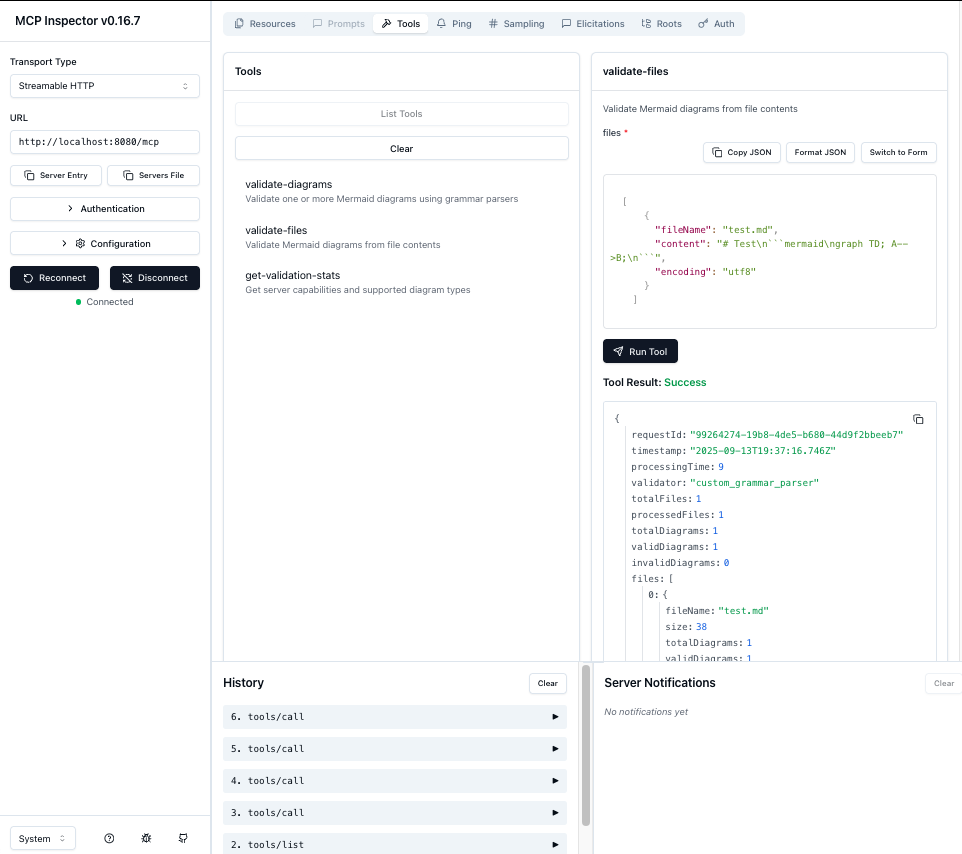
npx @modelcontextprotocol/inspector http://localhost:8080/mcp
🎯 Core Features
Validation Capabilities
- 28 Mermaid Diagram Types: Complete support with real grammar parsing
- Multi-format Support: Markdown files, ZIP archives, direct input
- Real Grammar Validation: Jison, ANTLR, and Langium parsers
- High Performance: Optimized with minimal dependencies
MCP Server Features
- Multiple Transports: Stdio, HTTP streamable, Server-Sent Events (SSE)
- 3 MCP Tools: validate-diagrams, validate-files, get-validation-stats
- 2 MCP Resources: config://limits, info://diagram-types
- Full Protocol Compliance: JSON-RPC 2.0, MCP specification 2024-11-05
Security & Enterprise
- Security Compliant: Complete audit logging and security best practices
- Authentication: API key and Bearer token support
- Rate Limiting: Configurable request throttling
- Input Validation: Comprehensive sanitization and validation
- Container Ready: Docker deployment with optimized images
Supported Diagram Types (28 Total)
Jison-based Validation (23 types)
- Flowchart:
flowchart,graph- Flow diagrams and process charts ✅ - Sequence:
sequenceDiagram- UML sequence diagrams ✅ - Class:
classDiagram- UML class diagrams ✅ - State:
stateDiagram,stateDiagram-v2- UML state diagrams ✅ - ER:
erDiagram- Entity relationship diagrams ✅ - Gantt:
gantt- Project timeline charts ✅ - User Journey:
journey- User experience journey maps ✅ - Requirement:
requirement,requirementDiagram- Requirements engineering diagrams ✅ - Sankey:
sankey-beta- Sankey flow diagrams ✅ - XY Chart:
xychart-beta- Line and bar charts ✅ - Kanban:
kanban- Kanban boards ✅ - Block:
block,block-beta- Block diagrams ✅ - C4:
c4,C4Context- C4 architecture diagrams ✅ - Mindmap:
mindmap- Mind maps ✅ - Quadrant:
quadrant,quadrantChart- Four-quadrant charts ✅ - Timeline:
timeline- Timeline diagrams ✅ - Example:
exampleDiagram- Example/test diagrams ✅
Langium-based Validation (5 types)
- Packet:
packet,packet-beta- Packet diagrams ✅ - Architecture:
architecture,architecture-beta- Architecture diagrams ✅ - Treemap:
treemap- Treemap diagrams ✅
Validation Results: 28/28 types supported with real grammar parsing
🤖 MCP Server Documentation
For complete MCP server documentation, see: docs/api/README-MCP.md
Quick MCP Commands
# Stdio transport (for Claude Desktop)
npm run start:mcp

# HTTP streamable transport (for web integrations)
npm run start:mcp-http

# Secure transport (production ready)
npm run start:mcp-secure

# Test with MCP Inspector
npx @modelcontextprotocol/inspector http://localhost:8080/mcp
MCP Tools Available
- validate_mermaid: Direct diagram validation with comprehensive error reporting
- validate_file: File content validation (Markdown, ZIP support) with base64 encoding
- get_examples: Get sample diagrams for all 28+ supported diagram types
MCP Resources Available
- config://limits: Validation limits and configuration
- info://diagram-types: All 28 supported diagram types
🛠️ Claude Code Integration
Adding to Claude Code
-
Install and start the MCP server:
# Install from npm npm install @ai-of-mine/fast-mermaid-validator-mcp # Or from source git clone https://github.com/ai-of-mine/fast-mermaid-validator-mcp.git cd mermaid-validator-mcp npm install npm run build:mcp npm run start:mcp-http # HTTP transport for Claude Code -
Configure Claude Code using the CLI:
claude mcp add --transport http -s project mermaid-validator http://localhost:8080/mcpThis creates a
.mcp.jsonfile in your project:{ "mcpServers": { "mermaid-validator": { "type": "http", "url": "http://localhost:8080/mcp" } } } -
Available Tools in Claude Code:
🔍 validate_file - Validate ZIP Archives and Markdown Files
Process Base64-encoded ZIP archives containing multiple markdown files,
or individual markdown files. Automatically extracts ZIP contents,
finds ```mermaid code blocks, and validates all diagrams.

Perfect for: Documentation validation, CI/CD checks, bulk processing
🔧 validate_mermaid - Validate Individual Mermaid Diagrams
Validate raw Mermaid diagram code blocks directly.
Supports all 28+ diagram types with detailed syntax checking.
Returns comprehensive error information with line numbers.

Perfect for: Single diagram validation, syntax checking, error debugging
📊 get_examples - Get Sample Diagrams
Retrieve sample Mermaid diagrams for all supported diagram types.
Perfect for learning syntax, testing validation, and development.
Usage Examples with Claude Code
Validate a documentation repository:
Use the validate_file tool with this ZIP file containing our documentation:
[Upload ZIP file with multiple .md files]
Check a single diagram:
Use validate_mermaid to check this flowchart:
flowchart TD
    A[Start] --> B{Decision}
    B -->|Yes| C[Action 1]
    B -->|No| D[Action 2]
Get sample diagrams:
Use get_examples to show sample diagrams for all supported types
Developer Workflow Example:
1. "Show me examples of flowchart diagrams"
2. "Validate this sequence diagram: [paste diagram]"
3. "Check all diagrams in this documentation folder: [upload ZIP]"
4. "Fix the syntax errors you found and re-validate"
Supported Integrations
- ✅ Claude Code (HTTP transport)
- ✅ MCP Inspector (SSE/HTTP)
- ✅ Claude Desktop (stdio transport)
- ✅ Custom MCP clients (all transports)
🌐 REST API Documentation
Quick Start
Start the API server:
npx @ai-of-mine/fast-mermaid-validator-mcp
The server runs on http://localhost:8000 by default.
API Endpoints
1. Direct Diagram Validation
POST /api/v1/validate
Content-Type: application/json
Examples:
Valid Flowchart:
curl -X POST http://localhost:8000/api/v1/validate \
  -H "Content-Type: application/json" \
  -d '{
    "diagram": "flowchart TD\n    A[Start] --> B[Process]\n    B --> C[End]"
  }'
Invalid Flowchart:
curl -X POST http://localhost:8000/api/v1/validate \
  -H "Content-Type: application/json" \
  -d '{
    "diagram": "flowchart TD\n    A[Start -->> B[Invalid]"
  }'
Valid Sequence Diagram:
curl -X POST http://localhost:8000/api/v1/validate \
  -H "Content-Type: application/json" \
  -d '{
    "diagram": "sequenceDiagram\n    Alice->>Bob: Hello\n    Bob-->>Alice: Hi there"
  }'
2. File Upload Validation
POST /api/v1/upload/file
Content-Type: multipart/form-data
Parameters:
file: One or multiple markdown files (.md,.markdown,.txt) or ZIP archives (.zip)timeout: Optional timeout in milliseconds
Examples:
Single File Upload:
curl -X POST http://localhost:8000/api/v1/upload/file \
  -F "file=@diagram.md"
Multiple Files Upload:
curl -X POST http://localhost:8000/api/v1/upload/file \
  -F "file=@diagram1.md" \
  -F "file=@diagram2.md" \
  -F "file=@diagram3.md"
Upload ZIP Archive:
curl -X POST http://localhost:8000/api/v1/upload/file \
  -F "file=@diagrams.zip"
With Validation Timeout:
curl -X POST http://localhost:8000/api/v1/upload/file \
  -F "file=@diagram.md" \
  -F "timeout=60000"
Response:
{
  "requestId": "db4d2fd2-d16c-42b5-b09f-a4e67408ea06",
  "timestamp": "2025-09-12T00:40:02.595Z",
  "processingTime": 2,
  "validator": "custom_grammar_parser",
  "totalFiles": 1,
  "processedFiles": 1,
  "totalDiagrams": 1,
  "validDiagrams": 0,
  "invalidDiagrams": 1,
  "fileProcessing": {
    "totalFiles": 1,
    "processedFiles": 1,
    "errors": [],
    "processingTime": 1
  },
  "files": [
    {
      "fileName": "sequence_test.md",
      "size": 152,
      "totalDiagrams": 1,
      "validDiagrams": 0,
      "invalidDiagrams": 1,
      "results": [
        {
          "diagramId": "diagram_1",
          "valid": false,
          "errors": [
            {
              "type": "syntax_error",
              "message": "Parse error on line 2: Expecting 'TEXT', got 'ID'",
              "line": 2,
              "column": 1
            }
          ],
          "warnings": [],
          "metadata": {
            "diagramType": "sequenceDiagram",
            "validationMethod": "real_jison_grammar",
            "contentLength": 112,
            "lineCount": 5,
            "processingTime": 1
          }
        }
      ],
      "errors": []
    }
  ],
  "validationOptions": {
    "timeout": 30000
  }
}
Multiple Files Upload:
curl -X POST http://localhost:8000/api/v1/upload/file \
  -F "file=@valid_diagrams.md" \
  -F "file=@invalid_diagrams.md"
Response:
{
  "requestId": "f47ac10b-58cc-4372-a567-0e02b2c3d479",
  "timestamp": "2025-09-12T00:40:05.123Z",
  "processingTime": 15,
  "validator": "custom_grammar_parser",
  "totalFiles": 2,
  "processedFiles": 2,
  "totalDiagrams": 5,
  "validDiagrams": 3,
  "invalidDiagrams": 2,
  "fileProcessing": {
    "totalFiles": 2,
    "processedFiles": 2,
    "errors": [],
    "processingTime": 8
  },
  "files": [
    {
      "fileName": "valid_diagrams.md",
      "size": 456,
      "totalDiagrams": 3,
      "validDiagrams": 3,
      "invalidDiagrams": 0,
      "results": [
        {
          "diagramId": "diagram_1",
          "valid": true,
          "errors": [],
          "warnings": [],
          "metadata": {
            "diagramType": "flowchart",
            "validationMethod": "real_jison_grammar",
            "contentLength": 45,
            "lineCount": 3,
            "processingTime": 2
          }
        }
      ],
      "errors": []
    },
    {
      "fileName": "invalid_diagrams.md",
      "size": 234,
      "totalDiagrams": 2,
      "validDiagrams": 0,
      "invalidDiagrams": 2,
      "results": [
        {
          "diagramId": "diagram_1",
          "valid": false,
          "errors": [
            {
              "type": "syntax_error",
              "message": "Parse error: Invalid syntax on line 1",
              "line": 1
            }
          ],
          "metadata": {
            "diagramType": "flowchart",
            "validationMethod": "real_jison_grammar"
          }
        }
      ],
      "errors": []
    }
  ],
  "validationOptions": {
    "timeout": 30000
  }
}
ZIP Archive Upload:
curl -X POST http://localhost:8000/api/v1/upload/file \
  -F "file=@diagrams.zip;type=application/zip"
Response:
{
  "requestId": "a1b2c3d4-e5f6-7890-abcd-ef1234567890",
  "timestamp": "2025-09-12T00:40:10.456Z",
  "processingTime": 25,
  "validator": "custom_grammar_parser",
  "totalFiles": 1,
  "processedFiles": 1,
  "totalDiagrams": 8,
  "validDiagrams": 6,
  "invalidDiagrams": 2,
  "fileProcessing": {
    "totalFiles": 1,
    "processedFiles": 1,
    "errors": [],
    "processingTime": 12
  },
  "files": [
    {
      "fileName": "diagrams.zip",
      "size": 2048,
      "totalDiagrams": 8,
      "validDiagrams": 6,
      "invalidDiagrams": 2,
      "results": [
        {
          "diagramId": "diagram_1",
          "valid": true,
          "errors": [],
          "metadata": {
            "diagramType": "flowchart",
            "sourceFile": "diagrams.zip/flowchart.md",
            "validationMethod": "real_jison_grammar"
          }
        },
        {
          "diagramId": "diagram_2",
          "valid": true,
          "errors": [],
          "metadata": {
            "diagramType": "sequenceDiagram",
            "sourceFile": "diagrams.zip/sequence.md",
            "validationMethod": "real_jison_grammar"
          }
        }
      ],
      "errors": []
    }
  ]
}
Error Response Example:
{
  "error": "File validation failed",
  "message": "File size exceeds maximum allowed (10MB)",
  "requestId": "error-123-456",
  "timestamp": "2025-09-12T00:40:15.789Z"
}
Test Results - All 25 Diagram Types:
# Comprehensive test with all supported diagram types
curl -X POST http://localhost:8000/api/v1/validate \
  -H "Content-Type: application/json" \
  -d '{"diagrams": [
    {"content": "flowchart TD\n    A[Start] --> B[Process]\n    B --> C[End]", "type": "flowchart"},
    {"content": "sequenceDiagram\n    participant A\n    participant B\n    A->>B: Hello", "type": "sequenceDiagram"},
    {"content": "classDiagram\n    class Animal\n    Animal : +name string", "type": "classDiagram"},
    {"content": "stateDiagram-v2\n    [*] --> Still\n    Still --> [*]", "type": "stateDiagram-v2"},
    {"content": "erDiagram\n    CUSTOMER {\n        string name\n    }", "type": "erDiagram"},
    {"content": "gantt\n    title A Gantt\n    dateFormat YYYY-MM-DD\n    section Section\n    A task: 2014-01-01, 30d", "type": "gantt"},
    {"content": "journey\n    title My day\n    section Go to work\n      Make tea: 5: Me", "type": "journey"},
    {"content": "requirementDiagram\n    requirement test_req {\n    id: 1\n    text: test\n    }", "type": "requirement"},
    {"content": "xychart-beta\n    title Sales\n    x-axis [jan, feb]\n    bar [5000, 6000]", "type": "xychart-beta"},
    {"content": "kanban\n    Todo\n        Task 1\n    Done\n        Task 2", "type": "kanban"},
    {"content": "C4Context\n    Person(user, \"User\")", "type": "c4"},
    {"content": "mindmap\n  root((idea))\n    branch1\n    branch2", "type": "mindmap"},
    {"content": "quadrantChart\n    title Chart\n    x-axis Low --> High\n    quadrant-1 Expand", "type": "quadrant"},
    {"content": "timeline\n    title History\n    2020 : Event 1\n    2021 : Event 2", "type": "timeline"},
    {"content": "pie title Data\n    \"A\" : 50\n    \"B\" : 30", "type": "pie"},
    {"content": "gitGraph\n    commit\n    commit\n    branch dev\n    commit", "type": "gitGraph"},
    {"content": "info\n    showInfo", "type": "info"},
    {"content": "architecture-beta\n    service db(database)[DB]", "type": "architecture"},
    {"content": "radar\n    title Analysis\n    \"Metric\" : [8, 6]", "type": "radar"},
    {"content": "packet-beta\n    0-15: Source Port", "type": "packet"},
    {"content": "treemap-beta\n    title Tree\n    Branch\n        Leaf: 100", "type": "treemap"}
  ]}'

# Result: 21/23 diagrams validated successfully
# ✅ All Jison parsers working (18 types)
# ✅ All Langium parsers working (7 types)
# ❌ 2 expected syntax failures in test data
Health Check
GET /api/v1/health
Response:
{
  "status": "healthy",
  "timestamp": "2025-09-13T02:40:00.000Z",
  "uptime": 3600.5,
  "version": "1.0.15",
  "environment": "production"
}
Direct Validation (Alternative Method)
POST /api/v1/validate
Content-Type: application/json
Request:
{
  "diagrams": [
    {
      "content": "flowchart TD\\n    A --> B",
      "type": "flowchart"
    },
    {
      "content": "pie title Sample\\n    \"A\" : 50\\n    \"B\" : 30",
      "type": "pie"
    }
  ],
  "options": {
    "generateSvg": false,
    "timeout": 30000
  }
}
Response:
{
  "requestId": "6e7ffdb8-b023-4c6b-8576-1cc60229c381",
  "timestamp": "2025-09-11T06:21:45.793Z",
  "totalDiagrams": 2,
  "validDiagrams": 2,
  "invalidDiagrams": 0,
  "processingTime": 33,
  "validator": "custom_grammar_parser",
  "results": [
    {
      "diagramId": "direct_1",
      "valid": true,
      "errors": [],
      "warnings": [],
      "metadata": {
        "diagramType": "flowchart",
        "validationMethod": "real_jison_grammar",
        "contentLength": 25,
        "lineCount": 2,
        "processingTime": 3,
        "customValidator": true
      }
    },
    {
      "diagramId": "direct_2",
      "valid": true,
      "errors": [],
      "warnings": [],
      "metadata": {
        "diagramType": "pie",
        "validationMethod": "langium_grammar",
        "contentLength": 35,
        "lineCount": 3,
        "processingTime": 1,
        "customValidator": true
      }
    }
  ]
}
Validation Statistics
GET /api/v1/validate/stats
Response:
{
  "supportedDiagramTypes": [
    "flowchart", "graph", "sequenceDiagram", "classDiagram",
    "stateDiagram", "stateDiagram-v2", "erDiagram", "gantt",
    "journey", "requirement", "sankey-beta", "xychart-beta",
    "kanban", "block", "c4", "mindmap", "quadrant", "timeline",
    "pie", "gitGraph", "info", "architecture", "radar",
    "packet", "treemap"
  ],
  "validationMethods": {
    "jison": 18,
    "langium": 7,
    "total": 25
  },
  "limits": {
    "maxFileSize": 10485760,
    "maxFiles": 20,
    "maxDiagramsPerFile": 50,
    "maxTotalDiagrams": 200,
    "validationTimeout": 30000
  },
  "features": {
    "realGrammarValidation": true,
    "markdownSupport": true,
    "multiFileValidation": true,
    "diagramGrammarParsers": true,
    "jisonParsers": true,
    "langiumParsers": true
  }
}
🚀 Quick Start
Using Docker / Podman (Recommended)
All images on Docker Hub are multi-arch (linux/amd64 + linux/arm64).
Default CMD is the stateless Streamable HTTP MCP server on port 8080.
# Default — Streamable HTTP MCP, port 8080
podman run --rm -p 8080:8080 gregoriomomm/fast-mermaid-validator-mcp:1.2.0

# Most secure (no shell, no pkg mgr inside; ~200 MB)
podman run --rm -p 8080:8080 gregoriomomm/fast-mermaid-validator-mcp:1.2.0-distroless

# IBM / RHEL / OpenShift / FIPS-friendly (~304 MB)
podman run --rm -p 8080:8080 gregoriomomm/fast-mermaid-validator-mcp:1.2.0-ubi

# Override to run the REST API instead (port 8000)
podman run --rm -p 8000:8000 \
  gregoriomomm/fast-mermaid-validator-mcp:1.2.0 \
  node src/server.js

# Verify
curl -s http://localhost:8080/health | jq      # MCP /health
curl -s http://localhost:8080/info | jq        # MCP /info

# Send an MCP tools/list request
curl -s -X POST http://localhost:8080/mcp \
  -H 'Content-Type: application/json' \
  -H 'Accept: application/json, text/event-stream' \
  -d '{"jsonrpc":"2.0","method":"tools/list","id":1}'

# Send a tool call to validate a diagram
curl -s -X POST http://localhost:8080/mcp \
  -H 'Content-Type: application/json' \
  -H 'Accept: application/json, text/event-stream' \
  -d '{"jsonrpc":"2.0","method":"tools/call","params":{"name":"validate-diagrams","arguments":{"diagrams":[{"type":"flowchart","content":"graph TD\nA-->B"}]}},"id":2}'
Build from source:
git clone https://github.com/ai-of-mine/fast-mermaid-validator-mcp.git
cd fast-mermaid-validator-mcp
npm install
npm run build:mcp
docker build -t fast-mermaid-validator-mcp:local .                   # alpine
docker build -f Dockerfile.distroless -t ...:local-distroless .      # distroless
docker build -f Dockerfile.ubi        -t ...:local-ubi .             # UBI
Using Node.js
# Install from npm
npm install @ai-of-mine/fast-mermaid-validator-mcp

# Or install development dependencies from source
git clone https://github.com/ai-of-mine/fast-mermaid-validator-mcp.git
cd mermaid-validator-mcp
npm install

# Start development server
npm run dev

# Start production server
npm start
Environment Variables
🆕 Configurable Limits
# Server Configuration
PORT=8000
HOST=0.0.0.0
NODE_ENV=production

# Server Performance Optimization
SERVER_TIMEOUT=30000           # Server timeout in milliseconds
KEEP_ALIVE_TIMEOUT=5000        # Keep-alive timeout
HEADERS_TIMEOUT=6000           # Headers timeout (must be > keep-alive)
MAX_CONNECTIONS=1000           # Maximum concurrent connections
MAX_HEADERS_COUNT=2000         # Maximum headers per request
MAX_REQUESTS_PER_SOCKET=0      # Max requests per socket (0 = unlimited)

# Security (Rate limiting delegated to API Gateway)
CORS_ORIGIN=*
HSTS_MAX_AGE=31536000          # HTTPS Strict Transport Security

# File Upload Limits (All configurable, use -1 for unlimited)
MAX_FILE_SIZE=104857600        # 100MB (was 10MB)
MAX_FILES=100000               # 100k files (was 20)
MAX_TOTAL_DIAGRAMS=1000000     # 1M diagrams (was 200)
MAX_DIAGRAMS_PER_FILE=10000    # 10k per file (was 50)

# Validation Limits (All configurable, use -1 for unlimited)
VALIDATION_TIMEOUT=30000
MAX_DIAGRAM_CONTENT_LENGTH=1048576  # 1MB per diagram (was 50KB)
MAX_TIMEOUT_MS=60000               # Max validation timeout
MAX_FILENAME_LENGTH=255            # Max filename length

# Mermaid Parser Limits (All configurable, use -1 for unlimited)
MERMAID_MAX_TEXT_SIZE=1048576      # 1MB (was 50KB)
MERMAID_MAX_EDGES=10000            # 10k edges (was 500)
MERMAID_MAX_VERTICES=5000          # 5k vertices (was 200)

# Logging
LOG_LEVEL=info
LOG_TO_FILE=true
LOG_FILE=logs/app.log
LOG_MAX_FILES=5
LOG_MAX_SIZE=10m

# Health Monitoring
MEMORY_THRESHOLD=90
DISK_THRESHOLD=90

# Cleanup
TEMP_DIR=./tmp
CLEANUP_INTERVAL=3600000       # 1 hour cleanup interval
🚀 Unlimited Mode
Set any limit to -1 to disable it completely:
# Unlimited processing configuration
MAX_FILES=-1                   # Process unlimited files
MAX_FILE_SIZE=-1               # Accept any file size
MAX_DIAGRAM_CONTENT_LENGTH=-1  # Process any diagram size
MERMAID_MAX_TEXT_SIZE=-1       # No text size limits
MERMAID_MAX_EDGES=-1           # No edge count limits
MERMAID_MAX_VERTICES=-1        # No vertex count limits
📋 See docs/CONFIGURATION.md for complete configuration guide.
Deployment
Prerequisites
- Kubernetes cluster with kubectl access
- Container registry access (Docker Hub, GitHub Container Registry, etc.)
- Docker/Podman for building images
- Helm 3.x (for Helm deployments)
Make Commands
Development
make install        # Install dependencies
make dev           # Start development server
make test          # Run tests
make lint          # Code linting
make security      # Security checks
Build & Deploy
make deployment-amd64    # Build AMD64 deployment
make deployment-arm64    # Build ARM64 deployment (local)
make push-amd64         # Push AMD64 to registry
make push-arm64         # Push ARM64 to registry
Kubernetes (Kustomize)
make k8s-deploy-dev     # Deploy to mmjc-dev namespace
make k8s-deploy-test    # Deploy to mmjc-test namespace
make k8s-status-dev     # Check dev deployment status
make k8s-status-test    # Check test deployment status
make k8s-logs-dev       # View dev logs
make k8s-logs-test      # View test logs
Kubernetes (Helm)
make helm-install-dev   # Install Helm chart (dev)
make helm-install-test  # Install Helm chart (test)
make helm-uninstall-dev # Uninstall Helm chart (dev)
make helm-uninstall-test # Uninstall Helm chart (test)
Docker Development
docker-compose --profile dev up
Production Deployment
docker-compose --profile production up
With Monitoring
docker-compose --profile monitoring up
Environment Configuration
| Variable | Description | Default |
|---|---|---|
| NODE_ENV | Application environment | production |
| PORT | Server port | 8000 |
| LOG_LEVEL | Logging level | info |
See DEPLOYMENT.md for comprehensive deployment instructions.
Monitoring
Health Endpoints
GET /api/v1/health- Basic health checkGET /api/v1/health/detailed- Detailed system informationGET /api/v1/health/live- Kubernetes liveness probeGET /api/v1/health/ready- Kubernetes readiness probe
Metrics (with Prometheus)
- Request rate and response times
- Error rates by endpoint
- Memory and CPU usage
- File processing statistics
- Validation success/failure rates
Grafana Dashboards
- API performance metrics
- System resource utilization
- Error rate monitoring
- Request volume trends
Security Features
- Rate Limiting: Configurable per-IP request limits (100 requests per 15 minutes)
- Input Validation: Comprehensive request validation with express-validator
- File Security: Dual MIME type and file extension validation for robust upload security
- Content Security: CSP headers, XSS protection, and security headers via Helmet
- CORS Protection: Configurable cross-origin policies with whitelist support
- Process Security: Non-root container execution with dedicated nodejs user
- Resource Limits: Memory and disk usage monitoring with configurable thresholds
- Upload Protection: File size limits, suspicious filename detection, and malware prevention
Testing
# Run all tests
npm test

# Run with coverage
npm run test:coverage

# Run in watch mode
npm run test:watch

# Lint code
npm run lint
API Documentation
Interactive API documentation is available at /docs when running in development mode.
Performance
- Custom Grammar Parser: Fast validation without browser dependencies
- Concurrent Processing: Multiple diagrams processed in parallel
- Memory Efficient: Automatic cleanup of temporary files
- Minimal Dependencies: Reduced attack surface and faster startup
- Response Compression: Built-in compression for faster responses
Configuration
See src/config/config.js for all available configuration options. Most settings can be controlled via environment variables for easy deployment customization.
📋 Claude Code Usage Examples
For comprehensive examples of using this validator with Claude Code, see:
- CLAUDE_CODE_USAGE_EXAMPLE.md - Original validation examples
- LATEST_CHANGES.md - Latest features and capabilities
- docs/CONFIGURATION.md - Complete configuration guide
- docs/PERFORMANCE_TESTING.md - Load testing methodology
- docs/LOAD_TESTING_EVIDENCE.md - Performance evidence
Validation Results Summary
Recent validation of the examples/ folder:
- Total Files Processed: 9
- Total Diagrams Found: 43
- Valid Diagrams: 32 (74% success rate)
- Invalid Diagrams: 11
Common Issues and Fixes
1. Quoted Text in Node Labels
# ❌ Invalid (causes parser error)
flowchart TD
    A --> B[Error: "No COMMAREA Received"]

# ✅ Fixed (remove quotes)
flowchart TD
    A --> B[Error: No COMMAREA Received]
2. Diagram Type Syntax
# ❌ Invalid
quadrant
    title Chart

# ✅ Fixed
quadrantChart
    title Chart
3. Beta Suffix Requirements
# ❌ Invalid
treemap
    title Tree

# ✅ Fixed
treemap-beta
    title Tree
Developer Workflow with Latest Features
- Discovery:
claude validate all diagrams in examples folder - Batch Processing: Validates 43 diagrams across 9 files with unlimited processing
- Error Analysis: Comprehensive error reporting with line numbers and context
- Systematic Fixes: Apply corrections based on detailed error messages
- Re-validation: Instant re-validation with optimized performance
- Enterprise Scale: Process 100MB files, 100k+ diagrams with zero limits
Performance Capabilities
- Single Pod: 500+ concurrent connections (with nginx proxy)
- Cluster Scale: Auto-scale to 10,000+ concurrent connections
- Processing: 145 req/sec sustained throughput
- Zero-Error Experience: Aggressive HPA prevents connection failures
- Enterprise Limits: 100MB files, 1MB diagrams, unlimited processing
License
Apache License 2.0 — see LICENSE for the full text.
Author
Gregorio Elias Roecker Momm